

Microsoft’s Shared audio preview in Windows 11 has taken a practical step forward: you can now share one PC’s audio stream to two Bluetooth headsets and control each listener’s volume independently, and Microsoft is rolling the feature out with a visible taskbar indicator and broader accessory support — but the capability remains gated to Copilot+ PCs and is being distributed gradually through Insider builds and OEM driver updates.
Bluetooth audio on Windows has been a patchwork of legacy stacks, proprietary codecs, and fragmented driver support for years. The shift that matters here is the arrival and slow maturation of Bluetooth LE Audio (the LE Audio ecosystem, LC3 codec and Auracast broadcast concepts), which fundamentally changes how Windows can send one audio source to multiple endpoints simultaneously and at much lower power cost than classic Bluetooth audio.
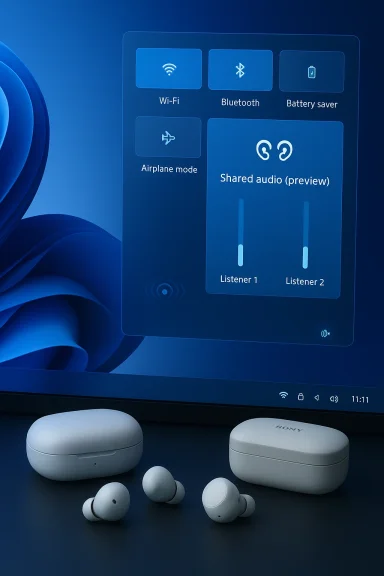
Microsoft first previewed a multi-listener “Shared audio (preview)” experience in Windows Insider channels late last year. That initial rollout demonstrated the basic ability to transmit audio to two LE Audio-capable accessories at the same time. The February/March Insider updates formally extended that preview: Windows now exposes individual volume sliders per listener, adds a system tray (taskbar) indicator while sharing is active, and lists additional supported accessories. These changes are included in recent Insider builds — notably Dev Channel build 26300.7939 and Beta Channel build 26220.7934 — and are being delivered as a controlled feature rollout to eligible devices.
Why this matters: Shared audio built on LE Audio promises better battery life for earbuds, more robust multi-stream audio (one source to multiple sinks), and a path to new use cases (group listening, assistive hearing, in-flight entertainment, classroom sharing) that were awkward or impossible on classic Bluetooth.
Why Microsoft is doing this:
Key elements:
The downsides are practical and familiar: ecosystem fragmentation, rigid hardware gating to Copilot+ PCs during preview, firmware and driver dependencies, and residual latency/sync issues when mixing different accessory types. These are solvable challenges, but they require sustained attention from Microsoft, OEMs, and accessory manufacturers.
At the same time, the simultaneous rollout of Windows MIDI Services and MIDI 2.0 support signals Microsoft’s broader effort to modernize Windows’ audio stack for both consumers and professionals. That work — if executed with clear documentation, driver support, and developer tooling — could yield lasting improvements for content creators and musicians.
If you want to try Shared audio now, be prepared for a multi-step process: verify Copilot+ eligibility, join the appropriate Insider channel if comfortable, and install driver and accessory firmware updates. If you prefer stability, wait for the broader rollout that will come once Microsoft and partners finish ironing out compatibility and timing across the wider PC ecosystem.
Shared audio’s per-listener volume control is a small but meaningful usability improvement built on a major underlying shift in wireless audio technology. Paired with native MIDI 2.0 support and a modernized media stack, Windows 11’s recent Insider updates show Microsoft pushing both consumer convenience and professional capability forward — while also highlighting the real-world friction of hardware and firmware coordination that will determine how fast ordinary users see these features on their everyday PCs.
Source: Вектор Ньюз Windows 11 has a new feature for headphones
 Background
Bluetooth audio on Windows has been a patchwork of legacy stacks, proprietary codecs, and fragmented driver support for years. The shift that matters here is the arrival and slow maturation of Bluetooth LE Audio (the LE Audio ecosystem, LC3 codec and Auracast broadcast concepts), which fundamentally changes how Windows can send one audio source to multiple endpoints simultaneously and at much lower power cost than classic Bluetooth audio.Microsoft first previewed a multi-listener “Shared audio (preview)” experience in Windows Insider channels late last year. That initial rollout demonstrated the basic ability to transmit audio to two LE Audio-capable accessories at the same time. The February/March Insider updates formally extended that preview: Windows now exposes individual volume sliders per listener, adds a system tray (taskbar) indicator while sharing is active, and lists additional supported accessories. These changes are included in recent Insider builds — notably Dev Channel build 26300.7939 and Beta Channel build 26220.7934 — and are being delivered as a controlled feature rollout to eligible devices.
Why this matters: Shared audio built on LE Audio promises better battery life for earbuds, more robust multi-stream audio (one source to multiple sinks), and a path to new use cases (group listening, assistive hearing, in-flight entertainment, classroom sharing) that were awkward or impossible on classic Bluetooth.
What’s new in this release
Per-listener volume control
- The Control Center (Quick Settings / Shared audio (preview) UI) now includes separate sliders for each connected listener. That means two people sharing the same movie or playlist can set comfortable loudness independently without affecting the other’s level.
- The traditional main volume control still adjusts the overall output level and continues to work with hardware volume buttons and keyboard volume keys.
Taskbar indicator and quick access
- When sharing is active, Windows shows a taskbar indicator to remind you audio is being shared. Clicking that indicator opens the sharing controls so you can adjust per-listener volume or stop sharing quickly — a convenience and privacy safeguard.
- The visual treatment and exact iconography may vary during the gradual rollout; Microsoft has described a speaker-like icon indicating active sharing, but the precise symbol and placement can differ between driver/firmware revisions and OEM UI overlays.
Expanded accessory list
Microsoft added explicit support for several recent mainstream models:- Samsung Galaxy Buds 4 and Galaxy Buds 4 Pro
- Sony WF-1000XM6 true-wireless earbuds
- Xbox Wireless Headset (recent firmware adds LE Audio support)
Insider builds and distribution
- The new controls and indicator appear in Insider Preview builds 26300.7939 (Dev channel) and 26220.7934 (Beta channel). Microsoft is using Controlled Feature Rollout, which means even on those builds the feature may appear only for systems that meet hardware/driver conditions and for Insiders who have “get the latest updates as they are available” toggled on.
- The feature has been implemented as a preview, and Microsoft continues to expand device support and refine performance as feedback comes in.
How Shared audio works (technical snapshot)
At a high level:- Shared audio leverages Bluetooth LE Audio multi-stream/broadcast capabilities (the same LE Audio family that underpins the Auracast broadcast concept and the LC3 codec).
- For Shared audio to work you need:
- A Windows 11 PC with the right hardware and Bluetooth stack (Microsoft currently requires a Copilot+ PC for the preview).
- Updated Bluetooth and audio drivers from OEMs to expose the LE Audio features to Windows.
- Two Bluetooth LE Audio–capable accessories (earbuds, headphones, speakers or hearing aids) that advertise and accept the LE Audio streams — often requiring a firmware update from the accessory vendor.
- Pair and connect two compatible LE Audio accessories to the PC.
- Open Quick Settings and tap the Shared audio (preview) tile.
- Start sharing; each connected accessory appears in the Shared audio UI with an independent slider.
- Use the new taskbar indicator to quickly access or stop sharing.
Copilot+ hardware gating: why some PCs can’t use it yet
One of the sharpest friction points is that Microsoft has limited early access to Copilot+ PCs. That hardware class — Microsoft’s new AI-enabled, premium configurations that include Qualcomm Snapdragon X and certain Intel ‘Core Ultra’ models — is being used as the first platform for Shared audio.Why Microsoft is doing this:
- Copilot+ machines typically have the latest Bluetooth controllers, firmware, and driver stacks OEMs are already updating for LE Audio features.
- Microsoft can coordinate driver and system updates more tightly on a narrower class of hardware, reducing the bug surface while the feature is refined.
- Controlled rollouts on a smaller, predictable set of devices help Microsoft measure power, latency, codec behavior and driver interoperability in a real-world but contained environment.
Real-world benefits
Shared audio delivers practical improvements for several scenarios:- Shared in-flight entertainment and travel: two passengers can watch the same movie without a wired splitter or a single pair of headphones shared awkwardly.
- Classroom and training settings: an instructor can feed audio to a student’s hearing device or earbuds for focused listening without broadcasting to the whole room.
- Assistive listening: people with hearing differences can set individual volume levels that suit their needs.
- Local collaborative listening: two people can enjoy a playlist together without needing separate speakers or an audio cable.
Important limits and risks
No new feature ships without trade-offs. Here are the most consequential limitations and risks you should keep in mind.Hardware and ecosystem fragmentation
- LE Audio adoption among accessory makers has been steady but incomplete. Many popular Bluetooth devices still use classic A2DP stacks or require vendor apps and firmware updates to gain LE Audio functionality.
- On Windows, the Shared audio feature is hardware-gated and dependent on OEM driver updates. You may need a Copilot+ PC and an updated accessory to participate.
Gradual rollouts and driver dependencies
- Microsoft is deploying Shared audio via Controlled Feature Rollout. That means even devices that meet the advertised requirements may not see the feature immediately.
- OEM audio/bt drivers must expose certain LE Audio interfaces to Windows. If an accessory shows as LE-capable on a phone but not on a PC, the likely culprit is missing or outdated PC drivers.
Latency and synchronization concerns
- While LE Audio multi-stream aims to improve synchronization, mixing different device behaviors (true wireless earbuds from different vendors, or distinct firmware versions) can still introduce perceptible skew between listeners. Microsoft’s preview focuses on two devices; pairing dissimilar endpoints may still produce small timing differences.
- If low-latency performance is critical (competitive gaming, musician monitoring), the preview may not be suitable yet. Expect Microsoft and accessory vendors to continue tightening timing as the feature matures.
Content protection and DRM
- Sharing protected audio (DRM-protected streaming content) raises implementation questions. In practice, platform vendors and content providers enforce content protection policies that may limit or block broadcasted streams for protected content. Microsoft’s preview documentation does not promise uniform behavior across all streaming services, and individual apps may intervene.
Privacy considerations
- The idea of “sharing” audio to another person naturally raises privacy questions: is the session discoverable? Can a shared stream be recorded? Microsoft’s public notes emphasize a paired/authorized model, but the precise privacy guarantees — e.g., whether streams are encrypted peer-to-peer, how session keys are managed and whether shared devices can be discoverable by others — are implementation details that vary by driver and accessory. Users and administrators should treat sharing as a deliberate action and stop sharing when done.
Copilot+ exclusivity and platform fragmentation
- Restricting the preview to Copilot+ PCs helps Microsoft control quality, but it also fragments the market: many users on capable hardware may find the feature inaccessible until drivers and rollout expand. That fragmentation is a practical hurdle to broad adoption.
How to try it (step-by-step)
If you’re an advanced user or Insider and want to experiment with Shared audio, here’s the recommended sequence:- Confirm your PC: verify whether your device is listed among Copilot+ machines or otherwise supported by Microsoft’s preview notes.
- Enroll in Windows Insider Dev or Beta channels if you’re comfortable with preview software and back up important data.
- Toggle “get the latest updates as they are available” in Windows Update settings to enable the controlled feature rollout.
- Update Windows to one of the relevant Insider builds (for example, Dev build 26300.7939 or Beta build 26220.7934).
- Update OEM Bluetooth and audio drivers via Windows Update or your manufacturer’s support site.
- Update firmware for your accessories using the manufacturer’s app (Samsung Wearable app, Sony Headphones Connect, Xbox Accessories app, etc.).
- Pair two LE Audio-capable accessories to the PC.
- Open Quick Settings and look for Shared audio (preview); start sharing and adjust per-listener sliders in the Control Center.
- Use the taskbar indicator to confirm active sharing and to quickly stop sharing.
Alternatives and fallbacks
If your hardware is not currently compatible or you prefer not to run Insider builds, you still have options:- Wired splitter: cheap, reliable, zero-latency but physically awkward and limited to users sitting together.
- Bluetooth transmitters: some external Bluetooth transmitters support two outgoing connections or hardware-split audio. These devices vary widely in quality and latency.
- Software mixers: utilities like EarTrumpet and audio routing tools can manage per-app volumes on the PC but won’t split one Bluetooth stream to two independent headsets.
- Manufacturer solutions: some earbuds have vendor-supported multi-device synchronization features for sharing audio within their own ecosystem on phones and tablets; watch for PC support from vendors.
What this means for musicians and audio pros: MIDI 2.0 arrives on Windows 11
At roughly the same time Microsoft extended Bluetooth LE Audio preview features, Windows 11 also shipped a major update to its music and audio stack: Windows MIDI Services, bringing native MIDI 2.0 support to the platform.Key elements:
- Windows now includes a new MIDI service and an updated kernel driver (usbmidi2.sys) that supports MIDI 2.0 and improves USB MIDI reliability.
- The OS exposes loopback endpoints, precise scheduling with timestamps, and automatic translation between MIDI 2.0 and MIDI 1.0 for backward compatibility.
- Microsoft is shipping an SDK and separate tools package out-of-band so Windows can iterate on the MIDI tooling without tying it strictly to OS updates.
- MIDI 2.0 introduces higher resolution controls, per-note controllers, and two-way capability that allows devices to negotiate features automatically.
- Musicians and DAW developers will gain consistent native support without relying on third-party drivers for most class-compliant USB MIDI hardware.
- The Windows MIDI Services loopback makes inter-app routing simpler and opens possibilities for browser-based WebMIDI and desktop apps to interoperate cleanly.
Developer and OEM implications: what needs to happen next
For Shared audio and the broader LE Audio movement to succeed on Windows, several practical changes and investments are necessary:- OEMs and driver teams must deliver consistent, well-tested LE Audio drivers across a wider range of Bluetooth controllers.
- Accessory makers must prioritize firmware updates that enable LE Audio features and clearly advertise LE Audio compatibility.
- App developers and streaming services should document how DRM and content protection behave with broadcast/multi-stream audio to avoid user surprises.
- Microsoft should publish robust developer APIs and accessibility hooks so third-party apps and assistive technologies can interact meaningfully with per-listener controls.
- Broad interoperability testing (including between different vendors’ earbuds) is essential to ensure reliable synchronization and low-latency behavior in the wild.
Verdict: an incremental but meaningful step forward
Windows 11’s Shared audio preview — now with per-listener volume sliders, a taskbar indicator, and expanded accessory support — is a pragmatic, user-facing improvement built on LE Audio’s technical foundation. For travelers, parents, teachers, and people who share audio locally, the new controls make the experience notably more usable.The downsides are practical and familiar: ecosystem fragmentation, rigid hardware gating to Copilot+ PCs during preview, firmware and driver dependencies, and residual latency/sync issues when mixing different accessory types. These are solvable challenges, but they require sustained attention from Microsoft, OEMs, and accessory manufacturers.
At the same time, the simultaneous rollout of Windows MIDI Services and MIDI 2.0 support signals Microsoft’s broader effort to modernize Windows’ audio stack for both consumers and professionals. That work — if executed with clear documentation, driver support, and developer tooling — could yield lasting improvements for content creators and musicians.
If you want to try Shared audio now, be prepared for a multi-step process: verify Copilot+ eligibility, join the appropriate Insider channel if comfortable, and install driver and accessory firmware updates. If you prefer stability, wait for the broader rollout that will come once Microsoft and partners finish ironing out compatibility and timing across the wider PC ecosystem.
Practical recommendations for users today
- Check your PC: confirm whether it’s listed as a Copilot+ device if you want immediate access to the preview.
- Update drivers and accessory firmware: most Shared audio problems stem from mismatched versions between PC drivers and headset firmware.
- Use the manufacturer apps: many accessory vendors provide firmware updates and pair management through their apps; follow those steps before troubleshooting Windows.
- Treat Shared audio like a preview feature: expect incremental improvements and be cautious with mission-critical use cases (e.g., professional audio monitoring).
- Keep an eye on Insider release notes: Microsoft is actively iterating and the Controlled Feature Rollout means features can be added or refined in subsequent builds.
Shared audio’s per-listener volume control is a small but meaningful usability improvement built on a major underlying shift in wireless audio technology. Paired with native MIDI 2.0 support and a modernized media stack, Windows 11’s recent Insider updates show Microsoft pushing both consumer convenience and professional capability forward — while also highlighting the real-world friction of hardware and firmware coordination that will determine how fast ordinary users see these features on their everyday PCs.
Source: Вектор Ньюз Windows 11 has a new feature for headphones
