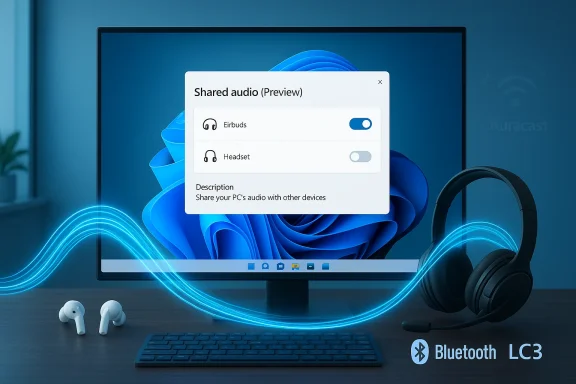
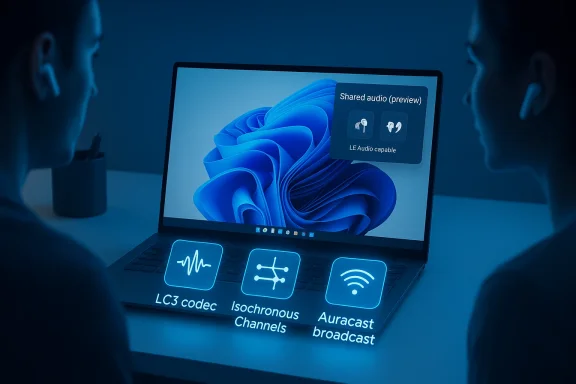
Microsoft has quietly begun rolling out a native Windows 11 preview that lets a single PC stream the same Bluetooth LE Audio feed to two headsets, earbuds, speakers, or hearing aids at once — surfaced as a "Shared audio (preview)" tile in Quick Settings and gated initially to a subset of Copilot+ machines while OEM drivers and accessory firmware catch up.
Windows audio sharing has long been a messy area. For years, desktop users who wanted to share the same audio with a friend needed wired splitters, proprietary dongles, or fragile software workarounds that either introduced latency or sacrificed audio quality. The Bluetooth LE Audio standard — and its LC3 codec and broadcast primitives commonly marketed as Auracast — changes that technical landscape by enabling efficient, synchronized broadcast-style audio and multi-stream topologies. Microsoft’s Shared audio (preview) takes those standards and exposes a simple, user-facing flow in Windows 11 Insider builds.
Microsoft documented the rollout in the Windows Insider channel as part of Insider Preview Build 26220.7051 (Dev & Beta), and followed up with a more detailed post describing compatible Copilot+ PCs, the Quick Settings workflow, and the driver/firmware dependency model. The company emphasizes this is an intentionally staged preview: the feature only appears when the OS, OEM Bluetooth/audio drivers, and accessory firmware align.
Source: findarticles.com More Windows 11 PCs Gain Bluetooth LE Audio Sharing
 Background
Windows audio sharing has long been a messy area. For years, desktop users who wanted to share the same audio with a friend needed wired splitters, proprietary dongles, or fragile software workarounds that either introduced latency or sacrificed audio quality. The Bluetooth LE Audio standard — and its LC3 codec and broadcast primitives commonly marketed as Auracast — changes that technical landscape by enabling efficient, synchronized broadcast-style audio and multi-stream topologies. Microsoft’s Shared audio (preview) takes those standards and exposes a simple, user-facing flow in Windows 11 Insider builds. Microsoft documented the rollout in the Windows Insider channel as part of Insider Preview Build 26220.7051 (Dev & Beta), and followed up with a more detailed post describing compatible Copilot+ PCs, the Quick Settings workflow, and the driver/firmware dependency model. The company emphasizes this is an intentionally staged preview: the feature only appears when the OS, OEM Bluetooth/audio drivers, and accessory firmware align.
What Microsoft shipped — the essentials
- Feature name: Shared audio (preview) (Windows 11 Quick Settings tile).
- Windows build: Appeared in Insider Preview Build 26220.7051 (Dev & Beta).
- Core technology: Bluetooth LE Audio using the LC3 codec and LE Audio broadcast/isochronous primitives (Auracast family).
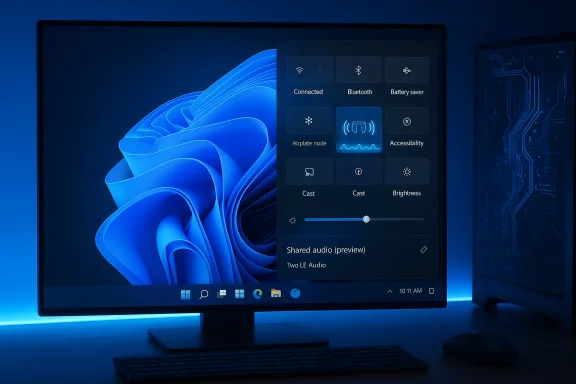
- UX: Pair two LE Audio–capable accessories, open Quick Settings, select the Shared audio (preview) tile, pick two connected devices and press Share. Use Stop sharing to end the session.
- Initial device gating: Limited to a curated set of Copilot+ PCs (initially certain Qualcomm Snapdragon X–powered Surface models; more Copilot+ machines marked “coming soon”). Driver availability from OEMs is the practical gate.
Why LE Audio (LC3, ISO, Auracast) matters
To understand why Windows’ Shared audio is significant, you need a quick primer on what changed in Bluetooth audio:- LC3 codec: The LC3 (Low Complexity Communications Codec) offers better perceived audio quality at much lower bitrates than the legacy SBC codec used by Classic Bluetooth. That efficiency reduces radio airtime and power use for both the host and the receivers. Bluetooth SIG and industry implementations show LC3 handles sample rates up to 48 kHz and a wide range of bitrates, enabling flexible tradeoffs between quality and bandwidth.
- Isochronous Channels (ISO): These provide timing guarantees and scheduling for tightly synchronized audio packets, which is essential for multiple receivers to play the same stream with minimal perceptible offset. Without ISO, trying to maintain two independent A2DP sessions in sync becomes unreliable.
- Auracast / Broadcast primitives: The broadcast model lets a transmitter advertise an audio stream that multiple receivers can join — in theory supporting an unlimited number of listeners for public broadcasts. Microsoft’s preview, however, is deliberately conservative: the Shared audio UX limits the experience to two selected receivers during the preview to prioritize reliability and a simpler user flow. That limit is a product decision rather than a technical ceiling of LE Audio.
How to try Shared audio (the practical checklist)
If you want to test Shared audio on Windows 11 today, here are the concrete steps and checks — this is the workflow Microsoft published for Insiders:- Enroll a compatible PC in the Windows Insider Program (Dev or Beta channel) and update to Build 26220.7051 or newer.
- Install all available OEM Bluetooth and audio driver updates delivered through Windows Update — the Shared audio tile only appears when Windows detects an LE Audio–capable stack exposed by the vendor driver.
- Update accessory firmware via manufacturers’ apps (Sony, Samsung, etc.) so the headphones/earbuds expose LE Audio/LC3 reception. Many vendors only enable LE Audio via firmware updates.
- Pair and connect two LE Audio–capable accessories in Settings > Bluetooth & devices.
- Open Quick Settings (taskbar), tap the Shared audio (preview) tile, select both devices and press Share to begin broadcasting the synchronized stream.
Supported hardware today — and why drivers matter
The capability depends on three pieces aligning:- The PC’s Bluetooth radio (hardware and firmware) must support LE Audio transport primitives (LE Isochronous Channels). This generally requires a recent Bluetooth 5.2+ radio and vendor driver support. The capability is determined by the chipset and vendor driver/firmware, not by Windows alone.
- The accessory must support LE Audio reception (LC3/Auracast). Many modern flagship earbuds and headsets on Qualcomm and MediaTek platforms either ship with LE Audio support or received firmware updates to add it. Check vendor spec sheets and companion apps for Auracast / LE Audio badges.
- Up-to-date OEM drivers. Intel, Qualcomm, and other radio vendors are distributing LE Audio–capable driver stacks through OEM update channels; waiting on or missing that driver is the most common reason the Shared audio tile won’t appear.
Real-world uses: calls, games, travel and accessibility
Shared audio is more than a gimmick — it addresses real user scenarios that have been awkward on PCs for years.- Movie and shared media watching: Two people can watch a film on one laptop during travel and each use their own earbuds without cables or awkward sharing. Synchronized playback is the critical UX win.
- Accessibility and hearing aids: LE Audio’s hearing aid profile and Auracast-style reception let compatible hearing aids receive direct, low-latency audio from the PC without proprietary dongles. That can be powerful in classrooms, at lectures, or when family members want to share audio while one user relies on fitted hearing aids.
- Calls and conferencing: LC3 and LE Audio’s better handling of media+voice streams reduce the old “music goes to mud” problem that occurred when Bluetooth Classic stacks downgraded quality to maintain microphone paths. Microsoft has also been enabling higher voice sampling (Super Wideband) on some Windows 11 PCs to deliver clearer, more natural voice during calls. In practice, this can make dual listening possible without sacrificing call quality.
- Local collaborative work and demos: Students and colleagues can instantly share audio for quick, local comparisons or collaborative editing sessions without passing earbuds back and forth.
Troubleshooting and common pitfalls
Early adopters should expect a handful of practical hiccups:- If one accessory “falls back” to Classic Bluetooth, it simply may not support LE Audio or may require a firmware update. Confirm LE Audio/Auracast support in the vendor app or spec sheet.
- If the Shared audio tile doesn’t appear, check Windows Update for optional OEM driver packages; driver availability is the primary gating factor. Rebooting after driver installation and re-pairing accessories often helps.
- For best synchronization, keep both listeners within a few meters of the PC, avoid placing the Bluetooth antenna near a USB 3.0 port (common interference source), and minimize heavy 2.4 GHz congestion from Wi‑Fi or nearby devices. Latency and sync will vary by headset vendor and firmware.
- If you need mission-critical, ultra-low-latency audio (e.g., competitive gaming), a wired connection or vendor-specific low-latency dongle may still be preferable until LE Audio stacks and headsets are fully optimized for sub-40 ms lip-sync in wide-ranging real-world environments.
Security, privacy and broadcast considerations
Auracast-style broadcasts introduce a new interaction model: audio streams can be advertised and joined like a public Wi‑Fi network. That raises both opportunities and questions:- Public Auracast broadcasts are powerful for venues (museums, gyms, airports) and assistive listening, but they also introduce the need for clear user consent and discovery UI so people don’t accidentally join public feeds. Bluetooth SIG and vendors are thinking about discovery UX and optional encryption for private broadcasts.
- Microsoft’s Shared audio preview is intentionally conservative and behaves like a controlled two-listener session surfaced through pairing and selection from Quick Settings, not an open, discoverable broadcast. That reduces the immediate privacy surface for Shared audio itself, though Microsoft may later expose broader Auracast-style broadcasting features with explicit consent flows.
- From an IT and enterprise perspective, administrators should treat broadcast features like any new I/O vector: evaluate policy controls for Bluetooth discoverability, and plan for testing if Shared audio becomes relevant to meeting-room hardware or public kiosks. Enterprise default update policies can also delay OEM driver rollouts, so plan pilot programs accordingly.
Ecosystem posture: chipset vendors, OEMs and accessory makers
LE Audio success on the PC hinges on coordinated vendor work. Key pieces of the vendor puzzle:- Chipset vendors (Intel, Qualcomm, MediaTek, Broadcom, etc.): They must ship radios with LE Isochronous Channel support and provide driver interfaces that expose those capabilities to the OS. Vendor driver stacks distributed through OEMs often determine whether a given laptop can actually enable LE Audio features.
- OEMs (Microsoft, Samsung, HP, Lenovo, etc.): OEMs package and test the driver stacks and distribute them through Windows Update. Microsoft’s Copilot+ gating is a pragmatic choice to limit the initial hardware set where drivers and testing are known to be reliable.
- Accessory makers (Sony, Samsung, Sennheiser, smaller TWS vendors): Many flagship earbuds and some hearing-aid vendors already ship LE Audio-capable firmware. Vendors often expose firmware updates via companion apps to enable LC3/Auracast functionality post-shipment. Expect the certified Auracast device list to grow over time.
Practical recommendations
For consumers- Before buying a new laptop specifically for Shared audio, check the device’s Copilot+ certification and the OEM’s published support notes for LE Audio/Shared audio. Expect broader availability in time, but drivers remain the gating factor today.
- If you own LE Audio–capable accessories, keep firmware up to date through the vendor’s companion app to ensure compatibility when your PC receives driver updates.
- Keep a wired fallback for latency-critical tasks until both host stacks and accessory firmware mature in your real-world environment.
- Treat Shared audio as a consumer‑grade feature for now. If you plan to deploy Copilot+ PCs at scale, pilot and document driver update paths and compatibility with your accessory inventory.
- Consider update policies: locked-down update channels can delay OEM driver delivery, so coordinate with OEM support if you want to enable Shared audio for specific user groups.
- Design for variability: headset latency, firmware differences, and RF conditions will affect synchronization. Plan test matrices that include accessory firmware versions and typical RF interference found in deployment locations (conference rooms, classrooms, public terminals).
Strengths, limits and the near-term outlook
Strengths:- Standards-based approach: Microsoft builds on LE Audio (LC3, ISO, Auracast) rather than a proprietary hack, improving future interoperability.
- User-friendly UX: Exposing Shared audio as a Quick Settings tile reduces friction for non-technical users.
- Accessibility gains: Direct streaming to hearing aids without special dongles is a meaningful win.
- Driver and firmware fragmentation: The most immediate practical barrier. Until OEMs and accessory makers synchronize updates, many users will be unable to access Shared audio.
- Performance variability: Real-world latency, sync stability, and codec negotiation will differ across headset firmware and radio implementations; some early glitches are expected.
- Conservative preview scope: Microsoft’s two-device cap is purposeful for reliability, but it means the full promise of Auracast (one-to-many public broadcasts) is not yet exposed to Windows users. Expect broader Auracast experiences in time, but timelines remain vendor-dependent.
- Over the next 6–18 months we should see increasing LE Audio support in new laptops and more accessory firmware updates. The critical path is vendor driver rollouts through OEMs and Microsoft’s staged expansion beyond Copilot+ machines. For early adopters, Shared audio is a useful preview; for the broader market, it signals the arrival of LE Audio on the PC and the practical benefits it will bring once the ecosystem completes the driver and firmware updates.
Conclusion
Microsoft’s Shared audio (preview) is a pragmatic, standards-first step that brings long-promised multi-listener Bluetooth audio to the PC. It packages LE Audio’s LC3 efficiency and broadcast/isochronous primitives into a simple Quick Settings UX that — when the right drivers and firmware line up — removes the need for cables, splitters, or awkward software hacks. The caveat is straightforward: the experience depends heavily on coordinated vendor updates, and Microsoft wisely limits the preview to a narrow set of Copilot+ machines while the ecosystem catches up. For Windows users who own LE Audio–capable accessories and a Copilot+ PC, this is an immediate, practical convenience. For the rest, it’s a clear signal that a higher-quality, lower-power, and more flexible era of wireless PC audio is finally arriving — but patience and careful driver/firmware management will be required while the industry finishes the job.Source: findarticles.com More Windows 11 PCs Gain Bluetooth LE Audio Sharing