

Windows 11’s latest Insider flight is expanding Bluetooth LE Audio on Copilot+ PCs with a new, practical twist: shared audio (preview) — a Quick Settings experience that can transmit the same audio stream simultaneously to two separate headphones, earbuds, speakers, or hearing aids. The rollout begins with Windows 11 Insider Preview Build 26220.7051 to Dev and Beta channels and is targeted at select Copilot+ hardware after OEM driver and firmware updates. This feature uses LE Audio broadcast primitives and the LC3 codec to deliver a low-power, synchronized audio stream to two paired devices at once — a small-scope preview that points toward broader Auracast-style one-to-many scenarios while raising important questions about compatibility, latency, and deployment timelines.
Bluetooth Low Energy (LE) Audio is the industry’s architectural replacement for legacy Bluetooth Classic audio (A2DP + HFP). LE Audio introduces the LC3 codec, Isochronous Channels (ISO) for time‑synchronized streaming, and higher‑level profiles such as TMAP (Telephony and Media Audio Profile) — all designed to enable new capabilities like simultaneous stereo + high‑quality voice, multi‑stream earbuds, Auracast broadcast, and now Windows’ shared audio feature. These protocol primitives are specified by the Bluetooth SIG and are the technical foundation Microsoft is leveraging. Microsoft’s engineering work over recent Windows 11 servicing updates exposed LE Audio primitives in the OS audio stack so that, where drivers and firmware support it, Windows can route media and telephony streams over LE transports and use LC3’s more efficient compression and sampling options (including a common “super‑wideband” voice mode around 32 kHz). That plumbing made the broader class of LE Audio experiences possible and created the surface that shared audio (preview) builds upon.
Source: Microsoft - Windows Insiders Blog Extending Bluetooth® LE Audio on Windows 11 with shared audio (preview)
 Background
Bluetooth Low Energy (LE) Audio is the industry’s architectural replacement for legacy Bluetooth Classic audio (A2DP + HFP). LE Audio introduces the LC3 codec, Isochronous Channels (ISO) for time‑synchronized streaming, and higher‑level profiles such as TMAP (Telephony and Media Audio Profile) — all designed to enable new capabilities like simultaneous stereo + high‑quality voice, multi‑stream earbuds, Auracast broadcast, and now Windows’ shared audio feature. These protocol primitives are specified by the Bluetooth SIG and are the technical foundation Microsoft is leveraging. Microsoft’s engineering work over recent Windows 11 servicing updates exposed LE Audio primitives in the OS audio stack so that, where drivers and firmware support it, Windows can route media and telephony streams over LE transports and use LC3’s more efficient compression and sampling options (including a common “super‑wideband” voice mode around 32 kHz). That plumbing made the broader class of LE Audio experiences possible and created the surface that shared audio (preview) builds upon.What exactly is “shared audio (preview)”?
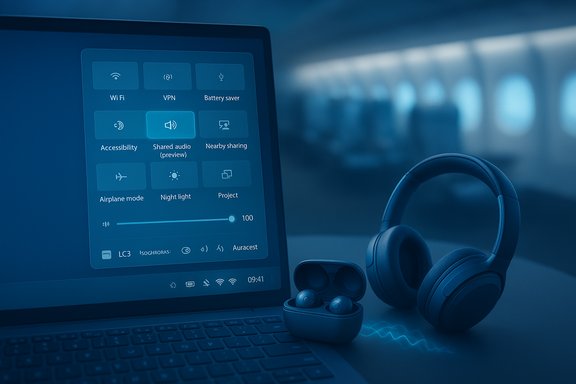
- What it does: Shared audio (preview) lets a supported Windows 11 Copilot+ PC transmit the same audio stream concurrently to two connected Bluetooth LE Audio accessories. It’s surfaced as a tile in Quick Settings called “Shared audio (preview)” that lists compatible, paired accessories and provides a Share / Stop sharing control.
- How it’s implemented: The feature uses LE Audio broadcast technology — i.e., the same transport and profiles that enable Auracast and multi‑stream scenarios — to duplicate or broadcast a synchronized stream to multiple sinks. Because LE Audio already supports synchronized multi‑stream channels, Windows can manage timing and codec negotiation so the two receiving devices stay in sync.
- Targeted experiences: Microsoft pitches simple, real‑world uses: two people sharing headphones on a plane, students listening together, or family members watching the same movie on a laptop. The preview intentionally limits scale (two simultaneous sinks) to make the UX straightforward and to reduce complexity during initial testing.
Supported hardware and availability
Compatible Copilot+ PCs (initial rollout)
Available now on select Copilot+ systems after the necessary Bluetooth and audio driver updates are installed. Microsoft’s initial list includes recent Surface models with Qualcomm Snapdragon X silicon, and a “coming soon” list expands to Samsung Galaxy Book and additional Surface SKUs. The preview is gated by OEM driver availability — the Quick Settings tile appears only once drivers enabling the capability are installed.- Available today on:
- Surface Laptop 13.8" and 15" (Qualcomm Snapdragon X)
- Surface Laptop for Business 13.8" and 15" (Qualcomm Snapdragon X)
- Surface Pro 13" and Surface Pro for Business 13" (Qualcomm Snapdragon X)
- Coming soon (driver updates expected):
- Samsung Galaxy Book5 360 / Galaxy Book5 Pro / Book5 Pro 360 (Intel Core Ultra Series 200)
- Galaxy Book4 Edge (Qualcomm Snapdragon X)
- Other Surface SKUs with Qualcomm Snapdragon X, and more.
Compatible accessories
Microsoft and early testing list a broad set of LE Audio devices as compatible — for example, Samsung Galaxy Buds2 Pro, Buds3 and Buds3 Pro, Sony WH‑1000XM6, and recent LE Audio hearing aids from vendors such as ReSound and Beltone. Vendor firmware and companion apps remain a critical step: manufacturers often expose LE Audio functionality via firmware updates and companion apps (Sony’s Sound Connect and Samsung’s Wearable apps are examples).Why not all PCs or headsets?
LE Audio is a standard, but full functionality requires coordination across:- Bluetooth silicon + firmware in the PC
- Vendor-supplied Bluetooth and audio offload drivers on Windows
- Companion‑app firmware updates for the accessory
If any of these links is missing, Windows will fall back to Classic Bluetooth behavior. That driver/firmware dependency is the main reason Microsoft limits preview availability to specific Copilot+ models for now.
How to enable and use shared audio (preview)
- Enroll your Copilot+ PC in the Windows Insider Dev or Beta Channel and install Build 26220.7051 (or later) along with the latest OEM driver updates via Windows Update.
- Pair and connect two LE Audio‑capable accessories to the PC using Settings > Bluetooth & devices.
- Open Quick Settings and tap the Shared audio (preview) tile.
- Select two supported paired and connected accessories.
- Tap Share to start broadcasting the audio stream to both devices. Use Stop sharing to end the session.
- Use each accessory vendor’s companion app to ensure LE Audio support is enabled and firmware is current — many vendors require an app-based firmware update to expose LC3/LE functionality. If a connected accessory does not appear in the Quick Settings tile, remove and re‑pair it after upgrading its firmware.
Technical primer: why this is possible now
- LC3 codec: LC3 delivers higher perceived quality than older codecs at lower bitrates and supports sample rates including 8, 16, 24, 32, 44.1 and 48 kHz. That efficiency is what enables synchronous multi‑streaming to multiple sinks on constrained Bluetooth links.
- Isochronous Channels (ISO): ISO channels provide the timing guarantees required for synchronized multi‑stream audio so two sinks can receive aligned audio packets without split‑second drift.
- TMAP: The Telephony and Media Audio Profile consolidates media and telephony roles so devices can negotiate both playback and mic capture without the old A2DP→HFP collapse. Shared audio uses the same broadcast/topology primitives as Auracast to coordinate multiple audio sinks.
Strengths: what this enables for Windows users
- Simple, low‑friction sharing: The Quick Settings tile offers a one‑tap UX for sharing audio to two devices without third‑party pairing tricks or hardware splitters.
- Energy‑efficient, modern transport: LE Audio’s LC3 and ISO primitives mean better battery life and more robust multi‑stream sync than Classic Bluetooth hacks.
- Accessibility and assistive gains: LE Audio and broadcast modes have strong accessibility implications; shared audio can be used with hearing aids and assistive listening devices that implement LE Audio broadcast sinks.
- A practical stepping stone to Auracast scenarios: Microsoft’s two‑sink preview proves a controlled pathway to richer one‑to‑many broadcasts on Windows (like in airports, gyms, or cinemas) while allowing engineers to work through UX and driver issues at a smaller scale.
Risks, caveats, and unanswered questions
1) Compatibility is the gating factor
LE Audio requires the headset, PC Bluetooth controller and firmware, and Windows drivers to all support the same LE primitives. Many devices advertised as “Bluetooth 5.x” do not necessarily implement LE Audio/TMAP/LC3 out of the box. Users should expect a staggered, OEM‑driven rollout and to perform companion‑app firmware updates. This is an ecosystem rollout, not a single Microsoft switch.2) Latency and lip‑sync concerns with two sinks
Broadcasting to two independent devices raises real‑world latency and synchronization challenges. Even with ISO timing, differences in accessory buffering, codec parameters, and proprietary audio processing can produce perceptible offset between devices — especially if one accessory applies heavier ANC, processing, or audio enhancement. During preview, expect occasional desync, which could be noticeable in video playback or split listening contexts. Independent testing and vendor firmware tuning are necessary to minimize this. Early community reports for LE Audio device pairings show varied results depending on dongles and chipsets.3) Battery and power tradeoffs
While LC3 is more efficient than SBC overall, sending to two sinks increases total radio airtime and may affect host power and accessory battery usage depending on bitrate choices. Vendors can tune bitrates and frames to mitigate this, but watch for reduced playback time in some scenarios.4) Driver/firmware delivery uncertainty
Microsoft cannot force third‑party OEMs to publish compatible drivers immediately. Users on Copilot+ PCs not yet listed will have to wait for OEM driver packages to appear via Windows Update or vendor support pages — and timelines are vendor‑dependent. Marked “coming soon” devices may receive support in “the coming weeks,” but that phrasing is inherently uncertain and contingent on OEM testing. Treat any “coming soon” list as provisional.5) Security & privacy considerations
Broadcast and multi‑sink audio raises questions:- Who can join a broadcast? The preview is limited to two paired accessories that the user explicitly selects; broader Auracast broadcast models may require attention to access control and privacy.
- Is the shared stream encrypted end‑to‑end per device? LE Audio broadcasts can operate in encrypted modes or with access control; implementations vary by device and host. Users should assume that shared audio uses standard Bluetooth encryption for paired connections, but public broadcast scenarios demand stronger guardrails. If you need confidentiality (private conversations or protected content), be cautious until broadcasters and device vendors clarify encryption models for broadcast modes.
Vendor landscape & early device behavior
Sony, Samsung, and other vendors have actively updated firmware to enable LE Audio and broadcast/auracast features across flagship products. For example, Sony published a firmware update for the WH‑1000XM6 that explicitly adds LE Audio support and related features; independent outlets have documented the steps to enable LE Audio mode on Sony devices through the companion app. Samsung’s Buds family and other flagship earbuds are also on manufacturer lists that declare LE Audio readiness. These updates are an important prerequisite to making shared audio work on Windows. Independent testing and community reports show that success can depend on the PC’s Bluetooth dongle or radio and its vendor driver. Some USB dongles and certain chipset combinations initially had interop issues with LE Audio headsets, necessitating firmware updates or alternative dongles. Expect variable behavior until the ecosystem consolidates on stable LE Audio drivers across chipset vendors.Practical troubleshooting checklist
- Confirm Windows and Insider enrollment:
- Ensure the device is enrolled in the Dev or Beta channel and has Build 26220.7051 (or newer) installed via Windows Update.
- Update OEM drivers:
- Check Windows Update for Bluetooth and audio driver packages; install any optional OEM drivers. If no updates appear, consult the OEM support page for driver downloads.
- Update accessory firmware:
- Use the accessory companion app (Sony | Sound Connect, Samsung Wearable, ReSound app, etc. to update firmware and enable LE Audio if necessary. Re‑pair the device after the firmware update.
- Re‑pair and toggle:
- If a device is paired but doesn’t appear under Shared audio (preview), remove it (forget), re‑pair after firmware updates, and check the Quick Settings tile again.
- Verify sync:
- Test with short video clips; if you notice lip‑sync drift, try different accessory combinations or check whether firmware updates change buffering strategies (some updates reduced audible lag). Community experiences vary by dongle/SoC.
Recommendations for users, buyers, and IT admins
- Consumers:
- If you want to use shared audio now, prioritize buying accessories that explicitly list LE Audio / LC3 support and have active firmware update channels.
- For the best chance of success on Windows, choose a Copilot+ PC listed as supported and keep firmware and drivers current.
- Power users and gamers:
- Test combinations before relying on them in live scenarios. Latency and sync will vary across accessory pairs; wired remains the lowest‑risk option for critical low‑latency needs.
- IT admins and procurement:
- For workplace deployments that might use shared audio or Auracast in public spaces, coordinate with AV and security teams to evaluate broadcast encryption options and endpoint behavior. Vendor interoperability matrices and driver roadmaps should be validated before mass rollout.
How Microsoft and the industry should proceed
Shared audio is a thoughtful, incremental approach to shipping multi‑sink experiences on Windows. It balances user value against implementation complexity by starting with two sinks and placing the feature behind the Quick Settings preview tile for Copilot+ PCs that have the necessary drivers. Going forward, attention should be paid to:- Standardizing driver delivery across chipset vendors so OEMs can push LE Audio drivers through Windows Update rapidly.
- Establishing clear UX affordances and access controls for Auracast-style broadcasts (public vs. private, encrypted vs. open).
- Encouraging vendors to expose tuning controls to minimize per‑device buffering that causes desync.
Microsoft’s preview approach gives the company and partners time to gather feedback and telemetry before a broad consumer release — the right play for a feature that depends so much on cross‑vendor coordination.
Conclusion
Shared audio (preview) on Windows 11 is a tangible, user-facing application of Bluetooth LE Audio’s technical advances: LC3, ISO channels, and TMAP. It demonstrates what the modern Bluetooth audio stack can enable — synchronized, energy‑efficient multi-sink streaming delivered through a simple Quick Settings UX — while also laying bare the ecosystem problems that remain: driver and firmware rollouts, accessory interop, latency tuning, and broadcast security. For Windows users with compatible Copilot+ hardware and LE Audio accessories, the preview is an early chance to test a genuinely useful sharing scenario. For everyone else, the feature is a clear signpost: LE Audio is moving from standards to real Windows experiences, but the full promise will only be visible once chipset vendors, OEMs, and accessory makers align their drivers and firmware at scale.Source: Microsoft - Windows Insiders Blog Extending Bluetooth® LE Audio on Windows 11 with shared audio (preview)
