

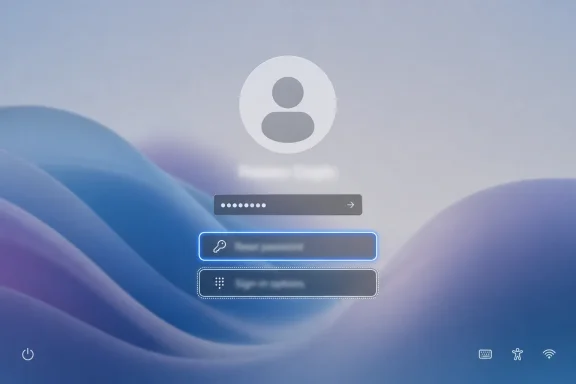
Microsoft has begun replacing the sharp-corner keyboard focus outlines on the Windows 11 sign-in screen’s “Reset password” and “Sign-in options” buttons with rounded focus rectangles in recent builds, a small visual change that brings one more pre-desktop surface closer to the operating system’s Fluent Design language. It is not a new feature, and it will not change how anyone authenticates. But that is precisely why it matters: Windows 11’s design problem has never been only about the big, screenshot-friendly surfaces. It has been about the places Microsoft forgot to sand down after the launch party ended.
The Windows sign-in screen is one of the few interfaces every Windows user sees before the system becomes personal. It is also one of the strangest places for visual inconsistency to linger, because it sits at the front door of the operating system. Before Start, before File Explorer, before Settings, Windows asks users to trust a surface that still contains bits of older Windows thinking.
The newly rounded focus rectangles are the kind of change that can sound ridiculous when written down. A rectangle around a button now has softer corners. Nobody’s workflow accelerates. No admin gets a new policy knob. No gamer gets more frames.
Yet the focus outline is not decoration. It is the visible signal that tells keyboard users where they are in the interface, and it matters especially on the sign-in screen, where mouse input may be inconvenient, touch may not be available, and recovery controls can be the difference between getting into a machine and staring at it helplessly. The change is therefore both cosmetic and functional, even if the function is not new.
The old squared-off outline looked like a remnant from an earlier layer of Windows. The new rounded version better matches the soft geometry Microsoft has been pushing since Windows 11 arrived in 2021. That alignment may be subtle, but it reduces the feeling that the login screen is a hybrid of design eras held together by habit.
The second impression was more complicated. Open enough dialogs, traverse enough system tools, or wander far enough into administrative plumbing, and the old Windows reappears. Sometimes it is a Win32 dialog that has not emotionally moved on from Windows 7. Sometimes it is a shell surface that looks Windows 10-ish. Sometimes it is an accessibility or recovery path that exposes the tension between modern visual polish and decades of backward compatibility.
That tension is not unique to Microsoft, but Windows makes it uniquely visible. The operating system carries consumer laptops, gaming rigs, government desktops, point-of-sale systems, school labs, enterprise fleets, industrial controllers, and developer workstations. Every redesign is constrained by the fact that something old, obscure, and business-critical may still need to work exactly as it did before.
This is why UI consistency in Windows usually arrives like sediment rather than a landslide. Microsoft rarely replaces an entire layer in one go. It modernizes Settings pages, updates system trays, revises File Explorer chrome, refreshes dialogs, changes icons, and then, much later, notices that a focus rectangle on the sign-in screen still belongs to a different visual century.
That is why minor visual bugs on the lock screen can produce disproportionate confusion. A missing sign-in option, an invisible icon, or a vague recovery prompt can trigger help desk tickets, forum threads, and rushed troubleshooting sessions. The user is not yet inside Windows, so the usual remedies feel further away. The system has not failed catastrophically, but it has failed at the one moment where reassurance matters most.
Rounded focus rectangles will not solve lock screen usability problems by themselves. They will not repair broken authentication flows or clarify every Windows Hello edge case. But they do make the keyboard navigation state look intentional rather than inherited. That distinction matters more than it seems.
A sharp-corner outline around a rounded button suggests that two systems are meeting awkwardly. A rounded focus rectangle around a modern control suggests that the control, the focus state, and the surface belong to the same design system. Users may not consciously register the difference, but they notice when the whole experience feels less patched together.
The important caveat is that accessibility depends on contrast, predictability, and behavior, not merely rounded corners. A beautiful focus indicator that is too faint is worse than an ugly one that is obvious. A modernized outline that disappears in high contrast modes or fails to track focus reliably would be a regression dressed as progress.
From what has been described, this change appears to preserve the role of the focus rectangle while updating its geometry. That is the right order of operations. Microsoft should not trade visibility for aesthetic consistency, and keyboard users should not become collateral damage in the campaign to make Windows look softer.
The better reading is that Microsoft is trying to bring an accessibility cue into the Windows 11 visual vocabulary without removing the cue itself. That is a small but meaningful design move. It acknowledges that accessibility indicators are not exempt from design consistency, but also that design consistency must serve the indicator rather than smother it.
That design theory runs into a practical reality: Windows is not one app. It is a platform full of overlapping frameworks, shell components, legacy utilities, web-rendered surfaces, XAML islands, Win32 windows, UWP remnants, inbox apps, enterprise snap-ins, and compatibility layers. Some pieces can be modernized quickly. Others are entangled with code paths that nobody wants to break for the sake of visual hygiene.
This is why the Windows 11 refresh has often felt uneven. File Explorer gained tabs and visual tweaks, but classic property sheets still appear. Settings absorbed more Control Panel territory, but Control Panel refuses to die. Context menus were redesigned, but many users still hit “Show more options” and fall through the trapdoor into the old world.
The rounded login focus rectangle belongs to the same story. Microsoft is not merely adding a radius to an outline. It is continuing the slow migration of system surfaces into a shared visual grammar. That migration is tedious, imperfect, and occasionally comical, but it is also how Windows actually changes.
Small UI inconsistencies are symptoms. They reveal where design systems end, where legacy code begins, and where Microsoft’s priorities have not yet reached. When a user spots an old focus rectangle on a new sign-in button, they are not only complaining about geometry. They are seeing the seam.
For IT pros, seams matter because they often correlate with support friction. An interface that looks old may behave differently, expose older assumptions, or fail to respect newer settings. That is not always true, but Windows has trained its most attentive users to treat visual discontinuity as a clue.
For enthusiasts, seams matter because Windows is a product people live in for hours every day. If a phone OS shipped with clashing system dialogs for years, users would notice. If a browser mixed design languages across core controls, reviewers would call it unfinished. Windows gets more leniency because it is older and broader, but that leniency has limits.
There is an upside to this. Design debt can be paid down gradually. Microsoft can update one system surface without waiting for a new Windows generation. Users can receive polish without reinstalling the OS or learning a new workflow.
There is also a downside. Continuous refinement can feel endless because it is endless. Users see one inconsistency fixed and immediately notice the next three. A rounded focus rectangle may make the sign-in screen look better, but it also raises the question of why other pre-desktop and recovery surfaces still feel older.
This is the risk of a polish-first story. Each improvement proves Microsoft can see the problem, but also reminds users how much remains. The company gets credit for attention to detail only if the detail accumulates into visible coherence.
But the more important comparison is not between Windows and macOS. It is between Windows and modern user expectation. People now move between iOS, Android, web apps, ChromeOS, game consoles, smart TVs, and productivity suites that update constantly. They have been trained to expect visual systems to be internally consistent, even when the underlying technology is complex.
Windows cannot excuse every seam by pointing to backward compatibility. Compatibility explains why some things are hard. It does not make inconsistency invisible. A user trying to reset a password on a laptop does not care which framework rendered the button.
That is why the login screen change is worth more than its pixel count. It suggests Microsoft understands that even utilitarian surfaces must meet the visual expectations Windows 11 created for itself. If the OS promises calm, soft, coherent design, then the promise applies before login too.
That evolution can improve security, but it also increases interface complexity. Users may see a PIN prompt, a password option, a biometric path, a security key option, or a recovery flow depending on device configuration, account type, policy, and previous setup. In managed environments, additional credential providers can add still more variation.
The login screen therefore has to communicate state with unusual precision. Which method is selected? Which options are available? What happens if the user cannot use the current method? Where does recovery begin? The focus indicator is a small part of that communication layer.
Modernizing it does not answer all the bigger authentication questions. But it does belong to the same discipline: make the available path visible, predictable, and consistent. A login screen is not the place to let old visual conventions linger just because they are technically harmless.
Still, enterprise IT tends to view UI changes through a different lens than consumers. Even small sign-in screen changes can matter when they affect training materials, support scripts, remote troubleshooting, or the expectations of users who already struggle with authentication prompts. The more locked-down the environment, the more sensitive the first screen becomes.
The good news is that this change should be easy to absorb. A rounded focus outline is unlikely to confuse users, and it may make keyboard navigation appear more natural in the context of Windows 11. Unlike a rearranged menu or renamed control, it does not ask anyone to relearn a task.
The broader enterprise concern is not this change, but Microsoft’s cadence. Administrators want Windows to improve, but they also want UI changes to arrive predictably, documentably, and with enough lead time to avoid support surprises. Microsoft’s challenge is to keep sanding down the OS without making the floor move under managed fleets.
These are not keynote moments. They are maintenance acts. But operating systems earn trust through maintenance as much as invention. The fact that Windows users still notice old UI fragments is evidence that the platform’s surface area remains enormous, but also that users expect better now.
Microsoft’s best design work in Windows 11 has often been subtractive. It removes friction, removes visual contradiction, removes old assumptions, or removes the sense that the user has wandered into a forgotten part of the OS. The rounded focus rectangle fits that pattern neatly.
That does not mean Microsoft should get endless applause for fixing inconsistencies years after Windows 11 launched. The company created the design promise, and users are right to hold it to that promise. But a late fix is still better than a permanent seam.
That reconciliation is happening surface by surface. It is visible in File Explorer refinements, Settings migrations, system tray changes, updated dialogs, modernized inbox apps, and now in the tiny keyboard focus affordances on the sign-in screen. The work is slow because Windows is sprawling. It is also necessary because Windows is sprawling.
If Microsoft wants Windows 11 to feel like a unified product rather than a compatibility museum with a modern lobby, it has to keep making changes exactly like this. Not because every corner must be rounded, but because every interface state should look like someone made an intentional decision.
The most encouraging part is that this change touches the login screen, not a showcase app. Microsoft could spend all its visual energy on Start, Copilot, widgets, and other high-visibility surfaces. Instead, it is also cleaning up a keyboard focus rectangle most users will only notice when tabbing through recovery controls.
The concrete reading is straightforward:
 The Jagged Edge Was Hiding in Plain Sight
The Windows sign-in screen is one of the few interfaces every Windows user sees before the system becomes personal. It is also one of the strangest places for visual inconsistency to linger, because it sits at the front door of the operating system. Before Start, before File Explorer, before Settings, Windows asks users to trust a surface that still contains bits of older Windows thinking.The newly rounded focus rectangles are the kind of change that can sound ridiculous when written down. A rectangle around a button now has softer corners. Nobody’s workflow accelerates. No admin gets a new policy knob. No gamer gets more frames.
Yet the focus outline is not decoration. It is the visible signal that tells keyboard users where they are in the interface, and it matters especially on the sign-in screen, where mouse input may be inconvenient, touch may not be available, and recovery controls can be the difference between getting into a machine and staring at it helplessly. The change is therefore both cosmetic and functional, even if the function is not new.
The old squared-off outline looked like a remnant from an earlier layer of Windows. The new rounded version better matches the soft geometry Microsoft has been pushing since Windows 11 arrived in 2021. That alignment may be subtle, but it reduces the feeling that the login screen is a hybrid of design eras held together by habit.
Windows 11’s Design Language Still Has to Fight Windows History
Windows 11 launched with a confident visual thesis: centered taskbar icons, softened window corners, refreshed system icons, Mica materials, cleaner context menus, and an operating system that tried to look calmer than Windows 10. Microsoft wanted the platform to feel less like a stack of legacy control panels and more like a coherent modern environment. The first impression was real.The second impression was more complicated. Open enough dialogs, traverse enough system tools, or wander far enough into administrative plumbing, and the old Windows reappears. Sometimes it is a Win32 dialog that has not emotionally moved on from Windows 7. Sometimes it is a shell surface that looks Windows 10-ish. Sometimes it is an accessibility or recovery path that exposes the tension between modern visual polish and decades of backward compatibility.
That tension is not unique to Microsoft, but Windows makes it uniquely visible. The operating system carries consumer laptops, gaming rigs, government desktops, point-of-sale systems, school labs, enterprise fleets, industrial controllers, and developer workstations. Every redesign is constrained by the fact that something old, obscure, and business-critical may still need to work exactly as it did before.
This is why UI consistency in Windows usually arrives like sediment rather than a landslide. Microsoft rarely replaces an entire layer in one go. It modernizes Settings pages, updates system trays, revises File Explorer chrome, refreshes dialogs, changes icons, and then, much later, notices that a focus rectangle on the sign-in screen still belongs to a different visual century.
The Login Screen Is a Small Surface With Outsized Trust
A login screen is not just another UI. It is a security boundary, a recovery path, and a confidence test. If the sign-in experience looks broken, inconsistent, or unclear, users do not merely think the interface is ugly. They think something is wrong with the device.That is why minor visual bugs on the lock screen can produce disproportionate confusion. A missing sign-in option, an invisible icon, or a vague recovery prompt can trigger help desk tickets, forum threads, and rushed troubleshooting sessions. The user is not yet inside Windows, so the usual remedies feel further away. The system has not failed catastrophically, but it has failed at the one moment where reassurance matters most.
Rounded focus rectangles will not solve lock screen usability problems by themselves. They will not repair broken authentication flows or clarify every Windows Hello edge case. But they do make the keyboard navigation state look intentional rather than inherited. That distinction matters more than it seems.
A sharp-corner outline around a rounded button suggests that two systems are meeting awkwardly. A rounded focus rectangle around a modern control suggests that the control, the focus state, and the surface belong to the same design system. Users may not consciously register the difference, but they notice when the whole experience feels less patched together.
Accessibility Is Not a Coat of Paint, but Paint Still Counts
It is tempting to dismiss this change as visual polish wearing an accessibility badge. That would be too cynical. Focus indicators are a core accessibility affordance, and their clarity matters for anyone navigating with a keyboard, switch device, remote session, or assistive workflow.The important caveat is that accessibility depends on contrast, predictability, and behavior, not merely rounded corners. A beautiful focus indicator that is too faint is worse than an ugly one that is obvious. A modernized outline that disappears in high contrast modes or fails to track focus reliably would be a regression dressed as progress.
From what has been described, this change appears to preserve the role of the focus rectangle while updating its geometry. That is the right order of operations. Microsoft should not trade visibility for aesthetic consistency, and keyboard users should not become collateral damage in the campaign to make Windows look softer.
The better reading is that Microsoft is trying to bring an accessibility cue into the Windows 11 visual vocabulary without removing the cue itself. That is a small but meaningful design move. It acknowledges that accessibility indicators are not exempt from design consistency, but also that design consistency must serve the indicator rather than smother it.
Fluent Design Was Always Going to Be a Long Migration
Windows 11’s rounded geometry is not random styling. Microsoft’s design guidance treats corner radius as part of a broader system: smaller rounding for common controls, larger rounding for overlays and containers, and restraint where edges meet or controls are joined. The point is not simply that rounded things look friendlier. The point is that repeated geometry helps users understand hierarchy.That design theory runs into a practical reality: Windows is not one app. It is a platform full of overlapping frameworks, shell components, legacy utilities, web-rendered surfaces, XAML islands, Win32 windows, UWP remnants, inbox apps, enterprise snap-ins, and compatibility layers. Some pieces can be modernized quickly. Others are entangled with code paths that nobody wants to break for the sake of visual hygiene.
This is why the Windows 11 refresh has often felt uneven. File Explorer gained tabs and visual tweaks, but classic property sheets still appear. Settings absorbed more Control Panel territory, but Control Panel refuses to die. Context menus were redesigned, but many users still hit “Show more options” and fall through the trapdoor into the old world.
The rounded login focus rectangle belongs to the same story. Microsoft is not merely adding a radius to an outline. It is continuing the slow migration of system surfaces into a shared visual grammar. That migration is tedious, imperfect, and occasionally comical, but it is also how Windows actually changes.
The Forum Crowd Is Right to Care About Tiny Things
Windows enthusiasts have a reputation for obsessing over tiny interface details. Sometimes that reputation is earned. A screenshot of one inconsistent corner can produce a debate longer than a security bulletin. But the obsession is not as silly as it looks from the outside.Small UI inconsistencies are symptoms. They reveal where design systems end, where legacy code begins, and where Microsoft’s priorities have not yet reached. When a user spots an old focus rectangle on a new sign-in button, they are not only complaining about geometry. They are seeing the seam.
For IT pros, seams matter because they often correlate with support friction. An interface that looks old may behave differently, expose older assumptions, or fail to respect newer settings. That is not always true, but Windows has trained its most attentive users to treat visual discontinuity as a clue.
For enthusiasts, seams matter because Windows is a product people live in for hours every day. If a phone OS shipped with clashing system dialogs for years, users would notice. If a browser mixed design languages across core controls, reviewers would call it unfinished. Windows gets more leniency because it is older and broader, but that leniency has limits.
Microsoft’s Quiet Fixes Are a Strategy, Not a Substitute
The rounded focus rectangle is part of a pattern: Microsoft continues to make small, quiet adjustments across Windows 11 rather than reserving design changes for monolithic releases. That approach fits the modern Windows servicing model. The operating system is no longer a box product that transforms every few years; it is a continuously serviced environment where small changes can appear through Insider builds, cumulative updates, feature enablement, or app updates.There is an upside to this. Design debt can be paid down gradually. Microsoft can update one system surface without waiting for a new Windows generation. Users can receive polish without reinstalling the OS or learning a new workflow.
There is also a downside. Continuous refinement can feel endless because it is endless. Users see one inconsistency fixed and immediately notice the next three. A rounded focus rectangle may make the sign-in screen look better, but it also raises the question of why other pre-desktop and recovery surfaces still feel older.
This is the risk of a polish-first story. Each improvement proves Microsoft can see the problem, but also reminds users how much remains. The company gets credit for attention to detail only if the detail accumulates into visible coherence.
The Real Competition Is Not macOS, It Is User Expectation
It is easy to frame every Windows design discussion as a comparison with macOS. Apple controls less legacy surface area, ships to a narrower hardware universe, and has historically been more willing to break old assumptions in the name of coherence. Microsoft does not have that luxury, at least not at Windows scale.But the more important comparison is not between Windows and macOS. It is between Windows and modern user expectation. People now move between iOS, Android, web apps, ChromeOS, game consoles, smart TVs, and productivity suites that update constantly. They have been trained to expect visual systems to be internally consistent, even when the underlying technology is complex.
Windows cannot excuse every seam by pointing to backward compatibility. Compatibility explains why some things are hard. It does not make inconsistency invisible. A user trying to reset a password on a laptop does not care which framework rendered the button.
That is why the login screen change is worth more than its pixel count. It suggests Microsoft understands that even utilitarian surfaces must meet the visual expectations Windows 11 created for itself. If the OS promises calm, soft, coherent design, then the promise applies before login too.
The Password Recovery Path Deserves More Than Cosmetic Attention
The presence of “Reset password” and “Sign-in options” on the login screen also reminds us that authentication UX is one of Windows’ most consequential design areas. Microsoft has spent years nudging users toward Windows Hello, PINs, biometrics, Microsoft accounts, passkeys, and stronger account recovery flows. The old password is no longer the only front door.That evolution can improve security, but it also increases interface complexity. Users may see a PIN prompt, a password option, a biometric path, a security key option, or a recovery flow depending on device configuration, account type, policy, and previous setup. In managed environments, additional credential providers can add still more variation.
The login screen therefore has to communicate state with unusual precision. Which method is selected? Which options are available? What happens if the user cannot use the current method? Where does recovery begin? The focus indicator is a small part of that communication layer.
Modernizing it does not answer all the bigger authentication questions. But it does belong to the same discipline: make the available path visible, predictable, and consistent. A login screen is not the place to let old visual conventions linger just because they are technically harmless.
Enterprise IT Will See Polish, Then Ask About Predictability
For administrators, the practical impact of this specific change is likely minimal. There is no indication that rounded focus rectangles alter policy, sign-in behavior, credential provider logic, Windows Hello enrollment, or recovery mechanics. It is visual polish, not an authentication feature.Still, enterprise IT tends to view UI changes through a different lens than consumers. Even small sign-in screen changes can matter when they affect training materials, support scripts, remote troubleshooting, or the expectations of users who already struggle with authentication prompts. The more locked-down the environment, the more sensitive the first screen becomes.
The good news is that this change should be easy to absorb. A rounded focus outline is unlikely to confuse users, and it may make keyboard navigation appear more natural in the context of Windows 11. Unlike a rearranged menu or renamed control, it does not ask anyone to relearn a task.
The broader enterprise concern is not this change, but Microsoft’s cadence. Administrators want Windows to improve, but they also want UI changes to arrive predictably, documentably, and with enough lead time to avoid support surprises. Microsoft’s challenge is to keep sanding down the OS without making the floor move under managed fleets.
The Best Windows 11 Fixes Are the Ones That Make the OS Less Interesting
There is a paradox at the heart of Windows design coverage. The changes most worth having are often the least exciting to describe. A jarring edge disappears. A dialog gets modern spacing. A legacy icon is replaced. A focus rectangle finally matches the button it surrounds.These are not keynote moments. They are maintenance acts. But operating systems earn trust through maintenance as much as invention. The fact that Windows users still notice old UI fragments is evidence that the platform’s surface area remains enormous, but also that users expect better now.
Microsoft’s best design work in Windows 11 has often been subtractive. It removes friction, removes visual contradiction, removes old assumptions, or removes the sense that the user has wandered into a forgotten part of the OS. The rounded focus rectangle fits that pattern neatly.
That does not mean Microsoft should get endless applause for fixing inconsistencies years after Windows 11 launched. The company created the design promise, and users are right to hold it to that promise. But a late fix is still better than a permanent seam.
The Rounded Rectangle Tells Us Where Windows Is Going
The useful lesson from this small update is not that rounded corners are inherently better than square ones. Design fashion changes, and Microsoft itself has swung between glass, flatness, chrome, tiles, acrylic, Mica, and soft geometry over the decades. The lesson is that Windows 11 is still being reconciled with itself.That reconciliation is happening surface by surface. It is visible in File Explorer refinements, Settings migrations, system tray changes, updated dialogs, modernized inbox apps, and now in the tiny keyboard focus affordances on the sign-in screen. The work is slow because Windows is sprawling. It is also necessary because Windows is sprawling.
If Microsoft wants Windows 11 to feel like a unified product rather than a compatibility museum with a modern lobby, it has to keep making changes exactly like this. Not because every corner must be rounded, but because every interface state should look like someone made an intentional decision.
The most encouraging part is that this change touches the login screen, not a showcase app. Microsoft could spend all its visual energy on Start, Copilot, widgets, and other high-visibility surfaces. Instead, it is also cleaning up a keyboard focus rectangle most users will only notice when tabbing through recovery controls.
The Pixels Are Small, but the Direction Is Clear
This update should be understood as a minor visual refinement with a larger symbolic footprint. It does not change authentication, but it improves the presentation of keyboard focus on a sensitive system surface. It does not complete Windows 11’s design migration, but it removes one more visible mismatch between legacy Windows behavior and modern Fluent geometry.The concrete reading is straightforward:
- The “Reset password” and “Sign-in options” controls on the Windows 11 sign-in screen are getting rounded keyboard focus rectangles instead of older sharp-corner outlines.
- The change is primarily visual, and there is no sign that it alters password reset, Windows Hello, PIN, or sign-in option behavior.
- The update matters most for coherence and accessibility because focus indicators are essential for users navigating the login screen without a mouse.
- The refinement fits Microsoft’s broader pattern of gradually modernizing older Windows surfaces rather than replacing the entire shell in one dramatic sweep.
- The remaining challenge is consistency across deeper Windows areas, where legacy dialogs, recovery tools, and administrative surfaces still often lag behind the Windows 11 design language.
References
- Primary source: thewincentral.com
Published: 2026-06-29T08:10:09.927379
Windows Login Screen Gets Rounded Focus Rectangles - WinCentral
Microsoft adds rounded focus rectangles to the Windows login screen, improving UI consistency with Windows 11's modern design. - Read in Windows 11 News on WinCentral thewincentral.com
- Official source: support.microsoft.com
Change or reset your Microsoft account password in Windows | Microsoft Support
Discover the step-by-step process to change or reset your Windows password if you've lost or forgotten it. This guide will help you regain access to your Windows account quickly and securely.support.microsoft.com - Related coverage: thegeekpage.com
How to Fix Windows 11 Login Screen Not Showing Sign-In Options (PIN/Password Missing)
You’re at the login screen. No PIN field. No password box. No sign-in options at all. Just your name and a blank screen. Usually a Windows Hello setting orthegeekpage.com - Related coverage: windowslatest.com
Microsoft confirms old Windows 8 UI elements are being replaced in Windows 11, but it's not enough yet
Microsoft if finally updating Windows 8 UI elements from Windows 11. Legacy tools still exist, although fixes for some are coming soon. www.windowslatest.com
- Related coverage: windowsreport.com
- Related coverage: techyorker.com
How to change default sign in option Windows 11 - TechYorker
×Recommended: Maximize Your PC's Performance with Chipps AI Assistant →Recommended: Click Here to Fix Windows Issues and Optimize System Performance... techyorker.com
- Related coverage: windowsforum.com
Windows 11 Password Sign‑in Icon Missing After August 2025 Preview Update — Fixes and Workarounds | Windows Forum
Microsoft has confirmed that an August 2025 optional preview update left the password sign-in icon invisible on some Windows 11 lock screens — a small...windowsforum.com - Related coverage: ctrlaltnod.com
How to Fix Missing Password Sign-In Option in Windows
Microsoft fixed a Windows 11 bug that made password sign-in buttons invisible on lock screens, affecting users with multiple authentication methods.www.ctrlaltnod.com - Related coverage: fdaytalk.com
Windows 11 Password Sign-In Missing Issue Fixed by Microsoft in Latest Update
Microsoft has rolled out a fix for a Windows 11 issue that caused the password sign-in option to disappear from the lock screen on some systems after recentwww.fdaytalk.com - Official source: learn.microsoft.com
Geometry in Windows 11 - Windows apps | Microsoft Learn
An overview of geometry and spacing in Windows 11learn.microsoft.com - Related coverage: teachucomp.com
- Official source: microsoft.com
Windows 11 Accessibility Features | Microsoft
Explore Windows 11 accessibility features from Microsoft. Learn the different ways Windows 11’s inclusive design and built-in features empower every user.www.microsoft.com
- Official source: developer.microsoft.com
What's new for Windows app developers - Windows apps | Microsoft Learn
Learn what's new for developers in Windows 11 and toolsdeveloper.microsoft.com - Related coverage: techradar.com
Windows 11 review | TechRadar
Windows 11 is the latest operating system from Microsoft, and while it gets a lot right, there's still work to be done.www.techradar.com - Official source: fluent2.microsoft.design
Fluent 2 Design System
Learn how Microsoft prioritizes accessibility in design by recognizing and remedying exclusion, solving for one and extending to many, and learning from diversity. Follow the guidelines for building accessible experiences.fluent2.microsoft.design - Related coverage: pureinfotech.com
Microsoft preps UI changes for File Explorer on Windows 11 - Pureinfotech
Microsoft is testing more pronounce rounded corners for the File Explorer address and search bars on Windows 11 preview builds. pureinfotech.com
- Official source: blogs.windows.com
Developing for Windows 11
Developing for Windows 11 Windows 11 was built to unlock the full power of the PC. This new operating system empowers you to deliver new and innovative apps, grow your business how you choose, and makes developing on Windows easier by allowiblogs.windows.com - Related coverage: psu.com
How Fluent Design Makes Windows 11 More Than Just a Pretty Face - PlayStation Universe
When Microsoft unveiled Windows 11, everyone noticed one thing first — it looked beautiful. Rounded corners, soft shadows, glass-like transparency …www.psu.com - Official source: microsoft.design
Windows 11 design principles + tenets - Microsoft Design
Our guiding force behind designing Windows for the AI eramicrosoft.design
- Official source: download.microsoft.com
- Related coverage: vassigh.com
- Related coverage: my.pennhighlands.edu
