

Paul Thurrott’s updated Windows 11 Field Guide highlights a useful capability that remains easy to miss: Snipping Tool can extract selectable text from screenshots and copy it to the clipboard.
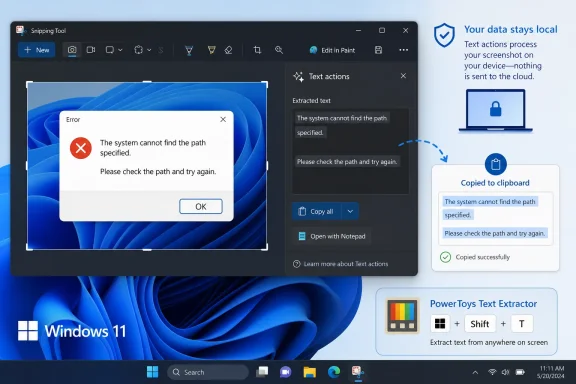
The July 12 update to Thurrott.com’s “Screenshots and Screen Recordings” chapter calls the feature “Text extractor.” In the current Windows 11 interface it appears as Text actions after a capture is opened, while the full-screen Snipping Tool capture bar can expose it directly. It uses optical character recognition to identify text in images, dialog boxes, videos, remote-desktop sessions, and apps that do not otherwise allow copying.
Microsoft’s Snipping Tool documentation confirms that Text actions can copy selected text or all recognized text from a snip. It can also quickly redact detected email addresses and phone numbers. Microsoft says recognition runs locally on the device, an important detail for admins handling screenshots containing internal information.
For everyday use, press Win + Shift + S or Print Screen if that key has been configured to open screen capture. Capture the needed area, open the resulting snip, select Text actions, and copy the recognized text.
The feature is particularly handy for pulling error messages from installer dialogs, serial numbers from screenshots, command output from images, and text embedded in PDFs or web pages where selection is blocked.
But Microsoft now recommends Snipping Tool over PowerToys Text Extractor for screenshot capture, and the in-box option is likely the better default for most Windows 11 systems. PowerToys still has a niche for users who want a direct OCR shortcut without retaining or editing a screenshot first.
OCR is not perfect, especially with unusual fonts, low-resolution images, tables, or text over complex backgrounds. Users should proofread extracted commands, IDs, and other consequential data before pasting it into a ticket, script, or administrative console.
For most Windows 11 users, the practical move is simply to use Snipping Tool’s Text actions before installing another OCR utility.
The July 12 update to Thurrott.com’s “Screenshots and Screen Recordings” chapter calls the feature “Text extractor.” In the current Windows 11 interface it appears as Text actions after a capture is opened, while the full-screen Snipping Tool capture bar can expose it directly. It uses optical character recognition to identify text in images, dialog boxes, videos, remote-desktop sessions, and apps that do not otherwise allow copying.
 Built into Windows 11
Microsoft’s Snipping Tool documentation confirms that Text actions can copy selected text or all recognized text from a snip. It can also quickly redact detected email addresses and phone numbers. Microsoft says recognition runs locally on the device, an important detail for admins handling screenshots containing internal information.For everyday use, press Win + Shift + S or Print Screen if that key has been configured to open screen capture. Capture the needed area, open the resulting snip, select Text actions, and copy the recognized text.
The feature is particularly handy for pulling error messages from installer dialogs, serial numbers from screenshots, command output from images, and text embedded in PDFs or web pages where selection is blocked.
PowerToys remains an alternative
Windows power users may already know Microsoft PowerToys’ separate Text Extractor utility. Its default shortcut, Win + Shift + T, lets users drag a region of the display and immediately places recognized text on the clipboard. Microsoft’s PowerToys documentation notes that it can work anywhere on screen, including video, and supports installed Windows OCR language packs.But Microsoft now recommends Snipping Tool over PowerToys Text Extractor for screenshot capture, and the in-box option is likely the better default for most Windows 11 systems. PowerToys still has a niche for users who want a direct OCR shortcut without retaining or editing a screenshot first.
OCR is not perfect, especially with unusual fonts, low-resolution images, tables, or text over complex backgrounds. Users should proofread extracted commands, IDs, and other consequential data before pasting it into a ticket, script, or administrative console.
For most Windows 11 users, the practical move is simply to use Snipping Tool’s Text actions before installing another OCR utility.
References
- Primary source: thurrott.com
Published: 2026-07-12T19:10:08.154562
text-extractor - Thurrott.com
 www.thurrott.com
- Official source: learn.microsoft.com
PowerToys Text Extractor Utility for Windows | Microsoft Learn
Learn how to use PowerToys Text Extractor to copy text from anywhere on your Windows screen, including images and videos. Extract text with OCR technology using simple keyboard shortcuts.learn.microsoft.com
