

Microsoft began testing a Windows 11 performance update on May 14, 2026, in Release Preview builds 26100.8514 and 26200.8514, while a separate May 15 Experimental build brought back movable taskbars for Insider testers. The two changes arrive through different Windows Insider tracks, but they tell the same story: Microsoft is trying to repair the parts of Windows 11 that users have been complaining about since launch. This is not a reinvention of Windows. It is something more revealing — an admission that polish, latency, and lost muscle memory matter as much as AI branding.
For years, Windows 11’s problem has not been that it cannot run modern software. It is that too many basic interactions have felt slower, fussier, or less flexible than the Windows 10 experience it replaced. Microsoft’s new performance push and taskbar retreat suggest the company has finally accepted that user trust is won in the milliseconds between a click and a menu appearing, and in the quiet dignity of letting people put the taskbar where they want it.
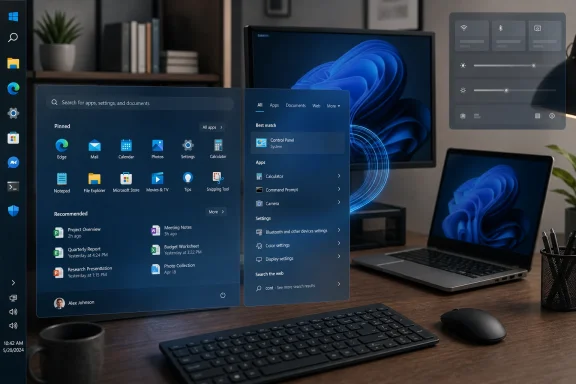
The centerpiece of the coming speed-up is a general performance improvement now visible in Windows 11 Release Preview builds 26100.8514 and 26200.8514, delivered as KB5089573 for versions 24H2 and 25H2. Microsoft’s public language is deliberately plain: the update “accelerates app launch and core shell experiences” such as the Start menu, Search, and Action Center. That phrasing matters because it targets the exact places where users judge whether an operating system feels alive or tired.
The underlying mechanism has been reported as Low Latency Profile, a feature that briefly raises CPU frequency when Windows detects high-priority interactive actions. In practice, that means the system can push harder for a second or two when the user opens an app, summons Start, calls up Search, or triggers shell UI that should appear instantly. It is not a traditional benchmark feature; it is a feel feature.
That distinction is important. A PC can score well in synthetic tests and still feel sticky if the shell hesitates, animations stutter, or menus take just long enough to break concentration. Windows 11 has been haunted by exactly that kind of complaint, especially on machines that meet Microsoft’s hardware requirements but do not have the newest CPUs, fastest SSDs, or generous thermal headroom.
Low Latency Profile is therefore not a magic horsepower upgrade. It will not turn a low-end laptop into a workstation, nor will it fix every slow Electron app, overloaded startup list, or vendor utility chewing through cycles in the background. But if it makes the common shell path feel more responsive, it addresses the form of slowness most users actually notice.
The stakes are unusually high because Windows 11 is no longer a young operating system asking for patience. It launched in 2021, and the old excuse that rough edges are merely early-adopter turbulence has expired. If users still describe the Start menu, taskbar, context menus, or Settings surfaces as less immediate than their Windows 10 equivalents, Microsoft has a perception problem that cannot be solved with another Copilot button.
This also lands in the shadow of Windows 10’s declining runway. Microsoft has spent years nudging users toward Windows 11 through hardware requirements, upgrade prompts, and the natural pressure of security support timelines. That pressure is effective, but it can also harden resentment if the destination feels like a downgrade in everyday usability.
A speed-focused update is a different kind of persuasion. It says, or at least implies, that Microsoft knows adoption cannot be driven only by support deadlines and OEM preinstalls. The operating system has to feel better when someone sits down in front of it.
Still, the criticism writes itself. If Windows needs to goose CPU clocks to make Start and Search feel fast, some users will reasonably ask why those experiences became heavy enough to need the trick in the first place. Windows 11’s shell has often felt like an accumulation of modern UI layers, web-connected surfaces, cloud hooks, and transitional design systems sitting atop decades of compatibility machinery.
That does not mean the optimization is bad. It means the optimization is only one layer of the answer. A responsive operating system needs good scheduling, efficient UI code, disciplined background behavior, and restraint about how much service-connected furniture gets placed between the user and a local action.
Microsoft’s challenge is that Windows has to be everything at once: legacy platform, modern app host, gaming target, enterprise endpoint, AI client, cloud companion, and consumer appliance. Low Latency Profile may smooth the symptoms of that complexity. It does not erase the complexity itself.
This is not a futuristic feature. It is the return of a basic affordance Windows users had for years before Windows 11 removed it. That is why the news resonates: Microsoft is not inventing a new personalization model so much as restoring one it chose to discard.
When Windows 11 launched, Microsoft made a bet that a simplified, centered, more controlled taskbar would feel modern enough to justify the loss of flexibility. For some users, it did. For many others — particularly multi-monitor workers, developers, sysadmins, ultrawide users, and anyone with long-established muscle memory — it felt like a regression wrapped in rounded corners.
The new implementation appears more considered than a simple rollback. Flyouts and animations follow the taskbar’s location, vertical layouts can work with uncombined labeled buttons, and the Settings app exposes the controls through the expected personalization path. But the emotional center of the change is simpler: Microsoft removed something useful, heard about it for years, and is now putting it back.
For casual users, a centered bottom taskbar may be fine. For people who live in Windows all day, placement is not cosmetic. A vertical taskbar can make better use of modern widescreen displays. A top taskbar may fit a user’s eye movement or accessibility needs. A smaller taskbar can reclaim pixels on compact laptops. Labels and uncombined windows can make multitasking less of a guessing game.
Microsoft’s own framing now leans into those arguments, describing taskbar placement as a matter of productivity, ergonomics, and screen space. That is the right framing, but it also highlights why the original removal was so costly. These were not obscure power-user hacks. They were visible controls for how people organize work.
The same logic applies to the Start menu changes Microsoft is preparing. Section-level controls, a clearer way to hide or show recommendations, separate file recommendation settings, Start size choices, and privacy options for profile visibility all point toward a Start menu that is less presumptuous. Users have been asking for that since Windows 11 arrived with a Start experience that often felt more designed for Microsoft’s priorities than theirs.
That distinction matters for anyone reading headlines and expecting everything to land next month. The speed improvements are plausibly close to mainstream release. The taskbar changes are real, visible, and testable for some Insiders, but they should not be treated as a guaranteed June feature for production PCs.
This is also where IT departments need to keep their heads. Release Preview builds can still contain regressions, and Experimental builds are not appropriate for primary machines unless the user understands the risk. The same build that brings a coveted shell feature can also carry known issues, partial localization, controlled rollouts, or rough edges around reset, gestures, auto-hide, and tablet behavior.
Microsoft’s controlled feature rollout system further complicates expectations. Two machines can be on the same Insider build and not expose exactly the same features at the same time. That is good for telemetry and damage control, but it makes community troubleshooting messy and can fuel confusion when one tester sees a toggle another tester cannot find.
That does not mean AI work is irrelevant. Microsoft clearly sees Windows as a front door for local and cloud AI, especially as NPUs become standard in new PCs. The KB5089573 release notes themselves include improved NPU visibility in Task Manager, which is the kind of infrastructure change that makes sense in an AI PC era.
But AI features are additive. Shell responsiveness is foundational. A user who watches the Start menu hesitate is not more likely to forgive the operating system because a chatbot is nearby. If anything, the contrast makes the irritation sharper: Microsoft can wire AI into half the desktop, but can it make the desktop feel immediate?
This is where the company’s renewed focus on performance, reliability, and craft becomes more than marketing. If Windows is going to be the platform for Microsoft’s AI ambitions, the platform itself has to stop feeling like the neglected part of the pitch.
Those are the systems where short bursts of CPU urgency could make the most visible difference. App launch latency and shell responsiveness often suffer when Windows is balancing battery, heat, background services, security agents, cloud sync, and whatever the OEM preloaded. If Low Latency Profile helps foreground actions cut through that noise, the perceived upgrade could be meaningful.
There are tradeoffs to watch. Brief CPU boosts can affect power draw, thermals, and fan behavior, especially on thin-and-light laptops. Microsoft will presumably tune the feature to avoid obvious battery damage, but the right balance is hardware-dependent. A one-second boost on a cool desktop is not the same thing as repeated boosts on a passively cooled device near its thermal ceiling.
That is why real-world testing after the public rollout will matter more than early impressions. The question is not whether a benchmark can show faster launches under ideal conditions. The question is whether the average Windows 11 PC feels less reluctant during ordinary work without becoming noisier, hotter, or less efficient.
The taskbar changes are more complicated. Many organizations standardize layouts for supportability, training, kiosk behavior, or compliance. More personalization can improve employee satisfaction, but it can also create variability that support teams must account for when walking users through steps. If Microsoft exposes policy controls for these options, admins will want to evaluate them early.
The camera, Bluetooth audio, Windows Hello, USB, HID, and storage improvements in the same Release Preview package also matter more to IT than consumer headlines suggest. Reliability around docks, standby, biometric resume, and device input can make or break the Windows experience in a managed laptop fleet. These are not glamorous changes, but they are exactly the sort of fixes that determine whether Windows feels dependable.
The broader lesson is that Microsoft’s quality push cannot be judged feature by feature. Windows 11 needs cumulative credibility. A faster Start menu helps. A movable taskbar helps. Better dock resume helps. Fewer authentication hiccups help. The operating system’s reputation improves when dozens of small irritants stop happening.
That does not mean every old option should come back. Compatibility nostalgia can become its own trap, and Windows has suffered for decades from carrying too many overlapping interfaces forward. But there is a difference between pruning clutter and removing high-value choices. Taskbar placement was high-value. Start menu control is high-value. Fast local shell response is non-negotiable.
Microsoft’s job now is to make these changes feel native rather than grudging. A restored taskbar that behaves awkwardly in vertical mode, breaks auto-hide expectations, or mishandles touch will only reopen the wound. A speed profile that improves Start but leaves Search cluttered or inconsistent will solve only part of the complaint.
The best version of this effort would not ask users to celebrate Microsoft for returning what it took away. It would make the restored functionality boring again — present, dependable, configurable, and no longer a daily topic of argument.
Microsoft’s Windows 11 problem was never only that it needed more features; it was that too many users felt the operating system had become less responsive and less theirs. The latest Insider builds suggest a company trying to win back credibility in the least glamorous but most consequential places: the click that opens Start, the taskbar edge chosen years ago, the laptop that feels just quick enough to keep a train of thought intact. If Microsoft follows through, Windows 11’s next chapter may be defined less by another AI splash screen than by something humbler and more valuable — a desktop that gets out of the way.
For years, Windows 11’s problem has not been that it cannot run modern software. It is that too many basic interactions have felt slower, fussier, or less flexible than the Windows 10 experience it replaced. Microsoft’s new performance push and taskbar retreat suggest the company has finally accepted that user trust is won in the milliseconds between a click and a menu appearing, and in the quiet dignity of letting people put the taskbar where they want it.
 Microsoft Finally Aims at the Lag Users Actually Feel
The centerpiece of the coming speed-up is a general performance improvement now visible in Windows 11 Release Preview builds 26100.8514 and 26200.8514, delivered as KB5089573 for versions 24H2 and 25H2. Microsoft’s public language is deliberately plain: the update “accelerates app launch and core shell experiences” such as the Start menu, Search, and Action Center. That phrasing matters because it targets the exact places where users judge whether an operating system feels alive or tired.The underlying mechanism has been reported as Low Latency Profile, a feature that briefly raises CPU frequency when Windows detects high-priority interactive actions. In practice, that means the system can push harder for a second or two when the user opens an app, summons Start, calls up Search, or triggers shell UI that should appear instantly. It is not a traditional benchmark feature; it is a feel feature.
That distinction is important. A PC can score well in synthetic tests and still feel sticky if the shell hesitates, animations stutter, or menus take just long enough to break concentration. Windows 11 has been haunted by exactly that kind of complaint, especially on machines that meet Microsoft’s hardware requirements but do not have the newest CPUs, fastest SSDs, or generous thermal headroom.
Low Latency Profile is therefore not a magic horsepower upgrade. It will not turn a low-end laptop into a workstation, nor will it fix every slow Electron app, overloaded startup list, or vendor utility chewing through cycles in the background. But if it makes the common shell path feel more responsive, it addresses the form of slowness most users actually notice.
The June Update Is Less About Benchmarks Than Trust
Because the performance work is in Release Preview, it is closer to general availability than the usual Insider experiment. If Microsoft keeps to its normal servicing rhythm and nothing serious blocks the rollout, the improvement could arrive for mainstream Windows 11 users with the June 2026 security update cycle. That timing makes the move more than another test-lab curiosity.The stakes are unusually high because Windows 11 is no longer a young operating system asking for patience. It launched in 2021, and the old excuse that rough edges are merely early-adopter turbulence has expired. If users still describe the Start menu, taskbar, context menus, or Settings surfaces as less immediate than their Windows 10 equivalents, Microsoft has a perception problem that cannot be solved with another Copilot button.
This also lands in the shadow of Windows 10’s declining runway. Microsoft has spent years nudging users toward Windows 11 through hardware requirements, upgrade prompts, and the natural pressure of security support timelines. That pressure is effective, but it can also harden resentment if the destination feels like a downgrade in everyday usability.
A speed-focused update is a different kind of persuasion. It says, or at least implies, that Microsoft knows adoption cannot be driven only by support deadlines and OEM preinstalls. The operating system has to feel better when someone sits down in front of it.
Low Latency Profile Is a Clever Patch for a Self-Inflicted Wound
There is an obvious defense of Low Latency Profile: modern operating systems routinely bias power and scheduling behavior around foreground activity. Phones do it, tablets do it, laptops do it, and desktop operating systems have long tried to balance responsiveness against power consumption. Briefly boosting clocks for interactive work is not inherently crude or illegitimate.Still, the criticism writes itself. If Windows needs to goose CPU clocks to make Start and Search feel fast, some users will reasonably ask why those experiences became heavy enough to need the trick in the first place. Windows 11’s shell has often felt like an accumulation of modern UI layers, web-connected surfaces, cloud hooks, and transitional design systems sitting atop decades of compatibility machinery.
That does not mean the optimization is bad. It means the optimization is only one layer of the answer. A responsive operating system needs good scheduling, efficient UI code, disciplined background behavior, and restraint about how much service-connected furniture gets placed between the user and a local action.
Microsoft’s challenge is that Windows has to be everything at once: legacy platform, modern app host, gaming target, enterprise endpoint, AI client, cloud companion, and consumer appliance. Low Latency Profile may smooth the symptoms of that complexity. It does not erase the complexity itself.
The Taskbar Retreat Is the Louder Admission
If the performance work is a technical course correction, the taskbar change is a cultural one. In Windows 11 Experimental Preview Build 26300.8493, Microsoft began testing the ability to place the taskbar on the bottom, top, left, or right edge of the screen. It is also testing a smaller taskbar option that reduces icon size and taskbar height for users who want more usable screen space.This is not a futuristic feature. It is the return of a basic affordance Windows users had for years before Windows 11 removed it. That is why the news resonates: Microsoft is not inventing a new personalization model so much as restoring one it chose to discard.
When Windows 11 launched, Microsoft made a bet that a simplified, centered, more controlled taskbar would feel modern enough to justify the loss of flexibility. For some users, it did. For many others — particularly multi-monitor workers, developers, sysadmins, ultrawide users, and anyone with long-established muscle memory — it felt like a regression wrapped in rounded corners.
The new implementation appears more considered than a simple rollback. Flyouts and animations follow the taskbar’s location, vertical layouts can work with uncombined labeled buttons, and the Settings app exposes the controls through the expected personalization path. But the emotional center of the change is simpler: Microsoft removed something useful, heard about it for years, and is now putting it back.
Windows 11’s Design Minimalism Ran Into Real Workflows
The Windows 11 taskbar controversy has always been about more than docking position. It became a symbol of a broader product tendency: remove old knobs in the name of coherence, then slowly rediscover why people used those knobs. The operating system looked cleaner, but it also asked users to accept that Microsoft’s preferred arrangement should outrank their established workflows.For casual users, a centered bottom taskbar may be fine. For people who live in Windows all day, placement is not cosmetic. A vertical taskbar can make better use of modern widescreen displays. A top taskbar may fit a user’s eye movement or accessibility needs. A smaller taskbar can reclaim pixels on compact laptops. Labels and uncombined windows can make multitasking less of a guessing game.
Microsoft’s own framing now leans into those arguments, describing taskbar placement as a matter of productivity, ergonomics, and screen space. That is the right framing, but it also highlights why the original removal was so costly. These were not obscure power-user hacks. They were visible controls for how people organize work.
The same logic applies to the Start menu changes Microsoft is preparing. Section-level controls, a clearer way to hide or show recommendations, separate file recommendation settings, Start size choices, and privacy options for profile visibility all point toward a Start menu that is less presumptuous. Users have been asking for that since Windows 11 arrived with a Start experience that often felt more designed for Microsoft’s priorities than theirs.
The Insider Split Tells Users Not to Confuse Soon With Certain
The performance update and taskbar changes are traveling through different lanes. KB5089573 is in Release Preview for Windows 11 24H2 and 25H2, which normally means it is being validated for a relatively near-term public rollout. The movable taskbar, by contrast, is in the Experimental channel, where Microsoft explicitly reserves the right to change, delay, or kill features.That distinction matters for anyone reading headlines and expecting everything to land next month. The speed improvements are plausibly close to mainstream release. The taskbar changes are real, visible, and testable for some Insiders, but they should not be treated as a guaranteed June feature for production PCs.
This is also where IT departments need to keep their heads. Release Preview builds can still contain regressions, and Experimental builds are not appropriate for primary machines unless the user understands the risk. The same build that brings a coveted shell feature can also carry known issues, partial localization, controlled rollouts, or rough edges around reset, gestures, auto-hide, and tablet behavior.
Microsoft’s controlled feature rollout system further complicates expectations. Two machines can be on the same Insider build and not expose exactly the same features at the same time. That is good for telemetry and damage control, but it makes community troubleshooting messy and can fuel confusion when one tester sees a toggle another tester cannot find.
Copilot Cannot Substitute for a Fast Start Menu
The timing of this quality push is awkward for Microsoft in a useful way. The company has spent enormous energy embedding Copilot and AI-adjacent features across Windows, Microsoft 365, Edge, and the broader PC ecosystem. Yet the Windows complaints that keep resurfacing are often stubbornly mundane: the taskbar is less flexible, the Start menu is noisy, Search is inconsistent, the shell feels slower than it should.That does not mean AI work is irrelevant. Microsoft clearly sees Windows as a front door for local and cloud AI, especially as NPUs become standard in new PCs. The KB5089573 release notes themselves include improved NPU visibility in Task Manager, which is the kind of infrastructure change that makes sense in an AI PC era.
But AI features are additive. Shell responsiveness is foundational. A user who watches the Start menu hesitate is not more likely to forgive the operating system because a chatbot is nearby. If anything, the contrast makes the irritation sharper: Microsoft can wire AI into half the desktop, but can it make the desktop feel immediate?
This is where the company’s renewed focus on performance, reliability, and craft becomes more than marketing. If Windows is going to be the platform for Microsoft’s AI ambitions, the platform itself has to stop feeling like the neglected part of the pitch.
Older Hardware Is Where the Promise Will Be Judged
The most interesting audience for Low Latency Profile is not the enthusiast with a brand-new desktop CPU and a clean Windows install. It is the user on an older but supported laptop, the office worker with a midrange corporate machine, the student whose device spends half its life thermally constrained, and the admin managing fleets that are good enough on paper but sluggish in the hand.Those are the systems where short bursts of CPU urgency could make the most visible difference. App launch latency and shell responsiveness often suffer when Windows is balancing battery, heat, background services, security agents, cloud sync, and whatever the OEM preloaded. If Low Latency Profile helps foreground actions cut through that noise, the perceived upgrade could be meaningful.
There are tradeoffs to watch. Brief CPU boosts can affect power draw, thermals, and fan behavior, especially on thin-and-light laptops. Microsoft will presumably tune the feature to avoid obvious battery damage, but the right balance is hardware-dependent. A one-second boost on a cool desktop is not the same thing as repeated boosts on a passively cooled device near its thermal ceiling.
That is why real-world testing after the public rollout will matter more than early impressions. The question is not whether a benchmark can show faster launches under ideal conditions. The question is whether the average Windows 11 PC feels less reluctant during ordinary work without becoming noisier, hotter, or less efficient.
Enterprise IT Gets Benefits, But Also Another Variable
For enterprise administrators, the performance work is potentially welcome because it targets exactly the class of user complaint that creates help desk noise without producing a clean failure code. “My PC feels slow” is difficult to triage when the machine is patched, healthy, and technically within spec. A shell-level responsiveness improvement could reduce that friction.The taskbar changes are more complicated. Many organizations standardize layouts for supportability, training, kiosk behavior, or compliance. More personalization can improve employee satisfaction, but it can also create variability that support teams must account for when walking users through steps. If Microsoft exposes policy controls for these options, admins will want to evaluate them early.
The camera, Bluetooth audio, Windows Hello, USB, HID, and storage improvements in the same Release Preview package also matter more to IT than consumer headlines suggest. Reliability around docks, standby, biometric resume, and device input can make or break the Windows experience in a managed laptop fleet. These are not glamorous changes, but they are exactly the sort of fixes that determine whether Windows feels dependable.
The broader lesson is that Microsoft’s quality push cannot be judged feature by feature. Windows 11 needs cumulative credibility. A faster Start menu helps. A movable taskbar helps. Better dock resume helps. Fewer authentication hiccups help. The operating system’s reputation improves when dozens of small irritants stop happening.
The Real Windows 11 Upgrade Is Permission to Prefer Your Own PC
The most encouraging thread in Microsoft’s latest moves is not speed by itself or taskbar movement by itself. It is the quiet return of user agency. Windows 11 has often felt as though it wants to guide users toward a single idealized desktop. The new direction suggests Microsoft is remembering that Windows became dominant partly because it adapted to messy, varied, deeply personal workflows.That does not mean every old option should come back. Compatibility nostalgia can become its own trap, and Windows has suffered for decades from carrying too many overlapping interfaces forward. But there is a difference between pruning clutter and removing high-value choices. Taskbar placement was high-value. Start menu control is high-value. Fast local shell response is non-negotiable.
Microsoft’s job now is to make these changes feel native rather than grudging. A restored taskbar that behaves awkwardly in vertical mode, breaks auto-hide expectations, or mishandles touch will only reopen the wound. A speed profile that improves Start but leaves Search cluttered or inconsistent will solve only part of the complaint.
The best version of this effort would not ask users to celebrate Microsoft for returning what it took away. It would make the restored functionality boring again — present, dependable, configurable, and no longer a daily topic of argument.
The Concrete Shape of Microsoft’s Course Correction
The near-term picture is clearer than the branding around it. Microsoft is using the Insider program to stage a two-part repair campaign: make Windows 11 feel faster, and give users back some of the desktop control they lost in the 2021 redesign.- Windows 11 builds 26100.8514 and 26200.8514 are Release Preview builds for versions 24H2 and 25H2, delivered through KB5089573.
- The performance improvement is aimed at app launches and shell experiences including Start, Search, and Action Center.
- The reported Low Latency Profile approach boosts CPU responsiveness briefly during interactive tasks rather than raising sustained performance across the whole system.
- Movable taskbar support is currently being tested in Experimental Preview Build 26300.8493, not in the same near-release channel as KB5089573.
- The taskbar work includes bottom, top, left, and right placement, smaller taskbar buttons, and better alignment behavior, while auto-hide, touch gestures, and some alternate-position features remain unfinished.
- Start menu changes are being staged to give users more direct control over pinned apps, recent items, recommendations, size, and profile visibility.
Microsoft’s Windows 11 problem was never only that it needed more features; it was that too many users felt the operating system had become less responsive and less theirs. The latest Insider builds suggest a company trying to win back credibility in the least glamorous but most consequential places: the click that opens Start, the taskbar edge chosen years ago, the laptop that feels just quick enough to keep a train of thought intact. If Microsoft follows through, Windows 11’s next chapter may be defined less by another AI splash screen than by something humbler and more valuable — a desktop that gets out of the way.
References
- Primary source: TechSpot
Published: Mon, 18 May 2026 15:52:00 GMT
A Windows 11 speed boost is coming as soon as next month, along with a taskbar you can finally move | TechSpot
This new optimization push comes even as the company continues its campaign to embed Copilot almost everywhere and for everything. CEO Satya Nadella has acknowledged the need...www.techspot.com - Related coverage: windowslatest.com
Microsoft confirms release date of macOS-like Windows 11 CPU boost trick that critics tried to mock
Microsoft confirms Windows 11's Low Latency Profile CPU boost is rolling out in June 2026. Get ready for faster app and Start menu launches. www.windowslatest.com
- Related coverage: pureinfotech.com
KB5094126 (build 26200.8655) for Windows 11 drops as part of the June 2026 update - Pureinfotech
KB5094126 (build 26200.8655) for Windows 11 brings Shared Audio, NPU tracking in Task Manager, and faster app launch improvements for 25H2 and 24H2. pureinfotech.com
- Official source: blogs.windows.com
Announcing new Release Preview builds for 14 May 2026
[19 May 2026: Updated build numbers for new releases containing bug fixes - see release notes for details] Hello Windows Insiders, Today we're releasing new builds for Release Preview across our supported versions of Windows 11. Please see the bublogs.windows.com - Related coverage: windowscentral.com
Major Windows 11 performance upgrades set to rollout within weeks, Microsoft confirms: New 'Low Latency Profile' improvements confirmed to "accelerate app launches and core shell experiences" | Windows Central
Windows 11's highly anticipated Low Latency Profile performance feature is now in the final round of testing, with rollout expected to begin within the next few weeks.www.windowscentral.com - Related coverage: windowsreport.com
Microsoft Is Preparing A Windows 11 Performance Boost For June
Windows 11 is expected to get a Low Latency Profile feature in June 2026, helping apps and system flyouts open faster. windowsreport.com
- Related coverage: computerbase.de
Schnellere App-Starts: CPU-Boost für Windows 11 steht kurz vor allgemeinem Release - ComputerBase
Der CPU-Boost im Rahmen der Low Latency Profile befindet sich bereits in der Release Preview von Windows 11.www.computerbase.de
- Related coverage: elevenforum.com
KB5089573 Windows 11 Insider Release Preview build 26100.8521 (24H2) and 26200.8521 (25H2) - May 19 | Windows 11 Forum
UPDATE 6/12: https://www.elevenforum.com/t/kb5095093-windows-11-insider-release-preview-build-26100-8728-24h2-and-26200-8728-25h2-june-12.47489/ Windows...www.elevenforum.com - Related coverage: techrounder.com
how to fix nvidia gpu performance drop and low fps in windows 11 24h2 and 25h2
PDF documentwww.techrounder.com
- Official source: learn.microsoft.com
Experimental Preview Build 26300.8493 - Windows Insider Program | Microsoft Learn
Release notes for Experimental Preview Build 26300.8493learn.microsoft.com - Related coverage: arstechnica.com
Five years later, Windows 11 brings back much-missed taskbar options (and more) - Ars Technica
Microsoft is also testing a smaller taskbar and more customizable Start menu.arstechnica.com - Related coverage: ntcompatible.com
Windows 11 Insider Experimental Preview Build 26300.8493 released
Windows 11 Build 26300 finally lets you move the taskbar to any screen edge and shrink its height for better screen real estate on compact displays. Widgets get quieter notifications while Windows Search prioritizes local files over web results, making everyday navigation noticeably faster.www.ntcompatible.com - Related coverage: betawiki.net
- Related coverage: windowsforum.com
Windows 11 Build 26300.8493 Brings Back Movable Taskbar and Smaller Buttons | Windows Forum
Microsoft released Windows 11 Build 26300.8493 to the Experimental channel on May 15, 2026, restoring official taskbar placement options, adding a smaller...windowsforum.com - Related coverage: bleepingcomputer.com
Microsoft testing adjustable taskbar, Start menu in Windows 11
Microsoft has finally brought back the resizable taskbar and Start menu to Windows 11 in the latest preview version rolling out to Insiders in the Experimental channel.www.bleepingcomputer.com
