

Microsoft’s latest Windows 11 revamp looks less like a cosmetic polish pass and more like a strategic correction. After years of criticism over the Start menu, taskbar behavior, File Explorer friction, and the general sense that Windows 11 favored form over function, the company appears to be moving toward a more flexible and more familiar desktop experience. The shift is notable not just because it addresses long-standing user complaints, but because it signals that Microsoft is finally willing to break from some of the design decisions that have defined Windows 11 since launch.
Windows 11 launched with a clear visual agenda: simplify the interface, modernize the shell, and present a cleaner desktop for both consumers and enterprises. In practice, that ambition came with trade-offs. The centered Start menu, the trimmed taskbar, and the reduced customization options made the operating system look contemporary, but they also removed several workflow habits users had relied on for years. For many people, Windows 11 did not feel like an evolution of Windows 10 so much as a reset.
That tension has shaped the platform ever since. Microsoft has spent years balancing two conflicting goals: preserve enough continuity to keep loyal users from resisting upgrades, while still defending a more constrained, touch-friendly, aesthetically uniform shell. The result has often been a product that looks refined on the surface but frustrates power users underneath. That friction matters, because the desktop is still where Windows earns its credibility.
The complaints have been persistent and unusually consistent. Users have criticized the Start menu for its recommendations-heavy layout, the taskbar for its limited flexibility, and File Explorer for not matching the responsiveness many expect from a modern operating system. Even when Microsoft has delivered incremental improvements, they have sometimes felt partial rather than decisive, as if the company were nudging the design rather than confronting the root cause.
Against that backdrop, a “massive rework” is significant because it implies more than a feature refresh. It suggests that Microsoft is listening to the feedback loop it helped create through Windows Insider testing, telemetry, and public criticism. If the company is now moving to restore some of the control and predictability users want, that could reshape the perception of Windows 11 from “beautiful but stubborn” into something much more practical.
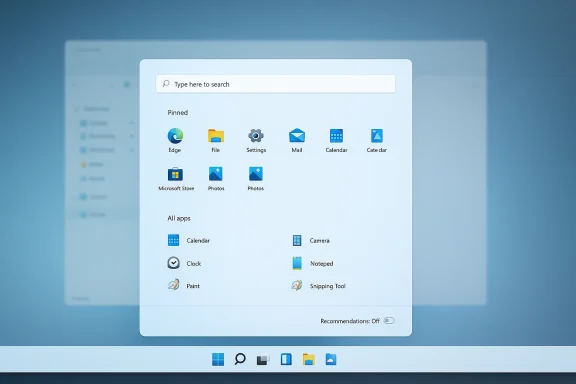
The biggest change is the move toward a single scrollable Start view that puts pinned items and the full app list in one place. Users no longer have to jump between sections to find installed apps, and Microsoft is also making room for turning off recommendations entirely. That directly addresses one of the loudest complaints about Windows 11: that the company had overemphasized content Microsoft wanted to surface instead of the content users wanted to control.
This shift also fits a broader product pattern. Microsoft has increasingly been willing to revisit once-controversial design decisions when enough feedback accumulates. In that sense, the rework is less a surprise than an admission that some early Windows 11 choices did not age well. The question is not whether Microsoft can change direction, but how much it is willing to change.
There is also an important market signal here. When Microsoft changes Windows, rivals in ChromeOS, macOS, and even the Linux desktop ecosystem watch closely. Windows remains the default operating system for much of enterprise computing, gaming, and general-purpose personal use, so small shell decisions can have outsized effects. If the company restores more utility without surrendering its design goals, it may slow the drift of frustrated users toward alternatives.
Windows 11’s Start menu drew criticism because it reduced information density while adding elements many people did not want. The Recommendations area, in particular, created the impression that Microsoft was optimizing for engagement rather than task completion. That is a dangerous perception for a desktop OS, especially one that exists to serve productivity.
There are also commercial reasons to act. Windows 10’s end-of-support timeline has made the upgrade conversation more urgent, and Microsoft needs Windows 11 to feel like a better experience, not merely a mandatory one. If users think the newer OS is still the inferior choice, migration resistance will harden.
That may sound minor, but menus are judged on friction, not aesthetics. If a user can reach what they want faster, the design wins even if it looks less “minimal.” Convenience beats elegance when people are trying to get work done.
Microsoft’s decision to make that area optional suggests a broader acknowledgment that personalization should mean control, not imposed curation. In a desktop environment, a recommended file is only useful if it is actually helpful to the person using the machine. Otherwise, it becomes noise.
The practical value here is straightforward. Faster app access, a more predictable menu layout, and the option to suppress recommendations all make the operating system easier to use at scale. For people who install and manage many applications, every saved click compounds into real efficiency.
A more scrollable and less segmented Start menu eases that transition. It restores a familiar “browse then launch” logic while preserving the visual style Microsoft wants. In practical terms, that makes the desktop feel less like a compromise and more like an adaptation.
Consumers tend to judge interfaces by how quickly they can recover from uncertainty. If the Start menu is readable, responsive, and easy to customize, users are less likely to feel alienated by the operating system. That can have a real impact on satisfaction, especially for family PCs and shared machines.
There is also a psychological angle. When users can switch off unwanted sections, they feel heard. That feeling of agency is often as important as the feature itself, because it changes the emotional tone of the interface.
The ability to minimize or eliminate recommendations should be especially welcome in managed environments. Corporate desktop standards often aim for consistency, and every unneeded panel is one more thing employees can misunderstand. Simplification has administrative value, not just aesthetic value.
In enterprises, even small workflow gains matter because they scale across thousands of endpoints. A menu that is easier to navigate and easier to standardize can save time in onboarding, troubleshooting, and documentation. That is not flashy, but it is business-relevant.
That is healthy. A desktop OS should not be a design manifesto; it should be a tool. Microsoft can still pursue visual consistency and modern flourishes, but it cannot forget that Windows succeeds because it is flexible. Flexibility is the operating system’s real brand.
This is also a lesson in platform humility. Microsoft may be the steward of Windows, but it does not own the habits of millions of users. The best design decisions are often the ones that accommodate existing behavior rather than erase it.
If Windows can combine better visual polish with greater configurability, it preserves its central advantage. That is especially important as users become more comfortable moving among devices and platforms. The OS that feels least obstructive often wins by default.
Competitors benefit whenever Microsoft appears rigid or dismissive. Every complaint about Windows 11’s Start menu gave people a reason to compare it with macOS Launchpad, Linux desktop menus, or even browser-based workflows. By loosening its grip, Microsoft removes an easy criticism.
The more Windows feels adaptable, the harder it is for rivals to frame themselves as the “serious” choice. Microsoft does not need users to love every detail; it needs them to feel that the platform bends with them rather than against them.
That said, feedback only matters when the company is willing to reinterpret it correctly. Not every complaint is about a single feature. Sometimes users are telling Microsoft that the overall philosophy is wrong, and the company needs to hear the pattern rather than just the individual bug report.
Microsoft’s challenge is to separate emotional resistance from valid workflow pain. In this case, the complaints were not just emotional. They reflected real, repeated interface problems that made daily use more cumbersome than it needed to be.
The opportunity is to prove that Windows can be modern and configurable at the same time. That would be a meaningful competitive message and a practical win for users who want less friction in everyday computing.
There is also the danger of fragmentation. If different builds and channels expose different behaviors for too long, support becomes messier and documentation becomes harder to maintain. That kind of ambiguity can frustrate both consumers and IT teams.
Microsoft also needs to communicate the redesign clearly. Users are more likely to embrace change when they understand why it is happening and how it improves the experience. Quietly shipping a better menu is good; making the case for the philosophy behind it is better.
Source: Neowin Microsoft gives Windows 11 massive rework to address top user complaints and feedback
Source: findarticles.com Microsoft Unveils Major Windows Overhaul Without Apology
 Background
Windows 11 launched with a clear visual agenda: simplify the interface, modernize the shell, and present a cleaner desktop for both consumers and enterprises. In practice, that ambition came with trade-offs. The centered Start menu, the trimmed taskbar, and the reduced customization options made the operating system look contemporary, but they also removed several workflow habits users had relied on for years. For many people, Windows 11 did not feel like an evolution of Windows 10 so much as a reset.That tension has shaped the platform ever since. Microsoft has spent years balancing two conflicting goals: preserve enough continuity to keep loyal users from resisting upgrades, while still defending a more constrained, touch-friendly, aesthetically uniform shell. The result has often been a product that looks refined on the surface but frustrates power users underneath. That friction matters, because the desktop is still where Windows earns its credibility.
The complaints have been persistent and unusually consistent. Users have criticized the Start menu for its recommendations-heavy layout, the taskbar for its limited flexibility, and File Explorer for not matching the responsiveness many expect from a modern operating system. Even when Microsoft has delivered incremental improvements, they have sometimes felt partial rather than decisive, as if the company were nudging the design rather than confronting the root cause.
Against that backdrop, a “massive rework” is significant because it implies more than a feature refresh. It suggests that Microsoft is listening to the feedback loop it helped create through Windows Insider testing, telemetry, and public criticism. If the company is now moving to restore some of the control and predictability users want, that could reshape the perception of Windows 11 from “beautiful but stubborn” into something much more practical.
Overview
The latest round of changes is centered on the Start menu, but the implications run deeper than a single panel. Neowin’s reporting on the redesign highlights a broader Microsoft willingness to reintroduce user choice, especially around the Recommended section and the scrollable app list. That matters because the Start menu is not just an app launcher; it is the symbolic heart of the Windows desktop experience.The biggest change is the move toward a single scrollable Start view that puts pinned items and the full app list in one place. Users no longer have to jump between sections to find installed apps, and Microsoft is also making room for turning off recommendations entirely. That directly addresses one of the loudest complaints about Windows 11: that the company had overemphasized content Microsoft wanted to surface instead of the content users wanted to control.
This shift also fits a broader product pattern. Microsoft has increasingly been willing to revisit once-controversial design decisions when enough feedback accumulates. In that sense, the rework is less a surprise than an admission that some early Windows 11 choices did not age well. The question is not whether Microsoft can change direction, but how much it is willing to change.
There is also an important market signal here. When Microsoft changes Windows, rivals in ChromeOS, macOS, and even the Linux desktop ecosystem watch closely. Windows remains the default operating system for much of enterprise computing, gaming, and general-purpose personal use, so small shell decisions can have outsized effects. If the company restores more utility without surrendering its design goals, it may slow the drift of frustrated users toward alternatives.
Why the Start menu became the pressure point
The Start menu has always carried emotional weight in Windows. It is the first place many users go after signing in, and it shapes the first impression of the operating system. When Microsoft changes it, users feel the difference immediately, often before they notice any deeper architectural improvement.Windows 11’s Start menu drew criticism because it reduced information density while adding elements many people did not want. The Recommendations area, in particular, created the impression that Microsoft was optimizing for engagement rather than task completion. That is a dangerous perception for a desktop OS, especially one that exists to serve productivity.
- Users wanted faster access to installed apps.
- Power users wanted less clutter and more control.
- Enterprises wanted consistency and fewer training headaches.
- Casual users wanted predictability more than novelty.
Why Microsoft is changing course now
Microsoft has had enough time to absorb the backlash, and that delay is telling. Large platform vendors rarely reverse themselves quickly because doing so can be read as an admission of error. Yet long-running complaints can become more expensive than the embarrassment of change.There are also commercial reasons to act. Windows 10’s end-of-support timeline has made the upgrade conversation more urgent, and Microsoft needs Windows 11 to feel like a better experience, not merely a mandatory one. If users think the newer OS is still the inferior choice, migration resistance will harden.
The New Start Menu Model
The redesign centers on a more unified layout that collapses the old two-section feel into something that behaves more like a single workspace. That is a substantial usability improvement because it reduces the amount of mental switching the interface demands. Instead of navigating a curated section and then explicitly expanding to see everything else, users can just scroll.A more linear workflow
A single scrollable page is a small interface change with a big behavioral impact. It makes app discovery easier while keeping pinned apps visible, which is precisely the sort of compromise Windows should have offered sooner. The visual hierarchy becomes clearer, and the menu feels less like an editorial surface.That may sound minor, but menus are judged on friction, not aesthetics. If a user can reach what they want faster, the design wins even if it looks less “minimal.” Convenience beats elegance when people are trying to get work done.
The importance of disabling recommendations
The ability to turn off Recommendations is arguably the most meaningful aspect of the redesign. For many users, the section was not merely unwanted; it was intrusive. It occupied prime screen real estate without consistently delivering value.Microsoft’s decision to make that area optional suggests a broader acknowledgment that personalization should mean control, not imposed curation. In a desktop environment, a recommended file is only useful if it is actually helpful to the person using the machine. Otherwise, it becomes noise.
- Less clutter on the Start menu.
- Greater user trust in the interface.
- More room for pinned apps and folders.
- A stronger sense of ownership over the desktop.
What This Means for Power Users
Power users have been among the most vocal critics of Windows 11 because they are often the first to notice when design choices interfere with workflow. The Start menu redesign does not solve every issue, but it does show that Microsoft is moving in a direction that feels more respectful of advanced users. That alone is important.The practical value here is straightforward. Faster app access, a more predictable menu layout, and the option to suppress recommendations all make the operating system easier to use at scale. For people who install and manage many applications, every saved click compounds into real efficiency.
Workflow and muscle memory
Many Windows users have decades of muscle memory tied to older Start menu behavior. When Microsoft changed the structure too abruptly, it created a mismatch between habit and interface. That mismatch is one reason the Windows 11 rollout felt more disruptive than Microsoft anticipated.A more scrollable and less segmented Start menu eases that transition. It restores a familiar “browse then launch” logic while preserving the visual style Microsoft wants. In practical terms, that makes the desktop feel less like a compromise and more like an adaptation.
Why advanced users care disproportionally
Power users are not the majority, but they influence the broader conversation. They write guides, support colleagues, and shape the reputation of the platform in forums, workplaces, and communities. When they complain, the effects ripple outward.- They notice design friction first.
- They recommend or reject upgrades for others.
- They shape the tone of community sentiment.
- They often become the test case for wider adoption.
Consumer Impact
For everyday users, the redesign may matter even more than for enthusiasts because it reduces confusion. The old Windows 11 Start menu could feel polished yet oddly constrained, especially for people who just wanted a simple list of installed apps. The new approach should make the operating system feel more direct.Consumers tend to judge interfaces by how quickly they can recover from uncertainty. If the Start menu is readable, responsive, and easy to customize, users are less likely to feel alienated by the operating system. That can have a real impact on satisfaction, especially for family PCs and shared machines.
A friendlier first impression
A first impression matters on a new PC because users often begin judging the system within minutes. If Windows 11 appears to “hide” their apps or push content they do not care about, they may associate the entire OS with friction. Microsoft has now taken a step toward reducing that risk.There is also a psychological angle. When users can switch off unwanted sections, they feel heard. That feeling of agency is often as important as the feature itself, because it changes the emotional tone of the interface.
Why casual users benefit too
Casual users are not always the least demanding; they just express dissatisfaction differently. They may not file feedback posts, but they absolutely notice when a system feels messy or unintuitive. A cleaner Start menu lowers the barrier to entry and makes Windows less intimidating.- Easier app discovery.
- Less visual distraction.
- Fewer accidental interactions with irrelevant content.
- Better fit for shared household PCs.
Enterprise and IT Administration
Enterprises view Start menu changes through a different lens. They care less about novelty and more about predictability, supportability, and the cost of change management. A redesigned Start menu is only valuable if it reduces support calls rather than creating new ones.The ability to minimize or eliminate recommendations should be especially welcome in managed environments. Corporate desktop standards often aim for consistency, and every unneeded panel is one more thing employees can misunderstand. Simplification has administrative value, not just aesthetic value.
Support burden and user training
Every major UI redesign imposes training costs. Help desks must update guidance, IT teams must explain what changed, and users must unlearn habits that no longer apply. If Microsoft can make the new Start menu easier to understand, it reduces the hidden cost of platform evolution.In enterprises, even small workflow gains matter because they scale across thousands of endpoints. A menu that is easier to navigate and easier to standardize can save time in onboarding, troubleshooting, and documentation. That is not flashy, but it is business-relevant.
Policy control and standardization
Administrators will want to know how much of this redesign can be controlled through policy. Microsoft has long understood that enterprise adoption depends on more than visual appeal. If the new menu is configurable enough to fit corporate standards, it becomes far easier to deploy.- Reduced help desk confusion.
- Better compatibility with desktop baselines.
- More predictable user support.
- Less resistance to Windows 11 migration.
Microsoft’s Design Philosophy Is Evolving
The broader story here is that Microsoft’s desktop philosophy appears to be softening. Windows 11 launched with a stronger sense of design authority, as if Microsoft knew what users should want and was prepared to impose it. The new Start menu work suggests a more pragmatic stance.That is healthy. A desktop OS should not be a design manifesto; it should be a tool. Microsoft can still pursue visual consistency and modern flourishes, but it cannot forget that Windows succeeds because it is flexible. Flexibility is the operating system’s real brand.
From curated experience to configurable experience
A curated experience can be elegant, but it becomes fragile if users feel trapped inside it. Windows 11 crossed that line for some users by removing familiar controls without offering enough upside. The rework implies a restoration of balance.This is also a lesson in platform humility. Microsoft may be the steward of Windows, but it does not own the habits of millions of users. The best design decisions are often the ones that accommodate existing behavior rather than erase it.
The competitive lens
Apple has long excelled at cohesive design, but macOS has its own constraints and conventions that users accept because the platform feels stable. Linux desktops emphasize flexibility, but at the cost of fragmented experiences. Microsoft sits between those worlds, and it has to thread the needle.If Windows can combine better visual polish with greater configurability, it preserves its central advantage. That is especially important as users become more comfortable moving among devices and platforms. The OS that feels least obstructive often wins by default.
The Competitive Implications
This rework has implications beyond Windows itself. A more user-friendly Windows 11 reduces the chance that dissatisfied users will treat the operating system as something to endure rather than prefer. That matters in an era where operating-system loyalty is weaker than it used to be.Competitors benefit whenever Microsoft appears rigid or dismissive. Every complaint about Windows 11’s Start menu gave people a reason to compare it with macOS Launchpad, Linux desktop menus, or even browser-based workflows. By loosening its grip, Microsoft removes an easy criticism.
Pressure on rivals and the desktop market
There is no direct knockout punch here, but the competitive logic is real. If Microsoft can improve Windows 11 without breaking compatibility or productivity, it reinforces the case for staying in the Windows ecosystem. That is especially relevant for gamers, businesses, and creators, three groups that still heavily shape desktop purchasing behavior.The more Windows feels adaptable, the harder it is for rivals to frame themselves as the “serious” choice. Microsoft does not need users to love every detail; it needs them to feel that the platform bends with them rather than against them.
Compatibility remains the moat
No matter how polished alternatives become, Windows still owns the compatibility moat. Enterprise software, legacy peripherals, game libraries, and administrative tooling all continue to give Windows enormous gravitational pull. That means Microsoft’s margin for UX mistakes is smaller, not larger.- Compatibility keeps users from leaving.
- Usability determines whether they stay happy.
- Enterprise trust determines whether they upgrade.
- Gaming loyalty reinforces the platform’s default status.
Why Feedback Hub Still Matters
The story of the Windows 11 redesign is also the story of feedback systems working, albeit slowly. Microsoft’s public feedback channels have often been criticized as too opaque or too easy to ignore, but they remain one of the few mechanisms through which user frustration can influence product direction. When enough people complain about the same friction point, it becomes harder to dismiss.That said, feedback only matters when the company is willing to reinterpret it correctly. Not every complaint is about a single feature. Sometimes users are telling Microsoft that the overall philosophy is wrong, and the company needs to hear the pattern rather than just the individual bug report.
Reading between the complaints
The common thread in the Windows 11 criticism is not nostalgia alone. It is the repeated demand for usefulness, control, and speed. Those are not old-fashioned requests; they are the minimum standard for a desktop operating system.Microsoft’s challenge is to separate emotional resistance from valid workflow pain. In this case, the complaints were not just emotional. They reflected real, repeated interface problems that made daily use more cumbersome than it needed to be.
A better feedback loop
The best outcome would be a Windows development model that tests with Insiders, ships iteratively, and responds visibly to community pressure. That would help Microsoft avoid the pattern of introducing unpopular features and then quietly working around them years later.- Faster reaction to user friction.
- More transparent design decisions.
- Less need for unofficial workarounds.
- Better trust in preview channels.
Strengths and Opportunities
Microsoft’s rework has genuine upside because it tackles complaints that have been loud, durable, and broadly shared. If the company executes well, it can improve satisfaction without sacrificing the clean visual identity that distinguishes Windows 11 from Windows 10.The opportunity is to prove that Windows can be modern and configurable at the same time. That would be a meaningful competitive message and a practical win for users who want less friction in everyday computing.
- Greater user control over the Start menu.
- Cleaner workflow for launching apps.
- Reduced clutter from unwanted recommendations.
- Better alignment with power-user expectations.
- Easier enterprise standardization across managed devices.
- Stronger upgrade appeal for reluctant Windows 10 users.
- Improved perception of Microsoft’s responsiveness.
Risks and Concerns
The main risk is that Microsoft stops halfway. Partial fixes can sometimes make a platform feel even more inconsistent, because users see progress but still run into old limitations. If the redesign is too limited or too hidden behind feature flags, the goodwill may be modest.There is also the danger of fragmentation. If different builds and channels expose different behaviors for too long, support becomes messier and documentation becomes harder to maintain. That kind of ambiguity can frustrate both consumers and IT teams.
- Incomplete rollout could blunt the benefit.
- Feature inconsistency may confuse users across builds.
- Hidden settings can limit discoverability.
- Enterprise policy gaps could slow adoption.
- Too much compromise may preserve old pain points.
- Design churn could undermine confidence in Windows 11.
- Performance issues elsewhere in the shell could overshadow the redesign.
Looking Ahead
The real test will be whether Microsoft carries this logic beyond the Start menu. If the company is serious about responding to user feedback, the same philosophy should apply to other shell areas that still feel uneven or overly constrained. File Explorer, taskbar behavior, search reliability, and notification handling remain areas where users still expect meaningful refinement.Microsoft also needs to communicate the redesign clearly. Users are more likely to embrace change when they understand why it is happening and how it improves the experience. Quietly shipping a better menu is good; making the case for the philosophy behind it is better.
- Watch for broader shell refinements in upcoming Insider builds.
- Watch whether recommendations become fully optional by default.
- Watch for policy controls that help enterprises standardize the experience.
- Watch whether Microsoft applies the same feedback-driven approach to File Explorer and the taskbar.
- Watch whether the change becomes a selling point for Windows 11 upgrades.
Source: Neowin Microsoft gives Windows 11 massive rework to address top user complaints and feedback
Source: findarticles.com Microsoft Unveils Major Windows Overhaul Without Apology
