

Microsoft is preparing to make the Windows 11 taskbar the main entry point for Copilot through an Ask Copilot experience expected around mid-2026, while reducing scattered AI buttons elsewhere in the operating system and pairing the change with its broader Windows K2 quality push. That is not Copilot retreating from Windows. It is Microsoft admitting that the first phase of AI integration made the desktop feel cluttered, opportunistic, and less coherent than it should have been. The new bet is that AI becomes easier to accept if it behaves less like an infestation and more like infrastructure.
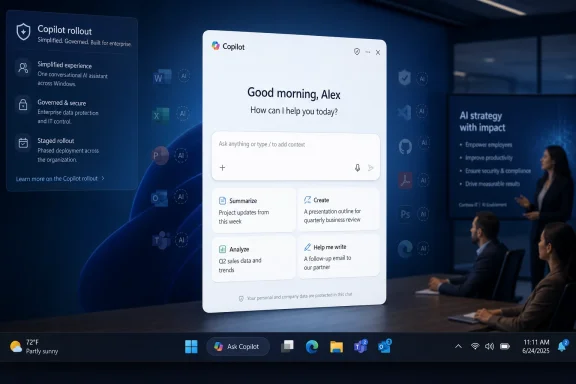
The most important part of the Ask Copilot taskbar plan is not that Microsoft wants another AI box on the desktop. It is that the company appears to be choosing a single, privileged surface for AI rather than treating every Windows corner as a candidate for a Copilot button.
That matters because Windows 11 has spent the last few years accumulating entry points. Copilot has been a taskbar icon, a sidebar-like pane, a standalone app, a keyboard key, a context-aware assistant, and a feature name attached to bits of Notepad, Photos, File Explorer, Snipping Tool, and Microsoft 365. Each individual experiment could be defended as small. Together, they made the operating system feel as if product strategy had outrun interface discipline.
Ask Copilot is Microsoft’s attempt to convert sprawl into habit. The taskbar is already where users look for running apps, pinned apps, notifications, search, widgets, and system state. If Copilot is going to be part of Windows rather than simply an app installed on Windows, the taskbar is the most defensible place to put it.
The risk is equally obvious. The taskbar is also sacred real estate. When Microsoft changes it, even slightly, users notice immediately because it sits in view all day. A cleaner Copilot strategy can still feel like an intrusion if the replacement for search is perceived as an AI upsell wearing a Windows costume.
Ask Copilot changes that contract. A traditional search box is transactional. A Copilot box is conversational. It can still find a document or open a setting, but its pitch is broader: ask, summarize, reason, extract, draft, compare, and act.
That sounds powerful until you consider how many users open Start or hit the search box because they want the fastest possible path to Notepad, Device Manager, a network adapter, or last quarter’s spreadsheet. For them, extra intelligence is useful only if it does not make the obvious slower. Microsoft’s challenge is not to prove that AI can answer questions. It is to prove that AI will not get in the way when the user is not asking for AI at all.
This is why the floating pop-up design matters. If Ask Copilot replaces the current taskbar search surface with a composer-style interface, Microsoft has to preserve the muscle memory of search while adding the broader capabilities of Copilot. A bad implementation turns one of Windows’ fastest workflows into a modal guessing game. A good one makes local search, web search, enterprise content, and AI assistance feel like one continuum.
The company’s language around “less context switching” is telling. That phrase is aimed squarely at knowledge workers who spend their day moving between Outlook, Teams, Edge, Excel, File Explorer, and line-of-business apps. The promise is not simply that Copilot can answer. It is that Copilot can become the first stop before the user decides which app should handle the next action.
K2 is best understood as a trust-repair program. It is not one build, one feature drop, or one magical “Windows 12 without the name” moment. It is a collection of quality commitments that appear designed to convince users and administrators that Microsoft still cares about the fundamentals: fast search, stable drivers, predictable updates, responsive Explorer, and fewer unnecessary distractions.
That gives the Ask Copilot rollout a strange dual role. On one hand, it is part of the AI roadmap that made many Windows users skeptical in the first place. On the other, it is being framed as part of a more disciplined Windows strategy, where AI appears only where Microsoft believes it has a clear job to do.
This is the tension Microsoft cannot escape. The company wants credit for reducing Copilot clutter while also expanding Copilot’s practical reach. The taskbar plan is therefore both a concession and an escalation. Microsoft is pulling Copilot back from random surfaces, but it is also planting it in one of the most important pieces of Windows UI.
That does not make the rollout simple. Enterprise IT will ask the same questions it asks about every AI integration: what data can it see, where does the prompt go, what is logged, what can be disabled, and how does this interact with compliance rules? A taskbar-level AI entry point may be convenient for employees, but it also becomes a governance object.
Microsoft knows this. The company has spent years turning admin controls, tenant boundaries, identity, and compliance promises into the language of enterprise AI adoption. Ask Copilot in the taskbar will be judged less by its demo and more by its manageability. If admins can configure, audit, pin, hide, or phase it in predictably, it has a chance. If it behaves like a consumer feature dropped onto corporate desktops, it will meet the same resistance that greeted earlier attempts to push unwanted Windows experiences into managed environments.
The enterprise-first angle also gives Microsoft cover. A staged rollout lets the company claim caution while still gathering telemetry and feedback from the audience most likely to pay for Microsoft 365 Copilot. Consumer PCs can wait, and Microsoft can present opt-in availability as restraint rather than hesitation.
For sysadmins, the practical question is not whether Copilot is “good” or “bad.” It is whether the feature creates another support surface. A new taskbar composer could change user expectations overnight: employees may ask why Copilot cannot find a file, summarize a local document, understand a disconnected network share, or access content blocked by policy. Every AI interface becomes a help desk multiplier if the boundary between “assistant” and “operating system feature” is unclear.
Copilot as a chatbot is easy to understand and easy to dismiss. Copilot as a layer that can perceive screen content, extract structure, and hand it to an app like Excel is more consequential. It moves AI from conversation into workflow.
This is where Copilot+ PCs come into the picture. Microsoft’s AI PC strategy depends on convincing users that local hardware, neural processing units, and Windows-level integration produce benefits that ordinary web chatbots cannot. Features like Click to Do are designed to make the desktop itself feel actionable. The user does not merely copy and paste; the user points, asks, and transforms.
That is also where the privacy debate becomes sharper. Screen-aware AI features require careful boundaries because the desktop contains everything: financial records, health portals, private messages, source code, admin consoles, and credentials screens. Microsoft can design consent prompts and local processing models, but user trust will depend on whether those controls are clear enough for normal people and strict enough for administrators.
The Excel extraction example is also revealing because it is concrete. AI features often arrive wrapped in vague promises of productivity. Extracting a table into Excel is a task people understand. It can save time, and it can be wrong in ways users can inspect. That makes it a better test of Windows AI than another generic “ask me anything” pane.
The taskbar strategy is more mature. It says Copilot should have a home. Users who want it know where to go. Users who do not want it should not have to dodge it inside unrelated apps.
But centralization also concentrates responsibility. If the taskbar becomes the AI front door, then Ask Copilot has to be excellent. It cannot be slow, ambiguous, ad-like, regionally inconsistent, or confused about local files. It cannot make Windows search worse while trying to make AI look more native. It cannot require users to understand the difference between Copilot on Windows, Microsoft 365 Copilot, Copilot+ PC features, Copilot Vision, and whatever branding Microsoft adds next quarter.
This is Microsoft’s perennial Windows problem: the company often has the components for a strong experience but weakens them through naming, licensing, rollout fragmentation, and half-overlapping versions. The user sees “Copilot.” Microsoft sees a matrix of account types, hardware classes, compliance boundaries, app packages, cloud services, and preview channels.
If Ask Copilot is to work, Microsoft must hide that complexity without hiding the important controls. That is harder than building the feature itself.
A taskbar-based Ask Copilot can answer that criticism only if it behaves like a Windows feature rather than a campaign. It should be fast to open, easy to disable, respectful of defaults, and honest about what it can access. It should not produce nags, mystery icons, or surprise reappearances after updates. It should not treat the operating system as a billboard for subscriptions.
The best version of this future is easy to imagine. A user presses the Windows key, types naturally, and gets the app, file, setting, or answer they intended. A finance worker grabs a table from a PDF into Excel without retyping it. An admin can keep the feature off for regulated groups while piloting it with a small cohort. A home user who wants the old search behavior can keep it.
The worst version is just as easy to imagine. Search results become noisier. The taskbar grows another persistent AI prompt. Consumer users see confusing toggles. Business users ask Copilot to do things blocked by policy and blame IT when it cannot. Microsoft declares the feature optional, then gradually moves defaults until “optional” means “not yet forced.”
Microsoft’s recent messaging suggests it knows the old playbook is exhausted. Windows users have become more suspicious of changes that look like growth tactics. If the company wants Copilot to become normal, it has to make it boringly reliable.
For IT pros, the more useful framing is that Windows is becoming a managed AI surface. The question is no longer whether AI appears somewhere in the stack. It will. The question is whether organizations can decide where it appears, which identities it uses, what data it can touch, and how much of the experience is local, cloud-backed, or tenant-governed.
The taskbar makes that debate unavoidable because it collapses the distance between the operating system and the assistant. Copilot is no longer merely a website, an Edge sidebar, or a Microsoft 365 feature. It becomes something users may perceive as part of Windows itself, even when its capabilities depend on cloud services and subscriptions.
That perception matters. When a feature is “in Windows,” users assume a baseline of availability, reliability, and support. They expect it to respect system settings. They expect it to work consistently across machines. They expect it not to vanish because of licensing subtleties or regional policies.
Microsoft will need to be unusually clear about those boundaries. If Ask Copilot is disabled by default on regular Windows 11 PCs at first, that should be communicated plainly. If it is aimed first at business professionals, Microsoft should say what that means in practice. If some features require Copilot+ PC hardware or Microsoft 365 subscriptions, the UI should make that clear before users build habits around missing capabilities.
That sounds negative, but it is not. Optionality is what turns a controversial platform feature into something people are willing to test. Users who feel trapped resist. Users who feel in control experiment.
Windows has a mixed record here. Microsoft often provides enterprise controls before consumer clarity, and it sometimes shifts defaults as features move from preview to general availability. With Ask Copilot, the company has a chance to avoid that pattern. A visible, stable, well-named setting would do more for trust than another promotional animation.
The taskbar is personal. People customize it, protect its space, and build years of muscle memory around it. Any AI feature placed there needs to earn its spot every day. If it does not, the off switch must be easy enough that disabling it does not become a small act of rebellion.
That is a healthier test. It forces Microsoft to compete against existing habits, not hide behind placement. Windows search, Start, File Explorer, browser tabs, PowerToys, third-party launchers, and plain old keyboard shortcuts already serve many workflows well enough. Ask Copilot has to beat “well enough” without making the desktop feel heavier.
It also has to survive contact with Windows’ diversity. A feature that feels elegant on a new Copilot+ laptop with a Microsoft 365 account may feel irrelevant on a gaming desktop, constrained on a locked-down enterprise image, and confusing on a family PC with mixed accounts. Windows is not one audience. It is a billion habits wearing the same shell.
That is why K2 matters so much. If Windows feels faster and more reliable, users may be more willing to accept a new AI layer. If updates remain messy and core UI performance remains uneven, every Copilot improvement will be judged as evidence that Microsoft is still solving the wrong problem.
 Microsoft Moves Copilot From Everywhere to Somewhere
The most important part of the Ask Copilot taskbar plan is not that Microsoft wants another AI box on the desktop. It is that the company appears to be choosing a single, privileged surface for AI rather than treating every Windows corner as a candidate for a Copilot button.That matters because Windows 11 has spent the last few years accumulating entry points. Copilot has been a taskbar icon, a sidebar-like pane, a standalone app, a keyboard key, a context-aware assistant, and a feature name attached to bits of Notepad, Photos, File Explorer, Snipping Tool, and Microsoft 365. Each individual experiment could be defended as small. Together, they made the operating system feel as if product strategy had outrun interface discipline.
Ask Copilot is Microsoft’s attempt to convert sprawl into habit. The taskbar is already where users look for running apps, pinned apps, notifications, search, widgets, and system state. If Copilot is going to be part of Windows rather than simply an app installed on Windows, the taskbar is the most defensible place to put it.
The risk is equally obvious. The taskbar is also sacred real estate. When Microsoft changes it, even slightly, users notice immediately because it sits in view all day. A cleaner Copilot strategy can still feel like an intrusion if the replacement for search is perceived as an AI upsell wearing a Windows costume.
The Search Box Becomes a Negotiation Over Intent
Windows search has always been more than a search box. It is a tiny contract between the user and the operating system: type a file name, an app name, a setting, or a half-remembered control panel phrase, and Windows should infer what you meant quickly enough that you do not think about the mechanism.Ask Copilot changes that contract. A traditional search box is transactional. A Copilot box is conversational. It can still find a document or open a setting, but its pitch is broader: ask, summarize, reason, extract, draft, compare, and act.
That sounds powerful until you consider how many users open Start or hit the search box because they want the fastest possible path to Notepad, Device Manager, a network adapter, or last quarter’s spreadsheet. For them, extra intelligence is useful only if it does not make the obvious slower. Microsoft’s challenge is not to prove that AI can answer questions. It is to prove that AI will not get in the way when the user is not asking for AI at all.
This is why the floating pop-up design matters. If Ask Copilot replaces the current taskbar search surface with a composer-style interface, Microsoft has to preserve the muscle memory of search while adding the broader capabilities of Copilot. A bad implementation turns one of Windows’ fastest workflows into a modal guessing game. A good one makes local search, web search, enterprise content, and AI assistance feel like one continuum.
The company’s language around “less context switching” is telling. That phrase is aimed squarely at knowledge workers who spend their day moving between Outlook, Teams, Edge, Excel, File Explorer, and line-of-business apps. The promise is not simply that Copilot can answer. It is that Copilot can become the first stop before the user decides which app should handle the next action.
K2 Is the Apology Hidden Behind the Feature Roadmap
Ask Copilot is arriving in the shadow of Windows K2, Microsoft’s reported internal push to repair Windows 11’s reputation for performance, reliability, update quality, and interface clutter. The timing is not accidental. Microsoft has spent years telling users that Windows is being modernized, only for many of those same users to complain about slower menus, inconsistent design, unwanted recommendations, and AI surfaces that arrived faster than long-requested fixes.K2 is best understood as a trust-repair program. It is not one build, one feature drop, or one magical “Windows 12 without the name” moment. It is a collection of quality commitments that appear designed to convince users and administrators that Microsoft still cares about the fundamentals: fast search, stable drivers, predictable updates, responsive Explorer, and fewer unnecessary distractions.
That gives the Ask Copilot rollout a strange dual role. On one hand, it is part of the AI roadmap that made many Windows users skeptical in the first place. On the other, it is being framed as part of a more disciplined Windows strategy, where AI appears only where Microsoft believes it has a clear job to do.
This is the tension Microsoft cannot escape. The company wants credit for reducing Copilot clutter while also expanding Copilot’s practical reach. The taskbar plan is therefore both a concession and an escalation. Microsoft is pulling Copilot back from random surfaces, but it is also planting it in one of the most important pieces of Windows UI.
Enterprise Gets the First Real Vote
The reported early focus on business professionals and enterprise environments is the most sensible part of the plan. Enterprises are where Microsoft can most plausibly argue that Copilot belongs in the operating system because the user’s work graph already lives in Microsoft 365. Files, chats, meetings, mail, calendars, spreadsheets, and permissions are all part of the same managed ecosystem.That does not make the rollout simple. Enterprise IT will ask the same questions it asks about every AI integration: what data can it see, where does the prompt go, what is logged, what can be disabled, and how does this interact with compliance rules? A taskbar-level AI entry point may be convenient for employees, but it also becomes a governance object.
Microsoft knows this. The company has spent years turning admin controls, tenant boundaries, identity, and compliance promises into the language of enterprise AI adoption. Ask Copilot in the taskbar will be judged less by its demo and more by its manageability. If admins can configure, audit, pin, hide, or phase it in predictably, it has a chance. If it behaves like a consumer feature dropped onto corporate desktops, it will meet the same resistance that greeted earlier attempts to push unwanted Windows experiences into managed environments.
The enterprise-first angle also gives Microsoft cover. A staged rollout lets the company claim caution while still gathering telemetry and feedback from the audience most likely to pay for Microsoft 365 Copilot. Consumer PCs can wait, and Microsoft can present opt-in availability as restraint rather than hesitation.
For sysadmins, the practical question is not whether Copilot is “good” or “bad.” It is whether the feature creates another support surface. A new taskbar composer could change user expectations overnight: employees may ask why Copilot cannot find a file, summarize a local document, understand a disconnected network share, or access content blocked by policy. Every AI interface becomes a help desk multiplier if the boundary between “assistant” and “operating system feature” is unclear.
Click to Do Shows the Real Direction of Travel
The same mid-2026 window reportedly includes Click to Do Excel extraction, a feature aimed at moving information from what the user sees into a spreadsheet-friendly form. That may sound smaller than a taskbar redesign, but it reveals the more important ambition behind Microsoft’s Windows AI work.Copilot as a chatbot is easy to understand and easy to dismiss. Copilot as a layer that can perceive screen content, extract structure, and hand it to an app like Excel is more consequential. It moves AI from conversation into workflow.
This is where Copilot+ PCs come into the picture. Microsoft’s AI PC strategy depends on convincing users that local hardware, neural processing units, and Windows-level integration produce benefits that ordinary web chatbots cannot. Features like Click to Do are designed to make the desktop itself feel actionable. The user does not merely copy and paste; the user points, asks, and transforms.
That is also where the privacy debate becomes sharper. Screen-aware AI features require careful boundaries because the desktop contains everything: financial records, health portals, private messages, source code, admin consoles, and credentials screens. Microsoft can design consent prompts and local processing models, but user trust will depend on whether those controls are clear enough for normal people and strict enough for administrators.
The Excel extraction example is also revealing because it is concrete. AI features often arrive wrapped in vague promises of productivity. Extracting a table into Excel is a task people understand. It can save time, and it can be wrong in ways users can inspect. That makes it a better test of Windows AI than another generic “ask me anything” pane.
The Taskbar Strategy Fixes Clutter but Raises the Stakes
Reducing scattered Copilot buttons is the right move. Windows does not need every app to advertise AI at the point where users are trying to crop an image, jot a note, or check the weather. The old strategy mistook visibility for value. It assumed that if Copilot appeared often enough, users would eventually discover a use for it.The taskbar strategy is more mature. It says Copilot should have a home. Users who want it know where to go. Users who do not want it should not have to dodge it inside unrelated apps.
But centralization also concentrates responsibility. If the taskbar becomes the AI front door, then Ask Copilot has to be excellent. It cannot be slow, ambiguous, ad-like, regionally inconsistent, or confused about local files. It cannot make Windows search worse while trying to make AI look more native. It cannot require users to understand the difference between Copilot on Windows, Microsoft 365 Copilot, Copilot+ PC features, Copilot Vision, and whatever branding Microsoft adds next quarter.
This is Microsoft’s perennial Windows problem: the company often has the components for a strong experience but weakens them through naming, licensing, rollout fragmentation, and half-overlapping versions. The user sees “Copilot.” Microsoft sees a matrix of account types, hardware classes, compliance boundaries, app packages, cloud services, and preview channels.
If Ask Copilot is to work, Microsoft must hide that complexity without hiding the important controls. That is harder than building the feature itself.
Users Will Forgive AI That Behaves Like Windows, Not Ads
The backlash against Copilot in Windows has never been only about artificial intelligence. It has been about consent, performance, and priority. Users who watched long-standing Windows complaints linger while AI buttons multiplied reasonably concluded that Microsoft’s incentives had drifted away from theirs.A taskbar-based Ask Copilot can answer that criticism only if it behaves like a Windows feature rather than a campaign. It should be fast to open, easy to disable, respectful of defaults, and honest about what it can access. It should not produce nags, mystery icons, or surprise reappearances after updates. It should not treat the operating system as a billboard for subscriptions.
The best version of this future is easy to imagine. A user presses the Windows key, types naturally, and gets the app, file, setting, or answer they intended. A finance worker grabs a table from a PDF into Excel without retyping it. An admin can keep the feature off for regulated groups while piloting it with a small cohort. A home user who wants the old search behavior can keep it.
The worst version is just as easy to imagine. Search results become noisier. The taskbar grows another persistent AI prompt. Consumer users see confusing toggles. Business users ask Copilot to do things blocked by policy and blame IT when it cannot. Microsoft declares the feature optional, then gradually moves defaults until “optional” means “not yet forced.”
Microsoft’s recent messaging suggests it knows the old playbook is exhausted. Windows users have become more suspicious of changes that look like growth tactics. If the company wants Copilot to become normal, it has to make it boringly reliable.
The Windows 11 Desktop Is Becoming a Managed AI Surface
For enthusiasts, the Ask Copilot shift is another chapter in the long argument over what Windows should be. Is it a neutral platform for apps and hardware, or is it a Microsoft service surface that steers users toward the company’s cloud? Windows 11 has increasingly answered: both, awkwardly.For IT pros, the more useful framing is that Windows is becoming a managed AI surface. The question is no longer whether AI appears somewhere in the stack. It will. The question is whether organizations can decide where it appears, which identities it uses, what data it can touch, and how much of the experience is local, cloud-backed, or tenant-governed.
The taskbar makes that debate unavoidable because it collapses the distance between the operating system and the assistant. Copilot is no longer merely a website, an Edge sidebar, or a Microsoft 365 feature. It becomes something users may perceive as part of Windows itself, even when its capabilities depend on cloud services and subscriptions.
That perception matters. When a feature is “in Windows,” users assume a baseline of availability, reliability, and support. They expect it to respect system settings. They expect it to work consistently across machines. They expect it not to vanish because of licensing subtleties or regional policies.
Microsoft will need to be unusually clear about those boundaries. If Ask Copilot is disabled by default on regular Windows 11 PCs at first, that should be communicated plainly. If it is aimed first at business professionals, Microsoft should say what that means in practice. If some features require Copilot+ PC hardware or Microsoft 365 subscriptions, the UI should make that clear before users build habits around missing capabilities.
The Most Important Windows AI Feature May Be the Off Switch
A mature Copilot strategy is not measured only by what Microsoft turns on. It is measured by how gracefully Microsoft lets users and administrators turn things off.That sounds negative, but it is not. Optionality is what turns a controversial platform feature into something people are willing to test. Users who feel trapped resist. Users who feel in control experiment.
Windows has a mixed record here. Microsoft often provides enterprise controls before consumer clarity, and it sometimes shifts defaults as features move from preview to general availability. With Ask Copilot, the company has a chance to avoid that pattern. A visible, stable, well-named setting would do more for trust than another promotional animation.
The taskbar is personal. People customize it, protect its space, and build years of muscle memory around it. Any AI feature placed there needs to earn its spot every day. If it does not, the off switch must be easy enough that disabling it does not become a small act of rebellion.
Microsoft’s Narrower Copilot Bet Leaves Less Room for Excuses
The coming Ask Copilot experience gives Microsoft a cleaner test than its earlier Copilot scattershot. If the company reduces the number of AI entry points and concentrates effort on the taskbar, it can no longer blame poor adoption on discoverability. Users will find it. The question is whether they will return to it.That is a healthier test. It forces Microsoft to compete against existing habits, not hide behind placement. Windows search, Start, File Explorer, browser tabs, PowerToys, third-party launchers, and plain old keyboard shortcuts already serve many workflows well enough. Ask Copilot has to beat “well enough” without making the desktop feel heavier.
It also has to survive contact with Windows’ diversity. A feature that feels elegant on a new Copilot+ laptop with a Microsoft 365 account may feel irrelevant on a gaming desktop, constrained on a locked-down enterprise image, and confusing on a family PC with mixed accounts. Windows is not one audience. It is a billion habits wearing the same shell.
That is why K2 matters so much. If Windows feels faster and more reliable, users may be more willing to accept a new AI layer. If updates remain messy and core UI performance remains uneven, every Copilot improvement will be judged as evidence that Microsoft is still solving the wrong problem.
The Mid-2026 Copilot Reset Gives Windows Users a Short Checklist
The practical lesson is that Microsoft is not removing Copilot from Windows 11. It is reorganizing it, narrowing its visible footprint, and preparing to make the taskbar the place where AI either proves itself or becomes another thing users disable.- Ask Copilot is expected to turn the Windows 11 taskbar search area into a more conversational AI and search entry point around mid-2026.
- Microsoft appears to be reducing scattered Copilot buttons across Windows while concentrating AI access in fewer, more prominent places.
- The first serious audience is likely to be business and enterprise users, where Microsoft 365 integration gives Copilot a clearer productivity argument.
- Regular Windows 11 PCs are not expected to receive the feature as a default-on experience immediately, which gives Microsoft room for staged testing.
- Click to Do Excel extraction shows that Microsoft’s Windows AI strategy is about actions on desktop content, not just chatbot answers.
- The success of the rollout will depend as much on controls, performance, and clarity as on the AI model behind the box.
References
- Primary source: Qoo Media
Published: 2026-06-01T05:46:11.004097
Microsoft Pulls Copilot Back In Windows 11, The Taskbar Becomes Its New AI Front Door
Microsoft is narrowing how Copilot appears in Windows 11, and the taskbar is set to become the most important entry point for the company’s AI push. Instead of… www.qoo10.co.id
- Related coverage: windowscentral.com
Microsoft confirms plans to integrate Copilot with the Taskbar on Windows 11 this summer: Ask Copilot expected to debut "mid-2026" | Windows Central
First announced last year, a new document has confirmed that Microsoft's upcoming "Ask Copilot" feature for Windows 11's Taskbar is arriving mid-2026.www.windowscentral.com - Related coverage: techradar.com
- Related coverage: windowslatest.com
Microsoft confirms Ask Copilot is coming to the Windows 11 taskbar in mid-2026
Footnotes in a new Microsoft e-book confirm Ask Copilot and Click to Do are launching in mid-2026 for enterprise "Frontier Firms." www.windowslatest.com
- Official source: support.microsoft.com
Getting started with Copilot on Windows | Microsoft Support
Discover how Microsoft Copilot, your everyday AI companion, can help you achieve anything you can imagine.support.microsoft.com - Official source: microsoft.com
Copilot on Windows: Your Built-In AI Assistant | Microsoft Windows
Discover how Copilot on Windows transforms productivity with AI-powered assistance built right into your computer. Launch Copilot on Windows today.www.microsoft.com
- Official source: learn.microsoft.com
Pin Microsoft 365 Copilot and its companion apps to the Windows taskbar | Microsoft Learn
Learn how to improve the use of Microsoft 365 Copilot across your organization by pinning the Copilot app to the Windows taskbar.learn.microsoft.com - Related coverage: pcworld.com
Copilot Vision gains ability to analyze apps in the Windows 11 taskbar | PCWorld
Microsoft's Copilot AI assistant can now analyze apps in the taskbar and offer assistance—only when you explicitly ask for it.www.pcworld.com - Related coverage: techspot.com
Microsoft tests new Windows AI in the taskbar and File Explorer | TechSpot
At the center of this effort is a new feature called Ask Copilot, which effectively turns the traditional Windows search bar into a gateway for Microsoft 365's...www.techspot.com - Related coverage: techrepublic.com
How to Enable Windows Copilot in Windows 11 23H2
Learn how to activate the Windows Copilot feature in Windows 11 23H2 with our step-by-step guide.www.techrepublic.com
- Related coverage: windowsreport.com
How to Access Microsoft Copilot on Windows 11 (Quick Guide)
Learn how to access Microsoft Copilot on Windows 11. Step-by-step guide to enable and use Copilot directly from the taskbar. windowsreport.com
- Related coverage: tomshardware.com
Microsoft wants you to talk to Windows 11 PCs again — Copilot gets 'conversational' input to complement your mouse and keyboard | Tom's Hardware
And Copilot is coming for your Windows 11 Search Barwww.tomshardware.com - Related coverage: tomsguide.com
How to disable Copilot in Windows 11 | Tom's Guide
Completely disable Copilot in Windows 11 in just a few simple steps.www.tomsguide.com - Official source: news.microsoft.com
- Official source: adoption.microsoft.com
- Related coverage: askwoody.com
- Related coverage: algonquincollege.com
- Related coverage: u3ahavelocknorth.com
- Official source: blogs.windows.com
Copilot App on Windows: Opening web links alongside your conversations begins rolling out to Windows Insiders
Hello Windows Insiders, In today's update, we are introducing a new way to get things done in the Copblogs.windows.com - Related coverage: redmondmag.com
Microsoft Dials Back Copilot, Pledges Windows 11 Quality Overhaul -- Redmondmag.com
Microsoft is hitting the brakes on its aggressive Copilot push in Windows 11, promising a sweeping quality overhaul that puts performance and reliability ahead of AI feature expansion .redmondmag.com - Related coverage: pureinfotech.com
Windows K2 progress report shows Microsoft fixing core problems on Windows 11 - Pureinfotech
Windows 11 K2 progress report reveals Microsoft’s work on updates, speed, and usability since March. pureinfotech.com
