

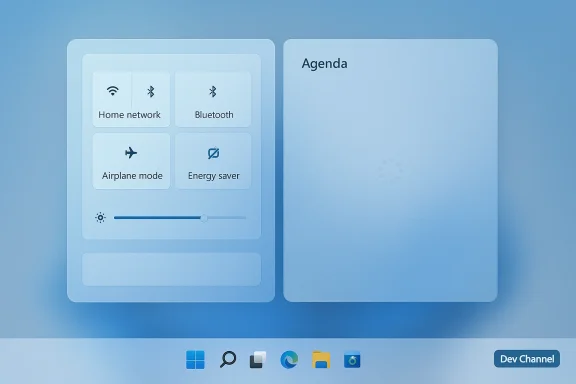
Microsoft's plan to unclutter the Windows 11 Taskbar is taking two very different forms this month: a small but welcome return of Quick Settings customization has quietly reappeared inside a Dev‑channel preview build, while a more visible — and much‑anticipated — Taskbar Agenda view has been pushed back as Microsoft reworks its implementation.
Windows' taskbar and notification surfaces have been the subject of chronic user debate since Windows 11 launched in 2021. Microsoft chose a cleaner, more opinionated approach for the new shell — centered icons, a simplified Notification Center, and a redesigned Quick Settings panel — but that simplification removed a couple of practical affordances many power users relied on in Windows 10, including an editable set of Quick Actions and the compact, chronological Agenda in the calendar flyout. That omission has driven years of user feedback and workarounds.
By late 2025 Microsoft publicly acknowledged those pain points and began promising a series of refinements targeted at day‑to‑day productivity, reliability, and customization. The company moved some changes through Windows Insider channels (Dev and Beta) to gather feedback, iterate, and validate quality before wider release. The latest Dev build released to Insiders — Build 26300.7965 (KB5079385) — is the most recent checkpoint in that process.
Crucially, the implementation discovered in the Dev preview is not yet fully functional: attempting to remove an item currently fails, and the edit flow appears to be only partially wired up. That suggests Microsoft has restored the UI and backend hooks but has not finished the feature experience or its policies for rollout. Several outlets treating the find as a "hidden" or "slipped through" discovery note the work is actively in progress and may or may not become part of a near‑term public release.
The feedback loop here has two parts: technical (performance and integration) and perceptual (users resist obvious web wrappers in core shell experiences). Microsoft appears to be taking a cautious approach: delay the preview, iterate on the implementation, and avoid shipping a compromised experience that might cause more negative reaction than a well‑executed later release.
However, the company still faces a trust and perception gap. Many users see Windows 11 as a collection of incremental, sometimes rushed experiments that prioritize bold ambitions (AI, Copilot) over polishing fundamentals. Restoring features originally present in Windows 10 can look like remedial work rather than progress — and that messaging matters. Microsoft must clearly communicate not just that it is bringing features back, but how the new implementations are better (or at least as good) as what users had before.
From a product strategy perspective, the two threads we’re watching — restoring classic affordances (Quick Settings edits, move/resize Taskbar prototypes) and building modern, cloud‑integrated experiences (Agenda with Copilot actions) — must be reconciled around performance, manageability, and trust. Getting any one of those wrong will cause louder backlash than shipping none at all.
The stakes are simple: users want shell experiences that are fast, predictable, and configurable. Microsoft is moving in that direction, but execution details — performance, manageability, and clarity in communication — will determine whether these changes are greeted as thoughtful fixes or half‑measures. For now, Insiders will continue to be the proving ground; the rest of us should watch the Dev and Beta channels for concrete, functional updates in the weeks and months ahead.
Source: Windows Central Microsoft is testing a new way to clean up the Windows 11 Taskbar
 Background
Windows' taskbar and notification surfaces have been the subject of chronic user debate since Windows 11 launched in 2021. Microsoft chose a cleaner, more opinionated approach for the new shell — centered icons, a simplified Notification Center, and a redesigned Quick Settings panel — but that simplification removed a couple of practical affordances many power users relied on in Windows 10, including an editable set of Quick Actions and the compact, chronological Agenda in the calendar flyout. That omission has driven years of user feedback and workarounds.By late 2025 Microsoft publicly acknowledged those pain points and began promising a series of refinements targeted at day‑to‑day productivity, reliability, and customization. The company moved some changes through Windows Insider channels (Dev and Beta) to gather feedback, iterate, and validate quality before wider release. The latest Dev build released to Insiders — Build 26300.7965 (KB5079385) — is the most recent checkpoint in that process.
What surfaced in Build 26300.7965
A small reversal: Quick Settings edit UX returning (hidden)
In Build 26300.7965, Windows UI researchers and community sleuths uncovered UI elements and code paths that indicate Microsoft is reintroducing the ability to remove Quick Settings tiles directly from the Quick Settings panel. The discovery centers on an updated Energy Saver quick setting that appears to host a subpage and an edit/unpin affordance — visually hinted at by a pin icon with a strike‑through in leaked screenshots. Early public reporting and screenshots credit an X user who highlighted the hidden bits inside the build.Crucially, the implementation discovered in the Dev preview is not yet fully functional: attempting to remove an item currently fails, and the edit flow appears to be only partially wired up. That suggests Microsoft has restored the UI and backend hooks but has not finished the feature experience or its policies for rollout. Several outlets treating the find as a "hidden" or "slipped through" discovery note the work is actively in progress and may or may not become part of a near‑term public release.
The formal build and other official notes
Microsoft formally announced Build 26300.7965 to Windows Insiders in the Dev Channel on March 6, 2026. The official release notes for that cumulative update focus on a number of fixes and enhancements aimed at stability and accessibility; they do not call out Quick Settings customization explicitly, which is consistent with a feature that remains hidden behind internal flags or incomplete code paths. That mismatch — public release notes listing stability fixes while community sleuths find hidden UI bits — is a pattern we see regularly in Insider flights.Why the Quick Settings change matters
- Quick Settings are the fastest way most users interact with commonly toggled controls (Wi‑Fi, Bluetooth, Energy Saver, theme switching, etc.). A cramped or noisy Quick Settings panel increases friction for routine tasks.
- Being able to remove rarely used toggles (for example, Energy Saver on a desktop PC) reduces clutter and reduces accidental toggles that confuse users.
- Restoring an edit/unpin flow brings parity with Windows 10 expectations and reduces the need for third‑party hacks or registry gymnastics that some users now rely on.
The Agenda view delay: what happened and why
What is the Agenda view?
The Agenda view is the compact, chronological list of upcoming calendar events that used to appear in the Taskbar calendar flyout in Windows 10. Microsoft said it would bring a similar experience back to Windows 11 — this time integrated with Microsoft 365 and Copilot actions, allowing quick meeting joins and AI‑assisted prep — and planned an initial Insider preview in late 2025.Why Microsoft delayed it
Publicly, Microsoft told Insiders it is delaying the Agenda preview to "ensure it meets our quality standards." Reporting indicates the delay is tied to the implementation strategy: the Agenda experience in current previews uses a WebView2 (Edge‑based) component, which raised concerns about performance, memory/CPU impact at launch, and the perceived web app nature of what users expect to be a lightweight, native UI. Community reaction — including early performance findings and UX critiques — helped drive Microsoft to pause and refine the design.The feedback loop here has two parts: technical (performance and integration) and perceptual (users resist obvious web wrappers in core shell experiences). Microsoft appears to be taking a cautious approach: delay the preview, iterate on the implementation, and avoid shipping a compromised experience that might cause more negative reaction than a well‑executed later release.
Technical reality: WebView2, integration, and resource implications
Using WebView2 to surface cloud or web‑centric content inside the Windows shell offers engineering advantages: it reduces duplicate rendering stacks, lets Microsoft reuse web assets, and speeds development. But it also carries tradeoffs:- Performance: embedding a WebView2 can increase a process' memory and CPU footprint, particularly if the content loads scripts and rich DOM elements. Early community testing of the Agenda preview flagged CPU jumps when the Agenda loads, which is a common WebView2 trade.
- Perceptual fit: users expect shell primitives like the calendar flyout to be instant and lightweight. A WebView‑backed Agenda that takes seconds to populate feels like an app, not shell plumbing.
- Manageability and update control: if core shell surfaces depend on web assets, enterprise admins will want clear policies and offline fallbacks. Microsoft must provide group policy and per‑tenant management options to keep behavior predictable in enterprise deployments. Early comments and community guides emphasize the need for such controls.
Cross‑referenced verification of key claims
- Microsoft released Windows 11 Insider Preview Build 26300.7965 (Dev) on March 6, 2026 as KB5079385. The official Insider blog entry documents the cumulative update and channel delivery.
- Community investigators discovered hidden Quick Settings edit affordances in Build 26300.7965, specifically inside an Energy Saver quick setting subpage; screenshots and commentary were shared publicly by a notable X user and subsequently covered by multiple outlets. The behavior is currently hidden and not fully functional.
- Microsoft has delayed the public preview of the Taskbar Agenda view after early implementation concerns — notably those around a WebView2‑based approach and performance — with reporting and Microsoft statements confirmed by Windows Central’s reporting on the delay.
Strengths: what Microsoft is getting right
- Listening and incrementalism. Rather than attempting a sweeping redesign, Microsoft is prioritizing pragmatic fixes — returning long‑requested behaviors (editable Quick Settings, agenda glanceability) while trying to preserve the Windows 11 visual language. The Insider rings enable quick iteration and targeted feedback before broader rollout.
- Safer rollout model. Delaying the Agenda preview shows Microsoft is willing to step back when a feature doesn't yet meet internal quality bars. That avoids shipping a superficially complete but technically fragile user experience.
- Modern architecture that enables richer integrations. If implemented well, a WebView2 approach lets Microsoft deliver deeper Microsoft 365 and Copilot interactions inside the shell without duplicating server logic across native and web clients. That could unlock helpful actions (one‑click join, contextual prep) inside the Taskbar calendar.
Risks and unresolved concerns
- Performance and resource costs. WebView2 can make shell interactions heavier. If Agenda or other shell surfaces cause noticeable CPU or memory spikes, users will view the change as a regression — especially on older hardware. Early community reports already flagged CPU jumps when Agenda loads.
- Perception of the OS becoming a web shell. Users are sensitive to the idea of the OS surface being a container for web content. Even if functionally identical, a WebView‑backed Agenda can feel like a step away from “native” quality. Microsoft must manage both technical fidelity and perception.
- Inconsistent functionality across device types. Quick Settings and some Calendar functions have different relevance on laptops vs desktops (e.g., Energy Saver is useful on laptops but unnecessary on many desktops). A one‑size‑fits‑all rollout risks confusing users unless the UI adapts contextually or exposes clear personalization controls. Restoring the ability to remove quick actions should alleviate this, but the feature must work reliably.
- Enterprise manageability and telemetry questions. When shell experiences integrate cloud services (Calendar, Copilot), IT admins will demand controls: feature gating, telemetry opt‑outs, and predictable update mechanics. Enterprise readiness must be considered early, or adoption will be slow in corporate environments.
What users can do right now
- If you're a Windows Insider on the Dev channel, you can install Build 26300.7965 to see the latest preview bits; remember that hidden UI elements may be incomplete and unstable. The official Insider post lists the build and its KB package.
- For users frustrated by non‑removable Quick Settings tiles today, community mods such as Windhawk + the Notification Center Styler have offered temporary workarounds that remove or hide tiles. These are unsupported third‑party solutions and carry the usual risks (compatibility after updates, security model differences), but they are an option until an official fix ships. Use caution and follow trustworthy community guidance.
- Provide feedback through the Feedback Hub if you encounter incomplete behavior (e.g., the "edit quick settings" affordance that doesn't remove tiles yet). Insider telemetry and user reports directly inform Microsoft’s refinement priorities.
A practical roadmap: what to expect next
- Short term (Insider flights): Microsoft will iterate on the Quick Settings edit path discovered in Build 26300.7965, finishing the removal flow and stabilizing the Energy Saver subpage. Expect incremental test releases and server‑side feature flags during Dev/Beta flights.
- Medium term (preview to broader audiences): If the Quick Settings customization is validated in Dev/Beta, Microsoft will likely gate the feature behind telemetry and enablement flags before enabling it widely in Release Preview or via an optional update. The Agenda view — currently delayed — may resurface in preview once performance and integration concerns are addressed.
- Long term (general availability): Microsoft will need to provide clear admin controls and update mechanics for enterprise customers if the Agenda view keeps a WebView‑backed implementation or if Copilot actions are tightly coupled. That work will influence rollout pacing.
Editorial analysis: credit where it's due — and where caution is still required
Microsoft deserves cautious credit here. Returning small, practical controls that were missing from Windows 11 proves that listening to users can lead to concrete, incremental improvements. Reintroducing Quick Settings edit capabilities is a straightforward UX win if it reaches consumers in a polished form. Delaying Agenda in favor of a higher‑quality, better‑performing release is also defensible; shipping a janky calendar flyout with perceptible lag would have been worse than a measured delay.However, the company still faces a trust and perception gap. Many users see Windows 11 as a collection of incremental, sometimes rushed experiments that prioritize bold ambitions (AI, Copilot) over polishing fundamentals. Restoring features originally present in Windows 10 can look like remedial work rather than progress — and that messaging matters. Microsoft must clearly communicate not just that it is bringing features back, but how the new implementations are better (or at least as good) as what users had before.
From a product strategy perspective, the two threads we’re watching — restoring classic affordances (Quick Settings edits, move/resize Taskbar prototypes) and building modern, cloud‑integrated experiences (Agenda with Copilot actions) — must be reconciled around performance, manageability, and trust. Getting any one of those wrong will cause louder backlash than shipping none at all.
Quick takeaways for readers
- A hidden Quick Settings edit/unpin mechanism has been found in Windows 11 Insider Build 26300.7965; it’s promising but not yet functional. Multiple community and news outlets independently reported the discovery.
- The Taskbar Agenda preview has been delayed while Microsoft refines its WebView2‑based implementation to avoid performance and integration pitfalls. That delay is intentional and aimed at improving quality.
- If you need immediate customization today, third‑party mods like Windhawk can hide Quick Settings tiles, but they should be used with caution. The official fix, when it ships, will be the safer long‑term option.
Conclusion
This latest Insider flight and the conversation around it crystallize a practical theme: Windows 11's next meaningful progress is likely to come from restoring and refining small but highly visible productivity touches rather than only chasing billboard features. Reintroducing the ability to remove Quick Settings tiles is the kind of usability correction most users will appreciate every day, while the Agenda delay reflects responsible product stewardship.The stakes are simple: users want shell experiences that are fast, predictable, and configurable. Microsoft is moving in that direction, but execution details — performance, manageability, and clarity in communication — will determine whether these changes are greeted as thoughtful fixes or half‑measures. For now, Insiders will continue to be the proving ground; the rest of us should watch the Dev and Beta channels for concrete, functional updates in the weeks and months ahead.
Source: Windows Central Microsoft is testing a new way to clean up the Windows 11 Taskbar
