

Microsoft is testing a change in Windows 11 that could make Microsoft Edge open automatically at sign-in, turning a browser into part of the startup experience rather than a separate app the user launches on demand. The move is small in code but large in consequence: it shifts the default from opt-in to opt-out, which is exactly the sort of change that can shape everyday behavior on a platform used by roughly a billion people. That is why this test is drawing such strong attention, even though it is still confined to preview builds.
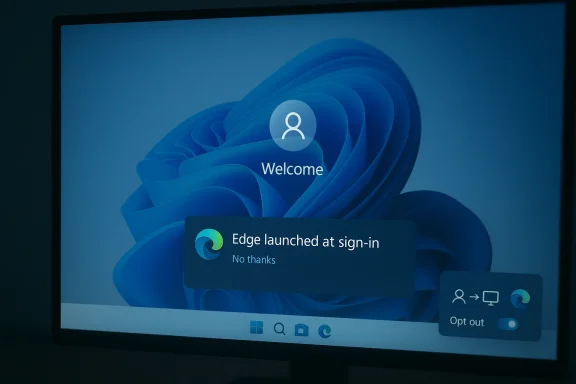
Microsoft has long blurred the line between operating system and browser, but this latest test pushes that relationship a little further. In the current Edge Beta build, a banner appears telling users that the browser now launches when Windows starts, and that they can change the behavior later in Settings. Windows Central says the browser launches automatically unless the user clicks “No thanks,” making the feature a classic default-on prompt rather than a user-requested startup action.
That distinction matters because defaults are not neutral. A browser that appears at sign-in gains recurring visibility, repeated opportunity, and a place at the top of the user’s attention stack before any competing browser has a chance to be opened. In consumer software, availability often does more work than marketing, and Windows is still one of the most powerful distribution channels in personal computing.
Microsoft has not issued a full public explanation for the test, which leaves analysts to infer intent from the company’s broader product direction. The timing is notable because the company is also experimenting with an Edge interface that borrows heavily from the Copilot aesthetic, and its assistant stack increasingly leans on the browser as a delivery layer. That suggests this may be less about a one-off startup experiment and more about building a tighter, more integrated Microsoft session from the moment the desktop appears.
Preview status offers one important caveat. Microsoft uses the Beta Channel to test behavior before deciding whether to widen it, so the startup-open feature may never ship broadly in its present form. Still, the mere existence of the test is enough to show where the company’s thinking is headed: more presence, more continuity, and fewer moments where the user starts with a blank slate.
The company has already spent years improving Startup Boost, background process behavior, and app-resume logic so Edge can launch more quickly and remain ready in the background. Microsoft’s own documentation describes Startup Boost as allowing Edge processes to start at OS sign-in and restart in the background after the last browser window is closed. In other words, the browser has already been engineered to feel present before a user actively asks for it.
Windows itself has also been moving toward more aggressive session restoration. Microsoft’s sign-in settings can reopen restartable apps after login, and the company documents that behavior as a convenience feature designed to preserve workflow continuity. That means the new Edge test fits into a broader operating-system philosophy: if the user was using it before shutdown, bring it back after sign-in. The difference is that Edge is now being nudged beyond restoration into proactive launch.
The market backdrop makes this especially sensitive. StatCounter’s worldwide browser data for March 2026 shows Edge at 5.79% global share, far behind Chrome’s 66.7% and Safari’s 17.9%. That is a reminder that Edge remains a minority browser globally even if it enjoys stronger visibility on Windows PCs. In that context, every startup touchpoint becomes strategically valuable.
There is also a consumer-protection dimension to this story. Microsoft already publishes guidance on how to stop Edge from starting automatically, which indicates that the company is aware of the friction this behavior can cause. That guidance is important, but it also underscores the larger issue: if Microsoft documents how to disable the behavior, that means it is at least plausible enough to affect many users.
That may seem abstract, but startup behavior is one of the most visible places where defaults become habits. If a browser opens every time a PC starts, it gains repeated impressions that can translate into use, even among people who would otherwise stay with Chrome, Firefox, or another browser. In product design terms, that is not just convenience; it is behavioral shaping.
The reporting also suggests the setting may not fully disappear even if another browser is set as default. That uncertainty matters because it hints that Microsoft may be experimenting with rules that are not purely tied to browser-default status. If true, the feature could become a broader platform behavior rather than a simple extension of default-browser choice.
That may sound harmless, but platform companies understand that first-screen presence has outsized influence. A browser that arrives automatically can become the default place to land, even if the user never consciously decided that should happen. Over time, repetition can create soft lock-in without the need for coercive settings or hard bundling.
There is also an enterprise implication. In managed environments, startup behavior can create help-desk noise if users do not understand why Edge is appearing. IT teams often want stable, predictable login flows, and any surprise app launch can be interpreted as policy drift or unwanted software behavior. That could make this change a larger administrative issue than Microsoft may be expecting.
The recent UI tests reinforce that direction. If Edge begins to resemble Copilot more closely, the browser stops being just a place to visit websites and starts functioning as a front-end for Microsoft’s broader service layer. That blurs categories in a way Microsoft has historically liked: the line between a local app and a cloud-powered assistant becomes thinner, and the operating system becomes more of a portal than a desktop shell.
That convergence may be attractive to Microsoft because it improves engagement without requiring users to search for features. It is also potentially risky because it can be perceived as overreach, especially if the user already prefers another browser and does not want to be steered back into Edge every time the PC starts. In a consumer trust context, perceived manipulation can be more damaging than outright annoyance.
That asymmetry matters in a market where browser loyalty is often shallow. Users may say they prefer one browser, but they will often tolerate whatever the OS makes easiest to see and use. If Edge starts every session, Microsoft gains a daily reminder loop that competing browsers can only counter through active user discipline.
The market-share data underscores why this matters. Edge is nowhere near Chrome in global usage, which means Microsoft has little incentive to compete purely on feature parity. Instead, it is rational for the company to use distribution, defaults, and ecosystem adjacency to keep Edge from fading into irrelevance. That may be smart business, but it keeps the antitrust and trust questions alive.
At the same time, not every consumer will object. Some users may appreciate a browser being ready the moment they log in, particularly if they use web apps heavily or rely on Microsoft services. In that sense, the test is not universally bad; it is just another example of a convenience feature whose value depends entirely on how much choice a person wants to preserve.
For users who already keep Edge disabled or rarely use it, the reaction is likely to be negative. For users who browse through Microsoft ecosystems, the impact may be negligible or even welcome. The challenge is that Windows is too broad a platform for one startup policy to satisfy both groups equally.
The key question for enterprises is whether the change is governed by policy, user preference, or some combination of the two. Microsoft’s documentation on automatic browser startup and restartable apps suggests there are already multiple layers that can influence post-login behavior. The more layers there are, the more likely it becomes that a seemingly simple test will create inconsistent outcomes across fleets.
There is also a governance angle. Enterprises often prefer settings that are explicit, documented, and centrally manageable. If Microsoft expands this behavior beyond the Beta Channel, it will likely need to ensure that it can be controlled cleanly through policy or deployment tooling, or else risk introducing friction into managed Windows environments.
That background matters because it explains why Microsoft may view the new behavior as a natural extension of existing work rather than a radical departure. If Edge is already preloaded in the background for speed, opening it at sign-in may be framed internally as a user-experience enhancement, not a strategic nudge. From a product-management perspective, that logic is coherent; from a user-choice perspective, it still feels like a meaningful escalation.
Microsoft’s support pages show there are ways to disable related behavior, including the ability to stop Edge from starting automatically and to turn off restartable apps in Windows sign-in options. The existence of these controls is useful, but it also indicates that startup behavior is now a layered system rather than a single checkbox. For ordinary users, that can be confusing; for Microsoft, it is a sign of how central the login experience has become to its platform strategy.
Another key variable is transparency. Users are often willing to accept integrated behavior when they understand the trade-off and can reverse it easily. What they resist is surprise, especially when the surprise happens before they have interacted with the desktop. If Microsoft wants this to survive beyond the Beta Channel, it will need to show that the feature is genuinely optional, clearly documented, and easy to manage across consumer and enterprise devices.
Source: news-2026.twaslnews.com Microsoft’s Windows Update Test Could Force Edge to Open at Startup for 1 Billion Users - شبكة تواصل الإخبارية
 Overview
Microsoft has long blurred the line between operating system and browser, but this latest test pushes that relationship a little further. In the current Edge Beta build, a banner appears telling users that the browser now launches when Windows starts, and that they can change the behavior later in Settings. Windows Central says the browser launches automatically unless the user clicks “No thanks,” making the feature a classic default-on prompt rather than a user-requested startup action.That distinction matters because defaults are not neutral. A browser that appears at sign-in gains recurring visibility, repeated opportunity, and a place at the top of the user’s attention stack before any competing browser has a chance to be opened. In consumer software, availability often does more work than marketing, and Windows is still one of the most powerful distribution channels in personal computing.
Microsoft has not issued a full public explanation for the test, which leaves analysts to infer intent from the company’s broader product direction. The timing is notable because the company is also experimenting with an Edge interface that borrows heavily from the Copilot aesthetic, and its assistant stack increasingly leans on the browser as a delivery layer. That suggests this may be less about a one-off startup experiment and more about building a tighter, more integrated Microsoft session from the moment the desktop appears.
Preview status offers one important caveat. Microsoft uses the Beta Channel to test behavior before deciding whether to widen it, so the startup-open feature may never ship broadly in its present form. Still, the mere existence of the test is enough to show where the company’s thinking is headed: more presence, more continuity, and fewer moments where the user starts with a blank slate.
Background
Microsoft’s browser strategy has always been shaped by a paradox. The company wants Edge to feel like a high-performance, modern browser, but it also wants Edge to remain deeply tied to Windows itself. That tension is not new. Internet Explorer once rode the operating system to dominance, and Edge has inherited the same distribution advantages even as it competes in a market led overwhelmingly by Chrome.The company has already spent years improving Startup Boost, background process behavior, and app-resume logic so Edge can launch more quickly and remain ready in the background. Microsoft’s own documentation describes Startup Boost as allowing Edge processes to start at OS sign-in and restart in the background after the last browser window is closed. In other words, the browser has already been engineered to feel present before a user actively asks for it.
Windows itself has also been moving toward more aggressive session restoration. Microsoft’s sign-in settings can reopen restartable apps after login, and the company documents that behavior as a convenience feature designed to preserve workflow continuity. That means the new Edge test fits into a broader operating-system philosophy: if the user was using it before shutdown, bring it back after sign-in. The difference is that Edge is now being nudged beyond restoration into proactive launch.
The market backdrop makes this especially sensitive. StatCounter’s worldwide browser data for March 2026 shows Edge at 5.79% global share, far behind Chrome’s 66.7% and Safari’s 17.9%. That is a reminder that Edge remains a minority browser globally even if it enjoys stronger visibility on Windows PCs. In that context, every startup touchpoint becomes strategically valuable.
There is also a consumer-protection dimension to this story. Microsoft already publishes guidance on how to stop Edge from starting automatically, which indicates that the company is aware of the friction this behavior can cause. That guidance is important, but it also underscores the larger issue: if Microsoft documents how to disable the behavior, that means it is at least plausible enough to affect many users.
What Microsoft Is Testing
The reported behavior is simple enough to describe but meaningful enough to unpack. When users sign into Windows, Edge may appear on screen automatically, accompanied by a banner explaining that the browser now launches at sign-in and can be changed later. According to Windows Central’s testing, the user must actively choose “No thanks” if they do not want the browser to open on every boot.Opt-in versus Opt-out
This is the core policy shift. An opt-in feature asks the user to make a positive choice before anything happens. An opt-out feature assumes permission unless the user objects. The latter is often criticized because it front-loads convenience for the platform and pushes the cost of refusal onto the user.That may seem abstract, but startup behavior is one of the most visible places where defaults become habits. If a browser opens every time a PC starts, it gains repeated impressions that can translate into use, even among people who would otherwise stay with Chrome, Firefox, or another browser. In product design terms, that is not just convenience; it is behavioral shaping.
The reporting also suggests the setting may not fully disappear even if another browser is set as default. That uncertainty matters because it hints that Microsoft may be experimenting with rules that are not purely tied to browser-default status. If true, the feature could become a broader platform behavior rather than a simple extension of default-browser choice.
- Default-on prompts usually produce higher activation than buried settings.
- Startup visibility can matter more than toolbar placement.
- User friction rises when the system assumes consent.
- Preview builds often reveal the direction of future shipping changes.
- Browser defaults and OS defaults are not the same thing.
Why Startup Matters So Much
Startup is the first interaction layer of the day. Before a user opens email, checks a cloud drive, or starts a document, the machine has already made a statement about what deserves attention first. If Edge is sitting there at login, Microsoft has effectively inserted the browser into the opening moments of the session.That may sound harmless, but platform companies understand that first-screen presence has outsized influence. A browser that arrives automatically can become the default place to land, even if the user never consciously decided that should happen. Over time, repetition can create soft lock-in without the need for coercive settings or hard bundling.
Habit Formation and Attention
Software success is often about reducing the number of steps between intent and action. Microsoft is clearly betting that if Edge is already open, some people will use it for search, news, work, or Copilot tasks simply because it is there. That is a rational product strategy, but it is also exactly why the move will make privacy-minded and choice-focused users uneasy.There is also an enterprise implication. In managed environments, startup behavior can create help-desk noise if users do not understand why Edge is appearing. IT teams often want stable, predictable login flows, and any surprise app launch can be interpreted as policy drift or unwanted software behavior. That could make this change a larger administrative issue than Microsoft may be expecting.
- First impressions shape user expectations.
- Repeated exposure can influence browser preference.
- Managed devices require clearer communication than consumer PCs.
- Unexpected startup behavior tends to trigger support tickets.
- Visibility is not the same as demand.
Microsoft’s Browser Strategy in 2026
Microsoft is not just trying to keep Edge alive; it is trying to make Edge feel indispensable inside Windows. The browser is increasingly becoming the doorway to search, AI, personalization, and Microsoft’s own web services. That is a much bigger ambition than simple browser competition, because it places Edge closer to the center of the Windows identity.The recent UI tests reinforce that direction. If Edge begins to resemble Copilot more closely, the browser stops being just a place to visit websites and starts functioning as a front-end for Microsoft’s broader service layer. That blurs categories in a way Microsoft has historically liked: the line between a local app and a cloud-powered assistant becomes thinner, and the operating system becomes more of a portal than a desktop shell.
The Copilot-Edge Convergence
This is where the startup test gets interesting strategically. If Edge appears automatically and also looks and feels more like Copilot, Microsoft can guide users into a product experience that feels coherent from login onward. The browser becomes both a utility and a distribution surface for Microsoft’s AI ambitions.That convergence may be attractive to Microsoft because it improves engagement without requiring users to search for features. It is also potentially risky because it can be perceived as overreach, especially if the user already prefers another browser and does not want to be steered back into Edge every time the PC starts. In a consumer trust context, perceived manipulation can be more damaging than outright annoyance.
- Edge is evolving from browser to service gateway.
- Copilot branding increases the sense of product unification.
- Startup presence amplifies Microsoft’s ecosystem reach.
- More integration can mean less perceived neutrality.
- Product coherence and user autonomy are in tension.
Competitive Implications
For rivals, the concern is not merely that Microsoft is promoting Edge. It is that Microsoft has a structural advantage competitors do not have: control over the startup environment on the world’s dominant desktop operating system. Chrome can win on speed, extensions, sync, and cross-platform familiarity, but it cannot command the login screen itself.That asymmetry matters in a market where browser loyalty is often shallow. Users may say they prefer one browser, but they will often tolerate whatever the OS makes easiest to see and use. If Edge starts every session, Microsoft gains a daily reminder loop that competing browsers can only counter through active user discipline.
What Rivals Are Up Against
Competitors are not powerless, but they are boxed in by platform realities. Google can improve Chrome, and Mozilla can keep Firefox differentiated, but neither can replicate the same kind of built-in operating-system leverage. That makes even a modest startup test strategically relevant because it shows Microsoft is willing to keep using Windows integration as a competitive moat.The market-share data underscores why this matters. Edge is nowhere near Chrome in global usage, which means Microsoft has little incentive to compete purely on feature parity. Instead, it is rational for the company to use distribution, defaults, and ecosystem adjacency to keep Edge from fading into irrelevance. That may be smart business, but it keeps the antitrust and trust questions alive.
- Chrome remains the benchmark to beat.
- Firefox depends heavily on choice-based loyalty.
- Safari benefits from Apple ecosystem lock-in, not Windows startup behavior.
- Edge can exploit OS-level integration that rivals cannot match.
- Distribution can matter more than product quality at the margin.
Consumer Impact
For home users, the biggest effect is psychological as much as technical. A browser opening at every sign-in can feel like the PC has made a decision on the user’s behalf, which is especially sensitive when that browser is tied to a dominant platform vendor. Even when the feature is reversible, the initial impression may leave users feeling managed rather than assisted.At the same time, not every consumer will object. Some users may appreciate a browser being ready the moment they log in, particularly if they use web apps heavily or rely on Microsoft services. In that sense, the test is not universally bad; it is just another example of a convenience feature whose value depends entirely on how much choice a person wants to preserve.
Convenience Versus Control
This is the familiar trade-off in platform design. Convenience reduces friction, but too much convenience can begin to resemble presumptive consent. Microsoft will likely argue that the setting is adjustable and the experience is helpful, while critics will argue that the adjustment should happen before launch, not after.For users who already keep Edge disabled or rarely use it, the reaction is likely to be negative. For users who browse through Microsoft ecosystems, the impact may be negligible or even welcome. The challenge is that Windows is too broad a platform for one startup policy to satisfy both groups equally.
- Power users will notice the extra startup activity.
- Casual users may not understand why Edge appears.
- Web-app users may find the behavior convenient.
- Browser-switchers will see it as a nudge they did not request.
- Choice clarity will determine whether the feature feels helpful or intrusive.
Enterprise Impact
In enterprise settings, startup behavior is rarely trivial. IT administrators care about predictability, login times, policy consistency, and whether the device launches only the software intended by the management stack. A browser appearing by default can complicate that picture, especially if it appears on devices where another browser is standard or where users are trained to open applications manually.The key question for enterprises is whether the change is governed by policy, user preference, or some combination of the two. Microsoft’s documentation on automatic browser startup and restartable apps suggests there are already multiple layers that can influence post-login behavior. The more layers there are, the more likely it becomes that a seemingly simple test will create inconsistent outcomes across fleets.
Policy, Support, and Predictability
Enterprise administrators tend to react poorly to surprises, even if the surprise is technically reversible. If Edge begins to appear on some devices and not others, help desks will have to explain the difference, and security teams may need to review whether the behavior affects user workflows or endpoint baselines. In large organizations, small defaults scale into large operational questions.There is also a governance angle. Enterprises often prefer settings that are explicit, documented, and centrally manageable. If Microsoft expands this behavior beyond the Beta Channel, it will likely need to ensure that it can be controlled cleanly through policy or deployment tooling, or else risk introducing friction into managed Windows environments.
- Login consistency matters more in enterprises than in consumer PCs.
- Help-desk volume can rise when startup behavior changes unexpectedly.
- Policy clarity is essential for managed devices.
- Mixed browser environments complicate rollout decisions.
- Documentation becomes as important as the feature itself.
Technical Context: Startup Boost, Restartable Apps, and Session Restoration
Edge’s automatic startup test does not appear in a vacuum. Microsoft has already spent years building the plumbing for faster startup and smoother resumption, including Startup Boost and restartable app behavior in Windows. Those mechanisms are designed to reduce delays, but they also normalize the idea that software can be present before the user explicitly launches it.That background matters because it explains why Microsoft may view the new behavior as a natural extension of existing work rather than a radical departure. If Edge is already preloaded in the background for speed, opening it at sign-in may be framed internally as a user-experience enhancement, not a strategic nudge. From a product-management perspective, that logic is coherent; from a user-choice perspective, it still feels like a meaningful escalation.
The Mechanics Behind the Feature
The mechanics also reveal how complex “automatic startup” has become on Windows. A process can be preloaded, a browser can be restarted, a session can be restored, and a sign-in option can cause apps to reopen after login. That web of behaviors makes it difficult for users to distinguish between restoration they requested and startup they did not.Microsoft’s support pages show there are ways to disable related behavior, including the ability to stop Edge from starting automatically and to turn off restartable apps in Windows sign-in options. The existence of these controls is useful, but it also indicates that startup behavior is now a layered system rather than a single checkbox. For ordinary users, that can be confusing; for Microsoft, it is a sign of how central the login experience has become to its platform strategy.
- Startup Boost reduces launch latency.
- Restartable apps restore prior workflow state.
- Automatic launch goes beyond mere restoration.
- Multiple settings can affect the same outcome.
- User comprehension often lags behind system complexity.
Strengths and Opportunities
Microsoft’s test has real strategic upside, even if it is controversial. It aligns Edge more closely with Windows, increases browser visibility, and potentially makes the first minutes of a session feel more integrated. For Microsoft, that could improve engagement with search, Copilot, and web-based services while also reinforcing the idea that Edge is the natural browser for Windows.- Higher visibility for Edge at login.
- Stronger ecosystem integration with Windows and Copilot.
- Better engagement with Microsoft web services.
- Potentially faster access for users who want a browser immediately.
- A clearer startup story for Microsoft’s product stack.
- A chance to test user acceptance before a wider rollout.
- More room for AI-powered workflow continuity if Copilot and Edge continue to converge.
Risks and Concerns
The downside is equally obvious: the feature can feel intrusive, especially because it uses a default-on pattern at a very sensitive moment in the user journey. It may reinforce perceptions that Microsoft is privileging its own browser by leveraging the operating system, which could irritate users, regulators, and enterprise administrators alike. If the rollout proves difficult to explain, it may also deepen skepticism about how much control Windows users truly have.- User resentment over opt-out behavior.
- Confusion about why Edge starts automatically.
- Support burden for enterprise IT and help desks.
- Antitrust scrutiny if distribution leverage becomes more aggressive.
- Fragmented rollout if only some testers see the feature.
- Brand backlash if users interpret it as coercive.
- Trust erosion if Microsoft keeps moving defaults toward self-promotion.
Looking Ahead
The most important question is not whether the current test ships exactly as shown. It is whether Microsoft is comfortable making startup presence a standard part of the Edge experience. If the answer is yes, the company may continue pushing Edge deeper into the Windows sign-in flow, using it as a launchpad for search, Copilot, and cloud-driven continuity. If the answer is no, the test may still serve as a useful signal of how far Microsoft can go before users push back.Another key variable is transparency. Users are often willing to accept integrated behavior when they understand the trade-off and can reverse it easily. What they resist is surprise, especially when the surprise happens before they have interacted with the desktop. If Microsoft wants this to survive beyond the Beta Channel, it will need to show that the feature is genuinely optional, clearly documented, and easy to manage across consumer and enterprise devices.
- Will the feature remain Beta-only, or expand to broader Windows 11 releases?
- Will Microsoft tie the behavior to default browser status?
- Will enterprise admins get a clean policy control for it?
- Will users interpret the feature as convenience or overreach?
- Will the company pair the change with clearer startup and privacy settings?
- Will Edge’s Copilot-style redesign make the startup launch feel more integrated or more aggressive?
Source: news-2026.twaslnews.com Microsoft’s Windows Update Test Could Force Edge to Open at Startup for 1 Billion Users - شبكة تواصل الإخبارية
