

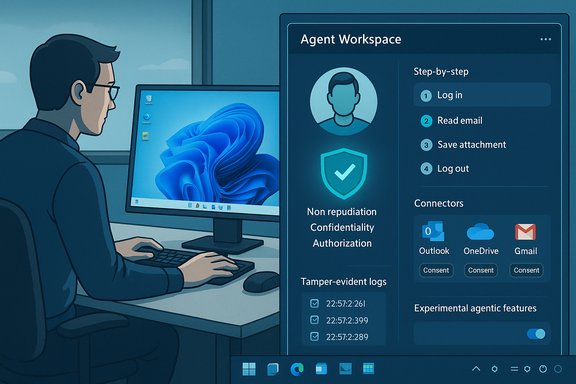
Microsoft’s plainspoken reveal — that Windows 11 is being reshaped into an agentic OS — finally gives concrete form to months of product hints: a permissioned, observable runtime for AI agents that can act on your behalf, running in isolated “agent workspaces” under distinct agent accounts and gated behind a user-controlled experimental toggle.
Background: what Microsoft announced and why it matters
Microsoft has published a formal support document and an explanatory Windows Experience blog post that together lay out an architectural and security-first approach to embedding agentic AI into Windows 11. The company frames this as a phased, opt‑in journey: experimental agentic features are disabled by default, available initially to Windows Insiders and developer previews, and will be expanded only after telemetry, feedback, and additional security controls are validated. Why this is a big deal: it’s a shift from “assistant that suggests” to “assistant that does.” Copilot has already moved beyond chat into vision and voice; Copilot Actions — Microsoft’s agentic layer — adds the ability to execute multi‑step, UI‑level workflows (open apps, click, type, move files, interact with websites) while leaving a visible, auditable trace of what it did. That change turns suggestions into real side‑effects on a PC and therefore raises new security, privacy, and governance questions that an operating system must now answer.Overview: the agentic model explained
What is an agent workspace?
An agent workspace is a lightweight, contained Windows session where an agent runs with its own desktop and its own standard Windows account. Microsoft describes the workspace as a runtime isolation boundary that lets agents interact with apps in parallel to a human user — more efficient than launching a full virtual machine for many operations but still distinct and observable. The initial preview runs agent workspaces in separate sessions so the human user can continue working while the agent completes tasks. Key characteristics:- Agents run under separate agent accounts (non‑personal, low‑privilege accounts) so all agent actions are distinguishable from human user actions.
- Agent workspaces are visible and interruptible: users can watch step‑by‑step progress and seize control or stop the agent at any time.
- Resource usage is scaled dynamically; Microsoft positions the workspace as more efficient than a VM for routine UI automation.
How users enable agentic behavior
Agentic capabilities are gated behind a master setting labeled Experimental agentic features in Settings → System → AI components → Agent tools. The toggle is intended as an explicit consent gate; nothing in the platform will let agents act unless the user knowingly enables the experimental switch. Microsoft emphasizes opt‑in, staged rollout through Insiders and Copilot Labs.Technical anatomy: how agentic Windows actually works
Agent identity and isolation
Every agent is provisioned with its own Windows account, separate from the logged‑in user. That design gives the OS a clear, auditable principal to apply ACLs, Intune/MDM policies, and revocation controls against — in other words, agents become first‑class principals the system can govern. During preview, agents start with narrow permissions and request additional access explicitly. Why this matters: identity separation turns an otherwise monolithic automation capability into a manageable surface for enterprise governance, audit logging, and forensics. It also means endpoint protection, DLP, and certificate revocation mechanisms can address misbehaving agents independently of the user’s main account.Scoped permissions and connectors
Initial previews limit agents to a small set of “known folders” (Documents, Desktop, Downloads, Pictures) unless broader access is explicitly granted. For cloud services (Outlook, OneDrive, Gmail, Google Drive), agents use connector flows and OAuth‑style consent so cloud access follows standard authorization models. Microsoft says agents must ask for permissions for sensitive steps and that per‑action approvals will be enforced for higher‑risk operations.Agent workspace vs VM vs sandbox
Microsoft positions the agent workspace as a middle ground: lighter than a full VM (Windows Sandbox), but stronger than in‑process plugins because it provides a separate session and account. The goal is to keep the user in control while supporting parallel execution and runtime isolation. Microsoft continues to refine the experience and security model as the feature matures.Platform plumbing: MCP, Windows AI Foundry, and Copilot+
Microsoft is coupling agentic runtime with broader platform primitives:- Model Context Protocol (MCP) integration to let agents discover and call local and cloud capability providers.
- Windows AI Foundry runtimes to run smaller models locally where hardware permits.
- A two‑tier device story (Copilot+ PCs) that favors machines with dedicated NPUs for lower-latency, on‑device inference. The specific NPU baseline often cited is around 40+ TOPS, though this threshold has been described as provisional and subject to change as hardware and criteria evolve. Treat hardware numbers as indicative rather than hard guarantees.
Security model: Microsoft’s three pillars and design principles
Microsoft lays out three core security pillars for agentic experiences: Non‑repudiation, Confidentiality, and Authorization. These are paired with practical design rules that every agent must follow.- Non‑repudiation: agent actions must be observable and distinguishable from user actions so there is a verifiable chain-of‑actions.
- Confidentiality: agents that handle protected data must meet or exceed the security and privacy standards of the underlying data. Data use must be purpose‑bound.
- Authorization: users must approve queries for personal data and the agent’s actions; agents can only access data in explicitly authorized contexts.
- Agents are autonomous entities and must be treated as attackable principals; their actions must be containable.
- Agents must produce tamper‑evident logs and allow supervisors to review multi‑step plans before and during execution.
- Agents must follow the principle of least privilege; privileges should be granular, time‑bound, and never exceed those of the initiating user.
- System entities (e.g., admin, local system) should not have special access to an agent except through the agent’s owner.
Cross‑checking the claims: verification and independent reporting
Multiple outlets and Microsoft’s own docs converge on the same core points: agent workspaces, agent accounts, experimental toggle gating, and scoped folder access. Microsoft’s support article and the Windows Experience blog form the primary public specification for the feature, and independent reporting from outlets like Reuters, The Verge, and PCWorld corroborate the functional claims and describe early preview behavior. That multi‑source agreement strengthens confidence that the announced architecture is real and actively shipping to Insiders. Caution on specific numbers and future timelines: hardware thresholds (e.g., the often‑quoted 40+ TOPS NPU baseline for Copilot+ certification), exact release dates, and the schedule for enterprise integration features (Entra/MSA hooks, Intune/DLP integrations) remain provisional in public documentation and reporting. Those specifics should be considered subject to change until Microsoft publishes firm dates and certification lists.Practical security and privacy risks
Turning a suggestion engine into an executor increases the blast radius. The architecture reduces many risks but cannot eliminate them.- Prompt and cross‑prompt injection: content within files, emails, or web pages can influence an agent’s plan. Unlike a text reply, injected instructions can lead to actions (exfiltrate, move, or delete data) if not properly constrained. This is a core risk for agents that parse and act on untrusted content.
- Credential scope creep: connectors and OAuth flows expand the surface area to cloud accounts; tokens and refresh tokens need robust scoping and expiration semantics to prevent token misuse.
- UI brittleness and unintended actions: agents that click and type are inherently brittle; layout changes, transient dialogs, or multi‑factor prompts can lead to failed or incorrect actions. Visible step logs mitigate but don’t eliminate the chance of harmful side effects.
- Supply chain and signing trust: Microsoft requires agent signing, allowing revocation, but a compromised signing chain or vulnerable agent runtime could still be exploited if not continuously audited.
Enterprise considerations and governance checklist
For IT teams evaluating agentic features, the immediate checklist should include:- Policy gating: ensure the Experimental agentic features toggle is centrally managed and disabled by default via Intune or MDM until policies are approved.
- DLP integration: require Data Loss Prevention (DLP) hooks to inspect agent activity and block sensitive data flows during automated workflows.
- Audit and tamper‑evident logging: collect and retain agent action logs for forensic analysis and compliance reporting.
- Certificate and signing controls: verify publisher certificates for agents, enforce revocation lists, and monitor signing infrastructure.
- Connector governance: validate OAuth consent flows and restrict which cloud connectors agents may use for each user group.
- Staged pilot and telemetry: run controlled pilots, capture error modes, and require step‑by‑step recovery workflows before wider enablement.
Recommendations for everyday users
- Leave experimental agentic features off unless you have a clear use case and understand the permissions being granted.
- If you enable the feature, restrict agents to only the folders and services they need for the task and review the agent’s step plan before execution.
- Watch the agent workspace when actions run: the visible step logs are the primary immediate mitigation for unintended behavior.
- Treat connectors (Gmail, OneDrive, Outlook) as sensitive and revoke connector access after use if the agent’s workflow doesn’t require persistent access.
- Keep endpoint and antivirus software up to date and prefer trusted, signed agents from reputable publishers.
Developer and vendor implications
Third‑party developers can build agents into their apps using Microsoft’s agentic framework, but they will need to satisfy the platform’s security and privacy requirements: signing, scope‑bounded permissions, tamper‑evident logs, and step‑up approvals for sensitive actions. Enterprises that plan to allow third‑party agents should establish vetting processes and require secure lifecycle practices from vendors. The presence of a signing and revocation mechanism is a positive, but it’s only as strong as certificate management and vetting practices.Where Microsoft succeeds, and where the model still needs work
Strengths- Clear isolation model: agent accounts + agent workspaces give a defensible containment boundary that is auditable and interruptible.
- Opt‑in default and visible controls: gating via an experimental toggle and visible step logs help preserve user control and transparency.
- Alignment to enterprise needs: the design anticipates Intune/MDM hooks, certificate revocation, and DLP integration — the right levers for IT governance.
- Brittleness of UI automation: agents that emulate human interactions remain fragile; errors have real consequences. Robust error handling and developer tooling are still required to scale reliably.
- Prompt injection and content manipulation: agents that act on content need hardened input validation and plan validation to prevent adversarial content from altering behavior. The platform must bake in protections beyond user review prompts.
- Hardware fragmentation: the Copilot+ device divide — driven by NPU requirements — risks creating inconsistent user expectations across the Windows 11 installed base. Exact hardware baselines remain provisional.
Timeline and what to expect next
Microsoft is running agentic capabilities through staged Insider and developer previews today; broader availability depends on preview learnings and additional enterprise hooks. Copilot Actions is explicitly experimental and will remain behind the Experimental agentic features toggle while Microsoft strengthens security controls and collects feedback. Expect incremental rollouts: feature flags, enterprise integrations, and gradual expansion of allowed agents and connectors rather than a single mass launch. Independent reporting and Microsoft’s own posts indicate that Copilot Actions, agent workspaces, and associated primitives are already visible to Insiders — but production readiness for enterprise will take more time.Conclusion: agentic Windows is real — proceed with both excitement and caution
Microsoft’s agentic OS vision is a meaningful evolution: by elevating agents to first‑class principals with isolated workspaces, scoped permissions, and transparent controls, Windows 11 can safely unlock real productivity wins — batch workflows, cross‑app automation, and accessible voice+vision+action experiences. The company is taking sensible early steps: opt‑in defaults, agent accounts, visible workspaces, and signing/revocation. Those are necessary design choices that make agentic automation defensible in theory. At the same time, this shift changes the operating system’s threat model in fundamental ways. The real work now is delivering robust developer tooling, ironclad auditability, continuous verification against prompt‑injection and supply‑chain attacks, and enterprise policy integrations that make large‑scale, safe deployment possible. Until those pieces are fully proven in production, cautious pilots, strict policy gating, and vigilant auditing are the responsible path forward.Windows 11’s move toward an agentic OS is not a marketing tweak — it’s a platform transformation. If Microsoft executes on the security and governance promises it has published, agentic automation could deliver genuinely useful automation without sacrificing control. If not, the technology’s very convenience will become its most dangerous liability.
Source: Windows Central https://www.windowscentral.com/micr...ly-the-explanation-weve-all-been-waiting-for/
