

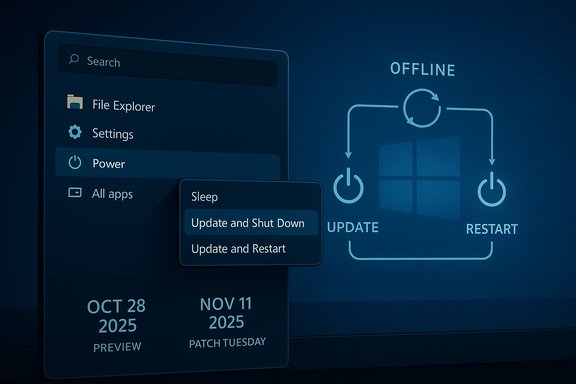
Microsoft has quietly corrected a small user-facing symptom with outsized consequences: the long-standing “Update and Shut Down” option in Windows 11 that commonly behaved like “Update and Restart” has been fixed in the October 28, 2025 optional preview cumulative update (KB5067036), and the fix is scheduled for broader distribution in the November 11, 2025 Patch Tuesday rollout. For years this mismatch between label and behavior frustrated home users and IT pros alike — leaving laptops powered on overnight, draining batteries, breaking maintenance workflows, and eroding trust in a basic OS action — and Microsoft’s terse release-note entry is the company’s official confirmation that the problem has finally been addressed in supported Windows 11 builds.
The symptom was simple and repeatable for many users: choose “Update and Shut Down” from the Start menu or Windows Update and expect the machine to power off after applying updates, but find the system back at the sign-in screen or desktop later — effectively restarting instead of shutting down. That mismatch raised practical problems beyond annoyance: overnight battery drain, unexpected background workloads, and failed automation that relied on deterministic shutdown behavior.
Microsoft included a corrective change in the preview cumulative update KB5067036 (OS builds 26200.7019 for 25H2 and 26100.7019 for 24H2), published as an optional update on October 28, 2025, and documented the change as: “Improved: Addressed underlying issue which can cause ‘Update and shutdown’ to not actually shut down your PC after updating.” The same update also lists an improvement addressing a Windows Update install failure with error code 0x800f0983. The fix is now rolling out gradually in preview and will be included in the mainstream cumulative update on Patch Tuesday, November 11, 2025.
A few important operational facts follow directly from Microsoft’s notes and the product lifecycle around Windows releases:
Practical consequences of a gradual rollout:
What to know about this secondary issue:
That improvement, however, comes with caveats. The change was landed quietly in a preview rollup, it is being enabled gradually, and an independent regression — Task Manager duplication — appeared in the same preview cycle. For Windows 10 users the identical symptom will not receive this correction under standard servicing because Windows 10 left mainstream support on October 14, 2025, meaning affected users must either enroll in the Extended Security Updates program or upgrade to Windows 11 to receive Microsoft’s fix.
Practical advice for users and IT administrators is straightforward: verify your OS build, install the optional update if you want the fix immediately (but be mindful of preview regressions), or wait for the November 11 cumulative update for broader distribution. For mission-critical systems, retain conservative update policies and require verification that the corrected behavior is present before relying on “Update and Shut Down” in automated routines.
This episode is a reminder that even small, label-level UX failures can have outsized operational impact, and that restoration of basic trust in an operating system often depends as much on careful servicing and transparent communication as it does on code fixes. The fix is in — but the surrounding rollout, regression risk, and Windows 10 exclusion underscore that the work of maintaining reliability in a complex OS is never finished.
Source: BetaNews Microsoft says irritating update and shutdown bug has been wiped from Windows 11
 Background / Overview
The symptom was simple and repeatable for many users: choose “Update and Shut Down” from the Start menu or Windows Update and expect the machine to power off after applying updates, but find the system back at the sign-in screen or desktop later — effectively restarting instead of shutting down. That mismatch raised practical problems beyond annoyance: overnight battery drain, unexpected background workloads, and failed automation that relied on deterministic shutdown behavior.Microsoft included a corrective change in the preview cumulative update KB5067036 (OS builds 26200.7019 for 25H2 and 26100.7019 for 24H2), published as an optional update on October 28, 2025, and documented the change as: “Improved: Addressed underlying issue which can cause ‘Update and shutdown’ to not actually shut down your PC after updating.” The same update also lists an improvement addressing a Windows Update install failure with error code 0x800f0983. The fix is now rolling out gradually in preview and will be included in the mainstream cumulative update on Patch Tuesday, November 11, 2025.
A few important operational facts follow directly from Microsoft’s notes and the product lifecycle around Windows releases:
- The fix is delivered to supported Windows 11 builds (24H2 and 25H2) as of the KB5067036 preview and will be pushed more widely via the November cumulative update.
- The identical symptom affected Windows 10 installations for years, but Windows 10 reached end of standard support on October 14, 2025, so Microsoft is not issuing the same corrective update to Windows 10 users under normal servicing channels.
- Microsoft’s release note itself offers no detailed root-cause explanation; the wording is intentionally brief and labelled as an “underlying issue,” leaving the technical forensic work to community testers and telemetry analysis.
How “Update and Shut Down” actually works (and why it broke)
The multi-phase servicing model
Modern Windows updates are rarely a single-step operation. Even for non-feature cumulative updates, servicing normally proceeds through several phases:- Background download and staging while the OS is live.
- A first commit that may require a restart to complete offline file replacements (the offline servicing phase).
- One or more offline servicing passes where files locked by the running OS are updated.
- A final commit that, depending on the user’s original selection, should either return to the desktop (restart) or power the machine down (shutdown).
Why the bug persisted for so long
This issue persisted for multiple reasons:- Intermittency: The bug did not affect every update or every machine. It showed up depending on update payloads, driver and firmware interactions, power settings (Fast Startup variations), and the specific sequence of servicing phases, which made it hard to reproduce consistently.
- Surface area: Windows Update touches many subsystems (servicing stack, drivers, firmware interfaces, ACPI power controls). A nondeterministic failure across this surface can be difficult to pin down from telemetry alone.
- Testing vs. real-world diversity: Preview channels and Insider builds catch many problems, but the combination of hardware permutations in the field exceeds what can be exhaustively tested in-lab, allowing a bug to slip through or to be hard to reproduce.
- Backwards compatibility and complexity: Windows’ servicing stack must handle both in-place and offline servicing scenarios, and subtly different flows can yield different outcomes for the final power decision.
What’s included in KB5067036 (technical snapshot)
The KB5067036 preview package is a fairly broad non-security rollup and includes:- Build updates: OS builds 26200.7019 (25H2) and 26100.7019 (24H2).
- Task Manager and process grouping improvements.
- Fixes for various display, input, Narrator, and filesystem issues.
- Windows Update improvements, specifically:
- Addressed the “Update and shut down” power-off problem.
- Addressed update installation failures with error code 0x800f0983.
- Driver install improvements for error 0x80070103 in some scenarios.
The rollout strategy and the “gradual rollout” caveat
Microsoft lists the correction under a gradual rollout for the preview build. A progressive rollout is a standard Microsoft practice: fixes are enabled via server-side flags or staged deployment so Microsoft can monitor telemetry, catch regressions, and limit the blast radius in case of unforeseen side effects.Practical consequences of a gradual rollout:
- Not all machines will receive the corrected behavior immediately even after installing KB5067036; the fix may be gated server-side and enabled over time.
- Administrators and power users who rely on deterministic shutdown behavior should not assume the preview update alone is sufficient until their specific machine shows the corrected behavior.
- The staged rollout reduces risk but also slows resolution for those experiencing the problem today.
A new wrinkle: KB5067036 and Task Manager duplication reports
While KB5067036 contains the “Update and shut down” fix, multiple independent reports after the October preview indicated a separate regression: a Task Manager duplication bug introduced or exposed by the update. Users reported that closing Task Manager with the “X” button spawns invisible background instances or causes visible duplicate windows, causing memory consumption to rise with repeated opens.What to know about this secondary issue:
- The Task Manager duplication reports are independent of the shutdown fix and seem tied to changes in Task Manager process grouping in the same update.
- The duplication bug can lead to dozens or hundreds of lingering taskmgr.exe instances over prolonged uptime, impacting RAM and CPU.
- Workarounds include terminating Task Manager processes manually via command line (taskkill /im taskmgr.exe /f) or using an unaffected Task Manager to “End task” on duplicates.
- Microsoft has acknowledged some Task Manager fixes in Insider builds previously, but the duplication regression prompted community pushback and suggestions to hold optional preview installs until Microsoft issues a targeted correction.
Who this matters to: users, admins, and endpoint managers
The fix matters for several groups in different ways:- Home users and laptop owners: Laptops failing to power off after selecting “Update and Shut Down” can be left on and draining battery overnight. The KB fix restores expected behavior once the corrective change is applied to the device.
- IT administrators and automation engineers: Maintenance windows, imaging, and update scripts often rely on precise shutdowns and restarts. Unexpected restarts break automation and complicate scheduling.
- Enterprises with compliance and power management policies: Energy usage reporting and overnight tasks may have produced inaccurate outcomes when machines did not shut down as expected.
- Windows 10 users: Unfortunately for those still on Windows 10, the identical problem will not be corrected via a standard update because Windows 10 exited standard support on October 14, 2025. Organizations on Windows 10 that need continued fixes must be enrolled in Extended Security Updates (ESU) or consider upgrading hardware or OS versions.
Practical guidance: how to check and what to do now
- Check your build number
- Open Settings > System > About and look for OS build. The fix is present in builds 26100.7019 (24H2) or 26200.7019 (25H2) and later.
- Install the optional preview (if you want the fix early)
- Go to Settings > Windows Update > Advanced options > Optional updates and install KB5067036. Keep in mind the update is optional and may be gated server-side for the fix.
- If you prefer to wait
- The fix will be included in the November 11, 2025 Patch Tuesday cumulative update. Waiting for the mainstream rollout reduces exposure to preview regressions.
- For critical systems or automation scripts
- Avoid relying solely on “Update and Shut Down” until the machine confirms the corrected behavior. Use controlled update sequences (restart-based routine maintenance) where deterministic outcomes are essential.
- If you see the Task Manager duplication regression after installing KB5067036
- Use the command prompt with administrator privileges and run: taskkill /im taskmgr.exe /f to forcibly remove lingering Task Manager instances.
- Consider uninstalling the optional preview if that regression is unacceptable and wait for Microsoft to issue a targeted repair in a cumulative update.
- For Windows 10 devices
- Windows 10 reached end of standard support on October 14, 2025. If continuing to run Windows 10 devices, enroll in the Extended Security Updates (ESU) program or plan an upgrade path to Windows 11 or another supported OS.
Critical analysis: strengths, risks, and what this says about software quality
Notable strengths
- The fix corrects a deceptively simple, high-impact problem that affected user trust and basic usability for years. Restoring deterministic shutdown behavior is a meaningful quality-of-life improvement for millions of users.
- Microsoft’s use of preview and staged rollouts is prudent. A staged enablement allows telemetry-driven safety checks that can prevent widespread regressions.
- Consolidating multiple servicing fixes into a single rollup helps reduce update churn and simplifies the update experience for administrators who want one consolidated package.
Risks and shortcomings
- Lack of transparency: Microsoft’s release-note wording is deliberately minimal. While brevity can be the norm for cumulative updates, the company did not provide a technical postmortem or root-cause analysis. That leaves users and admins to rely on community testing and speculation to understand the precise cause and ensure remediation has taken hold.
- Secondary regressions: KB5067036’s Task Manager duplication reports underscore the risk of bundling extensive fixes. A correction in one subsystem can introduce unintended side effects elsewhere, reinforcing the case for narrow, targeted patches when practical.
- Staged rollouts mean inconsistent experiences: The fix’s gradual enablement can leave some users patched but still experiencing the issue, or others missing the fix entirely. That delay complicates support workflows and increases help-desk volume as users report inconsistent outcomes.
- Windows 10 exclusion: Windows 10 users affected by the same symptom are not receiving this fix under normal servicing because Windows 10 reached end of standard support on October 14, 2025. That policy choice leaves a nontrivial population without an official repair unless they enroll in ESU or upgrade, which is an unsatisfying practical outcome for many households and small businesses.
Broader implications for trust and testing
The problem’s persistence for years, followed by a terse fix note, highlights two larger product-quality lessons:- User-visible features that interact with low-level servicing mechanics deserve focused, high-priority testing because their failure undermines confidence more than many invisible security patches.
- Complex state transitions (like those in offline update servicing) require end-to-end scenarios in test plans that reflect real-world hardware and firmware diversity. The mismatch between lab testing and the field hints at gaps in test coverage or at least the prioritization of user-facing continuity scenarios.
How Microsoft could improve transparency and user confidence
- Publish a short technical note or blog post explaining the servicing change: a brief, non-sensitive description of the fix, the component modified, and the scenarios covered would reassure IT pros and power users.
- Provide more precise telemetry-based rollout status to enterprises: a dashboard or advisory indicating the percentage of devices that received the server-side enablement would help SCCM and Intune-managed fleets plan.
- Offer targeted hotfixes for enterprise customers on Windows 10 under ESU, even if Windows 10 is out of standard support, to reduce operational pain for customers who cannot yet migrate.
- Decouple unrelated fixes where possible in optional previews to reduce the chance that a correction will introduce an unrelated regression.
Final assessment
Microsoft’s correction for the “Update and Shut Down” behavior is an overdue but important fix that restores expected, deterministic behavior to a simple UI action with real-world consequences. The improvement is published in KB5067036 (OS builds 26100.7019 and 26200.7019) as an optional preview and will be rolled into the mainstream cumulative update on November 11, 2025.That improvement, however, comes with caveats. The change was landed quietly in a preview rollup, it is being enabled gradually, and an independent regression — Task Manager duplication — appeared in the same preview cycle. For Windows 10 users the identical symptom will not receive this correction under standard servicing because Windows 10 left mainstream support on October 14, 2025, meaning affected users must either enroll in the Extended Security Updates program or upgrade to Windows 11 to receive Microsoft’s fix.
Practical advice for users and IT administrators is straightforward: verify your OS build, install the optional update if you want the fix immediately (but be mindful of preview regressions), or wait for the November 11 cumulative update for broader distribution. For mission-critical systems, retain conservative update policies and require verification that the corrected behavior is present before relying on “Update and Shut Down” in automated routines.
This episode is a reminder that even small, label-level UX failures can have outsized operational impact, and that restoration of basic trust in an operating system often depends as much on careful servicing and transparent communication as it does on code fixes. The fix is in — but the surrounding rollout, regression risk, and Windows 10 exclusion underscore that the work of maintaining reliability in a complex OS is never finished.
Source: BetaNews Microsoft says irritating update and shutdown bug has been wiped from Windows 11
