

Microsoft began rolling out Windows 11 update-control changes to Insiders on April 24, 2026, adding setup-time update skipping, repeatable 35-day update pauses, separate shutdown and restart commands, and clearer driver-update labels for consumer PCs while keeping managed commercial devices under organizational policy.
That is the plain version. The more interesting version is that Microsoft has finally admitted, in product design rather than PR language, that Windows Update has become a trust problem. The company is not turning Windows 11 into a hobbyist Linux distro where updates politely wait forever in the corner, but it is making a meaningful retreat from the most resented part of modern Windows: the sense that the operating system knows better than the person sitting in front of it.
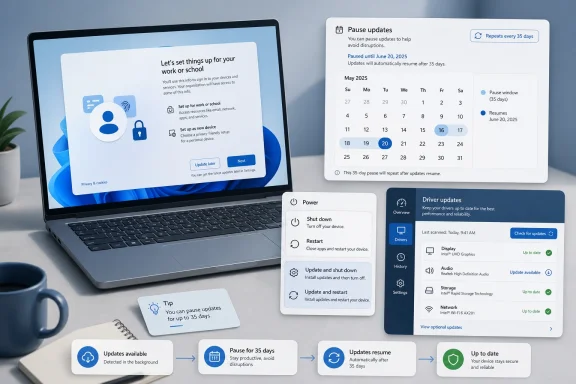
The headline-grabbing change is the repeatable pause. Windows 11 users will be able to pause updates for up to 35 days, and when that window expires, extend the pause again rather than being forced through the old ritual of updating before regaining the privilege to delay. In practice, that can look like an indefinite pause, though it is still built from 35-day chunks rather than a clean “off” switch.
That distinction matters. Microsoft is not abandoning the security model that made Windows 10 and Windows 11 more aggressively self-maintaining than Windows 7 ever was. It is preserving a default path where security patches still move quickly, updates still download in the background, and most people will remain on the conveyor belt unless they make an active choice to step away.
But the active choice is the point. For years, Microsoft has framed forced updating as the adult answer to a messy ecosystem: millions of consumer PCs, uneven technical skill, hostile networks, and a long history of users ignoring patches until malware made the decision for them. That argument was never irrational. It was simply incomplete, because the same machinery that protects ordinary users can punish careful ones.
The new model is a grudging acknowledgment that not every delay is negligence. Sometimes a user is traveling, recording a podcast, running a lab, finishing a deployment plan, or just trying to shut a laptop before boarding a plane. Sometimes the safest update is the one installed tomorrow morning after a backup, not tonight at 1 percent battery.
There is a defensible engineering reason for updating during setup. A machine sitting in a warehouse may be months behind on drivers, security fixes, firmware, and Windows components. From Microsoft’s point of view, the best first boot is a fully patched first boot.
From the user’s point of view, the best first boot is the one that reaches the desktop. A brand-new laptop that spends its first 20 or 30 minutes grinding through updates feels less like a premium computing device than a chore with a keyboard. Worse, setup is a moment when users are least prepared to troubleshoot. They do not yet know whether the machine is slow, whether the network is bad, whether a driver is stuck, or whether Windows is simply being Windows.
Allowing consumer users to “update later” changes that psychology. It lets the buyer verify the machine works, install essential apps, confirm files and settings, and then decide when to bring the device current. Commercial devices are a different story, and Microsoft is right to carve them out when OOBE is being managed by an organization. In an Autopilot or managed deployment world, the person holding the laptop is often not the person responsible for its risk.
Still, this is one of those small interface changes that says something larger. Microsoft has spent much of the Windows 11 era trying to make setup more cloud-connected, account-driven, and policy-guided. Giving users a “not now” button at the update stage is a rare move in the other direction.
Microsoft says the menu will now clearly separate ordinary power actions from update actions. If an update is pending, users should still see standard “Restart” and “Shut down” options alongside update-specific choices. That is how it always should have worked.
This is not just a convenience fix. It is a restoration of intent. A restart is a restart; an update is an update. When an operating system blurs that difference, it trains users to distrust ordinary controls. The button no longer means what it says. It means what Windows has decided it needs.
There is also a practical benefit for anyone who has ever needed a quick reboot to clear a driver glitch, reconnect to a dock, resolve an audio issue, or test a peripheral. Installing a pending cumulative update during that moment can turn a 90-second fix into a coffee break. On work machines, it can interrupt remote sessions, lab setups, and time-sensitive support calls.
The new menu does not make updates optional forever for every user in every circumstance. But it does recognize that power control is not a luxury feature. It is one of the most basic promises a personal computer makes.
Consumers have operational risk too. They just have less vocabulary for it. The gamer with a tournament this weekend, the contractor on a deadline, the musician before a session, the student during exams, and the family member maintaining an older relative’s PC all face versions of the same question: is now the right time to change the system?
Microsoft’s repeatable 35-day pause brings a slice of that planning logic into Windows 11 Home and unmanaged Pro machines. It does not provide enterprise-grade rings, approvals, or reporting. It does not distinguish elegantly between security-only patches and feature-adjacent “quality” changes. But it does provide one thing consumers have repeatedly asked for: time.
That time is valuable because Windows Update has grown more complicated than “install patch, fix vulnerability.” Monthly quality updates can contain security fixes, bug fixes, servicing stack changes, feature enablement, driver interactions, and in some cases behavioral changes that users experience as regressions. The Windows servicing model is cleaner than it was in the Windows 7 era, but “cleaner” does not always mean “less disruptive.”
A repeatable pause is also a pressure valve for Microsoft itself. When users feel trapped, they reach for registry hacks, metered-connection tricks, service disabling, third-party blockers, or unsupported policy edits. A visible, supported pause control may keep more people inside the intended update system, which is better for security than forcing them to sabotage it.
Microsoft knows this. The company’s own language around the rollout keeps returning to “secure by design” and “secure by default.” That phrase is doing work. It signals that the default behavior remains update-friendly, and that the new controls are escape hatches rather than a philosophical reversal.
There is a reason the pause still comes in 35-day increments. A calendar forces re-engagement. A user who wants to remain paused has to make that decision repeatedly. That friction will annoy some power users, but it also prevents the most dangerous version of user control: a single forgotten click that leaves a machine unpatched for years.
The better criticism is not that Microsoft should let everyone disable everything. It is that Windows still lacks a mainstream, consumer-facing way to separate “install urgent security fixes” from “accept the whole monthly bundle.” Many users who fear updates are not trying to dodge CVE remediation. They are trying to dodge broken printers, driver regressions, taskbar surprises, and post-reboot weirdness.
That is the unresolved tension. Microsoft is giving users more control over when updates happen. It is giving them less control over what kind of update they accept. For a company that talks constantly about trust, that distinction will become harder to avoid.
Adding device class information — display, audio, battery, extension, storage controller, and so on — is a modest improvement. It will not turn every user into a driver engineer, but it helps answer the first diagnostic question: what part of my machine is this touching?
That matters because driver updates are uniquely capable of causing visible pain. A bad GPU driver can break sleep, games, external monitors, or video acceleration. A bad audio driver can ruin calls. A bad touchpad, battery, Wi-Fi, or Bluetooth driver can make a laptop feel defective even when the hardware is fine.
For IT pros and enthusiasts, better labeling also improves triage. If a machine starts misbehaving after a reboot, knowing that the update batch included an audio driver rather than only a cumulative OS patch narrows the investigation. The fix does not need to be glamorous to be useful.
It is also part of a broader shift in tone. Microsoft is not merely saying “trust us.” It is adding slightly more observability to a system that often asks for blind acceptance. That is overdue.
Users do not experience updates as individual packages. They experience them as interruptions. Whether the reboot is for Windows, .NET, a driver, or firmware often matters less than the fact that the machine is unavailable, state may be lost, and the user’s attention has been hijacked.
A single monthly restart target is therefore the right ambition. It aligns with how people think about maintenance: batch the work, do it predictably, and stop making the system feel needy. If Microsoft can actually deliver fewer surprise restart prompts, it will do more for Windows goodwill than another round of Start menu polish.
But coordination is hard because Windows is an ecosystem, not a sealed appliance. Drivers come from hardware partners. Firmware updates involve OEMs. .NET updates have their own servicing needs. Security emergencies do not respect Patch Tuesday. The promise of fewer disruptions will be tested not by the happy path, but by the messy month when an out-of-band fix, a GPU issue, and an OEM firmware patch collide.
This is where Microsoft’s quality push and update-control push meet. Giving users more buttons helps. Shipping fewer disruptive updates helps more.
That migration pressure changes the politics of update control. Windows 11 is already fighting battles over hardware requirements, Microsoft account pressure, Copilot integration, advertising surfaces, Start menu changes, and the broader feeling that the OS is becoming less personal even as it becomes more “personalized.” Updates sit inside that larger trust deficit.
When a user already feels dragged into Windows 11, a forced update during setup lands differently. When a user already suspects Microsoft wants more telemetry, more cloud attachment, and more account integration, a missing “restart without updating” option becomes evidence in a bigger case. Product design cannot be separated from institutional reputation.
This is why the new controls matter beyond their technical footprint. They are Microsoft telling users, however carefully, that the complaint was legitimate. Not every frustration is a misunderstanding. Not every meme is unfair. Sometimes the product really did take control at the wrong moment.
For WindowsForum readers, that may sound like faint praise. It is. But faint praise is still praise, and Windows has earned worse.
There is merit in that argument. Windows once allowed more visible choice, even if the old model produced its own chaos. The modern Windows Update stack has swung far toward abstraction, and abstraction can feel like concealment when something breaks.
But Microsoft’s reluctance is also predictable. Every visible switch becomes a support burden. Every permanent disable option becomes a botnet risk. Every granular control invites users to create combinations Microsoft cannot test at consumer scale. The company’s job is not merely to satisfy the top 5 percent of technically confident users; it is to keep the bottom 50 percent from unknowingly harming themselves and others.
The compromise we are getting is therefore very Microsoft: more control, but framed by defaults; more flexibility, but not full sovereignty; more transparency, but not the package-level democracy some power users want. It will not satisfy everyone, and it is not meant to.
The question is whether it satisfies enough people to change the emotional temperature around Windows Update. That depends less on the presence of the pause calendar than on what happens after users trust it. If they pause, return, update, and nothing breaks, confidence grows. If they pause because the last update broke something and the next one breaks something else, the calendar becomes a prettier panic button.
But there is also a security risk in making users hate the update system. A user who pauses from Settings is still visible to Windows. A user who disables services, blocks hosts, spoofs policies, or uses dubious “debloat” utilities is harder to protect. Supported delay can be safer than unsupported rebellion.
The deeper truth is that Windows security has always been a negotiation between centralized protection and user autonomy. Microsoft has steadily centralized more of that protection because the threat environment demanded it. Now it is returning a little autonomy because the usability environment demanded it too.
That balance will not be static. In the next severe zero-day incident, Microsoft may need to override expectations, shorten grace periods, or make the case that a particular update cannot wait. The credibility to do that depends on not abusing urgency during ordinary months.
Trust is cumulative. So is distrust.
If the company follows this with better patch quality, clearer known-issue communication, and a real distinction between security urgency and feature churn, Windows 11 may finally make updating feel like maintenance again rather than a negotiation with a landlord. If not, users will keep treating every new toggle as temporary relief from the same old problem, and Microsoft will discover that control returned too late is still control remembered as taken.
Source: The FPS Review Microsoft to Enable Windows 11 Updates to Be Skipped During Install or Even Paused Indefinitely by Users
That is the plain version. The more interesting version is that Microsoft has finally admitted, in product design rather than PR language, that Windows Update has become a trust problem. The company is not turning Windows 11 into a hobbyist Linux distro where updates politely wait forever in the corner, but it is making a meaningful retreat from the most resented part of modern Windows: the sense that the operating system knows better than the person sitting in front of it.
 Microsoft’s Concession Is Smaller Than the Applause, but Larger Than the Fine Print
The headline-grabbing change is the repeatable pause. Windows 11 users will be able to pause updates for up to 35 days, and when that window expires, extend the pause again rather than being forced through the old ritual of updating before regaining the privilege to delay. In practice, that can look like an indefinite pause, though it is still built from 35-day chunks rather than a clean “off” switch.That distinction matters. Microsoft is not abandoning the security model that made Windows 10 and Windows 11 more aggressively self-maintaining than Windows 7 ever was. It is preserving a default path where security patches still move quickly, updates still download in the background, and most people will remain on the conveyor belt unless they make an active choice to step away.
But the active choice is the point. For years, Microsoft has framed forced updating as the adult answer to a messy ecosystem: millions of consumer PCs, uneven technical skill, hostile networks, and a long history of users ignoring patches until malware made the decision for them. That argument was never irrational. It was simply incomplete, because the same machinery that protects ordinary users can punish careful ones.
The new model is a grudging acknowledgment that not every delay is negligence. Sometimes a user is traveling, recording a podcast, running a lab, finishing a deployment plan, or just trying to shut a laptop before boarding a plane. Sometimes the safest update is the one installed tomorrow morning after a backup, not tonight at 1 percent battery.
The OOBE Skip Button Attacks Windows 11’s First Bad Impression
The most symbolically important change may not be the repeatable pause at all. It may be the ability to skip updates during the out-of-box experience, the first-run setup sequence Microsoft calls OOBE. That is where a new PC is supposed to feel fast, modern, and ready; instead, Windows has too often introduced itself by making the buyer wait.There is a defensible engineering reason for updating during setup. A machine sitting in a warehouse may be months behind on drivers, security fixes, firmware, and Windows components. From Microsoft’s point of view, the best first boot is a fully patched first boot.
From the user’s point of view, the best first boot is the one that reaches the desktop. A brand-new laptop that spends its first 20 or 30 minutes grinding through updates feels less like a premium computing device than a chore with a keyboard. Worse, setup is a moment when users are least prepared to troubleshoot. They do not yet know whether the machine is slow, whether the network is bad, whether a driver is stuck, or whether Windows is simply being Windows.
Allowing consumer users to “update later” changes that psychology. It lets the buyer verify the machine works, install essential apps, confirm files and settings, and then decide when to bring the device current. Commercial devices are a different story, and Microsoft is right to carve them out when OOBE is being managed by an organization. In an Autopilot or managed deployment world, the person holding the laptop is often not the person responsible for its risk.
Still, this is one of those small interface changes that says something larger. Microsoft has spent much of the Windows 11 era trying to make setup more cloud-connected, account-driven, and policy-guided. Giving users a “not now” button at the update stage is a rare move in the other direction.
The Power Menu Finally Stops Playing Semantic Games
Few Windows annoyances have been as meme-ready as the power menu that offers “Update and shut down” and “Update and restart” when all the user wants is to leave. It is not merely that updates take time. It is that the language of the menu has historically collapsed a basic power action into a system-maintenance event.Microsoft says the menu will now clearly separate ordinary power actions from update actions. If an update is pending, users should still see standard “Restart” and “Shut down” options alongside update-specific choices. That is how it always should have worked.
This is not just a convenience fix. It is a restoration of intent. A restart is a restart; an update is an update. When an operating system blurs that difference, it trains users to distrust ordinary controls. The button no longer means what it says. It means what Windows has decided it needs.
There is also a practical benefit for anyone who has ever needed a quick reboot to clear a driver glitch, reconnect to a dock, resolve an audio issue, or test a peripheral. Installing a pending cumulative update during that moment can turn a 90-second fix into a coffee break. On work machines, it can interrupt remote sessions, lab setups, and time-sensitive support calls.
The new menu does not make updates optional forever for every user in every circumstance. But it does recognize that power control is not a luxury feature. It is one of the most basic promises a personal computer makes.
The Repeatable Pause Is a Consumer Version of Enterprise Common Sense
Enterprise IT has never accepted the consumer fantasy that every update should land immediately everywhere. Organizations test patches, stage rings, defer feature updates, monitor known issues, and roll back when necessary. They do this not because they hate security, but because they understand operational risk.Consumers have operational risk too. They just have less vocabulary for it. The gamer with a tournament this weekend, the contractor on a deadline, the musician before a session, the student during exams, and the family member maintaining an older relative’s PC all face versions of the same question: is now the right time to change the system?
Microsoft’s repeatable 35-day pause brings a slice of that planning logic into Windows 11 Home and unmanaged Pro machines. It does not provide enterprise-grade rings, approvals, or reporting. It does not distinguish elegantly between security-only patches and feature-adjacent “quality” changes. But it does provide one thing consumers have repeatedly asked for: time.
That time is valuable because Windows Update has grown more complicated than “install patch, fix vulnerability.” Monthly quality updates can contain security fixes, bug fixes, servicing stack changes, feature enablement, driver interactions, and in some cases behavioral changes that users experience as regressions. The Windows servicing model is cleaner than it was in the Windows 7 era, but “cleaner” does not always mean “less disruptive.”
A repeatable pause is also a pressure valve for Microsoft itself. When users feel trapped, they reach for registry hacks, metered-connection tricks, service disabling, third-party blockers, or unsupported policy edits. A visible, supported pause control may keep more people inside the intended update system, which is better for security than forcing them to sabotage it.
Microsoft Is Still Designing for Security by Default
The danger in celebrating this change is pretending the old policy had no reason to exist. Windows is the world’s malware magnet because Windows is everywhere, because Windows runs decades of software, and because Windows machines sit in every imaginable network condition. A laissez-faire update model would create a vast pool of soft targets.Microsoft knows this. The company’s own language around the rollout keeps returning to “secure by design” and “secure by default.” That phrase is doing work. It signals that the default behavior remains update-friendly, and that the new controls are escape hatches rather than a philosophical reversal.
There is a reason the pause still comes in 35-day increments. A calendar forces re-engagement. A user who wants to remain paused has to make that decision repeatedly. That friction will annoy some power users, but it also prevents the most dangerous version of user control: a single forgotten click that leaves a machine unpatched for years.
The better criticism is not that Microsoft should let everyone disable everything. It is that Windows still lacks a mainstream, consumer-facing way to separate “install urgent security fixes” from “accept the whole monthly bundle.” Many users who fear updates are not trying to dodge CVE remediation. They are trying to dodge broken printers, driver regressions, taskbar surprises, and post-reboot weirdness.
That is the unresolved tension. Microsoft is giving users more control over when updates happen. It is giving them less control over what kind of update they accept. For a company that talks constantly about trust, that distinction will become harder to avoid.
The Driver-Update Label Fix Is Boring in the Way Good Infrastructure Is Boring
Among the announced changes, clearer driver-update labels will get the least attention. That is predictable and slightly unfair. Driver updates are where Windows Update can feel most opaque, because the names often look like fragments escaped from an OEM database rather than information meant for human beings.Adding device class information — display, audio, battery, extension, storage controller, and so on — is a modest improvement. It will not turn every user into a driver engineer, but it helps answer the first diagnostic question: what part of my machine is this touching?
That matters because driver updates are uniquely capable of causing visible pain. A bad GPU driver can break sleep, games, external monitors, or video acceleration. A bad audio driver can ruin calls. A bad touchpad, battery, Wi-Fi, or Bluetooth driver can make a laptop feel defective even when the hardware is fine.
For IT pros and enthusiasts, better labeling also improves triage. If a machine starts misbehaving after a reboot, knowing that the update batch included an audio driver rather than only a cumulative OS patch narrows the investigation. The fix does not need to be glamorous to be useful.
It is also part of a broader shift in tone. Microsoft is not merely saying “trust us.” It is adding slightly more observability to a system that often asks for blind acceptance. That is overdue.
The Monthly Restart Strategy Is the Real Operations Story
Microsoft’s update-control announcement also includes an attempt to reduce the number of restart moments by coordinating driver, .NET, and firmware updates around the monthly Windows quality update. If the pause feature is the consumer headline, this is the operationally important part.Users do not experience updates as individual packages. They experience them as interruptions. Whether the reboot is for Windows, .NET, a driver, or firmware often matters less than the fact that the machine is unavailable, state may be lost, and the user’s attention has been hijacked.
A single monthly restart target is therefore the right ambition. It aligns with how people think about maintenance: batch the work, do it predictably, and stop making the system feel needy. If Microsoft can actually deliver fewer surprise restart prompts, it will do more for Windows goodwill than another round of Start menu polish.
But coordination is hard because Windows is an ecosystem, not a sealed appliance. Drivers come from hardware partners. Firmware updates involve OEMs. .NET updates have their own servicing needs. Security emergencies do not respect Patch Tuesday. The promise of fewer disruptions will be tested not by the happy path, but by the messy month when an out-of-band fix, a GPU issue, and an OEM firmware patch collide.
This is where Microsoft’s quality push and update-control push meet. Giving users more buttons helps. Shipping fewer disruptive updates helps more.
The Windows 10 Shadow Hangs Over Every Windows 11 Trust Gesture
The timing is impossible to ignore. Windows 10 reached the end of mainstream free support in October 2025, pushing reluctant users toward Windows 11, paid extended updates, new hardware, or alternative operating systems. The Windows 11 update experience is no longer just an annoyance for early adopters; it is the future Microsoft is asking hundreds of millions of Windows users to accept.That migration pressure changes the politics of update control. Windows 11 is already fighting battles over hardware requirements, Microsoft account pressure, Copilot integration, advertising surfaces, Start menu changes, and the broader feeling that the OS is becoming less personal even as it becomes more “personalized.” Updates sit inside that larger trust deficit.
When a user already feels dragged into Windows 11, a forced update during setup lands differently. When a user already suspects Microsoft wants more telemetry, more cloud attachment, and more account integration, a missing “restart without updating” option becomes evidence in a bigger case. Product design cannot be separated from institutional reputation.
This is why the new controls matter beyond their technical footprint. They are Microsoft telling users, however carefully, that the complaint was legitimate. Not every frustration is a misunderstanding. Not every meme is unfair. Sometimes the product really did take control at the wrong moment.
For WindowsForum readers, that may sound like faint praise. It is. But faint praise is still praise, and Windows has earned worse.
Enthusiasts Will Still Want the Button Microsoft Will Not Give Them
The enthusiast critique writes itself: why not provide a true update mode selector? Let users choose automatic, security-only, manual approval, or fully managed. Let advanced users see every package, defer drivers separately, and reject feature enablement. Let Home users be treated like owners rather than endpoints.There is merit in that argument. Windows once allowed more visible choice, even if the old model produced its own chaos. The modern Windows Update stack has swung far toward abstraction, and abstraction can feel like concealment when something breaks.
But Microsoft’s reluctance is also predictable. Every visible switch becomes a support burden. Every permanent disable option becomes a botnet risk. Every granular control invites users to create combinations Microsoft cannot test at consumer scale. The company’s job is not merely to satisfy the top 5 percent of technically confident users; it is to keep the bottom 50 percent from unknowingly harming themselves and others.
The compromise we are getting is therefore very Microsoft: more control, but framed by defaults; more flexibility, but not full sovereignty; more transparency, but not the package-level democracy some power users want. It will not satisfy everyone, and it is not meant to.
The question is whether it satisfies enough people to change the emotional temperature around Windows Update. That depends less on the presence of the pause calendar than on what happens after users trust it. If they pause, return, update, and nothing breaks, confidence grows. If they pause because the last update broke something and the next one breaks something else, the calendar becomes a prettier panic button.
The Security Trade-Off Is Real, but So Is the Autonomy Trade-Off
There will be security professionals who look at repeatable pauses and see risk. They are not wrong. Any mechanism that lets unmanaged users delay updates indefinitely in practice can extend exposure windows, especially when high-profile vulnerabilities are being actively exploited.But there is also a security risk in making users hate the update system. A user who pauses from Settings is still visible to Windows. A user who disables services, blocks hosts, spoofs policies, or uses dubious “debloat” utilities is harder to protect. Supported delay can be safer than unsupported rebellion.
The deeper truth is that Windows security has always been a negotiation between centralized protection and user autonomy. Microsoft has steadily centralized more of that protection because the threat environment demanded it. Now it is returning a little autonomy because the usability environment demanded it too.
That balance will not be static. In the next severe zero-day incident, Microsoft may need to override expectations, shorten grace periods, or make the case that a particular update cannot wait. The credibility to do that depends on not abusing urgency during ordinary months.
Trust is cumulative. So is distrust.
The New Bargain Is Control Without Abandonment
The concrete changes are easy to summarize, but their meaning is more important than their mechanics. Microsoft is trying to keep Windows patched without making Windows feel confiscated.- Windows 11 consumer devices can skip updates during setup and reach the desktop sooner, while managed commercial devices remain governed by organizational policy.
- The Windows Update pause control now allows users to choose a date up to 35 days out and then repeat that pause without a fixed reset limit.
- The power menu is being redesigned so ordinary shutdown and restart commands remain available even when update-specific options are also present.
- Driver updates are getting clearer labels that identify the device class affected, which should make troubleshooting less opaque.
- Microsoft is trying to consolidate Windows, .NET, driver, and firmware update activity around fewer restart moments, with the monthly quality update as the anchor.
- The new controls reduce coercion, but they do not remove the need to install security updates promptly when risk is high.
If the company follows this with better patch quality, clearer known-issue communication, and a real distinction between security urgency and feature churn, Windows 11 may finally make updating feel like maintenance again rather than a negotiation with a landlord. If not, users will keep treating every new toggle as temporary relief from the same old problem, and Microsoft will discover that control returned too late is still control remembered as taken.
Source: The FPS Review Microsoft to Enable Windows 11 Updates to Be Skipped During Install or Even Paused Indefinitely by Users
