

Microsoft is finally moving Windows 11 toward a more humane update experience, and that alone makes the latest preview leak worth paying attention to. The first glimpse, spotted in a Dev Channel build, suggests Windows Update may soon let users pause updates for as long as they want instead of the familiar five-week cap. That would mark one of the most visible reversals in Windows servicing philosophy since Microsoft locked down consumer update controls a decade ago.
But this is not just about a new pause menu. It arrives alongside a broader Windows Insider Program overhaul that simplifies channels, reduces rollout randomness, and gives testers more direct control over what they see. Together, the changes hint that Microsoft is trying to fix a deeper trust problem: users do not simply hate updates, they hate surprise updates, unexplained reboots, and features that arrive half-delivered.
The modern Windows update story starts with a contrast. Windows 8.1 still let power users feel in charge, but Windows 10 shifted the balance sharply toward Microsoft’s servicing model. Security updates became compulsory for mainstream users, feature updates became unavoidable, and the old idea that you could simply switch Windows Update off disappeared for most consumers.
That change was not accidental. Microsoft moved Windows to a cloud-connected, continuously serviced platform and treated update compliance as a security necessity rather than a user preference. The company had good reasons: malware, fragmentation, and unpatched systems were persistent problems, and Windows’ vast install base made every delay in patch adoption a potential risk.
Yet the user backlash never really faded. Many people accepted automatic security updates in principle while still resenting restarts at the worst possible moment, buggy feature drops, and inconsistent rollout behavior. Over time, Microsoft added controls such as pause windows and active hours, but those controls often felt like damage limitation rather than genuine flexibility.
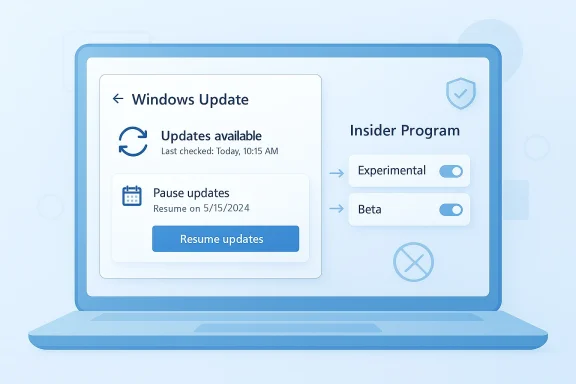
The current moment is different because Microsoft appears to be reconsidering the user experience, not just the servicing policy. Recent preview builds suggest the company is experimenting with a calendar-based pause system, which would replace the rigid five-week dropdown with a user-chosen resume date. That is a small interface change on paper, but symbolically it is huge: it restores a sense of agency that Windows users have not had in years.
At the same time, Microsoft is reworking how preview features are delivered to Insiders. The latest Dev Channel post confirms a broader effort to reduce the confusion created by Controlled Feature Rollouts and to make update behavior easier to understand. In other words, the company is not just polishing the settings page; it is trying to rebuild confidence in the whole pipeline. (blogs.windows.com)
That matters because it changes the psychological framing as much as the functionality. A timer says, “Microsoft will decide when your break ends.” A calendar says, “you decide when you are ready.” That difference may seem minor, but in product design it is often the difference between tolerated friction and perceived respect.
Still, there is an obvious tension here. A more permissive pause feature gives users control, but it also risks expanding the number of devices that fall behind on security patches. Microsoft will need to balance convenience with guardrails, and the company has not yet explained where that line will be drawn.
That distinction could reshape expectations. If Microsoft permits long pauses in consumer builds, it will have to decide whether to warn users more aggressively about exposure, force resumption after feature update end-of-support milestones, or otherwise define an upper limit through policy rather than UI. That part is still unclear, and the ambiguity is doing a lot of work right now.
Microsoft’s move to mandatory servicing in Windows 10 was understandable from a security standpoint, but it also removed one of the most visible signs of autonomy from consumer Windows. Users were no longer choosing when to patch in the way they had under earlier versions. They were being managed by the platform, and many never fully accepted that bargain.
That is why these changes matter beyond convenience. If Microsoft can make updates feel more legible, more deferential, and less mysterious, it may reduce the emotional resistance that has built up around Windows servicing. That would be a meaningful win, even if the underlying patch cadence does not change much.
That is why any improvement to Windows Update’s consumer interface carries outsized importance. It is not just a UI tweak; it is an attempt to narrow the gap between the control enterprises enjoy and the control regular users never had.
The biggest shift is the move toward two primary channels, Experimental and Beta, with more explicit purpose. Experimental is meant for the earliest, roughest builds. Beta is intended to be more predictable, with features that are closer to release and no longer hidden behind the same kind of gradual feature gating that frustrates people today. (windowslatest.com)
This is a direct response to the bad optics of Controlled Feature Rollouts. CFR is useful for Microsoft because it limits blast radius, but it is frustrating for testers because it undermines the whole point of being an Insider. If the feature is announced but not present on your machine, you are not really testing it. You are waiting for the system to bless you with access.
That change could broaden the audience for Insider builds, but it also raises the quality bar for Microsoft itself. The easier it becomes to move around the preview ecosystem, the less excuse there is for confusing channel design or broken release messaging.
It also acknowledges a reality Microsoft has sometimes resisted: many users do not hate updates because they hate security. They hate updates because they have learned, sometimes the hard way, that “optional” often becomes “eventual,” and “eventual” often becomes “inconvenient.” If Microsoft wants people to welcome updates, it has to do more than insist on their importance.
Microsoft will probably need to build strong warnings into the flow. It may also need to reserve the right to enforce updates when a version nears end of support, even if the new UI suggests open-ended control. That is where the design promise and the servicing reality could collide.
That may become the real test of this initiative. A long pause is easy to promise. A long pause that does not create a class of unmanaged, vulnerable devices is much harder.
That matters because Microsoft’s update strategy still has to serve two masters. Consumer Windows needs to feel less coercive. Managed Windows needs to remain predictable, supportable, and compliant. Those goals are not identical, and they cannot be solved with a single toggle.
A cleaner Insider model may actually help here. By making channels more explicit and reducing feature ambiguity, Microsoft can test update behavior more reliably before it reaches business devices. That is the kind of operational discipline enterprises care about far more than the headline-grabbing pause feature.
There is also a reputational angle. Windows has spent years fighting the image that it is both essential and annoying. A better update experience would not erase that reputation overnight, but it could soften one of the sharpest complaints people repeat about the platform.
That message is important because Windows’ biggest rival is not always another operating system. Sometimes it is user inertia. If people feel Windows is unpredictable, they delay upgrades, avoid new devices, or treat major updates as something to fear. Better servicing can reduce that anxiety.
If Microsoft wants this to land, it will need consistency, not just announcements. The update experience has to feel better in ordinary, boring weeks — not merely on launch day.
We should also expect Microsoft to keep talking about quality, stability, and control in parallel with these changes. That language is not accidental. It is part of a larger campaign to make Windows 11 feel less combative and more predictable, especially as the platform heads toward another cycle of version changes and servicing transitions.
The real measure of success will not be whether Windows 11 offers more control in a vacuum. It will be whether that control feels understandable, safe, and durable enough that users stop treating updates like a threat. If Microsoft can achieve that, this may turn out to be one of the most consequential quality-of-life shifts in Windows 11’s life cycle.
Source: Neowin Windows 11 is getting much-needed Windows Update improvements, here is the first look
But this is not just about a new pause menu. It arrives alongside a broader Windows Insider Program overhaul that simplifies channels, reduces rollout randomness, and gives testers more direct control over what they see. Together, the changes hint that Microsoft is trying to fix a deeper trust problem: users do not simply hate updates, they hate surprise updates, unexplained reboots, and features that arrive half-delivered.
 Overview
The modern Windows update story starts with a contrast. Windows 8.1 still let power users feel in charge, but Windows 10 shifted the balance sharply toward Microsoft’s servicing model. Security updates became compulsory for mainstream users, feature updates became unavoidable, and the old idea that you could simply switch Windows Update off disappeared for most consumers.That change was not accidental. Microsoft moved Windows to a cloud-connected, continuously serviced platform and treated update compliance as a security necessity rather than a user preference. The company had good reasons: malware, fragmentation, and unpatched systems were persistent problems, and Windows’ vast install base made every delay in patch adoption a potential risk.
Yet the user backlash never really faded. Many people accepted automatic security updates in principle while still resenting restarts at the worst possible moment, buggy feature drops, and inconsistent rollout behavior. Over time, Microsoft added controls such as pause windows and active hours, but those controls often felt like damage limitation rather than genuine flexibility.
The current moment is different because Microsoft appears to be reconsidering the user experience, not just the servicing policy. Recent preview builds suggest the company is experimenting with a calendar-based pause system, which would replace the rigid five-week dropdown with a user-chosen resume date. That is a small interface change on paper, but symbolically it is huge: it restores a sense of agency that Windows users have not had in years.
At the same time, Microsoft is reworking how preview features are delivered to Insiders. The latest Dev Channel post confirms a broader effort to reduce the confusion created by Controlled Feature Rollouts and to make update behavior easier to understand. In other words, the company is not just polishing the settings page; it is trying to rebuild confidence in the whole pipeline. (blogs.windows.com)
What Microsoft is changing in Windows Update
The most visible change is the pause experience itself. Today, Windows 11 lets regular users pause updates for a limited period, and Microsoft has historically capped that at five weeks for the familiar consumer pause flow. The emerging redesign replaces that rigid timer with a calendar-style control, allowing the user to choose when updates should resume instead of selecting a preset duration.That matters because it changes the psychological framing as much as the functionality. A timer says, “Microsoft will decide when your break ends.” A calendar says, “you decide when you are ready.” That difference may seem minor, but in product design it is often the difference between tolerated friction and perceived respect.
The new pause model
If Microsoft really allows pause periods that extend beyond the current cap, the practical implications are substantial. Users who travel, work on deadline, or rely on fragile legacy hardware would gain a way to defer disruptive changes without resorting to registry hacks, metered connections, or third-party workarounds. That is especially relevant for home users who lack enterprise tools like Windows Update for Business.Still, there is an obvious tension here. A more permissive pause feature gives users control, but it also risks expanding the number of devices that fall behind on security patches. Microsoft will need to balance convenience with guardrails, and the company has not yet explained where that line will be drawn.
Why this is different from old pause options
Windows has offered pause windows for years, but those controls were narrow, temporary, and deliberately bounded. The five-week cap was a compromise: long enough to let users ride out a bad patch cycle, short enough to keep most systems from drifting too far behind. The new model, at least in preview form, looks more like an open-ended scheduling tool than a simple deferral button.That distinction could reshape expectations. If Microsoft permits long pauses in consumer builds, it will have to decide whether to warn users more aggressively about exposure, force resumption after feature update end-of-support milestones, or otherwise define an upper limit through policy rather than UI. That part is still unclear, and the ambiguity is doing a lot of work right now.
Why users have been angry for so long
Windows Update has been a grievance engine for years because the pain points are cumulative. One broken driver is manageable. One surprise reboot is annoying. But when updates repeatedly interrupt work, slow down devices, or trigger compatibility issues, users start to treat the entire system as adversarial.Microsoft’s move to mandatory servicing in Windows 10 was understandable from a security standpoint, but it also removed one of the most visible signs of autonomy from consumer Windows. Users were no longer choosing when to patch in the way they had under earlier versions. They were being managed by the platform, and many never fully accepted that bargain.
The trust problem
The trust problem is not just about whether an update is good or bad. It is about whether users feel the update process is predictable. Preview builds that install half of a feature, roll out changes unevenly, and then reboot at random times all reinforce the idea that Windows is doing things to users rather than for them. Microsoft’s own Insider system has sometimes amplified that feeling by making even testers uncertain about what they will get. (blogs.windows.com)That is why these changes matter beyond convenience. If Microsoft can make updates feel more legible, more deferential, and less mysterious, it may reduce the emotional resistance that has built up around Windows servicing. That would be a meaningful win, even if the underlying patch cadence does not change much.
The enterprise versus consumer split
Enterprises have long had more options than home users. Policy controls, deferred servicing, update rings, and management tools give IT departments ways to stage and contain change. Consumers, by contrast, have mostly been asked to trust Microsoft’s defaults.That is why any improvement to Windows Update’s consumer interface carries outsized importance. It is not just a UI tweak; it is an attempt to narrow the gap between the control enterprises enjoy and the control regular users never had.
- Consumers want fewer surprise reboots.
- IT admins want clearer policy boundaries.
- Microsoft wants better patch compliance.
- Security teams want fewer out-of-date endpoints.
- Everyone wants fewer update-related support problems.
The Insider Program overhaul is part of the same story
Microsoft’s announcement of major Insider Program changes is not a separate story; it is the other half of the same reform effort. The company is simplifying its channel structure, giving Insiders more direct control over feature exposure, and making it easier to switch branches without wiping the device. That is a notable acknowledgment that the current system had become too opaque. (tomshardware.com)The biggest shift is the move toward two primary channels, Experimental and Beta, with more explicit purpose. Experimental is meant for the earliest, roughest builds. Beta is intended to be more predictable, with features that are closer to release and no longer hidden behind the same kind of gradual feature gating that frustrates people today. (windowslatest.com)
Feature Flags and controlled rollout fatigue
One of the most interesting details is the introduction of Feature Flags in the Experimental channel. That sounds technical, but the meaning is straightforward: instead of waiting for Microsoft’s rollout system to decide whether you get a feature, you can explicitly turn some features on or off inside the Insider settings. (windowslatest.com)This is a direct response to the bad optics of Controlled Feature Rollouts. CFR is useful for Microsoft because it limits blast radius, but it is frustrating for testers because it undermines the whole point of being an Insider. If the feature is announced but not present on your machine, you are not really testing it. You are waiting for the system to bless you with access.
Why channel switching matters
The other major improvement is the move toward in-place upgrades for channel switching and leaving the program. Historically, moving between Insider branches could require a clean install, which was enough to scare off all but the most enthusiastic testers. Microsoft now wants to reduce that barrier and make experimentation less costly. (windowslatest.com)That change could broaden the audience for Insider builds, but it also raises the quality bar for Microsoft itself. The easier it becomes to move around the preview ecosystem, the less excuse there is for confusing channel design or broken release messaging.
- Experimental is meant for early, unstable features.
- Beta is meant for closer-to-release experiences.
- Feature Flags reduce randomness in access.
- In-place upgrades reduce the pain of switching.
- Release Preview remains the near-production option.
What this means for everyday Windows 11 users
For ordinary Windows 11 users, the biggest gain is obvious: more breathing room. A calendar-based pause system would let people delay updates around travel, work deadlines, or known-problem periods without immediately triggering a forced update cycle. That gives users a simple, understandable way to protect stability when they need it most.It also acknowledges a reality Microsoft has sometimes resisted: many users do not hate updates because they hate security. They hate updates because they have learned, sometimes the hard way, that “optional” often becomes “eventual,” and “eventual” often becomes “inconvenient.” If Microsoft wants people to welcome updates, it has to do more than insist on their importance.
Consumer control versus consumer responsibility
More control is not free. If users can pause Windows Update for a long time, some will do so for legitimate reasons, and others will simply forget to resume. That creates a support and security challenge, because systems that stay paused too long can miss important patches, compatibility fixes, and feature update transitions.Microsoft will probably need to build strong warnings into the flow. It may also need to reserve the right to enforce updates when a version nears end of support, even if the new UI suggests open-ended control. That is where the design promise and the servicing reality could collide.
The end-of-support question
The most interesting unanswered question is what happens when a paused system reaches the end of support for its current Windows version. Microsoft has a long history of nudging, warning, and eventually pushing users forward when older releases age out. If the company truly wants “pause as long as you want,” it still has to reconcile that promise with the legal and security obligations that come with unsupported software.That may become the real test of this initiative. A long pause is easy to promise. A long pause that does not create a class of unmanaged, vulnerable devices is much harder.
The enterprise angle is more conservative than it looks
Businesses should not read the consumer pause story as a weakening of Microsoft’s update discipline. If anything, the company appears to be separating user-facing flexibility from administrative control. Enterprise-managed devices already have richer policy tools, and Microsoft has signaled that certain new consumer-facing experiences, such as Secure Boot status visuals, are disabled by default on managed systems. (blogs.windows.com)That matters because Microsoft’s update strategy still has to serve two masters. Consumer Windows needs to feel less coercive. Managed Windows needs to remain predictable, supportable, and compliant. Those goals are not identical, and they cannot be solved with a single toggle.
Admins care about policy clarity
For IT teams, the most important outcome is not whether a home user pauses updates for ten weeks. It is whether Microsoft keeps the policy surface coherent across consumer and enterprise editions. If new consumer controls start bleeding into managed environments without clear guardrails, administrators will have a new configuration headache.A cleaner Insider model may actually help here. By making channels more explicit and reducing feature ambiguity, Microsoft can test update behavior more reliably before it reaches business devices. That is the kind of operational discipline enterprises care about far more than the headline-grabbing pause feature.
Supportability still rules
Microsoft cannot afford to let update flexibility become update chaos. Enterprises depend on predictable servicing cycles, consistent rollback behavior, and known feature gates. If the company makes consumer users happier but makes business deployments more confusing, it will have only moved the problem from one audience to another.- Consumer control must not undermine security baselines.
- Enterprise policy must remain more authoritative than UI.
- Feature rollouts need clearer documentation.
- Support teams need cleaner failure modes.
- Managed devices should stay exempt from consumer experiments.
Competitive implications in the wider PC market
Microsoft’s update rethink also has competitive implications. The broader PC market increasingly sells the idea that Windows is the flexible, universal option, but that flexibility has often come with hidden frustration. If Microsoft improves update control, it strengthens one of Windows’ most important advantages against macOS and ChromeOS: the ability to serve both casual users and power users without making either group feel trapped.There is also a reputational angle. Windows has spent years fighting the image that it is both essential and annoying. A better update experience would not erase that reputation overnight, but it could soften one of the sharpest complaints people repeat about the platform.
A response to years of criticism
This looks like a direct response to years of criticism from enthusiasts, IT pros, and mainstream users alike. Microsoft has already spent time talking about quality, responsiveness, and fewer interruptions, and the update changes fit neatly into that message. In effect, the company is saying that the operating system should stop getting in the way of the work people are trying to do.That message is important because Windows’ biggest rival is not always another operating system. Sometimes it is user inertia. If people feel Windows is unpredictable, they delay upgrades, avoid new devices, or treat major updates as something to fear. Better servicing can reduce that anxiety.
The risk of overpromising
The challenge is that Windows users have heard promises like this before. Microsoft has repeatedly talked about smoother updates, better quality, and more control. Some of those improvements have stuck; others have been drowned out by the next bad patch cycle or the next confusing preview build. Trust is hard to rebuild when every new improvement is measured against a long record of annoyance.If Microsoft wants this to land, it will need consistency, not just announcements. The update experience has to feel better in ordinary, boring weeks — not merely on launch day.
Strengths and Opportunities
Microsoft has a genuine opportunity here to convert a long-running complaint into a differentiating feature. By making Windows Update feel more controllable, the company can reduce friction for everyday users while also improving the perception of Windows as a mature, respectful platform. That would support both consumer goodwill and enterprise confidence.- More user agency through calendar-based pause controls.
- Reduced update anxiety for people who fear surprise reboots.
- Better Insider clarity thanks to simplified channels.
- Less rollout randomness with Feature Flags in Experimental builds.
- Lower switching friction through in-place upgrades.
- Improved trust signaling by acknowledging long-standing complaints.
- Stronger competitiveness against more tightly controlled ecosystems.
Risks and Concerns
The biggest risk is that more control could create more noncompliance, especially if users pause updates indefinitely and forget to resume them. Microsoft will need to ensure that the promise of flexibility does not produce a new population of stale, unpatched devices. That is a security issue, a support issue, and a brand issue all at once.- Security exposure if devices stay paused too long.
- Unsupported-version conflicts when end-of-life approaches.
- Confusion over policies if consumer and enterprise rules blur.
- Partial rollout frustration if Feature Flags feel inconsistent.
- False expectations if “as long as you want” has hidden limits.
- Continued skepticism from users burned by past update behavior.
- Administrative complexity if managed environments are not clearly exempted.
What to Watch Next
The next few preview builds will tell us whether this is a meaningful policy shift or merely a polished interface on top of the same old servicing constraints. The key detail to watch is whether Microsoft explains the exact limits of the new pause model and whether it preserves enough safety rails to prevent abuse. The other thing to watch is whether the Insider overhaul arrives cleanly, because that will be the first real proof that Microsoft can simplify without breaking expectations. (blogs.windows.com)We should also expect Microsoft to keep talking about quality, stability, and control in parallel with these changes. That language is not accidental. It is part of a larger campaign to make Windows 11 feel less combative and more predictable, especially as the platform heads toward another cycle of version changes and servicing transitions.
- The exact maximum pause duration.
- Whether end-of-support triggers forced resumption.
- How the calendar UI will look in production builds.
- Whether Feature Flags expand beyond visible features.
- How quickly Insider channel migration becomes available.
- Whether consumer and managed devices get clearly different behavior.
- How Microsoft communicates the new rules to regular users.
The real measure of success will not be whether Windows 11 offers more control in a vacuum. It will be whether that control feels understandable, safe, and durable enough that users stop treating updates like a threat. If Microsoft can achieve that, this may turn out to be one of the most consequential quality-of-life shifts in Windows 11’s life cycle.
Source: Neowin Windows 11 is getting much-needed Windows Update improvements, here is the first look
Last edited:
