

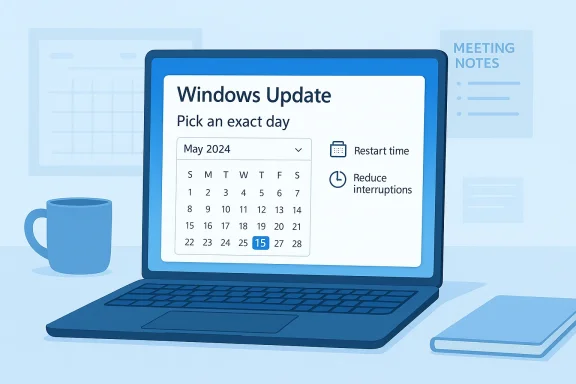
Windows 11’s update system is finally getting the kind of scheduling control users have wanted for years, and the change could be bigger than it first appears. Microsoft has already said it wants to reduce disruption from Windows Update, and new Insider builds now appear to add a calendar-based option that lets users choose an exact day rather than being limited to broad presets like “1 week” or “2 weeks.” If this test feature rolls out broadly, it would mark one of the clearest usability improvements to Windows Update in years. It also signals that Microsoft is trying to shift its image from “updates happen to you” to “updates happen on your terms.” (blogs.windows.com)
Windows users have lived with a deeply familiar frustration for decades: the operating system wants to update itself, and it often wants to do so on its own schedule. The annoyance has never been limited to the download itself. The real pain points have been the interruptions, the reboot prompts, the uncertainty around timing, and the sense that a machine can decide it is the right moment to install a patch even when the user is in the middle of something important.
Microsoft has spent the last few years trying to modernize that experience without compromising the security model that makes regular patching essential. That balancing act is difficult. On one side is convenience and predictability. On the other is the reality that deferred updates can leave devices exposed, especially in a world where vulnerabilities move quickly from disclosure to exploitation. The new calendar-style scheduling option, if it becomes public, suggests Microsoft believes it can offer more control without abandoning its update discipline. (blogs.windows.com)
The timing matters too. In March 2026, Microsoft published a broad commitment to improving Windows quality, and Windows Update was one of the specific areas called out for improvement. The company said it wanted more predictable updates, clearer control over restarts and timing, fewer surprises, and less disruption overall. That makes the Insider reports about an exact-date picker feel less like a random UI experiment and more like the next visible step in a wider redesign of Windows servicing. (blogs.windows.com)
For consumers, this kind of feature is about convenience and autonomy. For enterprises, it is about planning, compliance, and reducing workflow friction across large fleets. And for Microsoft, it is about repairing one of the oldest trust issues in Windows: the feeling that the OS is powerful, essential, and occasionally too eager to prove it.
Microsoft also said it wanted “fewer automatic restarts and notifications” and “more direct control over updates,” language that suggests a broader rethinking of how update prompts appear and how aggressively Windows inserts itself into the user’s day. The exact-date picker reported in Insider builds fits neatly into that narrative. Instead of asking users to think in terms of arbitrary waiting periods, Microsoft would be letting them anchor an update to an actual day on their calendar. That is a subtle change, but it is also the difference between vague deferral and deliberate planning. (blogs.windows.com)
There is also a psychological effect here. The more a system feels controllable, the less friction users experience even when they do not change the default behavior. In other words, the presence of choice matters as much as the choice itself. That is especially true for Windows, where many users have long assumed updates are something to survive rather than manage.
That matters because Windows Insider builds often reveal the direction of travel well before Microsoft makes an official announcement. When a feature appears in a test channel, it usually means the company is measuring behavior, gathering telemetry, and judging whether the implementation is good enough for broader release. The presence of the calendar picker does not guarantee immediate launch, but it does strongly suggest the feature is real, not hypothetical. (blogs.windows.com)
The key signal here is consistency. Microsoft’s March quality roadmap already promised stronger control over update timing, and the Insider build appears to implement exactly that philosophy. When the company’s public messaging and the Insider evidence line up this closely, it is reasonable to expect the feature to ship, assuming no major usability or servicing issues emerge.
That tension has existed for years because Windows has had to serve both consumer and enterprise needs. Consumers want convenience and predictability. Enterprises want control, compliance, maintenance windows, and the ability to stage rollouts. Microsoft has often optimized for the management model, which makes sense at scale, but it has also left everyday users feeling like they are administrating their own devices in the margins. (blogs.windows.com)
The company is now trying to reduce that friction without weakening the security model that makes Windows viable in the first place. That is a hard problem, because update friction and update compliance are often in tension. If updates are too intrusive, users delay them. If they are too easy to ignore, systems fall behind. Microsoft’s challenge is to make the default safer and the override more humane.
At the same time, a calendar-based picker may not solve the whole problem if Windows still behaves unpredictably around reboots, active hours, and feature-vs-quality updates. Control over one part of the flow is not the same as control over the entire experience. That distinction will matter a lot once more users get access to the feature.
There is also a trust angle. Windows has spent years building security messaging around the importance of updates, but the more painful the process feels, the more likely users are to resent it. A better scheduling UI can soften that resentment. It turns the interaction into a choice with boundaries, which is usually more acceptable than an open-ended prompt with a looming reboot. (blogs.windows.com)
For less technical users, the bigger concern is discoverability. A good feature can still fail if it is buried too deeply in Settings or explained poorly. Microsoft has been working to streamline Windows 11’s settings surfaces, but update controls have historically been fragmented. If the new calendar picker is to succeed, it needs to be obvious, consistent, and understandable at a glance.
That said, enterprises will likely treat this feature as supplementary, not transformative. IT departments typically rely on policy tooling such as Intune, Windows Update for Business, and other management systems to orchestrate patch timing at scale. A calendar picker in the UI is helpful for end users, but administrators will still want centralized controls, compliance reporting, and the ability to enforce deadlines. (blogs.windows.com)
There is a subtle enterprise benefit, though: fewer accidental conflicts between user expectations and managed policy. If an employee can align a reboot with a preferred day rather than getting trapped in a vague postponement loop, the help desk gets fewer complaints and the update process becomes easier to explain. That is not glamorous, but it is exactly the kind of operational polish that large deployments notice.
The new update controls also fit into Microsoft’s broader quality push, which explicitly mentions more dependable updates, clearer progress, and built-in recovery if something goes wrong. That suggests the company sees update reliability and update control as inseparable. Users will only trust more flexible scheduling if they also trust that Windows will recover cleanly when a patch does install. (blogs.windows.com)
There is another layer here. Update frustration is often a symptom of broader trust issues with Windows quality. If the OS feels faster, more stable, and less intrusive, then update prompts feel less threatening. Microsoft seems aware of that relationship, which is why the March 2026 roadmap bundled update improvements with broader performance and reliability work across File Explorer, Start, Windows Hello, and the system itself. (blogs.windows.com)
A well-designed system can do both. It can let users choose a convenient day while still escalating urgent patches or limiting how far they can slide. The ideal outcome is not “updates are optional”; it is “updates are manageable.” Those two things are very different.
That matters for perception as much as for function. Windows 11 has to balance enterprise credibility, consumer appeal, and a growing set of AI-driven features. If the basics still feel clunky, the platform’s more ambitious innovations can be overshadowed by the ordinary things people do every day. Update control is one of those ordinary things, which is exactly why it is strategically important. (blogs.windows.com)
There is also a brand element. Microsoft has spent much of 2026 talking about “quality,” “craft,” and “reduced disruption.” Those words are not accidental. They are part of a broader effort to reframe Windows as a platform that is not merely powerful but also considerate. In a market where user patience is finite, that message may prove more valuable than one more flashy feature.
The company also appears to be changing how it rolls out new features. Instead of relying only on big, disruptive releases, it is emphasizing steady improvements through Insider channels and more targeted testing. That means Windows 11 is becoming less about giant leaps and more about continuous refinement, especially in areas where users feel pain every day. Update control fits perfectly into that strategy.
At the same time, there is a strategic caution here. Microsoft can improve the interface all it wants, but if the underlying update cadence still surprises people, the old complaints will persist. The real success metric is not whether a calendar appears in Settings. It is whether users feel less interrupted a month after the feature ships.
That is why these changes matter. They reduce the sense that Windows is constantly asking for permission to be Windows. Instead, the OS starts to behave like a tool that fits into the user’s schedule rather than forcing the user to fit into its own.
The next questions are practical ones. Will the feature work only for postponing installations, or will it also affect restart timing and notification behavior? Will Microsoft let users choose any date indefinitely, or will there be a bounded window tied to security policy? And will the same philosophy eventually extend to other parts of Windows, such as setup, recommended content, and reboot prompts? Those are the details that will determine whether this is a cosmetic tweak or a real servicing overhaul.
Source: Gagadget.com Windows 11: new capabilities for installing updates
 Overview
Windows users have lived with a deeply familiar frustration for decades: the operating system wants to update itself, and it often wants to do so on its own schedule. The annoyance has never been limited to the download itself. The real pain points have been the interruptions, the reboot prompts, the uncertainty around timing, and the sense that a machine can decide it is the right moment to install a patch even when the user is in the middle of something important.Microsoft has spent the last few years trying to modernize that experience without compromising the security model that makes regular patching essential. That balancing act is difficult. On one side is convenience and predictability. On the other is the reality that deferred updates can leave devices exposed, especially in a world where vulnerabilities move quickly from disclosure to exploitation. The new calendar-style scheduling option, if it becomes public, suggests Microsoft believes it can offer more control without abandoning its update discipline. (blogs.windows.com)
The timing matters too. In March 2026, Microsoft published a broad commitment to improving Windows quality, and Windows Update was one of the specific areas called out for improvement. The company said it wanted more predictable updates, clearer control over restarts and timing, fewer surprises, and less disruption overall. That makes the Insider reports about an exact-date picker feel less like a random UI experiment and more like the next visible step in a wider redesign of Windows servicing. (blogs.windows.com)
For consumers, this kind of feature is about convenience and autonomy. For enterprises, it is about planning, compliance, and reducing workflow friction across large fleets. And for Microsoft, it is about repairing one of the oldest trust issues in Windows: the feeling that the OS is powerful, essential, and occasionally too eager to prove it.
What Microsoft Has Already Promised
Microsoft did not need a viral screenshot from an Insider build to admit Windows Update needed help. In its March 20, 2026 Windows Insider blog post, the company explicitly said it was “reducing disruption from Windows Updates” and promised users more control over update behavior. Among the headline changes were the ability to skip updates during device setup, restart or shut down without being forced to install them, and pause updates for longer when needed. That is a meaningful shift in tone, because it frames update management as a usability problem rather than a purely administrative one. (blogs.windows.com)Microsoft also said it wanted “fewer automatic restarts and notifications” and “more direct control over updates,” language that suggests a broader rethinking of how update prompts appear and how aggressively Windows inserts itself into the user’s day. The exact-date picker reported in Insider builds fits neatly into that narrative. Instead of asking users to think in terms of arbitrary waiting periods, Microsoft would be letting them anchor an update to an actual day on their calendar. That is a subtle change, but it is also the difference between vague deferral and deliberate planning. (blogs.windows.com)
Why this matters
A calendar is a human tool. A “1 week” or “2 weeks” dropdown is a system tool. When Microsoft moves from one to the other, it is acknowledging that people schedule around real events: travel, deadlines, product launches, exams, presentations, support windows, and payroll cycles. That makes the update dialog feel less like a machine’s demand and more like a negotiation.There is also a psychological effect here. The more a system feels controllable, the less friction users experience even when they do not change the default behavior. In other words, the presence of choice matters as much as the choice itself. That is especially true for Windows, where many users have long assumed updates are something to survive rather than manage.
The Insider Build Clue
According to reports from Windows Insider participants cited by Gagadget, the new test build replaces the usual fixed deferral periods with a calendar selector that lets users choose any date. If accurate, that means Microsoft is testing a much finer-grained scheduling model before it ships it to stable Windows 11. The feature appears to be at the UI level, which usually suggests the underlying capability already exists and is being surfaced for evaluation. (blogs.windows.com)That matters because Windows Insider builds often reveal the direction of travel well before Microsoft makes an official announcement. When a feature appears in a test channel, it usually means the company is measuring behavior, gathering telemetry, and judging whether the implementation is good enough for broader release. The presence of the calendar picker does not guarantee immediate launch, but it does strongly suggest the feature is real, not hypothetical. (blogs.windows.com)
What a test build usually means
A feature in Insider does not always survive to production. Microsoft sometimes removes experiments, reshapes them, or limits them to certain channels. But update-related changes are usually scrutinized carefully because they affect supportability, compliance, and security posture across the Windows base.The key signal here is consistency. Microsoft’s March quality roadmap already promised stronger control over update timing, and the Insider build appears to implement exactly that philosophy. When the company’s public messaging and the Insider evidence line up this closely, it is reasonable to expect the feature to ship, assuming no major usability or servicing issues emerge.
Why Users Have Been Frustrated for So Long
The complaints about Windows updates are not simply about “having to update.” Most users understand that patching is necessary. The frustration comes from timing, interruption, and the feeling that update logic often assumes the machine knows better than the person using it. A patch that appears at the wrong moment can derail a work session, a presentation, or a long download, and a badly timed reboot can feel like an act of sabotage.That tension has existed for years because Windows has had to serve both consumer and enterprise needs. Consumers want convenience and predictability. Enterprises want control, compliance, maintenance windows, and the ability to stage rollouts. Microsoft has often optimized for the management model, which makes sense at scale, but it has also left everyday users feeling like they are administrating their own devices in the margins. (blogs.windows.com)
The company is now trying to reduce that friction without weakening the security model that makes Windows viable in the first place. That is a hard problem, because update friction and update compliance are often in tension. If updates are too intrusive, users delay them. If they are too easy to ignore, systems fall behind. Microsoft’s challenge is to make the default safer and the override more humane.
The hidden tradeoff
The better Microsoft gets at giving users control, the more it must guard against endless postponement. That is where exact-date scheduling can be useful: it gives a real target rather than an open-ended delay. It also nudges users toward an intentional decision instead of a passive deferral.At the same time, a calendar-based picker may not solve the whole problem if Windows still behaves unpredictably around reboots, active hours, and feature-vs-quality updates. Control over one part of the flow is not the same as control over the entire experience. That distinction will matter a lot once more users get access to the feature.
Consumer Impact
For home users, the most obvious benefit is simple: fewer surprises. Being able to choose a specific date instead of a rough interval can help people avoid updates during trips, exams, major meetings, or any period when a reboot would be costly. That may sound small, but in consumer computing, small things often determine whether a feature feels thoughtful or intrusive.There is also a trust angle. Windows has spent years building security messaging around the importance of updates, but the more painful the process feels, the more likely users are to resent it. A better scheduling UI can soften that resentment. It turns the interaction into a choice with boundaries, which is usually more acceptable than an open-ended prompt with a looming reboot. (blogs.windows.com)
For less technical users, the bigger concern is discoverability. A good feature can still fail if it is buried too deeply in Settings or explained poorly. Microsoft has been working to streamline Windows 11’s settings surfaces, but update controls have historically been fragmented. If the new calendar picker is to succeed, it needs to be obvious, consistent, and understandable at a glance.
What consumers stand to gain
- Better control over when a patch lands.
- Fewer awkward reboot interruptions.
- Easier planning around travel and deadlines.
- Less resentment toward routine maintenance.
- A sense that Windows respects user time.
- More confidence in deferring updates responsibly.
- A cleaner, more modern Settings experience.
Enterprise Impact
Businesses may find this change even more useful than consumers do. Enterprises already operate around maintenance windows, patch rings, pilot groups, and rollout policies, but individual users still experience update prompts on endpoints that are actively being used. If Microsoft gives them a better way to delay installation to an exact day, it could reduce unnecessary friction on managed and unmanaged machines alike.That said, enterprises will likely treat this feature as supplementary, not transformative. IT departments typically rely on policy tooling such as Intune, Windows Update for Business, and other management systems to orchestrate patch timing at scale. A calendar picker in the UI is helpful for end users, but administrators will still want centralized controls, compliance reporting, and the ability to enforce deadlines. (blogs.windows.com)
There is a subtle enterprise benefit, though: fewer accidental conflicts between user expectations and managed policy. If an employee can align a reboot with a preferred day rather than getting trapped in a vague postponement loop, the help desk gets fewer complaints and the update process becomes easier to explain. That is not glamorous, but it is exactly the kind of operational polish that large deployments notice.
Enterprise value in practice
- Fewer support tickets tied to “unexpected” update timing.
- Better user cooperation with patch cycles.
- More predictable endpoint behavior during rollout periods.
- Reduced resistance to mandatory maintenance.
- Improved alignment between user scheduling and IT policy.
Security and Reliability Stakes
Microsoft cannot relax on update enforcement, because Windows patching is not just a convenience issue; it is a security issue. The company has already warned that Secure Boot certificates used by most Windows devices begin expiring in June 2026, a reminder that platform maintenance is becoming more, not less, important. In that context, giving users more control over timing only works if the system still pushes them toward timely patching.The new update controls also fit into Microsoft’s broader quality push, which explicitly mentions more dependable updates, clearer progress, and built-in recovery if something goes wrong. That suggests the company sees update reliability and update control as inseparable. Users will only trust more flexible scheduling if they also trust that Windows will recover cleanly when a patch does install. (blogs.windows.com)
There is another layer here. Update frustration is often a symptom of broader trust issues with Windows quality. If the OS feels faster, more stable, and less intrusive, then update prompts feel less threatening. Microsoft seems aware of that relationship, which is why the March 2026 roadmap bundled update improvements with broader performance and reliability work across File Explorer, Start, Windows Hello, and the system itself. (blogs.windows.com)
Security cannot be an afterthought
The risk with any new deferral mechanism is that it becomes another excuse to delay patching indefinitely. That is where Microsoft’s policy design matters more than the interface. The company will need to preserve guardrails around critical security updates, even as it makes ordinary scheduling more flexible.A well-designed system can do both. It can let users choose a convenient day while still escalating urgent patches or limiting how far they can slide. The ideal outcome is not “updates are optional”; it is “updates are manageable.” Those two things are very different.
The Competitive Angle
Microsoft is not making this change in a vacuum. Apple, Google, and other platform makers have spent years refining update behavior so that devices remain secure without feeling quite so chaotic. Windows, by contrast, has often been seen as the platform where patching is necessary but annoying. If Microsoft can make update scheduling look modern and user-friendly, it narrows one of the old experience gaps.That matters for perception as much as for function. Windows 11 has to balance enterprise credibility, consumer appeal, and a growing set of AI-driven features. If the basics still feel clunky, the platform’s more ambitious innovations can be overshadowed by the ordinary things people do every day. Update control is one of those ordinary things, which is exactly why it is strategically important. (blogs.windows.com)
There is also a brand element. Microsoft has spent much of 2026 talking about “quality,” “craft,” and “reduced disruption.” Those words are not accidental. They are part of a broader effort to reframe Windows as a platform that is not merely powerful but also considerate. In a market where user patience is finite, that message may prove more valuable than one more flashy feature.
Why rivals should care
- A better Windows Update experience raises the baseline for PC usability.
- Consumer complaints about update disruption can influence platform loyalty.
- Enterprise buyers value predictable maintenance as much as new features.
- A cleaner servicing experience strengthens Microsoft’s broader quality story.
- Better control reduces one of Windows’ most persistent reputation problems.
What This Says About Windows 11’s Direction
The bigger story is not just the calendar picker. It is the philosophy behind it. Microsoft is increasingly presenting Windows 11 as an OS that should be quieter, more deliberate, and less disruptive. The same March 2026 post that highlighted update control also talked about reducing distractions, improving personalization, and making core surfaces like Start and File Explorer more dependable. That is a coherent direction, not a random assortment of tweaks. (blogs.windows.com)The company also appears to be changing how it rolls out new features. Instead of relying only on big, disruptive releases, it is emphasizing steady improvements through Insider channels and more targeted testing. That means Windows 11 is becoming less about giant leaps and more about continuous refinement, especially in areas where users feel pain every day. Update control fits perfectly into that strategy.
At the same time, there is a strategic caution here. Microsoft can improve the interface all it wants, but if the underlying update cadence still surprises people, the old complaints will persist. The real success metric is not whether a calendar appears in Settings. It is whether users feel less interrupted a month after the feature ships.
The software design lesson
The best operating system features often look small in screenshots and large in daily life. A calendar picker is one of those features. It is not glamorous, but it changes the emotional contract between user and machine.That is why these changes matter. They reduce the sense that Windows is constantly asking for permission to be Windows. Instead, the OS starts to behave like a tool that fits into the user’s schedule rather than forcing the user to fit into its own.
Strengths and Opportunities
Microsoft’s update-control effort has several obvious strengths. It aligns with the company’s public quality roadmap, it answers a long-running user complaint, and it has the potential to improve both consumer goodwill and enterprise usability. The opportunity is not merely to make updates less annoying; it is to make Windows feel more respectful of time. That is a meaningful competitive advantage in a market where user patience is limited.- Exact-date scheduling is more intuitive than vague delay periods.
- The feature matches Microsoft’s March 2026 quality roadmap.
- It can reduce accidental disruption during critical work windows.
- It may improve trust in Windows Update overall.
- It gives IT teams and users a cleaner story about timing.
- It supports Microsoft’s “less disruption” design direction.
- It could reduce help desk noise around reboot prompts.
Risks and Concerns
The risks are equally real. A friendlier update system can still become a dangerous one if users abuse deferrals, if the UI is confusing, or if critical patches are too easy to postpone. Microsoft also has to ensure that more user choice does not weaken enterprise compliance or create new edge cases around active hours, restarts, and patch deadlines. A feature that feels empowering can still create operational drag if it is not carefully bounded.- Users may defer updates longer than is wise.
- The feature could confuse people if buried in Settings.
- Security-sensitive patches may need stronger enforcement.
- Enterprises may worry about policy conflicts.
- The calendar UI might not solve reboot frustration entirely.
- The rollout could be uneven across channels or device types.
- Microsoft may still need to refine notifications and active-hours behavior.
Looking Ahead
The most important thing to watch is whether Microsoft keeps the feature in the test channel long enough to validate the real-world behavior. Insider previews are useful, but update workflows only prove themselves when millions of people use them across different schedules, hardware configurations, and workloads. If the calendar picker survives that scrutiny, it will likely become part of a broader effort to make Windows 11 more predictable and less invasive. (blogs.windows.com)The next questions are practical ones. Will the feature work only for postponing installations, or will it also affect restart timing and notification behavior? Will Microsoft let users choose any date indefinitely, or will there be a bounded window tied to security policy? And will the same philosophy eventually extend to other parts of Windows, such as setup, recommended content, and reboot prompts? Those are the details that will determine whether this is a cosmetic tweak or a real servicing overhaul.
- Watch for broader rollout in a cumulative update or feature flight.
- Watch whether Microsoft adds clearer restart scheduling controls.
- Watch for enterprise policy hooks in Intune or Windows Update for Business.
- Watch whether the feature becomes available on all Windows 11 editions.
- Watch whether Microsoft pairs it with better update transparency and deadlines.
Source: Gagadget.com Windows 11: new capabilities for installing updates
Last edited:
