

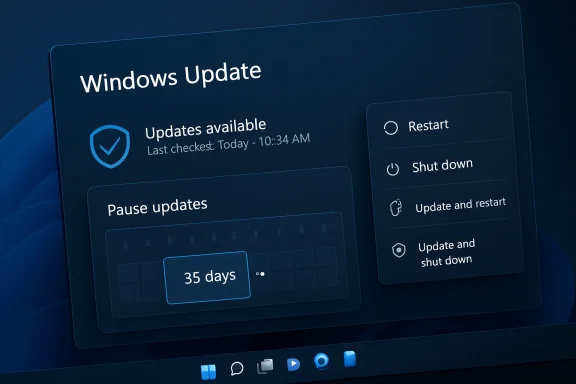
Microsoft is testing one of the most user-friendly Windows Update changes in years, and the target is not updates themselves but the moment Windows chooses to install them. In a new Windows Insider rollout, Windows 11 is gaining a redesigned update experience that can let testers pause updates in 35-day increments and then extend that pause again without a stated cap. The same update experience also separates ordinary power actions from update actions, meaning Restart and Shut down can remain available even when an update is waiting. If this approach survives testing, it could mark a meaningful shift away from the era when Windows users felt their PCs belonged partly to the update scheduler.
For more than a decade, Windows Update has sat at the center of a difficult trade-off: Microsoft needs hundreds of millions of PCs to stay patched, but users need their machines to remain predictable. The security case for automatic updates is strong, especially in a world of ransomware, credential theft, firmware vulnerabilities, and increasingly automated exploit chains. Yet the human frustration has always been equally real: a laptop closing at the wrong time, a restart landing before a meeting, or a shutdown turning into an installation session when the user is trying to leave.
That tension intensified during the Windows 10 era, when Microsoft moved Windows more decisively toward a service model. Monthly cumulative updates simplified servicing and reduced fragmentation, but they also made the operating system feel more assertive. Windows 11 inherited that model, adding a more polished interface while keeping the same broad premise that consumer devices should remain current unless a user or administrator actively configures otherwise.
The new Insider test arrives after Microsoft publicly promised a broader push to improve Windows 11 quality, reliability, performance, and overall craft. In that context, update timing is not a minor interface tweak; it is a trust issue. A modern operating system can be secure and still feel hostile if it interrupts work at the wrong moment.
The most notable part of this test is the pause behavior. Microsoft says testers can choose a pause date up to 35 days away, then extend the pause end date as many times as needed. That is not a permanent disable switch, and Microsoft is still encouraging users to install security updates promptly, but the practical message is hard to miss: Windows may finally be moving closer to a model where timing belongs to the person at the keyboard.
For ordinary users, the difference is practical rather than philosophical. A student can avoid updates during exams, a traveler can keep a laptop stable during a trip, and a freelancer can delay changes during a client deadline. The system still nudges toward maintenance, but it does not have to force the issue at the worst possible moment.
Key implications include:
The interface logic is simple:
For Microsoft, this is a recognition that predictability is part of reliability. A PC that updates securely but unpredictably can still feel unreliable. A PC that explains its choices and honors user intent feels more respectful, even if the underlying update system remains assertive.
There are several reasons Microsoft may be more willing to change now:
That distinction is crucial. The strongest version of Windows Update is not the one users fight; it is the one users understand well enough to cooperate with. If Microsoft can turn updates from an interruption into a planned maintenance event, it improves both satisfaction and patch compliance.
The security challenge is straightforward. If a critical zero-day vulnerability is being actively exploited, indefinite deferral could leave users exposed. If a firmware or driver update fixes a serious stability flaw, postponement could prolong crashes or device failures. If users habitually defer all updates, the ecosystem becomes harder to protect.
That creates a balancing act:
The consumer benefits are easy to summarize:
There is also a psychological benefit. A button that says exactly what it will do restores a sense of ownership. That may sound soft, but in operating system design, trust is built through thousands of small moments where the computer either respects or violates user expectation.
IT departments will want answers on several fronts:
For enterprises, the opportunity is not indefinite postponement. The opportunity is a better user-facing layer on top of structured compliance. If Windows can clearly distinguish between optional timing flexibility and mandatory security deadlines, administrators may get fewer support tickets and users may feel less blindsided.
For users, update fatigue often comes from repetition. A cumulative update arrives, then a driver update, then a firmware update, then a .NET update, each with its own restart logic or notification pattern. Even if each event is justified, the combined effect feels chaotic.
A more coordinated model offers clear advantages:
This is particularly important for enthusiasts. WindowsForum readers often understand that drivers can be both fixes and risks. A graphics driver may solve a rendering issue but introduce a performance regression. A firmware update may improve sleep reliability but require AC power and patience.
Clearer update information can improve several areas:
There is also a documentation mismatch to watch. Public Windows support guidance for the current pause feature still reflects the existing model, where users must install the latest updates after reaching the pause limit before pausing again. The Insider post describes the new test behavior, so the two are not necessarily contradictory; they apply to different states of Windows.
That distinction should guide expectations:
The competitive implications are significant:
There is a broader lesson here. Users are more willing to accept change when they believe the platform is acting in their interest. Giving people cleaner update choices is a low-drama way for Microsoft to rebuild that belief.
Watch for these developments:
Microsoft’s challenge is to ship the feature without losing the security discipline that made automatic updating necessary in the first place. If it succeeds, Windows 11 could become both safer and less intrusive, which is the balance users have wanted all along. The future of Windows Update should not be a choice between protection and control; it should be a system where maintenance is visible, predictable, and respectful enough that users no longer feel the need to fight it.
Source: Ubergizmo Microsoft Looks Ready To Stop Forcing Windows Updates At The Worst Time
 Background
For more than a decade, Windows Update has sat at the center of a difficult trade-off: Microsoft needs hundreds of millions of PCs to stay patched, but users need their machines to remain predictable. The security case for automatic updates is strong, especially in a world of ransomware, credential theft, firmware vulnerabilities, and increasingly automated exploit chains. Yet the human frustration has always been equally real: a laptop closing at the wrong time, a restart landing before a meeting, or a shutdown turning into an installation session when the user is trying to leave.That tension intensified during the Windows 10 era, when Microsoft moved Windows more decisively toward a service model. Monthly cumulative updates simplified servicing and reduced fragmentation, but they also made the operating system feel more assertive. Windows 11 inherited that model, adding a more polished interface while keeping the same broad premise that consumer devices should remain current unless a user or administrator actively configures otherwise.
The new Insider test arrives after Microsoft publicly promised a broader push to improve Windows 11 quality, reliability, performance, and overall craft. In that context, update timing is not a minor interface tweak; it is a trust issue. A modern operating system can be secure and still feel hostile if it interrupts work at the wrong moment.
The most notable part of this test is the pause behavior. Microsoft says testers can choose a pause date up to 35 days away, then extend the pause end date as many times as needed. That is not a permanent disable switch, and Microsoft is still encouraging users to install security updates promptly, but the practical message is hard to miss: Windows may finally be moving closer to a model where timing belongs to the person at the keyboard.
The Real Change: Control Over Timing, Not Rejection of Updates
The headline temptation is to say Microsoft is letting users stop updates indefinitely. That is directionally understandable, but it oversimplifies what is actually happening. The more accurate reading is that Microsoft is testing an update model where users can keep postponing updates in 35-day windows rather than hitting a hard pause wall and being forced to install before pausing again.Why the 35-day window matters
The 35-day number is familiar because Windows has long used it as a pause boundary in consumer-facing update controls. What changes in this Insider test is the apparent ability to reset that boundary repeatedly. That turns the pause feature from a short vacation control into something closer to an ongoing scheduling tool.For ordinary users, the difference is practical rather than philosophical. A student can avoid updates during exams, a traveler can keep a laptop stable during a trip, and a freelancer can delay changes during a client deadline. The system still nudges toward maintenance, but it does not have to force the issue at the worst possible moment.
Key implications include:
- Users gain more agency over when updates resume.
- The pause control becomes calendar-based, not just a generic dropdown.
- The 35-day cycle remains intact, preserving a safety-oriented structure.
- Repeated extensions reduce forced-update anxiety for consumers.
- Microsoft can still recommend prompt patching without removing user choice.
Power Menu Predictability Finally Gets Attention
The second major change may be even more visible in daily use. When an update is pending, the Windows power menu is being redesigned so standard Restart and Shut down options remain present alongside Update and restart and Update and shut down. That sounds small, but it addresses one of the most common Windows annoyances: clicking a basic power action and getting an update workflow instead.Four choices instead of one trap
The old behavior often made users feel as though Windows was hiding the exits. If an update was waiting, the most obvious shutdown or restart choices could become update-driven choices. The new model is cleaner because it labels intent directly.The interface logic is simple:
- Choose Restart if you want the PC to restart without installing the pending update.
- Choose Shut down if you want the PC to power off without starting update installation.
- Choose Update and restart if you are ready to install and reboot.
- Choose Update and shut down if you want the update process tied to shutdown.
For Microsoft, this is a recognition that predictability is part of reliability. A PC that updates securely but unpredictably can still feel unreliable. A PC that explains its choices and honors user intent feels more respectful, even if the underlying update system remains assertive.
Why Microsoft Is Listening Now
Microsoft says it reviewed more than 7,621 direct user verbatims while reworking the update experience. That detail matters because it suggests this change is not just the result of telemetry, crash data, or engineering preference. It reflects a user experience pattern that people have been describing in their own words for years.Feedback becomes product strategy
The timing also lines up with Microsoft’s broader 2026 quality push for Windows. The company has been talking more openly about performance, File Explorer responsiveness, Windows Insider clarity, and reducing unnecessary disruption. In that broader program, updates are not merely a servicing pipeline; they are one of the most emotionally charged parts of Windows.There are several reasons Microsoft may be more willing to change now:
- Windows 11 adoption depends on trust, especially after years of Windows 10 familiarity.
- AI features and Copilot integration need goodwill, not more resentment.
- Enterprises increasingly expect managed flexibility, not one-size-fits-all consumer behavior.
- Insider feedback has become a public accountability mechanism for Windows quality.
- Competing platforms emphasize low-friction maintenance, raising user expectations.
That distinction is crucial. The strongest version of Windows Update is not the one users fight; it is the one users understand well enough to cooperate with. If Microsoft can turn updates from an interruption into a planned maintenance event, it improves both satisfaction and patch compliance.
Security Still Sets the Boundary
The new pause behavior does not erase Microsoft’s security obligations. Windows remains one of the world’s largest attack surfaces, and delayed patching carries real risk. A system that allows repeated deferrals must be designed carefully so flexibility does not become an easy path to long-term neglect.Secure by default, flexible by design
Microsoft’s framing still emphasizes secure by design and secure by default. That means the company is unlikely to turn Windows Update into a completely optional consumer feature. Instead, it appears to be experimenting with a more flexible interface around a security-first core.The security challenge is straightforward. If a critical zero-day vulnerability is being actively exploited, indefinite deferral could leave users exposed. If a firmware or driver update fixes a serious stability flaw, postponement could prolong crashes or device failures. If users habitually defer all updates, the ecosystem becomes harder to protect.
That creates a balancing act:
- Security updates need urgency, especially during active exploitation.
- Feature updates can tolerate more scheduling flexibility in many cases.
- Driver updates need clearer labeling because they can improve or destabilize hardware.
- Firmware updates require caution because failed installation can be disruptive.
- Emergency out-of-band updates may need different rules from routine monthly patches.
Consumer Impact: Fewer Surprise Interruptions
For home users, the practical win is obvious: Windows 11 could become less likely to hijack the end of a work session. The ability to pause updates repeatedly and avoid update-linked power actions would directly improve the experience for people who use PCs in bursts, on travel schedules, or under deadline pressure. This is especially relevant for laptops, where shutdown timing often intersects with battery anxiety and mobility.The everyday scenarios Microsoft is trying to fix
The strongest case for this change is not theoretical. It is the person closing a laptop before boarding a flight. It is the gamer who wants to restart quickly after a driver crash. It is the parent finishing taxes, the student saving a paper, or the remote worker jumping between meetings.The consumer benefits are easy to summarize:
- Shutdown becomes more predictable when updates are pending.
- Restarting for troubleshooting becomes less risky during busy periods.
- Travel and exam windows can be protected with a clear pause date.
- Users can install updates intentionally, not reactively.
- Anxiety around Windows maintenance may decrease over time.
There is also a psychological benefit. A button that says exactly what it will do restores a sense of ownership. That may sound soft, but in operating system design, trust is built through thousands of small moments where the computer either respects or violates user expectation.
Enterprise Impact: Helpful, But Not a Replacement for Policy
For businesses, the story is more complicated. Managed Windows environments already have tools such as Windows Update for Business, mobile device management policies, active hours, compliance deadlines, deferral rings, and restart controls. A consumer-facing pause improvement does not replace those systems, but it may influence how Microsoft designs future commercial update experiences.Admins will ask harder questions
Enterprise IT teams care about flexibility, but they also care about compliance. A user who can defer updates indefinitely may be acceptable on a personal laptop, but not on a regulated corporate device subject to security baselines. Microsoft has already indicated that more details for commercial customers and admin controls will come later, which is exactly where enterprise attention will focus.IT departments will want answers on several fronts:
- Can administrators disable or limit repeated pause extensions?
- Will compliance deadlines override user-selected pause dates?
- How will Intune and Group Policy expose the new controls?
- Will reporting show whether users repeatedly defer updates?
- Will emergency patches bypass user deferral policies?
- How will this interact with Autopatch and managed deployment rings?
For enterprises, the opportunity is not indefinite postponement. The opportunity is a better user-facing layer on top of structured compliance. If Windows can clearly distinguish between optional timing flexibility and mandatory security deadlines, administrators may get fewer support tickets and users may feel less blindsided.
The Monthly Reboot Strategy
The Insider post also points to a broader effort to reduce update noise by coordinating driver, .NET, and firmware updates around the monthly Windows quality update. This may prove just as important as the pause control because interruption is not only about timing; it is also about frequency. A user can tolerate one planned maintenance window far more easily than scattered update prompts throughout the month.Consolidation could reduce fatigue
Microsoft’s strategy appears to be moving toward fewer, better-coordinated restarts. Updates can download in the background, wait for coordinated installation, and then align with the next Windows quality update or a user-approved action. That is a smarter experience because it treats the restart as the scarce resource.For users, update fatigue often comes from repetition. A cumulative update arrives, then a driver update, then a firmware update, then a .NET update, each with its own restart logic or notification pattern. Even if each event is justified, the combined effect feels chaotic.
A more coordinated model offers clear advantages:
- Fewer restart prompts during a typical month.
- A single maintenance rhythm that users can plan around.
- Less confusion about which update requires what action.
- Better alignment between background download and visible installation.
- Lower risk of users ignoring update prompts out of fatigue.
Clearer Update Information Is More Than Cosmetic
Another smaller but meaningful change is improved labeling for driver updates, including the addition of device class information. Driver update names have often been cryptic, repetitive, or nearly identical, leaving users unsure whether an update affects display, audio, battery, storage, extension components, or another device category. Better labels can help users make more informed decisions, especially when they are choosing whether to install now or later.Transparency changes behavior
Update transparency matters because uncertainty breeds avoidance. If users see a vague driver title, they may postpone it because they do not know whether it touches a critical component. If they see a clearer category, they can better judge urgency and relevance.This is particularly important for enthusiasts. WindowsForum readers often understand that drivers can be both fixes and risks. A graphics driver may solve a rendering issue but introduce a performance regression. A firmware update may improve sleep reliability but require AC power and patience.
Clearer update information can improve several areas:
- Users can identify hardware-related updates faster.
- Troubleshooting becomes easier after a problematic update.
- Optional updates become less mysterious.
- Driver categories help distinguish routine maintenance from targeted fixes.
- Power users gain more confidence in manual update decisions.
The Insider Caveat
The most important limitation is that this is still an Insider rollout. Features tested in Dev, Beta, or Experimental channels can change, roll out gradually, or fail to appear on every test machine immediately. Microsoft has not yet promised that the exact repeated-pause behavior will land unchanged for all Windows 11 users.Testing is not shipping
Windows Insider announcements are signals, not guarantees. Microsoft often uses these channels to validate behavior, collect telemetry, refine interface language, and test edge cases across hardware. The company may decide to adjust limits, add policy hooks, create exceptions for urgent patches, or stage the feature differently by edition.There is also a documentation mismatch to watch. Public Windows support guidance for the current pause feature still reflects the existing model, where users must install the latest updates after reaching the pause limit before pausing again. The Insider post describes the new test behavior, so the two are not necessarily contradictory; they apply to different states of Windows.
That distinction should guide expectations:
- Insider behavior may not equal public release behavior.
- Support documentation may lag preview features.
- Policy-managed devices may behave differently from personal PCs.
- Emergency updates may receive special handling.
- Rollout timing may vary by channel, hardware, and region.
Competitive Pressure and Platform Trust
Windows does not compete only on features; it competes on confidence. macOS, ChromeOS, Linux distributions, iPadOS, and Android all approach updates differently, but users increasingly judge platforms by whether maintenance fades into the background. When Windows interrupts at the wrong time, it reinforces the perception that the operating system is powerful but occasionally inconsiderate.The trust gap Windows must close
Microsoft has a unique challenge because Windows supports an enormous hardware and software ecosystem. The same update system must serve gaming rigs, office laptops, kiosks, classroom devices, workstations, handhelds, and machines with years of driver history. That complexity makes aggressive servicing understandable, but it does not make poor timing acceptable.The competitive implications are significant:
- A calmer update experience makes Windows feel more premium.
- Power users may be less inclined to disable services or use risky workarounds.
- Businesses may see fewer complaints around forced restarts.
- Windows 11 upgrades may become easier to recommend to Windows 10 holdouts.
- Microsoft’s AI ambitions benefit from a more trusted OS foundation.
There is a broader lesson here. Users are more willing to accept change when they believe the platform is acting in their interest. Giving people cleaner update choices is a low-drama way for Microsoft to rebuild that belief.
Strengths and Opportunities
The proposed update experience is strongest because it addresses a concrete problem without pretending updates are optional in a modern threat environment. Microsoft appears to be preserving the security-first model while giving users more meaningful control over timing, power actions, update visibility, and restart frequency.- Repeated 35-day pause extensions could reduce the feeling of forced maintenance.
- Separate power menu choices make shutdown and restart behavior more predictable.
- Calendar-based pausing aligns updates with real-world schedules.
- Coordinated monthly restarts could significantly reduce update fatigue.
- Clearer driver labels improve transparency for troubleshooting and decision-making.
- OOBE skip controls help new PC setup reach the desktop faster when appropriate.
- A feedback-driven design story gives Microsoft a credible quality-improvement narrative.
Risks and Concerns
The risks are real because update flexibility can become update avoidance if the guardrails are weak. Microsoft must also avoid creating an experience where consumer users receive broad freedom while enterprise administrators are left waiting for clear policy controls, reporting, and compliance behavior.- Long-term deferral may expose users to unpatched vulnerabilities.
- Emergency security updates need clear exception rules to avoid dangerous delays.
- Enterprise policy conflicts could create confusion between user choice and admin mandates.
- Repeated pauses may reduce update telemetry quality on some device populations.
- Firmware and driver coordination could be harder across diverse hardware partners.
- Documentation mismatches may confuse users until public support pages are updated.
- Preview-channel changes may disappoint users if the final release narrows the feature.
Looking Ahead
The next phase will determine whether this becomes a landmark Windows 11 usability improvement or another Insider experiment that arrives in reduced form. Microsoft has the right ingredients: direct user feedback, clearer interface choices, a specific pause model, and a broader quality agenda. What remains is the hard work of fitting those ideas into consumer, commercial, security, and hardware realities.What to watch next
The most important signals will come from rollout scope, policy documentation, and how Microsoft handles edge cases. If the feature reaches stable Windows 11 builds with repeated pause extensions intact, it will be one of the clearest signs yet that Microsoft is rethinking the emotional cost of Windows maintenance.Watch for these developments:
- Stable-channel availability for the redesigned update experience.
- Updated support documentation explaining the new pause behavior.
- Commercial policy details for Intune, Group Policy, and Windows Update for Business.
- Clarification on update categories, especially emergency patches and firmware.
- User reports from Insider channels on whether the power menu behaves consistently.
Microsoft’s challenge is to ship the feature without losing the security discipline that made automatic updating necessary in the first place. If it succeeds, Windows 11 could become both safer and less intrusive, which is the balance users have wanted all along. The future of Windows Update should not be a choice between protection and control; it should be a system where maintenance is visible, predictable, and respectful enough that users no longer feel the need to fight it.
Source: Ubergizmo Microsoft Looks Ready To Stop Forcing Windows Updates At The Worst Time
