

Microsoft is preparing a Windows Update driver-targeting change for Windows 11 that should reduce automatic GPU driver downgrades, with rollout beginning around April 2026 for some systems and broader availability expected by the fourth quarter of 2026. The fix matters because the bug sits at the intersection of convenience and control: Windows wants to keep hardware working, while users and administrators want Windows to stop “helping” by replacing known-good graphics drivers. Microsoft’s answer is not a dramatic new settings page or a universal opt-out. It is a quieter change to the plumbing that decides which PCs are offered which display drivers in the first place.
The important thing about this story is that Microsoft is not promising that every bad graphics-driver experience on Windows 11 will disappear. It is narrowing the blast radius of one particular failure mode: Windows Update offering a display driver to machines that match a broad hardware identifier but are not actually the right target for that driver. That sounds bureaucratic because it is, but the consequences have been anything but abstract for anyone who has watched a freshly installed AMD, Intel, or Nvidia driver get replaced after the next update scan.
The old model leans heavily on hardware IDs, the identifiers Windows uses to match a device to driver packages. In principle, that is sensible. A GPU has a vendor, a device ID, and often subsystem identifiers that describe the board or OEM implementation. In practice, those identifiers can still be broad enough that Windows Update decides a driver package is the best-ranked match even when the user has installed a newer or more appropriate package from a GPU vendor or PC maker.
Microsoft’s reported change adds more context to the targeting decision. Instead of relying only on a four-part hardware ID ranking approach, the new system uses a two-part hardware ID together with computer hardware IDs, or CHIDs, which are meant to describe the specific PC model or hardware configuration. The point is not that CHIDs are magic. The point is that Windows Update can make a more informed decision before pushing a display driver to a machine that merely looks compatible from a distance.
That distinction is where the story becomes more interesting than a simple “Microsoft fixes bug” headline. The company is not giving up on automatic driver delivery. It is trying to make the automatic system less blunt.
That is why the word downgrade carries so much weight here. A driver can be older in version number, less capable for a workload, missing a vendor control panel component, or simply not the package the owner intended to run. In some OEM scenarios, the Windows Update catalog may contain a driver that was appropriate for a laptop model at launch but stale compared with later packages from Intel, AMD, Nvidia, or the OEM itself.
Driver ranking is supposed to prevent chaos. Windows needs a deterministic way to decide which package wins when multiple drivers claim compatibility with the same device. But ranking becomes dangerous when the matching criteria are too broad or when a catalog entry intended for one slice of hardware is exposed to a wider population than intended.
That is the core of the reported Microsoft change. The company appears to be addressing not the existence of driver ranking, but the targeting granularity that feeds it. If Windows Update can better distinguish one PC configuration from another, fewer machines should be offered a driver merely because the GPU hardware ID looks close enough.
OEMs therefore have good reasons to publish drivers through Windows Update. A mass-market laptop buyer should not need to know what an INF file is to keep a display adapter working. If a clean Windows installation can automatically acquire a functional graphics driver, that is a real benefit. For businesses, Windows Update can also provide a predictable baseline across devices that would otherwise rely on manual downloads from support portals.
But the same mechanism becomes hostile when it overrides a more appropriate driver. Enthusiasts feel it first because they update aggressively, chase bug fixes, and notice small regressions in performance or features. Administrators feel it differently: one bad driver offer can turn into a support incident across dozens or thousands of endpoints, especially if the change lands during a normal patch window and looks like any other routine update.
The problem is not that Windows Update distributes drivers. The problem is that Microsoft has spent years telling users that Windows should be a managed, continuously serviced platform while still leaving too many driver decisions opaque. When the system is right, nobody notices. When it is wrong, users discover that the most important driver on their PC may be governed by a catalog ranking process they cannot easily see, audit, or override.
That matters because display drivers are unusually sensitive. A storage, network, or audio driver can certainly break a system, but GPU drivers sit in the user’s face. They affect login, browser acceleration, external monitors, gaming, video playback, color management, sleep and resume, and sometimes whether the desktop appears at all. A bad match can look like a Windows problem, a GPU problem, an app problem, or a monitor problem depending on where the failure surfaces.
Using multiple identifiers also aligns with the messy reality of PC hardware. Two machines can share the same GPU device ID while differing in firmware, display panel, dock behavior, thermal design, or OEM validation history. A broad driver match may be technically valid for both. A good driver offer should still know the difference.
The catch is that this only works if the driver packages are published with the right targeting metadata and if Microsoft’s pipeline enforces it consistently. Better identifiers do not automatically fix old catalog entries. They improve future targeting decisions for drivers that use the new system.
That may frustrate users who want an immediate end to the problem, but it is probably how Windows plumbing has to change. The Windows Update catalog is vast, full of packages from Microsoft and hardware partners, spanning years of devices and release practices. Retrofitting every existing display driver package with perfect targeting would be risky, labor-intensive, and politically complicated. Removing or narrowing old drivers too aggressively could strand machines that rely on them.
So Microsoft appears to be choosing the safer path: make the future less wrong first, then let the old mess age out or be cleaned up more selectively. That is defensible engineering, but it leaves a gap between “Microsoft has acknowledged the issue” and “my laptop will stop reinstalling the old driver tomorrow.” For users already affected, the fix may arrive more as a reduction in new incidents than a cure for every existing one.
That is why the April-to-Q4 timeline matters. An initial deployment in April 2026 suggests Microsoft is already moving the machinery. A broader Q4 target suggests partner adoption, catalog behavior, and staged rollout still need time. Driver distribution is not just a Windows feature; it is an ecosystem contract among Microsoft, OEMs, silicon vendors, and update policy.
Those are related only in the broad sense that both concern driver reliability. Prevention and recovery are different disciplines. Better targeting tries to avoid sending the wrong driver to the wrong machine. Recovery tries to get a machine back to a usable state when a driver or update has already caused damage.
For administrators, that distinction is not academic. A rollback mechanism is welcome, but it does not remove the operational cost of a bad deployment. A user still loses time. A help desk still receives tickets. A remote worker may still be locked out of a productive session. In a managed environment, a reliable prevention system is worth far more than an elegant emergency repair process.
Still, the two efforts point in the same direction. Microsoft seems to recognize that drivers are no longer peripheral to the Windows servicing experience. They are part of the platform’s reliability reputation. If Windows Update can break graphics performance, black-screen a system, or undo a vendor-installed driver, then the update system itself becomes the suspect.
GPU drivers are the place where predictability often collapses. Gamers install day-one drivers for new titles. Creators rely on workstation or studio drivers for application stability. Laptop owners depend on OEM-tuned packages for battery life and external display behavior. Enterprises may freeze driver versions for months while validating app compatibility. Windows Update, meanwhile, has historically behaved as if the “best” driver is the one that wins its ranking process.
That mismatch creates a trust problem. Users do not merely object to bugs; they object to the feeling that Windows is making a decision they did not authorize. The more Microsoft hides complexity in the name of simplicity, the more disruptive it feels when the hidden system chooses badly.
The Windows 11 era has also made display-driver quality more visible because the GPU is no longer just for games. Browser rendering, video conferencing, AI acceleration, media encoding, HDR, multiple high-refresh displays, and power management all depend on graphics-driver behavior. A regression that once might have affected a game can now affect everyday work.
The better lesson is that driver governance belongs in the same category as patch governance. Administrators need rings, deferrals, validation devices, reporting, and rollback plans. They also need to know which channel owns a driver: Windows Update, the OEM tool, the GPU vendor’s installer, a management platform, or a manually staged package.
Microsoft’s targeting change helps only if the organization’s update process can take advantage of it. If a fleet is already configured to accept drivers broadly from Windows Update with little validation, narrower targeting reduces risk but does not eliminate it. If a fleet blocks driver updates and deploys curated packages, the change may matter less day to day but still improves the baseline for unmanaged or newly provisioned devices.
The larger issue is visibility. Windows should make it easier to see why a driver was offered, what identifiers matched, what package it replaced, and whether it came from Microsoft, an OEM, or a silicon vendor. Administrators can work with complexity. What they cannot tolerate is a black box that changes a graphics stack and leaves only a vague update history entry behind.
The frustrating part is that none of this should be necessary for ordinary users. A modern operating system should be able to distinguish between a security update, a firmware update, a generic compatibility driver, and a user-chosen graphics package. It should not require a gamer or sysadmin to babysit version numbers after every scan.
But until the new targeting model is broadly in place, users affected by downgrades should assume the old behavior can still recur. That is especially true on older OEM systems, where legacy catalog entries may remain in circulation. The new system may reduce future mistakes without retroactively cleaning up every bad match from the Windows Update past.
That matters because it shifts responsibility back toward the platform. Users can install the wrong driver, and vendor installers can misbehave, but Windows Update is Microsoft’s trust surface. If it delivers a driver, Microsoft owns part of the outcome, even when the package originated with an OEM or hardware partner.
The fix also exposes a broader truth about Windows compatibility: “supported” is not the same as “appropriate.” A driver package can match the hardware and still be the wrong choice for a particular machine at a particular time. Windows Update’s job is not simply to find a technically installable package. It is to avoid surprising the user with a worse one.
That is a high bar, but Microsoft set it by making Windows Update central to the PC experience. Automatic servicing only works when the service is smarter than the people it is replacing. In the case of GPU driver downgrades, it has too often failed that test.
At the same time, the proposed direction is technically plausible. More precise targeting is the right answer to an overbroad distribution problem. A giant new toggle labeled “never touch my GPU driver” might satisfy enthusiasts, but it would not solve the catalog hygiene problem for mainstream devices. It would also push more responsibility onto users who do not know which drivers they need.
The best outcome is boring: fewer bad driver offers, fewer surprise downgrades, fewer forum threads where the solution is to fight Windows Update itself. That is the kind of platform improvement users rarely celebrate because its success is measured in incidents that never happen.
The risk is that Microsoft stops at “good enough.” A partial targeting fix for new submissions is useful, but it should be paired with better catalog cleanup, clearer update history, stronger administrative controls, and more transparent partner publishing rules. Otherwise, the same structural problem will reappear in a different costume.
Source: Tom's Hardware Microsoft is working on a fix to downgraded GPU drivers in Windows Update — new system uses multiple IDs
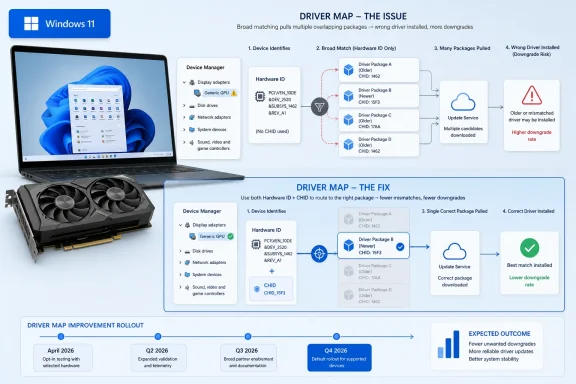 Microsoft Is Fixing the Map, Not the Driver
The important thing about this story is that Microsoft is not promising that every bad graphics-driver experience on Windows 11 will disappear. It is narrowing the blast radius of one particular failure mode: Windows Update offering a display driver to machines that match a broad hardware identifier but are not actually the right target for that driver. That sounds bureaucratic because it is, but the consequences have been anything but abstract for anyone who has watched a freshly installed AMD, Intel, or Nvidia driver get replaced after the next update scan.The old model leans heavily on hardware IDs, the identifiers Windows uses to match a device to driver packages. In principle, that is sensible. A GPU has a vendor, a device ID, and often subsystem identifiers that describe the board or OEM implementation. In practice, those identifiers can still be broad enough that Windows Update decides a driver package is the best-ranked match even when the user has installed a newer or more appropriate package from a GPU vendor or PC maker.
Microsoft’s reported change adds more context to the targeting decision. Instead of relying only on a four-part hardware ID ranking approach, the new system uses a two-part hardware ID together with computer hardware IDs, or CHIDs, which are meant to describe the specific PC model or hardware configuration. The point is not that CHIDs are magic. The point is that Windows Update can make a more informed decision before pushing a display driver to a machine that merely looks compatible from a distance.
That distinction is where the story becomes more interesting than a simple “Microsoft fixes bug” headline. The company is not giving up on automatic driver delivery. It is trying to make the automatic system less blunt.
The Downgrade Problem Was Always a Ranking Problem
Windows Update driver downgrades feel personal because they happen after the user has made an explicit choice. You install a newer Intel graphics package to fix a display glitch, or grab Nvidia’s latest release for a game profile, or deploy a validated AMD driver across a fleet, and then Windows Update silently decides that its catalog entry should take precedence. The machine still boots, Device Manager still shows a display adapter, and from Windows’ perspective the driver installation may have succeeded. From the user’s perspective, the operating system just undid their work.That is why the word downgrade carries so much weight here. A driver can be older in version number, less capable for a workload, missing a vendor control panel component, or simply not the package the owner intended to run. In some OEM scenarios, the Windows Update catalog may contain a driver that was appropriate for a laptop model at launch but stale compared with later packages from Intel, AMD, Nvidia, or the OEM itself.
Driver ranking is supposed to prevent chaos. Windows needs a deterministic way to decide which package wins when multiple drivers claim compatibility with the same device. But ranking becomes dangerous when the matching criteria are too broad or when a catalog entry intended for one slice of hardware is exposed to a wider population than intended.
That is the core of the reported Microsoft change. The company appears to be addressing not the existence of driver ranking, but the targeting granularity that feeds it. If Windows Update can better distinguish one PC configuration from another, fewer machines should be offered a driver merely because the GPU hardware ID looks close enough.
OEM Convenience Became the User’s Problem
The ugliest cases tend to appear on OEM machines, especially laptops and compact desktops where the GPU is part of a carefully integrated platform. An Intel graphics driver on a thin-and-light notebook is not just a generic display component. It may intersect with display outputs, sleep states, panel self-refresh, hybrid graphics, firmware assumptions, vendor utilities, and power-management tuning.OEMs therefore have good reasons to publish drivers through Windows Update. A mass-market laptop buyer should not need to know what an INF file is to keep a display adapter working. If a clean Windows installation can automatically acquire a functional graphics driver, that is a real benefit. For businesses, Windows Update can also provide a predictable baseline across devices that would otherwise rely on manual downloads from support portals.
But the same mechanism becomes hostile when it overrides a more appropriate driver. Enthusiasts feel it first because they update aggressively, chase bug fixes, and notice small regressions in performance or features. Administrators feel it differently: one bad driver offer can turn into a support incident across dozens or thousands of endpoints, especially if the change lands during a normal patch window and looks like any other routine update.
The problem is not that Windows Update distributes drivers. The problem is that Microsoft has spent years telling users that Windows should be a managed, continuously serviced platform while still leaving too many driver decisions opaque. When the system is right, nobody notices. When it is wrong, users discover that the most important driver on their PC may be governed by a catalog ranking process they cannot easily see, audit, or override.
CHIDs Are a Scalpel Where Windows Update Used a Net
The new targeting approach is best understood as a move from “this GPU is compatible” to “this GPU in this kind of machine is the intended target.” A hardware ID can say that a driver supports a given graphics device. A CHID can help describe the computer context around that device. Together, they offer Microsoft and hardware partners a better way to prevent an OEM-tailored display package from wandering onto machines where it is technically installable but operationally wrong.That matters because display drivers are unusually sensitive. A storage, network, or audio driver can certainly break a system, but GPU drivers sit in the user’s face. They affect login, browser acceleration, external monitors, gaming, video playback, color management, sleep and resume, and sometimes whether the desktop appears at all. A bad match can look like a Windows problem, a GPU problem, an app problem, or a monitor problem depending on where the failure surfaces.
Using multiple identifiers also aligns with the messy reality of PC hardware. Two machines can share the same GPU device ID while differing in firmware, display panel, dock behavior, thermal design, or OEM validation history. A broad driver match may be technically valid for both. A good driver offer should still know the difference.
The catch is that this only works if the driver packages are published with the right targeting metadata and if Microsoft’s pipeline enforces it consistently. Better identifiers do not automatically fix old catalog entries. They improve future targeting decisions for drivers that use the new system.
The Partial Fix Is the Most Honest Part of the Story
The caveat in the reporting is crucial: the change is expected to apply to new display driver submissions targeting new devices, while existing catalog drivers may still be capable of triggering downgrades on older systems. That means this is not a clean break with the past. It is a gradual correction to the distribution pipeline.That may frustrate users who want an immediate end to the problem, but it is probably how Windows plumbing has to change. The Windows Update catalog is vast, full of packages from Microsoft and hardware partners, spanning years of devices and release practices. Retrofitting every existing display driver package with perfect targeting would be risky, labor-intensive, and politically complicated. Removing or narrowing old drivers too aggressively could strand machines that rely on them.
So Microsoft appears to be choosing the safer path: make the future less wrong first, then let the old mess age out or be cleaned up more selectively. That is defensible engineering, but it leaves a gap between “Microsoft has acknowledged the issue” and “my laptop will stop reinstalling the old driver tomorrow.” For users already affected, the fix may arrive more as a reduction in new incidents than a cure for every existing one.
That is why the April-to-Q4 timeline matters. An initial deployment in April 2026 suggests Microsoft is already moving the machinery. A broader Q4 target suggests partner adoption, catalog behavior, and staged rollout still need time. Driver distribution is not just a Windows feature; it is an ecosystem contract among Microsoft, OEMs, silicon vendors, and update policy.
This Is Not Cloud-Initiated Driver Recovery
Microsoft’s driver story in 2026 now has two separate threads that are easy to blur together. One is the reported targeting change aimed at preventing inappropriate GPU driver offers. The other is Cloud-Initiated Driver Recovery, a reliability feature designed to help recover from bad driver updates after they cause trouble.Those are related only in the broad sense that both concern driver reliability. Prevention and recovery are different disciplines. Better targeting tries to avoid sending the wrong driver to the wrong machine. Recovery tries to get a machine back to a usable state when a driver or update has already caused damage.
For administrators, that distinction is not academic. A rollback mechanism is welcome, but it does not remove the operational cost of a bad deployment. A user still loses time. A help desk still receives tickets. A remote worker may still be locked out of a productive session. In a managed environment, a reliable prevention system is worth far more than an elegant emergency repair process.
Still, the two efforts point in the same direction. Microsoft seems to recognize that drivers are no longer peripheral to the Windows servicing experience. They are part of the platform’s reliability reputation. If Windows Update can break graphics performance, black-screen a system, or undo a vendor-installed driver, then the update system itself becomes the suspect.
Windows 11 Made the Tension Harder to Ignore
Windows has always had driver drama, but Windows 11 sharpened the conflict because the operating system leans so heavily into continuous servicing. The platform expects regular cumulative updates, security hardening, feature enablement, Store component updates, firmware updates on some devices, and driver updates flowing through overlapping channels. That is tolerable only if the machinery is predictable.GPU drivers are the place where predictability often collapses. Gamers install day-one drivers for new titles. Creators rely on workstation or studio drivers for application stability. Laptop owners depend on OEM-tuned packages for battery life and external display behavior. Enterprises may freeze driver versions for months while validating app compatibility. Windows Update, meanwhile, has historically behaved as if the “best” driver is the one that wins its ranking process.
That mismatch creates a trust problem. Users do not merely object to bugs; they object to the feeling that Windows is making a decision they did not authorize. The more Microsoft hides complexity in the name of simplicity, the more disruptive it feels when the hidden system chooses badly.
The Windows 11 era has also made display-driver quality more visible because the GPU is no longer just for games. Browser rendering, video conferencing, AI acceleration, media encoding, HDR, multiple high-refresh displays, and power management all depend on graphics-driver behavior. A regression that once might have affected a game can now affect everyday work.
The Enterprise Lesson Is Control, Not Panic
For managed IT, the lesson is not to disable every driver update forever. That is a tempting reaction, and in some environments it is already policy, but it can create its own security and reliability debt. Drivers fix real bugs. They close vulnerabilities. They improve compatibility with new Windows builds. A frozen driver estate can be as risky as an uncontrolled one.The better lesson is that driver governance belongs in the same category as patch governance. Administrators need rings, deferrals, validation devices, reporting, and rollback plans. They also need to know which channel owns a driver: Windows Update, the OEM tool, the GPU vendor’s installer, a management platform, or a manually staged package.
Microsoft’s targeting change helps only if the organization’s update process can take advantage of it. If a fleet is already configured to accept drivers broadly from Windows Update with little validation, narrower targeting reduces risk but does not eliminate it. If a fleet blocks driver updates and deploys curated packages, the change may matter less day to day but still improves the baseline for unmanaged or newly provisioned devices.
The larger issue is visibility. Windows should make it easier to see why a driver was offered, what identifiers matched, what package it replaced, and whether it came from Microsoft, an OEM, or a silicon vendor. Administrators can work with complexity. What they cannot tolerate is a black box that changes a graphics stack and leaves only a vague update history entry behind.
Enthusiasts Still Need Defensive Habits
For Windows enthusiasts, this development is a reason for cautious optimism, not a reason to stop paying attention. If you routinely install GPU drivers directly from AMD, Intel, or Nvidia, the same old defensive habits still apply. Watch the driver version after Patch Tuesday. Keep a copy of a known-good installer. Know how to roll back a driver in Device Manager. If Windows Update repeatedly reinstalls an unwanted package, use the available policy and troubleshooting tools to block that specific driver rather than tearing out the entire update mechanism.The frustrating part is that none of this should be necessary for ordinary users. A modern operating system should be able to distinguish between a security update, a firmware update, a generic compatibility driver, and a user-chosen graphics package. It should not require a gamer or sysadmin to babysit version numbers after every scan.
But until the new targeting model is broadly in place, users affected by downgrades should assume the old behavior can still recur. That is especially true on older OEM systems, where legacy catalog entries may remain in circulation. The new system may reduce future mistakes without retroactively cleaning up every bad match from the Windows Update past.
Microsoft’s Quiet Admission Changes the Argument
The most consequential part of this episode is not the technical mechanism. It is the acknowledgment that the complaint was real. For years, driver downgrade reports have circulated in forums, Reddit threads, vendor communities, and support channels, often treated as one-off weirdness or user error. Microsoft’s reported move reframes the issue as a systemic targeting problem, not merely a collection of isolated anecdotes.That matters because it shifts responsibility back toward the platform. Users can install the wrong driver, and vendor installers can misbehave, but Windows Update is Microsoft’s trust surface. If it delivers a driver, Microsoft owns part of the outcome, even when the package originated with an OEM or hardware partner.
The fix also exposes a broader truth about Windows compatibility: “supported” is not the same as “appropriate.” A driver package can match the hardware and still be the wrong choice for a particular machine at a particular time. Windows Update’s job is not simply to find a technically installable package. It is to avoid surprising the user with a worse one.
That is a high bar, but Microsoft set it by making Windows Update central to the PC experience. Automatic servicing only works when the service is smarter than the people it is replacing. In the case of GPU driver downgrades, it has too often failed that test.
The Fix Arrives Late, but the Direction Is Right
It is fair to ask why this took so long. Windows 11 launched in 2021, and GPU driver downgrade complaints have been part of the background noise ever since. The PC ecosystem is complex, but five years is a long time for a problem that can undo user-installed drivers and disrupt high-value workloads.At the same time, the proposed direction is technically plausible. More precise targeting is the right answer to an overbroad distribution problem. A giant new toggle labeled “never touch my GPU driver” might satisfy enthusiasts, but it would not solve the catalog hygiene problem for mainstream devices. It would also push more responsibility onto users who do not know which drivers they need.
The best outcome is boring: fewer bad driver offers, fewer surprise downgrades, fewer forum threads where the solution is to fight Windows Update itself. That is the kind of platform improvement users rarely celebrate because its success is measured in incidents that never happen.
The risk is that Microsoft stops at “good enough.” A partial targeting fix for new submissions is useful, but it should be paired with better catalog cleanup, clearer update history, stronger administrative controls, and more transparent partner publishing rules. Otherwise, the same structural problem will reappear in a different costume.
The New Driver Rulebook Windows Users Should Actually Remember
This is not the end of Windows GPU driver drama, but it does change how the next phase should be judged. The question is no longer whether Microsoft knows the downgrade problem exists. The question is whether the new targeting model measurably reduces it without creating new blind spots.- Microsoft’s reported fix changes driver targeting logic so Windows Update can use both hardware IDs and computer hardware IDs when deciding which PCs should receive certain display drivers.
- The rollout is expected to begin for some Windows 11 systems around April 2026, with broader deployment targeted by the fourth quarter of 2026.
- The change is partial because it appears focused on new display driver submissions for new devices, while older catalog drivers may still cause unwanted downgrades on existing systems.
- The issue is most painful on OEM PCs, where Windows Update may reinstall an older vendor-published graphics driver over a newer package chosen by the user or administrator.
- Cloud-Initiated Driver Recovery is a separate safety mechanism and should not be confused with the targeting fix that aims to prevent bad driver offers in the first place.
- Enthusiasts and IT administrators should continue monitoring GPU driver versions until Microsoft’s new targeting system has been widely adopted and proven in the field.
Source: Tom's Hardware Microsoft is working on a fix to downgraded GPU drivers in Windows Update — new system uses multiple IDs
