

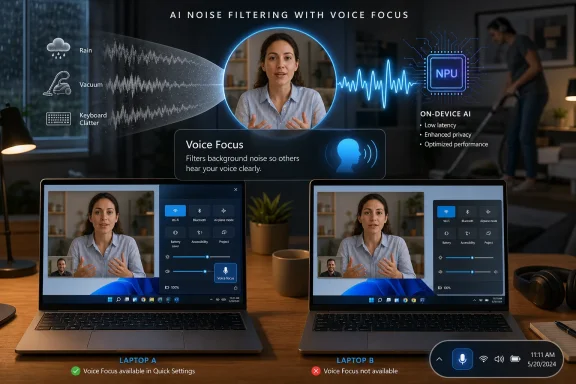
PCWorld’s June 2026 test of Windows 11 Voice Focus found that Microsoft’s AI-powered microphone filtering can dramatically reduce background noise during calls, but availability remains inconsistent across PCs because the feature depends on supported hardware, drivers, and OEM enablement. That makes Voice Focus a near-perfect example of Windows AI in 2026: useful, practical, and still weirdly hard to find. Microsoft has spent years selling the idea of the “AI PC,” yet one of its clearest everyday benefits may be hiding behind a tiny microphone icon in Quick Settings. The result is not just a feature-discovery problem, but a trust problem for the whole Copilot+ era.
The most persuasive AI features in Windows are rarely the ones that arrive with the loudest keynote music. They are the small, ambient improvements that remove friction from work users already do: joining a call, sharing a webcam, dictating a sentence, finding a file, reading a screen. Voice Focus belongs in that category because it is not asking users to change habits or learn a new conversational interface. It simply tries to make a bad microphone situation sound less bad.
That matters because the AI pitch around Windows 11 has often drifted toward abstraction. Copilot, Recall, agents, vision, semantic search, and natural-language control all promise a future where the PC becomes more context-aware and assistant-like. Some of those ideas are interesting; some are controversial; some remain unfinished. But a feature that suppresses fan noise, rain, appliances, keyboard clatter, and domestic chaos during a Teams or Zoom call is not speculative. It solves a problem people recognize immediately.
PCWorld’s finding is therefore more damaging than a simple “hidden gem” story might suggest. Voice Focus appears to work particularly well against steady background noise, and it can preserve voice quality better than some vendor-specific audio filters. Yet the author’s experience also shows the feature surfacing almost accidentally on a Surface Laptop 8 for Business after being absent from other PCs. That is the Windows AI story in miniature: the good stuff exists, but the path to it runs through silicon, firmware, drivers, rollout policy, OEM choices, and luck.
Microsoft does not lack the pieces. Windows Studio Effects already gathers AI-enhanced camera and microphone processing into a recognizable system feature. Microsoft’s own documentation describes Voice Focus as a microphone effect meant to filter background noise so a speaker’s voice comes through clearly during video calls. The problem is that the experience still feels less like an operating-system capability and more like a feature negotiated between Windows, the device maker, and whatever audio stack happened to ship with the laptop.
Voice Focus exposes that ambiguity with unusual clarity. If it appears in Quick Settings under Windows Studio Effects, it feels like a native Windows 11 feature. If it does not appear, the user has few obvious clues. Is the NPU missing? Is the NPU too weak? Is the driver absent? Did the OEM decline support? Is Windows waiting for a staged rollout? Is the feature present under another name, such as Voice Clarity, in a device-specific audio panel?
That confusion is not academic. Microsoft has conditioned users to expect Windows features to arrive through Windows Update, but modern PC capabilities increasingly depend on the stack below the OS. Neural processing units are marketed in TOPS; camera pipelines depend on image signal processors; audio effects may rely on Audio Processing Objects; OEMs may bundle their own AI noise suppression; and app behavior can differ depending on whether it uses Windows audio processing modes. The user, meanwhile, just wants the vacuum cleaner to disappear from a conference call.
The phrase “laptop lottery” is apt because the user cannot reliably infer support from the Windows version alone. Even buying a recent AI-capable PC may not guarantee the same set of controls across brands. A Surface system may expose the Microsoft implementation; an Asus machine may offer its own excellent filtering; another laptop with a capable NPU may never show the toggle at all. For enthusiasts, this is annoying. For IT departments trying to standardize fleets, it is a procurement and support headache.
Microsoft’s challenge is that Windows has historically been both a platform and a compromise. The company wants to offer Apple-like, polished, system-level AI features while preserving the OEM diversity that defines the PC market. Voice Focus shows how difficult that balance becomes when a feature depends not merely on CPU architecture or OS version, but on a chain of optional hardware acceleration, firmware support, model deployment, driver certification, and vendor participation.
That makes Voice Focus a more convincing Windows AI feature than many of Microsoft’s headline experiments. It works at the edge of the user’s attention. It does not require sending a private document into a chat interface. It does not ask for permission to remember everything on screen. It does not insert a new personality between the user and the machine. It performs a bounded job, locally or near-locally, with an immediately testable result.
PCWorld’s tests underline both the strength and the limitation of that approach. Against recorded rainfall, Voice Focus reportedly did an almost perfect job, even at high volume and with the noise source behind the speaker. Against music, the system was more uneven, sometimes locking onto the wrong audio pattern before identifying the human voice. That distinction is important because “noise” is not one thing. A steady broadband sound is easier to suppress than music with vocals, harmonics, rhythm, and competing speech-like elements.
Even so, the performance profile is promising. If Voice Focus can remove common household and office noise while preserving a more natural voice than some third-party filters, it deserves to be treated as a flagship quality-of-life feature. The irony is that Windows users are more likely to hear about Copilot buttons and AI agents than a microphone effect that might actually improve their next meeting.
This is where Microsoft’s AI messaging becomes self-defeating. The company has spent enormous energy telling users that AI will transform computing. But transformation often arrives first as subtraction: fewer distractions, fewer bad recordings, fewer awkward apologies at the start of calls. Voice Focus is compelling precisely because it is modest.
Yet the user experience still feels like a side door into the AI PC. The controls live in Quick Settings, in Settings, and sometimes in device-specific utilities. They may appear only when compatible hardware is detected. They may differ between laptops. They may interact with app-level noise suppression in Teams, Zoom, Discord, Google Meet, or WebRTC-based browser sessions. The UI gives users a toggle, but the ecosystem gives them uncertainty.
Microsoft has made progress here. Putting Windows Studio Effects in the system tray area gives users a central place to find camera and microphone effects. NPU monitoring improvements in Task Manager also help make AI hardware less invisible. If users can see an NPU being used, the “AI PC” stops being only a sticker on the palm rest.
But the feature still suffers from weak discoverability. A user who does not know to open Quick Settings and look for a Studio Effects flyout may never encounter Voice Focus. A user who searches Settings may find camera effects but miss audio effects. A user whose device lacks support may not receive a clear explanation of why. Windows is still too comfortable with silent absence as a form of communication.
Silent absence is especially corrosive in the AI era. If Microsoft wants people to believe that a new class of PCs provides new capabilities, the operating system has to explain what is present, what is missing, and why. A greyed-out control with a plain-English requirement would do more for user trust than another animated Copilot prompt.
Voice Focus gives the NPU a purpose that can be heard. PCWorld observed the feature using a meaningful slice of a 50 TOPS NPU during testing, while avoiding a major performance hit. That is exactly the kind of workload AI accelerators were supposed to handle: persistent, low-latency, power-efficient processing that improves an everyday experience without making the rest of the PC feel slower.
This is a stronger argument for AI silicon than many generative-AI demos. Running a local image model can be impressive, but it is not a daily requirement for most users. Summarizing documents may be useful, but it raises privacy, accuracy, and workflow questions. Cleaning up microphone input during calls is a universal enough need that users can understand the hardware value immediately.
For IT buyers, the implication is practical. NPUs should not be evaluated only as future-proofing for whatever Microsoft and Intel or AMD announce next year. They should be evaluated as enablers of specific endpoint experiences: better conferencing, lower battery impact, local media processing, improved accessibility, and eventually richer on-device security analysis. Voice Focus is one of the first features that makes that argument without needing a slide deck.
The catch is that a capability users can understand must also be a capability buyers can specify. “Has an NPU” is not enough. “Supports Windows Studio Effects including Voice Focus” is closer. “Supports the required Microsoft driver stack and exposes controls consistently in Windows 11” is better still. The AI PC market will mature only when those distinctions become part of normal procurement language.
There is nothing inherently wrong with OEM differentiation. Asus, Dell, HP, Lenovo, and others should compete on microphones, cameras, thermal design, speakers, and software tuning. But when a feature is presented through a Windows system surface, Microsoft needs to define the baseline more aggressively. Otherwise, users will blame Windows for missing features and OEMs for inconsistent ones, and both criticisms will be fair.
The audio stack is particularly messy because multiple layers can try to solve the same problem. A laptop vendor may provide hardware-level beamforming. The audio driver may include enhancements. Windows may expose Voice Focus or Voice Clarity. Teams or Zoom may apply their own noise suppression. A headset may add another filter. Stack enough “smart” processing together and the result can be worse than any single layer, especially for musicians, podcasters, streamers, or anyone using audio software that expects clean input.
This is why system-level AI features need transparency. Users should be able to see what is processing their microphone, where it is running, and which apps are affected. They should be able to disable it without spelunking through Device Manager, vendor utilities, and app settings. Windows has spent years modernizing privacy indicators for microphone and camera access; AI audio processing deserves the same clarity.
Microsoft also has to avoid the temptation to treat OEM inconsistency as someone else’s problem. If a feature appears in Microsoft’s Windows AI story, the company owns the user expectation. The PC market can remain open without becoming opaque.
This does not mean Copilot and agentic features are pointless. It means Microsoft has sometimes over-indexed on visible AI instead of valuable AI. The company wants AI to be a destination: a button, a pane, a prompt box, a branded experience. But the operating system’s most defensible AI work may be infrastructural: cleaning audio, improving cameras, indexing local content, summarizing notifications, translating captions, and helping accessibility tools run with less latency and more privacy.
There is a lesson here from smartphone photography. Computational photography became indispensable not because users wanted to manage neural networks, but because their pictures looked better. Night mode, portrait blur, HDR, stabilization, and face detection became normal camera behavior. The AI disappeared into the product.
Windows needs the same discipline. If AI makes the PC better, it should often feel like the PC simply got better. Voice Focus points in that direction. The tragedy is that Microsoft has not yet made the feature feel universal, obvious, or dependable enough to carry the story.
A better Windows AI strategy would promote fewer moonshots and harden more utilities. Make the microphone better. Make the webcam better. Make search better. Make dictation better. Make accessibility better. Make battery life better while these features run. Then tell users, plainly, which PCs can do which things.
The first concern is fleet consistency. If an organization buys a mix of models across refresh cycles, users may have different conferencing experiences despite running the same Windows 11 build. That complicates support scripts and training materials. It also makes it harder for IT to promise executives that the new AI PC rollout will produce measurable improvements.
The second concern is policy. Microphone processing touches privacy, compliance, accessibility, and recording quality. Organizations may want Voice Focus enabled by default for call centers and sales teams, disabled for audio production teams, or controlled centrally for regulated environments. If the feature is exposed inconsistently across devices, policy becomes harder to enforce.
The third concern is troubleshooting. When a user reports distorted audio, the cause could be the app, the headset, the driver, Windows Studio Effects, a vendor utility, or an interaction between several of them. AI processing adds another invisible variable. Without clear observability, administrators are left toggling settings and hoping the problem disappears.
This is where Microsoft’s AI PC push needs enterprise-grade plumbing. Group Policy and Intune visibility matter. Hardware inventory should expose Studio Effects support. Task Manager’s NPU visibility is a start, but administrators need fleet-level reporting. The AI features that matter most at scale are not the flashiest ones; they are the ones that can be deployed, audited, disabled, and explained.
That may seem like pedantry, but names are how users build mental models. If one setting is called Voice Clarity in one place and Voice Focus in another, users reasonably wonder whether they are the same feature, related features, or different generations of the same idea. If a Surface spec sheet says the microphones include voice focus, users may not know whether to expect a Windows toggle. If Microsoft documentation says Studio Effects require an NPU, users may not know how older Voice Clarity support fits into the story.
This is the kind of ambiguity Microsoft can fix without inventing new AI. Windows should present a unified audio enhancement page that explains available microphone effects, their hardware requirements, and their current state. If the effect runs on the NPU, say so. If it runs on CPU, say so. If the app has disabled or bypassed Windows audio processing, say so.
The company should also be careful not to let branding outrun behavior. Users will forgive technical limitations if those limitations are clear. They are less forgiving when a feature seems to vanish, rename itself, or depend on undocumented combinations of hardware and drivers.
In a mature AI PC ecosystem, “Voice Focus” should mean one thing to a buyer, a user, and an administrator. Right now, it still feels like a family resemblance among several overlapping implementations.
Windows has long had a discoverability problem. The operating system contains decades of features, legacy panels, new Settings pages, hidden menus, context actions, and OEM overlays. AI features have been layered onto that already crowded map. If Microsoft wants users to value them, it cannot rely on accidental discovery.
A good discovery flow would be contextual. The first time a user joins a call on a supported PC, Windows could unobtrusively offer to reduce background noise. The microphone privacy flyout could show whether Voice Focus is active. Settings search for “noise,” “microphone,” “calls,” “AI,” and “Studio Effects” should all lead to the same place. Unsupported systems should explain the missing requirement instead of leaving users to search forums.
The same principle applies beyond Voice Focus. The AI PC cannot be a scavenger hunt. If features are local, hardware-accelerated, privacy-preserving, or battery-efficient, Windows should say so in ordinary language. If they require a Copilot+ PC or a 40-plus TOPS NPU, Windows should say that too. The operating system should become the interpreter between Microsoft’s AI roadmap and the user’s actual machine.
Until then, Windows AI will continue to feel uneven. Some users will experience genuinely useful enhancements. Others will see marketing, missing toggles, and forum threads full of speculation. That gap is where skepticism grows.
But that creates a delicate problem. When Surface gets the cleanest version of Windows AI, the rest of the ecosystem can look second-class. OEM partners may have excellent alternatives, as PCWorld’s comparison with Asus noise filtering suggests. Yet from the user’s perspective, a Windows feature that appears reliably on Surface and inconsistently elsewhere reinforces the sense that Microsoft cannot fully control its own platform experience.
Apple does not face this exact problem because it controls the hardware, OS, silicon roadmap, and feature exposure. Microsoft’s answer has traditionally been scale and choice. That answer still matters. But AI features that depend on tight hardware-software integration make the comparison harsher.
Surface can serve as a model, but Microsoft has to make the model portable. OEMs need clear requirements, strong driver support, and incentives to expose common Windows controls even when they add their own enhancements. Users should not have to buy Surface to get the version of Windows Microsoft demonstrates.
The PC ecosystem can tolerate differentiation. It cannot thrive on mystery.
This kind of messaging would also help rehabilitate the AI PC label. Many users have grown wary of AI branding because it often arrives attached to subscriptions, data questions, or intrusive UI. Voice Focus is different. It is a local enhancement to a familiar workflow. If Microsoft wants to win back skeptical Windows enthusiasts, it should lead with features like this.
The company also needs to stop treating practical AI as a secondary story. A cleaner microphone may not excite investors the way autonomous agents do, but it improves daily computing more reliably. The Windows team has a long history of under-selling the mundane improvements that make the OS better while over-selling strategic visions that arrive half-formed. Voice Focus deserves the opposite treatment: less hype, more availability.
For developers and app makers, the lesson is similar. The most successful AI integrations will often be those that fit into existing user intent. Users opened a meeting app because they wanted to communicate. Voice Focus improves that action. It does not redirect them into a new AI workflow.
That is the version of AI Windows can sell without exhausting its audience.
The practical lessons are already visible:
The next phase of Windows AI will not be won by whichever demo looks most futuristic onstage. It will be won by the features users can find, understand, trust, and hear working the first time they need them. Voice Focus proves Microsoft has some of those features already; now Windows has to stop hiding them like an Easter egg and start treating them like part of the operating system’s basic promise.
 Microsoft’s Best AI Demo Is Not a Chatbot
The most persuasive AI features in Windows are rarely the ones that arrive with the loudest keynote music. They are the small, ambient improvements that remove friction from work users already do: joining a call, sharing a webcam, dictating a sentence, finding a file, reading a screen. Voice Focus belongs in that category because it is not asking users to change habits or learn a new conversational interface. It simply tries to make a bad microphone situation sound less bad.That matters because the AI pitch around Windows 11 has often drifted toward abstraction. Copilot, Recall, agents, vision, semantic search, and natural-language control all promise a future where the PC becomes more context-aware and assistant-like. Some of those ideas are interesting; some are controversial; some remain unfinished. But a feature that suppresses fan noise, rain, appliances, keyboard clatter, and domestic chaos during a Teams or Zoom call is not speculative. It solves a problem people recognize immediately.
PCWorld’s finding is therefore more damaging than a simple “hidden gem” story might suggest. Voice Focus appears to work particularly well against steady background noise, and it can preserve voice quality better than some vendor-specific audio filters. Yet the author’s experience also shows the feature surfacing almost accidentally on a Surface Laptop 8 for Business after being absent from other PCs. That is the Windows AI story in miniature: the good stuff exists, but the path to it runs through silicon, firmware, drivers, rollout policy, OEM choices, and luck.
Microsoft does not lack the pieces. Windows Studio Effects already gathers AI-enhanced camera and microphone processing into a recognizable system feature. Microsoft’s own documentation describes Voice Focus as a microphone effect meant to filter background noise so a speaker’s voice comes through clearly during video calls. The problem is that the experience still feels less like an operating-system capability and more like a feature negotiated between Windows, the device maker, and whatever audio stack happened to ship with the laptop.
The Laptop Lottery Is the Real Product
Windows users are accustomed to variation. One machine has a better touchpad, another has a better webcam, another ships with a control center utility that looks like it was designed during the Windows 8 era and never emotionally recovered. But AI hardware has added a new kind of fragmentation: the feature may be advertised as part of Windows, explained as part of Windows, and surfaced through Windows UI, while still not being present on a given Windows PC.Voice Focus exposes that ambiguity with unusual clarity. If it appears in Quick Settings under Windows Studio Effects, it feels like a native Windows 11 feature. If it does not appear, the user has few obvious clues. Is the NPU missing? Is the NPU too weak? Is the driver absent? Did the OEM decline support? Is Windows waiting for a staged rollout? Is the feature present under another name, such as Voice Clarity, in a device-specific audio panel?
That confusion is not academic. Microsoft has conditioned users to expect Windows features to arrive through Windows Update, but modern PC capabilities increasingly depend on the stack below the OS. Neural processing units are marketed in TOPS; camera pipelines depend on image signal processors; audio effects may rely on Audio Processing Objects; OEMs may bundle their own AI noise suppression; and app behavior can differ depending on whether it uses Windows audio processing modes. The user, meanwhile, just wants the vacuum cleaner to disappear from a conference call.
The phrase “laptop lottery” is apt because the user cannot reliably infer support from the Windows version alone. Even buying a recent AI-capable PC may not guarantee the same set of controls across brands. A Surface system may expose the Microsoft implementation; an Asus machine may offer its own excellent filtering; another laptop with a capable NPU may never show the toggle at all. For enthusiasts, this is annoying. For IT departments trying to standardize fleets, it is a procurement and support headache.
Microsoft’s challenge is that Windows has historically been both a platform and a compromise. The company wants to offer Apple-like, polished, system-level AI features while preserving the OEM diversity that defines the PC market. Voice Focus shows how difficult that balance becomes when a feature depends not merely on CPU architecture or OS version, but on a chain of optional hardware acceleration, firmware support, model deployment, driver certification, and vendor participation.
Voice Focus Wins Because It Does Not Ask Users to Believe in AI
The most interesting thing about Voice Focus is that it does not need to be branded as AI for users to value it. In fact, it may be better off if it is not. People do not want “AI-powered microphone intelligence.” They want to sound professional when a dog barks, a dishwasher runs, a neighbor starts landscaping, or a child discovers percussion.That makes Voice Focus a more convincing Windows AI feature than many of Microsoft’s headline experiments. It works at the edge of the user’s attention. It does not require sending a private document into a chat interface. It does not ask for permission to remember everything on screen. It does not insert a new personality between the user and the machine. It performs a bounded job, locally or near-locally, with an immediately testable result.
PCWorld’s tests underline both the strength and the limitation of that approach. Against recorded rainfall, Voice Focus reportedly did an almost perfect job, even at high volume and with the noise source behind the speaker. Against music, the system was more uneven, sometimes locking onto the wrong audio pattern before identifying the human voice. That distinction is important because “noise” is not one thing. A steady broadband sound is easier to suppress than music with vocals, harmonics, rhythm, and competing speech-like elements.
Even so, the performance profile is promising. If Voice Focus can remove common household and office noise while preserving a more natural voice than some third-party filters, it deserves to be treated as a flagship quality-of-life feature. The irony is that Windows users are more likely to hear about Copilot buttons and AI agents than a microphone effect that might actually improve their next meeting.
This is where Microsoft’s AI messaging becomes self-defeating. The company has spent enormous energy telling users that AI will transform computing. But transformation often arrives first as subtraction: fewer distractions, fewer bad recordings, fewer awkward apologies at the start of calls. Voice Focus is compelling precisely because it is modest.
Windows Studio Effects Still Feels Like a Side Door
Windows Studio Effects should be one of the cleanest stories in Windows 11. It bundles camera effects such as background blur, portrait blur, automatic framing, and eye contact with microphone processing such as Voice Focus. These are easy to understand, broadly useful, and well matched to NPUs because they can run continuously without hammering the CPU or GPU.Yet the user experience still feels like a side door into the AI PC. The controls live in Quick Settings, in Settings, and sometimes in device-specific utilities. They may appear only when compatible hardware is detected. They may differ between laptops. They may interact with app-level noise suppression in Teams, Zoom, Discord, Google Meet, or WebRTC-based browser sessions. The UI gives users a toggle, but the ecosystem gives them uncertainty.
Microsoft has made progress here. Putting Windows Studio Effects in the system tray area gives users a central place to find camera and microphone effects. NPU monitoring improvements in Task Manager also help make AI hardware less invisible. If users can see an NPU being used, the “AI PC” stops being only a sticker on the palm rest.
But the feature still suffers from weak discoverability. A user who does not know to open Quick Settings and look for a Studio Effects flyout may never encounter Voice Focus. A user who searches Settings may find camera effects but miss audio effects. A user whose device lacks support may not receive a clear explanation of why. Windows is still too comfortable with silent absence as a form of communication.
Silent absence is especially corrosive in the AI era. If Microsoft wants people to believe that a new class of PCs provides new capabilities, the operating system has to explain what is present, what is missing, and why. A greyed-out control with a plain-English requirement would do more for user trust than another animated Copilot prompt.
The NPU Finally Has a Job Users Can Understand
The NPU has been a hard sell because most people do not buy computers by counting neural operations per second. TOPS numbers make sense to chip vendors, OEM marketing teams, and a subset of enthusiasts. To everyone else, they sound like a benchmark in search of a purpose.Voice Focus gives the NPU a purpose that can be heard. PCWorld observed the feature using a meaningful slice of a 50 TOPS NPU during testing, while avoiding a major performance hit. That is exactly the kind of workload AI accelerators were supposed to handle: persistent, low-latency, power-efficient processing that improves an everyday experience without making the rest of the PC feel slower.
This is a stronger argument for AI silicon than many generative-AI demos. Running a local image model can be impressive, but it is not a daily requirement for most users. Summarizing documents may be useful, but it raises privacy, accuracy, and workflow questions. Cleaning up microphone input during calls is a universal enough need that users can understand the hardware value immediately.
For IT buyers, the implication is practical. NPUs should not be evaluated only as future-proofing for whatever Microsoft and Intel or AMD announce next year. They should be evaluated as enablers of specific endpoint experiences: better conferencing, lower battery impact, local media processing, improved accessibility, and eventually richer on-device security analysis. Voice Focus is one of the first features that makes that argument without needing a slide deck.
The catch is that a capability users can understand must also be a capability buyers can specify. “Has an NPU” is not enough. “Supports Windows Studio Effects including Voice Focus” is closer. “Supports the required Microsoft driver stack and exposes controls consistently in Windows 11” is better still. The AI PC market will mature only when those distinctions become part of normal procurement language.
OEM Freedom Is Becoming User Confusion
The PC ecosystem’s strength has always been choice. That same choice is now turning into a support burden. If one vendor ships its own superior noise cancellation, another relies on Microsoft’s Voice Focus, and a third offers neither despite similar silicon, Windows becomes less predictable at the exact moment Microsoft is trying to make it feel more intelligent.There is nothing inherently wrong with OEM differentiation. Asus, Dell, HP, Lenovo, and others should compete on microphones, cameras, thermal design, speakers, and software tuning. But when a feature is presented through a Windows system surface, Microsoft needs to define the baseline more aggressively. Otherwise, users will blame Windows for missing features and OEMs for inconsistent ones, and both criticisms will be fair.
The audio stack is particularly messy because multiple layers can try to solve the same problem. A laptop vendor may provide hardware-level beamforming. The audio driver may include enhancements. Windows may expose Voice Focus or Voice Clarity. Teams or Zoom may apply their own noise suppression. A headset may add another filter. Stack enough “smart” processing together and the result can be worse than any single layer, especially for musicians, podcasters, streamers, or anyone using audio software that expects clean input.
This is why system-level AI features need transparency. Users should be able to see what is processing their microphone, where it is running, and which apps are affected. They should be able to disable it without spelunking through Device Manager, vendor utilities, and app settings. Windows has spent years modernizing privacy indicators for microphone and camera access; AI audio processing deserves the same clarity.
Microsoft also has to avoid the temptation to treat OEM inconsistency as someone else’s problem. If a feature appears in Microsoft’s Windows AI story, the company owns the user expectation. The PC market can remain open without becoming opaque.
The Best Windows AI Feature Is Also a Rebuke to Copilot Theater
Voice Focus succeeds because it is humble. That makes it an implicit critique of the more theatrical parts of Microsoft’s AI push. Users have been told that AI will reinvent search, productivity, creativity, coding, and the operating system itself. Then one of the most useful examples turns out to be a microphone toggle many people never noticed.This does not mean Copilot and agentic features are pointless. It means Microsoft has sometimes over-indexed on visible AI instead of valuable AI. The company wants AI to be a destination: a button, a pane, a prompt box, a branded experience. But the operating system’s most defensible AI work may be infrastructural: cleaning audio, improving cameras, indexing local content, summarizing notifications, translating captions, and helping accessibility tools run with less latency and more privacy.
There is a lesson here from smartphone photography. Computational photography became indispensable not because users wanted to manage neural networks, but because their pictures looked better. Night mode, portrait blur, HDR, stabilization, and face detection became normal camera behavior. The AI disappeared into the product.
Windows needs the same discipline. If AI makes the PC better, it should often feel like the PC simply got better. Voice Focus points in that direction. The tragedy is that Microsoft has not yet made the feature feel universal, obvious, or dependable enough to carry the story.
A better Windows AI strategy would promote fewer moonshots and harden more utilities. Make the microphone better. Make the webcam better. Make search better. Make dictation better. Make accessibility better. Make battery life better while these features run. Then tell users, plainly, which PCs can do which things.
Enterprise IT Will Ask the Questions Consumers Skip
Home users may treat Voice Focus availability as a pleasant surprise. Enterprise administrators will not be so charitable. In managed environments, a feature that appears on some machines and not others becomes a ticket generator, a documentation problem, and a standardization risk.The first concern is fleet consistency. If an organization buys a mix of models across refresh cycles, users may have different conferencing experiences despite running the same Windows 11 build. That complicates support scripts and training materials. It also makes it harder for IT to promise executives that the new AI PC rollout will produce measurable improvements.
The second concern is policy. Microphone processing touches privacy, compliance, accessibility, and recording quality. Organizations may want Voice Focus enabled by default for call centers and sales teams, disabled for audio production teams, or controlled centrally for regulated environments. If the feature is exposed inconsistently across devices, policy becomes harder to enforce.
The third concern is troubleshooting. When a user reports distorted audio, the cause could be the app, the headset, the driver, Windows Studio Effects, a vendor utility, or an interaction between several of them. AI processing adds another invisible variable. Without clear observability, administrators are left toggling settings and hoping the problem disappears.
This is where Microsoft’s AI PC push needs enterprise-grade plumbing. Group Policy and Intune visibility matter. Hardware inventory should expose Studio Effects support. Task Manager’s NPU visibility is a start, but administrators need fleet-level reporting. The AI features that matter most at scale are not the flashiest ones; they are the ones that can be deployed, audited, disabled, and explained.
Voice Clarity, Voice Focus, and the Naming Fog
Part of the confusion around Microsoft’s audio AI comes from naming. Voice Clarity has appeared in Windows and Surface contexts for years, including on devices without NPUs. Voice Focus appears as part of Windows Studio Effects, with Microsoft describing it as a microphone effect for filtering background noise. Surface materials and support pages sometimes blur the line between hardware microphone branding, Windows effects, and device-specific capabilities.That may seem like pedantry, but names are how users build mental models. If one setting is called Voice Clarity in one place and Voice Focus in another, users reasonably wonder whether they are the same feature, related features, or different generations of the same idea. If a Surface spec sheet says the microphones include voice focus, users may not know whether to expect a Windows toggle. If Microsoft documentation says Studio Effects require an NPU, users may not know how older Voice Clarity support fits into the story.
This is the kind of ambiguity Microsoft can fix without inventing new AI. Windows should present a unified audio enhancement page that explains available microphone effects, their hardware requirements, and their current state. If the effect runs on the NPU, say so. If it runs on CPU, say so. If the app has disabled or bypassed Windows audio processing, say so.
The company should also be careful not to let branding outrun behavior. Users will forgive technical limitations if those limitations are clear. They are less forgiving when a feature seems to vanish, rename itself, or depend on undocumented combinations of hardware and drivers.
In a mature AI PC ecosystem, “Voice Focus” should mean one thing to a buyer, a user, and an administrator. Right now, it still feels like a family resemblance among several overlapping implementations.
The Search for the Toggle Says Everything About Windows AI
The most revealing part of PCWorld’s account is not the test result. It is the discovery story. The feature appeared while testing a new Surface business laptop, tucked behind a small microphone indicator in the Windows Studio Effects drop-down. This is not how a marquee platform capability should introduce itself.Windows has long had a discoverability problem. The operating system contains decades of features, legacy panels, new Settings pages, hidden menus, context actions, and OEM overlays. AI features have been layered onto that already crowded map. If Microsoft wants users to value them, it cannot rely on accidental discovery.
A good discovery flow would be contextual. The first time a user joins a call on a supported PC, Windows could unobtrusively offer to reduce background noise. The microphone privacy flyout could show whether Voice Focus is active. Settings search for “noise,” “microphone,” “calls,” “AI,” and “Studio Effects” should all lead to the same place. Unsupported systems should explain the missing requirement instead of leaving users to search forums.
The same principle applies beyond Voice Focus. The AI PC cannot be a scavenger hunt. If features are local, hardware-accelerated, privacy-preserving, or battery-efficient, Windows should say so in ordinary language. If they require a Copilot+ PC or a 40-plus TOPS NPU, Windows should say that too. The operating system should become the interpreter between Microsoft’s AI roadmap and the user’s actual machine.
Until then, Windows AI will continue to feel uneven. Some users will experience genuinely useful enhancements. Others will see marketing, missing toggles, and forum threads full of speculation. That gap is where skepticism grows.
The Surface Advantage Cuts Both Ways
It is not surprising that Voice Focus surfaced cleanly on a Surface machine. Surface has always been Microsoft’s reference line, even when it sells in smaller volumes than the broader Windows PC ecosystem. If Microsoft wants to showcase how Windows hardware and software should work together, Surface is the obvious place to do it.But that creates a delicate problem. When Surface gets the cleanest version of Windows AI, the rest of the ecosystem can look second-class. OEM partners may have excellent alternatives, as PCWorld’s comparison with Asus noise filtering suggests. Yet from the user’s perspective, a Windows feature that appears reliably on Surface and inconsistently elsewhere reinforces the sense that Microsoft cannot fully control its own platform experience.
Apple does not face this exact problem because it controls the hardware, OS, silicon roadmap, and feature exposure. Microsoft’s answer has traditionally been scale and choice. That answer still matters. But AI features that depend on tight hardware-software integration make the comparison harsher.
Surface can serve as a model, but Microsoft has to make the model portable. OEMs need clear requirements, strong driver support, and incentives to expose common Windows controls even when they add their own enhancements. Users should not have to buy Surface to get the version of Windows Microsoft demonstrates.
The PC ecosystem can tolerate differentiation. It cannot thrive on mystery.
The Feature Microsoft Should Be Shouting About Quietly
There is a paradox in Voice Focus. Microsoft should do more to promote it, but not in the bombastic way it has promoted some AI features. The pitch should be concrete: your laptop can make you sound clearer on calls, with less battery drain and less background noise, using local AI hardware when available. That is enough.This kind of messaging would also help rehabilitate the AI PC label. Many users have grown wary of AI branding because it often arrives attached to subscriptions, data questions, or intrusive UI. Voice Focus is different. It is a local enhancement to a familiar workflow. If Microsoft wants to win back skeptical Windows enthusiasts, it should lead with features like this.
The company also needs to stop treating practical AI as a secondary story. A cleaner microphone may not excite investors the way autonomous agents do, but it improves daily computing more reliably. The Windows team has a long history of under-selling the mundane improvements that make the OS better while over-selling strategic visions that arrive half-formed. Voice Focus deserves the opposite treatment: less hype, more availability.
For developers and app makers, the lesson is similar. The most successful AI integrations will often be those that fit into existing user intent. Users opened a meeting app because they wanted to communicate. Voice Focus improves that action. It does not redirect them into a new AI workflow.
That is the version of AI Windows can sell without exhausting its audience.
Microsoft’s Voice Filter Leaves a Clear Signal in the Noise
Voice Focus is not a reason by itself to replace a perfectly good laptop. It is, however, a reason to ask better questions before buying the next one. If Microsoft and OEMs want AI PCs to command attention, they need to make sure that the most useful AI features are not hidden, optional, or inconsistently named.The practical lessons are already visible:
- Users should check Quick Settings and Windows Studio Effects before assuming their PC lacks AI microphone processing.
- Buyers should verify specific support for Voice Focus or Windows Studio Effects rather than relying on generic AI PC branding.
- Administrators should treat AI audio processing as a fleet capability that needs inventory, policy, and troubleshooting documentation.
- Microsoft should make unsupported features explain themselves inside Windows instead of disappearing from the interface.
- OEMs should expose Windows-native controls even when they ship their own noise suppression tools.
- The most valuable Windows AI features may be the ones that quietly improve existing workflows rather than demand new ones.
The next phase of Windows AI will not be won by whichever demo looks most futuristic onstage. It will be won by the features users can find, understand, trust, and hear working the first time they need them. Voice Focus proves Microsoft has some of those features already; now Windows has to stop hiding them like an Easter egg and start treating them like part of the operating system’s basic promise.
References
- Primary source: PCWorld
Published: Wed, 17 Jun 2026 11:00:00 GMT
Windows 11’s best AI feature is the one you might never find | PCWorld
Microsoft’s AI noise filter makes Windows 11 video calls sound cleaner — assuming your laptop actually has it.www.pcworld.com - Official source: learn.microsoft.com
Windows Studio Effects Overview - Windows apps | Microsoft Learn
Windows Studio Effects applies AI effects that utilize the device camera (currently supported) or microphone (coming soon), including Background Blur, Background Segmentation, Eye Contact and Auto Framing, leveraging NPU to optimize performance and using standardized control interaces.learn.microsoft.com - Official source: support.microsoft.com
Windows Studio Effects - Microsoft Support
 support.microsoft.com
- Related coverage: livemint.com
‘Hey Copilot’: Microsoft gives Windows 11 a voice, vision and action with new AI features | Mint
As Windows 10 ends, Microsoft upgrades Windows 11 with Copilot AI, enabling voice commands and desktop sharing. Features like conversational interactions and task automation promise improved user engagement and efficiency. www.livemint.com
- Related coverage: windowscentral.com
Here are the 6 biggest features and improvements coming to Windows 11 in the June 2026 update on Tuesday | Windows Central
Microsoft's June 2026 Windows 11 update boosts responsiveness, adds Shared Audio, expands NPU metrics, and improves OOBE.www.windowscentral.com - Related coverage: techtimes.com
Windows 11's June 2026 Update Lands June 9 With Shared Audio And NPU Monitoring: The 6 Features Worth Knowing
Microsoft is set to begin rolling out the June 2026 update for Windows 11 on Tuesday, June 9, and unlike a routine security patch, this one carries a handful of consumer features worth turning on.www.techtimes.com
- Related coverage: techradar.com
- Related coverage: tomshardware.com
Microsoft wants you to talk to Windows 11 PCs again — Copilot gets 'conversational' input to complement your mouse and keyboard | Tom's Hardware
And Copilot is coming for your Windows 11 Search Barwww.tomshardware.com - Official source: news.microsoft.com
- Official source: cdn-dynmedia-1.microsoft.com
