

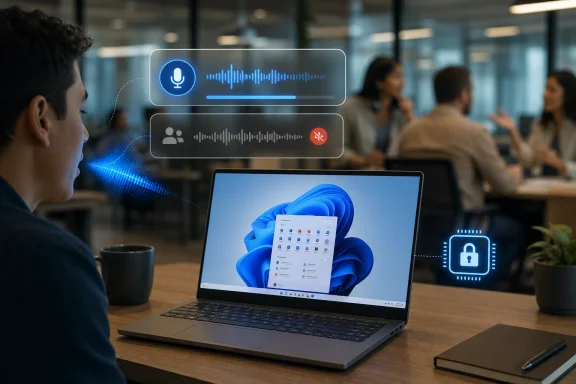
Microsoft began testing Voice Isolation for Voice Access in Windows 11 Insider Preview builds on May 22, 2026, adding an on-device noise and competing-speaker filter for users who control or dictate to their PCs by voice. The feature is arriving first in Microsoft’s Experimental channel alongside screen tint and improved braille display support, which makes this less a one-off speech tweak than a broader accessibility push. The important story is not that Windows can suppress background noise; Teams, Studio Effects, and headset utilities have trained users to expect that. The story is that Microsoft is moving that intelligence into the operating system’s command layer, where misheard words can mean misfired actions.
Voice Isolation sounds, at first, like a feature we already have. Anyone who has used Teams, Zoom, modern webcams, or a halfway decent headset has seen some version of “background noise suppression” marketed as the cure for barking dogs, mechanical keyboards, and open-plan office chaos. But Voice Access is not a meeting app, and that distinction matters.
In a video call, noise suppression is mostly about presentation. If the algorithm gets aggressive, your voice may sound clipped or robotic, but the damage is usually social rather than operational. In Voice Access, the computer is listening for instructions: click this, open that, type these words, select that field, correct that sentence. A bad recognition event is not just embarrassing; it can become a wrong command.
That is why Microsoft’s decision to place Voice Isolation directly inside Voice Access is more consequential than the name suggests. It treats speech input as a first-class control surface for Windows rather than as an accessory to conferencing. The PC is no longer merely trying to make you sound better to other people. It is trying to decide whether you are the person speaking to it.
The feature is currently framed for shared offices, open floor plans, and homes where other people may be speaking nearby. That is exactly the environment where Voice Access users have had to make compromises: wear a headset, retreat to a quieter room, repeat commands, or abandon voice control when the room becomes too unpredictable.
That is not a backhanded compliment. Windows has spent years accumulating features that feel either defensive, regulatory, enterprise-driven, or promotional. Accessibility is one of the few areas where the operating system can still demonstrate a direct improvement in the relationship between user and machine.
Voice Access already changed that relationship by letting users navigate, dictate, and manipulate interface elements without a keyboard or mouse. Voice Isolation tightens the loop. If the machine is going to accept speech as command input, it has to get better at knowing which speech counts.
This is also where Microsoft’s AI-era messaging becomes more credible. The company has sometimes stretched the term “AI” across features that feel like marketing garnish. Accessibility, by contrast, gives the technology a concrete job: reduce friction, preserve privacy, and make the PC usable in imperfect real-world conditions.
Speech is sensitive data even when it is not being transcribed into a document. It can reveal health, disability, location, family activity, workplace conversations, and ambient context. A voice-control system that sends too much audio to the cloud would be a hard sell in regulated offices and a non-starter for many security-conscious users.
On-device processing does not eliminate every privacy question. Administrators will still want to know how the feature is logged, how models are updated, what telemetry is collected, and whether enterprise policy can disable or configure it. But the local-processing design puts Voice Isolation in a much more defensible category than cloud-first voice assistants of the last decade.
It also gives Microsoft a cleaner accessibility argument. If the feature is meant to help someone control their PC reliably in a noisy room, requiring cloud routing would add latency, dependency, and trust friction. A local model is not just more private; it is more appropriate for the job.
Voice control fails differently from keyboard and mouse input. A missed mouse click is visible and usually easy to correct. A misheard voice command can be ambiguous: Did Windows not hear the command, hear it incorrectly, confuse it with another speaker, or fail because the target element was not exposed properly to accessibility APIs?
Voice Isolation addresses only one part of that chain, but it is an important one. By reducing the chance that background speech or noise corrupts recognition, Microsoft can make failures less mysterious. If Voice Access becomes more predictable in shared spaces, users can build the muscle memory that turns an accessibility feature into a dependable workflow.
That is the bar Microsoft has to clear. Accessibility users do not need another feature that works beautifully in a quiet lab and collapses in a kitchen, classroom, hospital station, or help desk bullpen. They need something boring enough to trust.
That matters because Windows enthusiasts often treat Insider features as previews of the next Patch Tuesday. They are not. Microsoft has become more comfortable using the Insider Program as a staging ground for controlled rollouts, A/B tests, feature flags, and ideas that may be reworked before they reach stable PCs.
For Voice Isolation, that caution is especially important. Speech features need broader testing than many interface tweaks because microphones, accents, room acoustics, disability contexts, and language patterns vary wildly. A feature that improves recognition for one user can make another user’s setup worse if the filtering is too aggressive or tuned to the wrong assumptions.
The right conclusion is not cynicism. It is patience. Microsoft is surfacing the feature early enough to collect feedback from people who actually depend on Voice Access, and that is exactly how accessibility work should be tested. But IT admins should not plan around it as a production capability until Microsoft moves it into a stable Windows 11 release and documents the management surface around it.
Screen tint is aimed at users who experience eye strain or light sensitivity. It applies a color overlay across the display and offers controls such as presets and strength adjustment. That may sound minor next to speech recognition, but visual comfort is one of those everyday computing issues that becomes profound when ignored.
The braille improvement is similarly practical. By supporting HID braille displays with more plug-and-play behavior, Microsoft reduces the setup burden for users who rely on refreshable braille hardware. USB connection should become more straightforward, and Bluetooth pairing is framed more like adding any other accessory.
This is where Windows can still win goodwill. Accessibility often improves not through a single dramatic invention but by removing the setup tax, the compatibility tax, and the “why is this buried three menus deep?” tax. The May 2026 Insider drop is full of that kind of work.
Microsoft’s on-device framing helps, but the company still has to earn trust in implementation. Users should be able to understand when Voice Access is active, when Voice Isolation is enabled, what microphone it is using, and how to turn the feature off. Enterprise administrators should be able to audit and govern the capability without spelunking through consumer-style settings pages.
There is also a social dimension. In shared workspaces, voice control can be liberating for one user and distracting for another. If Windows becomes more capable of isolating a command speaker from background voices, it may make voice workflows more viable in offices where they previously felt too awkward or error-prone.
That could broaden the audience for Voice Access beyond those who identify as accessibility users. Many Windows features that begin as accommodations eventually become mainstream conveniences. The curb-cut effect is real in software: captions help more than deaf users, high contrast helps more than low-vision users, and better voice recognition helps anyone whose hands are occupied, fatigued, or unavailable.
The question for users will be availability. Some recent Windows intelligence features have been tied to Copilot+ PCs, while others have been expanded more broadly over time. If Voice Isolation depends heavily on specific local hardware acceleration, Microsoft will need to be clear about which devices qualify and what fallback experience exists for everyone else.
That clarity matters because accessibility should not become a premium hardware upsell. There are legitimate performance and battery reasons to use NPUs for audio processing, but the optics change when essential usability features are gated behind new silicon. Microsoft has to balance innovation with the expectation that Windows accessibility belongs to Windows users, not just buyers of the latest machines.
The best outcome would be a tiered implementation that uses available local hardware where possible while preserving broad access where feasible. The worst outcome would be a confusing matrix of partial support, hidden requirements, and marketing names that obscure what users actually get.
Those details are not glamorous, but they determine whether a feature becomes deployable or merely interesting. Enterprises increasingly have to support accessibility not as a special exception but as part of standard endpoint planning. That means features like Voice Access and Voice Isolation need documentation, controls, and support boundaries.
There is also a procurement angle. If Windows’ built-in assistive technologies become more capable, organizations may be able to reduce dependence on third-party utilities for some users. But built-in does not automatically mean sufficient. Specialized assistive technology vendors exist because user needs can be highly specific, and Windows must interoperate rather than assume it can replace everything.
The encouraging part is that HID braille support points in the right direction. Standards-based hardware support is exactly how platform vendors should approach accessibility ecosystems. Microsoft should apply the same humility to voice: improve the built-in layer, expose reliable APIs, and avoid pretending one model will cover every user.
That means Microsoft needs feedback from the users most likely to stress the system. People with soft voices, atypical speech patterns, respiratory conditions, regional accents, noisy households, shared offices, cheap microphones, and assistive workflows will find the edge cases faster than any internal demo team.
The company also needs to resist the temptation to hide uncertainty. If Voice Isolation works best in certain languages, microphone configurations, or acoustic conditions, say so. Accessibility users are better served by honest limitations than by magical claims that collapse under daily use.
Windows has a long history of features that are technically present but practically fragile. Voice Access cannot afford that reputation. A speech control system has to become part of a user’s trust relationship with the machine, and trust is built through consistency.
 Microsoft Moves Noise Cancellation From Meetings to Control
Voice Isolation sounds, at first, like a feature we already have. Anyone who has used Teams, Zoom, modern webcams, or a halfway decent headset has seen some version of “background noise suppression” marketed as the cure for barking dogs, mechanical keyboards, and open-plan office chaos. But Voice Access is not a meeting app, and that distinction matters.In a video call, noise suppression is mostly about presentation. If the algorithm gets aggressive, your voice may sound clipped or robotic, but the damage is usually social rather than operational. In Voice Access, the computer is listening for instructions: click this, open that, type these words, select that field, correct that sentence. A bad recognition event is not just embarrassing; it can become a wrong command.
That is why Microsoft’s decision to place Voice Isolation directly inside Voice Access is more consequential than the name suggests. It treats speech input as a first-class control surface for Windows rather than as an accessory to conferencing. The PC is no longer merely trying to make you sound better to other people. It is trying to decide whether you are the person speaking to it.
The feature is currently framed for shared offices, open floor plans, and homes where other people may be speaking nearby. That is exactly the environment where Voice Access users have had to make compromises: wear a headset, retreat to a quieter room, repeat commands, or abandon voice control when the room becomes too unpredictable.
Accessibility Features Are Becoming Windows Infrastructure
Microsoft’s accessibility work in Windows 11 has often been discussed in moral or inclusive terms, and rightly so. Voice Access, Narrator, live captions, natural voices, magnifier improvements, and braille support can make the difference between a computer being usable and unusable. But the more strategic reading is that accessibility is becoming one of the places where Microsoft can still make Windows feel meaningfully modern.That is not a backhanded compliment. Windows has spent years accumulating features that feel either defensive, regulatory, enterprise-driven, or promotional. Accessibility is one of the few areas where the operating system can still demonstrate a direct improvement in the relationship between user and machine.
Voice Access already changed that relationship by letting users navigate, dictate, and manipulate interface elements without a keyboard or mouse. Voice Isolation tightens the loop. If the machine is going to accept speech as command input, it has to get better at knowing which speech counts.
This is also where Microsoft’s AI-era messaging becomes more credible. The company has sometimes stretched the term “AI” across features that feel like marketing garnish. Accessibility, by contrast, gives the technology a concrete job: reduce friction, preserve privacy, and make the PC usable in imperfect real-world conditions.
The On-Device Claim Is Doing a Lot of Work
Microsoft says Voice Isolation processing happens privately on the device. That phrase is not decorative. For a feature that listens continuously or semi-continuously for command input, the privacy architecture is central to whether users and IT departments will trust it.Speech is sensitive data even when it is not being transcribed into a document. It can reveal health, disability, location, family activity, workplace conversations, and ambient context. A voice-control system that sends too much audio to the cloud would be a hard sell in regulated offices and a non-starter for many security-conscious users.
On-device processing does not eliminate every privacy question. Administrators will still want to know how the feature is logged, how models are updated, what telemetry is collected, and whether enterprise policy can disable or configure it. But the local-processing design puts Voice Isolation in a much more defensible category than cloud-first voice assistants of the last decade.
It also gives Microsoft a cleaner accessibility argument. If the feature is meant to help someone control their PC reliably in a noisy room, requiring cloud routing would add latency, dependency, and trust friction. A local model is not just more private; it is more appropriate for the job.
Voice Access Needs Reliability More Than Novelty
The central challenge for Voice Access has never been whether voice control is impressive in a demo. It is whether it remains usable after the novelty wears off, when the user is tired, the room is noisy, the microphone is mediocre, and Windows is presenting one of its many inconsistent interface surfaces.Voice control fails differently from keyboard and mouse input. A missed mouse click is visible and usually easy to correct. A misheard voice command can be ambiguous: Did Windows not hear the command, hear it incorrectly, confuse it with another speaker, or fail because the target element was not exposed properly to accessibility APIs?
Voice Isolation addresses only one part of that chain, but it is an important one. By reducing the chance that background speech or noise corrupts recognition, Microsoft can make failures less mysterious. If Voice Access becomes more predictable in shared spaces, users can build the muscle memory that turns an accessibility feature into a dependable workflow.
That is the bar Microsoft has to clear. Accessibility users do not need another feature that works beautifully in a quiet lab and collapses in a kitchen, classroom, hospital station, or help desk bullpen. They need something boring enough to trust.
The Experimental Channel Is a Warning Label, Not a Launch Party
The feature is not generally available yet. Microsoft is testing it in Insider builds, and specifically through its newer channel structure where Experimental builds can contain work that may change, arrive later, or never ship broadly in its current form.That matters because Windows enthusiasts often treat Insider features as previews of the next Patch Tuesday. They are not. Microsoft has become more comfortable using the Insider Program as a staging ground for controlled rollouts, A/B tests, feature flags, and ideas that may be reworked before they reach stable PCs.
For Voice Isolation, that caution is especially important. Speech features need broader testing than many interface tweaks because microphones, accents, room acoustics, disability contexts, and language patterns vary wildly. A feature that improves recognition for one user can make another user’s setup worse if the filtering is too aggressive or tuned to the wrong assumptions.
The right conclusion is not cynicism. It is patience. Microsoft is surfacing the feature early enough to collect feedback from people who actually depend on Voice Access, and that is exactly how accessibility work should be tested. But IT admins should not plan around it as a production capability until Microsoft moves it into a stable Windows 11 release and documents the management surface around it.
The Rest of the Build Shows a Pattern
Voice Isolation did not arrive alone. The same Windows Insider announcement also included a new screen tint accessibility setting and improved Narrator support for refreshable braille displays using the HID standard. Taken together, these features suggest Microsoft is working on a practical accessibility layer rather than chasing one flashy assistive technology headline.Screen tint is aimed at users who experience eye strain or light sensitivity. It applies a color overlay across the display and offers controls such as presets and strength adjustment. That may sound minor next to speech recognition, but visual comfort is one of those everyday computing issues that becomes profound when ignored.
The braille improvement is similarly practical. By supporting HID braille displays with more plug-and-play behavior, Microsoft reduces the setup burden for users who rely on refreshable braille hardware. USB connection should become more straightforward, and Bluetooth pairing is framed more like adding any other accessory.
This is where Windows can still win goodwill. Accessibility often improves not through a single dramatic invention but by removing the setup tax, the compatibility tax, and the “why is this buried three menus deep?” tax. The May 2026 Insider drop is full of that kind of work.
The PC Is Becoming a Better Listener, But That Cuts Both Ways
There is an obvious tension in making Windows a better listener. On one hand, voice input is essential for many users and convenient for many more. On the other, every microphone-adjacent feature arrives in an era of heightened suspicion about surveillance, telemetry, and AI model training.Microsoft’s on-device framing helps, but the company still has to earn trust in implementation. Users should be able to understand when Voice Access is active, when Voice Isolation is enabled, what microphone it is using, and how to turn the feature off. Enterprise administrators should be able to audit and govern the capability without spelunking through consumer-style settings pages.
There is also a social dimension. In shared workspaces, voice control can be liberating for one user and distracting for another. If Windows becomes more capable of isolating a command speaker from background voices, it may make voice workflows more viable in offices where they previously felt too awkward or error-prone.
That could broaden the audience for Voice Access beyond those who identify as accessibility users. Many Windows features that begin as accommodations eventually become mainstream conveniences. The curb-cut effect is real in software: captions help more than deaf users, high contrast helps more than low-vision users, and better voice recognition helps anyone whose hands are occupied, fatigued, or unavailable.
Copilot+ Casts a Long Shadow Even When It Is Not the Headline
It is impossible to discuss modern Windows input features without mentioning the Copilot+ PC strategy. Microsoft has spent the last two years trying to define a new class of Windows hardware around local AI acceleration, neural processing units, and features that run on device. Voice Isolation for Voice Access fits neatly into that worldview, even if Microsoft’s announcement does not need to turn it into another Copilot+ commercial.The question for users will be availability. Some recent Windows intelligence features have been tied to Copilot+ PCs, while others have been expanded more broadly over time. If Voice Isolation depends heavily on specific local hardware acceleration, Microsoft will need to be clear about which devices qualify and what fallback experience exists for everyone else.
That clarity matters because accessibility should not become a premium hardware upsell. There are legitimate performance and battery reasons to use NPUs for audio processing, but the optics change when essential usability features are gated behind new silicon. Microsoft has to balance innovation with the expectation that Windows accessibility belongs to Windows users, not just buyers of the latest machines.
The best outcome would be a tiered implementation that uses available local hardware where possible while preserving broad access where feasible. The worst outcome would be a confusing matrix of partial support, hidden requirements, and marketing names that obscure what users actually get.
Admins Will Want Policy Before Praise
For home users, the key question is simple: does it work? For IT departments, the questions multiply quickly. Can Voice Isolation be managed by policy? Does it interact with microphone privacy settings? Is it available in multi-user environments? Does it behave predictably across remote desktop, VDI, kiosk, and shared-device scenarios?Those details are not glamorous, but they determine whether a feature becomes deployable or merely interesting. Enterprises increasingly have to support accessibility not as a special exception but as part of standard endpoint planning. That means features like Voice Access and Voice Isolation need documentation, controls, and support boundaries.
There is also a procurement angle. If Windows’ built-in assistive technologies become more capable, organizations may be able to reduce dependence on third-party utilities for some users. But built-in does not automatically mean sufficient. Specialized assistive technology vendors exist because user needs can be highly specific, and Windows must interoperate rather than assume it can replace everything.
The encouraging part is that HID braille support points in the right direction. Standards-based hardware support is exactly how platform vendors should approach accessibility ecosystems. Microsoft should apply the same humility to voice: improve the built-in layer, expose reliable APIs, and avoid pretending one model will cover every user.
This Is the Kind of Windows AI That Deserves Less Hype and More Testing
Voice Isolation is easy to oversell because it sits at the intersection of AI, accessibility, and Windows modernization. But the feature should not be judged by keynote language. It should be judged by whether it reduces corrections, prevents false commands, and makes voice control viable in rooms where it previously failed.That means Microsoft needs feedback from the users most likely to stress the system. People with soft voices, atypical speech patterns, respiratory conditions, regional accents, noisy households, shared offices, cheap microphones, and assistive workflows will find the edge cases faster than any internal demo team.
The company also needs to resist the temptation to hide uncertainty. If Voice Isolation works best in certain languages, microphone configurations, or acoustic conditions, say so. Accessibility users are better served by honest limitations than by magical claims that collapse under daily use.
Windows has a long history of features that are technically present but practically fragile. Voice Access cannot afford that reputation. A speech control system has to become part of a user’s trust relationship with the machine, and trust is built through consistency.
The Real Test Will Happen Outside the Quiet Room
The concrete picture from this Insider release is promising, but narrow. Voice Isolation is in testing, screen tint is in testing, and improved braille display support is in testing. The final value will depend on rollout pace, hardware coverage, policy support, and whether Microsoft listens to accessibility feedback before declaring victory.- Microsoft is testing Voice Isolation inside Voice Access so Windows can better distinguish the command speaker from nearby voices and background noise.
- The feature is designed to run on the device, which is essential for privacy, latency, and trust in a voice-control system.
- The same Insider wave includes screen tint and improved HID braille display support, making this a broader accessibility update rather than a single speech feature.
- Insider availability does not guarantee immediate general release, and the feature may change before it reaches stable Windows 11 builds.
- IT departments should watch for management documentation, hardware requirements, telemetry details, and policy controls before treating the feature as enterprise-ready.
- The most important measure of success will be whether users can rely on Voice Access in ordinary noisy spaces, not whether the feature performs well in a controlled demo.
References
- Primary source: thurrott.com
Published: Sat, 23 May 2026 09:38:05 GMT
Windows 11 Voice Isolation - Thurrott.com
 www.thurrott.com
- Related coverage: windowscentral.com
Windows 11 tests new accessibility upgrades including screen tint and improved Braille support | Windows Central
Microsoft is rolling out new accessibility features for testing, including screen tint, improved Braille display support, and updates to Voice Access.www.windowscentral.com - Official source: support.microsoft.com
Complete guide to Narrator | Microsoft Support
Learn how to use Narrator, a screen-reading app built into Windows, with this complete guide and how-to articles.support.microsoft.com - Official source: microsoft.com
Windows 11 Accessibility Features | Microsoft
Explore Windows 11 accessibility features from Microsoft. Learn the different ways Windows 11’s inclusive design and built-in features empower every user.www.microsoft.com
- Official source: blogs.windows.com
Announcing new builds for 22 May 2026
Hello Windows Insiders, Today, we continue to expand the rollout of the new Windows Insider Program changes to devices in channels already announced. As a reminder, we have not yet begun moving devices in the Canary 29500 Series Channelblogs.windows.com - Related coverage: pureinfotech.com
Build 26300.8497 for Windows 11 26H2 adds new Screen Tint and Voice Isolation features - Pureinfotech
Build 26300.8497 for Windows 11 adds Screen Tint, Voice Isolation, HID Braille support, Windows Ready Print, and several fixes. pureinfotech.com
- Related coverage: windowsreport.com
Latest Windows 11 Beta Build Brings Voice Isolation Feature & More
Microsoft’s latest Windows 11 Beta build 26220.8491 adds Voice Isolation for Voice Access alongside explorer.exe and audio fixes. windowsreport.com
- Official source: learn.microsoft.com
Windows IoT Enterprise Accessibility | Microsoft Learn
Learn about the Accessibility in Windows IoT Enterprise.learn.microsoft.com - Related coverage: tomshardware.com
Windows will now let you swear at it — introduces toggle to disable profanity filter for voice typing | Tom's Hardware
Your PC will take it without any censoring.www.tomshardware.com - Official source: news.microsoft.com
