

Microsoft confirmed on May 1, 2026, that new Windows 11 Insider builds will make Widgets quieter by default, opening first to user-selected widgets instead of the MSN-powered feed while disabling hover launch, taskbar badging, and some alerts. The change sounds cosmetic, but it is really a concession about power. For years, Windows 11 Widgets behaved less like a utility drawer and more like a small media business stapled to the taskbar. Microsoft is now admitting, in the language of defaults rather than apology, that the operating system got too loud.
The original sin of Windows 11 Widgets was not that Microsoft built a panel for glanceable information. Weather, calendar, tasks, traffic, stocks, photos, package tracking, and system status all make sense as lightweight surfaces. The problem was that Microsoft wrapped that idea in the gravitational pull of MSN.
The panel was marketed as personal productivity, but the experience often felt like opening a side door into an algorithmic news portal. Users who wanted the temperature got headlines, promoted stories, entertainment blurbs, market churn, and whatever else the feed decided belonged between them and their desktop. That mismatch mattered because it turned a potentially useful operating system affordance into a trust tax.
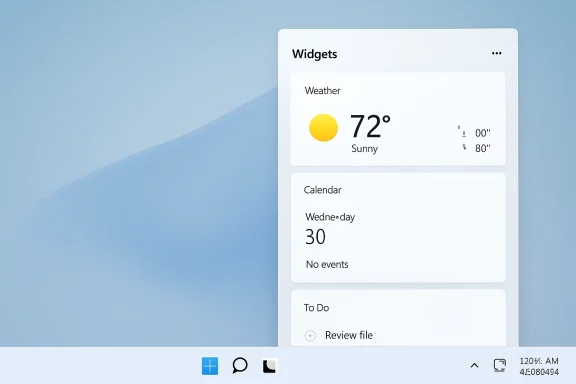
Microsoft’s new default behavior tries to correct that mismatch. The Widgets board is being tested so that it opens to the widgets experience first, not the Discover feed. Open-on-hover is off by default. Taskbar badging is off by default. Taskbar alerts are limited until the user chooses to open and engage with Widgets.
That is a more important shift than another round of redesign polish. Microsoft is not merely moving pixels around; it is moving the burden of attention back where it belongs. If a user wants a feed, they can opt into a more active experience. If they want a quiet desktop, Windows should stop mistaking restraint for under-monetization.
Windows has long been full of accidental activations, but Widgets made that problem unusually visible because the board could appear as a large, animated interruption from a tiny taskbar target. The mere act of moving the pointer near the weather icon could summon a content panel that users had not asked to read. On a desktop operating system, that is a profound design choice masquerading as convenience.
A click says intent. A hover says proximity. Microsoft spent years treating proximity as permission, and the result was predictable annoyance.
Disabling open-on-hover by default is therefore not a minor usability tweak. It reasserts an old desktop principle that Windows has occasionally forgotten in the age of feeds: the shell should wait for the user. The taskbar is not a billboard that gets to leap forward because the mouse got too close.
Windows is infrastructure. It runs classrooms, hospitals, point-of-sale terminals, family laptops, development rigs, gaming PCs, call centers, home offices, and machines that have not been rebooted with dignity since the previous fiscal year. When that infrastructure starts pushing engagement bait into privileged UI surfaces, users do not judge it like a website. They judge it like a breach of decorum.
That distinction is why Edge new-tab feeds, Start menu recommendations, search highlights, lock screen content, and Widgets have generated such durable irritation. Each individual surface can be defended as optional, configurable, or useful to someone. Together they create the impression that Windows has become too comfortable treating the user’s desktop as inventory.
The Widgets change does not erase MSN, and it does not necessarily end Microsoft’s interest in content distribution. But it does demote the feed from first-class interruption to something closer to a secondary destination. In Windows terms, that demotion is the story.
That answer is technically accurate and strategically wrong. Defaults define the product for most people. They determine what a new laptop feels like in the first hour, what a managed fleet looks like before policy catches up, and what relatives complain about over a holiday visit.
Microsoft knows this better than anyone. Windows Update, Defender, SmartScreen, OneDrive backup prompts, Microsoft account nudges, Edge defaults, telemetry choices, and app recommendations all live or die by default placement. The company’s decision to make Widgets “quiet by default” is important precisely because it acknowledges that asking users to undo noisy design after the fact is not enough.
A setting buried behind a gear icon does not fully absolve an intrusive default. It merely creates a path for the motivated. The great majority of Windows users experience the product Microsoft ships, not the product a forum thread can carefully tame.
The danger, as always, is that Microsoft loves a slogan. “Quiet by default” is a good phrase. So was “fast and fluid.” So was “people-centric.” So was “the best Windows ever.” Windows history is littered with tidy positioning lines that ran into messy product incentives.
Still, this particular change is encouraging because it is specific. Microsoft is not merely promising to listen. It is changing a default that users have complained about for years, and it is doing so in a way that reduces interruptions rather than adding another layer of personalization controls on top of the same old behavior.
The distinction matters. A calmer Windows cannot be built entirely out of toggles. At some point, Microsoft has to decide that some experiences should be less aggressive before the user ever opens Settings.
A taskbar badge that distracts one user is an annoyance. A taskbar badge that distracts 10,000 users is a help desk pattern. A feed that seems harmless on a consumer laptop can look inappropriate on a shared workstation, a regulated desktop, or a machine used in a classroom. The question is not whether every alert is disastrous. The question is why administrators should spend energy suppressing content surfaces that many organizations never asked for.
That is why the default change should be welcomed even by people who disable Widgets entirely. Better consumer defaults often reduce the amount of policy plumbing enterprise admins must rely on to make Windows feel professional. When Microsoft ships quieter defaults, everyone downstream starts from a less hostile baseline.
There is still work to do. Microsoft needs to be clear about rollout timing, regional behavior, managed-device interaction, existing user settings, and whether these defaults will survive feature updates without being “helpfully” revisited. Trust in Windows defaults is not rebuilt by one Insider build.
The real test is whether Microsoft treats this as a design principle or a temporary pressure valve. If Widgets becomes quiet while other parts of Windows grow louder, users will see the move as whack-a-mole. If the MSN feed recedes only to return under a Copilot-branded wrapper, the lesson will look less like humility and more like rebranding.
That possibility is not theoretical. Microsoft has already experimented with AI-curated discovery surfaces and has repeatedly pushed Copilot into places where the user intent was debatable. The company’s strongest products often emerge when it respects context; its weakest Windows moments tend to arrive when every surface becomes a candidate for growth, engagement, or assistant placement.
The Widgets change is therefore promising but incomplete. It says Microsoft can still hear users when a feature becomes a punchline. It does not yet prove that Windows has escaped the internal incentives that made the punchline possible.
Good operating systems disappear until needed. Bad ones keep asserting that they have something you should look at. Windows 11 has often lived uneasily between those two states, with genuinely elegant design work sitting beside nudges, promos, feed modules, and defaults that seemed optimized for metrics no user cares about.
Widgets had the ingredients to be good. The idea of a glanceable, customizable board is not wrong. The failure was the insistence that a user opening a widget surface should first pass through Microsoft’s content ambitions.
By changing the default destination, Microsoft gives Widgets a chance to become what it should have been: a utility layer. Weather can be weather. Calendar can be calendar. OneDrive can be OneDrive. The panel does not need to impersonate a homepage.
That does not mean Windows must be austere. It can be beautiful, helpful, ambient, personalized, and occasionally proactive. But it has to earn those interventions. The desktop is not a social feed, the taskbar is not a notification slot machine, and the shell should not behave like a media product trying to improve retention.
This is where Microsoft’s consumer and enterprise identities collide. The same company wants Windows to be the friendly front door to Microsoft services and the dependable platform for serious work. Those ambitions are not automatically incompatible, but they become incompatible when the front door keeps shouting through the conference room wall.
A quieter Widgets experience suggests that someone inside Microsoft understands the conflict. The remaining question is whether that understanding can survive the next quarterly push to surface more value, drive more engagement, or introduce one more intelligent recommendation.
The irony is that this may make Widgets more successful, not less. Users are more likely to trust a panel that waits quietly than one that lunges at the cursor. They are more likely to customize a space that feels like theirs than tolerate one that arrives preloaded with someone else’s content strategy.
Microsoft’s best Windows work has always understood that the PC is personal before it is promotional. If “quiet by default” becomes a real design constraint rather than a one-build talking point, Widgets could be remembered not as another failed feed experiment, but as the moment Windows 11 began giving back a little of the attention it had been spending too freely.
Source: The Verge Microsoft is finally ditching the junk MSN feed in Windows widgets
 Microsoft Finally Discovers That a Widget Is Not a Newspaper
The original sin of Windows 11 Widgets was not that Microsoft built a panel for glanceable information. Weather, calendar, tasks, traffic, stocks, photos, package tracking, and system status all make sense as lightweight surfaces. The problem was that Microsoft wrapped that idea in the gravitational pull of MSN.The panel was marketed as personal productivity, but the experience often felt like opening a side door into an algorithmic news portal. Users who wanted the temperature got headlines, promoted stories, entertainment blurbs, market churn, and whatever else the feed decided belonged between them and their desktop. That mismatch mattered because it turned a potentially useful operating system affordance into a trust tax.
Microsoft’s new default behavior tries to correct that mismatch. The Widgets board is being tested so that it opens to the widgets experience first, not the Discover feed. Open-on-hover is off by default. Taskbar badging is off by default. Taskbar alerts are limited until the user chooses to open and engage with Widgets.
That is a more important shift than another round of redesign polish. Microsoft is not merely moving pixels around; it is moving the burden of attention back where it belongs. If a user wants a feed, they can opt into a more active experience. If they want a quiet desktop, Windows should stop mistaking restraint for under-monetization.
The Hover Panel Was the Canary in the Taskbar
The hover behavior was always the tell. A feature that opens because the cursor briefly passes over it is not behaving like a tool. It is behaving like a trapdoor.Windows has long been full of accidental activations, but Widgets made that problem unusually visible because the board could appear as a large, animated interruption from a tiny taskbar target. The mere act of moving the pointer near the weather icon could summon a content panel that users had not asked to read. On a desktop operating system, that is a profound design choice masquerading as convenience.
A click says intent. A hover says proximity. Microsoft spent years treating proximity as permission, and the result was predictable annoyance.
Disabling open-on-hover by default is therefore not a minor usability tweak. It reasserts an old desktop principle that Windows has occasionally forgotten in the age of feeds: the shell should wait for the user. The taskbar is not a billboard that gets to leap forward because the mouse got too close.
MSN Was Not Just Clutter — It Was a Credibility Problem
The phrase “junk feed” is blunt, but it stuck because many users recognized the experience immediately. The issue was not simply that the feed contained news. It was that the quality, tone, and placement of that feed felt out of step with the expectations people bring to an operating system.Windows is infrastructure. It runs classrooms, hospitals, point-of-sale terminals, family laptops, development rigs, gaming PCs, call centers, home offices, and machines that have not been rebooted with dignity since the previous fiscal year. When that infrastructure starts pushing engagement bait into privileged UI surfaces, users do not judge it like a website. They judge it like a breach of decorum.
That distinction is why Edge new-tab feeds, Start menu recommendations, search highlights, lock screen content, and Widgets have generated such durable irritation. Each individual surface can be defended as optional, configurable, or useful to someone. Together they create the impression that Windows has become too comfortable treating the user’s desktop as inventory.
The Widgets change does not erase MSN, and it does not necessarily end Microsoft’s interest in content distribution. But it does demote the feed from first-class interruption to something closer to a secondary destination. In Windows terms, that demotion is the story.
The Default Is the Product
Power users often respond to Windows annoyances with a familiar shrug: just turn it off. Disable Widgets. Hide the feed. Change the taskbar setting. Use Group Policy. Strip the app. Run a debloat script. Install a third-party shell utility and move on with your life.That answer is technically accurate and strategically wrong. Defaults define the product for most people. They determine what a new laptop feels like in the first hour, what a managed fleet looks like before policy catches up, and what relatives complain about over a holiday visit.
Microsoft knows this better than anyone. Windows Update, Defender, SmartScreen, OneDrive backup prompts, Microsoft account nudges, Edge defaults, telemetry choices, and app recommendations all live or die by default placement. The company’s decision to make Widgets “quiet by default” is important precisely because it acknowledges that asking users to undo noisy design after the fact is not enough.
A setting buried behind a gear icon does not fully absolve an intrusive default. It merely creates a path for the motivated. The great majority of Windows users experience the product Microsoft ships, not the product a forum thread can carefully tame.
This Is Windows 11’s Larger Course Correction in Miniature
Microsoft’s Widgets retreat lands amid a broader Windows quality campaign. The company has been talking about making Windows calmer, more performant, more transparent, and less burdened by decisions that feel like internal business goals leaking into the shell. Recent preview messaging has touched on File Explorer performance, a modernized Run dialog, fewer unnecessary Copilot buttons in app chrome, memory-footprint work, lock screen widget changes, and more visible responsiveness to Insider feedback.The danger, as always, is that Microsoft loves a slogan. “Quiet by default” is a good phrase. So was “fast and fluid.” So was “people-centric.” So was “the best Windows ever.” Windows history is littered with tidy positioning lines that ran into messy product incentives.
Still, this particular change is encouraging because it is specific. Microsoft is not merely promising to listen. It is changing a default that users have complained about for years, and it is doing so in a way that reduces interruptions rather than adding another layer of personalization controls on top of the same old behavior.
The distinction matters. A calmer Windows cannot be built entirely out of toggles. At some point, Microsoft has to decide that some experiences should be less aggressive before the user ever opens Settings.
The Enterprise Read Is Simple: Fewer Surprises, Fewer Tickets
For IT departments, Widgets has rarely been the most urgent Windows 11 problem. Compatibility, patch reliability, driver quality, identity, endpoint security, VPN behavior, app lifecycle management, and hardware readiness all outrank a noisy panel. But small irritations scale brutally across fleets.A taskbar badge that distracts one user is an annoyance. A taskbar badge that distracts 10,000 users is a help desk pattern. A feed that seems harmless on a consumer laptop can look inappropriate on a shared workstation, a regulated desktop, or a machine used in a classroom. The question is not whether every alert is disastrous. The question is why administrators should spend energy suppressing content surfaces that many organizations never asked for.
That is why the default change should be welcomed even by people who disable Widgets entirely. Better consumer defaults often reduce the amount of policy plumbing enterprise admins must rely on to make Windows feel professional. When Microsoft ships quieter defaults, everyone downstream starts from a less hostile baseline.
There is still work to do. Microsoft needs to be clear about rollout timing, regional behavior, managed-device interaction, existing user settings, and whether these defaults will survive feature updates without being “helpfully” revisited. Trust in Windows defaults is not rebuilt by one Insider build.
The Feed Is Losing the Argument, Not Necessarily the War
It would be naïve to read this as Microsoft renouncing engagement surfaces. The company still has MSN, Microsoft Start, Edge content modules, Copilot discovery surfaces, lock screen experiences, recommendations, and a vast business interest in keeping users inside Microsoft-controlled flows. The feed may be less prominent in Widgets, but the feed mindset is not dead.The real test is whether Microsoft treats this as a design principle or a temporary pressure valve. If Widgets becomes quiet while other parts of Windows grow louder, users will see the move as whack-a-mole. If the MSN feed recedes only to return under a Copilot-branded wrapper, the lesson will look less like humility and more like rebranding.
That possibility is not theoretical. Microsoft has already experimented with AI-curated discovery surfaces and has repeatedly pushed Copilot into places where the user intent was debatable. The company’s strongest products often emerge when it respects context; its weakest Windows moments tend to arrive when every surface becomes a candidate for growth, engagement, or assistant placement.
The Widgets change is therefore promising but incomplete. It says Microsoft can still hear users when a feature becomes a punchline. It does not yet prove that Windows has escaped the internal incentives that made the punchline possible.
Windows Users Win When Microsoft Stops Spending Their Attention
The most concrete win here is psychological. A quieter Widgets panel makes Windows feel less needy. That sounds soft until you consider how much of modern OS design is really about reducing the number of moments when software asks the user to manage the software.Good operating systems disappear until needed. Bad ones keep asserting that they have something you should look at. Windows 11 has often lived uneasily between those two states, with genuinely elegant design work sitting beside nudges, promos, feed modules, and defaults that seemed optimized for metrics no user cares about.
Widgets had the ingredients to be good. The idea of a glanceable, customizable board is not wrong. The failure was the insistence that a user opening a widget surface should first pass through Microsoft’s content ambitions.
By changing the default destination, Microsoft gives Widgets a chance to become what it should have been: a utility layer. Weather can be weather. Calendar can be calendar. OneDrive can be OneDrive. The panel does not need to impersonate a homepage.
The Desktop Is Not a Growth Hack
The deeper lesson is that Windows has to stop borrowing too much from the web. Websites chase engagement because attention is the business. Operating systems should be more conservative because attention is the user’s work surface.That does not mean Windows must be austere. It can be beautiful, helpful, ambient, personalized, and occasionally proactive. But it has to earn those interventions. The desktop is not a social feed, the taskbar is not a notification slot machine, and the shell should not behave like a media product trying to improve retention.
This is where Microsoft’s consumer and enterprise identities collide. The same company wants Windows to be the friendly front door to Microsoft services and the dependable platform for serious work. Those ambitions are not automatically incompatible, but they become incompatible when the front door keeps shouting through the conference room wall.
A quieter Widgets experience suggests that someone inside Microsoft understands the conflict. The remaining question is whether that understanding can survive the next quarterly push to surface more value, drive more engagement, or introduce one more intelligent recommendation.
The Small Settings That Tell the Bigger Story
The near-term facts are simple enough, and they matter because they draw a line between user intent and Microsoft’s appetite for attention.- Windows 11 Insider Preview Build 26300.8346 is testing a quieter Widgets experience in the Experimental channel.
- The Widgets board is being changed to open first to the user’s widgets rather than leading with the MSN-powered Discover feed.
- Open-on-hover is being disabled by default, which should reduce accidental panel launches from the taskbar.
- Taskbar badging is being turned off by default, and taskbar alerts are being limited until the user engages with Widgets.
- Users who want a more active Widgets experience will still be able to turn features such as badging back on in Widgets settings.
- The change is part of a wider Windows quality push, but it remains a preview behavior until Microsoft ships it broadly.
The irony is that this may make Widgets more successful, not less. Users are more likely to trust a panel that waits quietly than one that lunges at the cursor. They are more likely to customize a space that feels like theirs than tolerate one that arrives preloaded with someone else’s content strategy.
Microsoft’s best Windows work has always understood that the PC is personal before it is promotional. If “quiet by default” becomes a real design constraint rather than a one-build talking point, Widgets could be remembered not as another failed feed experiment, but as the moment Windows 11 began giving back a little of the attention it had been spending too freely.
Source: The Verge Microsoft is finally ditching the junk MSN feed in Windows widgets
