

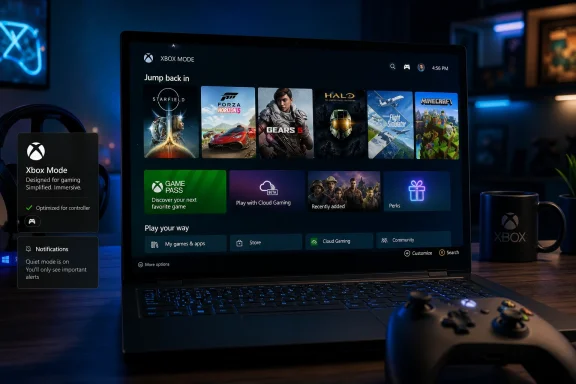
Microsoft began rolling out Xbox mode for Windows 11 PCs on April 30, 2026, through the optional KB5083631 preview update for Windows 11 versions 24H2 and 25H2, bringing a full-screen, controller-first Xbox-style interface to laptops, desktops, tablets, and handheld PCs. The move is not just another gaming toggle buried in Settings. It is Microsoft’s clearest admission yet that the Windows desktop, for all its flexibility, is still the wrong living-room and handheld interface. Xbox mode is the company’s attempt to make Windows feel less like Windows precisely when gamers least want Windows in the way.
For decades, PC gaming’s greatest strength has also been its most obvious user-experience failure. Windows can run almost anything, from Steam blockbusters to emulators to obscure launchers that look like they were designed during the Vista era. But that same openness becomes awkward the moment the keyboard and mouse disappear.
Xbox mode is Microsoft’s answer to that mismatch. It turns the Xbox app into a full-screen shell built around a controller, game library, Game Pass, cloud gaming, and installed titles, with the traditional desktop pushed out of sight. On paper, that sounds cosmetic. In practice, interface priority is product strategy.
The important part is not that Windows now has another way to launch games. It is that Microsoft is conceding that the normal Windows session is too noisy, too general-purpose, and too mouse-centric for the devices PC gaming is increasingly moving toward. Handhelds, docked mini-PCs, gaming laptops plugged into TVs, and tablet-like hybrids all expose the same problem: Windows is powerful, but it rarely feels designed for play.
That is why Xbox mode matters even if the first version is imperfect. Microsoft is not replacing Windows with Xbox. It is building a console-shaped room inside Windows and hoping players will choose to spend more time there.
That distinction matters. A launcher can be ignored, uninstalled, replaced, or buried under Steam Big Picture. An operating-system mode can change expectations about what a Windows PC is supposed to feel like when it becomes a gaming device.
Microsoft’s own framing is careful: Xbox mode is rolling out gradually, in select markets, and not every eligible machine will see it immediately. That staged language is the tell. The company is treating this less like a one-day feature drop and more like a controlled platform migration, where compatibility, telemetry, device classes, and user feedback will shape how aggressively it expands.
The feature’s path also says something about Microsoft’s confidence. Xbox mode was tested through Insider channels and shaped by feedback from handheld devices before arriving on standard Windows 11 PCs. The company has watched Steam Deck and Windows handhelds turn UI friction into a market-level problem. KB5083631 is the point where Microsoft stops answering that problem with promises and starts shipping code.
That is the strategic value of a full-screen mode. It gives Microsoft a way to make a PC feel more like an Xbox without closing the PC. Players still get Windows compatibility, third-party storefronts, modding, drivers, peripherals, and the unruly breadth of the PC ecosystem. But the first interaction can be curated, simplified, and controller-friendly.
This is a truce, not a merger. Windows keeps its openness; Xbox gets a more coherent front door. The desktop is still there when users need it, but it no longer has to be the main character in every gaming session.
That balance is crucial because Microsoft cannot simply build a closed Xbox PC and expect the Windows gaming audience to applaud. PC players are allergic to walls, especially walls built by platform holders. Xbox mode succeeds only if it hides friction without hiding choice.
Xbox mode goes further by changing the surface of the session. It suppresses distractions and foregrounds a console-style dashboard where a controller can drive the experience. That difference is not trivial, because gaming friction is often perceptual before it is technical.
A frame-rate gain is nice, but a clean path from power-on to play is what makes a device feel like a console. The Steam Deck’s genius was never raw performance. It was the feeling that Linux, Proton, Steam, sleep, resume, input, and updates had been disciplined into a single appliance-like loop.
Microsoft is chasing that same emotional target from the opposite direction. Instead of making a Linux handheld behave like a console that can also run PC games, it is trying to make Windows behave like a console while preserving the PC underneath. That is harder, messier, and possibly more valuable.
On a traditional gaming laptop, a clumsy launcher is annoying. On a handheld, it becomes the whole product experience. A login dialog that requires a touch keyboard, a launcher that demands a mouse pointer, a sleep state that drains battery, or a notification that steals focus can make the device feel unfinished.
Valve exploited this weakness with SteamOS. The Steam Deck did not beat Windows on game compatibility in every case, and it certainly did not match Windows’ native access to every PC launcher. But it made a handheld gaming PC feel coherent. That coherence changed the benchmark.
Microsoft has since had to answer a question it avoided for years: if Windows is the home of PC gaming, why does it feel so much worse than a console when the PC is shaped like a console? Xbox mode is the beginning of that answer.
That vision is especially important as the console market matures. Selling a dedicated box under the TV is still meaningful, but it is no longer the only way to distribute a gaming platform. Game Pass, cloud gaming, Play Anywhere, cross-save, and PC storefront integration all point toward a less hardware-bound Xbox.
A Windows 11 PC that can enter Xbox mode becomes part of that strategy. It is not an Xbox console, but it can behave like one when the user wants it to. That creates a continuum: console, handheld, laptop, desktop, cloud endpoint.
The risk is that a continuum can become mush. If everything is Xbox, then Xbox must stand for a quality of experience, not merely a logo. Xbox mode is where Microsoft has to prove that the brand means something operational: fast access, controller comfort, fewer interruptions, reliable sleep and resume, and a library that feels unified rather than stapled together.
Microsoft appears to understand that. Xbox mode is designed around installed games from major PC storefronts, Game Pass titles, cloud gaming, and the user’s broader library. The company is trying to make the dashboard a front end for PC gaming rather than a funnel into Microsoft’s store alone.
That is a politically delicate design challenge. If Xbox mode feels like a Game Pass billboard, Steam users will treat it as bloat. If it treats Steam, Epic, Battle.net, GOG, Ubisoft Connect, EA, and other ecosystems as first-class citizens, Microsoft gives players a reason to use it even when they are not buying from Microsoft.
The business temptation will always be to tilt the interface toward subscription and store conversion. The product necessity is to resist doing that too aggressively. The mode has to earn trust before it can monetize attention.
The simplicity of the shortcut is important. A mode designed for casual switching cannot be buried behind a ritual. If the desktop is for work and tinkering, and Xbox mode is for play, the transition has to feel reversible and low-risk.
That reversibility is one of Microsoft’s advantages over a dedicated console interface. A Windows gaming PC can become an Xbox-like device without ceasing to be a Windows PC. The user can jump back to the desktop for mods, Discord troubleshooting, graphics settings, browser authentication, file management, or anything else the full-screen shell cannot handle.
But that is also the trap. Every time the player has to leave Xbox mode to fix something, the illusion weakens. The feature will be judged not just by how attractive the dashboard is, but by how rarely it collapses back into ordinary Windows problem-solving.
Gamers have learned to fear the invisible tax of background tasks. Indexing, update checks, launchers, overlays, telemetry, chat apps, RGB utilities, cloud sync tools, and vendor services all nibble at resources and attention. On a high-end desktop, the cost may be barely measurable. On a handheld, every watt and every gigabyte of memory matters.
This is where Xbox mode could become more than a skin. If Microsoft can meaningfully discipline Windows’ background behavior during gaming sessions, it can improve not just vibes but battery life, thermals, memory headroom, and consistency. The promise is not necessarily higher peak frame rates. It is fewer interruptions and less variance.
That is a more honest target anyway. Modern gaming performance is often less about a magical FPS boost and more about eliminating the stutter, wake event, focus steal, and rogue notification that remind the player they are running a general-purpose computer.
Those caveats may sound like release-note trivia, but they cut directly against the console illusion. A console-like mode must handle screens predictably. It must also sleep and wake like an appliance. If either behavior feels fragile, users will fall back to the desktop or avoid the mode entirely.
The sleep issue is especially important for handhelds. The Steam Deck trained players to expect a suspend-and-resume loop that feels closer to a Nintendo Switch than a laptop. Windows has historically struggled here because PC hardware, drivers, firmware, anticheat systems, launchers, and modern standby implementations vary wildly.
Hibernation is safer, but it is not the same experience. It is slower, less seamless, and more computer-like. Microsoft can ship Xbox mode before solving every power-state problem, but it cannot declare victory until suspend and resume feel boring.
For IT admins, the preview nature also matters because Windows 11 is now a platform where consumer features, AI components, gaming changes, and enterprise servicing all coexist in one update pipeline. A gaming toggle may not sound like a fleet-management concern, but anything that changes shell behavior, notification handling, input assumptions, or update exposure deserves scrutiny.
Most enterprise desktops will never use Xbox mode. But Windows is one codebase serving classrooms, studios, developers, kiosk-like deployments, creative shops, and bring-your-own-device environments. Features built for consumers can still have policy, support, and imaging implications.
Microsoft’s gradual rollout is therefore not merely about consumer telemetry. It is about preventing a flashy gaming feature from becoming another Windows servicing headache. The company has learned, often painfully, that broad Windows changes need escape hatches and staged exposure.
But Microsoft has an advantage Valve cannot fully duplicate: Windows itself. Xbox mode can, in principle, coordinate with OS-level notification suppression, background activity reduction, Game Bar, power behavior, input systems, and account-level services. Valve can build a superb app shell, but it is still operating inside Windows when SteamOS is not in play.
That does not mean Microsoft automatically wins. Steam has the library gravity, community trust, store maturity, and handheld credibility. Many PC gamers would rather boot directly into Steam than into a Microsoft surface that might nudge them toward Game Pass.
The contest is therefore not launcher versus launcher. It is whether Microsoft can use OS integration to make Xbox mode feel meaningfully calmer, broader, and more reliable than an app-based front end. If it cannot, players will treat it as another optional overlay in a stack already crowded with overlays.
Xbox mode enters that environment carrying Microsoft’s brand, which is both a strength and a liability. Microsoft can integrate deeply with Windows in ways competitors cannot. It can also trigger suspicion that integration is being used to privilege its own services.
The healthiest version of Xbox mode would be boringly pluralistic. It would show the games a user owns, launch them reliably, respect the storefronts they came from, and disappear when asked. The worst version would become a glossy vestibule to Game Pass with third-party games treated as tolerated guests.
Microsoft’s public language leans toward openness, and the inclusion of games from leading PC storefronts is the right signal. But users will judge the feature by daily behavior, not messaging. A dashboard earns credibility one successful launch at a time.
The desktop is not neutral. It is a dense visual and behavioral environment built for multitasking, files, windows, alerts, settings, and productivity. That is wonderful when editing a video or debugging a driver. It is absurd when all the user wants is to sit on a sofa with a controller and resume a game.
Xbox mode reduces the visible surface area of Windows. It hides the taskbar, deemphasizes notifications, and organizes the session around play. Done well, that can make Windows feel lighter even though the underlying system remains just as complex.
This is the same lesson Apple applied to iPadOS, Valve applied to SteamOS, and console makers have understood for decades. A device’s interface should fit the user’s posture. Lean-forward desk work and lean-back gaming are not the same posture, and Windows has spent too long pretending they are.
Xbox mode is built for that kind of fluidity. Its value is highest when the user does not want to manage Windows before playing. The ideal flow is brutally simple: wake the device, pick up a controller, choose a game, play.
That sounds easy until Windows is involved. Authentication prompts, launcher updates, driver messages, display handshakes, cloud sync warnings, and power-state weirdness all conspire against immediacy. The Xbox mode dashboard can only solve part of that problem, but it gives Microsoft a place to start concentrating fixes.
If the five-minute session becomes pleasant, Xbox mode will matter. If it only looks good after the user has already completed a half-dozen desktop chores, it will become another feature enthusiasts enable once, screenshot, and forget.
The better view is that Windows should be a substrate, not always the stage. Sometimes the best operating-system design is to get out of the way and let a purpose-built experience take over. For gaming, that means fewer visible system demands and a stronger sense of continuity between devices.
This does not diminish Windows. It modernizes it. The operating system’s value increasingly lies in enabling multiple modes of use without forcing one interface to serve them all badly.
Xbox mode is therefore part of a wider shift in personal computing. The same machine may need to be a workstation at 10 a.m., a tablet at 3 p.m., a console at 8 p.m., and a cloud endpoint at midnight. The OS that wins is the one that changes shape without losing trust.
Source: Notebookcheck Xbox mode is now live on Windows 11
 Microsoft Finally Stops Pretending the Desktop Is Good Enough for the Couch
For decades, PC gaming’s greatest strength has also been its most obvious user-experience failure. Windows can run almost anything, from Steam blockbusters to emulators to obscure launchers that look like they were designed during the Vista era. But that same openness becomes awkward the moment the keyboard and mouse disappear.Xbox mode is Microsoft’s answer to that mismatch. It turns the Xbox app into a full-screen shell built around a controller, game library, Game Pass, cloud gaming, and installed titles, with the traditional desktop pushed out of sight. On paper, that sounds cosmetic. In practice, interface priority is product strategy.
The important part is not that Windows now has another way to launch games. It is that Microsoft is conceding that the normal Windows session is too noisy, too general-purpose, and too mouse-centric for the devices PC gaming is increasingly moving toward. Handhelds, docked mini-PCs, gaming laptops plugged into TVs, and tablet-like hybrids all expose the same problem: Windows is powerful, but it rarely feels designed for play.
That is why Xbox mode matters even if the first version is imperfect. Microsoft is not replacing Windows with Xbox. It is building a console-shaped room inside Windows and hoping players will choose to spend more time there.
KB5083631 Turns a Gaming Feature Into an Operating-System Bet
The rollout arrives through KB5083631, an optional non-security preview update released April 30 for Windows 11 24H2 and 25H2. Optional preview updates are Microsoft’s staging ground for features and fixes that later flow into broader monthly servicing, so this is not a random app experiment. Xbox mode is being delivered as part of the Windows platform, not merely as an Xbox app redesign.That distinction matters. A launcher can be ignored, uninstalled, replaced, or buried under Steam Big Picture. An operating-system mode can change expectations about what a Windows PC is supposed to feel like when it becomes a gaming device.
Microsoft’s own framing is careful: Xbox mode is rolling out gradually, in select markets, and not every eligible machine will see it immediately. That staged language is the tell. The company is treating this less like a one-day feature drop and more like a controlled platform migration, where compatibility, telemetry, device classes, and user feedback will shape how aggressively it expands.
The feature’s path also says something about Microsoft’s confidence. Xbox mode was tested through Insider channels and shaped by feedback from handheld devices before arriving on standard Windows 11 PCs. The company has watched Steam Deck and Windows handhelds turn UI friction into a market-level problem. KB5083631 is the point where Microsoft stops answering that problem with promises and starts shipping code.
The New Shell Is Really a Truce Between Xbox and Windows
Microsoft has spent years trying to decide whether Xbox is a console, a store, a subscription, a cloud service, a developer platform, or a brand stretched across all of the above. Xbox mode says the quiet part plainly: Xbox is now an experience layer, and Windows is one of the places it runs.That is the strategic value of a full-screen mode. It gives Microsoft a way to make a PC feel more like an Xbox without closing the PC. Players still get Windows compatibility, third-party storefronts, modding, drivers, peripherals, and the unruly breadth of the PC ecosystem. But the first interaction can be curated, simplified, and controller-friendly.
This is a truce, not a merger. Windows keeps its openness; Xbox gets a more coherent front door. The desktop is still there when users need it, but it no longer has to be the main character in every gaming session.
That balance is crucial because Microsoft cannot simply build a closed Xbox PC and expect the Windows gaming audience to applaud. PC players are allergic to walls, especially walls built by platform holders. Xbox mode succeeds only if it hides friction without hiding choice.
Game Mode Was a Hint, Xbox Mode Is the Argument
Windows already has Game Mode, and that older feature has always sounded more ambitious than it feels. It prioritizes gaming workloads and reduces some background interference, but it does not change the basic fact that the player is still inside Windows. Notifications, windows, launchers, overlays, update prompts, and taskbar oddities remain part of the landscape.Xbox mode goes further by changing the surface of the session. It suppresses distractions and foregrounds a console-style dashboard where a controller can drive the experience. That difference is not trivial, because gaming friction is often perceptual before it is technical.
A frame-rate gain is nice, but a clean path from power-on to play is what makes a device feel like a console. The Steam Deck’s genius was never raw performance. It was the feeling that Linux, Proton, Steam, sleep, resume, input, and updates had been disciplined into a single appliance-like loop.
Microsoft is chasing that same emotional target from the opposite direction. Instead of making a Linux handheld behave like a console that can also run PC games, it is trying to make Windows behave like a console while preserving the PC underneath. That is harder, messier, and possibly more valuable.
The Handheld PC Forced Microsoft’s Hand
The timing is no accident. Windows handhelds have become one of the most interesting hardware categories in PC gaming, but they have also been a public demonstration of Windows’ weakest habits. Tiny screens, gamepad controls, and battery-constrained hardware do not forgive desktop assumptions.On a traditional gaming laptop, a clumsy launcher is annoying. On a handheld, it becomes the whole product experience. A login dialog that requires a touch keyboard, a launcher that demands a mouse pointer, a sleep state that drains battery, or a notification that steals focus can make the device feel unfinished.
Valve exploited this weakness with SteamOS. The Steam Deck did not beat Windows on game compatibility in every case, and it certainly did not match Windows’ native access to every PC launcher. But it made a handheld gaming PC feel coherent. That coherence changed the benchmark.
Microsoft has since had to answer a question it avoided for years: if Windows is the home of PC gaming, why does it feel so much worse than a console when the PC is shaped like a console? Xbox mode is the beginning of that answer.
Project Helix Is the Bigger Shadow Behind the Toggle
Xbox mode also fits into Microsoft’s broader Project Helix effort, which aims to pull Xbox and Windows closer together across devices. The phrase sounds like platform-marketing fog, but the product direction is becoming visible. Microsoft wants Xbox identity, Xbox services, and Windows compatibility to meet on more hardware than the traditional console cycle allows.That vision is especially important as the console market matures. Selling a dedicated box under the TV is still meaningful, but it is no longer the only way to distribute a gaming platform. Game Pass, cloud gaming, Play Anywhere, cross-save, and PC storefront integration all point toward a less hardware-bound Xbox.
A Windows 11 PC that can enter Xbox mode becomes part of that strategy. It is not an Xbox console, but it can behave like one when the user wants it to. That creates a continuum: console, handheld, laptop, desktop, cloud endpoint.
The risk is that a continuum can become mush. If everything is Xbox, then Xbox must stand for a quality of experience, not merely a logo. Xbox mode is where Microsoft has to prove that the brand means something operational: fast access, controller comfort, fewer interruptions, reliable sleep and resume, and a library that feels unified rather than stapled together.
The Library Problem Is Bigger Than the Dashboard
The most compelling promise in Xbox mode is not the full-screen interface. It is the aggregated game library. PC gamers do not live in one store, and any console-style Windows shell that pretends otherwise will fail immediately.Microsoft appears to understand that. Xbox mode is designed around installed games from major PC storefronts, Game Pass titles, cloud gaming, and the user’s broader library. The company is trying to make the dashboard a front end for PC gaming rather than a funnel into Microsoft’s store alone.
That is a politically delicate design challenge. If Xbox mode feels like a Game Pass billboard, Steam users will treat it as bloat. If it treats Steam, Epic, Battle.net, GOG, Ubisoft Connect, EA, and other ecosystems as first-class citizens, Microsoft gives players a reason to use it even when they are not buying from Microsoft.
The business temptation will always be to tilt the interface toward subscription and store conversion. The product necessity is to resist doing that too aggressively. The mode has to earn trust before it can monetize attention.
The Shortcut Is Simple Because the Ambition Is Not
Once enabled, Xbox mode can be launched with Windows + F11, through the Xbox app, or from Game Bar-related settings. Users can enable it from the Gaming area of Windows Settings where the Xbox mode or full-screen experience option appears, depending on rollout state and device configuration.The simplicity of the shortcut is important. A mode designed for casual switching cannot be buried behind a ritual. If the desktop is for work and tinkering, and Xbox mode is for play, the transition has to feel reversible and low-risk.
That reversibility is one of Microsoft’s advantages over a dedicated console interface. A Windows gaming PC can become an Xbox-like device without ceasing to be a Windows PC. The user can jump back to the desktop for mods, Discord troubleshooting, graphics settings, browser authentication, file management, or anything else the full-screen shell cannot handle.
But that is also the trap. Every time the player has to leave Xbox mode to fix something, the illusion weakens. The feature will be judged not just by how attractive the dashboard is, but by how rarely it collapses back into ordinary Windows problem-solving.
Background Activity Is the Battlefield Nobody Sees
Microsoft says Xbox mode reduces background activity and keeps notifications out of the way. That may sound mundane, but it reaches into one of the oldest complaints about Windows gaming: the operating system has a talent for remembering its own priorities at the worst possible time.Gamers have learned to fear the invisible tax of background tasks. Indexing, update checks, launchers, overlays, telemetry, chat apps, RGB utilities, cloud sync tools, and vendor services all nibble at resources and attention. On a high-end desktop, the cost may be barely measurable. On a handheld, every watt and every gigabyte of memory matters.
This is where Xbox mode could become more than a skin. If Microsoft can meaningfully discipline Windows’ background behavior during gaming sessions, it can improve not just vibes but battery life, thermals, memory headroom, and consistency. The promise is not necessarily higher peak frame rates. It is fewer interruptions and less variance.
That is a more honest target anyway. Modern gaming performance is often less about a magical FPS boost and more about eliminating the stutter, wake event, focus steal, and rogue notification that remind the player they are running a general-purpose computer.
The First Caveats Are Exactly the Ones That Matter
The early rollout comes with rough edges. Multi-monitor behavior is reportedly inconsistent, with some secondary displays going blank when Xbox mode is active. Sleep and resume behavior can also be unreliable on some configurations, and Microsoft is recommending hibernation rather than standard sleep while the feature is still settling in.Those caveats may sound like release-note trivia, but they cut directly against the console illusion. A console-like mode must handle screens predictably. It must also sleep and wake like an appliance. If either behavior feels fragile, users will fall back to the desktop or avoid the mode entirely.
The sleep issue is especially important for handhelds. The Steam Deck trained players to expect a suspend-and-resume loop that feels closer to a Nintendo Switch than a laptop. Windows has historically struggled here because PC hardware, drivers, firmware, anticheat systems, launchers, and modern standby implementations vary wildly.
Hibernation is safer, but it is not the same experience. It is slower, less seamless, and more computer-like. Microsoft can ship Xbox mode before solving every power-state problem, but it cannot declare victory until suspend and resume feel boring.
The Optional Preview Label Is Doing a Lot of Work
KB5083631 is an optional preview update, which gives Microsoft room to move carefully. Enthusiasts can install it now, while more cautious users and managed environments can wait for the feature and fixes to mature. That is the sensible route for something that changes how a machine presents itself during gaming.For IT admins, the preview nature also matters because Windows 11 is now a platform where consumer features, AI components, gaming changes, and enterprise servicing all coexist in one update pipeline. A gaming toggle may not sound like a fleet-management concern, but anything that changes shell behavior, notification handling, input assumptions, or update exposure deserves scrutiny.
Most enterprise desktops will never use Xbox mode. But Windows is one codebase serving classrooms, studios, developers, kiosk-like deployments, creative shops, and bring-your-own-device environments. Features built for consumers can still have policy, support, and imaging implications.
Microsoft’s gradual rollout is therefore not merely about consumer telemetry. It is about preventing a flashy gaming feature from becoming another Windows servicing headache. The company has learned, often painfully, that broad Windows changes need escape hatches and staged exposure.
Steam Big Picture Now Has a Native Windows Rival
Xbox mode inevitably invites comparison with Steam Big Picture, and that comparison is both fair and incomplete. Steam Big Picture already gives PC gamers a controller-friendly interface, and on many living-room PCs it is the default console substitute. Valve got there first, and for Steam-heavy users it remains the most natural layer.But Microsoft has an advantage Valve cannot fully duplicate: Windows itself. Xbox mode can, in principle, coordinate with OS-level notification suppression, background activity reduction, Game Bar, power behavior, input systems, and account-level services. Valve can build a superb app shell, but it is still operating inside Windows when SteamOS is not in play.
That does not mean Microsoft automatically wins. Steam has the library gravity, community trust, store maturity, and handheld credibility. Many PC gamers would rather boot directly into Steam than into a Microsoft surface that might nudge them toward Game Pass.
The contest is therefore not launcher versus launcher. It is whether Microsoft can use OS integration to make Xbox mode feel meaningfully calmer, broader, and more reliable than an app-based front end. If it cannot, players will treat it as another optional overlay in a stack already crowded with overlays.
The Storefront Politics Will Decide the Mood
The PC gaming audience is unusually sensitive to platform control. That sensitivity is not paranoia; it is memory. Players have lived through forced launchers, exclusivity deals, account migrations, broken overlays, store shutdowns, and subscription reshuffles.Xbox mode enters that environment carrying Microsoft’s brand, which is both a strength and a liability. Microsoft can integrate deeply with Windows in ways competitors cannot. It can also trigger suspicion that integration is being used to privilege its own services.
The healthiest version of Xbox mode would be boringly pluralistic. It would show the games a user owns, launch them reliably, respect the storefronts they came from, and disappear when asked. The worst version would become a glossy vestibule to Game Pass with third-party games treated as tolerated guests.
Microsoft’s public language leans toward openness, and the inclusion of games from leading PC storefronts is the right signal. But users will judge the feature by daily behavior, not messaging. A dashboard earns credibility one successful launch at a time.
Windows Gaming Needed Less Chrome, Not More Chrome
A full-screen Xbox interface might seem like another layer added to an already layered OS. Yet the paradox is that Windows gaming may need more interface in order to feel like less computer.The desktop is not neutral. It is a dense visual and behavioral environment built for multitasking, files, windows, alerts, settings, and productivity. That is wonderful when editing a video or debugging a driver. It is absurd when all the user wants is to sit on a sofa with a controller and resume a game.
Xbox mode reduces the visible surface area of Windows. It hides the taskbar, deemphasizes notifications, and organizes the session around play. Done well, that can make Windows feel lighter even though the underlying system remains just as complex.
This is the same lesson Apple applied to iPadOS, Valve applied to SteamOS, and console makers have understood for decades. A device’s interface should fit the user’s posture. Lean-forward desk work and lean-back gaming are not the same posture, and Windows has spent too long pretending they are.
The Real Test Is the Five-Minute Session
The future of gaming interfaces is being shaped by short sessions as much as marathon sessions. A player may want to grab a handheld for ten minutes, dock a laptop for an hour, stream a cloud game during travel, or jump between desktop and controller play without rethinking the setup each time.Xbox mode is built for that kind of fluidity. Its value is highest when the user does not want to manage Windows before playing. The ideal flow is brutally simple: wake the device, pick up a controller, choose a game, play.
That sounds easy until Windows is involved. Authentication prompts, launcher updates, driver messages, display handshakes, cloud sync warnings, and power-state weirdness all conspire against immediacy. The Xbox mode dashboard can only solve part of that problem, but it gives Microsoft a place to start concentrating fixes.
If the five-minute session becomes pleasant, Xbox mode will matter. If it only looks good after the user has already completed a half-dozen desktop chores, it will become another feature enthusiasts enable once, screenshot, and forget.
Microsoft’s Best Gaming Feature May Be Humility
There is a humility embedded in Xbox mode that Microsoft should embrace. The company is effectively admitting that the all-purpose desktop is not always the right interface, even on a Windows PC. That may seem obvious, but Windows culture has often treated the desktop as the inevitable center of gravity.The better view is that Windows should be a substrate, not always the stage. Sometimes the best operating-system design is to get out of the way and let a purpose-built experience take over. For gaming, that means fewer visible system demands and a stronger sense of continuity between devices.
This does not diminish Windows. It modernizes it. The operating system’s value increasingly lies in enabling multiple modes of use without forcing one interface to serve them all badly.
Xbox mode is therefore part of a wider shift in personal computing. The same machine may need to be a workstation at 10 a.m., a tablet at 3 p.m., a console at 8 p.m., and a cloud endpoint at midnight. The OS that wins is the one that changes shape without losing trust.
The April 30 Rollout Gives Windows Gamers a New Default to Argue About
The practical advice is simple, but the implications are larger. Xbox mode is worth trying if it appears on your Windows 11 24H2 or 25H2 device, especially if you play with a controller, use a handheld PC, dock a laptop to a TV, or live heavily inside Game Pass. It is less urgent if your gaming life is already built around mouse, keyboard, multiple monitors, and Steam on the desktop.- Xbox mode began rolling out on April 30, 2026, through the optional KB5083631 preview update for Windows 11 versions 24H2 and 25H2.
- The feature creates a full-screen, controller-optimized Xbox-style interface rather than merely adding another game launcher.
- Microsoft is rolling it out gradually, so eligible PCs may not all see the toggle immediately after installing the update.
- The mode is designed to reduce background distractions and surface an aggregated library spanning Game Pass, cloud gaming, installed titles, and major PC storefronts.
- Early caveats include imperfect multi-monitor behavior and sleep/resume reliability, with hibernation currently the safer option on some systems.
- The feature’s long-term success depends less on the dashboard’s appearance than on whether it can make Windows feel predictable, quiet, and console-like during play.
Source: Notebookcheck Xbox mode is now live on Windows 11
