

Windows is at an inflection point: as free support for Windows 10 ends on October 14, 2025, Microsoft’s roadmap and the community’s imagination are converging on an AI-first successor — popularly dubbed Windows 12 in rumors and concept art — that promises to be everything Windows 11 should have been and, for many, the OS the market deserves.
Microsoft’s formal lifecycle calendars drew a line under Windows 10 in mid‑October 2025, when mainstream technical assistance, feature updates and free security fixes officially stopped. For consumers and IT departments alike, that milestone forced a stark set of choices: upgrade eligible machines to Windows 11, replace aging hardware, or enroll in the Windows 10 Extended Security Updates (ESU) program for a limited bridge to safety. Microsoft introduced consumer ESU enrollment paths including a one‑time paid option and two free alternatives, ensuring a managed but temporary runway for stragglers.
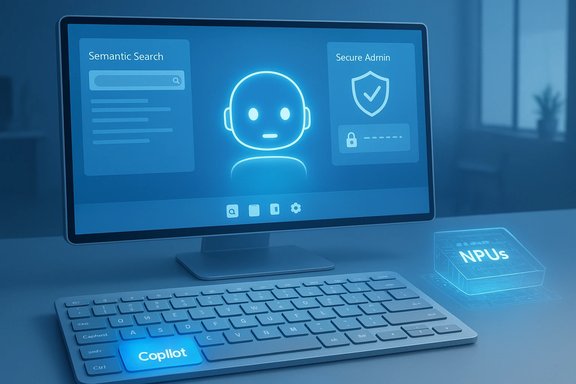
At the same time, chatter about the next generation of Windows — widely referred to in leaks and trade reporting as “Hudson Valley” or informally as Windows 12 — shifted from speculative concept art to concrete engineering signals: a push for deeper AI integration in the operating system, the arrival of a new Copilot key on keyboards, and early platform work that embraces local neural processing and agent frameworks. Hardware partners are positioning “AI PCs” with dedicated NPUs to deliver on those ambitions, and Microsoft’s developer platforms are evolving to let models and agents interact with core OS services.
This article synthesizes the confirmed lifecycle facts, the engineering direction Microsoft is publicly pursuing, and the wild creativity of concept designers. It evaluates what these trends mean for users, enterprises, and the broader Windows ecosystem — and it flags the realistic risks that come with an AI‑centric desktop.
Several OEM and industry reports reference internal codenames and a set of platform features — a dedicated Copilot key, tighter NPU support, and agent protocols — that could appear as part of a major update or as a branded new release. Until Microsoft declares an official product name and versioning plan, any label (Windows 12, Hudson Valley, etc. should be treated as shorthand for a broad, AI‑centric shift in Windows engineering rather than a precise marketing name.
Benefits:
Reality check:
Yet concept aesthetics must be matched by engineering rigor. Smooth, context‑aware AI features require:
For users and IT leaders, the immediate priorities are pragmatic: evaluate hardware, plan upgrades, and use the Windows 10 ESU window strategically. For developers and designers, there is a generational opportunity to build tools that respect user agency while amplifying productivity.
Microsoft’s design and engineering signals suggest a future desktop that is smarter, more conversational, and more tightly coupled to silicon and cloud. Whether that future will arrive under the label Windows 12, as an extended Windows 11 branch, or under another naming scheme is secondary to the more important questions: will that future be secure, fair, and accessible — and will it respect user choice? The answer will determine whether this will be the Windows we deserve, or merely the Windows we were pushed into buying.
Source: BetaNews Windows 12 is everything Windows 11 should be -- and the Microsoft OS we deserve!
 Background
Microsoft’s formal lifecycle calendars drew a line under Windows 10 in mid‑October 2025, when mainstream technical assistance, feature updates and free security fixes officially stopped. For consumers and IT departments alike, that milestone forced a stark set of choices: upgrade eligible machines to Windows 11, replace aging hardware, or enroll in the Windows 10 Extended Security Updates (ESU) program for a limited bridge to safety. Microsoft introduced consumer ESU enrollment paths including a one‑time paid option and two free alternatives, ensuring a managed but temporary runway for stragglers.At the same time, chatter about the next generation of Windows — widely referred to in leaks and trade reporting as “Hudson Valley” or informally as Windows 12 — shifted from speculative concept art to concrete engineering signals: a push for deeper AI integration in the operating system, the arrival of a new Copilot key on keyboards, and early platform work that embraces local neural processing and agent frameworks. Hardware partners are positioning “AI PCs” with dedicated NPUs to deliver on those ambitions, and Microsoft’s developer platforms are evolving to let models and agents interact with core OS services.
This article synthesizes the confirmed lifecycle facts, the engineering direction Microsoft is publicly pursuing, and the wild creativity of concept designers. It evaluates what these trends mean for users, enterprises, and the broader Windows ecosystem — and it flags the realistic risks that come with an AI‑centric desktop.
Why the timing matters
The Windows 10 deadline forces adoption
October 14, 2025 is now a hard pivot date for Windows users. After that day, Windows 10 devices still work, but they no longer receive free security updates or technical support. Microsoft offered a one‑year consumer ESU option spanning Oct. 15, 2025 through Oct. 13, 2026, plus extended commercial options — a short-term safety net rather than a long‑term strategy. The consumer ESU program includes three enrollment paths: syncing PC settings to the cloud, redeeming Microsoft Rewards points, or paying a one‑time fee (the paid option is positioned as a convenience choice for those who prefer not to use cloud sync or reward points). The policy choices underline Microsoft’s intent to accelerate the Windows 11 transition while giving users time to plan hardware refreshes.The market landscape and hardware constraints
Windows 11 brought a modern UI and stricter hardware requirements — TPM 2.0, Secure Boot and recent CPU generations — that blocked many older PCs from upgrading. That friction remains a major factor in adoption rates and explains why so many users considered ESU instead of upgrading. In parallel, OEMs and silicon vendors are pivoting toward “Copilot+” or AI PC designs with NPUs and silicon optimizations intended to run on‑device models, or at least accelerate hybrid cloud/local AI workloads. Any successor OS that leans into these hardware capabilities risks accelerating obsolescence for legacy machines while unlocking new functionality on modern hardware.What “Windows 12” actually is — and isn’t
Rumor, roadmap and reality
The name “Windows 12” is largely a media and community shorthand for Microsoft’s next major Windows platform effort. Microsoft has not released a formal product called Windows 12 with a shipping date or SKU breakdown that replaces Windows 11. What is clear is this: Microsoft is aggressively reworking Windows to make AI a first‑class feature of the OS — integrating Copilot, enabling semantic search across local data, and opening new developer surfaces for AI agents.Several OEM and industry reports reference internal codenames and a set of platform features — a dedicated Copilot key, tighter NPU support, and agent protocols — that could appear as part of a major update or as a branded new release. Until Microsoft declares an official product name and versioning plan, any label (Windows 12, Hudson Valley, etc. should be treated as shorthand for a broad, AI‑centric shift in Windows engineering rather than a precise marketing name.
What to expect in practical terms
From the public signals and platform work, the likely outcomes for the next major Windows platform iteration include:- Deeper Copilot integration as a central, OS‑level assistant invoked by a dedicated Copilot key or keyboard shortcut.
- Local AI acceleration: native support for NPUs and an expectation that some semantics and search functions will work offline.
- Agent frameworks and model interoperability: systems to allow AI agents to securely interact with files, apps and OS APIs.
- UI refinements: continued evolution of the centered taskbar, floating widgets, and micro‑interactions that some concept artists preview.
- Stronger privacy/security controls around model access to local and cloud data.
Key feature areas and what they mean for users
Copilot as a core OS surface
The most visible change is the elevation of Copilot from an app or panel to a central, system‑level feature. Microsoft has already introduced a Copilot key on many new keyboards, which invokes Copilot in Windows. The goal is to make natural language interaction a primary user input — a shortcut to manipulate files, adjust settings, draft content, or ask contextual questions about what’s on the PC.Benefits:
- Faster, natural language access to system tasks.
- Unified place for AI‑assisted productivity (summaries, drafts, context-aware actions).
- Potentially transformative discoverability for power features buried in Settings and Control Panel.
- Privacy and telemetry gating must be clear — Copilot will operate across local files and cloud data, so consent and transparency matter.
- Reliance on Copilot could exacerbate accessibility gaps if offline capabilities are limited to NPUs on new hardware.
Local and hybrid AI (NPUs and Copilot+ PCs)
A wave of "AI PCs" ships with NPUs, allowing models to run locally or perform inference on device efficiently. That enables:- Semantic indexing and on‑device search that remains functional offline.
- Lower latency for interactive tasks and reduced cloud costs.
- Greater privacy when processing sensitive files locally.
Windows AI Foundry, Model Context Protocol and agentization
Microsoft’s platform work includes frameworks to let developers plug models into Windows securely. Concepts include:- A Windows AI Foundry for managing models and access.
- Support for protocols that allow agents to interact with OS services in controlled ways.
Smarter search and semantic indexing
Semantic search turns the classic file search into conversational discovery: ask for “last month’s expense PDF from Sarah” and the OS finds it. This relies on:- Local model indexing (where available).
- Selective cloud index for device‑agnostic content.
UI and UX refinements (what concept videos get right and wrong)
Concept creators have produced polished mockups showing a centered taskbar with rounded corners, floating widgets, a slim top bar for Start and Search, and a dedicated “Windows AI” surface. These visual ideas capture the direction of incremental polish — more fluid animations, density controls, and contextual surfaces for AI suggestions.Reality check:
- Visual design experiments don’t guarantee a final shipping UI. Microsoft ships iterative design updates, so elements may arrive piecemeal or only in certain channels.
- Some UI concepts are powered by underlying platform features (semantic layers, agent callbacks) that must be implemented first. A pretty mockup without robust plumbing is vapid.
Migration, compatibility and enterprise impact
Upgrade paths and enterprise planning
Enterprises face a set of concrete tasks:- Inventory hardware and software compatibility against Windows 11 (and any successor) requirements.
- Evaluate the ESU bridge for machines that can’t upgrade immediately.
- Test AI features for compliance — data residency, logging, and consent are top priorities.
- Build pilot programs that balance productivity gains with security posture.
Security, compliance and regulatory concerns
An OS that natively enables agents and models to access files poses regulatory challenges:- Data access controls must be enforceable and auditable.
- Organizations in regulated sectors must know whether AI processing occurs locally or in the cloud and how model outputs are stored.
- Identity and access management needs to extend to model and agent identities (token issuance, scoping, and revocation).
The benefits — measured and speculative
- Productivity uplift: Faster context switching, natural language queries, and intelligent suggestions can reduce friction in everyday workflows.
- Accessibility gains: Natural language interfacing can help users with mobility or visual impairments — provided implementations respect accessibility standards.
- Developer opportunity: A richer OS model that exposes secure agent hooks could spawn a new class of productivity apps and integrations.
- Edge‑capable AI: On‑device models reduce latency, protect privacy for some workloads, and lower cloud dependency.
- Universal, OS‑level agent orchestration that chains multi‑app workflows from a single prompt.
- Seamless handoff between local model inference and cloud models for heavier workloads.
The risks and tradeoffs
Fragmentation and planned obsolescence
A bifurcated experience — full AI features on Copilot+ NPUs vs. degraded features on hardware without AI acceleration — risks splitting the Windows user base. That split could accelerate hardware churn and put pressure on consumers and SMBs to replace otherwise functional PCs.Privacy, telemetry and user agency
AI features are data‑hungry. The industry debate over telemetry and model prompts is already heated. Windows must make privacy options conspicuous and default to the least surprising behavior. Reliance on Microsoft accounts for certain enrollment and feature access increases lock‑in concerns for users who prefer local accounts.Security vulnerabilities from agent protocols
Model Context Protocols and agent systems are powerful but can be weaponized. Any agent that can read and write files, call APIs, or access secrets increases the attack surface. Sandboxing, least privilege controls, and transparent permissions must be enforced by default.UX regressions and trust erosion
Overreliance on AI to automate tasks risks erroneous actions — e.g., a Copilot assistant suggesting changes to system settings or sending messages on the user’s behalf. Users must retain simple, reliable undo paths and clear confirmations for potentially destructive operations.Practical recommendations for users and IT teams
- Confirm hardware compatibility now. Use official system checks to determine whether machines can run Windows 11 or will need replacement.
- Treat ESU as a temporary bridge: enroll if necessary, but plan hardware refresh and migration timelines within the ESU window.
- Pilot the AI features early in non‑critical environments to evaluate security, privacy, and productivity gains.
- Implement robust data governance: define what folders, services and cloud content agents can index or access.
- For organizations, require model and agent access to be discoverable and auditable within security logs.
Design, concept culture and the appetite for a “Windows we deserve”
Concepts — those polished videos and mockups that circulate online — matter because they shape expectation. Designers imagine a leaner, smarter desktop: an unobtrusive centralized AI, a cleaner Start, floating widgets, and micro‑interactions that anticipate user intent. These designs capture pent‑up demand for an OS that is less cluttered and more anticipatory.Yet concept aesthetics must be matched by engineering rigor. Smooth, context‑aware AI features require:
- Reliable local indexing and model performance.
- Predictable privacy and permission models.
- Backward compatibility with the thriving Windows ecosystem of apps and drivers.
Conclusion — a cautious optimism
The next major chapter of Windows is not simply a new skin or a point upgrade: it represents a platform transition toward agentized, AI‑augmented PC computing. That transition brings genuine promise — faster discovery, language‑first interactions, and on‑device intelligence — alongside real risks around security, privacy and device fragmentation.For users and IT leaders, the immediate priorities are pragmatic: evaluate hardware, plan upgrades, and use the Windows 10 ESU window strategically. For developers and designers, there is a generational opportunity to build tools that respect user agency while amplifying productivity.
Microsoft’s design and engineering signals suggest a future desktop that is smarter, more conversational, and more tightly coupled to silicon and cloud. Whether that future will arrive under the label Windows 12, as an extended Windows 11 branch, or under another naming scheme is secondary to the more important questions: will that future be secure, fair, and accessible — and will it respect user choice? The answer will determine whether this will be the Windows we deserve, or merely the Windows we were pushed into buying.
Source: BetaNews Windows 12 is everything Windows 11 should be -- and the Microsoft OS we deserve!
