

CSP partners should not treat the Windows 365 Business Windows Hybrid Benefit retirement as a forced migration event. The practical recommendation is to renew existing WHB subscriptions by default only after a fresh per-customer cost and eligibility review; customers that no longer gain a clear advantage from WHB should deliberately evaluate the newly cheaper non-WHB offer instead.
Microsoft’s May 7 Partner Center announcement makes the timing clear: new customers have been unable to buy Windows 365 Business WHB SKUs since May 1, 2026. But active customers are not being removed from the program. They can continue using and renewing their existing WHB subscriptions without interruption, and Microsoft says renewal remains on the current WHB SKU unless the customer chooses to change.
That distinction turns an apparently simple end-of-sale notice into a renewal-management problem. The WHB product is closed to new customer acquisition, but its installed base is now a collection of individual commercial decisions—some worth preserving, some worth changing, and none safe to handle with a blanket auto-renew policy.
Windows 365 Business WHB is not reaching end of support. Microsoft is retiring the SKUs from sale to new customers, while preserving renewal rights for customers that already have active WHB subscriptions.
For CSP partners, that creates two separate populations that must not be mixed together:
Microsoft’s wording also means partners should avoid telling customers that WHB has “ended” without qualification. It has ended for new sales, not for existing active subscriptions. That distinction matters to customers that have budgeted around their present licensing position, and it matters just as much to support teams fielding questions about whether their Cloud PCs will keep working.
A practical Partner Center review should follow this sequence:
The account review should also name an owner. Sales may own the quote, licensing specialists may validate entitlement assumptions, and technical staff may need to assess any consequences of changing subscription arrangements. Without a named owner, a “renew as is” choice can become an accidental decision made by deadline pressure.
WHB was historically tied to a customer’s qualifying Windows Pro licensing on each user’s primary work device. The non-WHB offer changes the conversation because its lower list price may reduce or erase the commercial value of retaining WHB for some accounts. The answer will vary by customer, and it should not be inferred from a single seat count or a broad claim that “WHB is always cheaper.”
The comparison needs to stay narrow and auditable:
The table is a decision framework, not a substitute for a quote. Microsoft has announced a list-price decrease, but the relevant customer decision is the renewal price and licensing arrangement actually available to that account. CSPs should avoid promising savings until both routes have been checked through their normal pricing process.
This is also why “keep WHB because it is grandfathered” is not sufficient advice. Grandfathered renewal rights can have value, particularly when the customer wants no subscription change. But a renewal right is not automatically the best price or the cleanest administrative result.
That does not mean every customer needs a disruptive device audit. It does mean the partner should be able to ask useful questions: Are the same users still assigned? Do they still have a primary work device? Has the customer’s Windows licensing or device estate changed materially? Are contractors, shared-device users, or newly reassigned staff now in the WHB population?
The distinction between subscription quantity and user assignment matters here. A customer may have the same number of WHB seats while the people holding those seats have changed completely. A renewal that looks unchanged in billing can be very different from the licensing picture that existed when the original purchase attestation was made.
For sysadmins, the practical work is to maintain a clean mapping between the Windows 365 Business WHB user assignment and the user’s primary Windows device and Pro licensing status. For CSP account teams, the work is to turn that mapping into a clear renewal record rather than relying on a vague assertion that the customer “has Windows Pro.”
WindowsForum’s recent coverage of Microsoft 365 retirements has repeatedly shown why this discipline matters: product simplification notices often look harmless until an old entitlement assumption meets a renewal date. The broader lesson from Microsoft’s ongoing feature-retirement cycle is that continuity is rarely the same thing as automatic optimization.
Partners should document the result in plain language. A renewal record should state whether the customer chose to remain on renewable WHB after comparison, or chose the non-WHB route after reviewing pricing and licensing implications. It should not simply say “renewed Windows 365 Business.”
This protects both sides. The customer sees that the WHB end of sale was considered rather than ignored. The partner can show that the lower list-price environment was reviewed. And the technical team knows whether it is supporting a continuity decision or preparing for a deliberate subscription change.
The messaging should be equally direct: there is no automatic migration to non-WHB, and there is no reason to imply that existing WHB Cloud PCs are at immediate risk. The decision is commercial and administrative first. It becomes a technical project only if the customer elects to change its subscription path.
The next renewal cycle is the real milestone, not the May 1 end-of-sale date. CSP partners that inventory active WHB subscriptions now, validate the users behind them, and require an explicit customer choice will turn Microsoft’s SKU retirement into a repeatable recommendation process rather than a surprise buried in a renewal quote.
Microsoft’s May 7 Partner Center announcement makes the timing clear: new customers have been unable to buy Windows 365 Business WHB SKUs since May 1, 2026. But active customers are not being removed from the program. They can continue using and renewing their existing WHB subscriptions without interruption, and Microsoft says renewal remains on the current WHB SKU unless the customer chooses to change.
That distinction turns an apparently simple end-of-sale notice into a renewal-management problem. The WHB product is closed to new customer acquisition, but its installed base is now a collection of individual commercial decisions—some worth preserving, some worth changing, and none safe to handle with a blanket auto-renew policy.
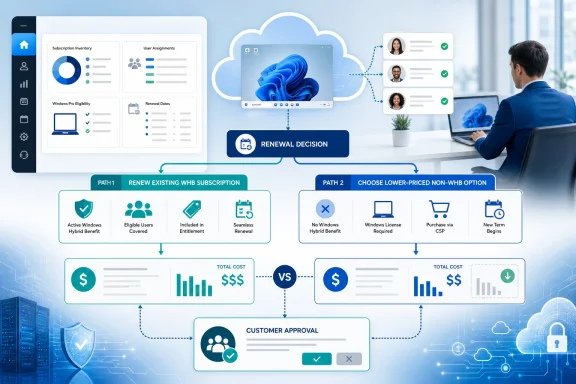 The Retirement Date Closes New Sales, Not Existing Entitlements
Windows 365 Business WHB is not reaching end of support. Microsoft is retiring the SKUs from sale to new customers, while preserving renewal rights for customers that already have active WHB subscriptions.For CSP partners, that creates two separate populations that must not be mixed together:
- A prospective Windows 365 Business customer cannot begin with a WHB SKU after May 1, 2026.
- An existing customer with an active WHB subscription can continue to use and renew that subscription.
- An existing customer is not automatically shifted to a non-WHB SKU at renewal.
- A customer that wants non-WHB must elect that change rather than assuming Microsoft will make it on its behalf.
Microsoft’s wording also means partners should avoid telling customers that WHB has “ended” without qualification. It has ended for new sales, not for existing active subscriptions. That distinction matters to customers that have budgeted around their present licensing position, and it matters just as much to support teams fielding questions about whether their Cloud PCs will keep working.
Start With a Renewal Inventory, Not a Portfolio-Wide Recommendation
The correct decision tree begins with an inventory of subscriptions that are actually renewable under WHB. Do this account by account, with the customer’s renewal date, assigned users, and current licensing evidence in the same review record.A practical Partner Center review should follow this sequence:
- Identify every customer with an active Windows 365 Business WHB subscription and record the renewal date, quantity, and currently assigned users.
- Separate those active subscriptions from ordinary Windows 365 Business subscriptions. The fact that a customer uses Windows 365 Business does not establish that it holds renewable WHB subscriptions.
- Confirm whether the customer wants to preserve the present Cloud PC assignment model through the next term. A renewal conversation is the wrong time to discover that an account has already planned user, device, or licensing changes.
- Recheck the licensing position for every WHB-assigned user. WHB purchase attestation historically required each Windows 365 Business WHB user to have a valid Windows 10 or Windows 11 Pro license installed on that user’s primary work device.
- Obtain current pricing for both paths: renewal of the existing WHB subscription and purchase of the applicable non-WHB Windows 365 Business offer.
- Present the result as a documented customer election: renew WHB unchanged, or move intentionally to non-WHB.
The account review should also name an owner. Sales may own the quote, licensing specialists may validate entitlement assumptions, and technical staff may need to assess any consequences of changing subscription arrangements. Without a named owner, a “renew as is” choice can become an accidental decision made by deadline pressure.
The 20% Price Cut Changes the Math Before It Changes the Architecture
Microsoft paired the WHB end of sale with a 20% Windows 365 Business list-price decrease. That is the reason a passive renewal approach is no longer enough.WHB was historically tied to a customer’s qualifying Windows Pro licensing on each user’s primary work device. The non-WHB offer changes the conversation because its lower list price may reduce or erase the commercial value of retaining WHB for some accounts. The answer will vary by customer, and it should not be inferred from a single seat count or a broad claim that “WHB is always cheaper.”
The comparison needs to stay narrow and auditable:
| Renewal decision | What to verify | Likely recommendation |
|---|---|---|
| Continue WHB | Active renewable WHB subscriptions remain in place, and every assigned user’s historical qualifying-device position is still understood. | Renew if the customer prefers continuity and WHB still makes commercial sense. |
| Move to non-WHB | The 20% lower Windows 365 Business list price produces a better outcome after reviewing the customer’s current licensing assumptions. | Change only as an explicit customer decision. |
| Mixed customer environment | Some users have a straightforward historical WHB basis while others have changed devices, assignments, or licensing circumstances. | Review by user group rather than applying one answer to the entire tenant. |
| New Windows 365 Business customer | The customer does not have an existing active WHB subscription to renew. | Quote non-WHB Windows 365 Business; WHB is no longer available for new customers. |
This is also why “keep WHB because it is grandfathered” is not sufficient advice. Grandfathered renewal rights can have value, particularly when the customer wants no subscription change. But a renewal right is not automatically the best price or the cleanest administrative result.
Eligibility Evidence Is the Quiet Risk in a Routine Renewal
The biggest trap is treating the WHB requirement as a historical purchase detail that no longer deserves scrutiny. Microsoft’s published attestation model required every WHB user to hold a valid Windows 10 or Windows 11 Pro license installed on that user’s primary work device. Any renewal review that cannot connect users to that premise should stop short of a casual recommendation.That does not mean every customer needs a disruptive device audit. It does mean the partner should be able to ask useful questions: Are the same users still assigned? Do they still have a primary work device? Has the customer’s Windows licensing or device estate changed materially? Are contractors, shared-device users, or newly reassigned staff now in the WHB population?
The distinction between subscription quantity and user assignment matters here. A customer may have the same number of WHB seats while the people holding those seats have changed completely. A renewal that looks unchanged in billing can be very different from the licensing picture that existed when the original purchase attestation was made.
For sysadmins, the practical work is to maintain a clean mapping between the Windows 365 Business WHB user assignment and the user’s primary Windows device and Pro licensing status. For CSP account teams, the work is to turn that mapping into a clear renewal record rather than relying on a vague assertion that the customer “has Windows Pro.”
WindowsForum’s recent coverage of Microsoft 365 retirements has repeatedly shown why this discipline matters: product simplification notices often look harmless until an old entitlement assumption meets a renewal date. The broader lesson from Microsoft’s ongoing feature-retirement cycle is that continuity is rarely the same thing as automatic optimization.
Make the Customer Election Explicit
Microsoft says existing WHB subscriptions stay on their current SKU at renewal unless the customer selects a change. That default protects continuity, but it can also hide indecision.Partners should document the result in plain language. A renewal record should state whether the customer chose to remain on renewable WHB after comparison, or chose the non-WHB route after reviewing pricing and licensing implications. It should not simply say “renewed Windows 365 Business.”
This protects both sides. The customer sees that the WHB end of sale was considered rather than ignored. The partner can show that the lower list-price environment was reviewed. And the technical team knows whether it is supporting a continuity decision or preparing for a deliberate subscription change.
The messaging should be equally direct: there is no automatic migration to non-WHB, and there is no reason to imply that existing WHB Cloud PCs are at immediate risk. The decision is commercial and administrative first. It becomes a technical project only if the customer elects to change its subscription path.
Frequently Asked Questions
Can existing Windows 365 Business WHB customers still renew?
Yes. Microsoft says customers with active Windows 365 Business WHB subscriptions can continue using and renewing them without interruption.Did Microsoft automatically move WHB customers to non-WHB on May 1, 2026?
No. Existing WHB subscriptions remain on their current WHB SKU at renewal unless the customer elects a change.Can a new customer buy Windows 365 Business WHB now?
No. Microsoft ended sale of new Windows 365 Business WHB SKUs for new customers on May 1, 2026.Does the 20% list-price decrease mean every WHB customer should switch?
No. It means every renewable WHB customer deserves a new comparison. The decision depends on the customer’s specific renewal pricing, user assignments, and historical WHB eligibility position.The next renewal cycle is the real milestone, not the May 1 end-of-sale date. CSP partners that inventory active WHB subscriptions now, validate the users behind them, and require an explicit customer choice will turn Microsoft’s SKU retirement into a repeatable recommendation process rather than a surprise buried in a renewal quote.
References
- Primary source: learn.microsoft.com
May 2026 announcements - Partner Center announcements | Microsoft Learn
May 2026 announcements for Microsoft Partner Center including new capabilities, promotions, offers, markets, or changes to existing offers.learn.microsoft.com - Independent coverage: partner.microsoft.com
Unlock growth with proactive renewals
A practical guide for Microsoft partners on driving business growth through proactive Cloud Solution Provider (CSP) renewals, timely customer engagement, and leveraging new AI and security offers.partner.microsoft.com
- Independent coverage: microsoftpartners.microsoft.com
- Independent coverage: support.microsoft.com
Partners: Request a reseller relationship | Microsoft Support
Partners can request a reseller relationship in the Microsoft 365 partner admin center.support.microsoft.com - Independent coverage: blog.cloudfactorygroup.com

Windows 365 Business Windows Hybrid Benefit End of Sale: What Partners Must Know — Cloud Factory
Windows 365 Business WHB SKUs are end-of-sale from May 1, 2026. Learn what CSP partners must know about renewals, pricing changes, and migration planning.
blog.cloudfactorygroup.com
- Independent coverage: microsoft.com
