

Teams should pilot the Windows App SDK 2.2 feature set now, but new production work should pin to Windows App SDK 2.3.1, the newer stable release published July 16, 2026. Treat the upgrade as two separate decisions:
Windows App SDK 2.2.0, released June 9, 2026, is still important because it introduced two practical capabilities that change how traditional Windows desktop applications can be built and maintained. But it is not the endpoint for a new project. The sensible path is to adopt the current 2.3.1 stable baseline while explicitly testing the 2.2 APIs that matter to your application.
Do not make “upgrade to 2.2” a single release gate. Use two workstreams with separate success criteria.
For organizations maintaining classic Win32, WPF, WinForms, C++, or WinUI desktop software,
WindowsForum readers following earlier SDK performance and modernization work will recognize the broader direction: the platform is becoming more useful to existing desktop deployment models, not only fully packaged apps. The operational difference now is that teams can modernize storage independently from the riskier AI-video feature.
Track these four outcomes:
That deployment responsibility is separate from storage migration. Validate both in the same test matrix:
Can
No. It is a first-class application-data path for unpackaged apps, not an automatic replacement for every Registry-based design. Inventory the current data, migrate compatible settings and application state deliberately, and retain rollback compatibility.
The practical next move is to upgrade the development baseline to Windows App SDK 2.3.1, ship
ApplicationData.GetForUnpackaged() is a comparatively low-risk modernization for desktop apps, while Microsoft.Windows.AI.Video.VideoScaler needs a controlled, hardware-aware AI-video pilot before any broad rollout.Windows App SDK 2.2.0, released June 9, 2026, is still important because it introduced two practical capabilities that change how traditional Windows desktop applications can be built and maintained. But it is not the endpoint for a new project. The sensible path is to adopt the current 2.3.1 stable baseline while explicitly testing the 2.2 APIs that matter to your application.
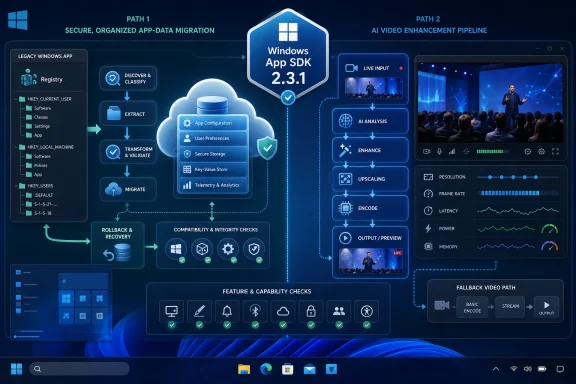 Start with a split upgrade plan
Do not make “upgrade to 2.2” a single release gate. Use two workstreams with separate success criteria.- Set Windows App SDK 2.3.1 as the dependency baseline for new development.
- Update the project’s Windows App SDK dependency through its normal package-management process.
- Update the deployment package or runtime deployment plan to match the selected stable release.
- Record the SDK version in release documentation so support staff can identify it from an installer, build, or diagnostics bundle.
- Create a feature branch or pilot ring for
ApplicationData.GetForUnpackaged().- Use it first in one application area with well-understood settings or local data.
- Keep the existing storage behavior available during the pilot so rollback does not strand user preferences or operational state.
- Create a separate pilot for
VideoScaler.- Limit it to a controlled workflow such as video preview, conferencing, streaming, or an editing preview path.
- Do not make AI upscaling mandatory for every user or every video stream until capability, quality, latency, power, and memory results are known.
- Test on your real Windows estate, not only the newest developer PCs.
- Windows App SDK 2.2 supports Windows 10 version 1809, build 17763, and later.
- That support floor does not mean every individual platform feature is available everywhere. Your app must still perform runtime availability checks when it targets older Windows builds.
Why 2.2 deserves a pilot even when 2.3.1 is the target
The important distinction is between an SDK version and a feature introduction point. Windows App SDK 2.3.1 is the newer stable package for new work, but the two capabilities introduced in 2.2 are still the decision points worth evaluating.For organizations maintaining classic Win32, WPF, WinForms, C++, or WinUI desktop software,
ApplicationData.GetForUnpackaged() may be the more immediately valuable change. It gives unpackaged apps a first-class WinRT route to application data rather than pushing developers toward Registry-oriented workarounds.VideoScaler is more specialized. It provides real-time AI video upscaling with controls for output resolution, frame rate, and region of interest. It also supports BGR, RGB, and NV12 video formats. That makes it relevant to applications that already own a video pipeline, but it does not make it an automatic upgrade for every desktop application.WindowsForum readers following earlier SDK performance and modernization work will recognize the broader direction: the platform is becoming more useful to existing desktop deployment models, not only fully packaged apps. The operational difference now is that teams can modernize storage independently from the riskier AI-video feature.
How to pilot VideoScaler without creating a support problem
VideoScaler should be treated as an optional enhancement, not as the only path to a usable video experience.Build a capability-first video path
- Keep the existing rendering or scaling pipeline intact.
- Your current video path is the fallback.
- Do not remove it merely because the app can compile against the new API.
- Check VideoScaler capability at runtime before offering or activating the feature.
- Microsoft includes a runtime capability check with VideoScaler.
- Use the result to decide whether the enhanced path is available on that device and configuration.
- Create the VideoScaler path only after capability succeeds.
- Select the input and output format deliberately: BGR, RGB, and NV12 are supported.
- Configure the output resolution, target frame rate, and region of interest according to the workload.
- Use a transparent fallback when capability does not succeed.
- Continue with the original stream, standard scaling, or the existing preview pipeline.
- Do not show an error that implies the PC is malfunctioning. The feature is optional by design.
- Make the feature reversible during the pilot.
- Provide an in-app setting or controlled configuration mechanism that returns the app to its original video path.
- Preserve that switch until the pilot demonstrates acceptable behavior across supported devices.
Measure more than “does it work?”
A successful pilot is not simply a stream that looks sharper. Compare the enhanced path with the fallback using the same source clips, resolutions, and network conditions.Track these four outcomes:
- Visual quality: Look for improvements where the subject is most important, especially faces and conversational video. Also watch for distracting detail changes, unstable edges, or results that are less useful than the original stream.
- Latency: Measure the user-visible delay introduced between incoming video and displayed output. A quality improvement that damages a real-time conversation may not be a production win.
- Power: Test both plugged-in and battery-powered systems. A feature suitable for a desktop workstation may be unsuitable as a default on portable devices.
- Memory: Observe the app’s memory behavior during sustained playback, resolution changes, and repeated start/stop cycles.
Do not invent a hardware eligibility list
The safe eligibility rule is the runtime capability check, not a static list of graphics cards, processors, or Windows editions. VideoScaler support must be determined on the device at runtime. That approach is more durable than maintaining an unsupported allowlist and avoids incorrectly disabling a capability that is available through a different hardware configuration.How to migrate unpackaged application storage safely
ApplicationData.GetForUnpackaged() is not a reason to move every file, setting, cache, and machine-level value in one release. It is a reason to establish a supported storage abstraction for unpackaged apps.Use a staged storage migration
- Inventory current storage before changing code.
- Identify user settings, local data, temporary data, shared data, machine-level state, and Registry-based values.
- Mark which values are settings, caches, secrets, license data, or operational configuration. They should not all be migrated the same way.
- Choose stable publisher and product identifiers.
GetForUnpackaged()retrieves application data for an unpackaged app using publisher and product information.- Treat those identifiers as part of your app’s storage identity. Changing them can turn an upgrade into an apparent first launch.
- Implement read compatibility before writing new data.
- On first launch after the upgrade, read the previous location when the new store has no value.
- Write the recovered value to the new application-data location only after validating it.
- Keep the prior location available during a defined transition period.
- Do not immediately delete Registry values or old local files.
- A rollback build must still be able to read the state created before the migration.
- Test every supported architecture and installer path.
- Verify x86, x64, and ARM64 builds where your product ships them.
- Test clean install, in-place upgrade, repair, uninstall/reinstall, and downgrade where your installer supports those scenarios.
- Validate user and machine behavior separately.
- The API is intended to provide access to per-user and per-machine application data.
- Test standard-user behavior as well as administrative deployment behavior; do not assume an elevated installer proves the app will work for ordinary users.
Deployment and operating-system checks that still matter
Unpackaged applications and apps packaged with an external location remain responsible for deploying the Windows App SDK runtime they require. They also need Windows App SDK runtime initialization, typically through the Bootstrapper API or the project configuration Microsoft provides for unpackaged projects.That deployment responsibility is separate from storage migration. Validate both in the same test matrix:
- The application starts successfully after a clean installation.
- The required runtime is present through the supported deployment method.
- The app can access its intended storage as a standard user.
- The VideoScaler capability check is performed before the optional AI path starts.
- The fallback video path remains functional on systems where the feature is unavailable.
- The application behaves correctly on Windows 10 version 1809, build 17763, if that remains in your supported estate.
Frequently Asked Questions
Should an app remain on Windows App SDK 2.2 to use VideoScaler?
No. Windows App SDK 2.2 introduced VideoScaler, but Windows App SDK 2.3.1 is the newer stable release as of July 16, 2026. Use 2.3.1 for new work while specifically testing the 2.2-introduced feature behavior you plan to ship.Does VideoScaler require explicit Windows ML initialization?
No. Microsoft states that VideoScaler does not require explicit Windows ML initialization. Your application still needs a runtime capability check and a working fallback path.Can ApplicationData.GetForUnpackaged() replace every Registry use?
No. It is a first-class application-data path for unpackaged apps, not an automatic replacement for every Registry-based design. Inventory the current data, migrate compatible settings and application state deliberately, and retain rollback compatibility.Is Windows 10 version 1809 enough to guarantee every feature works?
No. Windows App SDK 2.2 supports Windows 10 version 1809, build 17763, and later, but individual platform APIs may require runtime availability checks on older Windows builds.The practical next move is to upgrade the development baseline to Windows App SDK 2.3.1, ship
GetForUnpackaged() only after a reversible storage migration, and hold VideoScaler to measurable pilot criteria. That approach captures the real value of the 2.2 release without making everyday desktop reliability depend on an AI-video path that may not be appropriate for every device or workload.References
- Primary source: learn.microsoft.com
Latest Windows App SDK downloads - Windows apps | Microsoft Learn
This page provides links to the latest downloads of the Windows App SDK for all three release channels (stable, preview, and experimental).learn.microsoft.com - Independent coverage: github.com
Releases · microsoft/WindowsAppSDK · GitHub
The Windows App SDK empowers all Windows desktop apps with modern Windows UI, APIs, and platform features, including back-compat support, shipped via NuGet. - Releases · microsoft/WindowsAppSDK github.com
- Primary source: WindowsForum
Windows App SDK 1.6 Released: AOT Compilation and Performance Boosts | Windows Forum
Microsoft has officially rolled out the latest version of its Windows App SDK, now numbered 1.6. This update introduces a host of impressive features and...windowsforum.com
