• Thread Author
Microsoft is quietly reshaping how Copilot and the web interact on Windows 11: in the latest Insider preview the Copilot app can open web links in a docked side pane next to your conversation, save per‑conversation tabs, and — if you opt in — surface saved passwords and form data so the assistant can act on web content without forcing you into a separate browser window. This change is rolling out to Windows Insiders as part of Copilot app package version 146.0.3856.39 and is explicitly designed to reduce context switching between browsing and chat — but it also raises immediate questions about privacy, enterprise control, and where sensitive web data gets processed and stored. ([blogs.windows.com]s.com/windows-insider/2026/03/04/copilot-app-on-windows-opening-web-links-alongside-your-conversations-begins-rolling-out-to-windows-insiders/)

Split-screen UI with a Chat panel on the left and a Copilot panel on the right on a soft blue desktop.Background / Overview​

Microsoft has been steadily folding Copilot into more locations across Windows, Edge, and Microsoft 365 for more than two years. The company’s stated aim has been to make the assistant a continuous productivity layer — not just a separate chat box — and to give it access to contextual signals like open pages, emails, and files when users permit it. The new side‑pane behavior is the latest step in that trajectory: instead of opening a target web link in your default browser, Copilot will render it inside the Copilot app in a web sidepane tied to the current conversation. Tabs you open inside a conversation are saved with that conversation for later retrievrequest permission to read the content of those tabs so it can summarize, synthesize, or draft text that references them.
This update is being previewed to all Windows Insider channels and will be expanded gradually; Microsoft frames it as an improvement in productivity continuity rather than a replacement for a full browser. The integration uses Edge’s rendering stack under the hood and, for now, operates inside the Copilot app context rather than any arbitrary third‑party browser.

What changed in this Insider preview​

Key user‑facing features​

  • Copilot opens clicked links in a side pane adjacent to your conversation instead of launching a separate browser window. This keeps the chat and the web content visible at the same time.
  • With explicit permission, Copilot can read the content of tabs opened in that conversation — and that contextual access is scoped to the conversation. That allows follow‑up prompts such as “summarize the three tabs I opened” or “draft an email referencing the highlights.”
  • Tabs you open in a conversation are saved with that conversation so they’re available when you return to the same chat later.
  • Optional sync of passwords and form data to streamline multi‑step web work inside Copilot; this is an opt‑in capability and requires explicit enabling.
  • The update rolled as Copilot app version 146.0.3856.39 and includes various performance and reliability improvements, plus the addition of features from Copilot.com such as Podcasts and Study & Learn mode; Microsoft notes some features may be temporarily removed while the team iterates.
Independent reporting and community analysis confirm the above behavior and emphasize that the change is staged and gated to Insiders first; availability will expand over time.

How the new side‑pane behavior works (technical breakdown)​

Rendering and security model​

The side pane is implemented as an embedded web view that reuses Microsoft Edge’s rendering engine (WebView2 or a similar stack), meaning pages render the same way they would in Edge but inside the Copilot app. This approach gives Microsoft the benefits of a hardened rendering model and consistent web compat behavior whilerated with the conversation context. It also means the security model and content filtering behaviors of Edge are largely inherited, but the exact telemetry and content‑processing boundaries are shaped by Copilot’s additional context‑sharing mechanics. ([blogs.windows.com](Copilot App on Windows: Opening web links alongside your conversations begins rolling out to Windows Insiders## Scoped context and permissions
Microsoft’s messaging emphasizes per‑conversation scoping: Copilot asks before it reads tab conssion is limited to the conversation in which the tabs were opened. That model reduces the assistant’s reach compared with a global tab‑reading permot eliminate risk because any page Copilot can read becomes part of that conversation’s context and therefore could be retained or processed further by the systemlogs.windows.com]

Persistence and synchronization​

Tabs are saved with the conversation to support persistent research sessions. It’s not yet fully documented whether saved tabs are stored purely locally, synced to a Microsoft account, or backed up to cloud infrastructure for cross‑device continuity; Microsoft’s rollout notes leave that distinction open, and community analyses treat it as a pending implementation detail to be clarified in documentation. Where and how the saved tab metadata and page snapshots are stored matter for privacy and compliance.

The UX promise — and real tradeoffs​

Microsoft’s design goal is clear: reduce context switching. For common tasks — researching, drafting messages, comparing product pages, summarizing multiple sources — an integrated view where you can open pages and immediately ask Copilot to synthesize them is powerful. Typical benefits include:
  • Faster summarization and synthesis when Copilot can see multiple source pages concurrently.
  • Cleaner drafting workflows: open the reference pages, ask Copilot to write a shareable draft that cites or uses those sources.
  • Persistent research sessions that resume where you left off, with tabs saved to the conversation rather than scattered across browser windows.
But there are tradeoffs:
  • Screen real estate: a docked side pane reduces horizontal space for the web page; complex, layout‑heavy sites may feel cramped.
  • Tab management friction: tabs tied to conversatio if users forget they’re saved; accidental retention creates a traceable browsing history that persists beyond ephemeral research.
  • Mental model shifts: users are conditioned to think of the browser as the canonical place for web content. Moving page rendering into an assistant app requires new expectations around navigation, privacy prompts, and session lifecycle.
These UX tradeoffs are why Microsobehavior to Insiders and iterating based on feedback rather than flipping the toggle for all customers at once.

Privacy and security — the hard questions​

The most consequential questions about this change are not “can it summarize?” but “what does Copilot see, store, and process, and where?” The high‑level facts Microsoft has stated are helpful but incomplete.

Known design points​

  • Copilot requests consent before reading tab content and scopes that access to the conversation in which the tabs were opened.
  • Password and form data sync is explicitly optional and requires enabling; it’s not automatic.

Unresolved or unclear pprivacy‑conscious users and admins)​

  • Processing locus: Microsoft’s announcement does not specify whether the text Copilot extracts from pages opened in the side pane is processed entirely on‑device, sent to Microsoft cloud services for model grounding, or handled via a hybrid model. The distinction matters for regulatory compliance (HIPAA, GDPR), enterprise data loss prevention, and sovereignty requirements. Independent commentary flags this as an open question until Microsoft publishes detailed technical documentation. Treat any claim about pure local processing as unverified until Microsoft confirms it.
  • Persistence and telemetry: saving tabs with conversations implies persistence of page references and possibly snapshots. If saved conversations are synced across devices via a Microsoft account or tenant service, those snapshots could be retained in cloud backups. Microsoft has not yet described retention policies or the exact telemetry surface for saved tabs.
  • Credential handling: optional password and form data sync is convenient but increases attack surface. Security‑minded administrators will want to know whether the vaulting mechanism uses the Windows Credentials Manager, Microsoft Edge’s saved credentials, or a separate encrypted store; and whether vault data is escrowed to the cloud in a way that requires additional tenant controls. Microsoft’s short announcement does not enumerate the implementation details.
  • Third‑party content and cross‑prompt injection: when an AI assistant reads web pages and can act on them, adversarial web content could attempt to manipulate the assistant (prompt injection) or craft content that triggers unintended behaviors. Microsoft’s broader Copilot documentation has acknowledged novel security risks in agentic or web‑interactive flows; this new integration amplifies those considerations.
Because several of these items remain unspecified in public release notes, security and privacy teams must treat the feature as experimental and assume conservative defaults (that some processing and persistence happen in Microsoft‑controlled cloud services) until Microsoft publishes precise technical and compliance documentation.

Enterprise management: what admins can (and can’t) do today​

Enterprises have been asking Microsoft for more control over Copilot for months. Microsoft has started to provide admin levers, but these controls are often intentionally conservative and scoped — a pragmatic compromise between user convenience and enterprise governance.

What Microsoft has shipped so far (preview controls)​

  • A Group Policy named RemoveMicrosoftCopilotApp was introduced in Insider Preview (Build 26220.7535 / KB5072046), enabling a one‑time uninstall of the consumer Copilot app under very specific conditions. That policy is co it triggers only when all gating conditions are met (for example, the consumer app was provisioned rather than user‑installed and has not been launched in the last 28 days). It is not a persistent block; users could reinstall the app unless administrators layer additional controls.
  • Microsoft 365 tenant‑level controls exist for managing Copilot app provisioning and Copilot access for unlicensed users; blocking the Copilot app via the “Integrated Apps” control can be tenant‑wide, but it has implications for licensed users and other surfaces. Admins are advised to use integrated app controls, app management in Teams/Outlook, and Intune policies to tailor who receives which Copilot experience.

Practical enterprise controls (recommended layered approach)​

  • Pilot the new feature in a small, controlled ring and validate the behavior on test devices. Use Insider channels for early validation.
  • If you need to remove the consumer Copilot app from provisioned devices, test and deploy the RemoveMicrosoftCopilotApp Group Policy carefully — remember the 28‑day inactivitystraints. It is designed for surgical cleanup, not for blanket prohibition.
  • For durable prevention of reinstallation or uncontrolled use, combine the Group Policy approach with *AppLockerer Application Control (WDAC)** rules and MDM‑deployed App‑restriction policies. AppLocker provides an enforcement mechanism that survives user reinstallation attempts.
  • Use Microsoft 365 admin center and Teams admin controls to manage tenant‑level Copilot provisioning and block unlicensed access where appropriate. This prevents tenant provisioning from reintroducing the consumer app.
  • Update internal acceptable‑use and DLP policies to clarify whether users may use Copilot with sensitive data and instruct them about the consent prompts they will see when the assision to read web tabs.
The upshot: admins now have more tools, but not yet a single, simple “turn Copilot off everywhere” switch that is guaranteed to be persistent across OS updates, provisioning flows, and user actions. That reality matters for regulated environments and organizations that require deterministic controls.

Threat models and mitigations​

If your organization must limit exposure, consider these short, prioritized mitigations:
  • Assume any web content be temporarily processed by cloud services. Treat the feature as equivalent to past web‑grounded Copilot features in terms of processing locus until Microsoft clarifies otherwise. Mitigation: restrict Copilot usage in high‑risk groups and ensure DLP policies block sensitive page content from being processed by external services.
  • For endpoints requiring strict application whitelisting, deploy AppLocker/WDAC rules that prevent the consumer Copilot app or the Copilot side‑pane host from running. Mitigation: enforce via Intune/MDM for scale.
  • Monitor for abusive web content and promMitigation:* educate users to treat assistant actions skeptically, enable logging and audit trails where possible, and apply web‑content filtering to limit exposure to high‑risk sites.
  • Validate credential handling: until the credential sync behavior is fully documented, avoid enabling password/form sync on machines that handle regulated credentials. Mitigation: enforce a policy that restricts enabling credential sync to approved groups only.

How this compares to other browser‑anchored Copilot experiences​

Microsoft has previously added Copilot features to the Edge side pane (page summarization, contextual prompts) and to integrated Copilot modes across Microsoft 365 apps. This new behavior differs in two ways:
  • The assistant is now hosting web pages inside the Copilot app (an app‑anchored embedded browser) rather than being a side pane inside Edge; that shi and permission flows occur.
  • Per‑conversation tab saving introduces persistent research artifacts tied to chat history rather than just ephemeral tab state in a browser. That improves workflow continuity but increases the potential for long‑lived records of browsing activity.
Competitors are also experimenting with browser‑anchored assistants, but Microsoft’s approach stands out because it merges the assistant’s conversational memory with saved web sessions — turning a chain of searches into a project‑scoped wot. That convergence is powerful but also increases the stakes for privacy and governance.

Practical advice for everyday users​

  • Treat the Copilot side‑pane as an opt‑in productivity experiment. If you rely on private or sensitive websites (banking, medical, HR portals), avoid opening those pages inside the Copilot side pane until Microsoft publishes clear processing and retention guarantees.
  • Review consent prompts carefully. When Copilot asks to read tab contents, that’s the moment to decide whether you want those pages to become part of the assistant’s context. If you’re unsure, deny and use a conventional browser window instead.
  • Use browser privacy featte mode) if you need ephemeral browsing; note however that the integration and saved‑tabs behavior may not honor this the way a normal browser session does — test before trusting.
  • If you enable credentials or form‑data sync for convenience, document the decision and understand how your organization expects credentials to be managed. Prefer platform password managers and vaults with documented protections.

Critical analysis — strengths, weaknesses, and the broader implications​

Strengths​

  • The feature directly addresses a genuine pain point: context switching between browser and assistant. For knowledge‑work flows (research, drafting, competitive checks), being able to open multiple pages and ask Copilot to synthesize them without manual copy‑paste is objectively valuable.
  • Technical consistency with Edge’s rendering stack reduces compatibility surprises; embedding a proven web engine inside Copilot preserves rendering fidelity for modern sites.
  • Microsoft’s staged rollout via Insiders and the inclusion of permission prompts show that the company is aware of the privacy, UX, and enterprise governance tradeoffs and is choosing to iterate rather than rush.

Weaknesses and risks​

  • The lack of explicit documentation about where and how page content is processed and retained is the single largest omission. That technical detail determines compliance posture for many organizations; until it’s published, admins must assume conservative defaults and proceed cautiously.
  • The administrative control available today (a one‑time uninstall policy) is pragmatic but not sufficient as a durable enforcement mechanism in large, heterogeneous environments. Enterprises that require deterministic controls will have to assemble layered mitigations (AppLocker/WDAC, tenant provisioning settings, Intune restrictions) — a higher operational cost.
  • The new interaction model increases the attack surface for prompt‑injection and adversarial web content, and existing DLP and threat detection tooling may not be ready to monitor assistant‑driven flows without configuration changes.

Strategic implications​

Microsoft is betting that a persistent, multi‑surface Copilot — one that can see the web and act across apps — will deliver enough productivity upside to offset user friction and governance costs. For consumers and individual knowledge workers, the convenience tradeoff may be worthwhile. For regulated enterprises, the burden of proof lies with Microsoft: provide clear technical documentation, retention and telemetry policies, and admin controls that can be relied upon in production environments. Until those are available, cautious, controlled pilots are the right approach.

What to watch next​

  • Microsoft’s forthcoming technical documentation explaining whether side‑pane page content is processed on‑device or in the cloud, and the retention/backup policies for saved tabs. This is the clearest gating item for broad enterprise adoption.
  • New or expanded admin policies that provide permanent blocking or durable prevention of the consumer Copilot app or the side‑pane behavior, beyond the current one‑time uninstall capability.
  • Signals from Insiders about real‑world usability: how often users accept the permission prompts, whether saved tabs are beneficial or burdensome, and whether the feature interferes with multi‑device workflows.

Conclusion​

Microsoft’s move to render web content inside the Copilot app and tie tabs to conversations is a meaningful evolution of the assistant: it stitches browsing and chat into a single, project‑scoped workspace that can speed research and drafting. That convenience is real and likely to be welcomed by many users. But the change is also a clear escalation in scope for an assistant that can now see and persist web sessions — and with that power come real governance, privacy, and security responsibilities. For individuals, the rule is simple: treat the side‑pane as opt‑in and protect sensitive browsing. For IT teams, the rule is systemic: pilot the feature, assume conservative processing defaults, and combine Microsoft’s early admin policies with AppLocker/WDAC and tenant controls for durable protection. Microsoft’s staged rollout and permission prompts show awareness of these tensions, but until the company publishes definitive technical details about processing and retention, security‑minded organizations should proceed with caution.

Source: Thurrott.com Microsoft is Testing Web Integration in Copilot on Windows 11
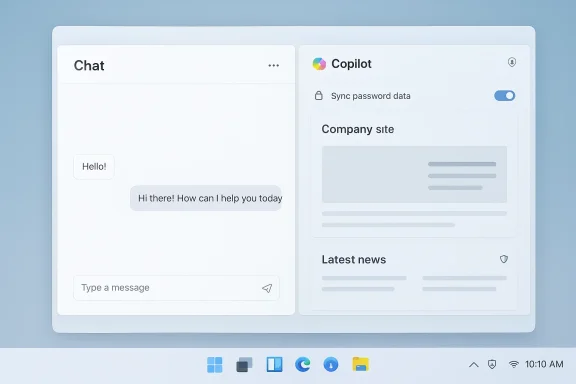
 

Microsoft’s Copilot app on Windows now opens web links inside a docked sidepane tied to the conversation, promising a smoother, less interruptive workflow — and promptly reigniting the debate over whether convenience is worth ceding control of the browsing experience. (blogs.windows.com) (theregister.com)

Laptop screen split: Copilot chat on the left and a blue UI mockup on the right.Background​

Microsoft announced the change in an Insider blog post on March 4, 2026, describing a new behavior in Copilot app builds (Copilot app version 146.0.3856.39 and later) that opens clicked links “in a sidepane next to your conversation instead of a separate browser window.” The company says Copilot will, with explicit permission, read the content of tabs opened inside that conversation, save those tabs with the conversation for future recall, and — if a user enables it — sync passwords and form data to make in-pane navigation and form completion easier. Microsoft frames this as a productivity feature that reduces context switching. (blogs.windows.com)
At first glance it’s a simple user-experience decision: keep the web page you clicked visible next to the chat so Copilot can reference it without you flipping between windows. But the mechanics, implications, and vendor reactions make this more than a UX tweak: it touches browser choice, credential handling, enterprise policy, privacy memories like Windows Recall, and regulatory scrutiny about platform leverage. Independent reporting and commentary from browser vendors and the press have already begun to dissect what the small interface change really means. (theregister.com)

What Microsoft says and what is already clear​

The new sidepane behavior (what’s in the release notes)​

  • Click a link in a Copilot conversation and the page opens inside a sidepane inside the Copilot app rather than launching your default browser.
  • Copilot can access, with your permission, the context of tabs opened in that conversation only — enabling cross-tab summarization and follow-up prompts.
  • Tabs opened inside a conversation are saved with that conversation so you can return to them later.
  • An optional sync for passwords and form data can be enabled to permit autofill inside the Copilot sidepane.
  • The change is rolling out to Windows Insiders gradually starting in Copilot app package versions beginning with 146.0.3856.39. (blogs.windows.com)
These bullet points are the crucial factual building blocks for any assessment: the feature is explicit in scope and gated to Insiders, Microsoft claims per-conversation consent, and password/form-data sync is an optional setting. That combination — opt-in features plus default-on UX behavior for link rendering — is the root of the ensuing controversy. (blogs.windows.com)

Rendering engine and technical plumbing (what Microsoft didn’t explicitly say)​

Microsoft’s blog post describes the behavior, but it does not publish low-level implementation details such as the exact embedding technology. Independent reporting and community analysis point to an embedded Edge rendering stack — commonly WebView2 or an equivalent — powering the internal web view inside the Copilot app, which means pages will generally render exactly as they do in Edge. That alignment explains cross-compatibility and why Microsoft can inherit many of Edge’s site permissions and content-safety behaviors, but it’s an inference rather than a vendor-confirmed implementation detail. Treat mentions of WebView2 as highly plausible but technically inferred from the architecture Microsoft has used in similar integrations, not as a direct, explicit statement from Microsoft.

UX and competition: convenience vs. choice​

Embedding a complete web rendering surface inside an assistant-style app is, in product terms, a genuine productivity win for some workflows. Researchers, writers, and people who use Copilot to triage web-based information can keep the browser content and the assistant’s working memory visible at once — a win for “one-window” workflows. Microsoft sells the feature on that basis: less context switching, faster drafting and summarization, and an easier path to follow-up prompts that reference exact pages. (blogs.windows.com)
But that convenience comes at a competitive cost. The Copilot sidepane replaces the long-standing desktop convention that clicking a link hands off to your default browser — an app choice you made and configured with preferences, extensions, font sizes, security settings and an established autofill vault. Several browser vendors have framed the change as presumptuous: if links default to opening in Copilot-sidepane pages rather than the browser you intentionally set as default, that erodes the user’s control of core platform behavior and potentially funnels attention, telemetry, and transactions toward Microsoft’s surfaces. The same complaint repeatedly surfaces when platform owners embed their own UI stacks: convenience for some, pressure on competition for others. (theregister.com)
  • For users who want to keep every link in their preferred browser, the new default flow represents a change in habit and potentially in trust.
  • For browser vendors, the feature can look like a competitor buying eyeballs by changing the expected mechanics of link-opening.
  • For developers and publishers, embedded rendering inside Copilot may change how their pages are experienced and monetized (ads, tracking, and scripts behave differently depending on the embedding context and the user’s installed extensions).
These trade-offs are straightforward: Microsoft is prioritizing integrated productivity flows; browser vendors are defending user choice and platform parity. The tension is structural, not merely rhetorical.

Privacy and security: why “password sync” matters​

The part of Microsoft’s note that has raised the most eyebrows is the optional password and form-data sync. Autofill is a substantial convenience — but it also materially changes the threat model when you allow another application surface (the Copilot app) to access credential material, even if that access is mediated by a vault or a token.
Key points to consider:
  • Password syncing and autofill are opt-in per Microsoft’s messaging. But opt-in consent is only as strong as the UX used to secure it; ambiguous prompts or buried settings can lead users to enable features without fully understanding consequences. (blogs.windows.com)
  • There’s ambiguity about which credential store Copilot will use when autofilling in the sidepane. Will it call into Edge’s password vault, Windows Credential Manager, or a separate Copilot-controlled store? That difference matters for administration, telemetry, and corporate policy enforcement. Public documentation does not yet spell out the precise credential store semantics. Independent analysis suggests Copilot is likely to reuse an existing Edge-style encrypted store, but Microsoft has not published the exact plumbing. That lack of detail is a real implementation risk.
  • Practical attack surface: expanding the number of apps that can invoke autofill increases the attack surface, particularly for credential-stealing malware, misconfigured policy controls, or flaws in how a sidepane handles focus and scripting. Even if the autofill process uses tokens and never exposes plaintext to Copilot’s reasoning pipeline, the mere fact that filling occurs in a different app surface raises questions about logging, telemetry, and crash dumps that may leak sensitive metadata.
These concerns are especially sensitive given Microsoft’s recent history with the Recall feature, a previously announced and controversial “memory” capability that captured desktop snapshots and drew widespread privacy criticism before Microsoft delayed and reworked the offering. Recall’s public missteps eroded some trust around on-device, always-on capture, so any feature that deals with persistent data (saved tabs and credential sync) will be judged against that backdrop. Citeable reporting and reviews have repeatedly flagged Recall as a source of user anxiety for security and privacy reasons.

Enterprise controls and administration: what IT needs to know​

Enterprises should be paying attention for several reasons:
  • Policy control and MDM: Administrators will want to know whether and how Copilot sidepane behavior can be restricted through Group Policy, Intune (MDM), or other management layers. Early reporting indicates Microsoft is still iterating on controls and that rollout to Insiders is gradual; there are early signs that Intune/Entra policy controls will be extended to govern Copilot behaviors, but the documentation is not yet comprehensive. Enterprise admins should treat the preview as a testbed for policy mapping.
  • Credential governance: If Copilot uses Edge’s credential vault or Windows Credential Manager, admins will need clarity on whether the Copilot autofill experience respects organizational policies like Conditional Access, managed browser restrictions, or enterprise-only vaults. If Copilot surfaces a separate credential store, that’s a new governance surface to manage. At this early stage, Microsoft’s public notes do not provide crisp answers on binding Copilot autofill to enterprise credential stores. (blogs.windows.com)
  • Data residency and telemetry: The per-conversation saved tabs feature implies persistent metadata stored against chat state. Admins must know where that metadata (and any derived summaries) is stored, how long it persists, whether it leaves the device, and whether it is subject to tenant-level retention, deletion, and eDiscovery policies. The Microsoft post emphasizes Insiders and opt-in permissions but does not enumerate data residency guarantees for business tenants. This gap should concern compliance teams until Microsoft clarifies retention and export behaviors. (blogs.windows.com)
  • Incident response and forensic impact: Sidepane browsing changes forensic artifacts. For example, some activity may now be logged in Copilot conversation histories rather than in the enterprise’s usual browser telemetry streams, complicating investigation workflows unless tooling and logs are updated to capture both surfaces. IT teams should evaluate logs and endpoint telemetry during pilot testing.

Vendor reactions, competition and regulatory angle​

Browser vendors were quick to critique Microsoft’s move. Vivaldi’s communications officer called the behavior “impertinent,” warning that overriding the expectation that a link opens the default browser is discourteous and could be anti-competitive if it becomes a de facto experience for many users. Similar critiques from other browser stakeholders emphasize user choice, policy enforcement and the possibility that embedded assistants will slowly narrow the ways people access the open web. (theregister.com)
There’s also a regulatory dimension. European competition rules and frameworks like the Digital Markets Act are designed to limit platform owners’ ability to use system-level advantages to gain undue control of markets. Whether embedding Edge’s rendering stack inside a Microsoft-managed app counts as circumvention of browser-choice remedies is a legal question that will be litigated in policy and courts, but it’s reasonable to expect regulators to pay attention if the behavior becomes widespread and if opt-out or administrative controls are weak. That said, these are complex legal matters that depend on specific implementation, distribution mechanics, and whether the sidepane is the user’s explicit choice or the system default. (theregister.com)

Practical recommendations for users and IT (what to do next)​

If you’re a Windows user, power user, or IT administrator, here’s a prioritized list of practical steps to handle the change while it’s in preview:
  • Inspect the permission UX before enabling anything. If Copilot asks for password/form-data sync, evaluate the precise wording and whether it binds to your existing vault (Edge or Windows credential manager) or to a new Copilot account vault. Do not enable credential sync by default. (blogs.windows.com)
  • Pilot the feature in a controlled environment. IT teams should enroll a small set of test devices in the Insider ring and verify how Copilot sidepane artifacts appear in existing logs, endpoint detection tools, and MDM policies. Confirm whether Conditional Access and managed-browser controls remain enforced when logins happen inside the sidepane.
  • Define short-term policy. If there’s uncertainty about the credential store used or telemetry, create a temporary policy: block Copilot autofill for enterprise accounts until Microsoft publishes implementation-level details and admin controls. This reduces exposure while preserving the right to enable the feature when governance is confirmed.
  • Educate users. Explain the difference between “opening in Copilot sidepane” and opening in the default browser. Users should know how to force links into their chosen browser (context menu options or a setting are likely forthcoming).
  • Follow Microsoft’s documentation and updates. Because this is an Insider preview, features may move and controls may be added or removed. Keep a short update cadence until the behavior stabilizes and GA documentation is published. (blogs.windows.com)

Strengths and legitimate product benefits​

  • Reduced context switching. Users who live in chat-and-research workflows will value having the reference page visible while drafting and prompting Copilot.
  • Integrated summarization. Copilot can summarize multiple tabs opened inside the conversation and produce drafts that reference exact source pages without users copying and pasting links.
  • Faster micro-workflows. Autofill and saved tabs can accelerate multi-step web interactions such as filling forms, booking travel, or pulling data from an internal dashboard — all without switching windows.
  • Feature consolidation. By bringing Podcasts and Study & Learn mode into the Copilot app, Microsoft is consolidating features, which can reduce fragmentation for users invested in Microsoft’s ecosystem. (blogs.windows.com)

Risks, unknowns and red flags​

  • Ambiguous credential store semantics. Microsoft hasn’t spelled out which vault the Copilot autofill uses, leaving an important governance question unanswered. That ambiguity matters for enterprise credential control, telemetry, and potential auditability.
  • Opt-in vs. default behavior. Even if password sync and tab-reading are opt-in, changing the default behavior for link opening (from system default browser to Copilot sidepane) is a UX-level alteration that can be felt as coercive by users and browser vendors. (theregister.com)
  • Data persistence and eDiscovery. Saved tabs tied to conversation state raise questions about retention, export, and deletion policies in enterprise settings.
  • Regulatory attention. If the sidepane becomes a broad channel for capturing user attention and transactions, regulators may investigate whether it privileges Microsoft’s services over competitors.
  • Trust erosion due to prior incidents. The Recall controversy means Microsoft must work harder to demonstrate that saved content and autofill flows are secure, private, and controllable. Users’ diminished trust amplifies the impact of any small misstep.

What we still don’t know (and what needs confirmation)​

  • Is the embedded web view explicitly WebView2, or an internally adapted rendering component? The evidence points to Edge’s rendering stack, but Microsoft’s blog does not use the term “WebView2” in the announcement, so that exact technical attribution remains inferred rather than confirmed. Proceed with caution when assuming WebView2-specific behaviors. (blogs.windows.com)
  • Where is per-conversation tab metadata stored, and how long is it retained by default? Microsoft’s announcement is silent on retention windows and export/erasure semantics for saved tabs.
  • Which credential store(s) are used for autofill and how do enterprise controls (Intune/Group Policy) apply? Until Microsoft provides explicit admin documentation, these are open questions for security and compliance teams.
Flag these as high-priority items for Microsoft to clarify in follow-up documentation and for IT teams to validate inside pilot programs.

Bottom line​

Microsoft’s Copilot sidepane is a logical product evolution if you view Copilot as a persistent, context-aware assistant: keeping the web content next to the conversation makes many workflows smoother and less error-prone. For users and organizations who already trust Microsoft’s integrated surfaces, the feature is likely to provide real productivity gains.
But the small print matters: changing the default link-handling behavior, introducing a new autofill surface, and persisting tabs with conversations all change the balance of control, telemetry, and governance on Windows machines. Those are not trivial shifts. Vendors and regulators have reasons to be wary, enterprises have reasons to impose cautious policies, and privacy-minded users will want precise assurances about credential handling and data retention.
Microsoft is running this change through Windows Insiders first — a wise move because the rollout will generate feedback, policy demands and possibly new admin controls. Yet the event also highlights a larger industry choice: do we accept assistant-embedded web surfaces as the new norm, or do we insist on preserving the browser as the canonical gateway to the web? The answer will depend on how transparent vendors are about implementation, how granular admin and privacy controls become, and how regulators interpret platform leverage when assistant experiences are tightly coupled to operating system behavior. (blogs.windows.com)
If you manage Windows endpoints, pilot this feature in a controlled lab this week. If you’re a privacy-conscious user, avoid enabling password or form-data sync until Microsoft publishes detailed documentation explaining precisely how those secrets are stored, which vaults are used, and how they can be administered or revoked. The feature may well be helpful — but convenience should never be the only lens through which we evaluate changes that touch credentials, browsing defaults, and cross-app context. (blogs.windows.com)


Source: theregister.com Copilot swallows your browser. You're welcome
 

Microsoft has rolled a notable change into the Windows 11 Copilot app: links clicked inside a Copilot conversation can now open in a docked side pane rendered by Microsoft Edge’s engine, keeping web content beside the chat rather than launching a separate browser window — a move that’s live for Windows Insiders in builds beginning with Copilot app version 146.0.3856.39.

Split-screen UI showing Copilot chat on the left and a browser window on the right in soft blue tones.Background​

Microsoft has been steadily folding Copilot into Windows and Edge as a continuous productivity layer rather than a single, isolated chat window. The latest Insider preview continues that trajectory by turning the Copilot app itself into a browsing surface for links opened from within conversations. The company announced the rollout on March 4, 2026, and confirmed the change ships in Copilot app package versions starting at 146.0.3856.39, which are being distributed across Windows Insider channels.
This update is more than a UI tweak: it includes persistent, per-conversation tab saving, scoped permission controls that require explicit consent before Copilot reads page contents, and an optional credential/form-data sync to permit autofill inside the side pane. Microsoft framed the feature as a productivity enhancement — “so you don’t lose context” — and emphasized that web access is opt-in and scoped per conversation.

What changed — the new user-facing surface​

The change can be broken down into a handful of user-visible behaviors:
  • Click a link inside a Copilot chat and the page opens in a docked side pane inside the Copilot app instead of the system’s default browser.
  • Tabs opened in that side pane are saved with the conversation, turning each chat into a persistent research workspace that you can revisit later.
  • Webpage content access is disabled by default; Copilot will request explicit permission before it reads the content of tabs opened in a conversation. Permission is scoped to the conversation and does not carry over automatically.
  • An optional passwords and form-data sync can be enabled to allow autofill inside the embedded browser, streamlining multi-step web workflows. Microsoft describes this as opt-in.
  • The update also brings features from Copilot.com — Podcasts and Study and Learn modes — into the native Windows app, while Microsoft iterates on other features that may be temporarily removed and restored before general availability.
These are the functional anchors for how the integration will be experienced by Insiders testing the feature today.

How the in-app browser is implemented (what we can verify)​

Microsoft’s official Insider announcement describes the behavioral changes but does not publish exhaustive low-level technical details. Independent reporting and the app’s historical architecture strongly indicate that the side pane reuses Microsoft Edge’s rendering stack — commonly exposed to third-party apps as WebView2 or an equivalent embedded engine — to render webpages inside the Copilot app. That approach delivers Edge-like compatibility and allows Microsoft to inherit many of Edge’s site-safety and compatibility behaviors. Treat references to WebView2 as a highly plausible inference supported by the architecture Microsoft typically uses for embedded web content.
Why this matters: using Edge’s rendering engine ensures pages display consistently with Edge, reduces engineering effort for compatibility, and lets Microsoft enforce content-safety policies it already operates in the browser. The tradeoff is that pages opened inside Copilot won’t necessarily be subject to the extension ecosystem, profile-specific settings, or privacy choices users have set in their preferred browser.

Permission model and privacy design​

Microsoft explicitly designed the web access flow with a careful opt-in structure:
  • Default off: Copilot will not read the contents of any open tab until a user grants permission.
  • Per-conversation scoping: Consent is scoped to a single conversation. A permission granted in one conversation does not automatically extend to another. This reduces passive, cross-session exposure.
  • Optional credential sync: Passwords and form data can be enabled for autofill inside the side pane, but this remains an opt-in setting; Microsoft frames it as similar to browser autofill but accessible to the Copilot surface instead of (or in addition to) a standard browser vault.
These design choices are notable because they trade off seamless continuity for tighter user control. Scoping permission to the conversation is a thoughtful guardrail: it prevents Copilot from passively reading all browsing activity across sessions and reduces the risk surface from accidental data leakage between unrelated chats.
However, the optional credential sync raises a new threat vector: enabling autofill in Copilot effectively surfaces user credentials to an additional application surface with potentially different persistence, telemetry, and administrative controls than a traditional browser password manager. Microsoft’s public notes suggest autofill will be implemented in a manner that uses a vault-like mechanism rather than injecting plaintext credentials into Copilot’s reasoning context — but the precise storage location (Edge vault, Windows Credential Manager, or a Copilot-specific store), any cloud backup behavior, and telemetry details are not fully documented in the initial release notes. Those are material questions for privacy and enterprise compliance.

Productivity wins: why Microsoft is betting on this design​

The user experience argument for the side pane is straightforward and persuasive in many workflows:
  • Researchers, writers, and knowledge workers often toggle between reference pages and a writing or summarization interface. Embedding pages next to Copilot reduces context switching and shortens the loop between discovery and synthesis.
  • Per-conversation tabs create a persistent research workspace. Instead of relying on browser history, users can return to the exact set of pages used to produce a particular draft or summary. This helps continuity for multi-step tasks like compiling reports, drafting emails, or comparing product specifications across multiple sources.
  • With permission, Copilot can summarize open pages, extract key points across multiple tabs, and draft text that references the exact passages the user presented — eliminating repetitive copy/paste workflows.
Independent tech coverage and early hands-on reports from Insiders highlight these gains: faster summarization, cleaner drafting, and a generally more coherent AI-assisted browsing workflow. For many users these are genuine time-savers that make Copilot more immediately useful for research and content work.

Competition, platform leverage, and user control​

This change also sits squarely at the intersection of convenience and competitive dynamics. By rendering links inside Copilot using Edge’s engine, Microsoft introduces a surface that competes for user attention with whichever browser the user has intentionally chosen as their default.
  • For users who deliberately set a default browser and rely on its extensions, privacy settings, or saved profiles, the Copilot side pane represents a parallel browsing surface that may not honor those choices or extensions. That can feel like an erosion of user control over how links should behave.
  • Browser vendors and privacy advocates are likely to frame the move as pressure toward Microsoft’s ecosystem. Similar platform-level integrations have triggered scrutiny in the past whenever a platform owner exposes its own service in a way that circumvents user-set defaults.
  • Microsoft has previously taken steps to integrate Copilot heavily into Edge (Copilot Mode, automatic side pane triggers for Outlook links). The two directions together — Copilot embedding web rendering on Windows and Edge auto-opening Copilot for certain link types — show a coordinated strategy to make Copilot the central productivity layer across browsing and desktop workflows.
From a user-control perspective, the critical questions are transparency and choice: can users opt to have every link open in their default browser instead of the Copilot pane? Will administrative controls allow organizations to disable the in-app browser or the optional credential sync? Microsoft’s Insider notes and community reporting acknowledge the staged testing approach and suggest policy features are likely to follow, but specific Group Policy or Intune controls were not present in the initial release notes. IT leaders should treat the feature as experimental for now and look for administrative controls before rolling Copilot’s web integration into managed fleets.

Security, telemetry, and enterprise risk​

From an enterprise security perspective, several immediate concerns should be evaluated:
  • Credential surface area: Enabling the optional password sync effectively grants another application access to credential autofill. Enterprises must confirm whether credentials remain protected by the same vault, encryption, and cloud-synchronization policies they currently enforce for browsers and password managers. The implementation details (vault backend, cloud backup, tokenization, telemetry) will determine whether compliance requirements are met.
  • Data retention and discovery: Saved tabs tied to conversations create a new, potentially persistent store of browsing activity. Administrators need clarity on how saved tabs are stored, how long they persist, whether they are included in eDiscovery or backup policies, and how they are scoped across accounts and devices. Microsoft’s notes leave some of these details open.
  • Telemetry and processing: When Copilot reads a page (with permission), what telemetry is recorded? Are page contents ever sent to remote services for indexing or processing, and if so, how are they sanitized and logged? The per-conversation consent model reduces unnecessary exposure, but the enterprise threat model requires explicit answers about server-side processing and retention.
  • Extension and policy gaps: The Copilot side pane is unlikely to honor third-party browser extensions, content-blockers, or enterprise-managed security extensions. That can change the security posture for any workflows that depend on those protections. IT should test Copilot’s browsing surface under real-world conditions before approving the feature for broad use.
At present, the update is in Insider preview and Microsoft has signalled it will iterate on features and reintroduce temporarily removed functionality before general availability. Enterprises should treat this as a preview: important for planning, testing, and policy definition — but not yet a production change to be enforced across user fleets.

Design trade-offs and the user mental model​

The Copilot side pane changes the classic desktop mental model where clicking a link hands off to the user’s chosen browser. That convention communicates user control: your default browser reflects your extensions, your privacy settings, and your saved session. Embedding web content inside Copilot replaces that handoff with a contextualized assistant experience.
That design trade-off has pros and cons:
  • Pros:
  • Reduced window switching and faster context-aware assistance.
  • Persistent research sessions and simpler follow-up prompts referencing open tabs.
  • Integrated drafting flows that can cite exactly the material you provided to Copilot.
  • Cons:
  • Potential confusion about where credentials and cookies are stored and which browser protections apply.
  • Loss of extension-based protections and third-party tooling for pages opened inside Copilot.
  • Competitive concerns that platform-level integration nudges users toward Microsoft-managed surfaces.
For users who value convenience and tighter AI-driven assistance, the trade may be worth it. For those who prioritize extension compatibility and a single trusted browser surface, the new default behavior will feel like friction.

What Microsoft has not fully documented (and where caution is warranted)​

Microsoft’s initial notes are explicit about many of the high-level behaviors, but several implementation details remain under-specified and should be verified before broad rollout:
  • Where saved tab metadata and any possible page snapshots are stored (local only, synced to Microsoft account, or uploaded to cloud storage).
  • The exact vault or storage engine used for optional credential and form-data sync — and whether that sync is subject to the same protections, recovery and export controls as other credential managers.
  • The telemetry footprint associated with readable page content and any retention period for data Copilot uses from web pages.
  • Administrative controls (Group Policy / Intune) that allow IT to block the Copilot in-app browser or disable credential sync for managed devices. Early coverage suggests Microsoft will iterate and likely add enterprise controls, but those were not published with the initial Insider note.
Until those gaps are closed with concrete documentation and administrative controls, risk-averse users and IT teams should evaluate the feature in guarded test environments.

Recommendations — what users and IT admins should do now​

For end users:
  • If you test the feature, keep web access disabled by default until you understand how Copilot uses page content and where any saved tabs are stored.
  • Prefer leaving credential sync disabled unless you need autofill inside Copilot for specific workflows. When you enable it, treat Copilot as a new client surface for credentials.
  • Use per-conversation permissions deliberately; grant access only for the sessions where Copilot needs to read pages to complete a task.
For IT administrators:
  • Treat the rollout as a preview and block or delay rollout in production environments until Microsoft publishes enterprise guidance and administrative controls.
  • Define acceptable-use policies for Copilot browsing and test how saved tabs, cred sync, and telemetry behave under your M365, Intune, and compliance settings.
  • Monitor Microsoft’s documentation and Insider notes for newly published Group Policy and MDM controls that can disable in-app browsing or credential sync.
These measures let teams benefit from the productivity gains where appropriate while containing privacy and compliance exposure.

The bigger picture: Copilot as a productivity layer​

This rollout reflects Microsoft’s broader strategy: make Copilot an OS-level productivity fabric rather than an optional chatbox. The company has previously integrated Copilot into Edge (Copilot Mode), Outlook workflows, and other surfaces; the new in-app browser on Windows is the desktop-side complement to auto-triggering Copilot in Edge for certain link types. Taken together, these moves push toward an ecosystem where Copilot sits at the center of reading, drafting, and actioning content across the user’s digital workflow.
That strategy has upside: a consistent, feature-rich assistant that reduces friction in day-to-day work. It also raises questions about competition and user autonomy: embedding core experiences into system-managed surfaces is a powerful lever that requires careful guardrails, transparency, and enterprise-grade controls.

Final assessment​

Microsoft’s decision to let the Copilot app render web pages in a side pane is a natural next step for an assistant designed to operate on context. The feature delivers meaningful productivity benefits for research and drafting workflows by keeping web content and the assistant visible together, enabling per-conversation persistence and tightly scoped permissioning that reduces passive data exposure.
At the same time, the optional credential sync and the new browsing surface expand the threat model in ways that matter to privacy-conscious users and enterprises. Key technical details — storage, telemetry, and administrative controls — remain to be fully documented. Organizations and cautious users should treat this as an Insider-preview feature: evaluate benefits, demand clear documentation, and avoid enabling credential sync or broad deployment until Microsoft publishes definitive security and admin guidance.
For power users and knowledge workers who prioritize fast, AI-assisted research and drafting, the Copilot side pane is a potentially transformative workflow improvement. For security teams and privacy advocates, it’s a reminder that convenience and control must be balanced with transparency and enforceable policy. The coming weeks of Insider testing should clarify how Microsoft will close the remaining gaps and what administrative levers will be made available before general availability.

In the short term, the best practical approach for most users is cautious experimentation: try the feature in a controlled setting, keep sensitive sync options off by default, and provide feedback through the Insider channels so Microsoft can refine the behavior before it lands in production releases.

Source: WinBuzzer Microsoft Adds In-App Browser to Windows 11 Copilot
 

Microsoft’s Copilot app for Windows is quietly being reshaped into a built‑in browsing surface — and the way Microsoft is doing it has prompted sharp pushback from users who say the change effectively hijacks their default browser choice. Beginning March 4, 2026, Microsoft began rolling an update to Insiders (Copilot app version 146.0.3856.39 and higher) that opens links you click inside a Copilot conversation in a new sidepane inside the Copilot app instead of launching your system default browser. Microsoft frames the change as a usability improvement — “so you don’t lose context” — but the practical result is that web pages, cookies, saved sessions, and the visual surface for browsing are now served inside Microsoft’s Copilot environment unless you explicitly avoid or disable the feature.

Split-screen interface: Copilot chat on the left and a sample website on the right.Background​

Microsoft has built Copilot into multiple places across Windows, Office, and Edge as the company pursues a vision of the assistant as an omnipresent productivity layer. The March 4, 2026 update to the Copilot desktop app, announced on the Windows Insider Blog and rolling out first to Windows Insider channels, pushes that model further: when you click a link in a conversation, the page loads in a sidepane next to the chat rather than opening in an external browser window. The blog post also explains that, with your permission, Copilot can read the content of tabs opened in a conversation to summarize pages, answer follow‑up questions, or help draft text based on what’s on screen. Tabs you open inside a conversation are saved with that conversation for later retrieval, and — if you enable it — passwords and form data can be synced so that pages opened inside Copilot can autofill like a regular browser.
This change is currently Insider‑only (the announced build family is 146.0.3856.39+), and Microsoft describes the feature as gradual and preview‑stage while it iterates with the Insider community. Nevertheless, the capability is already visible to testers and reported widely by independent outlets and specialist publications, which note both the convenience and the competitive implications.

What changed in practical terms​

Sidepane web pages replace separate browser windows​

  • Clicking a hyperlink inside a Copilot conversation opens the target page inside a Copilot sidepane rather than launching your default browser.
  • The sidepane is docked next to the conversation so you can see the page and the assistant simultaneously.

Conversation‑scoped tab context and saved research​

  • With explicit permission, Copilot can access the content of tabs opened in the sidepane for the duration of that conversation.
  • Tabs you open inside a conversation are saved with that conversation, so your research and sources remain attached to the chat for later return.

Optional password and form sync for convenience​

  • Copilot can optionally sync passwords and form data to autofill logins and forms inside the embedded browsing surface — but only if the user chooses to enable that feature.

Additional feature moves​

  • Microsoft also said the update brings features such as Podcasts and Study & Learn mode from Copilot.com into the desktop app, and that some other features may be temporarily removed while they refine the experience.

How it works (technical surface and limitations)​

Microsoft’s official announcement focuses on user experience and permissions. It explicitly states that pages open in a sidepane and that Copilot requires permission to access the content of tabs within a conversation. Microsoft did not, in that announcement, use the phrase “Edge renderer” or “WebView2” in the post itself, but reporting from multiple independent outlets and hands‑on coverage by testers indicates the embedded browsing surface is powered by Microsoft’s browser technology — i.e., the same Chromium‑based engine Microsoft uses in Edge. In practice that means the Copilot app’s in‑app web view behaves like an Edge‑powered renderer, with the browsing experience isolated inside the app rather than passed through to your preferred browser.
It’s important to stress one verification detail: Microsoft’s blog post confirms the in‑app sidepane behavior, the version numbers, the per‑conversation permission model, and the optional password/form sync. Third‑party reporting and practical tests by Insiders add the interpretation that the embedded view is Edge‑powered (the likely technical implementation is an embedded Chromium WebView, as Microsoft commonly uses for in‑app web content). That specific phrasing — “Edge engine” — is widely used by outlets summarizing the change, but the company’s own announcement emphasized the UI and permission model rather than naming the underlying rendering component.

Microsoft’s stated rationale: context preservation and efficiency​

Microsoft frames the change as an attempt to reduce task switching. The company explained that loading content “in a sidepane next to your conversation instead of a separate browser window” preserves context and keeps the assistant and source material visible at the same time. The Copilot team also highlighted the convenience of being able to ask Copilot to summarize or extract information from pages opened inside a conversation, and the productivity benefit of saving tab contexts alongside the conversation so you can return to them later.
Those are reasonable user‑experience goals in many scenarios. For researchers, students, and writers who frequently pivot between source material and notes, an integrated view that attaches the page state to the conversation can be a meaningful time saver. The ability to ask Copilot to summarize multiple pages you’ve opened in the same conversation is an extension of the assistant’s core value proposition: reducing friction when synthesizing information.

Why critics call it a “hijack”​

The criticism is straightforward and principled: for years a clicked link has meant your default browser opens with your environment — your extensions, your privacy and security settings, and your saved sessions. The Copilot sidepane breaks that expectation by rendering the page inside Microsoft’s app instead of honoring the system default. The result:
  • Your default browser preference is bypassed when the link is clicked inside Copilot.
  • The browsing environment you get is not necessarily the browser you chose; it is the Copilot app’s embedded view, which behaves like a Microsoft‑powered renderer.
  • Extensions, ad‑blockers, privacy tools, and password managers installed in your preferred browser will not necessarily apply to pages opened inside Copilot — unless the Copilot view supports the same extensions or you enable built‑in sync features.
Many users and independent observers characterize this as attention preservation implemented as ecosystem lock‑in: keeping people inside Microsoft’s UI and away from competing browsers and services. There’s a pattern here: Microsoft has previously integrated Copilot into other surfaces and Edge has gained features that surface Copilot content. The sidepane browsing change is the flip side — Copilot now hosts web pages directly.
Critics are also concerned about consent and discoverability. Microsoft’s post says Copilot requires permission to access tab content in a conversation, but it does not make an explicit case in the announcement for how the default in‑pane behavior will be presented to users who prefer to open links externally. Early reports from Insiders show the sidepane experience active by default in the preview channel, so many users have encountered the change without a clear, prominent opt‑out.

Privacy and security analysis — what to watch for​

This is the section where practical, technical tradeoffs matter. The new behavior changes the threat model and the data surface in ways users need to understand.
  • Scope of page reading: Copilot requires per‑conversation permission to access the content of tabs opened in that conversation. If you grant that permission, Copilot can read the pages, extract text, and use that content to answer questions or generate drafts. That capability is powerful — but it increases the share of page content available to Microsoft’s assistant in that session.
  • Saved tabs and persistent context: Tabs opened in a conversation are saved with that conversation. On shared or multi‑user devices this could create accidental exposure of previously opened pages if the conversation is available later to another user. Treat saved conversations like any other stored record that may contain links and context.
  • Password and form sync are optional but sensitive: Microsoft explicitly says password and form sync are user‑choice features. If you enable them, Copilot will have access to stored credentials to autofill sites inside the sidepane. That’s convenient, but it’s also sensitive: credentials synchronized into an app increase the places where a compromise could expose them. Users should weigh convenience against risk and prefer dedicated, audited password managers where appropriate.
  • Extensions and security posture: Many security and privacy tools are implemented as browser extensions. Pages rendered inside an embedded Copilot view won’t inherit extensions from your external browser unless the Copilot host explicitly supports the same extension ecosystem — and there’s no general mechanism today for third‑party browser extensions to run inside arbitrary embedded views. That may affect tracking prevention, ad blocking, script control, and enterprise security extensions.
  • Telemetry, logging, and enterprise compliance: The embedded browsing surface changes where browsing telemetry could be collected and how logs are generated. Organizations should evaluate how this affects logging, monitoring, and data loss prevention (DLP) controls. At present, Microsoft’s public messaging focuses on user permissions and per‑conversation scope; enterprises should expect to test and validate the model before adopting it.
  • Attack surface and phishing: Rendering pages inside an app increases the number of code paths that can be targeted by web‑based attacks. Microsoft uses a Chromium‑based stack in Edge and WebView, which is regularly patched, but embedding web content in new hosts has historically added complexity to sandboxing and update considerations. This is not unique to Copilot, but it is a practical security consideration.
Where Microsoft is explicit about privacy, it also signals control points: the permission is described as per conversation and password sync is opt‑in. Those are important mitigations. Still, opt‑in is not the same as default‑off for in‑pane rendering; the primary behavior (loading pages in the sidepane) appears to be the default in the Insider preview, which fuels the “hijack” response.

User experience and workflow impacts​

For certain workflows the sidepane is undeniably useful:
  • Researchers and writers can keep the assistant’s context and source material visible at the same time.
  • Summarization and multi‑page analysis become faster when Copilot can directly read the pages you opened during a conversation.
  • Saving tabs with conversations makes it easier to resume a research session later.
But there are real tradeoffs:
  • Default browser features are lost inside Copilot. Your extensions, profiles, and personalization do not automatically follow into the Copilot view.
  • Password managers may not autofill unless you enable Copilot sync. That can be inconvenient or dangerous if users choose to store sensitive credentials in the app instead of a dedicated password manager.
  • Developers and power users lose control. People who rely on developer tools, extension‑based workflows, or specialized browser settings will find the in‑app view lacks parity.
  • Enterprise policies may not apply to the embedded view: group policies and browser management tools are typically targeted at specific browser processes; they may not extend automatically to an embedded webview without explicit administrative controls.
At this early stage, there is no clear universal “switch” being documented to force Copilot to always open external browser windows instead of the sidepane. Some users can avoid granting Copilot permission to read page content and can decline password sync, which reduces the integration surface, but the core behavior — opening links inside Copilot — appears to be the default in the Insider preview. This is an area where Microsoft’s forthcoming settings, feedback, and enterprise controls will matter a great deal.

How to defend your browser choice today (practical steps)​

If you’re an Insider tester or you’ve encountered the in‑pane behavior and want to avoid being redirected into Copilot for web tasks, here are practical mitigations and steps to consider:
  • Disable or decline per‑conversation web access
  • When Copilot asks for permission to read tabs in a conversation, choose no unless you explicitly want Copilot to read those pages.
  • Don’t enable password and form sync in Copilot
  • Leave password sync disabled and continue to use your dedicated password manager in your preferred browser. That prevents credentials from being copied into the Copilot app’s storage.
  • Manually open links in your browser
  • If the sidepane loads a page, look for UI options in Copilot (menu, three‑dot controls, or right‑click on the link) to copy the link and paste it into your external browser. If there is no explicit “open in external browser” control, copying the link and opening it outside the app is the manual fallback.
  • Provide feedback through the app
  • Microsoft’s announcement explicitly asks Insiders for feedback via the Copilot app’s “Give feedback” control. Use that mechanism to request a clear setting to honor system default browsers or to add a persistent user preference.
  • Avoid installing experimental builds as your day‑to‑day environment
  • If you are not comfortable with the new behavior, do not run Insider builds on production machines. Keep a stable release on primary devices until Microsoft publishes clear settings and controls.
  • For enterprises: test in a controlled lab and contact Microsoft support
  • IT teams should test the behavior in a lab environment, evaluate DLP and logging gaps, and open official support cases with Microsoft to learn what administrative controls will be available.
Those steps are practical and immediate, but they are not permanent policy controls. Users who want an automated or permanently enforced preference to always open links in their external default browser should press Microsoft for a dedicated setting and monitor updates as the feature moves out of Insider preview.

Broader implications — platform control, competition, and user choice​

This Copilot change sits at the intersection of UX design and platform economics. Large platform owners have long used integration to create friction that keeps users inside their ecosystems. From the user perspective, an integrated view that reduces app switching is valuable. From the antitrust and competition perspective, forcing an embedded browsing surface that bypasses a user’s chosen default app raises legitimate questions about user choice and competitive fairness.
Microsoft has previously faced scrutiny for bundling and platform behaviors. The current move is subtler than a mandatory default, but it is consistent with a broader strategy to make Copilot the primary productivity surface. Regulators, enterprise customers, and users who prize interoperability will be watching how Microsoft balances integrated convenience against the right to pick and use third‑party tools without being steered.
At the same time, Microsoft has tried to cushion concerns with design choices: the per‑conversation permission model, optional sync features, and staged Insider rollout. Those are meaningful mitigations if they remain clearly visible, discoverable, and default‑protective. The question for Microsoft is whether defaults and discoverability respect user autonomy — or whether the friction of separate browsing windows is simply seen as a convenience barrier the company is willing to remove.

Recommendations for Microsoft (what good stewardship would look like)​

If Microsoft wants to avoid the “hijack” label while still offering the integrated experience, there are concrete product decisions that would build trust:
  • Make honoring the system default browser a clear, persistent user setting with a visible toggle in Copilot preferences.
  • Default in‑pane page viewing to off for users who do not explicitly opt in, and make the opt‑in prompt prominent and specific.
  • Provide an explicit “Open externally” control for every page loaded in the sidepane, and a right‑click menu item to open in the default browser.
  • Offer enterprise administrative controls (Group Policy / MDM) to force external browser behavior for managed devices.
  • Publish detailed privacy documentation about what content is read, how long it is retained in saved conversations, and how password sync is stored and protected.
  • Expand support for third‑party extensions or provide hooks for reputable password managers and privacy tools to function inside the embedded browsing surface, or make it trivial to always open pages externally.
Those steps would keep the productivity benefits while preserving user choice and enterprise manageability.

Conclusion​

The Copilot update that opens web links in an in‑app sidepane is a textbook example of a design tradeoff between seamless productivity and user control. On one hand, the integration promises real convenience: fewer task switches, saved research contexts, and the ability to ask Copilot to analyze what you’ve opened without copy‑pasting. On the other hand, the behavioral consequence is that Microsoft’s app can override the longstanding expectation that clicking a link launches your chosen browser with your chosen settings.
For now, the change is limited to Insiders and to Copilot app builds beginning with version 146.0.3856.39, and Microsoft is explicit about the permission model and optional password sync. But defaults matter. How Microsoft configures the experience as it moves from Insider preview to general availability will determine whether this feature is seen as a legitimate productivity improvement or as another case of platform leverage pushing users toward an integrated surface at the expense of the choices and controls they expect.
Users who value their default browser and extension ecosystem should be cautious with the preview, avoid enabling password sync in Copilot, and provide feedback asking for an explicit, persistent setting to open links in their external browser. Enterprises should test the feature in controlled environments, assess DLP and logging impacts, and demand administrative controls from Microsoft where necessary.
The technology is promising. The governance and defaults will decide whether it is empowering or encroaching.

Source: Reclaim The Net Microsoft Copilot Update Hijacks Default Browser Links
 

Microsoft’s latest Copilot update quietly changes a basic assumption of desktop computing: when you click a web link inside the Copilot app, it no longer respects the browser you set as your system default — it opens the page inside a new, Edge‑powered side pane next to your conversation. (Copilot App on Windows: Opening web links alongside your conversations begins rolling out to Windows Insiders))

Split-screen UI: Copilot chat on the left and a sample web page on the right.Background​

Microsoft published the change to the Windows Insider Blog on March 4, 2026, describing the side pane as “a new way to get things done” that keeps web content visible alongside Copilot conversations. The post explicitly notes three linked behaviors: links open in a side pane instead of a separate browser window; Copilot can access the context of the tabs opened in that conversation with your permission; and users can optionally sync passwords and form data to make sign‑ons easier inside the pane. (blogs.windows.com)
Insider builds carrying the behavior begin with Copilot app package versions identified in the announcement, and Microsoft is rolling the feature out to Windows Insider channels first. The company framed the change as a productivity feature still under iteration rather than a finished product. Independent hands‑on reporting and vendor commentary published during the Insider preview confirm the public blog details and add practical observations about implementation and potential impacts.

What the side pane actually does​

In‑conversation browsing, tab persistence, and optional sync​

The side pane loads web pages inside the Copilot UI when you click links during a chat. That keeps the destination page visible while you continue to ask Copilot follow‑ups, summarize what you’ve opened, or draft content that references the page. Tabs you open in the pane are saved with the conversation so you can return to the same research set without rebuilding context. The feature is scoped to a conversation: any permission you give Copilot to “read” pages is limited to the current chat session and does not automatically persist across unrelated conversations. (blogs.windows.com)
Microsoft also offers an opt‑in password and form‑data sync inside the pane; this is presented as a convenience for workflows that require repeated sign‑ins. Microsoft’s announcement and subsequent coverage make clear that the sync option is separate from the core link‑interception behavior (the latter applies whether or not you enable the sync). That separation matters for both privacy analysis and for how users will experience the change in practice. (blogs.windows.com)

How this changes everyday behavior​

For research‑heavy tasks (comparative shopping, literature review, or writing that relies on multiple sources), the side pane is functionally attractive: it reduces context switching, and — with explicit permission — lets Copilot reason across multiple open pages. For routine workflows, however, the update breaks the long‑standing expectation that clicking links opens the system default browser, in which users keep their extensions, credentials, accessibility settings, and security posture. That tension — convenience versus control — is the root of the debate playing out now. (blogs.windows.com)

Edge under the hood: it’s not your browser, it’s Microsoft’s rendering engine​

Microsoft does not spell out the low‑level rendering technology in the blog post, but independent technical reporting and hands‑on inspection make the implementation clear: pages in the Copilot side pane are rendered by Microsoft’s Edge stack (the WebView2 runtime), not by whichever browser you set as the operating‑system default. In practical terms, that means the pane does not inherit your Chrome, Firefox, or Vivaldi environment — no extensions, no external profile data, and, unless you explicitly enable the Copilot sync option, no stored passwords or autofill. (theregister.com)
This is important for two reasons. First, embedding a Chromium‑based web runtime makes predictable page rendering and integration with Copilot features easier for Microsoft. Second, and less benignly from a competitive or privacy perspective, it funnels link opens into Microsoft’s own browser surface even when users have explicitly chosen different tooling for web browsing. That funneling occurs not by changing the default browser settings globally but by intercepting link targets inside a specific application — Copilot — and presenting them inside an embedded Edge‑powered view. (theregister.com)

Why browser vendors and privacy advocates are alarmed​

Browser developers and privacy‑focused vendors have reacted sharply, and the complaints fall into three buckets: user expectation and control, privacy and security, and competition/regulatory risk.
  • User expectation: For decades, desktop operating systems have honored a single default browser to ensure consistent behavior when links are clicked. Vendors argue that routing links into an in‑app renderer violates that expectation and strips users of their chosen browsing environment. Vivaldi’s Technical Communications Officer, Bruce Lawson, put it bluntly: if the behavior is not opt‑in, “it’s bad behavior,” and “pulling that rug from under users’ feet is impertinent and discourteous.” (theregister.com)
  • Privacy and security: Even though Copilot requires per‑conversation permission to read tab contents and makes password sync opt‑in, the addition of an embedded browsing layer increases the attack surface. In particular, saving tabs with conversations and adding optional credential sync means that sensitive session state and authentication tokens can become linked to an application that is itself a live AI workspace. Security‑minded readers worry about ephemeral credentials, accidental data exposure in saved conversations, and whether the side pane’s threat model matches that of a full browser. (blogs.windows.com)
  • Competition and regulation: The update has triggered a question that will quickly move from vendor blogs to legal teams: does routing links into an Edge‑powered pane amount to a new form of defaulting that runs afoul of platform competition rules like the EU’s Digital Markets Act (DMA)? Critics point to Microsoft’s historical pattern of integrating and promoting Edge in Windows, and to prior regulatory scrutiny in the EEA. Where regulators will land is uncertain, but vendors are already flagging potential DMA implications and asking for clarity. (theregister.com)

The Digital Markets Act (DMA) angle — what regulators will look at​

The DMA creates a set of obligations for designated “gatekeepers” about how platform features are presented, how defaults are handled, and how rival services access platform primitives. The core regulatory worry raised by browser vendors is straightforward: embedding a first‑party rendering surface into an OS‑level assistant and allowing it to capture most in‑app link opens could functionally redirect user traffic away from competitor browsers without explicit user choice.
Regulatory analysis will hinge on several questions:
  • Is Copilot’s side pane a defaulted behavior that materially disadvantages rival browsers?
  • Does Microsoft provide a clear and accessible opt‑out for users across jurisdictions covered by the DMA?
  • Does the combination of in‑pane browsing, saved tabs, and optional credential sync create a lock‑in effect for web activity inside Microsoft’s ecosystem?
Answers to these questions will determine whether the side pane is merely a UX feature or whether it becomes subject to remedies and enforcement under the DMA framework. Legal evaluations usually take time, and regulators prefer evidence‑based assessments; the current Insider rollout is exactly the phase where Microsoft could clarify opt‑in/opt‑out behavior and demonstrate competitive neutrality.

Security and privacy analysis: practical risks and mitigations​

Data access, saved conversations, and credential sync​

The side pane’s two most sensitive capabilities are (a) the ability for Copilot to read the content of in‑pane tabs when you grant permission, and (b) the optional password/form‑data sync that makes in‑pane sign‑ons frictionless. Both are opt‑in by Microsoft’s description, but both increase the value of a Copilot conversation as a data artifact: saved tabs plus synchronous credential references create a richer bundle of user data tied to a chat. That raises two operational risks.
  • Risk 1: accidental data leakage. Saved conversation states with attached tab lists could be mishandled by users or leaked, and the presence of attached session contexts increases the potential impact.
  • Risk 2: elevated attack surface. An embedded web runtime that holds active sessions and credentials becomes a target for forms of credential‑stealing or session‑hijacking attacks if an attacker can exploit the Copilot surface or some linked trust boundary.
Those risks are mitigable by good design: strong sandboxing of the embedded renderer, transparent permission prompts, short token lifetimes, secure storage based on device TPM or enterprise EDR policies, and robust admin controls for managed devices. Microsoft’s documentation on Copilot and enterprise management indicates administrators already have a growing set of controls in the Microsoft 365 admin center and Intune to manage Copilot experiences; organizations should use those tools to govern which Copilot features are allowed and whether in‑pane web reading or password sync is permitted. (blogs.windows.com)

Real‑world mitigation steps (for end users and IT)​

  • For users: be conservative about granting Copilot permission to read tabs and avoid enabling password sync inside the pane unless you understand the implications.
  • For IT administrators: review Copilot settings in the Microsoft 365 admin center and Intune Settings Catalog; apply policies that restrict Copilot features where corporate risk is unacceptable. Microsoft already documents policies and admin controls for Copilot in enterprise contexts and provides guidance for disabling or limiting Copilot where necessary.

Rollout status, discoverability, and the opt‑out question​

Microsoft’s Windows Insider Blog lists the rollout as starting March 4, 2026 (Insiders only) and references Copilot app package versions where the behavior appears. The company framed the side pane as a preview feature being iterated with Insiders; that means Microsoft can — and often does — adjust defaults and discoverability prior to general availability. (blogs.windows.com)
Two practical questions shape user experience now:
  • Will Microsoft make the side‑pane behavior opt‑in, opt‑out, or forced by default when it reaches stable channels?
  • If opt‑out is available, how easy will it be to discover and use?
History suggests an answer of “it depends”: Microsoft has previously shipped AI integrations enabled by default in preview and then added user controls after backlash. Whether the company follows that pattern here will influence not only user sentiment but also whether vendors and regulators escalate the issue. Independent reporting indicates Microsoft has not publicly stated an opt‑out toggle in the initial blog post, and browser vendors have criticized that silence. The Insider feedback window is the moment where Microsoft can add a clearly visible, persistent toggle before the feature reaches broader users.

Impact on browser competition and the broader ecosystem​

Pulling web traffic into an assistant built on first‑party rendering technology is not just a UX shift — it has ecosystem consequences.
  • For browsers: routing click‑throughs away from externally launched browsers reduces opportunities for third‑party browsers to engage users and show value through extensions, privacy features, or integrated workflows.
  • For extension developers: extensions are unlikely to run in an embedded WebView2 environment the same way they do in standalone Chrome or Firefox profiles, diminishing their reach.
  • For search and advertising ecosystems: centralizing browsing inside Copilot and Microsoft’s Edge stack can concentrate control over how content is presented and which suggestions or search providers are surfaced.
These are the long‑term stakes: a set of seemingly small UX choices can over time reshape default user pathways on the desktop, and when those pathways fall inside a platform vendor’s own runtime, rivals have reason to be wary. (theregister.com)

Practical guidance for Windows users and administrators today​

  • If you are a Windows Insider and want to test or evaluate the side pane, expect to see the behavior appear in Copilot app versions identified by Microsoft’s announcement; be mindful that features may be toggled or pulled during the preview. (blogs.windows.com)
  • If you’re privacy‑minded, avoid granting Copilot permission to read tab contents and do not enable password sync inside the pane until you’re comfortable with how the data is stored and transported. (blogs.windows.com)
  • If you manage corporate devices, review Copilot‑related controls in the Microsoft 365 admin center and Intune, and consider applying policy to limit the Copilot surface area or disable in‑pane features for managed endpoints where compliance and data control matter. Microsoft provides admin settings and Intune catalog options for managing Copilot behavior at scale.
  • Keep an eye on regulatory guidance and vendor statements if you operate in the EEA; the DMA context means changes to desktop defaults may draw scrutiny and could require remedial action or UI changes from platform vendors.

Strengths, trade‑offs, and the bottom line​

There are legitimate productivity reasons for the Copilot side pane: less context switching, the ability to reason across multiple pages in the same session, and a streamlined research‑and‑draft loop that benefits knowledge workers and creators. For many users — particularly those who work inside Microsoft’s productivity ecosystem — the feature will be compelling. (blogs.windows.com)
At the same time, the side pane raises real concerns:
  • It changes a decades‑old user expectation that the OS respects a single chosen default browser.
  • It centralizes web activity inside a Microsoft‑powered runtime, which has implications for extensions, privacy settings, and stored credentials unless users explicitly opt‑in to alternate flows.
  • It sits in a regulatory landscape (the DMA and related competition scrutiny) that is highly sensitive to platform actions perceived as privileging first‑party services.
How Microsoft responds in the Insider preview window — by clarifying opt‑in/opt‑out behavior, improving discoverability of controls, and documenting enterprise management capabilities — will determine whether the update lands as a productivity improvement or as another flashpoint in the long browser wars. (blogs.windows.com)

Final assessment and what to watch next​

The Copilot side pane is a technically sensible feature for users who want a tightly integrated research environment, but it moves the needle on user control and competitive neutrality. Microsoft’s official blog post frames the update as a preview and appears to leave room for iteration; the company now has an opportunity to mitigate concerns by:
  • Adding an explicit, discoverable toggle (opt‑in or opt‑out) before general availability.
  • Publishing clear documentation about how saved conversation state, tab contents, and optional password sync are stored and protected.
  • Providing administrators with granular, documented policy controls to manage Copilot side‑pane behaviors in enterprise fleets.
If Microsoft takes those steps, the side pane could become a highly useful feature for many users while preserving choice for those who prefer to keep their browsing in a separate, user‑preferred application. If not, expect continued vendor pushback, user frustration, and a likely regulatory check in jurisdictions where gatekeeper rules are actively enforced. (blogs.windows.com)
The Windows Insider channel is the place to test the feature and — crucially — to make the company hear user and vendor concerns while there is still time to change defaults and controls. If you use Copilot, try the pane with caution and review your privacy and password settings; if you administer Windows at scale, validate Copilot policies in a test tenant now so you can control the experience for your organization when this lands more broadly. (blogs.windows.com)

Source: WinBuzzer Windows 11: Microsoft Copilot Will Bypass Your Default Browser
 

Back
Top