

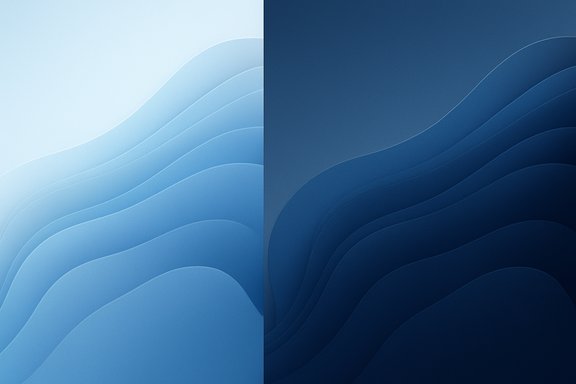
Microsoft has quietly marked the Windows Insider Program’s 11th anniversary with two new, theme‑aware wallpapers — offered in both Light and Dark variants and packaged for desktop and phone — a small but deliberate design gesture that underscores the program’s continuing role as Microsoft’s public product lab and community touchpoint.
The Windows Insider Program began as a public experiment in October 2014, inviting enthusiasts, IT pros and developers to test pre‑release Windows builds and feed back directly to Microsoft engineering teams. That open preview model reshaped how Windows was developed and released, evolving from early “rings” into today’s multi‑channel architecture (Canary, Dev, Beta, Release Preview). The original announcement and the program’s first Technical Preview posts are preserved in Microsoft’s early blog coverage. Over the past decade the Insider program matured into both a large testing pool and a visible community: public previews, design experiments and marketing gestures like anniversary wallpapers have become recurring rituals. Microsoft’s Design team has, in several years, produced commemorative backgrounds as a tangible “thank you” to Insiders while reinforcing Windows’ visual language. This year’s release follows that pattern but arrives at a notable moment — Windows 10 reached its end of servicing on October 14, 2025, intensifying conversations about Windows’ past and future and changing the optics around community gestures.
For anyone who enjoys a well‑made background, the files are worth a quick download and a place on the desktop. For the broader community, the anniversary is an opportunity to ask for both small acts of appreciation and large acts of accountability that ensure the Insider program continues to be a meaningful, two‑way lab for building Windows.
Source: The Tech Outlook Microsoft introduces new wallpapers in light/dark mode celebrating 11 years of the Windows Insider Program - The Tech Outlook
 Background
The Windows Insider Program began as a public experiment in October 2014, inviting enthusiasts, IT pros and developers to test pre‑release Windows builds and feed back directly to Microsoft engineering teams. That open preview model reshaped how Windows was developed and released, evolving from early “rings” into today’s multi‑channel architecture (Canary, Dev, Beta, Release Preview). The original announcement and the program’s first Technical Preview posts are preserved in Microsoft’s early blog coverage. Over the past decade the Insider program matured into both a large testing pool and a visible community: public previews, design experiments and marketing gestures like anniversary wallpapers have become recurring rituals. Microsoft’s Design team has, in several years, produced commemorative backgrounds as a tangible “thank you” to Insiders while reinforcing Windows’ visual language. This year’s release follows that pattern but arrives at a notable moment — Windows 10 reached its end of servicing on October 14, 2025, intensifying conversations about Windows’ past and future and changing the optics around community gestures. What Microsoft released
Two wallpapers, theme‑aware and multi‑format
- Two unique artworks were published: one for Light mode and one for Dark mode.
- Each artwork is provided in multiple aspect ratios so they display correctly on desktops, tablets and phones without manual cropping.
- The assets were prepared by the Windows Design team and distributed through the Windows Insider download hub as ZIP packages for easy consumption.
Packaging and distribution
Microsoft packaged the wallpapers in ZIP archives that contain the different theme and aspect variants. Community observers noted the archives include a __MACOSX directory — a common artifact when zips are produced on macOS — which sparked online speculation before people noted the mundane technical explanation. The canonical download location is the Windows Insider pages and the Microsoft Design wallpapers collection; third‑party mirrors exist but downloading from official channels is the safest option.Why this matters (and why the timing is interesting)
Symbolic value vs. technical weight
A wallpaper drop is a low‑friction way to acknowledge a community: it lands directly on users’ devices, costs nothing to deploy and creates an immediate, visual connection between Insiders and Microsoft’s design team. These small design tokens serve several practical purposes:- Community recognition — a visible “thank you” for testers and contributors.
- Brand continuity — consistent visual language across Windows touchpoints.
- Low‑risk outreach — no code changes, no feature flags, no stability risk.
Context: Windows 10 end of servicing
The anniversary drop happened just after Microsoft ceased mainstream servicing for Windows 10 on October 14, 2025. That calendar event reframes the celebration: for long‑time Insiders who began with Windows 10 Technical Previews, the anniversary is partly nostalgic and partly forward‑looking. Microsoft’s lifecycle documentation and public guidance confirm the servicing cutoff and the availability of Extended Security Updates (ESU) options. For many organizations the practical focus shifted from personalization to migration, security and lifecycle planning — concerns wallpapers don’t address.Design analysis — Bloom heritage and material intent
The Bloom lineage
The new Insider wallpapers explicitly reference the Bloom family: layered, sculptural shapes, soft, tactile gradients and a sense of depth achieved through subtle shadows and highlights. Bloom is among Microsoft’s most resilient visual tokens from the Windows 11 era; designers have iterated on the motif for device launches, special editions and even the company’s 50th anniversary assets earlier in 2025. The Bloom family’s strength is familiarity — it’s instantly recognizable and scales well across resolutions.What the new art adds
- Theme awareness: providing distinct light and dark variants is a practical adaptation to Windows 11 system theming and avoids poor contrast or washed‑out visuals when a user switches modes.
- Aspect‑aware packaging: shipping widescreen and square/vertical variants prevents user cropping and preserves composition across devices.
- Subtle typography/numbering: integrating the numeral “11” as a design layer makes the milestone explicit without resorting to heavy branding.
Community reaction and the curious __MACOSX moment
Community forums and news sites picked up the drop quickly; coverage focused on both the design and the packaging oddity. A small subset of users treated the presence of an MACOSX folder inside the wallpaper ZIP as an Easter egg hinting at cross‑platform signals, while the majority of observers pointed out that the folder is a benign byproduct of zips created on macOS and not evidence of a strategic message. That pragmatic explanation is the most defensible: creators frequently use macOS for design work, and compression tools on macOS often leave resource metadata in a MACOSX directory. This episode is a tidy example of how small technical artifacts can provoke outsized conjecture in an attentive community. The relevant takeaway for readers is to favor the simplest explanation unless Microsoft explicitly frames such artifacts as intentional messaging.Practical download and setup (step‑by‑step)
If you want to install the new wallpapers and preserve image quality and composition, follow these steps:- Visit the official Windows Insider or Microsoft Design wallpapers page and download the ZIP for the theme you want (Light or Dark). Use official Microsoft distribution to avoid altered files.
- Extract the ZIP to a local folder. Ignore packaging artifacts (for example, __MACOSX) if they appear.
- On Windows:
- Right‑click the image file and choose Set as desktop background, or
- Open Settings > Personalization > Background, choose Picture, and click Browse to pick the file for more fit options (Fill / Fit / Center).
- On phones/tablets: open the image in your gallery app and use Set as wallpaper, choosing Home, Lock, or Both depending on preference.
- For multi‑monitor setups, test different fit options (Fill, Fit, Stretch) or use the widescreen variant designed for your primary monitor to avoid unsightly cropping.
Security and integrity considerations
Although a wallpaper is a benign asset, it’s still best practice to treat any downloadable file with standard hygiene:- Download only from official Microsoft pages to avoid tampered assets or bundled unwanted software.
- Confirm file sizes and check the ZIP contents before opening. If a ZIP contains executable files (.exe, .scr) or installer payloads, do not run them. The wallpaper archives are expected to contain only image assets and metadata folders.
- Use built‑in antivirus or a corporate endpoint scanner to scan downloaded files if you’re in a managed environment.
- Avoid third‑party mirrors unless you verify their integrity via checksums published on official channels. The safest route is official hosting.
Critical analysis — strengths, limits, and what Microsoft might have signaled
Strengths
- Low‑risk, high‑visibility thank‑you: Wallpapers are immediate, universally accessible tokens that reward Insiders without introducing risk. For a community that often contributes unpaid testing labor, a design gesture is a visible acknowledgement.
- Design attention to detail: Theme variants and multiple aspect ratios reduce friction for real users, reflecting a practical understanding of how personalization works across modern devices.
- Brand coherence: The Bloom lineage maintains Windows’ design continuity, reinforcing the product’s visual identity across new and legacy touchpoints.
Limits and risks
- Symbol over substance risk: The community sometimes reads goodwill gestures as a substitute for meaningful program improvements — clearer channel governance, faster responses to high‑impact bugs, or better transparency about roadmap decisions. For critics of Microsoft’s preview practices, wallpapers risk being perceived as token gestures.
- Optics during Windows 10 transition: With Windows 10 servicing ended on October 14, 2025, some Insiders are focused on migrations, ESU enrollment and enterprise compatibility — areas where design niceties matter less. The wallpaper drop can therefore feel tone‑deaf to users whose immediate concern is security and migration logistics.
- Speculation attractors: Small, easily explained artifacts (like __MACOSX folders) can become rumor engines. Microsoft could reduce noise by publishing a short note about packaging choices whenever assets are released.
What this says about the Windows Insider Program today
The wallpaper release is useful evidence of two ongoing realities about the Windows Insider Program:- It remains a public face of Microsoft’s development model — a place where design experiments and small cultural rituals are still visible and celebrated. The Design team’s involvement signals that Insiders are not purely a QA cohort but part of the broader user experience conversation.
- The program’s political economy remains mixed: Insiders supply feedback and detect regressions, but the influence of that feedback is sometimes opaque. Small public gestures preserve goodwill, but they do not substitute for governance or engineering process improvements Insiders have requested. The program is still valuable, but persistent community friction points remain unresolved.
Recommendations for Insiders, administrators and everyday users
- Insiders and enthusiasts: Download and use the wallpapers from the official hub if you enjoy them; treat them as design tokens that celebrate the program’s continuity. Use the fitted aspect ratio for best results and keep originals if you want to apply them across multiple machines.
- Enterprise administrators: Focus on migration, ESU enrollment and device lifecycle before aesthetic personalization. Deploying custom wallpapers via policy is harmless, but it won’t mitigate the security and compatibility challenges posed by an OS reach‑end date.
- Security‑minded users: Always download official assets and scan ZIP files. Avoid third‑party repackaging unless you can verify checksums or vendor signatures.
The road ahead — small rituals and larger expectations
Design rituals like anniversary wallpapers will continue to play a role in community management and brand identity. They are effective at humanizing large organizations and creating tiny moments of delight that keep engaged users connected. That said, the program’s long‑term health will depend on Microsoft expanding gestures into practical process improvements:- clearer documentation of how high‑impact feedback is triaged,
- more timely responses to recurring issues,
- improved telemetry and opt‑in experiments that maintain trust while enabling innovation.
Conclusion
The Windows Insider Program’s 11th‑anniversary wallpapers are a modest, well‑crafted gift: theme‑aware, aspect‑aware and designed to sit comfortably on a modern Windows desktop or phone. They are a reminder that Microsoft still values visible design touchpoints and the community that helped shape Windows over the past decade. At the same time, the gesture illuminates a recurring tension: Insiders appreciate recognition, but many want deeper, structural answers about how feedback shapes product decisions — and the end of Windows 10 servicing has elevated those conversations from nostalgic to operational.For anyone who enjoys a well‑made background, the files are worth a quick download and a place on the desktop. For the broader community, the anniversary is an opportunity to ask for both small acts of appreciation and large acts of accountability that ensure the Insider program continues to be a meaningful, two‑way lab for building Windows.
Source: The Tech Outlook Microsoft introduces new wallpapers in light/dark mode celebrating 11 years of the Windows Insider Program - The Tech Outlook
