

Microsoft has kicked off a major reboot of the Windows Insider Program, and the first public sign of that reset is the arrival of the inaugural Experimental build alongside a refreshed Beta track. The change is more than a rename: Microsoft is reshaping how people enter preview builds, how features are exposed, and how much control testers have over what they see. The company is also trying to answer a long-running complaint from Insiders — that the old channel structure and gradual feature rollouts often made the experience feel inconsistent and hard to interpret.
Microsoft’s Insider program has always been one of the most important public-facing testing systems in consumer software. It gives enthusiasts, IT pros, and curious users a window into Windows development, while also giving Microsoft telemetry and feedback from machines that look a lot more like real-world deployments than lab test rigs. But over time, the program’s layers became difficult to explain, especially as build families, version labels, and staged feature delivery all began to overlap. Microsoft’s April 10 post acknowledged that the experience needed to be clearer, and the April 24 rollout shows that the company is now acting on that feedback.
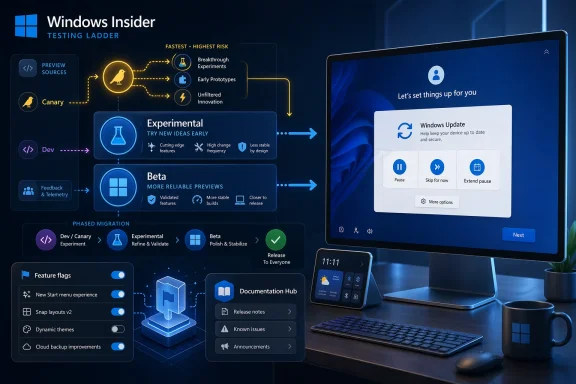
The new structure is centered around Experimental and Beta as the primary preview lanes, with Dev and Canary users being reassigned into those paths over time. Most people currently in Dev are being moved to Experimental, while Beta users are remaining in Beta but with a revised definition of what that channel means. Microsoft says this rollout is being phased in to preserve quality and reliability, which is a polite way of saying the company does not want to break the transition all at once.
That matters because the old Insider model often forced people to decode Microsoft’s intentions. A feature might be announced in a build, partially rolled out, then withheld from some users for reasons that were never obvious to the average tester. The new setup tries to reduce that uncertainty by separating more experimental platform work from build paths that are closer to retail timing. Microsoft is also introducing a Feature flags page so users in Experimental can explicitly enable or disable certain new experiences without resorting to third-party tools.
For Windows watchers, this is not just an organizational cleanup. It is a statement about how Microsoft wants Windows development to work in public: clearer boundaries, more honest preview semantics, and more direct user control. That makes the first Experimental build interesting even beyond the features it contains. It marks the beginning of a more deliberate Insider era, one that is meant to feel less like feature lottery and more like a structured testing ladder.
Microsoft’s April 24 blog post says the transition begins with Dev users moving to Experimental first, and then expands to Canary users over the coming weeks. Canary 28000-series devices are slated for Experimental (26H1), while Canary 29500-series devices move to Experimental (Future Platforms). That split is a clue that Microsoft is still maintaining multiple development lines underneath the simplified public-facing channel model.
The company also says that Beta users should expect a similar overall experience, but not necessarily identical feature exposure after the transition. In practical terms, that means Microsoft is still reserving the right to stage features differently depending on the channel and the build family. For users who want the greatest continuity with existing feature sets, Microsoft says moving from Beta to Dev before the shift may preserve more of what they are already seeing. That is a subtle but important warning for enthusiasts who assume “Beta” always means the safest preview lane.
That sounds modest, but it solves a very real pain point. Anyone who has set up a new PC in recent years knows the frustration of being pulled into a long update cycle before even reaching the desktop. Microsoft is trying to give users more agency during that first-run experience, which should make setup less disruptive and more adaptable to different scenarios. For enterprise deployment, this may also help administrators control when a first boot becomes an updating session versus a pure provisioning step.
The build also includes smaller refinements such as improved detection of clicks at the leftmost edge of the taskbar to invoke Start when icons are left-aligned, a print driver hardware ID change in preparation for printer driver ranking adjustments, and a fix for an unexpected Group Policy Editor error. There is also a Times New Roman update to improve support for combining diacritical marks across Greek and Cyrillic ranges, which is the kind of detail that only shows up in preview builds but matters to language and typography fidelity.
The broader significance is that Microsoft is no longer treating update behavior as merely a background service. It is becoming a user-facing product feature. That shift is visible not only in the new OOBE controls, but also in the company’s recent emphasis on clearer labels, more insight into available updates, and more predictable paths through the update process. This is the kind of quality-of-life work that tends to be undervalued until it disappears.
For consumers, the upside is obvious: less friction when setting up a new PC, less pressure to sit through a large initial update, and more room to choose the right moment. For enterprise and education customers, the upside is more procedural. It should become easier to separate machine provisioning from update installation, and that can reduce downtime during device rollout windows. The tradeoff is that Microsoft must be careful not to create an experience that feels too permissive or too easy to postpone essential maintenance.
This distinction is crucial because Beta has often been the channel where people expected stability, only to discover that rollout behavior still varied widely. Microsoft’s recent Insider posts have already been moving toward more explicit release notes and clearer build documentation, and this revamp continues that trend. The company is trying to make Beta more legible for people who care about what Windows will look like soon, not just what it might become eventually.
The challenge, of course, is that “closer to retail” still does not mean “feature-complete” or “fully deterministic.” There will still be feature changes, small variances, and staggered delivery. But the new framing should reduce confusion for testers who want a preview environment that feels like a more accurate mirror of the shipping product. That is a meaningful improvement even if the underlying servicing complexity remains.
This is significant because it suggests Microsoft wants to separate routine early testing from deeper platform changes. The Experimental (Future Platforms) label implies that some machines are being used to test work that is not aligned with the immediate retail pipeline. That is an unusually explicit acknowledgement that not all preview code is trying to get to the same destination.
For longtime Windows Insiders, that may actually be welcome. Canary has often been the hardest channel to explain to newcomers, and it has sometimes felt like a moving target rather than a coherent space. Giving it a clearer destination, even if that destination is still unstable, should make it easier for enthusiasts to understand where they stand and what they are helping test.
In the past, many Windows enthusiasts used third-party toggles and workaround tools to surface dormant UI and feature code. Microsoft is now bringing some of that behavior into the product itself, which is both pragmatic and symbolic. Pragmatic because it reduces the need for unsupported tools. Symbolic because it shows Microsoft is willing to let testers have a more active role in deciding what they evaluate.
That said, Microsoft is still drawing boundaries. The company has indicated that not every change will be user-toggleable, and that some behind-the-scenes fixes and system behaviors will remain managed by Microsoft’s own rollout logic. That makes sense, because not every engineering experiment should be treated as a switch the user can flip. But it also means the new Feature flags page is a partial answer, not a universal control panel.
The company says the new hub will offer easier navigation, dark and light mode support, better localization, and deeper linking. Those are not flashy features, but they matter in a program where many users live inside release notes and need to compare build changes across channels quickly. The move also suggests Microsoft wants the Insider blog itself to focus more on the narrative and less on the exhaustive changelog format.
This separation is healthy. It gives Microsoft a better way to communicate broad direction in the blog while preserving a more structured, reference-friendly documentation environment for the actual build details. For power users, that should make it easier to track changes across channel families without hunting through old posts. For Microsoft, it creates a cleaner long-term home for a more complicated preview system.
This is a notable contrast with earlier eras of Insider hype, when the biggest talking points often centered on visibly new UI or obviously marketable features. Here, Microsoft seems more interested in proving that the plumbing works. That may not generate the same amount of excitement in the short term, but it is usually the right move if the company wants the channel model to feel trustworthy.
There is also a subtle strategic angle. By making the channel structure easier to understand, Microsoft lowers the friction for participation. By making feature exposure more explicit, it reduces the frustration of “where did my feature go?” moments. And by improving update control, it acknowledges that users do not want automation at any cost. That combination is a strong signal that Microsoft is trying to make the Insider experience feel more mature.
It will also be worth watching how much agency the new Feature flags page ultimately provides. If it offers useful control over visible new experiences without becoming overly complex, it could become a major quality-of-life win for Insiders. If it is too limited, though, power users may keep looking for unofficial methods to get at hidden functionality.
For enterprise observers, the practical question is whether this redesign makes Insider testing easier to recommend internally. If the answer is yes, Microsoft could end up with a healthier and more diverse pool of testers, which would improve the quality of Windows feedback before features hit retail.
The first Experimental build is therefore less a finish line than a foundation. It shows Microsoft is serious about reshaping how Windows development is surfaced to the public, and it hints that future Insider flights may be judged as much by their clarity and controllability as by the features they preview. If that balance holds, the reboot could make the Windows Insider Program more useful, more honest, and far easier to trust.
Source: Windows Central Windows Insider reboot starts with the first Experimental build
 Overview
Microsoft’s Insider program has always been one of the most important public-facing testing systems in consumer software. It gives enthusiasts, IT pros, and curious users a window into Windows development, while also giving Microsoft telemetry and feedback from machines that look a lot more like real-world deployments than lab test rigs. But over time, the program’s layers became difficult to explain, especially as build families, version labels, and staged feature delivery all began to overlap. Microsoft’s April 10 post acknowledged that the experience needed to be clearer, and the April 24 rollout shows that the company is now acting on that feedback.The new structure is centered around Experimental and Beta as the primary preview lanes, with Dev and Canary users being reassigned into those paths over time. Most people currently in Dev are being moved to Experimental, while Beta users are remaining in Beta but with a revised definition of what that channel means. Microsoft says this rollout is being phased in to preserve quality and reliability, which is a polite way of saying the company does not want to break the transition all at once.
That matters because the old Insider model often forced people to decode Microsoft’s intentions. A feature might be announced in a build, partially rolled out, then withheld from some users for reasons that were never obvious to the average tester. The new setup tries to reduce that uncertainty by separating more experimental platform work from build paths that are closer to retail timing. Microsoft is also introducing a Feature flags page so users in Experimental can explicitly enable or disable certain new experiences without resorting to third-party tools.
For Windows watchers, this is not just an organizational cleanup. It is a statement about how Microsoft wants Windows development to work in public: clearer boundaries, more honest preview semantics, and more direct user control. That makes the first Experimental build interesting even beyond the features it contains. It marks the beginning of a more deliberate Insider era, one that is meant to feel less like feature lottery and more like a structured testing ladder.
What Microsoft Changed
The most visible change is the formal split between Beta and Experimental. Beta is now intended to track experiences that are closer to what reaches retail, while Experimental is where Microsoft wants to place earlier and more mutable work. That distinction is important because it gives Insiders a clearer expectation of what kind of software they are running and what kind of feedback Microsoft wants from them.Microsoft’s April 24 blog post says the transition begins with Dev users moving to Experimental first, and then expands to Canary users over the coming weeks. Canary 28000-series devices are slated for Experimental (26H1), while Canary 29500-series devices move to Experimental (Future Platforms). That split is a clue that Microsoft is still maintaining multiple development lines underneath the simplified public-facing channel model.
The company also says that Beta users should expect a similar overall experience, but not necessarily identical feature exposure after the transition. In practical terms, that means Microsoft is still reserving the right to stage features differently depending on the channel and the build family. For users who want the greatest continuity with existing feature sets, Microsoft says moving from Beta to Dev before the shift may preserve more of what they are already seeing. That is a subtle but important warning for enthusiasts who assume “Beta” always means the safest preview lane.
Why the rename matters
This is not just branding. The new names are meant to communicate intent. Beta is about near-term preview confidence, while Experimental signals that Microsoft is willing to let users opt into something rougher and earlier. That clarity should help reduce confusion among both hobbyists and enterprise testers who need a more predictable map of Windows’ development path.The First Experimental Build
The first Experimental release, Build 26300.8289, is not a giant feature dump, but it is very revealing. Its most notable addition is a set of new Windows Update controls focused on user choice and setup flexibility. Microsoft is explicitly testing the ability to skip updates during the out-of-box experience, extend update pauses as many times as needed, and choose shutdown or restart paths that do not force immediate updating.That sounds modest, but it solves a very real pain point. Anyone who has set up a new PC in recent years knows the frustration of being pulled into a long update cycle before even reaching the desktop. Microsoft is trying to give users more agency during that first-run experience, which should make setup less disruptive and more adaptable to different scenarios. For enterprise deployment, this may also help administrators control when a first boot becomes an updating session versus a pure provisioning step.
The build also includes smaller refinements such as improved detection of clicks at the leftmost edge of the taskbar to invoke Start when icons are left-aligned, a print driver hardware ID change in preparation for printer driver ranking adjustments, and a fix for an unexpected Group Policy Editor error. There is also a Times New Roman update to improve support for combining diacritical marks across Greek and Cyrillic ranges, which is the kind of detail that only shows up in preview builds but matters to language and typography fidelity.
Setup flexibility as a design choice
The update-skipping feature is the clearest signal in the whole build. Microsoft is effectively admitting that one-size-fits-all update behavior does not make sense during first-run setup. That is especially true when the device may be on battery power, in a business deployment queue, or being evaluated by an IT department that wants to image and validate first, then update later.Why Update Control Matters
Windows Update has long been one of the most emotionally charged parts of the Windows experience. Users want security and reliability, but they also want to avoid being interrupted at the worst possible time. By giving Insiders more ways to pause, defer, and skip certain update actions, Microsoft is trying to rebalance that relationship in favor of control without abandoning servicing discipline.The broader significance is that Microsoft is no longer treating update behavior as merely a background service. It is becoming a user-facing product feature. That shift is visible not only in the new OOBE controls, but also in the company’s recent emphasis on clearer labels, more insight into available updates, and more predictable paths through the update process. This is the kind of quality-of-life work that tends to be undervalued until it disappears.
For consumers, the upside is obvious: less friction when setting up a new PC, less pressure to sit through a large initial update, and more room to choose the right moment. For enterprise and education customers, the upside is more procedural. It should become easier to separate machine provisioning from update installation, and that can reduce downtime during device rollout windows. The tradeoff is that Microsoft must be careful not to create an experience that feels too permissive or too easy to postpone essential maintenance.
Consumer and enterprise implications
This change speaks to two audiences at once. Consumers want convenience and speed. Enterprises want controllability and fewer surprises. Microsoft is trying to give both camps a better answer by making update timing more visible and more manageable, while still preserving the company’s underlying servicing model.- Consumers get a less frustrating first-boot experience.
- IT teams get more flexibility in provisioning workflows.
- Users can delay some update actions without fighting the system.
- Microsoft gets more realistic feedback on update timing behavior.
- The risk of update fatigue may be reduced if the controls work well.
- The company can test whether users prefer more autonomy when starting fresh.
The New Beta Philosophy
The revamped Beta channel may sound less dramatic than Experimental, but it is arguably the more important structural change. Microsoft says Beta is being realigned to reflect what is coming to retail in the following weeks, which makes it more of a near-term proving ground than a loosely defined preview bucket. That should help users understand that Beta is not the same thing it used to be.This distinction is crucial because Beta has often been the channel where people expected stability, only to discover that rollout behavior still varied widely. Microsoft’s recent Insider posts have already been moving toward more explicit release notes and clearer build documentation, and this revamp continues that trend. The company is trying to make Beta more legible for people who care about what Windows will look like soon, not just what it might become eventually.
The challenge, of course, is that “closer to retail” still does not mean “feature-complete” or “fully deterministic.” There will still be feature changes, small variances, and staggered delivery. But the new framing should reduce confusion for testers who want a preview environment that feels like a more accurate mirror of the shipping product. That is a meaningful improvement even if the underlying servicing complexity remains.
What Beta is becoming
Beta is becoming less of a random sampling pool and more of a calibrated preview lane. That shift is likely to help Microsoft compare feedback from users who want near-term polish against those who want earlier, riskier access in Experimental. In other words, the program is becoming more segmented by intent, not just by build number.Canary’s New Role
Canary remains the most extreme part of the Insider ecosystem, but even it is being given more structure. Instead of serving as a catch-all for the earliest Windows experiments, it is now being split according to build lineage and future platform direction. That is why the 28000-series and 29500-series devices are heading to different Experimental paths.This is significant because it suggests Microsoft wants to separate routine early testing from deeper platform changes. The Experimental (Future Platforms) label implies that some machines are being used to test work that is not aligned with the immediate retail pipeline. That is an unusually explicit acknowledgement that not all preview code is trying to get to the same destination.
For longtime Windows Insiders, that may actually be welcome. Canary has often been the hardest channel to explain to newcomers, and it has sometimes felt like a moving target rather than a coherent space. Giving it a clearer destination, even if that destination is still unstable, should make it easier for enthusiasts to understand where they stand and what they are helping test.
Canary’s strategic value
Canary is where Microsoft can test the ideas that are too early, too risky, or too infrastructure-heavy for the mainstream preview lanes. By splitting the channel into more defined experimental tracks, Microsoft is effectively saying that even its earliest testing needs a clearer internal logic. That should improve feedback quality, but it also raises the bar for how well Microsoft explains those differences over time.- 28000-series Canary devices move to Experimental (26H1).
- 29500-series Canary devices move to Experimental (Future Platforms).
- The branch split suggests different development goals under one umbrella.
- Clearer labeling should help testers understand why a build exists.
- Microsoft can isolate platform-risk work more effectively.
- Feedback may become more useful if the audience is better segmented.
Feature Flags and User Agency
One of the most interesting changes in the whole reboot is the new Feature flags page. Microsoft says Insiders in Experimental can use it to enable new experiences before they roll out broadly, which formalizes a practice that power users often relied on unofficial tools to accomplish. That is a quiet but important change in how Microsoft sees the relationship between testers and hidden features.In the past, many Windows enthusiasts used third-party toggles and workaround tools to surface dormant UI and feature code. Microsoft is now bringing some of that behavior into the product itself, which is both pragmatic and symbolic. Pragmatic because it reduces the need for unsupported tools. Symbolic because it shows Microsoft is willing to let testers have a more active role in deciding what they evaluate.
That said, Microsoft is still drawing boundaries. The company has indicated that not every change will be user-toggleable, and that some behind-the-scenes fixes and system behaviors will remain managed by Microsoft’s own rollout logic. That makes sense, because not every engineering experiment should be treated as a switch the user can flip. But it also means the new Feature flags page is a partial answer, not a universal control panel.
A more transparent preview culture
This is where the Insider reboot becomes philosophically interesting. Microsoft is not just simplifying channels; it is acknowledging that users want agency over previews. The company is trying to replace a culture of hidden surprises with one of explicit participation, and that should make Insider feedback more meaningful if the implementation is clean.Release Notes Move to a New Home
Microsoft is also changing where it publishes build information. Release notes are being moved to the Windows Insider Program Documentation Hub, while the blog will continue to announce the builds and link out to the more detailed documentation. That sounds administrative, but it has practical benefits for users who track builds seriously.The company says the new hub will offer easier navigation, dark and light mode support, better localization, and deeper linking. Those are not flashy features, but they matter in a program where many users live inside release notes and need to compare build changes across channels quickly. The move also suggests Microsoft wants the Insider blog itself to focus more on the narrative and less on the exhaustive changelog format.
This separation is healthy. It gives Microsoft a better way to communicate broad direction in the blog while preserving a more structured, reference-friendly documentation environment for the actual build details. For power users, that should make it easier to track changes across channel families without hunting through old posts. For Microsoft, it creates a cleaner long-term home for a more complicated preview system.
Why documentation matters
In a fragmented Insider world, documentation becomes part of the product. If users cannot quickly understand which build they are on, what it represents, and how it differs from neighboring channels, the testing experience starts to collapse into guesswork. Microsoft’s move to centralize release notes is a strong sign that it recognizes this problem.What the First Build Says About Microsoft’s Priorities
The first Experimental build is not packed with giant headline features, and that is exactly why it is revealing. The changes focus on update control, setup flow, shell polish, printer servicing, policy cleanup, and typography support. That mix suggests Microsoft is thinking about Windows as a system that needs to be more controllable, more consistent, and more internationally robust before it is more dazzling.This is a notable contrast with earlier eras of Insider hype, when the biggest talking points often centered on visibly new UI or obviously marketable features. Here, Microsoft seems more interested in proving that the plumbing works. That may not generate the same amount of excitement in the short term, but it is usually the right move if the company wants the channel model to feel trustworthy.
There is also a subtle strategic angle. By making the channel structure easier to understand, Microsoft lowers the friction for participation. By making feature exposure more explicit, it reduces the frustration of “where did my feature go?” moments. And by improving update control, it acknowledges that users do not want automation at any cost. That combination is a strong signal that Microsoft is trying to make the Insider experience feel more mature.
The real product is the process
The best way to understand this reboot is to think of the Insider program itself as the product. The features in Build 26300.8289 matter, but the bigger story is the design of the testing system around them. Microsoft is trying to make experimentation safer, clearer, and more intentional, and that may be the most important Windows story of the week.Strengths and Opportunities
Microsoft’s new Insider structure has several clear strengths. It is easier to explain, more openly segmented, and better aligned with how different testers actually use preview builds. The opportunity here is not only to deliver features faster, but to make the entire feedback loop more credible.- Clearer channel definitions should reduce confusion about what each build is for.
- Feature flags give testers more direct control over visible experiments.
- Update-skipping during setup improves the first-run experience for consumers and IT teams.
- Beta’s new positioning should make near-term preview behavior easier to understand.
- Canary lineage splits can help Microsoft isolate more ambitious platform work.
- Documentation Hub consolidation should make build tracking easier.
- Better shell and typography fixes show attention to day-to-day quality.
- The overall model may make Insider participation feel more intentional and less random.
Risks and Concerns
The overhaul is promising, but it is not risk-free. A simpler model can still produce confusion if the transitions are poorly documented or if build behavior diverges too much across channels. There is also a danger that “Experimental” becomes a label people treat casually, even though it still contains unstable code.- Transition confusion could arise if users do not understand where their device moved.
- Feature fragmentation may persist if staged rollouts overlap with channel changes.
- Canary splitting could complicate feedback comparisons across build lines.
- Too much control may tempt users to enable features they do not fully understand.
- Underspecified beta behavior could still frustrate users expecting retail-like consistency.
- Documentation lag would undermine the very clarity Microsoft is trying to create.
- Setup update skipping could be misread as a license to delay important servicing indefinitely.
Looking Ahead
The most important thing to watch now is whether Microsoft can sustain the new channel model without turning it into another layer of jargon. The company has taken a real step toward clarity, but the success of the reboot will depend on how well it explains the differences between Beta, Experimental, and the various Canary-derived branches as the rollout continues. That will be especially important over the coming weeks as Canary users are transitioned.It will also be worth watching how much agency the new Feature flags page ultimately provides. If it offers useful control over visible new experiences without becoming overly complex, it could become a major quality-of-life win for Insiders. If it is too limited, though, power users may keep looking for unofficial methods to get at hidden functionality.
For enterprise observers, the practical question is whether this redesign makes Insider testing easier to recommend internally. If the answer is yes, Microsoft could end up with a healthier and more diverse pool of testers, which would improve the quality of Windows feedback before features hit retail.
- Watch how quickly Canary devices complete their transition.
- Watch whether Beta really feels closer to retail in the next few weeks.
- Watch for additional build notes about the new Feature flags page.
- Watch whether the update-skipping controls expand beyond OOBE testing.
- Watch how Microsoft documents the 26H1 and Future Platforms split.
- Watch for any signs that enterprise admins begin using the new model more aggressively.
The first Experimental build is therefore less a finish line than a foundation. It shows Microsoft is serious about reshaping how Windows development is surfaced to the public, and it hints that future Insider flights may be judged as much by their clarity and controllability as by the features they preview. If that balance holds, the reboot could make the Windows Insider Program more useful, more honest, and far easier to trust.
Source: Windows Central Windows Insider reboot starts with the first Experimental build
