

Windows Insiders who thought the Release Preview channel was the “safe” path to test Windows 11 25H2 got a blunt reminder this week that the modern update pipeline is controlled as much by remote servers as it is by local settings — and when the server flips, clients follow without debate.
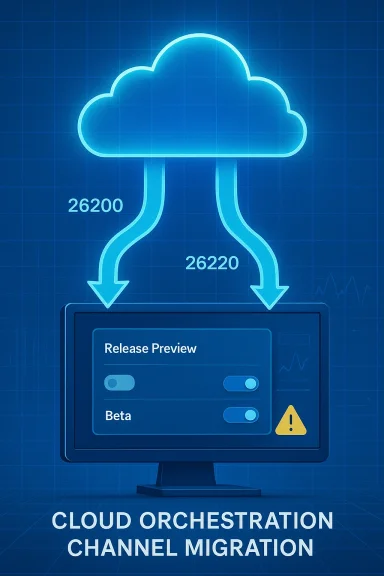
The incident began when a batch of Windows 11 Insiders in the Release Preview channel saw their machines install builds from the 26200 family as expected — then, inexplicably, the Insider settings UI reported the device as belonging to the Beta channel and Windows Update began downloading a 26220-series build (reported as Build 26220.7872) without an explicit opt‑in from the user. This behavior was first reported in community write‑ups and by an independent technical site, and it matches other Insiders’ reports that channel membership and build families have been increasingly governed by server-side flighting flags rather than only local toggles.
Microsoft’s Flight Hub and Insider blog make the technical distinction explicit: Release Preview 25H2 work lives in the 26200 build family, while Beta/matched preview flows that are testing broader 25H2 service updates often use the 26220 band. Microsoft has, at times, shipped identical or closely related 25H2‑based updates to multiple channels simultaneously, but those are still separate development bands and can diverge when server assignments or behind‑the‑scenes enablement toggles change.
What made this event notable was not simply that Beta builds landed on Release Preview machines — that can happen under tightly controlled circumstances — but that the Release Preview option temporarily disappeared from device settings, leaving Insiders unable to manually re‑select the channel until Microsoft reverted whatever backend assignment had flipped. That absence turned what could have been a benign optional prompt into an involuntary channel migration for some devices. Community threads and troubleshooting threads captured the confusion and the ad hoc remediation steps users pursued while the server‑side flags remained inconsistent.
When an incident affects user‑facing assignments, the cultural expectation for cloud services is a transparent incident summary that explains root cause, blast radius, and mitigation. In this case, Microsocorrection over public technical disclosure, leaving IT teams and enthusiasts to reverse‑engineer the chain of events from logs, builds and community reports. Flight Hub and the Insider Blog do confirm the existence of separate 26200 and 26220 families and show the cadence of related previews — useful background, but not a substitute for a formal incident report.
If you want to test close to production, you must accept more responsibility: keep an eye on your Insider channel, control optional feature downloads, build rollback plans into your validation playbook, and assume that the cloud may change assignments without local consent. The Insider Program remains a powerful mechanism for early feedback, but remember: Insider means you’re testing Microsoft’s update orchestration as much as you’re testing Windows itself.
Source: igor´sLAB Windows 11 25H2: When Release Preview suddenly plays beta | igor´sLAB
 Background / Overview
The incident began when a batch of Windows 11 Insiders in the Release Preview channel saw their machines install builds from the 26200 family as expected — then, inexplicably, the Insider settings UI reported the device as belonging to the Beta channel and Windows Update began downloading a 26220-series build (reported as Build 26220.7872) without an explicit opt‑in from the user. This behavior was first reported in community write‑ups and by an independent technical site, and it matches other Insiders’ reports that channel membership and build families have been increasingly governed by server-side flighting flags rather than only local toggles.Microsoft’s Flight Hub and Insider blog make the technical distinction explicit: Release Preview 25H2 work lives in the 26200 build family, while Beta/matched preview flows that are testing broader 25H2 service updates often use the 26220 band. Microsoft has, at times, shipped identical or closely related 25H2‑based updates to multiple channels simultaneously, but those are still separate development bands and can diverge when server assignments or behind‑the‑scenes enablement toggles change.
What made this event notable was not simply that Beta builds landed on Release Preview machines — that can happen under tightly controlled circumstances — but that the Release Preview option temporarily disappeared from device settings, leaving Insiders unable to manually re‑select the channel until Microsoft reverted whatever backend assignment had flipped. That absence turned what could have been a benign optional prompt into an involuntary channel migration for some devices. Community threads and troubleshooting threads captured the confusion and the ad hoc remediation steps users pursued while the server‑side flags remained inconsistent.
What exactly happened — step by step
- An Insider device on Release Preview had installed a 25H2 Release Preview build in the 26200 family (for example, build series near 26200.7921 as reported by some users).
- The Windows Insider settings UI updated and displayed the device’s channel as Beta, even though the local user had not changed the setting.
- Windows Update moved to offer a 26220‑series build (reported in community logs as 26220.7872) and — depending on each device’s optional update settings — proceeded to download the new build without a separate opt‑in dialog in some cases.
- For a short period the Release Preview choice was missing from the Settings > Windows Update > Windows Insider Program page, preventing users from switching back locally. This indicated the assignment was being controlled remotely by Microsoft’s flighting system rather than being purely a local preference.
- Microsoft restored the Release Preview option after an internal correction, at which point affected users could rejoin Release Preview and roll back or decline the Beta build as appropriate. The company did this quietly, without a public post detailing the root cause. Community reports date the restoration step to late February 2026.
Technical anatomy: why build numbers and bands matter
To many users, build numbers are vanity strings. To update engineers and IT pros, they are a shorthand for development branches and staged payloads.- Build family (band): The three‑ and five‑digit family ID (for example, 26200 vs 26220) indicates which branch and enablement context a preview update belongs to. A change from 26200 → 26220 means the device has jumped to a parallel development flow that can include different feature toggles, new agents, or orchestration plumbing.
- Flighting flags / server-side assignment: Modern Microsoft update delivery uses centralized flighting decisions. A device checks with Microsoft’s flighting service and receives an assignment that can include channel membership, targeted feature rollouts, and staged enablements. When that assignment flips remotely, the client obeys. This model enables rapid, low‑friction experimentation but amplifies blast radius when misassignments occur.
- Enablement packages and shared servicing: Microsoft increasingly ships enablement packages on top of the existing servicing stream rather than large, monolithic OS rebases. That means builds across channels can be close cousins, but they still remain separate — and moving between them is not functionally neutral.
Where the chain is weakest: server control, telemetry and dynamic assignment
Microsoft’s Insider model today is a four‑part choreography:- Build bands (the numeric families such as 26200 / 26220)
- Server‑side feature gates and flighting assignments
- Telemetry‑driven evaluation (controlled feature rollouts)
- Local toggles and optional prompts (the UI)
- Push targeted enablement packages only to compatible hardware
- Scale controlled feature rollouts
- Quickly disable a feature server‑side when telemetry flags show problems
Microsoft’s handling: quick repair, quiet explanation
Microsoft’s apparent remediation was fast: the Release Preview option reappeared in the Insider settings and the mismatched offering behavior stopped for most devices. That quiet rollback or correction closed the immediate problem. But there was no detailed public post‑mortem explaining whether the cause was a configuration error, a telemetry gating miscue, or an intentional (but poorly communicated) reassigning of devices to Beta.When an incident affects user‑facing assignments, the cultural expectation for cloud services is a transparent incident summary that explains root cause, blast radius, and mitigation. In this case, Microsocorrection over public technical disclosure, leaving IT teams and enthusiasts to reverse‑engineer the chain of events from logs, builds and community reports. Flight Hub and the Insider Blog do confirm the existence of separate 26200 and 26220 families and show the cadence of related previews — useful background, but not a substitute for a formal incident report.
Why this matters for IT professionals and enthusiasts
This episode is a concentrated example of broader trends in how operating system updates are designed, tested, and delivered. The practical implications are:- Testing fidelity is reduced. When server‑side flags can change channel assignment remotely, the “controlled” environment of a Release Preview ring can be altered without local consent. That undermines predictability for lab and pilot deployments.
- Rollbacks become more urgent. Installing a build from a different band increases the chance of incompatibilities, and forced or unexpected installs make timely snapshots or system images a non‑optional precaution.
- Telemetry can be weaponized by accident. Telemetry criteria that drive feature gating are powerful, but if thresholds, sampling, or evaluation rules are misconfigured, they can redirect large device populations into experimental code paths. That can escalate minor regressions into broad service disruptions.
- The cloud removes friction — and permission. Centralized orchestration is efficient for rapid iteration, but it centralizes risk. For organizations that demand strict control over updates, the Insider model requires additional guardrails.
Strengths revealed by the episode
It would be easy to treat this as purely a cautionary tale. But the design choices that made the problem possible also deliver concrete benefits when they work as intended:- Faster recovery and fixes. Central control allowed Microsoft to roll back the mismatched assignment quickly, minimizing prolonged exposure for most Insiders. That same mechanism is why staged rollouts can be stopped or adjusted rapidly when metrics indicate trouble.
- Fine‑grained experimentation. Dynamic assignment and feature gating let Microsoft test features across many combinations of hardware and telemetry signals without shipping monolithic binaries to everyone. This reduces the time between an idea and its production validation.
- Smaller update artifacts. The enablement package approach for 25H2 reduces bandwidth and complexity for many upgrades, making it easier to manage deployments and to ship targeted quality improvements. When the system is working, it redcantly.
Risks and failure modes
That said, the incident surfaces several non‑trivial risks:- Opaque assignments: Without transparent assignment logs exposed to local admins, troubleshooting becomes guesswork. When channel membership is remote‑controlled, administrators need clear signals and logs to understand what the device saw and why.
- Inadvertent drift: Devices can drift from a pre‑approved test configuration into experimental code, creating support nightmares for enterprises that rely on predictable baselines.
- Telemetry misinterpretation: If telemetry funnels are miscalibrated, an early, noisy signal can be scaled into a decision to move a cohort between experimental gates, amplifying instability.
- Trust erosion: Quiet fixes without technical explanations erode trust among the most vigilant Insiders and enterprise pilots who rely on predictable staging for validation and compliance.
Practical recommendations: how to test close to production without being surprised
For Insiders, small businesses, and IT teams that want to be close to production without taking unnecessary risk, adopt these concrete practices:- Regularly verify channel membership in Settings > Windows Update > Windows Insider Program, and record the OS build family (winver) before and after optional updates.
- Maintain golden images and snapshots for test machines so you can roll back quickly if an unexpected flight or build arrives. Use full disk images when possible rather than relying solely on system restore points.
- Disable automatic installation of optional feature updates in Windows Update, forcing manual approval for feature‑band changes. This reduces the chance that a server‑side reassignment triggers an unplanned upgrade on critical devices.
- Use telemetry and logging: enable verbose Windows Update logging and retain WindowsUpdate.* logs for the timeframe of the event to determine why a machine received a particular assignment. Centralized logging in test fleets can speed investigation.
- Test with small cohorts and staggered schedules: don’t validate a whole fleet on a single day. Staggered deployments find issues earlier with smaller blast radius.
- When piloting Insider builds at scale, create a checklist that includes preflight steps: full backup, pinned driver versions, and a communications plan for rollback.
- Consider keeping a small pool of untouched devices as a baseline to detect behavioral drift in update delivery or feature availability.
What Microsoft should publish (and why)
This event underscores an opportunity for Microsoft to improve transparency and observability for Insiders and IT pilots:- Publish a short incident report when a server‑side assignment error impacts channel UI or causes unexpected migrations. The report should include root cause, affected build families, and concrete remediation steps.
- Expose clearer device‑side diagnostics that show the last server assignment payload, control flags received, and the timestamp for when channel membership was last evaluated.
- Offer a forced local override for channel selection that persists even if the server‑side assignment attempts to change it — with appropriate warnings — so enterprises can keep critical systems pinned during sensitive validation windows.
The larger context: development cadence and modular servicing
This episode is not an isolated fluke; it is a symptom of a broad architectural shift in Windows delivery:- Microsoft is accelerating development cycles and using a modular servicing model where feature bands are more flexible and channel boundaries are more fluid. That allows for faster capability delivery but increases coupling to central control systems.
- Shared servicing and enablement packages mean that multiple channels can share binaries, with the decisive differences being server‑side toggles and enablement flags rather than wholly separate installers. In practice this makes channels semantically closer — and operationally more brittle — when flighting rules are misapplied.
A quick playbook for when the pipeline surprises you
If you find your Release Preview device unexpectedly offered a Beta build, take these immediate steps:- Pause: don’t approve optional updates until you confirm the build family and the device’s channel listing in Settings.
- Capture logs: save Windows Update logs and the output of winver/ systeminfo. These artifacts are crucial for triage.
- Roll back if needed: use your image or snapshot to revert to a clean baseline. If you installed but haven’t rebooted, consider halting the install process if possible.
- Re‑select channel: once Microsoft has restored the UI or fixed the assignment, re‑select Release Preview and decline the optional Beta update. Document the timestamps for your actions.
Conclusion
The automatic, server‑driven jump from Release Preview to Beta was not catastrophic, but it was instructive. It showed how the modern blend of centralized flighting, telemetry evaluation, and flexible build bands can reduce friction for feature delivery while simultaneously creating new, systemic failure modes that are most visible to Insiders and enterprise pilots.If you want to test close to production, you must accept more responsibility: keep an eye on your Insider channel, control optional feature downloads, build rollback plans into your validation playbook, and assume that the cloud may change assignments without local consent. The Insider Program remains a powerful mechanism for early feedback, but remember: Insider means you’re testing Microsoft’s update orchestration as much as you’re testing Windows itself.
Source: igor´sLAB Windows 11 25H2: When Release Preview suddenly plays beta | igor´sLAB
