

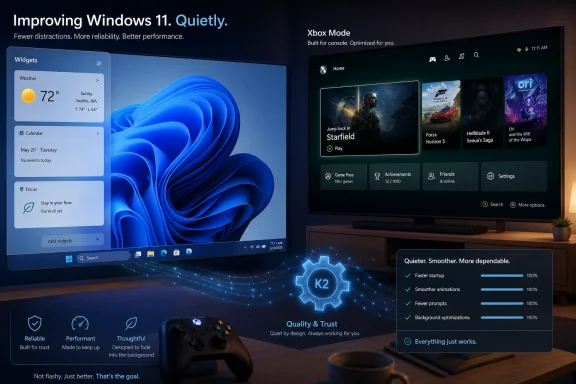
On April 30, 2026, Microsoft began rolling out Xbox Mode to Windows 11 PCs in select markets, while new Insider builds and reporting around the internal “Windows K2” effort pointed to a broader push to make Windows 11 quieter, faster, and less irritating. That is the factual week-in-review version. The more interesting version is that Microsoft appears to have rediscovered the one thing Windows users have been asking for since 2021: care. Not another brand campaign, not another Copilot surface, not another feed pretending to be a feature — but the slow, unglamorous work of making the operating system feel like it belongs to the people using it.
Windows K2 is not a product name, and that matters. It is reportedly an internal codename for a quality-and-trust initiative inside Microsoft, not a boxed release, not a Windows 12 detour, and not a marketing banner users will see on a splash screen. In practical terms, that makes it both less exciting and more important than a conventional Windows launch.
The old Microsoft instinct would have been to move the conversation forward by moving the version number forward. If Windows 11 had become too associated with nags, rough edges, odd UI decisions, and creeping monetization, the cleanest corporate move would have been to start teasing Windows 12. New logo, new wallpaper, new promises, same unresolved foundation.
K2 suggests a different read of the room. The problem is not that Windows 11 lacks novelty. The problem is that novelty has too often arrived before the plumbing was fixed, before the UI felt coherent, and before Microsoft had earned the right to ask users to accept one more “recommended” thing in the Start menu.
That is why the most consequential Windows news of the week was not a single feature. It was the pattern: reduce ads, hide the MSN feed by default in Widgets, improve reliability, tune performance, make gaming feel less like a second-class use case, and stop treating user annoyance as acceptable collateral damage. Microsoft may not say it in those words, but the shape of the work is an apology.
But Windows 11 made it news by spending years blurring the line between operating system utility and traffic funnel. The Widgets panel could have been a useful glanceable surface: weather, calendar, commute, system status, stocks, reminders. Instead, for many users, it became a trapdoor into low-grade content sludge — headlines, recommendations, promos, and the familiar feeling that the OS was trying to harvest one more click.
That was never merely an aesthetic complaint. It changed the emotional contract between user and platform. A taskbar element is not a website. A system panel is not a homepage. When Microsoft fills native OS space with feed content, users do not experience it as “engagement”; they experience it as trespass.
Hiding the feed by default will not fix Windows 11 by itself. It will, however, remove one of the clearest examples of Microsoft confusing distribution power with user permission. The company can still offer MSN. It can still let users opt into a news panel. But the default should be restraint, and restraint has been missing from Windows for too long.
Users are not short on operating system concepts. They are short on patience. The complaints around Windows 11 have been remarkably consistent: sluggishness in places that should feel instantaneous, File Explorer regressions, inconsistent settings surfaces, ads and recommendations in system UI, aggressive Microsoft account nudges, AI features that feel more imposed than invited, and a sense that basic fit and finish had been deprioritized.
A new release does not erase those grievances if it inherits the same incentives. If Start continues to promote things users did not ask for, if Widgets remain a content funnel, if performance varies unpredictably, and if “AI integration” becomes another euphemism for taking over screen space, users will not care whether the box says Windows 11, Windows 12, or Windows Nebula.
That is why fixing Windows 11 is the more mature move. It is less glamorous than launching a successor, but it sends a stronger signal. Microsoft is effectively saying the current platform is still worth repairing — and that the people who installed it should not have to wait for the next SKU to get an operating system that behaves better.
Microsoft’s new Xbox Mode brings a full-screen, controller-oriented experience to Windows 11 PCs, expanding beyond handhelds and the earlier Full Screen Experience branding. It is not a new operating system. It is not a magic performance layer. It is, at this stage, a shell-like experience for making a Windows PC feel more console-like.
That distinction is important because Microsoft is walking into a comparison it cannot avoid. Valve’s Steam Deck did not win affection merely because SteamOS launches games. It won affection because it makes the machine feel like one coherent object. Sleep, resume, store, library, controller input, settings, updates — everything bends toward the job of playing games.
Windows, by contrast, is a general-purpose machine wearing a gaming mask. Xbox Mode can improve the first impression, but the hard work begins when something goes wrong: a Bluetooth pairing hiccup, a driver prompt, an anti-cheat failure, a launcher demanding focus, an update interrupting the session, a game opening behind the interface, or a display mode that needs changing. The closer Microsoft gets to the console experience, the more visible every remaining seam becomes.
Still, the move matters. It shows Microsoft understands that Windows cannot win the next phase of PC gaming with raw compatibility alone. Compatibility is the moat; experience is the battleground.
Xbox Mode is an attempt to reconcile those worlds. On a handheld or TV-connected PC, the user should not have to feel the full weight of Windows every time they want to launch a game. They should not have to fight the taskbar, squint at desktop dialogs, or reach for a trackpad because a launcher forgot controllers exist.
The trouble is that Windows’ strength has always been its refusal to be one thing. It is the OS for a workstation, a school laptop, a flight simulator rig, a point-of-sale terminal, a gaming handheld, a corporate fleet, and a bedroom PC assembled from discounted parts. That flexibility is why Windows remains dominant. It is also why making Windows feel like a console is so difficult.
A successful Xbox Mode cannot merely be Big Picture with a green coat of paint. It has to suppress the wrong parts of Windows without breaking the useful parts. It has to give gamers the confidence that they can stay inside the experience for ordinary tasks. It has to make the desktop feel available but not lurking.
That is a subtle design challenge, and subtlety has not always been modern Windows’ calling card.
They are reminders that Microsoft once had interface languages people loved enough to mourn. The original Xbox dashboard had attitude. Windows Phone had clarity. Metro, before the brand became tangled in Windows 8 backlash and corporate second-guessing, had a point of view: typography, motion, glanceability, restraint, and information hierarchy.
Windows 11, by comparison, often feels tasteful but uncertain. It has rounded corners, translucency, centered icons, and modernized surfaces, but it does not always feel like a finished philosophy. Too many areas still expose the sedimentary layers of Windows history. Too many new experiences feel bolted on for business reasons rather than designed from first principles.
That is why these community projects resonate. They are not practical replacements for mainstream users. Nobody should pretend a revived Windows Phone marketplace is a sensible daily-driver strategy in 2026. But nostalgia is data. It tells Microsoft which parts of its past still have emotional value, and which parts of the present feel disposable.
Reliability in Windows is not one thing. It is the accumulated absence of friction. File Explorer opens quickly. Search returns what it should. Sleep works. Updates complete without drama. The Start menu does not pause like it is waiting for a server-side experiment. Context menus appear instantly. Settings are where users expect them. Notifications respect attention. The OS feels local, even when cloud services are attached.
That last point is crucial. Much of the resentment around Windows 11 comes from the suspicion that the PC has become a client for Microsoft’s priorities rather than the user’s. When an OS feels slow because it is doing useful local work, users may tolerate it. When it feels slow because it is loading recommendations, account prompts, cloud hooks, or feed content, irritation hardens into distrust.
Microsoft cannot talk its way out of that. It has to make Windows feel faster in the hand. Not in benchmark decks alone, not in selective comparisons, but in the everyday muscle memory of people who open laptops dozens of times a day and notice every hesitation.
Windows 11 has been a complicated migration story for many businesses, not just because of hardware requirements or Windows 10’s support clock, but because the operating system arrived with enough visible change to require user education while not always delivering an obvious productivity payoff. A cleaner, quieter, more consistent Windows 11 would make that conversation easier.
The reduced-noise theme matters here. Every consumer-style surface that slips into business deployments becomes another policy to configure, another helpdesk ticket, another “why is this on my work PC?” moment. IT departments do not want to spend their time disabling distractions Microsoft could have left off by default.
There is also a deeper governance issue. Modern Windows increasingly depends on cloud-delivered experiences and server-side feature behavior. That gives Microsoft flexibility, but it can make the platform feel less deterministic. Enterprises want to know what their users will see on Monday morning. K2 will only matter to them if it improves not just consumer vibes, but administrative confidence.
There are good versions of AI in Windows. Local summarization, accessibility improvements, natural-language settings help, smarter search, better dictation, image tools, troubleshooting assistance, and context-aware automation could all make PCs easier to use. For power users, an agent that can safely perform multi-step system tasks would be genuinely valuable if it is transparent, reversible, and controllable.
But AI becomes toxic when it feels like another layer of promotion. If the user sees Copilot as something Microsoft is pushing because Wall Street expects an AI story, resistance grows. If the feature consumes resources, occupies interface space, or nudges users toward services without a clear immediate benefit, it becomes part of the same trust deficit K2 is supposed to repair.
The path forward is not “less AI” as a slogan. It is better boundaries. AI should appear where it solves a user problem and disappear where it does not. The most powerful AI feature in Windows may turn out to be the one that knows when to stay out of the way.
Longtime Windows users have a particular relationship with the taskbar. It is not decoration. It is workflow infrastructure. People position it, size it, overload it, ignore it, script around it, and build habits around it over years. When Microsoft modernized the taskbar but removed capabilities users depended on, it sent the message that visual coherence mattered more than muscle memory.
Reported efforts to restore or improve taskbar flexibility therefore matter beyond the specific feature. They suggest Microsoft may be relearning an old Windows lesson: customization is not clutter when it protects established workflows. A PC operating system does not need to be as locked down as a phone. In fact, it should not be.
The challenge is balancing modern design with inherited expectations. Windows cannot be frozen in 2009. But it also cannot treat decades of user behavior as a nuisance. The best version of Windows 11 would make the default cleaner while giving experienced users back the agency they lost.
Live Tiles were imperfect, but they were conceptually bold. They made the home screen informational without turning it into a chaotic feed. They gave apps a visual presence beyond static icons. They made the phone feel personal in a way that was not just wallpaper and widget stacking.
That is why METROV and similar projects strike a nerve. Users are not simply asking for an old Lumia cosplay. They are expressing fatigue with sameness. Android and iOS have converged around grids, widgets, notification piles, and algorithmic surfaces. Windows Phone, for all its commercial failure, represented a different bet.
Microsoft should pay attention, not because it is about to re-enter the phone OS war, but because the design lesson applies to Windows. People respond to software that has a point of view and respects attention. The original Metro idea was not “put rectangles everywhere.” It was “make information clear, navigable, and alive without drowning the user.” Windows 11 could use some of that discipline.
Users began to expect that every quiet corner of Windows might eventually become inventory. That expectation changes how people interpret even useful features. A genuinely helpful suggestion looks suspicious when it arrives from a company that has too often optimized for engagement. A new panel feels suspect when previous panels became feeds.
This is the context in which K2 has to operate. Microsoft is not launching improvements into a neutral environment. It is launching them into a skeptical one. Many users will assume the company is trimming annoyances now because it has to, not because it has permanently changed its philosophy.
That skepticism is healthy. Microsoft should have to earn back credibility through shipped behavior, not blog-post language. If Widgets become quieter, if ads recede, if performance improves, if Xbox Mode matures, if updates become less disruptive, and if AI features become more respectful, users will notice. But they will notice over months, not minutes.
Microsoft has often answered these pressures with breadth. Windows runs everything, supports everything, adapts to everything. That remains a formidable advantage. But breadth without polish increasingly feels like sprawl.
The gaming front makes this especially clear. If a user buys or builds a living-room PC, Microsoft is no longer competing only with another Windows installation. It is competing with consoles, SteamOS handhelds, cloud gaming clients, and simplified appliance-like experiences. The question is not whether Windows can technically run the game. The question is whether it feels like the best way to play it.
K2 and Xbox Mode meet at that pressure point. One tries to make Windows less annoying overall. The other tries to make one high-value use case feel more focused. Together, they suggest Microsoft understands that Windows’ future depends on being not only compatible, but desirable.
The most concrete signs are easy to track:
Microsoft has spent decades making Windows indispensable; K2, Xbox Mode, and the retreat of the MSN feed suggest it now has to make Windows likable again. The encouraging part is that the company appears to be working on the right layer: not just features, but friction. If Microsoft can keep choosing quiet competence over noisy monetization, Windows 11 may not need Windows 12 to rescue it. It may simply need Microsoft to keep acting as though the PC is still personal.
Source: Windows Central Windows K2 pushes Windows 11 in the right direction, Xbox Mode turns PCs into consoles, OG Xbox mods return, and Windows Phone fans bring the platform back to life
 Microsoft’s New Windows Pitch Starts With an Admission
Windows K2 is not a product name, and that matters. It is reportedly an internal codename for a quality-and-trust initiative inside Microsoft, not a boxed release, not a Windows 12 detour, and not a marketing banner users will see on a splash screen. In practical terms, that makes it both less exciting and more important than a conventional Windows launch.The old Microsoft instinct would have been to move the conversation forward by moving the version number forward. If Windows 11 had become too associated with nags, rough edges, odd UI decisions, and creeping monetization, the cleanest corporate move would have been to start teasing Windows 12. New logo, new wallpaper, new promises, same unresolved foundation.
K2 suggests a different read of the room. The problem is not that Windows 11 lacks novelty. The problem is that novelty has too often arrived before the plumbing was fixed, before the UI felt coherent, and before Microsoft had earned the right to ask users to accept one more “recommended” thing in the Start menu.
That is why the most consequential Windows news of the week was not a single feature. It was the pattern: reduce ads, hide the MSN feed by default in Widgets, improve reliability, tune performance, make gaming feel less like a second-class use case, and stop treating user annoyance as acceptable collateral damage. Microsoft may not say it in those words, but the shape of the work is an apology.
The MSN Feed Retreat Is Small, Symbolic, and Overdue
The planned change to the Windows 11 Widgets board is almost comically modest. Microsoft is testing a default experience that opens to user-selected widgets rather than the MSN-powered feed, with the feed moved behind its own dedicated page for people who actually want it. In a saner software universe, this would not be news.But Windows 11 made it news by spending years blurring the line between operating system utility and traffic funnel. The Widgets panel could have been a useful glanceable surface: weather, calendar, commute, system status, stocks, reminders. Instead, for many users, it became a trapdoor into low-grade content sludge — headlines, recommendations, promos, and the familiar feeling that the OS was trying to harvest one more click.
That was never merely an aesthetic complaint. It changed the emotional contract between user and platform. A taskbar element is not a website. A system panel is not a homepage. When Microsoft fills native OS space with feed content, users do not experience it as “engagement”; they experience it as trespass.
Hiding the feed by default will not fix Windows 11 by itself. It will, however, remove one of the clearest examples of Microsoft confusing distribution power with user permission. The company can still offer MSN. It can still let users opt into a news panel. But the default should be restraint, and restraint has been missing from Windows for too long.
Windows 11’s Real Enemy Was Never Windows 12
The K2 framing also punctures one of the stranger assumptions around Windows: that every major problem needs a major version reset. Windows 11’s reputation problem is not the kind a new name automatically solves. In fact, a rushed Windows 12 could have made it worse.Users are not short on operating system concepts. They are short on patience. The complaints around Windows 11 have been remarkably consistent: sluggishness in places that should feel instantaneous, File Explorer regressions, inconsistent settings surfaces, ads and recommendations in system UI, aggressive Microsoft account nudges, AI features that feel more imposed than invited, and a sense that basic fit and finish had been deprioritized.
A new release does not erase those grievances if it inherits the same incentives. If Start continues to promote things users did not ask for, if Widgets remain a content funnel, if performance varies unpredictably, and if “AI integration” becomes another euphemism for taking over screen space, users will not care whether the box says Windows 11, Windows 12, or Windows Nebula.
That is why fixing Windows 11 is the more mature move. It is less glamorous than launching a successor, but it sends a stronger signal. Microsoft is effectively saying the current platform is still worth repairing — and that the people who installed it should not have to wait for the next SKU to get an operating system that behaves better.
Gaming Is Becoming the Test Case for Whether Microsoft Can Simplify Windows
Xbox Mode is the liveliest part of this story because it takes Windows into territory where excuses are harder to hide. Productivity users tolerate complexity because Windows has trained them to. Gamers, especially living-room and handheld users, are less forgiving. If the interface cannot be navigated comfortably with a controller from the couch, the illusion breaks immediately.Microsoft’s new Xbox Mode brings a full-screen, controller-oriented experience to Windows 11 PCs, expanding beyond handhelds and the earlier Full Screen Experience branding. It is not a new operating system. It is not a magic performance layer. It is, at this stage, a shell-like experience for making a Windows PC feel more console-like.
That distinction is important because Microsoft is walking into a comparison it cannot avoid. Valve’s Steam Deck did not win affection merely because SteamOS launches games. It won affection because it makes the machine feel like one coherent object. Sleep, resume, store, library, controller input, settings, updates — everything bends toward the job of playing games.
Windows, by contrast, is a general-purpose machine wearing a gaming mask. Xbox Mode can improve the first impression, but the hard work begins when something goes wrong: a Bluetooth pairing hiccup, a driver prompt, an anti-cheat failure, a launcher demanding focus, an update interrupting the session, a game opening behind the interface, or a display mode that needs changing. The closer Microsoft gets to the console experience, the more visible every remaining seam becomes.
Still, the move matters. It shows Microsoft understands that Windows cannot win the next phase of PC gaming with raw compatibility alone. Compatibility is the moat; experience is the battleground.
“This Is an Xbox” Only Works If Windows Stops Acting Like a Desktop First
Microsoft’s broader Xbox strategy has been drifting toward a blunt idea: Xbox is not a box, it is a service-and-platform identity across screens. That is strategically logical. It also collides with the physical reality that most Windows PCs are still designed around keyboard, mouse, windows, notifications, and desktop assumptions.Xbox Mode is an attempt to reconcile those worlds. On a handheld or TV-connected PC, the user should not have to feel the full weight of Windows every time they want to launch a game. They should not have to fight the taskbar, squint at desktop dialogs, or reach for a trackpad because a launcher forgot controllers exist.
The trouble is that Windows’ strength has always been its refusal to be one thing. It is the OS for a workstation, a school laptop, a flight simulator rig, a point-of-sale terminal, a gaming handheld, a corporate fleet, and a bedroom PC assembled from discounted parts. That flexibility is why Windows remains dominant. It is also why making Windows feel like a console is so difficult.
A successful Xbox Mode cannot merely be Big Picture with a green coat of paint. It has to suppress the wrong parts of Windows without breaking the useful parts. It has to give gamers the confidence that they can stay inside the experience for ordinary tasks. It has to make the desktop feel available but not lurking.
That is a subtle design challenge, and subtlety has not always been modern Windows’ calling card.
The Modders Are Telling Microsoft Where the Nostalgia Lives
The same week Microsoft pushed its official Xbox-flavored Windows work forward, enthusiasts were busy reviving old Microsoft interfaces in unofficial ways. The rebuilt original Xbox dashboard for PC is not just a curiosity. The Windows Phone-inspired Android launcher METROV and the community effort around 8Marketplace are not merely retrocomputing footnotes.They are reminders that Microsoft once had interface languages people loved enough to mourn. The original Xbox dashboard had attitude. Windows Phone had clarity. Metro, before the brand became tangled in Windows 8 backlash and corporate second-guessing, had a point of view: typography, motion, glanceability, restraint, and information hierarchy.
Windows 11, by comparison, often feels tasteful but uncertain. It has rounded corners, translucency, centered icons, and modernized surfaces, but it does not always feel like a finished philosophy. Too many areas still expose the sedimentary layers of Windows history. Too many new experiences feel bolted on for business reasons rather than designed from first principles.
That is why these community projects resonate. They are not practical replacements for mainstream users. Nobody should pretend a revived Windows Phone marketplace is a sensible daily-driver strategy in 2026. But nostalgia is data. It tells Microsoft which parts of its past still have emotional value, and which parts of the present feel disposable.
Reliability Is the Feature Microsoft Cannot Demo on Stage
The most important promises around K2 are also the least theatrical: reliability, responsiveness, reduced bloat, lower resource usage, fewer bugs, and more polish. These are the features that do not produce good launch-event clips. They are also the features that decide whether users trust an operating system.Reliability in Windows is not one thing. It is the accumulated absence of friction. File Explorer opens quickly. Search returns what it should. Sleep works. Updates complete without drama. The Start menu does not pause like it is waiting for a server-side experiment. Context menus appear instantly. Settings are where users expect them. Notifications respect attention. The OS feels local, even when cloud services are attached.
That last point is crucial. Much of the resentment around Windows 11 comes from the suspicion that the PC has become a client for Microsoft’s priorities rather than the user’s. When an OS feels slow because it is doing useful local work, users may tolerate it. When it feels slow because it is loading recommendations, account prompts, cloud hooks, or feed content, irritation hardens into distrust.
Microsoft cannot talk its way out of that. It has to make Windows feel faster in the hand. Not in benchmark decks alone, not in selective comparisons, but in the everyday muscle memory of people who open laptops dozens of times a day and notice every hesitation.
Enterprise IT Wants Boring, Which Is Another Word for Good
For sysadmins and enterprise IT teams, the K2 pitch lands differently. Consumers may focus on ads, widgets, and gaming. Organizations care about predictability, manageability, update quality, and the cost of explaining Microsoft’s latest idea to thousands of users who did not ask for it.Windows 11 has been a complicated migration story for many businesses, not just because of hardware requirements or Windows 10’s support clock, but because the operating system arrived with enough visible change to require user education while not always delivering an obvious productivity payoff. A cleaner, quieter, more consistent Windows 11 would make that conversation easier.
The reduced-noise theme matters here. Every consumer-style surface that slips into business deployments becomes another policy to configure, another helpdesk ticket, another “why is this on my work PC?” moment. IT departments do not want to spend their time disabling distractions Microsoft could have left off by default.
There is also a deeper governance issue. Modern Windows increasingly depends on cloud-delivered experiences and server-side feature behavior. That gives Microsoft flexibility, but it can make the platform feel less deterministic. Enterprises want to know what their users will see on Monday morning. K2 will only matter to them if it improves not just consumer vibes, but administrative confidence.
AI Is Useful Only When It Stops Feeling Like a Land Grab
No serious account of Windows 11 in 2026 can avoid AI. Microsoft has spent the last several years trying to turn Copilot into a defining layer across its products, and Windows has been one of the most visible battlegrounds. The problem is not that AI features are inherently unwelcome. The problem is that Microsoft’s eagerness has sometimes outpaced user consent.There are good versions of AI in Windows. Local summarization, accessibility improvements, natural-language settings help, smarter search, better dictation, image tools, troubleshooting assistance, and context-aware automation could all make PCs easier to use. For power users, an agent that can safely perform multi-step system tasks would be genuinely valuable if it is transparent, reversible, and controllable.
But AI becomes toxic when it feels like another layer of promotion. If the user sees Copilot as something Microsoft is pushing because Wall Street expects an AI story, resistance grows. If the feature consumes resources, occupies interface space, or nudges users toward services without a clear immediate benefit, it becomes part of the same trust deficit K2 is supposed to repair.
The path forward is not “less AI” as a slogan. It is better boundaries. AI should appear where it solves a user problem and disappear where it does not. The most powerful AI feature in Windows may turn out to be the one that knows when to stay out of the way.
The Taskbar Still Carries the Weight of Windows’ Identity Crisis
One reason Windows 11 generated disproportionate frustration is that it changed familiar surfaces while removing or delaying familiar options. The taskbar became a symbol of that trade-off. Centered icons were not the issue; reduced flexibility was.Longtime Windows users have a particular relationship with the taskbar. It is not decoration. It is workflow infrastructure. People position it, size it, overload it, ignore it, script around it, and build habits around it over years. When Microsoft modernized the taskbar but removed capabilities users depended on, it sent the message that visual coherence mattered more than muscle memory.
Reported efforts to restore or improve taskbar flexibility therefore matter beyond the specific feature. They suggest Microsoft may be relearning an old Windows lesson: customization is not clutter when it protects established workflows. A PC operating system does not need to be as locked down as a phone. In fact, it should not be.
The challenge is balancing modern design with inherited expectations. Windows cannot be frozen in 2009. But it also cannot treat decades of user behavior as a nuisance. The best version of Windows 11 would make the default cleaner while giving experienced users back the agency they lost.
Windows Phone’s Ghost Haunts Android for a Reason
The renewed attention around Windows Phone-style Android launchers is easy to dismiss until you remember what Windows Phone got right. It was not an app ecosystem success, and that failure was fatal. But as a mobile interface, it had coherence and confidence that many modern launchers lack.Live Tiles were imperfect, but they were conceptually bold. They made the home screen informational without turning it into a chaotic feed. They gave apps a visual presence beyond static icons. They made the phone feel personal in a way that was not just wallpaper and widget stacking.
That is why METROV and similar projects strike a nerve. Users are not simply asking for an old Lumia cosplay. They are expressing fatigue with sameness. Android and iOS have converged around grids, widgets, notification piles, and algorithmic surfaces. Windows Phone, for all its commercial failure, represented a different bet.
Microsoft should pay attention, not because it is about to re-enter the phone OS war, but because the design lesson applies to Windows. People respond to software that has a point of view and respects attention. The original Metro idea was not “put rectangles everywhere.” It was “make information clear, navigable, and alive without drowning the user.” Windows 11 could use some of that discipline.
The Trust Deficit Was Built One Recommendation at a Time
Microsoft’s difficulty is that trust is cumulative. No single Start menu recommendation destroyed faith in Windows. No single widget feed, Edge prompt, Teams auto-install, OneDrive nudge, Copilot icon, lock-screen promotion, or account requirement did it alone. The damage came from repetition.Users began to expect that every quiet corner of Windows might eventually become inventory. That expectation changes how people interpret even useful features. A genuinely helpful suggestion looks suspicious when it arrives from a company that has too often optimized for engagement. A new panel feels suspect when previous panels became feeds.
This is the context in which K2 has to operate. Microsoft is not launching improvements into a neutral environment. It is launching them into a skeptical one. Many users will assume the company is trimming annoyances now because it has to, not because it has permanently changed its philosophy.
That skepticism is healthy. Microsoft should have to earn back credibility through shipped behavior, not blog-post language. If Widgets become quieter, if ads recede, if performance improves, if Xbox Mode matures, if updates become less disruptive, and if AI features become more respectful, users will notice. But they will notice over months, not minutes.
The Competitive Pressure Is Finally Hitting the Right Nerve
Windows remains dominant on traditional PCs, but dominance is not the same as affection. Apple has spent years turning hardware-software integration into a consumer expectation. Valve proved Linux could become invisible enough for handheld gaming. Android and iOS trained users to expect smooth updates and coherent app stores, even if they introduced their own frustrations. Chromebooks made simplicity a selling point.Microsoft has often answered these pressures with breadth. Windows runs everything, supports everything, adapts to everything. That remains a formidable advantage. But breadth without polish increasingly feels like sprawl.
The gaming front makes this especially clear. If a user buys or builds a living-room PC, Microsoft is no longer competing only with another Windows installation. It is competing with consoles, SteamOS handhelds, cloud gaming clients, and simplified appliance-like experiences. The question is not whether Windows can technically run the game. The question is whether it feels like the best way to play it.
K2 and Xbox Mode meet at that pressure point. One tries to make Windows less annoying overall. The other tries to make one high-value use case feel more focused. Together, they suggest Microsoft understands that Windows’ future depends on being not only compatible, but desirable.
The Week Windows Remembered It Has Fans to Win Back
The week’s news is best read as a cluster of signals rather than a victory lap. Microsoft is not done. It has not “saved” Windows 11 by hiding a feed, renaming a gaming interface, or attaching a codename to internal quality work. But the direction is notable because it points toward user trust rather than user extraction.The most concrete signs are easy to track:
- Microsoft is treating Windows 11 as the platform to repair rather than rushing the conversation toward Windows 12.
- The Widgets board is being tested with the MSN feed hidden by default, which changes a long-criticized surface from opt-out noise to opt-in content.
- Xbox Mode is expanding the idea that Windows gaming should be usable from a couch, a handheld, or a controller-first setup.
- The Windows K2 effort reportedly centers on performance, reliability, lower bloat, fewer bugs, and a less intrusive experience.
- Community projects reviving Xbox and Windows Phone design language show that Microsoft’s older interface ideas still have emotional pull.
- The real test will be whether these changes survive contact with Microsoft’s advertising, AI, and services incentives.
Microsoft has spent decades making Windows indispensable; K2, Xbox Mode, and the retreat of the MSN feed suggest it now has to make Windows likable again. The encouraging part is that the company appears to be working on the right layer: not just features, but friction. If Microsoft can keep choosing quiet competence over noisy monetization, Windows 11 may not need Windows 12 to rescue it. It may simply need Microsoft to keep acting as though the PC is still personal.
Source: Windows Central Windows K2 pushes Windows 11 in the right direction, Xbox Mode turns PCs into consoles, OG Xbox mods return, and Windows Phone fans bring the platform back to life
