

Windows has a lot going for it under the hood — a mature kernel, a battle-tested storage stack, a sprawling driver ecosystem — and yet for many long-time users the day-to-day experience feels noisy, opinionated, and friction-filled. That’s the blunt diagnosis former Microsoft engineer Dave Plummer lays out in his recent video and interviews, and his prescription is simple, pragmatic, and aimed squarely at restoring choice, predictability, and respect for power users in the operating system. The proposal centers on a first-class “professional” or “hardcore” mode that treats users as adults: no ads, no unsolicited guidance, no surprise UI changes or forced cloud fallbacks, and clear, auditable telemetry and update behavior. For anyone who spends their life inside Windows, Plummer’s argument lands as both familiar and oddly refreshing — an engineering-minded nudge toward sane defaults that respect the people who expect their machine to do exactly what they asked, not what it guesses they need.
This is not a radical engineering overhaul; it’s a change of defaults, a consolidation of settings, and a product decision to honor a class of user explicitly. The biggest obstacles are organizational and financial, not technical. Microsoft can ship most of these ideas today by:
If Microsoft wants to keep its most technically loyal customers, it can do so without abandoning mainstream usability. The path Plummer outlines is a narrow, well-lit bridge between those two worlds: one toggle during setup, clear explanations, and the humility to let users choose. For users who have felt pushed out by decades of “friendly” defaults, that is a compelling, concrete start toward building an operating system that welcomes both beginners and builders.
Source: PC Gamer An ex-Microsoft Engineer has explained how he would fix Windows, and I think I might actually be on board
 Background
Who is Dave Plummer and why his voice matters
Dave Plummer is a well-known figure in the Windows developer community: the creator of Windows Task Manager, author of ZIP-folder support, and the engineer who ported the popular Space Cadet 3D Pinball to Windows NT. His career at Microsoft places him in the rare position of speaking from direct experience about how Windows evolved, and his recent public commentary is framed by decades of shipping system-level code. Plummer’s credentials and the specific anecdotes he brings — including the infamous Pinball frame-rate story — make him an authoritative critic of Windows’ current ergonomics.The immediate spark: a short, sharp critique
Plummer opens his video with a deliberately provocative line — “Windows Sucks” — not as sensationalism but as the cold-open to a detailed engineering critique. His point is not that the kernel is broken; it is that over the last 15 years Windows has turned into a mainstream-friendly, highly guided environment that intentionally hides sharp tools and constantly nudges users. That’s great for casual buyers, he says, but it’s the wrong default for the people who live in the OS. The friction he targets is the constant verbosity: notifications, balloon tips, suggestions, product nudges, and default cloud fallbacks that interrupt workflows and erode user trust.What Plummer proposes: a concise, engineer-friendly blueprint
The core idea: a first-class professional / hardcore mode
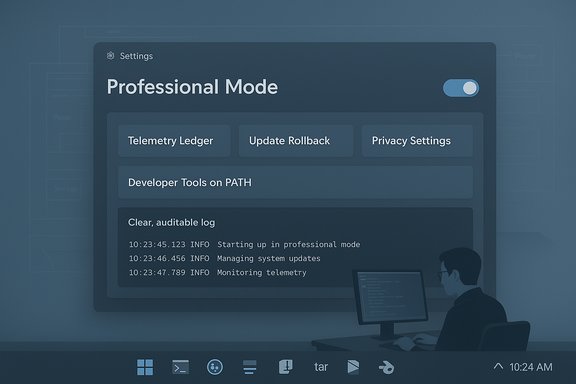
At the center of Plummer’s plan is a single, discoverable system profile — call it Professional Mode or Hardcore Mode — that flips the operating characteristics of Windows from “chatty and protective” to “deterministic and terse.” Key attributes he outlines include:- No promotional placements, Start menu ads, or suggested apps.
- No unsolicited UI changes or automated reconfiguration based on perceived user preferences.
- Local search should default to local results; web fallback should only occur when explicitly requested.
- A single, authoritative control surface where advanced settings are discoverable and explained.
Centralized controls and clarity
Plummer calls for a unified control center — a single pane of glass in Settings — where every option that affects behavior or telemetry is visible, explained, and adjustable. When you toggle a setting the UI should show:- Exactly which subsystems are affected.
- What network or telemetry activity will follow.
- Whether the change is governed by policy, user choice, or a built-in system behavior.
Radical transparency for telemetry
Plummer does not call for telemetry to be abolished; rather, he argues for a privacy ledger — an auditable log that records every datum Windows intends to send off-machine, with a plain-English explanation of why it’s being sent and what it will be used for. Users should be able to mute categories of telemetry, and those choices should persist across updates unless the system explicitly re-asks and justifies why the data is necessary. If some non-negotiable data must be collected for security or regulatory reasons, Windows should make the case publicly rather than hiding or re-enabling telemetry silently.Respect the console and ship dev tools by default
Plummer wants the Windows Console and command-line ecosystem treated as first-class citizens for power users. Concretely, he proposes:- Make Windows Console (and Windows Terminal) hard defaults for advanced installs.
- Ensure Winget (Windows Package Manager), SSH, tar, and other GNU/Unix-style tools are installed, available on PATH, and discoverable by default.
- Let the OS accept “I am a power user” without second-guessing with prompts or limitations.
Safer, choreographed updates with easy rollback
Plummer wants updates that behave like carefully choreographed maintenance windows: no surprise reboots, no UI changes outside of the agreed window, and plain-English release notes describing what changed. Rolling back an update should be simple and reliable. He specifically calls out the pain of unexpected updates interrupting work and changing UI behavior at inopportune times.A paid ad-free tier or paid remove-ads option
Because many built-in promotions and suggestions are revenue-driven, Plummer acknowledges this could be a paid option: a version of Windows that removes all upsells and ads in exchange for a fee. Either way, the core principle is the same: do not subject users to a persistent sales channel inside the OS they already own.Cross-checks and factual verification
- Plummer’s background and claims that he authored Task Manager and ported Pinball to NT are corroborated by multiple sources; his résumé and public interviews document those contributions.
- The Pinball story — the game running at thousands of frames per second on modern CPUs due to a missing frame limiter — is a verified anecdote recounted by Plummer himself and reported by multiple outlets. Raymond Chen later introduced a limiter to tame the runaway CPU usage. These independent reports match Plummer’s recollection.
- The PC Gamer summary of Plummer’s new video (the item that likely prompted this discussion) lays out the same list of proposals summarized above — the professional mode idea, the privacy ledger, update choreography, and the call to respect the console.
Why this matters: who benefits and who loses
Benefits for power users and enterprise IT
- Productivity and predictability: No surprise prompts, no UI flakiness caused by automatic reconfiguration, and fewer interruptions from upsells or cloud fallbacks.
- Better tooling out of the box: Having Winget, SSH, tar, and other tools available on PATH reduces onboarding friction for developers and sysadmins.
- Auditability and compliance: A telemetry ledger would be a boon to organizations that already demand logs, transparency, and the ability to document what leaves the network.
- Less need for third-party tweaks: Many users today resort to scripts and third-party “debloat” tools to regain control; an official mode would remove the need for fragile hacks and help desks would see fewer “Windows changed my PC” tickets.
Business tradeoffs and the revenue question
- Microsoft currently benefits financially from discoverability: promoting Microsoft 365, Edge, and store apps inside the OS drives conversions. Removing those prompts or offering a paid ad-free tier has a direct revenue impact.
- Plummer’s suggestion to make ad-free an option is a realistic compromise: consumers who prefer guidance keep the default, and those willing to pay for a distraction-free environment can opt in.
Risks and downsides
- Security exposure: A mode that reduces protective prompts could make some novice users more vulnerable if they accidentally disable security features. Plummer’s model must ensure that lowered verbosity does not equal lowered safety for people who need those protections.
- Fragmentation and support complexity: Microsoft already supports multiple SKUs and policies. Adding a prominent professional mode would increase QA permutations and could complicate support for OEMs and corporate deployment profiles.
- Regulatory and legal visibility: Telemetry changes and clear opt-out mechanisms interact with regulatory regimes (GDPR, ePrivacy) and could invite scrutiny if Microsoft reintroduces data collection in different forms.
- Revenue impact: The financial calculus of removing in-OS nudges isn’t trivial; Microsoft could see reductions in conversions for cloud services and subscriptions if discoverability is dialed back.
Can Microsoft build this? An implementation roadmap
1. Define a durable profile: “Professional Mode”
- Add a selectable profile during OOBE (first-run experience) and in Settings.
- Expose the profile via Group Policy and MDM for enterprise control.
- Ensure the profile is honored by Search, the Start menu, Store, and background services.
2. Build a single, authoritative control surface
- Consolidate telemetry, privacy, and update controls into a centralized pane.
- Each toggle should expand into a plain-English panel describing:
- What changes
- Which subsystems are affected
- What network activity is expected
- Surface links to the privacy ledger and show recent outbound events.
3. Default developer tools and PATH behavior
- Make Winget, OpenSSH, tar, and common CLI tools part of the system image for Pro/Enterprise/Professional installs and add them to PATH.
- Ship Windows Terminal and the classic Console as defaults for advanced profiles.
- Document the PATH behavior and ensure it’s consistent across updates.
4. Choreographed updates with transparent rollbacks
- Let Professional Mode enroll devices into an update cadence that respects active hours and locks UI behavior during update windows.
- Provide plain-language release notes and a one-click rollback in Settings.
- Expose update telemetry for administrators to audit.
5. Telemetry ledger and audit trail
- Record metadata for outbound packets or telemetry events in a local ledger, with a human-readable rationale.
- Allow per-category muting and provide admin controls to enforce or exempt logging for compliance reasons.
- Require any mandatory telemetry to be flagged publicly with a documented reason.
6. Offer a paid ad-free SKU
- Provide an official ad-free option for users or enterprises that removes promotions entirely from the desktop shell and Start menu.
- Publish an internal report on expected revenue impact and offer a migration path for OEMs and IT procurement.
What you can do right now (practical takeaways)
- If you want to stop web results and suggestions in Start/search today, there are policy and registry keys that do this — enterprises already use keys like ConnectedSearchUseWeb and DisableSearchBoxSuggestions to disable web fallbacks and suggestions. Administrators can deploy these via Group Policy or MDM. For individual power users, a short registry or PowerShell script can toggle these keys.
- To get developer tools onto a machine quickly:
- Install Winget and use it to bootstrap SSH, tar, Windows Terminal, and other utilities: winget install openssh; winget install microsoft.windows-terminal.
- On managed devices, add these to the system image or provisioning scripts so that they’re on PATH for all users.
- Audit telemetry today using the built-in Diagnostic Data Viewer and privacy settings. While imperfect, these tools give insight into what’s being sent and provide some knobs for control.
- Use enterprise update rings and staged deployments to prevent surprises; test updates in a representative ring before broad rollout and ensure recovery media and system images are available to simplify rollback.
Critical analysis: strengths, gaps, and realism
The strengths of Plummer’s proposal
- Clear, actionable design principles. The plan isn’t ideological; it’s practical: give the user choice and then respect it.
- Leverage existing mechanics. Many elements already exist (policy keys, developer mode, S Mode); what’s missing is discoverability and product discipline.
- Improved trust. A telemetry ledger and transparent update behavior would materially improve trust and reduce support cost, especially for businesses that must demonstrate compliance and control.
The gaps and unanswered questions
- Security trade-offs. Plummer’s mode must clearly define safety boundaries. Turning off UX guardrails must not equate to turning off essential security protections. Product design must separate annoying nudges from protective prompts. This is a design and engineering challenge, not merely a policy decision.
- Economic incentives. Microsoft monetizes discoverability; removing that channel will force a corporate calculus about subscriptions and OEM relationships. The viability of a paid ad-free tier needs financial modeling.
- Engineering and QA burden. Consolidating settings and guaranteeing consistent behavior across all subsystems (Search, Shell, Store, Update) is a large integration effort. Backwards compatibility with enterprise tooling and OEM customizations complicates the rollout.
Political and organizational friction
Changing defaults across a platform the size of Windows requires buy-in across product teams: consumer, enterprise, security, OEM relations, legal, and finance. Plummer’s plan is straightforward on paper, but the organizational momentum and incentive structures inside a large platform company are where the friction will appear.Verdict: would this make Windows “better”?
Plummer’s proposals are a tightly focused prescription for a particular class of user: people who value determinism, control, and predictable behavior. Implemented well, a first-class Professional Mode would directly address the most common complaints advanced users have about the modern Windows experience — ads in the shell, surprise updates, confusing telemetry, and buried advanced controls.This is not a radical engineering overhaul; it’s a change of defaults, a consolidation of settings, and a product decision to honor a class of user explicitly. The biggest obstacles are organizational and financial, not technical. Microsoft can ship most of these ideas today by:
- Adding a durable profile in OOBE.
- Exposing a single control center.
- Moving critical dev tools on PATH for advanced installs.
- Introducing a telemetry ledger and clearer update rollback UX.
Conclusion
The critique is blunt: Windows doesn’t have to be a sales channel that second-guesses veteran users. Dave Plummer’s plan is a practical, engineer-friendly roadmap that would restore respect for deterministic behavior, reduce friction for people who live in the OS, and improve transparency around telemetry and updates. The idea of a first-class professional mode, centralized advanced controls, auditable telemetry, and developer tools on PATH is not merely nostalgic — it’s a coherent, implementable defense of user sovereignty in an OS that has drifted toward being a product surface for services.If Microsoft wants to keep its most technically loyal customers, it can do so without abandoning mainstream usability. The path Plummer outlines is a narrow, well-lit bridge between those two worlds: one toggle during setup, clear explanations, and the humility to let users choose. For users who have felt pushed out by decades of “friendly” defaults, that is a compelling, concrete start toward building an operating system that welcomes both beginners and builders.
Source: PC Gamer An ex-Microsoft Engineer has explained how he would fix Windows, and I think I might actually be on board
