

Microsoft is turning one of Windows’ most invisible security foundations into something ordinary users can finally see. Starting in April 2026, Windows Security will surface a Secure Boot status dashboard that tells users whether their PC has already received Microsoft’s newer certificates, whether action is recommended, or whether the device may be stuck on an aging trust chain that can no longer be serviced normally. The timing is no accident: Microsoft has been warning that the original Secure Boot certificates issued in 2011 begin expiring in June 2026, and the new status view is meant to make that transition understandable before it becomes urgent.
The headline sounds modest, almost routine, but the underlying change is significant. Secure Boot is part of the earliest layer of trust in a Windows PC, helping ensure that the machine only starts trusted code during the boot process. When that trust chain ages out, the system may still appear to work normally while quietly losing the ability to accept future boot-level protections, which is exactly the kind of problem that tends to become visible only after attackers exploit it.
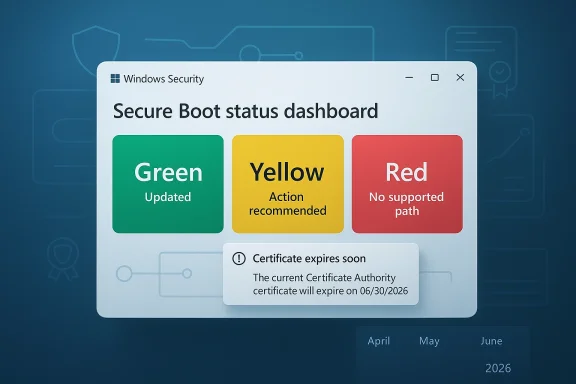
That is why Microsoft’s new dashboard matters. It reduces a deeply technical firmware transition into a simple color-coded status inside the Windows Security app: green for updated, yellow for recommended action, and red for no supported path forward. In practical terms, that means users no longer have to guess whether the update happened or whether their device is depending on an OEM firmware step they have not yet taken.
The broader context is just as important. Microsoft ended free support for Windows 10 on October 14, 2025, and that makes the Secure Boot transition more than a technical refresh; it becomes part of the platform migration story. Supported Windows 11 PCs and Windows 10 systems enrolled in Extended Security Updates are expected to receive the new certificates automatically, while unsupported Windows 10 devices may not get them at all.
For Microsoft, this is also a messaging shift. The company is no longer treating Secure Boot as something only enterprise admins or firmware specialists need to think about. It is putting boot trust into a consumer-facing security surface, which signals that the company now sees firmware continuity as part of everyday PC hygiene, not a niche back-end concern. That is a meaningful change in how Windows security is being presented to the public.
The deeper reason is operational visibility. Microsoft knows that users and even many IT teams will not proactively check firmware trust state unless something obvious prompts them to do so. The new dashboard gives the company a way to surface a hidden dependency before it turns into a silent security gap. That is a sensible move because the worst outcome would be to discover the problem only when a boot-chain vulnerability appears and there is no longer a clean update path.
That color system is deliberately simple, and that simplicity is the point. Users do not need a lecture on PKI, KEK, DB, or DBX just to know whether their PC is protected. They need a plain-language answer, and Microsoft is trying to compress a complex firmware lifecycle into something visible at a glance. The challenge, of course, is that the right next step may still require an OEM firmware package rather than a standard Windows patch.
The timing is also important because the expiration is not a single switch-flip event. The certificates begin expiring in June 2026 and continue rolling off through later months depending on the certificate involved, with some guidance describing the full expiration window extending into October 2026. That means the issue will play out over months, not days, and that gives Microsoft room to stagger the transition without overwhelming the servicing pipeline.
That distinction matters because users often assume a Microsoft security issue can be fixed entirely by Microsoft. Here, the truth is more complicated. A device may need a motherboard vendor’s firmware support before the new certificates can be loaded, and if that support does not exist, the machine may not have a path to full remediation. That makes the dashboard as much about accountability as it is about diagnosis.
A PC in that state can still boot, still browse, and still run applications. What it may lose is the ability to stay current at the lowest levels of startup security, which is where bootkits and other persistent threats live. That is why the issue is serious even though it is not instantly visible to the user. It is less dramatic than a blue screen, but arguably more consequential over time.
Windows 10 is a different story. Microsoft ended free support for the consumer version of Windows 10 on October 14, 2025, and unsupported Windows 10 devices are not expected to receive the new Secure Boot certificates. That turns what might have been a routine security maintenance item into a security and lifecycle problem for a huge installed base.
That also explains why Microsoft is surfacing the status page now. By making the certificate state visible inside Windows Security, the company is creating a feedback loop for users who might not realize their PC is still running but has fallen behind on an increasingly important security baseline. It is a gentle nudge with a hard edge underneath it.
That pressure may be uncomfortable, but it is strategically effective. A machine that looks healthy can still be security-degraded, and Microsoft appears to want users to understand that “still works” is not the same thing as “still protected.” That message is especially important in the Windows 10 era, where many endpoints are now living on borrowed servicing time.
That matters because user attention is scarce. If a problem is hidden in firmware menus or buried in documentation, most people will never see it until support techs are already involved. By putting the status into a familiar security app, Microsoft lowers the friction for checking, interpreting, and acting on the problem. That is good design, even if the underlying issue is complicated.
A yellow badge may simply mean the device needs more time to receive the payload through normal servicing. It may also mean the motherboard maker has to release compatible firmware before the update can take effect. That distinction is why Microsoft’s simplified UI is still paired with deeper guidance, because a single badge cannot capture every hardware-specific dependency.
The deeper lesson is that modern Windows maintenance increasingly spans layers users do not normally see. Windows Update, firmware updates, and OEM support are now tied together in a way that makes endpoint health less about a single checkbox and more about a chain of dependencies. Microsoft’s new dashboard makes that chain visible, which is exactly what a security UX should do when the stakes are this high.
The problem, however, is scale. Large fleets contain mixed hardware generations, different OEMs, different firmware baselines, and machines that may not check in regularly. A clean rollout on paper can still leave scattered endpoints behind if they are offline, undermanaged, or blocked by missing firmware support. That is exactly where the new visibility becomes useful.
This also changes expectations around escalation. If a machine is stuck on yellow because the OEM has not provided compatible firmware, the fix may be outside Microsoft’s direct control. In those cases, the vendor relationship becomes part of the security process, which is one more reason enterprise procurement teams should care about post-sale firmware support.
Remote and intermittent devices are the biggest concern. A laptop that has not been online often enough to receive the certificate update may appear compliant in inventory while actually lagging behind in boot trust. The dashboard gives enterprises a visible checkpoint, but it will still take policy discipline to ensure the entire fleet catches up.
That is why the dashboard is useful. Most consumers do not think about certificates, trust anchors, or firmware tooling until a problem has already become inconvenient. A simple badge in Windows Security makes it much more likely that users will act before the issue becomes a serious security blind spot.
Windows 10 users have a more complicated story. Those on supported ESU devices may still be fine, but users on unsupported hardware should not assume the update will come through automatically. In plain English: if the machine is old, still on Windows 10, and not clearly in a supported update path, it deserves a closer look now rather than later.
That tension is real. Transparency is valuable, but only if the explanation travels with the alert. Microsoft seems aware of that, which is why the dashboard includes explanatory text rather than just a badge. The hope is that users will see the warning as a maintenance cue, not as evidence that their PC has already failed.
That sequence matters because each layer can affect the next. Windows Update may deliver the certificate payload, but if the motherboard firmware is too old, the process may stall. In that case, the dashboard’s yellow warning is not just a suggestion; it is a clue that the remediation path has a hardware dependency.
A second thing to watch is how OEMs respond. If vendors provide firmware updates promptly, the yellow-state devices should resolve smoothly. If not, Microsoft’s dashboard will become a public scoreboard for vendor support quality, which may be uncomfortable for hardware makers but useful for buyers and enterprise procurement teams.
Microsoft’s Secure Boot dashboard is therefore bigger than a UI refresh. It is a signal that firmware trust, support timing, and endpoint security are now inseparable parts of the Windows maintenance story. The companies and users who take that message seriously now will have a much easier time when the June 2026 certificate deadline starts to bite.
Source: Mix93.3 Inside Story | Mix93.3 | Kansas City's #1 Hit Music Station | Kansas City, MO
 Overview
The headline sounds modest, almost routine, but the underlying change is significant. Secure Boot is part of the earliest layer of trust in a Windows PC, helping ensure that the machine only starts trusted code during the boot process. When that trust chain ages out, the system may still appear to work normally while quietly losing the ability to accept future boot-level protections, which is exactly the kind of problem that tends to become visible only after attackers exploit it.That is why Microsoft’s new dashboard matters. It reduces a deeply technical firmware transition into a simple color-coded status inside the Windows Security app: green for updated, yellow for recommended action, and red for no supported path forward. In practical terms, that means users no longer have to guess whether the update happened or whether their device is depending on an OEM firmware step they have not yet taken.
The broader context is just as important. Microsoft ended free support for Windows 10 on October 14, 2025, and that makes the Secure Boot transition more than a technical refresh; it becomes part of the platform migration story. Supported Windows 11 PCs and Windows 10 systems enrolled in Extended Security Updates are expected to receive the new certificates automatically, while unsupported Windows 10 devices may not get them at all.
For Microsoft, this is also a messaging shift. The company is no longer treating Secure Boot as something only enterprise admins or firmware specialists need to think about. It is putting boot trust into a consumer-facing security surface, which signals that the company now sees firmware continuity as part of everyday PC hygiene, not a niche back-end concern. That is a meaningful change in how Windows security is being presented to the public.
Why this update exists
The immediate reason is certificate expiration. Microsoft’s guidance says the older Secure Boot trust material, including the 2011-era certificates that anchor the Windows boot chain, is approaching its end-of-life window in 2026. The newer 2023 certificates are being distributed to preserve trust continuity so that future boot-level protections can still be delivered after the old ones age out.The deeper reason is operational visibility. Microsoft knows that users and even many IT teams will not proactively check firmware trust state unless something obvious prompts them to do so. The new dashboard gives the company a way to surface a hidden dependency before it turns into a silent security gap. That is a sensible move because the worst outcome would be to discover the problem only when a boot-chain vulnerability appears and there is no longer a clean update path.
What the status colors mean
The green state means the device has received the updated certificates and no further action is needed. Yellow means the PC still has a path forward, but Microsoft recommends some sort of follow-up, often through Windows Update or an OEM firmware update. Red means the device cannot receive the updated certificates in its current configuration, which may limit future boot-level security fixes.That color system is deliberately simple, and that simplicity is the point. Users do not need a lecture on PKI, KEK, DB, or DBX just to know whether their PC is protected. They need a plain-language answer, and Microsoft is trying to compress a complex firmware lifecycle into something visible at a glance. The challenge, of course, is that the right next step may still require an OEM firmware package rather than a standard Windows patch.
The Secure Boot timeline
Microsoft’s rollout is staged, which is a clue that the company expects a long tail of devices needing attention. The new status view starts appearing in April 2026, while more visible notifications outside the app are scheduled for May 2026. That sequencing suggests Microsoft wants users to see the status early, then get more aggressive reminders if they have not acted before the June 2026 expiration window.The timing is also important because the expiration is not a single switch-flip event. The certificates begin expiring in June 2026 and continue rolling off through later months depending on the certificate involved, with some guidance describing the full expiration window extending into October 2026. That means the issue will play out over months, not days, and that gives Microsoft room to stagger the transition without overwhelming the servicing pipeline.
Why this is not an ordinary update
This is not the kind of update that can be reduced to “install the latest cumulative patch and move on.” Secure Boot sits at the boundary between Windows, firmware, and the hardware vendor’s support policy. In some cases, Windows Update can deliver the certificate payload; in others, an OEM firmware update has to happen first, which is why Microsoft’s yellow state is really a dependency warning in disguise.That distinction matters because users often assume a Microsoft security issue can be fixed entirely by Microsoft. Here, the truth is more complicated. A device may need a motherboard vendor’s firmware support before the new certificates can be loaded, and if that support does not exist, the machine may not have a path to full remediation. That makes the dashboard as much about accountability as it is about diagnosis.
Why the red state matters
The red state is the most serious because it does not mean the machine is dead. It means the device cannot receive the updated trust material needed to keep future boot protections viable. That is a subtle but important difference, and Microsoft seems to be trying hard to avoid panic while still making the risk plain.A PC in that state can still boot, still browse, and still run applications. What it may lose is the ability to stay current at the lowest levels of startup security, which is where bootkits and other persistent threats live. That is why the issue is serious even though it is not instantly visible to the user. It is less dramatic than a blue screen, but arguably more consequential over time.
Windows 11 versus Windows 10
The Secure Boot rollout sharpens the difference between Windows 11 and Windows 10. Microsoft says supported Windows 11 devices should receive the new certificates automatically through regular servicing, which makes the transition relatively seamless for most users. The company is clearly positioning the current platform as the easy, managed path forward.Windows 10 is a different story. Microsoft ended free support for the consumer version of Windows 10 on October 14, 2025, and unsupported Windows 10 devices are not expected to receive the new Secure Boot certificates. That turns what might have been a routine security maintenance item into a security and lifecycle problem for a huge installed base.
ESU becomes more than a stopgap
Extended Security Updates now do more than buy time. For Windows 10 systems enrolled in ESU, Microsoft says the Secure Boot certificate updates should flow automatically, which means ESU is effectively preserving access to the boot trust refresh as well as normal security servicing. That makes ESU feel less like a temporary convenience and more like a formal risk-management bridge.That also explains why Microsoft is surfacing the status page now. By making the certificate state visible inside Windows Security, the company is creating a feedback loop for users who might not realize their PC is still running but has fallen behind on an increasingly important security baseline. It is a gentle nudge with a hard edge underneath it.
The upgrade pressure is real
For users still clinging to Windows 10, this is yet another reason to rethink the status quo. Some users stayed because they preferred the interface, others because their hardware could not meet Windows 11 requirements, and many because the PC still seemed perfectly functional. Secure Boot certificate expiration gives Microsoft one more lever to push those systems toward ESU enrollment, replacement hardware, or a broader migration plan.That pressure may be uncomfortable, but it is strategically effective. A machine that looks healthy can still be security-degraded, and Microsoft appears to want users to understand that “still works” is not the same thing as “still protected.” That message is especially important in the Windows 10 era, where many endpoints are now living on borrowed servicing time.
What the Windows Security dashboard changes
The real product change here is not the certificate rollout itself. It is the fact that Windows Security is now the front door for a firmware trust question that most users would otherwise never inspect. Microsoft is effectively taking a back-end lifecycle issue and giving it a consumer-friendly face.That matters because user attention is scarce. If a problem is hidden in firmware menus or buried in documentation, most people will never see it until support techs are already involved. By putting the status into a familiar security app, Microsoft lowers the friction for checking, interpreting, and acting on the problem. That is good design, even if the underlying issue is complicated.
A dashboard that doubles as remediation guidance
Microsoft says the status page does more than show a color. It also provides explanatory text that points users toward the right action, whether that is a Windows Update, an OEM firmware update, or no action at all. That extra context is crucial because the remediation path is not the same for every machine.A yellow badge may simply mean the device needs more time to receive the payload through normal servicing. It may also mean the motherboard maker has to release compatible firmware before the update can take effect. That distinction is why Microsoft’s simplified UI is still paired with deeper guidance, because a single badge cannot capture every hardware-specific dependency.
Why ordinary users should care
Many users will never directly touch Secure Boot settings in BIOS or UEFI. They should not have to. The point of the dashboard is to turn a highly technical security lifecycle into something actionable for people who only want to know whether their PC is okay. That is especially helpful for home users who may be running older machines and have no idea that a hidden certificate deadline is approaching.The deeper lesson is that modern Windows maintenance increasingly spans layers users do not normally see. Windows Update, firmware updates, and OEM support are now tied together in a way that makes endpoint health less about a single checkbox and more about a chain of dependencies. Microsoft’s new dashboard makes that chain visible, which is exactly what a security UX should do when the stakes are this high.
Enterprise implications
For enterprises, the dashboard is potentially more valuable than for consumers because it gives help desks and endpoint teams a common language for remediation. A green, yellow, or red state is much easier to triage than a vague complaint that “something changed in Secure Boot.” That should reduce confusion when the inevitable support tickets start arriving.The problem, however, is scale. Large fleets contain mixed hardware generations, different OEMs, different firmware baselines, and machines that may not check in regularly. A clean rollout on paper can still leave scattered endpoints behind if they are offline, undermanaged, or blocked by missing firmware support. That is exactly where the new visibility becomes useful.
Help desks will need new scripts
Support teams will have to distinguish between a Windows Update issue, a firmware issue, and a policy issue. Those are not the same thing, and the dashboard’s value is that it helps separate them before a technician starts troubleshooting the wrong layer. That is especially important for organizations that historically treated boot security as a specialist concern.This also changes expectations around escalation. If a machine is stuck on yellow because the OEM has not provided compatible firmware, the fix may be outside Microsoft’s direct control. In those cases, the vendor relationship becomes part of the security process, which is one more reason enterprise procurement teams should care about post-sale firmware support.
Inventory now needs firmware awareness
Organizations already track OS versions, patch levels, and hardware age. Secure Boot status suggests they should also track whether devices are eligible for the new certificates and whether firmware paths are still active. That is a subtle but important shift, because it moves firmware from a periodic maintenance footnote into a living asset-management variable.Remote and intermittent devices are the biggest concern. A laptop that has not been online often enough to receive the certificate update may appear compliant in inventory while actually lagging behind in boot trust. The dashboard gives enterprises a visible checkpoint, but it will still take policy discipline to ensure the entire fleet catches up.
Consumer impact
For consumers, the most important part of the story is that nothing dramatic should happen immediately. Microsoft says affected PCs can continue to boot and ordinary Windows use should keep working, which means the change is not an instant alarm bell. The real risk is slow degradation in the ability to receive future boot protections, and that is much easier for users to ignore than an obvious failure.That is why the dashboard is useful. Most consumers do not think about certificates, trust anchors, or firmware tooling until a problem has already become inconvenient. A simple badge in Windows Security makes it much more likely that users will act before the issue becomes a serious security blind spot.
What home users should expect
Many Windows 11 users will probably never notice anything beyond a status check and a normal update. If the hardware is modern and the firmware supports the transition, the update should arrive quietly through Windows Update. That is the ideal path, and it is how most security infrastructure should behave when it is healthy.Windows 10 users have a more complicated story. Those on supported ESU devices may still be fine, but users on unsupported hardware should not assume the update will come through automatically. In plain English: if the machine is old, still on Windows 10, and not clearly in a supported update path, it deserves a closer look now rather than later.
Why the warning can feel alarming
The new dashboard could scare people who do not understand that red does not necessarily mean “PC broken.” It means the machine cannot receive the updated trust material in its current configuration, which is a very different thing. Still, the color itself is intentionally attention-grabbing, and Microsoft is clearly betting that a little alarm is better than silent exposure.That tension is real. Transparency is valuable, but only if the explanation travels with the alert. Microsoft seems aware of that, which is why the dashboard includes explanatory text rather than just a badge. The hope is that users will see the warning as a maintenance cue, not as evidence that their PC has already failed.
Practical verification steps
The simplest way to handle this transition is to verify status in layers. First, confirm which version of Windows the PC is running and whether it is still on a supported servicing path. Then check Windows Security under Device security > Secure Boot, and finally look for any pending Windows and OEM firmware updates.That sequence matters because each layer can affect the next. Windows Update may deliver the certificate payload, but if the motherboard firmware is too old, the process may stall. In that case, the dashboard’s yellow warning is not just a suggestion; it is a clue that the remediation path has a hardware dependency.
A simple user checklist
- Open Windows Security and check Secure Boot status.
- Install all pending Windows updates.
- Check the device maker’s support page for firmware updates.
- Reboot and verify whether the badge changes.
- If the machine is still yellow or red, treat OEM support as the next step.
Strengths and Opportunities
Microsoft’s Secure Boot dashboard has several strengths, and they are all tied to visibility. The company is making a hidden security lifecycle easier to understand, easier to audit, and easier to act on. That is the kind of UI change that rarely looks dramatic but can have outsize impact over time.- It turns a firmware issue into a readable status signal.
- It reduces the chance that users miss the certificate transition.
- It helps IT teams triage remediation more quickly.
- It nudges unsupported Windows 10 users toward an upgrade or ESU decision.
- It creates a common vocabulary across consumers, admins, and OEMs.
- It makes firmware support part of the product story after sale.
- It allows Microsoft to phase in urgency instead of flooding users at once.
Risks and Concerns
The biggest risk is confusion. A red or yellow badge may worry users who do not understand that a device can still function while its boot trust is aging out. Without careful explanation, the new dashboard could create unnecessary alarm even as it solves a real visibility problem.- Users may mistake the status badge for a general Windows failure.
- Some machines will need OEM firmware, not just Windows Update.
- Unsupported Windows 10 devices may be left behind entirely.
- Enterprise fleets may have inconsistent hardware and update paths.
- Remote devices could miss the transition if they are offline too long.
- OEMs that lag on firmware support will become bottlenecks.
- Users may delay action because the machine still appears to work.
Looking Ahead
The most important thing to watch is whether the dashboard actually changes user behavior before June 2026. If Microsoft’s status page is adopted broadly and the notifications are clear enough, the company may avoid a wave of quiet security drift across the Windows base. If not, the expiration will expose just how many devices were still depending on old trust material without realizing it.A second thing to watch is how OEMs respond. If vendors provide firmware updates promptly, the yellow-state devices should resolve smoothly. If not, Microsoft’s dashboard will become a public scoreboard for vendor support quality, which may be uncomfortable for hardware makers but useful for buyers and enterprise procurement teams.
The next pressure points
- Adoption of the April 2026 status rollout.
- The volume and clarity of May 2026 notifications.
- Firmware support from major OEMs.
- How many Windows 10 devices remain outside ESU.
- Whether enterprise policies expose or suppress the status view.
- The first wave of devices that hit the yellow and red states in the field.
Microsoft’s Secure Boot dashboard is therefore bigger than a UI refresh. It is a signal that firmware trust, support timing, and endpoint security are now inseparable parts of the Windows maintenance story. The companies and users who take that message seriously now will have a much easier time when the June 2026 certificate deadline starts to bite.
Source: Mix93.3 Inside Story | Mix93.3 | Kansas City's #1 Hit Music Station | Kansas City, MO
