

Microsoft is rolling out a new Secure Boot status dashboard in Windows Security just as the clock starts ticking on a major certificate transition that affects Windows 10 and Windows 11 PCs. The change is modest on the surface, but it gives users a much clearer answer to a problem that has been easy to miss for years: whether their device has received Microsoft’s newer Secure Boot certificates, still needs an update, or may be stuck on hardware or firmware that cannot complete the transition. Microsoft says the dashboard began appearing in April 2026, with more prominent caution badges and notifications following in May 2026. The timing matters because the original Secure Boot certificates used by most Windows devices begin expiring in June 2026, and unsupported Windows 10 systems are especially exposed.
Secure Boot has always been one of those Windows security features that most people never think about unless something breaks. It lives close to the firmware layer, where it helps make sure only trusted code loads during startup, and that makes it one of the most important defenses against bootkits and other low-level malware. Microsoft’s new dashboard is significant because it turns that invisible trust chain into something a regular user can actually see without entering the BIOS or digging through obscure admin tools.
The underlying issue is a certificate rollover, not a dramatic product change. Microsoft’s support guidance says the Secure Boot trust material introduced in 2011 is reaching expiration in 2026, while updated 2023 certificates are being distributed to preserve trust continuity and keep future boot protections working. In practical terms, the machine may still boot normally even if it misses the update path, but it may lose the ability to receive future boot-level protections. That is exactly the kind of risk that hides in plain sight until it becomes expensive.
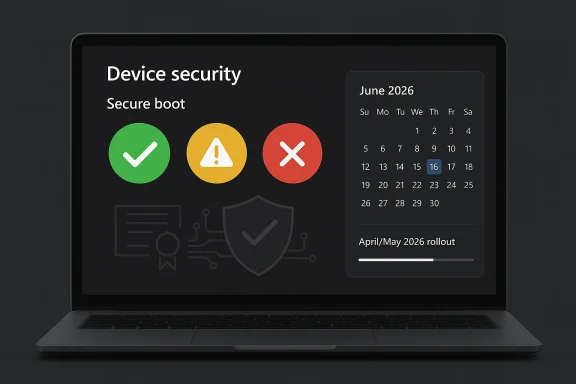
That is why the new Windows Security view matters. Microsoft is trying to compress a deeply technical firmware transition into a simple status model, and that is the right instinct for a feature most users will only check once something draws their attention. Green means the device has the updated certificates. Yellow means action is recommended, often because firmware support or an OEM update is still needed. Red means the device cannot receive the new certificates in its current configuration.
There is also a broader platform story here. Windows 10 left free support on October 14, 2025, which means the Secure Boot certificate transition is landing in the middle of a much larger lifecycle shift. For supported Windows 11 PCs and Windows 10 devices enrolled in Extended Security Updates, Microsoft says the new certificates should generally arrive through normal servicing. Unsupported Windows 10 systems, however, may be left behind, and that makes the dashboard as much a migration tool as a security feature.
This is precisely why the alerting model needs to be visible in Windows Security. If the issue only showed up as a firmware warning buried in a support article, many people would ignore it until they encountered a boot-related vulnerability later. By surfacing the status in the OS itself, Microsoft is trying to move the conversation from panic response to routine maintenance. That is a smarter security posture.
The company’s announcement history also suggests a carefully staged rollout. Microsoft published the status feature in early April 2026, then planned additional notifications for May 2026. That sequencing makes sense if the goal is to give users time to react before the June expiration window becomes urgent. It also suggests Microsoft expects a long tail of devices that will need manual follow-up.
That is a useful design choice because it turns a technical lifecycle issue into a fast decision tree. Users do not need a boot-chain lecture just to know whether they are safe. They need to know whether to do nothing, to update Windows, or to go looking for firmware support from the PC maker. That is the right level of abstraction for consumer security UX.
The detailed status messages matter almost as much as the colors. Microsoft says the app can explain whether Secure Boot is on but the device lacks support for the automated certificate update, or whether the machine can no longer receive required updates for the Windows boot experience. That distinction helps separate a normal servicing delay from a hardware limitation.
That matters because many Windows 10 PCs are old enough that they may not be easy Windows 11 candidates. In other words, the Secure Boot issue is not only about software policy; it is also about aging hardware, firmware readiness, and whether the OEM still supports the device at all. Those are three very different problems, and the dashboard helps distinguish them.
For Windows 11 users, the experience should usually be quieter. On modern hardware with current firmware, the update should arrive through normal servicing and the new status should turn green with little fuss. That is the ideal case, and it is probably what most consumers will see.
The good news is that many vendors have already been preparing for this. Microsoft points to its own Surface guidance as an example of firmware-based delivery, where Secure Boot certificate updates were installed through UEFI firmware and Windows Update coordination. That suggests the architecture is workable when OEMs participate.
The bad news is that not every PC maker or older model will be equally responsive. For devices whose firmware is no longer actively maintained, the red state is not just a warning label; it may be an architectural dead end. That is where the update becomes a hardware-lifecycle problem instead of a software task. And that is exactly the point Microsoft is trying to surface early.
That matters because many organizations still track OS version, patch level, and device age, but not always firmware trust state. Microsoft is effectively saying that Secure Boot certificate status should now be treated as part of endpoint health. That is a subtle but important shift in how Windows administration works.
There is also a procurement lesson here. If a vendor no longer supports firmware updates for a model, that becomes a post-sale security issue, not just a lifecycle inconvenience. Enterprises that buy in bulk should pay more attention to long-term BIOS and UEFI support, because this transition shows how quickly an apparently “working” machine can slip out of the secure path.
If a consumer sees yellow, the next step is usually simple: install Windows updates, check the maker’s support page, and reboot. If the machine still stays yellow or turns red, that is a sign that the update path depends on hardware support the PC may no longer have. At that point, the decision becomes less about tweaking settings and more about whether the machine is still worth keeping in a security-sensitive role.
This is one of those cases where ordinary users may benefit from a little anxiety. Not because the PC is about to stop working, but because it may be silently drifting away from the platform’s current security baseline. That is a far more important distinction than many consumer alerts manage to communicate.
Microsoft also states that Secure Boot certificate expiration affects more than consumer PCs, reaching into Windows Server, virtualized environments, and cloud-managed devices. That is an important reminder that boot trust is not a niche desktop issue. It is a foundational security concern across much of the Windows stack.
The existence of troubleshooting guides and sample PowerShell scripts is also telling. Microsoft clearly expects some devices to require more than a simple update click, which is why it is giving administrators tools to inventory and monitor status. That is a practical move, and it suggests the company understands this transition will not be friction-free.
Windows 10 remains a special problem. Microsoft says unsupported Windows 10 devices will not get the new certificates, which means a huge installed base could drift into a weaker trust state simply by staying put. That creates pressure on consumers and businesses alike to upgrade, enroll in ESU, or replace hardware sooner than they might like.
There is also a communication risk. Green, yellow, and red are easy to understand, but they may also be easy to overinterpret. A red badge does not necessarily mean the PC is broken today, and a green badge does not mean the machine is immune to all boot-chain problems forever. The badge is a status check, not a guarantee.
The rollout also gives Microsoft an opportunity to improve security literacy without overwhelming people. If done well, this could make users more comfortable with the idea that firmware updates matter and that boot trust is part of normal PC hygiene. That is a valuable shift in perception.
The most important thing to watch is whether the dashboard actually changes behavior. If users see the warning and install updates, the rollout will look like a textbook example of security UX done well. If they ignore it, or if too many devices turn red because of missing firmware support, then the industry will have exposed another hard truth about aging Windows hardware. Either outcome will be instructive.
Source: WKLW 94.7 FM Inside Story | WKLW 94.7 FM | K 94.7 | Paintsville-KY
 Overview
Secure Boot has always been one of those Windows security features that most people never think about unless something breaks. It lives close to the firmware layer, where it helps make sure only trusted code loads during startup, and that makes it one of the most important defenses against bootkits and other low-level malware. Microsoft’s new dashboard is significant because it turns that invisible trust chain into something a regular user can actually see without entering the BIOS or digging through obscure admin tools.The underlying issue is a certificate rollover, not a dramatic product change. Microsoft’s support guidance says the Secure Boot trust material introduced in 2011 is reaching expiration in 2026, while updated 2023 certificates are being distributed to preserve trust continuity and keep future boot protections working. In practical terms, the machine may still boot normally even if it misses the update path, but it may lose the ability to receive future boot-level protections. That is exactly the kind of risk that hides in plain sight until it becomes expensive.
That is why the new Windows Security view matters. Microsoft is trying to compress a deeply technical firmware transition into a simple status model, and that is the right instinct for a feature most users will only check once something draws their attention. Green means the device has the updated certificates. Yellow means action is recommended, often because firmware support or an OEM update is still needed. Red means the device cannot receive the new certificates in its current configuration.
There is also a broader platform story here. Windows 10 left free support on October 14, 2025, which means the Secure Boot certificate transition is landing in the middle of a much larger lifecycle shift. For supported Windows 11 PCs and Windows 10 devices enrolled in Extended Security Updates, Microsoft says the new certificates should generally arrive through normal servicing. Unsupported Windows 10 systems, however, may be left behind, and that makes the dashboard as much a migration tool as a security feature.
Why Microsoft Is Doing This Now
The reason for the dashboard is simple: Microsoft wants to reduce surprises. A lot of users and even many IT teams do not proactively check firmware trust state, and they certainly do not do it before a deadline is looming. Microsoft’s support updates make clear that the rollout is already underway and that the company wants devices to surface status early, before the expiration window creates a support scramble.Certificate expiration is not the same as a dead PC
One of the most important things to understand is that expiration does not mean instant failure. Microsoft says affected devices can continue to boot and ordinary Windows use can continue, which is why many users may not notice anything unusual at first. The deeper problem is that the device may no longer be able to accept future boot-chain protections once the trust material ages out. That is a subtle but serious form of degradation.This is precisely why the alerting model needs to be visible in Windows Security. If the issue only showed up as a firmware warning buried in a support article, many people would ignore it until they encountered a boot-related vulnerability later. By surfacing the status in the OS itself, Microsoft is trying to move the conversation from panic response to routine maintenance. That is a smarter security posture.
The company’s announcement history also suggests a carefully staged rollout. Microsoft published the status feature in early April 2026, then planned additional notifications for May 2026. That sequencing makes sense if the goal is to give users time to react before the June expiration window becomes urgent. It also suggests Microsoft expects a long tail of devices that will need manual follow-up.
- The issue is about trust continuity, not just a patch.
- The risk is gradual, not immediate.
- The user-visible warning is meant to appear before the problem becomes operationally painful.
- Some devices will need OEM firmware help, not just Windows Update.
- Windows 10 support status now matters more than ever.
How the New Dashboard Works
Microsoft’s Secure Boot status page appears inside Windows Security under Device security > Secure Boot. The idea is to give users a plain-language answer instead of making them interpret cryptic firmware details. That simplicity is intentional, because the people most likely to need the warning are also the least likely to know what DB, DBX, or KEK means.Green, yellow, and red carry real operational meaning
The color model is more than cosmetic. Green means the device has the updated certificate set and no further action is needed. Yellow means Microsoft sees a path forward, but the system may need a Windows Update step, an OEM firmware update, or both. Red means the device cannot receive the updated certificates in its current configuration and may lose the ability to accept future boot protections.That is a useful design choice because it turns a technical lifecycle issue into a fast decision tree. Users do not need a boot-chain lecture just to know whether they are safe. They need to know whether to do nothing, to update Windows, or to go looking for firmware support from the PC maker. That is the right level of abstraction for consumer security UX.
The detailed status messages matter almost as much as the colors. Microsoft says the app can explain whether Secure Boot is on but the device lacks support for the automated certificate update, or whether the machine can no longer receive required updates for the Windows boot experience. That distinction helps separate a normal servicing delay from a hardware limitation.
- Green: updated and good to go.
- Yellow: a follow-up action is recommended.
- Red: the device is stuck on an unsupported path.
- Status text matters as much as the badge.
- The fix may be firmware-related rather than Windows-related.
What Changes for Windows 10 and Windows 11
The split between Windows 11 and Windows 10 is where this becomes especially important. Microsoft’s guidance says most Windows 11 devices and Windows 10 systems enrolled in ESU should receive the updated certificates automatically through Windows servicing. Unsupported Windows 10 PCs are much less likely to get the same treatment, which means the old OS’s end-of-support date is now colliding with a new security deadline.ESU becomes more than a temporary bridge
For Windows 10 users, Extended Security Updates is now doing more than buying time. Microsoft’s support materials indicate that ESU-covered systems are part of the managed certificate-update path, while unsupported systems are not. That makes ESU not just a patching subscription, but a gatekeeper for continued Secure Boot trust continuity.That matters because many Windows 10 PCs are old enough that they may not be easy Windows 11 candidates. In other words, the Secure Boot issue is not only about software policy; it is also about aging hardware, firmware readiness, and whether the OEM still supports the device at all. Those are three very different problems, and the dashboard helps distinguish them.
For Windows 11 users, the experience should usually be quieter. On modern hardware with current firmware, the update should arrive through normal servicing and the new status should turn green with little fuss. That is the ideal case, and it is probably what most consumers will see.
- Windows 11 devices are more likely to stay on a supported path.
- Windows 10 ESU systems have a better chance of receiving the certificates.
- Unsupported Windows 10 devices are the most exposed.
- Older PCs may need OEM firmware support.
- The update path is not uniform across the installed base.
Why Firmware Support Matters So Much
This rollout is not a standard “install the latest cumulative update” situation. Microsoft’s own documentation says the updated Secure Boot certificates may require coordination among Windows Update, device firmware, and the OEM’s support tools. In some cases, Windows can deliver the payload; in others, the motherboard vendor has to provide firmware support first.The hidden dependency is the real story
That hidden dependency is why yellow status is so important. It is not an error so much as a warning that the device needs a second layer of support beyond Windows itself. For users, that can be confusing because they usually assume Microsoft controls the whole update experience. Here, Microsoft is only one part of the chain.The good news is that many vendors have already been preparing for this. Microsoft points to its own Surface guidance as an example of firmware-based delivery, where Secure Boot certificate updates were installed through UEFI firmware and Windows Update coordination. That suggests the architecture is workable when OEMs participate.
The bad news is that not every PC maker or older model will be equally responsive. For devices whose firmware is no longer actively maintained, the red state is not just a warning label; it may be an architectural dead end. That is where the update becomes a hardware-lifecycle problem instead of a software task. And that is exactly the point Microsoft is trying to surface early.
- Firmware support can determine whether the update succeeds.
- OEMs may need to ship a separate BIOS or UEFI update.
- A yellow warning usually means “not yet” rather than “broken.”
- A red warning may mean the platform cannot be fixed in place.
- The dashboard helps reveal which layer is actually failing.
Enterprise Implications
For enterprises, the dashboard is potentially more useful than it is for consumers because it gives help desks and endpoint teams a shared language for triage. A green, yellow, or red state is far easier to operationalize than a vague user complaint about Secure Boot. That alone can save time when large fleets start generating support tickets.Fleet visibility becomes a security control
The biggest enterprise issue is not one PC. It is the possibility that a quiet rollout succeeds on paper while leaving older, offline, or intermittently connected devices behind. Microsoft’s support pages include guidance for managed environments, Intune, Autopatch, and inventory collection for exactly this reason. Fleet visibility is now a security control, not just an IT preference.That matters because many organizations still track OS version, patch level, and device age, but not always firmware trust state. Microsoft is effectively saying that Secure Boot certificate status should now be treated as part of endpoint health. That is a subtle but important shift in how Windows administration works.
There is also a procurement lesson here. If a vendor no longer supports firmware updates for a model, that becomes a post-sale security issue, not just a lifecycle inconvenience. Enterprises that buy in bulk should pay more attention to long-term BIOS and UEFI support, because this transition shows how quickly an apparently “working” machine can slip out of the secure path.
- Help desks need new scripts for Secure Boot status.
- Inventory tools should include firmware readiness.
- Remote devices may lag behind without regular check-ins.
- OEM support now affects remediation outcomes.
- Firmware support history should matter in procurement decisions.
Consumer Impact
For home users, the immediate message is reassuring: this should not cause a sudden wave of broken PCs. Microsoft says affected devices can continue to boot and keep using Windows normally, which means the danger is gradual rather than explosive. The problem is that gradual security erosion is easy to ignore.The risk is inertia, not panic
That is why the dashboard is a good idea even if many people never open it until they receive a warning. A lot of users still rely on older Windows 10 PCs for school, home office, entertainment, and browsing, and those systems can seem healthy long after their security posture has weakened. The new status view gives them a chance to act before the issue becomes urgent.If a consumer sees yellow, the next step is usually simple: install Windows updates, check the maker’s support page, and reboot. If the machine still stays yellow or turns red, that is a sign that the update path depends on hardware support the PC may no longer have. At that point, the decision becomes less about tweaking settings and more about whether the machine is still worth keeping in a security-sensitive role.
This is one of those cases where ordinary users may benefit from a little anxiety. Not because the PC is about to stop working, but because it may be silently drifting away from the platform’s current security baseline. That is a far more important distinction than many consumer alerts manage to communicate.
- Most Windows 11 users should see little disruption.
- Windows 10 users need to check support status carefully.
- Yellow usually means there is still a path forward.
- Red means the path may no longer exist.
- The goal is to act before the deadline becomes a problem.
What Microsoft’s Support Pages Reveal
Microsoft’s support materials make clear that this is a coordinated rollout, not a one-off UI tweak. The company has published announcement histories, troubleshooting guidance, deployment scripts, inventory tools, and guidance for both managed and consumer devices. That breadth shows how broad the problem really is.The company is building an ecosystem response
The support page for the Windows Security status feature says the app will begin showing Secure Boot certificate information in April 2026, with yellow caution badges appearing in May 2026 if additional action is required. That same timing appears alongside other Microsoft guidance for gradual rollout and fleet-level monitoring. It is hard to read that as anything other than a staged ecosystem response.Microsoft also states that Secure Boot certificate expiration affects more than consumer PCs, reaching into Windows Server, virtualized environments, and cloud-managed devices. That is an important reminder that boot trust is not a niche desktop issue. It is a foundational security concern across much of the Windows stack.
The existence of troubleshooting guides and sample PowerShell scripts is also telling. Microsoft clearly expects some devices to require more than a simple update click, which is why it is giving administrators tools to inventory and monitor status. That is a practical move, and it suggests the company understands this transition will not be friction-free.
- Microsoft published a formal announcement history.
- The company added consumer-facing status cues in Windows Security.
- Admin tools and scripts are part of the rollout plan.
- Servers and cloud environments are also in scope.
- Microsoft is treating this as a long-term servicing event.
Risks and Concerns
The biggest risk is simple complacency. Because the machine will likely keep working, many users may treat the Secure Boot warning as optional maintenance rather than a real security issue. That would be a mistake, because the whole point of Secure Boot is to preserve trust at the earliest and most fragile stage of startup.Compatibility gaps could leave devices stranded
Another concern is hardware fragmentation. Some systems will update cleanly, some will need a firmware package from the OEM, and some may have no viable path forward at all. The red state is an honest warning, but it also exposes a painful truth: not every PC sold in the last decade will remain equally supportable.Windows 10 remains a special problem. Microsoft says unsupported Windows 10 devices will not get the new certificates, which means a huge installed base could drift into a weaker trust state simply by staying put. That creates pressure on consumers and businesses alike to upgrade, enroll in ESU, or replace hardware sooner than they might like.
There is also a communication risk. Green, yellow, and red are easy to understand, but they may also be easy to overinterpret. A red badge does not necessarily mean the PC is broken today, and a green badge does not mean the machine is immune to all boot-chain problems forever. The badge is a status check, not a guarantee.
- Users may ignore the warning if the PC still boots.
- Older hardware may have no remediation path.
- Unsupported Windows 10 devices are especially exposed.
- Status colors can be misunderstood without explanatory text.
- OEM support gaps could turn a software issue into a replacement decision.
Strengths and Opportunities
Microsoft’s approach has real strengths because it combines transparency with actionability. Instead of forcing users to decipher firmware details, it surfaces a simple status in the same app they already use to check device security. That lowers friction and improves the odds that people will respond before the June 2026 window creates avoidable trouble.The rollout also gives Microsoft an opportunity to improve security literacy without overwhelming people. If done well, this could make users more comfortable with the idea that firmware updates matter and that boot trust is part of normal PC hygiene. That is a valuable shift in perception.
- Makes a hidden security layer visible.
- Gives users a simple remediation signal.
- Helps enterprises triage fleets faster.
- Encourages better firmware support from OEMs.
- Reduces the chance of last-minute remediation panic.
- Fits Microsoft’s broader security messaging around managed updates.
- Could improve long-term user awareness of boot integrity.
Looking Ahead
The next few months will be about adoption, not announcement. Microsoft has already laid out the milestones, and the real test is whether users, enterprises, and OEMs act before the June 2026 expiration window tightens. The company’s staged warnings suggest it expects uneven uptake, especially on older hardware and on Windows 10 systems that are not part of a supported update path.The most important thing to watch is whether the dashboard actually changes behavior. If users see the warning and install updates, the rollout will look like a textbook example of security UX done well. If they ignore it, or if too many devices turn red because of missing firmware support, then the industry will have exposed another hard truth about aging Windows hardware. Either outcome will be instructive.
- Watch for the May 2026 notification phase.
- Watch for OEM firmware updates on older PCs.
- Watch whether Windows 10 ESU enrollment increases.
- Watch how enterprises use the new status in fleet tools.
- Watch whether more devices turn yellow or red as June approaches.
Source: WKLW 94.7 FM Inside Story | WKLW 94.7 FM | K 94.7 | Paintsville-KY
Last edited:
