

Microsoft Turns a Firmware Problem Into a Desktop Warning
Secure Boot has always lived in that awkward place between Windows, firmware, hardware vendors, and whatever bootloader or recovery environment a user happens to rely on. Most people never see it unless they are installing Linux, enabling BitLocker, troubleshooting anti-cheat software, or fighting with a BIOS menu at 1 a.m. That invisibility is exactly why Microsoft’s new warning behavior matters.
The certificates at issue were introduced with the Windows 8-era Secure Boot ecosystem and have been in service since 2011. They are part of the trust chain that lets UEFI firmware decide what can run before Windows itself starts. Microsoft is now replacing those 2011 certificates with 2023-era certificates before the old ones begin expiring, with the first major deadlines arriving in June 2026 and the Windows bootloader certificate following in October.
The catch is that Secure Boot certificate updates are not quite like a normal cumulative update. Windows Update can deliver much of the work, but firmware support, OEM behavior, device age, virtual-machine configuration, and enterprise update policy all matter. That is why Microsoft’s April changes to the Windows Security app were more than an interface tweak: they put a status light on a trust migration that had previously been buried in servicing guidance.
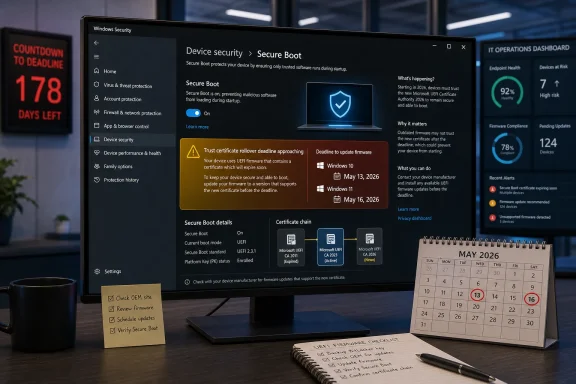
Phase 1, which arrived in April, gave users and administrators informational status in Windows Security. Phase 2 is the sharper edge. Starting May 13 for Windows 10 and May 16 for Windows 11, Windows Security can show stronger yellow and red warnings for devices that need action or cannot be serviced cleanly.
The PC Will Still Boot, Which Is Exactly the Trap
The most important nuance is also the easiest to miss: an affected PC is not expected to suddenly become a brick the moment a certificate expires. Microsoft’s own guidance says devices without the new certificates should continue to start and operate normally, and standard Windows updates should continue to install. That sounds reassuring until you notice what gets carved out.
The loss is in future early-boot protection. A machine stuck on the old trust chain may no longer receive new protections for the boot process, including updates to Windows Boot Manager, Secure Boot databases, revocation lists, and mitigations for newly discovered boot-level vulnerabilities. In other words, Windows may keep working while the foundation under its pre-OS security model stops evolving.
That distinction matters because Secure Boot is not primarily about convenience; it is about resisting malware that wants to run before the operating system can defend itself. Bootkits and firmware-adjacent attacks are rare compared with commodity phishing or browser exploits, but their whole value is persistence and stealth. Once attackers can live below the operating system, the familiar tools of endpoint defense become less reliable.
This is why the Forbes framing of “action is needed” lands harder than a typical update reminder. Microsoft is not saying every yellow badge means panic. It is saying the window for treating this as routine background maintenance is closing.
The New Red Badge Is a Governance Tool, Not Just a Consumer Alert
Microsoft’s color system is doing two jobs at once. For consumers, it is a plain-language signal: green is fine, yellow means caution, red means a critical state that should not be ignored. For IT departments, the same signal is a governance mechanism, because it creates an observable user-facing consequence when a fleet has not been brought into compliance.
That matters in enterprises where firmware updates are often treated as exceptions, not routine hygiene. Organizations can be very good at deploying monthly cumulative updates and still be slow at BIOS and UEFI servicing. Secure Boot sits at the intersection of those two worlds, and this certificate rollover exposes how unevenly they are managed.
The “I accept the risks, don’t remind me” option for red states is especially revealing. Microsoft is giving administrators and users a way to silence the warning, but it is making that choice explicit. That is not remediation; it is risk acceptance with a green badge painted over it.
That design will irritate purists, and perhaps it should. A red warning that can be dismissed into green risks teaching users that security posture is a notification preference. But Microsoft’s alternative was worse: leave millions of machines with invisible Secure Boot debt and hope every OEM, admin, and home user reads the servicing notes.
Windows 10 Is the Awkward Passenger Microsoft Still Has to Carry
This story would be cleaner if the Windows ecosystem had fully moved to Windows 11. It has not. Windows 10 remains widespread, and Microsoft’s Secure Boot certificate work applies across supported Windows 10 versions, Windows 11 releases, and multiple Windows Server generations.
That creates an uncomfortable overlap with Windows 10’s broader end-of-support transition. Many Windows 10 PCs are old enough to have complicated firmware histories, missing OEM updates, unsupported vendor utilities, or custom boot configurations. Some are in homes where firmware updates never happen; others are in small businesses where “the update person” is whoever last remembered the admin password.
For those systems, the certificate migration is not merely a Microsoft cloud service flipping a switch. It may require the device to have recent servicing stack updates, a compatible firmware path, and the right Secure Boot state. A PC that has Secure Boot disabled, an old BIOS version, or a nonstandard boot environment may not follow the happy path.
This is also where Microsoft’s “most devices will update automatically” deserves both credit and scrutiny. Automatic servicing is the only plausible way to move a 1.6-billion-user ecosystem. But “most” is doing a lot of work in a world where the remaining percentage can still represent tens or hundreds of millions of machines.
The OEM Layer Is Where Simple Advice Gets Messy
For a home user, the advice can sound almost insultingly basic: run Windows Update, reboot, check Windows Security, and install firmware updates from the PC maker if offered. That will probably be enough for many relatively modern machines. Surface devices and newer PCs are in a better position because many have already received updated Secure Boot databases through firmware updates.
But the broader PC market is not Surface. It is a long tail of motherboards, laptops, mini PCs, business desktops, white-box builds, gaming rigs, and virtualized environments. Some OEMs are diligent about firmware delivery through Windows Update. Others bury updates behind vendor tools, support pages, model-number lookups, or update utilities users disabled years ago.
Desktop motherboard owners have their own flavor of pain. A board may be technically capable of receiving updated keys, but the vendor’s BIOS release cadence may have slowed or stopped. Enthusiasts who have customized Secure Boot keys, dual-booted Linux, or changed compatibility support settings may need more care than a standard Windows Update cycle can provide.
This is where Microsoft’s Windows Security status page is useful but not magical. It can tell you the state Windows sees. It cannot guarantee your OEM will ship what your firmware needs, nor can it untangle every custom boot chain without human judgment.
BitLocker, Bootloaders, and Anti-Cheat Make This More Than a Microsoft-Only Issue
Secure Boot trust does not stop at Windows. BitLocker hardening, third-party bootloaders, recovery media, enterprise imaging workflows, and some anti-cheat systems all intersect with early-boot trust. That is why this rollover matters even to users who never think about certificates.
The Windows boot path is only one part of the story. The Microsoft UEFI CA has historically helped sign third-party EFI applications and bootloaders, including scenarios outside Windows itself. The 2023 certificate split gives Microsoft and OEMs more granular control over bootloader and option ROM trust, but that granularity also means compatibility depends on the right certificates being present in the right firmware stores.
For Linux dual-boot users, the practical concern is not that Windows alone changes. It is that the firmware trust database used by bootloaders such as shim and other EFI components must remain aligned with the new certificate reality. Microsoft’s migration is meant to preserve continuity, but any machine with a hand-tuned boot setup deserves extra caution before blindly dismissing warnings.
For gamers, the issue may surface through anti-cheat requirements rather than security dashboards. Competitive anti-cheat systems often require Secure Boot and TPM-backed states because they are trying to keep kernel and boot-level tampering out of the game environment. If Secure Boot trust becomes stale or misconfigured, the first symptom may be a game refusing to launch rather than Windows refusing to boot.
Enterprises Should Treat May as Inventory Month
For managed fleets, the May warnings should be treated less like user education and more like an audit deadline. If a device reaches a red state in mid-May, the organization should already know whether that device is pending a normal update, blocked by policy, missing firmware, out of support, or intentionally excluded. Discovering that answer one help-desk ticket at a time is the expensive way to do security operations.
Microsoft has been publishing guidance for IT-managed devices, Windows Server, Microsoft Defender visibility, and Secure Boot playbooks for months. The problem is not lack of documentation. The problem is that certificate and firmware projects often fall between endpoint management, security operations, desktop engineering, and server teams.
Virtual machines add another wrinkle. Secure Boot in a VM is still Secure Boot, but the firmware implementation belongs to the hypervisor platform. That means VMware, Hyper-V, cloud images, golden templates, and older VM generations all need attention. A fleet can look patched from the guest OS perspective while still depending on virtual firmware choices made years ago.
Enterprises should also think about devices in storage, loaner pools, labs, and disaster-recovery shelves. A laptop that has been powered off for six months does not receive staged Windows Update changes by magic. The same goes for recovery media and old deployment images that may not boot smoothly on newer hardware once the ecosystem moves further toward 2023 trust.
The Warning Microsoft Doesn’t Want Users to Misread
There is a temptation to turn this into a melodrama: Microsoft certificates expire, PCs fail, chaos ensues. That is not the best reading of the facts. Microsoft is being clear that normal boot and normal Windows use should continue even if a device misses the certificate update.
The real risk is slower and more boring, which makes it more dangerous. A machine can remain usable while becoming less eligible for future boot-chain security protections. Users can keep browsing, working, and gaming while their platform drifts out of compliance with the assumptions Microsoft and hardware vendors are building around.
This is the same kind of maintenance debt that has haunted Windows for decades. The ecosystem is backward-compatible enough that old configurations keep limping along, but security increasingly depends on hardware-backed features that cannot be patched forever with user-mode code. Secure Boot, TPMs, virtualization-based security, measured boot, and BitLocker all assume the lower layers remain trustworthy.
Microsoft’s badge escalation is therefore not just a warning about certificates. It is a reminder that modern Windows security is no longer purely an operating-system feature. It is a contract among Windows, firmware, hardware vendors, cloud management, and the user’s willingness to reboot when asked.
Checking Now Is Boring, Which Is Why It Works
The user-facing path is mercifully short. Open Windows Security, go to Device security, then Secure Boot, and look for the new certificate status once the relevant updates have landed. If Windows Update offers cumulative, security, or firmware updates, install them and reboot fully rather than postponing the restart for a week.
If the status remains yellow or red after the May Phase 2 rollout, the next step is not to disable Secure Boot. That is the wrong workaround. The better path is to check the PC or motherboard vendor for firmware updates, confirm the machine is on a supported Windows release, and look for Microsoft’s Secure Boot guidance for the specific status shown.
On business machines, users should resist the urge to click away a red warning just because work needs to continue. The help desk needs the signal. A dismissed warning may reduce annoyance on one laptop, but it also hides evidence of a fleet problem.
On enthusiast systems, the wise move is to document the current firmware settings before changing anything. If you dual-boot, use custom Secure Boot keys, rely on older rescue media, or have BitLocker enabled, make sure recovery keys are backed up and boot media is current. The certificate transition is designed to be routine, but routine is not the same as consequence-free.
The Certificate Rollover Is a Dress Rehearsal for the Next Windows Security Era
The biggest lesson here is that Microsoft is willing to move Windows security deadlines down into the firmware layer and then expose them in the user interface. That is a significant cultural shift. For years, Windows Update trained users to think of security as something delivered after the OS loads; this change says the pre-boot chain is now part of the monthly-maintenance conversation.
It also foreshadows the world Microsoft wants Windows to inhabit. Newer PCs, especially those designed around Windows 11 and Copilot+ branding, increasingly assume a tighter relationship among firmware, TPM, virtualization, identity, and cloud policy. The certificate rollover is not glamorous, but it is foundational plumbing for that world.
The risk is that Windows’ hardware diversity makes every foundational change noisy. Apple can move platform trust with far fewer hardware permutations. Microsoft has to drag along OEMs, enterprise images, hobbyist builds, old servers, dual-boot users, virtual machines, and unsupported-but-still-running PCs.
That complexity is not a reason to avoid the migration. It is the reason Microsoft is pushing visible warnings before the cliff edge. If the company waited until boot-chain updates failed silently or new mitigations skipped old trust stores, the backlash would be worse and the security outcome weaker.
The May Badge Is the Message
By mid-May, the right response is not panic; it is verification. The machines most likely to sail through are the ones already receiving current Windows and firmware updates. The machines most worth checking are the ones that have been ignored precisely because they have been stable.
- Windows 10 devices begin receiving the stronger Phase 2 Secure Boot status behavior on May 13, 2026.
- Windows 11 devices begin receiving the stronger Phase 2 Secure Boot status behavior on May 16, 2026.
- The first original Microsoft Secure Boot certificates begin expiring in June 2026, with another key Windows boot certificate expiring in October 2026.
- A PC that misses the update should still boot and run, but it may stop receiving future early-boot security protections.
- Disabling Secure Boot is not a proper fix for the certificate transition.
- Red or persistent yellow warnings should lead users to Windows Update, OEM firmware updates, and documented IT remediation rather than dismissal.
Microsoft’s Secure Boot certificate rollover is the kind of story Windows users are trained to underestimate because nothing explodes immediately. That is the point: the warning arrives before the failure mode becomes obvious, and the fix for most people is still mundane enough to do today. Check the status, take the firmware update seriously, and treat the May badge not as another nag but as Windows telling you whether the roots of trust beneath your PC are ready for the next decade.