Windows Security Shows Secure Boot Certificate Status (April 2026)

Starting in April 2026, Microsoft is doing something Windows users have not seen before: surfacing Secure Boot certificate status directly inside the Windows Security app. That matters because the company’s original Secure Boot certificates, issued in 2011, are now approaching expiration in June 2026, and Microsoft is pushing the updated 2023 certificates through Windows Update to keep the boot chain protected. At the same time, the April Patch Tuesday release has reignited debate over how aggressively Microsoft uses Windows Update not just to fix security flaws, but to steer user behavior and promote its own browser stack.

Abstract cybersecurity graphic with glowing shield and checkmark among device icons on blue circuitry.Overview​

For most of the Windows era, the operating system’s security model has evolved in layers rather than through dramatic visible changes to everyday users. The current shift around Secure Boot is different because it touches the earliest stage of startup, where trust is established before Windows proper begins loading. That makes it one of the most sensitive maintenance tasks Microsoft has attempted across the Windows ecosystem in recent memory.
Secure Boot was introduced as part of the broader UEFI transition and has long relied on Microsoft-issued certificates to validate firmware and boot components. Those certificates, first issued in 2011, are now nearing the end of their validity window, with expiration beginning in June 2026 and continuing through later months depending on the certificate chain in question. Microsoft says the replacement certificates are being delivered automatically through Windows Update, but some devices may need OEM firmware support to complete the transition.
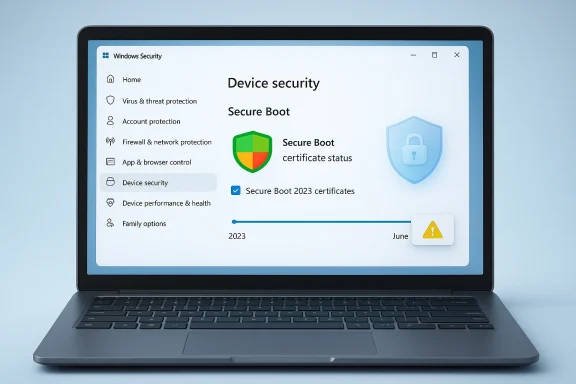
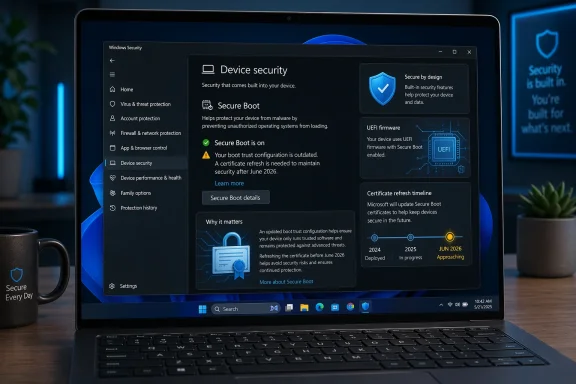
The company’s decision to expose status in the Windows Security app is more than a cosmetic tweak. It reflects a recognition that users and IT teams need a simple, at-a-glance signal to know whether a device is on the old trust chain, is still waiting for an update, or has run into a hardware or firmware limitation. Microsoft now describes distinct states such as fully updated, not yet updated, and requires action, each paired with colored badges and explanatory text.
That visibility matters because the impact is not identical across the Windows installed base. Newer devices manufactured in roughly the last two years are more likely to already carry the 2023 certificate set, while older systems may still depend on the 2011 lineage. In other words, the problem is not just “patch or don’t patch”; it is a coordinated migration across a sprawling hardware ecosystem with uneven firmware quality, inconsistent management practices, and millions of endpoints in enterprise and consumer settings.

Why Secure Boot Certificates Matter Now​

Secure Boot is easy to misunderstand because it operates below the level where most users ever look. It is not a typical app or driver update; it is a trust mechanism that checks whether the software starting the machine has been signed by an approved authority. That means it can block bootkit-style attacks before traditional antivirus products even have a chance to load, which is precisely why Microsoft and security vendors treat it as a foundational control.
The significance of the 2026 certificate transition is that the old trust anchors are finally aging out. Microsoft says the current certificates begin expiring in June 2026, and once a device reaches that point without the refreshed certificates, it may still boot normally but lose the ability to receive some boot-chain security updates. That distinction is crucial: the machine may not immediately break, but its protection against future boot-level threats becomes progressively weaker.

What the new status view changes​

The Windows Security app now shows whether the device has received the updates, whether action is needed, and whether a limitation is blocking full remediation. Microsoft says the interface can present a green checkmark, a yellow caution indicator, or a red stop state, with text that clarifies what is happening and what the user should do next. The aim is not merely to inform; it is to reduce the chance that a silent firmware issue becomes a security blind spot.
That matters because certificate expiration is the sort of problem that can remain invisible until the cost of delay is already high. Microsoft’s new alerts are an admission that boot-time trust needs better user-facing telemetry, especially when the solution depends on a blend of Windows servicing, OEM firmware, and device-specific compatibility. It is a rare case where more visibility is also a more honest security posture.
Key implications:
  • Boot-level attacks are harder to stop than ordinary malware.
  • Certificate renewal is a maintenance issue, not a feature upgrade.
  • Old hardware is more likely to need manual intervention.
  • Enterprise fleets may encounter device-specific exceptions.
  • Visibility is now part of the remediation strategy.

How Microsoft Is Rolling It Out​

Microsoft says the Secure Boot certificate updates are delivered automatically through Windows Update, which is the least disruptive path for the broadest set of users. The company also states that the Windows Security app enhancements begin rolling out in April 2026, with additional notifications outside the app arriving in May 2026. That staggered approach suggests Microsoft wants the telemetry in place before the expiration pressure peaks.
The timing is not accidental. The company needs enough lead time to identify devices that cannot be updated automatically because of firmware or hardware limitations. By surfacing status in April and expanding alerting in May, Microsoft can create a two-step warning runway before the June 2026 certificate deadline begins to bite. That is a sensible operational choice, even if it also reveals how much coordination is required behind the scenes.

The device experience​

For most users, the flow should be simple: install the latest Windows updates, open Windows Security, and check the Secure Boot status. Microsoft says a fully updated device will show the green indicator and explicitly state that all required certificate updates have been applied, while older devices will carry text describing what remains outstanding. In theory, this should turn a hidden firmware event into a visible, actionable status check.
In practice, the experience will vary. Devices managed by organizations may receive certificate updates through IT tooling, while home PCs might depend on whether they are current on cumulative updates and whether the firmware chain cooperates. That variation is exactly why Microsoft is trying to normalize the status information inside the Windows Security app instead of leaving the issue buried in support articles and OEM documentation.
Numbered action path for users:
  • Install the latest Windows cumulative update.
  • Open Windows Security and check Device security > Secure Boot.
  • Confirm the text says all required certificate updates have been applied.
  • If the device is marked not yet updated, reconnect to the internet and run Windows Update again.
  • If the device requires action, contact the OEM or IT administrator.

The Enterprise Problem Is Bigger Than the Home Problem​

For consumers, the biggest risk is complacency. A home user may see “Secure Boot is on” and assume everything is fine, even if the old certificate set remains in place. Microsoft is explicitly warning that a green checkmark alone does not prove the certificate migration is complete, which is a subtle but important distinction. On is not the same thing as fully updated.
For enterprises, the challenge is more complicated because firmware, device models, and management policy all interact. Microsoft’s guidance for IT professionals notes that some devices may be blocked by compatibility issues, and it even documents temporary pauses for certain configurations while those issues are investigated. That kind of exception handling is normal in fleet management, but it makes the rollout feel less like a universal update and more like a large-scale remediation campaign.

Why IT teams should care​

The most important enterprise implication is that secure boot compliance is becoming a visible operational metric. That means patching teams, endpoint teams, and firmware teams can no longer treat it as an abstract dependency; they have to coordinate around it. Microsoft’s own guidance highlights the role of OEM firmware updates and diagnostic reporting, which is a reminder that hardware vendors remain part of the security chain.
This also has audit consequences. A device that boots successfully may still be out of compliance if it cannot receive the new certificate set, and Microsoft says that could leave it at risk as new boot-chain vulnerabilities emerge. In regulated environments, that is the kind of gap that turns into a policy finding long before it turns into an incident report.
Enterprise takeaways:
  • Fleet visibility is now a security requirement.
  • Firmware ownership matters as much as Windows patching.
  • Compliance gaps may exist even when devices appear healthy.
  • Unsupported hardware could require replacement planning.
  • Reporting will likely become part of standard device governance.

Windows Update Is Doing More Than Security Maintenance​

The Secure Boot changes are the substantive story, but they are not the only reason Windows Update is in the headlines. Microsoft’s April Patch Tuesday also fixed a large volume of security vulnerabilities, including actively exploited issues, which reinforces the point that the update pipeline now carries both urgent risk reduction and long-tail trust maintenance. This is no longer just “install the latest patch”; it is an ecosystem hygiene exercise.
What makes the month especially controversial is the reported behavior in which Windows 11 opens Microsoft Edge automatically for some users after the first restart following the update. That has drawn criticism because it looks less like a neutral post-update confirmation flow and more like product promotion embedded in an operating-system mechanism. Microsoft has previously described similar behavior as a limited experiment, saying it was trying to understand how people access the web after boot.

Security UX or browser promotion?​

The tension here is obvious. On the one hand, operating systems do sometimes use the first post-update session to explain what changed. On the other hand, opening a browser window by default, especially without a close button or obvious opt-out in the moment, feels like a nudge that is difficult to interpret charitably. The optics are even worse when the browser in question is Microsoft Edge, which has long struggled to gain meaningful market share against Chrome.
The deeper issue is trust. If users begin to associate Windows Update with product messaging rather than purely security and stability improvements, then even legitimate maintenance features risk being viewed with suspicion. That is a self-inflicted credibility problem Microsoft can ill afford at the same moment it is asking users to trust a new Secure Boot status system and a new certificate migration path.
Important contrasts:
  • Secure Boot notices are defensive and security-oriented.
  • Edge auto-launch is promotional and behavior-shaping.
  • Both happen in update context, which amplifies user sensitivity.
  • User trust is now an operating-system asset.
  • Good intentions do not automatically create good optics.

Historical Context: Why This Took 15 Years​

Secure Boot certificates are not being refreshed because Microsoft suddenly discovered a problem in 2026. They are being refreshed because the original trust material is reaching the end of a planned lifespan that traces back to the Windows 8 UEFI era. In that sense, the current shift is less a crisis than the inevitable consequence of a long-lived platform design.
Microsoft says the coordinated rollout spans Windows servicing, firmware updates, and hardware configurations delivered by OEMs worldwide. That is a telling phrase because it underscores just how many moving parts exist between a Windows update being available and a device being truly remediated. A modern Windows machine is not a single product; it is a layered trust stack built by multiple vendors over several years.

The long arc of trust management​

The 2011 certificates were good enough for an entire era of PCs, but no trust anchor is meant to last forever. Eventually, operational safety requires rotation, not just patching, and that is what Microsoft is doing now. The lesson is that foundational security systems need lifecycle planning just as much as applications do.
There is also a generational hardware divide. Newer machines are more likely to be ready because OEMs have had time to ship the refreshed certificates in firmware, while older systems may depend on consumer patch habits or administrative discipline. That means the same Microsoft announcement lands differently depending on whether a PC is two years old, six years old, or sitting in a managed corporate image.
Historical lesson bullets:
  • Security roots age out, even when the platform remains stable.
  • OEM firmware can be as important as Windows itself.
  • Visible status becomes necessary when invisible assumptions expire.
  • Old devices often inherit the cost of long transitions.
  • Lifecycle planning is the real story behind the certificate change.

Consumer Impact: What Home Users Should Actually Do​

For home users, the advice is straightforward but easy to ignore: make sure Windows Update is current and then verify the Secure Boot status in Windows Security. Microsoft says most devices will receive the updated certificates automatically, but that is not a guarantee for every device, especially older hardware or systems with unusual firmware constraints.
The most useful consumer mindset is to treat this as a checkup, not a one-click fix. If the app shows that the device is not yet updated, the next step is usually to let Windows Update finish its work and keep the device online long enough for the certificate payloads to arrive. If the app says the device requires action, the user is likely dealing with a hardware or firmware boundary, not a simple missing patch.

What the consumer should watch for​

Microsoft’s messaging is careful because it needs to avoid panic. The company is not saying that every PC will stop booting in June; it is saying that the systems most exposed to boot-chain threats will lose the ability to get future protection unless they receive the new certificates. That is a serious issue, but it is also a more nuanced one than the “your PC will die” interpretation some posts online may imply.
Consumers should also be alert to the fact that Windows Security may surface status changes progressively. Microsoft says more prominent notifications, including system alerts, will arrive in May 2026, which means the app is only the first layer of the user experience. If you rely on Windows in a personal or small-business setting, it is wise to treat those alerts as actionable rather than ornamental.
Consumer checklist:
  • Run Windows Update and install the latest cumulative patch.
  • Open Windows Security and inspect Secure Boot status.
  • Do not rely only on the green checkmark.
  • Keep the device online long enough for automatic delivery.
  • Escalate to the OEM if the app says the device needs action.

What This Means for Microsoft’s Security Strategy​

Microsoft is increasingly using Windows itself as a security distribution platform, not just a desktop OS. That includes delivering certificate transitions, boot-chain safeguards, and in-app guidance that makes complex infrastructure changes visible to non-experts. In a world of persistent firmware threats, that approach is logical, even if it is operationally messy.
The advantage is obvious: Microsoft can coordinate a mass trust refresh without asking users to understand UEFI internals. The downside is equally obvious: if something goes wrong, Microsoft absorbs blame for an issue that may actually stem from OEM firmware, update policies, or inconsistent device histories. That is the price of centralization in a fragmented ecosystem.

Security at platform scale​

This also illustrates a broader shift in how Microsoft thinks about security operations. Rather than waiting for admins to notice a documentation change, the company is embedding status signals into the operating system itself and extending notifications beyond the app when necessary. That is a more modern approach to trust maintenance, but it also blurs the line between an OS and a managed security service.
The strategic value is that Windows remains relevant in a threat landscape where firmware-level attacks are no longer theoretical. The strategic risk is that user fatigue could set in if every major maintenance event comes with new prompts, warnings, and cross-promotional behavior. Microsoft must therefore balance clarity with restraint, because the wrong UI choices can undermine even the best security program.
Strategic points:
  • Windows is becoming a trust orchestration layer.
  • Security UX now matters as much as patch content.
  • Firmware visibility is a competitive advantage.
  • OEM coordination remains the hardest part.
  • Excessive prompting can erode user confidence.

Strengths and Opportunities​

The strongest aspect of this rollout is that it finally gives users a practical way to see whether a deeply technical security transition has happened on their device. That should reduce guesswork, improve compliance, and make it easier for both consumers and IT teams to act before June 2026 arrives. It also gives Microsoft a platform to harden the Windows boot chain without requiring a separate utility or arcane manual checks.
  • Better visibility for a hidden security dependency.
  • Automatic delivery for most supported devices.
  • Clear status states that reduce ambiguity.
  • Improved enterprise compliance through shared telemetry.
  • Lower user friction compared with manual certificate management.
  • Stronger protection against boot-level threats.
  • Earlier warning before expiration pressure spikes.
The broader opportunity is to normalize certificate lifecycle management as part of routine patching rather than an exceptional event. If this works well, Microsoft could use the same pattern for future foundational trust transitions, turning security maintenance into something users can understand instead of something they discover after a failure.

Risks and Concerns​

The main risk is that users will misread the status signals, assume they are protected, and stop looking deeper. Microsoft’s own warning about the green checkmark makes clear that visibility alone is not enough if the wording is not precise enough to distinguish a functional boot state from a fully refreshed certificate chain. That is a communication risk as much as a technical one.
  • Misinterpretation of “Secure Boot on” as “fully updated.”
  • Hardware limitations on older or noncompliant devices.
  • OEM delays that slow the final mile of remediation.
  • Enterprise complexity across mixed device fleets.
  • User distrust if update UX feels promotional.
  • Notification fatigue if warnings become too frequent.
  • False reassurance when the status badge looks green but the certificate state is incomplete.
A second concern is that Microsoft’s update channel continues to mix urgent security work with user-facing behavior that can look self-serving. If Edge opens automatically after some updates, the company risks turning a necessary maintenance process into a venue for product promotion. That may save a few clicks for some users, but it also creates unnecessary skepticism around otherwise legitimate Windows notifications.

Looking Ahead​

The next few weeks will tell us whether Microsoft’s new Secure Boot status view is merely informative or truly actionable for a broad range of PCs. The most important practical question is whether the automatic certificate rollout reaches enough older systems before June 2026 to prevent a wave of exceptions, warnings, and support calls. If the answer is yes, this will be remembered as a quiet but important platform transition.
The second question is whether Microsoft keeps the experience focused on security. If the company continues to intertwine update flows with Edge promotion or other product nudges, it may weaken the credibility of the very notifications it now needs users to trust. A secure platform is not just one that blocks malware; it is one that users believe is telling them the truth.
  • May 2026 alerts should expose lagging systems more clearly.
  • OEM firmware updates may become the deciding factor for some PCs.
  • Enterprise reporting will likely mature quickly around these states.
  • Edge-related update behavior may trigger more scrutiny.
  • June 2026 is the real deadline for the old certificate chain.
  • User trust will determine whether Microsoft’s messaging succeeds.
The most likely outcome is that most supported Windows devices will transition quietly, while a smaller but meaningful slice of older hardware surfaces exactly the kind of edge cases Microsoft is trying to expose early. That is a worthwhile tradeoff if the company uses the new visibility to reduce surprise and preserve the boot chain’s security posture. The real test is whether Microsoft can make a deeply technical certificate rotation feel like routine maintenance rather than an emergency disguised as an update.

Source: https://www.forbes.com/sites/zakdof...rosoft-changes-windows-update-after-15-years/
 

Last edited:
The latest Windows 11 April update is doing something quietly important: it now tells you whether your PC has received Microsoft’s newer Secure Boot 2023 certificates. That matters because the older certificates issued in 2011 begin expiring in June 2026, and Microsoft has been working to move consumer and business devices onto the new trust chain before that deadline hits. For most people, this will be a reassuring green check; for some PCs, it may surface a yellow caution or even a red warning that needs attention. In practical terms, Microsoft is turning a previously invisible boot-security project into something ordinary users can finally see and understand.

A laptop screen shows Windows Security “Device security” with Secure Boot certificate status and a warning icon.Background​

The Secure Boot certificate refresh is one of those Windows security transitions that has been years in the making, yet most users will only notice it when the interface changes. Secure Boot itself is not new; it is part of the UEFI firmware trust model and has been a foundation requirement for Windows 11 hardware certification since launch. Microsoft has now confirmed that the Secure Boot certificates originally issued in 2011 begin expiring in June 2026, and that a new set of 2023 certificates is being rolled out to preserve boot integrity and future protection.
That expiration matters because the boot chain is the earliest stage of trust on a Windows PC. If the system cannot verify boot components, defenders lose leverage before the operating system is even fully awake. Microsoft’s guidance is blunt: devices that miss the certificate transition will still boot and keep receiving ordinary Windows updates, but they will gradually lose the ability to receive new protections for the early boot environment. That includes updates for Windows Boot Manager, Secure Boot databases, and revocation lists that are used to blunt boot-level attacks.
This is why the change is bigger than a simple settings tweak. For years, Secure Boot status in Windows Security mainly told users whether Secure Boot was on or off, which was useful but incomplete. The new system adds certificate state, so Microsoft can distinguish between a device that is merely enabled and a device that is also fully updated. That distinction is critical because “on” does not necessarily mean “current,” and that subtlety has been a blind spot for consumers and small businesses alike.
Microsoft began warning administrators well before the deadline. The company’s IT guidance says the current Secure Boot certificates will begin expiring starting in June 2026, and that devices must move to the 2023 certificates before then or risk falling out of security compliance. Microsoft also says most devices will be updated automatically, though some systems will require OEM firmware updates to complete the transition. That caveat is what makes the new Windows Security visibility so useful: it reduces guesswork.
The April 2026 cumulative update, KB5083769, is where the new user-facing status starts showing up in Windows Security for Windows 11 version 24H2 and 25H2. Microsoft’s release notes say the update may display Secure Boot certificate status in the Windows Security app under Device security > Secure Boot, and that the enhancement is part of a broader set of monthly improvements. The app can now surface a green, yellow, or red state depending on how current the device is.

Overview​

At a high level, Microsoft is trying to solve a classic security problem: the most important parts of protection are often the least visible to normal users. Secure Boot certificate updates happen automatically in the background on most PCs, but when something goes wrong, users often have no clue whether their machine is fully protected or simply functioning by luck. By adding explicit status messaging, Microsoft is making a complex firmware trust transition legible without forcing people into PowerShell or Event Viewer.
That change also reflects how Windows security is evolving. Modern Windows increasingly blends OS-level security, cloud-managed policy, firmware controls, and UI-based guidance into a single experience. The Windows Security app is no longer just a dashboard; it is becoming a control plane for risk communication. The new Secure Boot state is part of that pattern, much like the recent ability to adjust Smart App Control without reinstalling Windows. The April update is not just patching vulnerabilities; it is reshaping how Windows explains its own defenses.
For consumers, the promise is simple: a green badge should mean “you’re good,” while yellow and red should prompt action before trouble arrives. Microsoft’s support article says a green check means Secure Boot is on and all required certificate updates have been applied, while yellow indicates an actionable issue such as a hardware or firmware limitation, and red signals a vulnerability that cannot be serviced on the current boot configuration. In other words, Microsoft is translating a back-end certificate migration into plain language.
For enterprises, the picture is more complicated. Microsoft says these badge changes and notifications are disabled by default on managed devices to reduce noise, though administrators can enable them if they want the visibility. That makes sense: businesses need control, policy consistency, and fewer surprise alerts. But it also means the same feature can behave very differently depending on whether the PC is consumer-managed or domain-managed.
The timing is also notable. Microsoft is rolling this out months before the June 2026 expiration window, which suggests the company wants the ecosystem to self-correct gradually rather than face a last-minute scramble. That is the right strategy, because boot trust is not something users should discover after a problem happens. Better to expose the status early, while firmware updates are still practical and OEM support channels are still available.

What Secure Boot Certificate Status Actually Means​

Secure Boot certificate status is not the same thing as a simple on/off switch. The feature historically told you whether Secure Boot was enabled in firmware, but it did not tell you whether the underlying certificate trust chain was up to date. That gap mattered because a machine could appear secure while still carrying an aging trust foundation that would become problematic as certificates aged out.

On, but not necessarily current​

The new status model splits the experience into feature state and certificate state. If Secure Boot is on and the 2023 certificates are in place, the user gets a clear green indication. If Secure Boot is on but the trust chain is older, Windows Security can now warn the user that an update is recommended or that an older boot trust configuration remains in use. That is a subtle but important distinction because modern security failures often come from stale components, not obviously broken ones.
The practical advantage is that users do not need to infer security status from vague system behavior. A PC can appear stable, boot normally, and install everyday updates while still lacking the latest boot protections. Microsoft’s updated wording makes the difference visible inside the same app most people already use for antivirus and device health. That is a smart move, because security that people cannot see is security they are unlikely to verify.

Why the certificates expire​

The expiration issue exists because Microsoft’s original Secure Boot certificates date back to the Windows 8 and Windows Server 2012 era. Those older certificates are now reaching the end of their lifecycle, and Microsoft is shifting to 2023 certificate material so boot components can continue to be signed and validated. This is not a panic event; it is lifecycle management. But it does become urgent if devices miss the migration window.
The key risk is not that the machine suddenly stops booting on June 2026. Microsoft explicitly says devices will continue to start and operate normally if they miss the transition. The deeper risk is that the machine will no longer be able to receive future protections for the boot chain. That means new revocations, updates to boot managers, and mitigations for newly discovered vulnerabilities may no longer arrive.

What the new badges mean​

Microsoft’s badge system is designed to be straightforward. Green means no action is needed. Yellow means there is a recommendation, often tied to firmware compatibility or the need to contact the manufacturer. Red means immediate attention is required because a security vulnerability exists that the current boot configuration cannot service. That hierarchy is useful because it gives non-technical users a sense of severity without burying them in jargon.
  • Green: Secure Boot is on and certificate updates are applied.
  • Yellow: A recommendation exists, often involving firmware or OEM follow-up.
  • Red: Immediate action is needed because the current configuration cannot be fully serviced.
Those labels are only helpful if users trust them, which is why Microsoft has paired them with plain-English messages. The phrase “No further certificate changes are needed” is especially important because it confirms that the device has crossed the threshold from partially updated to fully updated. That is the kind of status statement most users can understand at a glance.

How Microsoft Is Delivering the Change​

The rollout is not just a one-time switch flipped in the UI. Microsoft says the new Secure Boot status appears in Windows Security starting in April 2026 and is being delivered through monthly updates and service updates. The company’s release notes for KB5083769 explicitly call out the new display in Windows Security, while the dedicated support article says the enhancements are gradually rolling out.

Rollout mechanics​

That gradual delivery matters because not all devices will show the same thing at the same time. Microsoft says the status experience is still rolling out, which means some PCs may receive the update earlier than others even if they are on the same version. For users, that can look inconsistent, but it is normal for feature rollouts on Windows. It also helps Microsoft avoid flooding support channels if a hardware edge case causes trouble.
The update path is especially important because certificate delivery may depend on firmware behavior. Microsoft notes that most devices receive the new certificates automatically through Windows Update, but some systems may need additional OEM firmware updates. That means the OS layer is only part of the story; the platform firmware still matters, which is why some users may see a warning even after installing the latest cumulative update.

Why some devices won’t update cleanly​

Not every motherboard and firmware stack is equally cooperative. Microsoft says a yellow badge can indicate a hardware or firmware limitation that prevents the automated certificate update, and in those cases the advice is to contact the device manufacturer. That is a polite way of saying the problem may be outside Windows itself. If the firmware refuses to accept the newer certificate chain, Windows can detect the issue but may not be able to fix it alone.
This is where the consumer experience gets tricky. A Windows update can carry the right certificate payload, but the device still needs firmware support to apply it correctly. On Surface hardware, Microsoft has already documented that firmware updates have been used to deliver the updated UEFI certificate chain. On other OEM systems, support quality will vary. That difference is exactly why a friendly status screen is more valuable than buried logs.

Enterprise control is different​

Microsoft says the enhanced badge and notification behavior is disabled by default on enterprise-managed Windows 10 and Windows 11 client devices, as well as Windows Server. Administrators can enable it by changing registry settings, but the default behavior reflects a deliberate tradeoff: enterprises generally prefer centralized compliance tracking over user-facing alerts. That design choice is reasonable, though it also means managed devices may not surface urgency in the same way consumer PCs do.
  • Consumer devices get the most visible experience.
  • Managed devices prioritize quieter workflows.
  • Firmware compatibility still determines whether the update succeeds.
  • OEM support may be required for stubborn hardware.
The broader implication is that Microsoft is trying to keep the certificate migration mostly invisible while still providing enough transparency to avoid surprise. That balance is difficult. If the company makes the warning too loud, users panic; too quiet, and they never act. The new Secure Boot section seems designed to sit in the middle.

Why This Matters for Security​

The urgency here comes from the fact that Secure Boot is not just a nice-to-have checkbox. It is part of the chain that helps block bootkits, unauthorized bootloader tampering, and other early-startup threats that traditional antivirus may never see. If attackers can subvert the earliest trust layers, they can persist in ways that are much harder to detect and remove.

Boot-level threats are harder to clean up​

Boot-level malware is dangerous because it lives beneath the operating system’s normal visibility. Once a malicious component starts before Windows, it can undermine system integrity, interfere with security tools, and survive OS-level remediation. That is why certificate-based trust transitions matter so much: they are not cosmetic, they are about maintaining the legitimacy of the boot path itself.
Microsoft’s support materials make clear that if the 2011 certificates expire without being replaced, the device won’t instantly fail, but it will stop receiving new Secure Boot protections. Over time, that means the system becomes progressively less protected as new threats emerge. That “gradual erosion” model is easy to overlook, but it is often how security failures happen in the real world.

The update is about futureproofing, not just compliance​

There is also a compliance angle. Microsoft says devices that remain on the old trust chain can fall out of security compliance. In enterprise environments, that matters because compliance frameworks increasingly expect timely patching and firmware hygiene, not just operating system patch levels. A machine that is technically usable can still be unacceptable from a governance standpoint.
The update is especially relevant to BitLocker and other startup trust features. Microsoft warns that scenarios relying on Secure Boot trust, such as BitLocker hardening and boot-level code integrity, may be affected if updated trust entries are missing. That makes the certificate transition a downstream issue for far more than just the Secure Boot toggle itself.

Not all risk is dramatic​

One reason this story can sound scarier than it is: many users will never notice a problem. Microsoft says most devices will continue to work normally even if they miss the update for a while, and everyday app use, networking, and browsing remain unchanged. That is true, but it should not be misread as “nothing to see here.” The issue is not immediate breakage; it is reduced resilience. That distinction matters.
  • Devices may still boot normally.
  • Ordinary Windows usage may look unchanged.
  • The hidden risk is reduced boot-chain protection.
  • Future boot-related fixes may not apply cleanly.
So the security story is not that Microsoft is fixing a visible crisis. It is that Microsoft is surfacing a latent deadline before it turns into a widespread support problem. That is a much more mature way to handle platform security, and it is one of the few times a proactive warning is better than a dramatic incident.

Consumer Impact​

For home users, the biggest win is simplicity. A person who opens Windows Security should be able to see whether their PC is fully updated without learning about UEFI databases, certificate authorities, or boot trust chains. Microsoft is effectively translating a technical backend migration into a consumer-readable health signal. That is exactly how security should behave in a mature operating system.

What the average user should do​

In the majority of cases, users do not need to manually fix anything. Microsoft says the certificate update is delivered automatically through Windows Update to consumer PCs, and if the Secure Boot badge is green, no action is needed. The practical advice is basic but important: stay connected, keep Windows updated, and let the servicing stack do its job.
If the badge is yellow, the user may need to check with the PC maker. That does not mean the computer is broken; it means the firmware path may need help from the OEM. This is where many consumer support experiences become messy, because firmware updates are less familiar than OS patches and often vary by model. Microsoft’s new badge system at least tells users when they should not assume everything is fine.

Why green is not just a color​

The green badge is meaningful because it communicates both Secure Boot enabled and certificate updates applied. Microsoft even warns that a green checkmark alone does not confirm the certificates are current unless the status text explicitly says that all required certificate updates have been applied. That nuance matters because simple visual cues can be misleading if users do not read the accompanying text.
Consumers should treat this like a health indicator, not a panic light. Green means move on. Yellow means investigate when convenient but do not ignore it. Red means the device needs attention sooner rather than later, especially if it was upgraded from an older Windows install or has unusual firmware constraints. That simple triage is a welcome improvement.

Upgraded PCs may be the most interesting edge case​

The most likely consumer edge case is the PC that was upgraded from Windows 10 rather than freshly installed with Windows 11. Microsoft notes that Secure Boot is a mandatory Windows 11 requirement, but people who bypassed the requirement during upgrade may see red alerts if Secure Boot is not enabled or if the newer certificates are missing. In other words, the platform may expose the consequences of past shortcut decisions.
That makes the new Windows Security status feel less like a cosmetic upgrade and more like an audit. It gives users a clearer picture of how secure their setup really is, not just how secure it looks in the abstract. And for home PCs that have lived through multiple years of updates, that level of clarity is overdue.

Enterprise Impact​

The enterprise story is more about control, fleet hygiene, and reducing hidden variance. Microsoft’s support guidance says the Secure Boot badge and notifications are disabled by default on managed devices, which reflects the reality that IT departments already have monitoring tools, compliance baselines, and firmware deployment workflows. Still, the underlying certificate transition matters a lot more in enterprises than it does in casual home use.

Compliance and fleet visibility​

From a fleet-management perspective, Secure Boot certificate migration is the kind of issue that can hide in plain sight. A machine may remain online and productive while silently drifting out of compliance with the newest boot protections. That is why Microsoft has published detailed IT guidance and inventory methods alongside the consumer-facing Windows Security changes.
The enterprise risk is not merely theoretical. Microsoft warns that devices that do not update before the expiration window may lose the ability to receive boot-chain security updates and could face compatibility issues with newer operating systems, firmware, hardware, or Secure Boot-dependent software. For organizations that rely on standardized images and long refresh cycles, that is a real planning constraint.

Why admins may prefer quieter defaults​

It makes sense that Microsoft kept the default experience quieter on managed devices. Enterprises often do not want every end user getting badge notifications about firmware trust status, especially if the organization already has compliance dashboards and patch management systems. The risk, however, is that a disabled default can also hide useful signals from smaller IT teams that do not have deep telemetry.
That is why the registry option to enable the experience matters. It gives IT a path to expose Secure Boot status where it helps, without forcing it universally. The flexibility is good design, though it also shifts responsibility to administrators to decide whether user-visible alerts or centralized reporting are the better fit.

The bigger administrative lesson​

The broader lesson is that firmware security can no longer be treated as a one-time provisioning task. Like drivers, BIOS settings, and TPM configuration, Secure Boot trust is now part of ongoing operational maintenance. The 2026 certificate transition is a reminder that Windows security is increasingly a lifecycle discipline rather than a checkbox. That is a good thing, even if it adds work.
  • IT teams should confirm devices are receiving the new certificates.
  • Firmware support may be required for some hardware.
  • Managed-device notifications are off by default.
  • Compliance tools may need adjustment for boot-trust auditing.
The enterprise upside is better long-term resilience if administrators take this seriously now. The downside is that organizations with aging hardware stacks may discover their bottlenecks only after the UI starts flagging them. That is not a Microsoft problem alone; it is a reminder that endpoint security is only as strong as the oldest device in the fleet.

Strengths and Opportunities​

Microsoft deserves credit for making a complicated security migration easier to see. The new Secure Boot status in Windows Security reduces reliance on command-line checks, helps users distinguish between enabled and fully updated devices, and gives the company a cleaner way to nudge people before the June 2026 deadline arrives. It also fits the broader Windows trend of surfacing security state in plain language rather than hiding it behind admin tools.
  • Better transparency for consumers and SMB users.
  • Earlier warning before the certificate deadline becomes urgent.
  • Clearer triage with green, yellow, and red states.
  • Reduced support friction for users who would otherwise dig through logs.
  • Improved security posture by pushing certificate hygiene into the UI.
  • Useful fallback guidance when firmware or OEM limitations block updates.
  • Stronger messaging around the difference between Secure Boot enabled and Secure Boot fully updated.
The opportunity is even larger if Microsoft uses this approach elsewhere. Windows has many security subsystems that are hard to understand at a glance, and a user-facing status model could make them more actionable. If the company can keep the messaging accurate and unobtrusive, it has a template worth reusing.

Risks and Concerns​

The biggest concern is uneven rollout. Microsoft says the feature is still being gradually deployed, so some devices will show the new Secure Boot status before others. That can create confusion, especially if two similar PCs on the same network show different security messages because one has received the UI update and the other has not. The other concern is that users may overreact to a yellow or red badge without understanding that the system may still function normally for some time.
  • Rollout inconsistency may confuse users and support staff.
  • Firmware limitations could prevent some PCs from fully updating.
  • Older hardware may never receive a clean fix.
  • Badge anxiety could lead some users to panic unnecessarily.
  • Managed-device defaults may hide useful warnings from some organizations.
  • UI simplicity could obscure the technical difference between “on” and “fully protected.”
  • OEM dependency means Microsoft cannot solve every case alone.
There is also a subtle communication risk. Microsoft is right to reassure users that devices will usually keep working, but that reassurance can accidentally minimize the importance of acting on warnings. The truth is balanced: most devices will be fine, but the systems that are not fine are exactly the ones people will regret ignoring. That is why the status screen has to be both calm and serious at the same time.

Looking Ahead​

The next phase will be less about announcing the feature and more about watching how widely it works in the real world. The central question is whether Microsoft’s automatic delivery model can reach the vast majority of devices before the June 2026 expiration window without creating a wave of firmware support cases. If it can, this will be remembered as a quiet but effective security transition. If it cannot, the badge system may become the first visible sign of a larger compatibility problem.
The other thing to watch is whether Microsoft expands the model beyond Secure Boot. If Windows Security can clearly communicate certificate state, firmware readiness, and actionability for one important subsystem, it may eventually do the same for other hidden components. That would be a meaningful step toward a more understandable Windows security posture, especially for ordinary users who do not live in PowerShell or BIOS setup screens.
  • Rollout coverage across different OEMs and motherboard generations.
  • How many PCs show yellow or red once the feature is broadly visible.
  • Whether firmware updates from OEMs keep pace with Microsoft’s OS-side rollout.
  • Enterprise adoption of the registry-based notification controls.
  • User comprehension of the difference between enabled Secure Boot and updated Secure Boot.
Microsoft’s decision to show Secure Boot certificate status in Windows Security is a small UI change with outsized strategic value. It brings visibility to an otherwise hidden trust transition, gives users a simple way to confirm whether their devices are ready for the June 2026 expiration, and highlights the growing importance of firmware health in the Windows ecosystem. If the rollout stays smooth, the real success here may be that most people never have to think about Secure Boot again—because their PC already told them everything was fine.

Source: Windows Latest Windows 11 April update now reveals if Secure Boot 2023 certificate is applied to your PC
 

Windows 11 users are getting a clearer warning system for one of the platform’s most important security foundations, and that matters far beyond a simple UI tweak. Microsoft is now surfacing Secure Boot certificate status directly in the Windows Security app, giving people a fast answer to a problem that previously required PowerShell checks, IT guidance, or blind trust that Windows Update would handle it in time. The timing is deliberate: Microsoft’s 2011 Secure Boot certificates begin expiring in June 2026, and the company is trying to get consumer and enterprise PCs onto the newer 2023 certificate set before that deadline hits.

Windows Security “Device security” page with Secure Boot enabled shown on a laptop screen.Background​

Secure Boot is one of those Windows features most people never think about until something goes wrong, but it sits at the heart of modern PC trust. It is designed to ensure that only trusted software loads during the startup sequence, blocking attackers from planting bootkits or other malicious code before the operating system even has a chance to defend itself. Microsoft’s updated guidance makes clear that the certificates involved in that chain of trust were originally issued in 2011 and are now approaching expiration beginning in June 2026.
That expiration does not mean every PC will instantly fail to boot on June 1, 2026. Microsoft says devices without the new certificates will generally continue to start and continue receiving standard Windows updates, but they will lose the ability to receive new protections for the early boot process. In practical terms, that means less resilience against newly discovered threats in the boot chain, fewer opportunities for Microsoft to update revocation lists, and reduced support for future Secure Boot hardening.
This is why the issue has become a priority in Windows 11’s monthly servicing. Microsoft has already published broad guidance for IT professionals, server administrators, Windows 365 customers, and consumer devices, all pointing to the same conclusion: the certificate refresh needs to happen before the old trust anchors age out. The company has also said that most devices should receive the update automatically through regular Windows security updates, though some systems may need firmware attention or management-plane visibility to confirm their status.
The new Windows Security notification is therefore less about adding a flashy feature and more about reducing uncertainty. Until recently, checking Secure Boot readiness could feel like an expert-only task, one that involved digging through firmware state or running commands that many ordinary users would never attempt. Microsoft’s April 2026 enhancement changes that by making the status visible in a place users already expect to find device security health.
For Windows 11, that is a meaningful evolution in how Microsoft handles security communication. The company has spent years pushing the idea of secure by default and secure by design, but those promises only hold when users can actually see whether their machine is protected. The Secure Boot certificate update story shows how security maintenance has to become more legible as the platform matures and old cryptographic assumptions age out.

What Microsoft Changed​

The headline change is simple: the Windows Security app now displays additional information about Secure Boot certificate update status on Windows 11 devices. Microsoft says this enhancement began rolling out in April 2026, and it helps users see whether their system is already using the newer boot trust configuration or still relies on the older one that should be updated.
That extra context matters because Secure Boot can be on while the certificate state is still not ideal. A machine may still display a reassuring message about Secure Boot being enabled, yet a secondary message can reveal that the device is using an older boot trust configuration that should be refreshed. In other words, the new prompt separates feature enabled from certificate readiness, which is exactly the distinction many users previously missed.

Why the new message matters​

The old approach relied heavily on manual verification. Microsoft and the broader Windows ecosystem have long provided guidance for checking Secure Boot state, but those checks were not especially friendly for everyday users. By moving the status into the Windows Security interface, Microsoft is effectively turning an abstract firmware issue into a visible maintenance item.
That change also reduces support burden. If a user can see a clear warning that their Secure Boot trust configuration is outdated, they are more likely to leave Windows Update enabled, keep diagnostic data turned on, and avoid disabling security features in frustration. The warning is a small UX improvement, but in security terms small UX improvements can have outsized value. Clarity is a control.
  • Secure Boot status is now visible in Windows Security.
  • The app can indicate whether the device needs a certificate refresh.
  • Users no longer need to depend entirely on PowerShell or firmware inspection.
  • The goal is to reduce missed updates before June 2026.
  • The warning is intended to appear before the old certificates age out.
Microsoft has also signaled that more notifications may be added later, including alerts for faulty Secure Boot or outdated certificates. That suggests the April change is not the final stop but the start of a broader effort to bring early boot health into the ordinary Windows maintenance experience. If that happens, Secure Boot could become one of the first low-level firmware protections that consumers routinely monitor without needing special tools.

Why Secure Boot Still Matters​

Secure Boot is important because it protects the first moments of system startup, when the machine is most vulnerable and the operating system is not yet in control. Malware that gets in at the boot stage can be exceptionally persistent, difficult to detect, and difficult to remove. That makes the trust chain behind Secure Boot one of the most valuable defenses in modern PC security.
Microsoft’s support documentation emphasizes that the 2011 certificates are expiring and that the new 2023 certificates are needed to continue receiving early boot security updates. That includes updates to Windows Boot Manager, Secure Boot databases, revocation lists, and fixes for newly discovered vulnerabilities in the boot chain. Once a device falls behind, it does not necessarily break, but it becomes progressively less protected over time.

What expiration really changes​

It is easy to misread certificate expiration as a hard outage, but Microsoft’s guidance is more nuanced. Devices that miss the update should still boot and keep functioning, and standard Windows updates should continue to install. The problem is not immediate failure; the problem is that the early boot environment stops benefiting from the latest trust updates, which is where attackers often look for long-lived persistence.
That distinction is vital for consumers, because it means the issue is easy to underestimate. If the PC looks fine on the surface, people may assume everything is fine underneath. But boot-chain security is one of those areas where normal operation and secure operation are not the same thing.
  • Devices may still boot normally after expiration.
  • Security posture will degrade gradually, not instantly.
  • Future revocations and boot protections may no longer arrive.
  • The risk is broader than one single vulnerability.
  • The issue affects long-term resilience, not just day-one uptime.
For Windows 11 specifically, this is more than a legacy cleanup. Secure Boot is part of the OS’s identity as a modern, hardware-rooted platform, and Microsoft has repeatedly positioned Windows 11 as a security-forward release. If the company cannot keep that trust chain updated transparently, it weakens the broader message that Windows 11 is meant to be safer by default.

How the New Status Appears​

Microsoft says users should open Windows Security, go to Device security, and look for the Secure Boot section. If all is well, the status should say Secure Boot is on and is preventing malicious software from loading when the device starts up. That is the ideal message, because it implies the device has the necessary certificates and is ready to continue using Secure Boot beyond the June 2026 deadline.
If the PC instead reports that it is using an older boot trust configuration that should be updated, that is the sign that action may still be needed. The exact wording matters because it gives users a simple yes-or-no indicator instead of asking them to interpret arcane firmware details. For a feature this low-level, that kind of plain-language status is a major usability win.

The practical user experience​

In practice, the new view should reduce the need for people to follow technical forum instructions or copy PowerShell commands they do not fully understand. That is especially useful for home users, small businesses, and less technical administrators who want to confirm protection without touching firmware settings. Security has a much better chance of sticking when the status is visible where users already look.
It also helps separate the secure boot certificate issue from unrelated startup problems. A device can have Secure Boot turned on and still not be fully ready for the certificate transition. By making the certificate state visible, Microsoft is preventing a common category of confusion before it turns into a support headache. That is the real product improvement here.
  • Open Windows Security.
  • Go to Device security.
  • Check the Secure Boot status message.
  • Look for wording about an older boot trust configuration.
  • Treat that wording as a sign that updates may still be pending.
This also signals a broader shift in Windows design. For years, a lot of important security state lived below the user interface layer, hidden in management consoles or command-line tools. Microsoft is gradually exposing more of that state in consumer-facing panels, and the Secure Boot certificate warning is a strong example of that trend.

The Update Path​

Microsoft says the new Secure Boot certificates should be installed automatically once devices have received enough Windows 11 updates. That means the company is relying primarily on ordinary Windows servicing rather than a special one-time migration tool for most people. As a result, keeping automatic updates enabled is the most important step consumers can take.
The company also recommends enabling diagnostic data in Settings under Privacy & Security so Windows can identify which certificates are present. That detail is especially important because it suggests Microsoft needs telemetry to determine which systems have made the transition and which ones still require attention. In security terms, that is a reasonable tradeoff, but it is also a reminder that modern patch orchestration depends on visibility as much as code delivery.

Why diagnostics matter​

Diagnostics are not just about product analytics here. They appear to be part of the mechanism that helps Microsoft determine whether the correct certificate set is installed and whether the machine needs additional handling. Without that signal, some devices might remain ambiguous, especially in environments where updates are paused, restricted, or customized.
This creates an important consumer-versus-enterprise split. Home users are mostly being asked to let Windows do its job. Enterprises, by contrast, must consider policy, fleet management, update rings, firmware diversity, and compliance logging. The same certificate transition is happening for both groups, but the operational burden is very different.
  • Enable automatic updates.
  • Keep diagnostic data turned on if possible.
  • Check the Windows Security app for status.
  • Assume that some systems may need firmware-related follow-up.
  • Treat the transition as a normal part of maintenance, not a one-time fix.
Microsoft’s guidance also makes clear that there is no obvious consumer shortcut to force the migration if Windows has not already delivered it. That may frustrate users who want a manual “fix now” button, but it also reflects the reality that Secure Boot trust updates are tied to platform state, not just a regular app setting.

Consumer Impact​

For home users, the biggest benefit is simply knowing whether action is needed. Most people do not care about certificate authority lifecycles, but they do care whether their PC is secure and whether something important might be expiring soon. By putting a visible status in Windows Security, Microsoft has made a complex firmware issue feel closer to an ordinary system health warning.
That said, consumers are also the group most likely to ignore the warning if they do not understand it. A message about an “older boot trust configuration” may be informative to enthusiasts, but it still sounds technical to the average user. The danger is not that people cannot act; it is that they may not realize the message matters until they see it repeated in multiple places. Security prompts only work when people trust them enough to act.

What ordinary users should expect​

Most consumer PCs should handle the update silently through Windows Update. If the machine is current and not heavily modified, users may never need to intervene at all. That is the best-case outcome, and it is the one Microsoft is clearly aiming for with the April notification change.
Still, consumer devices vary widely in BIOS/UEFI settings, OEM firmware quality, and update cadence. Older machines, niche hardware, and systems that have skipped updates may be more likely to fall into the “needs attention” category. That makes the notification especially useful because it gives at least one place to check before the deadline becomes a problem.
  • Most users should not need to run commands.
  • Some older systems may need additional attention.
  • A visible warning can prevent last-minute surprises.
  • The issue is more likely to appear on neglected PCs.
  • The simplest defense is keeping Windows current.
This is also a reminder that Windows security is increasingly tied to background maintenance. In earlier eras, users could reasonably ignore firmware state for years. Today, the boundary between OS updates, firmware, and platform trust is much thinner, which means even everyday consumers are being pulled into a more modern security model.

Enterprise Impact​

Enterprises have a harder road because certificate expiration is not just a device issue; it is an inventory issue. Microsoft has published separate guidance for IT professionals and organizations, including remediation tools, monitoring suggestions, and managed-update pathways. That indicates the company expects fleets to need visibility, not just passive update delivery.
The new Windows Security notification helps endpoint admins indirectly, but it does not replace fleet management. Managed environments often disable or restrict consumer-style device security enhancements, and Microsoft notes that the new Secure Boot state features are disabled by default on enterprise-managed Windows 10 and Windows 11 client devices as well as Windows Server. That means IT teams cannot assume the consumer UI is enough for compliance.

Why admins still need tooling​

For larger organizations, the challenge is discovering which devices have received the 2023 certificates, which have not, and which need firmware intervention. Microsoft’s guidance points to Intune remediation scripts and reporting, which suggests a more structured, telemetry-driven approach for fleet readiness. In other words, the Windows Security app is helpful, but it is not the control plane.
This is a classic enterprise Windows problem: a security change can be simultaneously straightforward and complicated. Straightforward because the certificates are being delivered through standard servicing. Complicated because real fleets include paused updates, custom images, old hardware, remote workers, and devices that do not always behave like the test lab. Scale turns a simple update into a project.
  • Enterprises need device-by-device visibility.
  • Managed devices may not expose the same consumer UI.
  • Intune and remediation scripts are part of the path.
  • Firmware diversity can slow rollout.
  • Compliance teams will want proof, not assumptions.
There is also a broader governance angle. If Microsoft is tying boot-trust continuity to Windows servicing, then organizations that lag on patching are not just missing feature updates; they are falling behind on trust-chain maintenance. That makes Secure Boot certificate readiness another reason why patch discipline is now inseparable from endpoint security posture.

Microsoft’s Communication Strategy​

Microsoft deserves credit for how directly it has addressed the Secure Boot expiration problem. Rather than waiting until the deadline to push an emergency fix, the company has been publishing support articles, IT guidance, server instructions, Windows 365 notes, and now a consumer-facing status cue. That layered approach suggests Microsoft knows the issue needs both technical remediation and plain-language communication.
The messaging has also become more explicit over time. Earlier guidance framed the issue as an upcoming certificate refresh. The April 2026 Windows Security enhancement turns that into an actionable state inside the OS. That is a notable shift from documentation-first communication to product-first communication.

Why this approach is smart​

This matters because most users never read support articles until after a problem occurs. Putting the warning in Windows Security increases the odds that the message is seen before the deadline, not after. That is exactly how good platform security communications should work: visible, contextual, and easy to interpret.
It also helps Microsoft avoid a support avalanche in June 2026. If a large share of users can already see that their system is ready or needs updates, then the company reduces the risk of a sudden wave of avoidable confusion. Security transparency is often framed as a user benefit, but it is also operational risk reduction for the vendor.
  • The company is communicating early rather than reactively.
  • The warning is embedded where users already look.
  • The story is being told through multiple channels.
  • Consumer and enterprise guidance are aligned.
  • The approach reduces confusion near the deadline.
The remaining question is whether Microsoft can make the message understandable enough for nontechnical users without oversimplifying it. That is the hardest part of any platform security campaign. The company needs enough precision for administrators, but enough clarity for everyone else, and that balance is rarely easy.

Competitive and Market Implications​

At first glance, this seems like a Windows maintenance story, not a competitive one. But there is a real market signal here: Microsoft is continuing to invest in Windows 11 as a managed, security-centric operating system rather than a purely consumer product. The Secure Boot notification reinforces the idea that Windows is moving deeper into the “continuous trust maintenance” era.
That has implications for competitors and ecosystem partners. PC makers, firmware vendors, and enterprise management platforms all need to stay aligned with Microsoft’s security baseline if they want to avoid support friction. When Microsoft changes how it reports security readiness, it effectively sets expectations for the broader PC ecosystem.

What this means for the broader PC stack​

The Secure Boot update also underscores how dependent modern PCs are on the collaboration between hardware, firmware, and OS vendors. Unlike a simple app patch, this is a trust-chain migration that crosses multiple layers. That gives Microsoft leverage, but it also increases the responsibility shared by OEMs and enterprise tooling vendors to keep systems compatible.
For end users, the competitive angle is subtler. Microsoft is trying to make Windows feel safer without making it feel more difficult. That is a difficult balance, and it is central to the platform’s ability to defend itself against more tightly integrated rivals or simpler appliance-style devices. If Windows security becomes more visible and less intimidating, it strengthens the platform’s case in both consumer and business markets.
  • Microsoft is deepening Windows 11’s security-first identity.
  • OEMs must stay aligned with certificate migration.
  • Enterprise tools become more important when platform trust changes.
  • Better UI visibility can improve Windows’s security reputation.
  • The broader ecosystem shares responsibility for readiness.
It is also worth noting that Microsoft is not waiting for a crisis to drive the story. That proactive stance is increasingly part of its competitive posture, especially as Windows 11 continues to be framed around hardware-backed security features. In that context, a seemingly small notification becomes part of a larger message about platform maturity.

Strengths and Opportunities​

Microsoft’s approach has several clear advantages. The company is turning an invisible security dependency into a visible status signal, which is exactly the sort of change that helps users act sooner and administrators plan better. It also gives Windows 11 another reason to look like a mature security platform instead of a system that expects users to discover problems after the fact.
  • Better visibility into Secure Boot readiness.
  • Less reliance on advanced tools for basic checks.
  • Earlier warning before June 2026.
  • Reduced support burden for home users.
  • Stronger alignment between Windows Security and platform trust.
  • A clearer story for enterprises managing fleets.
  • More momentum behind Windows 11’s security branding.

Why this can work well​

The strongest opportunity is behavioral. If users see a warning in a familiar place, they are more likely to trust that the warning matters. That can translate into fewer missed updates, fewer support incidents, and fewer devices slipping past the certificate deadline without anyone noticing.
There is also a platform opportunity. By making Secure Boot status more visible, Microsoft can normalize the idea that firmware trust is part of everyday maintenance. That is a big deal for the PC industry, because it nudges users and administrators toward a more realistic understanding of security.

Risks and Concerns​

The biggest risk is that the messaging may still be too technical for many consumers. A warning about an older boot trust configuration is better than silence, but it may not be enough to make an average user understand what to do next or why it matters. If the language is unclear, people may ignore the alert or assume Windows will sort it out automatically.
Another concern is uneven rollout across devices and management environments. Microsoft has acknowledged that enterprise-managed systems may have the feature disabled by default, and some systems may need firmware updates in addition to standard Windows updates. That creates room for mismatch between what the consumer UI says and what fleet administrators actually need to verify.
  • The warning may be too technical for some users.
  • Managed environments may not see the same behavior.
  • Some devices will need more than Windows Update.
  • OEM firmware quality may slow readiness.
  • Users may wrongly assume Secure Boot being “on” is enough.
  • Telemetry dependence may concern privacy-minded users.
  • Late discovery could still happen on neglected systems.

Why delayed action is still possible​

A final concern is complacency. Because systems may continue to boot normally after the old certificates begin expiring, users could interpret the absence of symptoms as proof that nothing is wrong. That is the classic security trap: the problem is not the immediate visible failure, but the gradual loss of future protection.
There is also a trust issue. When platforms surface security guidance repeatedly, users can start to tune it out unless the warnings are specific and actionable. Microsoft will need to ensure future notifications are even clearer than the first one, or the signal could become background noise. That would defeat the point.

Looking Ahead​

The near-term story is whether Microsoft expands the Windows Security messaging beyond the current status indicator. The company has already hinted at additional alerts for faulty Secure Boot or outdated certificates, and those could arrive as soon as a future Patch Tuesday. If that happens, Windows Security may evolve into a more comprehensive early-boot health dashboard.
The broader story is whether the industry can execute the certificate migration cleanly before June 2026. Microsoft’s documentation suggests most devices will be updated automatically, but the real test will be mixed fleets, delayed patches, and older hardware that sits outside the happy path. In other words, the deadline is not just a cryptographic milestone; it is an operational one.

What to watch next​

  • Whether Microsoft adds more detailed Secure Boot alerts in Windows Security.
  • Whether enterprise environments get broader remediation visibility.
  • Whether OEM firmware updates become a bottleneck.
  • Whether users start seeing the new status message widely after Patch Tuesday.
  • Whether Microsoft extends similar status reporting to other trust-chain components.
If Microsoft keeps this up, Secure Boot could become a model for how Windows handles future platform-level transitions: explain them early, surface them in the UI, and let ordinary users see whether their device is ready without turning every maintenance task into a support-case adventure. That would not just help with the 2026 certificate expiration; it would also make Windows a little more transparent about the invisible machinery that keeps a PC safe. In a world where security failures are often discovered too late, that kind of visibility is a genuine step forward.

Source: PCWorld This new notification in Windows 11 tells you whether everything is secure
 

Back
Top