

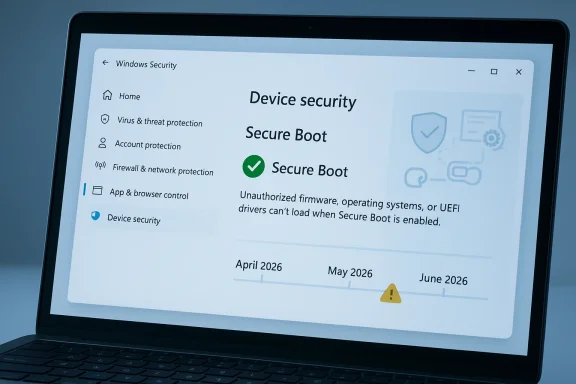
Microsoft is rolling out a long-telegraphed but still important Windows security change: beginning in April 2026, the Windows Security app will surface the status of Secure Boot certificate updates for consumers and small-business users. The move matters because the original Microsoft Secure Boot certificates issued in 2011 begin expiring in June 2026, and Microsoft is now trying to make the transition visible before that deadline turns into a support problem. In practice, the change adds a new warning layer to Windows 10 and Windows 11 at the exact moment many PCs need to move to the updated 2023 certificates.
The Secure Boot story is one of those infrastructure issues that rarely gets attention until it becomes urgent. Secure Boot is part of the UEFI trust chain, designed to ensure that only signed, approved code loads during startup, which helps stop bootkits and other pre-OS malware before Windows even begins to run. Microsoft describes the feature as a foundational trust anchor for the Windows boot process, and that framing is not marketing fluff; it is a reminder that once this layer weakens, everything above it becomes easier to compromise.
The certificates in question were first issued in 2011, which means they have been doing their job for roughly 15 years. That longevity is useful context because certificate expiration is not a bug, but a security control working as intended: cryptographic trust material is supposed to rotate before it becomes a liability. Microsoft’s current guidance says those old certificates begin expiring in June 2026 and that new 2023 certificates are being delivered automatically through Windows Update for most devices.
What makes this moment significant is the scale of the installed base. Older devices, especially PCs that have not been refreshed in the last two years, are more likely to still rely on the older certificate set. That creates a visibility problem as much as a cryptography problem, because users can easily assume that “Secure Boot is on” means everything is current, when the real issue is whether the certificates behind that feature have actually been updated. Microsoft’s new status display is intended to close that gap.
There is also a broader support-policy backdrop. Windows 10 remains in extended support for many users and organizations, and Microsoft has been nudging eligible devices toward continued servicing through normal Windows Update channels or, where appropriate, extended security options. That matters here because Microsoft says the Secure Boot certificate update and the new status indicators are tied to current servicing channels. In other words, staying patched is now part of staying informed, not just staying secure.
That staged rollout is important because certificate transitions are often invisible until they fail. For the average user, a machine that boots normally feels healthy even if its secure boot chain is outdated. Microsoft’s answer is to turn an abstract trust-chain update into a visible status badge, with green, yellow, and red indicators tied to the device’s actual Secure Boot certificate state.
This is also a useful case study in security UX. Microsoft is trying to reduce silent exposure by embedding status signals into a place users already visit during troubleshooting, rather than requiring them to understand UEFI tooling or firmware settings. That should lower the support burden over time, but only if the messaging is specific enough to overcome the common habit of glancing at a green icon and moving on.
The practical impact is that Secure Boot helps defend against bootkits, unsigned loaders, and malicious firmware-adjacent behavior. Windows-based security software is not always designed to police that layer on its own, which is why Microsoft treats Secure Boot as a structural security control rather than a convenience feature. ZDNet’s explanation is directionally correct: if the boot chain is compromised, normal endpoint protection can be undermined before it starts.
Microsoft is also careful not to oversell the immediate consequences. The company says a device can continue to operate normally even after expiration, but the protection level degrades over time as new threats emerge. That is a subtle but crucial point: this is not a “PC stops working” event, but it is a security regression event, and those are often more dangerous because they are easy to ignore.
A fully updated device gets a green checkmark and text stating that all required Secure Boot certificate updates have been applied. A not yet updated device may show that it is still running an older certificate and that the update should arrive automatically through Windows Update, assuming the PC is connected and fully serviced. A requires action state is the most serious, indicating that the current boot configuration cannot receive the needed security update without intervention.
The May 2026 update will push the experience further by adding notifications outside the app, including system alerts and additional in-app controls. That is a smart escalation path, because it gives users time to self-remediate before Microsoft starts treating the issue as a more urgent compliance problem. It also suggests that the company expects some devices to need repeated nudges before the June deadline.
But the automatic path is not universal. Microsoft notes that some systems may need additional firmware updates, and the support article explicitly points to hardware or firmware limitations as a reason the update may not be applied automatically. That means the existence of Windows Update alone is not enough; the machine’s firmware and vendor-specific support chain still matter.
Microsoft’s enterprise guidance is already separate from the home-user messaging, which tells you the company sees this as both a user-support issue and an IT-admin issue. That split is sensible, because organizations will need inventory tooling, firmware validation, and phased rollout planning, not just a badge in the Windows Security app. In other words, the same change has two very different operating models.
Windows 11 devices are more likely to be newer and therefore more likely to already have the updated certificates, but that is not a guarantee. Microsoft’s own support language avoids making a blanket assumption because device age is only one variable; update cadence, vendor firmware support, and whether the machine has been connected to the right servicing channels all play a role.
For users who are already skeptical of Windows Update, this may feel like yet another warning bolted onto a system they thought was already protected. In truth, it is the opposite: the warning is evidence that Microsoft is trying to expose a hidden dependency before it becomes exploitable. That is a sign of better visibility, even if it comes with extra complexity.
The enterprise challenge is that Secure Boot certificates are embedded in a broader boot trust architecture. That means some systems may need coordination with OEMs, some may require firmware updates, and some may need special handling if diagnostic data is not being shared or if policy blocks automatic remediation. Microsoft is already advising administrators to follow its Secure Boot guidance rather than waiting for the certificates to age out in production.
Microsoft’s support pages also imply that some environments will need a more hands-on strategy, including scripts and device collection steps. That is a signal that the company expects uneven adoption and wants administrators to build an internal campaign rather than rely purely on passive servicing. In practice, this is exactly how mature Windows security operations should work.
The problem is that many users will misread a green icon as a full guarantee. Microsoft’s insistence on reading the text next to the badge is therefore not a minor UI note; it is the difference between assuming everything is fixed and knowing whether the boot trust chain actually moved forward. That is a good example of how security interfaces must educate as well as inform.
Users should also pay attention to whether the machine is connected to the internet and receiving the latest cumulative updates. Some of the rollout depends on normal servicing channels, and a device that has been paused, disconnected, or partially maintained may appear to be healthy while still lagging behind on boot-level protections. That is one reason the new messaging is being added now rather than later.
The deeper issue is that the security landscape keeps evolving after the original trust material was issued. Microsoft can patch the OS all day, but if the boot trust anchor cannot accept new signed components or revocation updates, then the platform gradually becomes less able to defend itself against fresh threats. That is why the company is emphasizing continuity rather than a one-time migration.
The June deadline also has a psychological effect. Once a vendor names a date, the problem stops being theoretical and becomes operational. Microsoft’s phased warnings in April and May are a sensible attempt to avoid a last-minute scramble, but they also signal that the company expects some percentage of devices to miss the first wave of automatic updates.
The bigger test is what happens on older hardware and in large managed fleets. Those are the systems most likely to reveal gaps in firmware support, update hygiene, and user understanding, which means the coming months will effectively be a stress test for Microsoft’s servicing model. If enough devices still show not yet updated or requires action as June approaches, the story may shift from “new status indicator” to “major deployment challenge.”
Source: Forbes https://www.forbes.com/sites/zakdof...rosoft-changes-windows-update-after-15-years/
 Background
The Secure Boot story is one of those infrastructure issues that rarely gets attention until it becomes urgent. Secure Boot is part of the UEFI trust chain, designed to ensure that only signed, approved code loads during startup, which helps stop bootkits and other pre-OS malware before Windows even begins to run. Microsoft describes the feature as a foundational trust anchor for the Windows boot process, and that framing is not marketing fluff; it is a reminder that once this layer weakens, everything above it becomes easier to compromise.The certificates in question were first issued in 2011, which means they have been doing their job for roughly 15 years. That longevity is useful context because certificate expiration is not a bug, but a security control working as intended: cryptographic trust material is supposed to rotate before it becomes a liability. Microsoft’s current guidance says those old certificates begin expiring in June 2026 and that new 2023 certificates are being delivered automatically through Windows Update for most devices.
What makes this moment significant is the scale of the installed base. Older devices, especially PCs that have not been refreshed in the last two years, are more likely to still rely on the older certificate set. That creates a visibility problem as much as a cryptography problem, because users can easily assume that “Secure Boot is on” means everything is current, when the real issue is whether the certificates behind that feature have actually been updated. Microsoft’s new status display is intended to close that gap.
There is also a broader support-policy backdrop. Windows 10 remains in extended support for many users and organizations, and Microsoft has been nudging eligible devices toward continued servicing through normal Windows Update channels or, where appropriate, extended security options. That matters here because Microsoft says the Secure Boot certificate update and the new status indicators are tied to current servicing channels. In other words, staying patched is now part of staying informed, not just staying secure.
Why Microsoft Is Changing Windows Update Now
Microsoft’s timing is deliberate. The company is not merely pushing another routine Patch Tuesday message; it is trying to surface a potentially silent security transition before the 2011 certificates age out. Because the certificates begin expiring in June 2026, Microsoft has built the warning system to start in April and expand in May, creating a runway rather than a cliff.That staged rollout is important because certificate transitions are often invisible until they fail. For the average user, a machine that boots normally feels healthy even if its secure boot chain is outdated. Microsoft’s answer is to turn an abstract trust-chain update into a visible status badge, with green, yellow, and red indicators tied to the device’s actual Secure Boot certificate state.
The key design choice
The biggest change is not the certificate update itself; it is the way Microsoft is exposing it. A green checkmark no longer just means Secure Boot is enabled. Users are now expected to read the accompanying text carefully, because the app may show that Secure Boot is on while still warning that certificate updates are incomplete or that the device needs further action. That distinction matters, and it is exactly the kind of nuance most consumers would otherwise miss.This is also a useful case study in security UX. Microsoft is trying to reduce silent exposure by embedding status signals into a place users already visit during troubleshooting, rather than requiring them to understand UEFI tooling or firmware settings. That should lower the support burden over time, but only if the messaging is specific enough to overcome the common habit of glancing at a green icon and moving on.
- The rollout starts in April 2026.
- More alerts arrive in May 2026.
- The expiration pressure builds in June 2026.
- The app shows whether the device is fully updated, not yet updated, or requires action.
- The goal is to make a firmware-trust issue legible to non-technical users.
What Secure Boot Actually Protects
Secure Boot is not just another checkbox in Windows Security. It is the mechanism that tries to ensure the machine starts only with trusted, signed components, which means it protects the earliest part of the system startup sequence when traditional antivirus tools are not yet active. That is why boot-level malware is such a persistent threat: once malicious code lands below the operating system, the usual defenses can arrive too late.The practical impact is that Secure Boot helps defend against bootkits, unsigned loaders, and malicious firmware-adjacent behavior. Windows-based security software is not always designed to police that layer on its own, which is why Microsoft treats Secure Boot as a structural security control rather than a convenience feature. ZDNet’s explanation is directionally correct: if the boot chain is compromised, normal endpoint protection can be undermined before it starts.
Why the certificate set matters
The certificates are what make the trust chain verifiable. If the signing material ages out, the device may still boot and ordinary Windows updates may continue, but the machine loses the ability to receive new protections for the early boot process. That includes future updates to Windows Boot Manager, Secure Boot databases, revocation lists, and fixes for newly discovered boot-chain vulnerabilities.Microsoft is also careful not to oversell the immediate consequences. The company says a device can continue to operate normally even after expiration, but the protection level degrades over time as new threats emerge. That is a subtle but crucial point: this is not a “PC stops working” event, but it is a security regression event, and those are often more dangerous because they are easy to ignore.
- Secure Boot enabled does not always mean fully current certificates.
- Expired certificates do not instantly brick the machine.
- The real loss is in future boot-level security coverage.
- The update is meant to preserve a trusted startup path.
- Some devices will need OEM firmware help, not just Windows Update.
How the New Windows Security App Status Works
Microsoft’s new Windows Security app behavior is designed to answer a single question: has this PC received the Secure Boot certificate update, and if not, what is blocking it? The app adds this under Device security > Secure Boot, where it can present a badge and text guidance that reflect the current state of the device.A fully updated device gets a green checkmark and text stating that all required Secure Boot certificate updates have been applied. A not yet updated device may show that it is still running an older certificate and that the update should arrive automatically through Windows Update, assuming the PC is connected and fully serviced. A requires action state is the most serious, indicating that the current boot configuration cannot receive the needed security update without intervention.
Why wording matters
Microsoft’s warning that a green checkmark alone is not enough is probably the most important line in the guidance. Users need to read the accompanying text, because the visual icon can be misleading if they assume it implies complete certificate health rather than just Secure Boot being active. That is a classic case of a UI signal being necessary but not sufficient.The May 2026 update will push the experience further by adding notifications outside the app, including system alerts and additional in-app controls. That is a smart escalation path, because it gives users time to self-remediate before Microsoft starts treating the issue as a more urgent compliance problem. It also suggests that the company expects some devices to need repeated nudges before the June deadline.
Status states at a glance
- Fully updated: green checkmark, no action needed.
- Not yet updated: older certificate still present, update expected through Windows Update.
- Requires action: the current boot configuration cannot receive the update as-is.
- Hardware or firmware limitations may block automation.
- System alerts begin appearing in May 2026.
Who Gets the Update Automatically — and Who May Not
Microsoft says updated 2023 certificates are being delivered automatically through Windows Update for many devices. That is the reassuring part, and it should cover a large share of consumer PCs and many smaller business systems that are regularly maintained and configured for automatic patching. In those cases, the process should feel like a normal Windows servicing event rather than a special migration.But the automatic path is not universal. Microsoft notes that some systems may need additional firmware updates, and the support article explicitly points to hardware or firmware limitations as a reason the update may not be applied automatically. That means the existence of Windows Update alone is not enough; the machine’s firmware and vendor-specific support chain still matter.
Consumer versus enterprise reality
For consumers, the story is relatively straightforward: keep Windows updated, check the Security app, and watch for the new status messaging. For enterprises, the challenge is more complicated because managed fleets often have imaging customizations, network restrictions, and older hardware profiles that make “automatic” less automatic than Microsoft’s consumer-facing guidance suggests.Microsoft’s enterprise guidance is already separate from the home-user messaging, which tells you the company sees this as both a user-support issue and an IT-admin issue. That split is sensible, because organizations will need inventory tooling, firmware validation, and phased rollout planning, not just a badge in the Windows Security app. In other words, the same change has two very different operating models.
- Consumers mostly need to ensure Windows Update is current.
- Some PCs require OEM firmware updates.
- Managed environments may need inventory and remediation scripts.
- Older hardware could block automated servicing.
- Organizations should not wait for the June expiration window.
Why This Matters for Windows 10 and Windows 11
The certificate transition affects both Windows 10 and Windows 11, which is one reason the news is broader than a routine Windows 11 feature update. Many older devices still running Windows 10 are the most likely to be sitting on aging firmware and certificate state, even if they continue to receive extended servicing. That makes the Secure Boot warning especially relevant to a huge installed base that may not be thinking about firmware in everyday use.Windows 11 devices are more likely to be newer and therefore more likely to already have the updated certificates, but that is not a guarantee. Microsoft’s own support language avoids making a blanket assumption because device age is only one variable; update cadence, vendor firmware support, and whether the machine has been connected to the right servicing channels all play a role.
The Windows 10 factor
The Windows 10 angle is especially important because the operating system remains widely deployed even as Microsoft encourages migration to newer versions or supported servicing paths. A lot of Windows 10 machines are perfectly usable, but some will be trapped in the long tail of older BIOS/UEFI implementations and conservative update policies. That makes Microsoft’s new status messaging less about a single OS version and more about the aging reality of the Windows ecosystem.For users who are already skeptical of Windows Update, this may feel like yet another warning bolted onto a system they thought was already protected. In truth, it is the opposite: the warning is evidence that Microsoft is trying to expose a hidden dependency before it becomes exploitable. That is a sign of better visibility, even if it comes with extra complexity.
- Windows 10 remains a major exposure surface.
- Windows 11 is not immune, just generally better positioned.
- Older firmware makes certificate rotation harder.
- Managed environments may face slower rollouts.
- Visibility is the key improvement here.
Enterprise and IT Admin Implications
For IT departments, the Secure Boot certificate transition is not just about getting patches installed. It is about making sure fleets are inventoried, exception cases are identified, and devices with blocked firmware paths are handled before the expiration date turns into a support incident. Microsoft’s separate guidance for IT-managed devices underscores that this is now a planning item, not a background maintenance detail.The enterprise challenge is that Secure Boot certificates are embedded in a broader boot trust architecture. That means some systems may need coordination with OEMs, some may require firmware updates, and some may need special handling if diagnostic data is not being shared or if policy blocks automatic remediation. Microsoft is already advising administrators to follow its Secure Boot guidance rather than waiting for the certificates to age out in production.
What admins should care about first
The biggest concern for IT is not the update itself but the inventory gap. An organization can only fix what it can identify, and a badge inside Windows Security is useful only if someone is checking it systematically. That means the work likely belongs alongside other endpoint hygiene tasks, such as hardware refresh planning, firmware baselines, and compliance reporting.Microsoft’s support pages also imply that some environments will need a more hands-on strategy, including scripts and device collection steps. That is a signal that the company expects uneven adoption and wants administrators to build an internal campaign rather than rely purely on passive servicing. In practice, this is exactly how mature Windows security operations should work.
Enterprise action list
- Audit devices for Secure Boot certificate status.
- Confirm Windows Update and firmware servicing are healthy.
- Identify devices with firmware limitations.
- Coordinate with OEM vendors where automatic rollout fails.
- Prepare user-facing guidance before May alerts begin.
- Prioritize older and unmanaged endpoints first.
Consumer Impact: What Ordinary Users Should Expect
For home users, the practical message is simple: if your PC is up to date, the change should mostly appear as new information in the Windows Security app. You may notice a Secure Boot status badge, but if the machine is healthy and the certificate update has been applied, the guidance should remain reassuring rather than disruptive.The problem is that many users will misread a green icon as a full guarantee. Microsoft’s insistence on reading the text next to the badge is therefore not a minor UI note; it is the difference between assuming everything is fixed and knowing whether the boot trust chain actually moved forward. That is a good example of how security interfaces must educate as well as inform.
What home users should look for
The most important thing is not to disable Secure Boot. Microsoft explicitly warns against using that as a workaround, because turning it off removes an important layer of boot protection rather than solving the certificate problem. If the device shows that it needs attention, the next move is to let Windows Update run, and then check whether the status text confirms the certificate change.Users should also pay attention to whether the machine is connected to the internet and receiving the latest cumulative updates. Some of the rollout depends on normal servicing channels, and a device that has been paused, disconnected, or partially maintained may appear to be healthy while still lagging behind on boot-level protections. That is one reason the new messaging is being added now rather than later.
- Do not disable Secure Boot.
- Keep Windows Update current.
- Read the text, not just the icon.
- Check the Device security > Secure Boot panel.
- Watch for May 2026 alerts if the device is still behind.
Security Significance: Why the Deadline Is Real
This is not alarmism, but it is serious. If the certificates expire without replacement, the machine will not suddenly become unusable, yet it will lose access to future protections for early boot vulnerabilities. That makes the deadline meaningful because boot-chain weaknesses are exactly the kind of issues attackers love to exploit quietly and persistently.The deeper issue is that the security landscape keeps evolving after the original trust material was issued. Microsoft can patch the OS all day, but if the boot trust anchor cannot accept new signed components or revocation updates, then the platform gradually becomes less able to defend itself against fresh threats. That is why the company is emphasizing continuity rather than a one-time migration.
Why this is different from ordinary patching
Most Windows users think in terms of monthly updates, reboot prompts, and app changes. Secure Boot certificate rotation is different because it reaches into the startup trust chain, where problems are harder to observe and easier to dismiss. That makes it a classic infrastructure security issue: invisible when it works, expensive when it fails.The June deadline also has a psychological effect. Once a vendor names a date, the problem stops being theoretical and becomes operational. Microsoft’s phased warnings in April and May are a sensible attempt to avoid a last-minute scramble, but they also signal that the company expects some percentage of devices to miss the first wave of automatic updates.
- The issue is about future protection, not immediate boot failure.
- Boot-chain threats are harder to detect than ordinary malware.
- Expired trust material weakens the platform over time.
- Microsoft is trying to prevent a June panic.
- Visibility is the best defense against slow security drift.
Strengths and Opportunities
Microsoft’s approach has several strengths. Most notably, it turns an obscure security dependency into an observable status within a familiar app, which should help reduce confusion and support calls. It also gives the company a chance to improve user education around Secure Boot at the exact moment the risk becomes time-sensitive. The rollout is a good example of security by visibility done the right way.- Better user awareness without requiring BIOS-level expertise.
- Automatic delivery for many devices through Windows Update.
- Clearer status labels that distinguish partial from full protection.
- Phased alerts that reduce the chance of a last-minute scramble.
- Enterprise guidance that can be paired with fleet management tools.
- Reduced ambiguity between Secure Boot being enabled and Secure Boot being current.
- Improved security posture against boot-level threats.
Risks and Concerns
The downside is that this change will still be easy to misunderstand. A green icon can encourage complacency if users stop reading the full status text, and some machines may require OEM firmware fixes that ordinary users cannot self-serve. There is also a real risk that older PCs, especially those outside managed environments, will simply miss the update window and quietly lose boot-chain protections. That is the danger of a deadline hidden inside a routine update experience.- User confusion if the green icon is mistaken for complete assurance.
- Firmware limitations on older devices that block automation.
- Support burden for OEMs and IT departments.
- Delayed remediation in unmanaged or rarely updated machines.
- False confidence if users assume Windows Update alone is always enough.
- Enterprise fragmentation across mixed hardware generations.
- Security degradation after June if devices miss the transition.
Looking Ahead
The next few weeks will show whether Microsoft’s new Secure Boot status messaging is enough to move the average user from passive trust to active checking. If the company gets this right, the April and May notifications will push many devices onto the 2023 certificates before June, avoiding a noisy deadline and reducing the number of devices left in a partially protected state. That would make this one of those rare Windows changes that is both technically subtle and operationally successful.The bigger test is what happens on older hardware and in large managed fleets. Those are the systems most likely to reveal gaps in firmware support, update hygiene, and user understanding, which means the coming months will effectively be a stress test for Microsoft’s servicing model. If enough devices still show not yet updated or requires action as June approaches, the story may shift from “new status indicator” to “major deployment challenge.”
What to watch next
- Whether the May 2026 alerts materially increase remediation.
- How many devices land in the requires action state.
- Whether OEM firmware updates are needed at scale.
- How Windows 10 machines behave compared with Windows 11 systems.
- Whether enterprise admins report broad rollout friction or a smooth transition.
Source: Forbes https://www.forbes.com/sites/zakdof...rosoft-changes-windows-update-after-15-years/
Last edited:
