

Windows Server 2022 will leave mainstream support on October 13, 2026, giving administrators less than three months to decide whether five more years of security-only servicing is sufficient or whether key workloads should move to Windows Server 2025. Microsoft’s Lifecycle documentation lists October 14, 2031 as the end of extended support for the 2021-era server release.
The warning, highlighted this week by Windows Report and echoed by Neowin, is not an end-of-support notice. Windows Server 2022 will remain a supported operating system after October 13, and it will continue to receive security updates during extended support. But the calendar marks a meaningful change in what Microsoft will service—and in what IT teams can reasonably expect from the platform.
Microsoft’s Windows Server release information page currently identifies Windows Server 2025 as the latest Long-Term Servicing Channel, or LTSC, release. For organizations standardizing on the conventional five years of mainstream support followed by five years of extended support, the 2022-to-2025 transition is now the upgrade decision that needs to enter formal change planning.
The distinction between mainstream and extended support matters because Windows Server 2022 does not suddenly become unsafe or unpatched on October 14. Under Microsoft’s Fixed Lifecycle Policy, extended support continues to include security updates at no additional charge. The separate, paid Extended Security Updates program is a post-extended-support measure used for much older products; it is not required for Windows Server 2022 in 2026.
What organizations lose after the October 13 cutoff is the broader servicing relationship. Microsoft will no longer take feature requests, deliver design changes, or generally provide non-security updates. Paid support can remain available, but that does not restore mainstream-level servicing or turn enhancement requests into patches.
That changes the operating model for infrastructure teams. A Windows Server 2022 file server, domain controller, print server, Hyper-V host, application server, or cluster node can continue operating through October 2031 with monthly security servicing. A business that depends on future platform capabilities, deeper vendor certification windows, hardware refreshes, or newer hybrid-management features should not interpret those security updates as a reason to postpone upgrade planning indefinitely.
Microsoft also notes one specific feature boundary: Hotpatch support for Windows Server 2022 Datacenter: Azure Edition Core runs only through the end of mainstream support. Organizations using that edition to reduce reboot-driven maintenance windows should account for the October deadline separately from the broader security-update timeline.
Microsoft documents direct in-place upgrade support to Windows Server 2025 from Windows Server 2012 R2 and later, up to four versions at a time. That reduces the number of technical hops for many environments, but a supported upgrade path is not the same as a low-risk production change. Domain controllers, failover clusters, Hyper-V hosts, line-of-business application servers, and systems with endpoint security or backup agents all deserve validation in representative test environments.
Windows Server 2025 also has a different operational proposition from Server 2022. Microsoft is emphasizing security, performance, storage, and hybrid-cloud capabilities, while its newer release documentation presents the LTSC alongside the more frequently updated Annual Channel. For conventional infrastructure roles, LTSC remains the familiar choice: stable, long-lived, and designed for workloads that should not be constantly reshaped around a rapid release schedule.
The practical question is therefore not simply, “Can Server 2022 stay?” It can. The better question is whether a system’s business lifespan, vendor roadmap, and refresh schedule fit inside its remaining mainstream-support runway.
For many organizations, the sensible answer will be mixed:
That deadline should not be folded into the Windows Server 2022 plan without careful inventory work. Windows 11 uses a different servicing model, and edition matters. The October 2026 date applies to Home and Pro, including Pro Education and Pro for Workstations; Enterprise and Education have their own lifecycle timetable.
Microsoft says unmanaged Windows 11 24H2 Home and Pro devices will be offered Windows 11 version 25H2 automatically. IT-managed endpoints should be governed through the organization’s established Windows Update for Business, Windows Server Update Services, Intune, or endpoint-management processes rather than relying on consumer-oriented upgrade behavior.
There is also an important current-state wrinkle: Microsoft’s lifecycle listings now show Windows 11 version 26H1 as an available Home and Pro release, alongside version 25H2. That makes an internal endpoint roadmap more important than simply setting “25H2” as a blanket destination. Administrators should select the release appropriate to their hardware, policies, application readiness, and deployment rings.
The first review should separate systems where extended support is a deliberate strategy from systems that are simply unmanaged. Those are not equivalent. Retaining Server 2022 through 2031 can be a defensible decision for a stable workload, but only if the organization understands what it is giving up and has a plan for the next five-year boundary.
A useful upgrade test should include the less glamorous dependencies that often derail server projects: monitoring agents, EDR tooling, backup and restore workflows, certificate services, storage multipathing, printer drivers, bespoke scheduled tasks, and management scripts. It should also confirm that rollback and recovery procedures work before production systems are touched.
Microsoft’s reminder does not require a rushed migration in July 2026. It does establish the point at which Windows Server 2022 becomes a security-maintained platform rather than one still receiving the full breadth of mainstream product servicing. By October 13, administrators should know which servers are intentionally staying, which are moving to Windows Server 2025, and which workloads should disappear before the next lifecycle deadline becomes the urgent one.
The warning, highlighted this week by Windows Report and echoed by Neowin, is not an end-of-support notice. Windows Server 2022 will remain a supported operating system after October 13, and it will continue to receive security updates during extended support. But the calendar marks a meaningful change in what Microsoft will service—and in what IT teams can reasonably expect from the platform.
Microsoft’s Windows Server release information page currently identifies Windows Server 2025 as the latest Long-Term Servicing Channel, or LTSC, release. For organizations standardizing on the conventional five years of mainstream support followed by five years of extended support, the 2022-to-2025 transition is now the upgrade decision that needs to enter formal change planning.
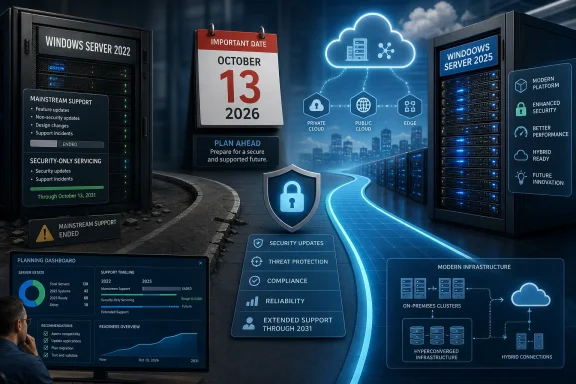 Security coverage continues, but the platform stops moving
The distinction between mainstream and extended support matters because Windows Server 2022 does not suddenly become unsafe or unpatched on October 14. Under Microsoft’s Fixed Lifecycle Policy, extended support continues to include security updates at no additional charge. The separate, paid Extended Security Updates program is a post-extended-support measure used for much older products; it is not required for Windows Server 2022 in 2026.What organizations lose after the October 13 cutoff is the broader servicing relationship. Microsoft will no longer take feature requests, deliver design changes, or generally provide non-security updates. Paid support can remain available, but that does not restore mainstream-level servicing or turn enhancement requests into patches.
That changes the operating model for infrastructure teams. A Windows Server 2022 file server, domain controller, print server, Hyper-V host, application server, or cluster node can continue operating through October 2031 with monthly security servicing. A business that depends on future platform capabilities, deeper vendor certification windows, hardware refreshes, or newer hybrid-management features should not interpret those security updates as a reason to postpone upgrade planning indefinitely.
Microsoft also notes one specific feature boundary: Hotpatch support for Windows Server 2022 Datacenter: Azure Edition Core runs only through the end of mainstream support. Organizations using that edition to reduce reboot-driven maintenance windows should account for the October deadline separately from the broader security-update timeline.
Windows Server 2025 becomes the forward-looking option
Windows Server 2025 reached general availability on November 1, 2024, and Microsoft lists its mainstream support end date as November 13, 2029, with extended support running until November 14, 2034. That makes it the obvious successor for organizations that want to reset the lifecycle clock, though it does not turn every Server 2022 estate into an automatic in-place upgrade candidate.Microsoft documents direct in-place upgrade support to Windows Server 2025 from Windows Server 2012 R2 and later, up to four versions at a time. That reduces the number of technical hops for many environments, but a supported upgrade path is not the same as a low-risk production change. Domain controllers, failover clusters, Hyper-V hosts, line-of-business application servers, and systems with endpoint security or backup agents all deserve validation in representative test environments.
Windows Server 2025 also has a different operational proposition from Server 2022. Microsoft is emphasizing security, performance, storage, and hybrid-cloud capabilities, while its newer release documentation presents the LTSC alongside the more frequently updated Annual Channel. For conventional infrastructure roles, LTSC remains the familiar choice: stable, long-lived, and designed for workloads that should not be constantly reshaped around a rapid release schedule.
The practical question is therefore not simply, “Can Server 2022 stay?” It can. The better question is whether a system’s business lifespan, vendor roadmap, and refresh schedule fit inside its remaining mainstream-support runway.
For many organizations, the sensible answer will be mixed:
- Stable, isolated workloads with well-understood dependencies may remain on Windows Server 2022 and receive security servicing through October 2031.
- Systems scheduled for hardware replacement, application modernization, or major virtualization changes are stronger candidates for Windows Server 2025.
- Workloads dependent on third-party agents, legacy drivers, or tightly controlled application stacks should be tested before an in-place upgrade is approved.
- Servers approaching retirement should not be upgraded merely to meet a lifecycle target if decommissioning or migration eliminates the workload sooner.
The client-side deadline is similar—but not the same problem
October 13, 2026 is also the end-of-updates date for Windows 11 version 24H2 Home and Pro editions. Microsoft’s Windows 11 release-health documentation says devices on those editions will no longer receive monthly security and preview updates, fixes for known issues, time-zone updates, or technical support after that date.That deadline should not be folded into the Windows Server 2022 plan without careful inventory work. Windows 11 uses a different servicing model, and edition matters. The October 2026 date applies to Home and Pro, including Pro Education and Pro for Workstations; Enterprise and Education have their own lifecycle timetable.
Microsoft says unmanaged Windows 11 24H2 Home and Pro devices will be offered Windows 11 version 25H2 automatically. IT-managed endpoints should be governed through the organization’s established Windows Update for Business, Windows Server Update Services, Intune, or endpoint-management processes rather than relying on consumer-oriented upgrade behavior.
There is also an important current-state wrinkle: Microsoft’s lifecycle listings now show Windows 11 version 26H1 as an available Home and Pro release, alongside version 25H2. That makes an internal endpoint roadmap more important than simply setting “25H2” as a blanket destination. Administrators should select the release appropriate to their hardware, policies, application readiness, and deployment rings.
Inventory work now matters more than the deadline itself
The approaching mainstream-support boundary is a reminder that lifecycle management starts with an accurate asset record. Organizations should identify not only every Windows Server 2022 installation, but also its edition, role, virtualization status, attached management agents, backup and disaster-recovery dependencies, and software-vendor support commitments.The first review should separate systems where extended support is a deliberate strategy from systems that are simply unmanaged. Those are not equivalent. Retaining Server 2022 through 2031 can be a defensible decision for a stable workload, but only if the organization understands what it is giving up and has a plan for the next five-year boundary.
A useful upgrade test should include the less glamorous dependencies that often derail server projects: monitoring agents, EDR tooling, backup and restore workflows, certificate services, storage multipathing, printer drivers, bespoke scheduled tasks, and management scripts. It should also confirm that rollback and recovery procedures work before production systems are touched.
Microsoft’s reminder does not require a rushed migration in July 2026. It does establish the point at which Windows Server 2022 becomes a security-maintained platform rather than one still receiving the full breadth of mainstream product servicing. By October 13, administrators should know which servers are intentionally staying, which are moving to Windows Server 2025, and which workloads should disappear before the next lifecycle deadline becomes the urgent one.
References
- Primary source: Windows Report
Published: 2026-07-17T05:02:26+00:00
Microsoft Warns Windows Server 2022 Mainstream Support Ends Soon
Microsoft warns that Windows Server 2022 mainstream support ends October 13, 2026, while security updates will continue until 2031. windowsreport.com
- Official source: learn.microsoft.com
Windows Server 2025 - Microsoft Lifecycle | Microsoft Learn
Windows Server 2025 follows the Fixed Lifecycle Policy.learn.microsoft.com - Related coverage: cisecurity.org