

Microsoft's recent Windows coverage reads like a compact masterclass in product evolution: a Release Preview update that quietly expands the built-in Windows share experience, weekly app roundups that spotlight useful utilities, a contentious public letter from a major browser vendor, and a continued debate over how Microsoft balances convenience with user control. Taken together, these items reveal the same theme: Microsoft is accelerating integration and discoverability across Windows while testing new defaults that bring both benefits and risks to users and IT teams alike.
Microsoft’s servicing model mixes regular security Patch Tuesday updates with optional cumulative and preview releases that introduce new features, UI tweaks, and quality fixes. These non-security updates—delivered as named KB packages—are often published to the Release Preview Channel first and then staged out more broadly. For Windows 10, preview builds continue to arrive as optional installs; they are useful for early access but deliberately riskier than fully validated Patch Tuesday releases.
That update cadence matters because many of the items we’re analyzing—feature changes to the Share UI, new cross-device behaviors, and Start menu redesigns—are feature work that Microsoft often gates and gradually enables after shipping binaries. The net result is a steady velocity of change that requires users and administrators to choose between early access and stability.
Beyond adding targets, Microsoft continues to polish share discoverability and promotion inside the Share dialog—helpful for users who want one-click posting while also enabling store promotion lanes for apps not yet installed. The tradeoff here is clear: better discoverability, but an experience that can surface promoted or recommended apps into a system dialog.
BetaNews and community discussion have flagged experimental behaviors where Edge browsing data may be used by Windows features to improve discoverability or contextual suggestions. These experiments are intended to surface faster answers and more cohesive cross-app experiences, but they also rekindle long-standing concerns around default data flows in Windows and the boundaries between application telemetry and OS-level personalization. Community commentary emphasizes the tension between convenience and control: users appreciate fast, contextual features but may not want browsing habits folded into system-level personalization without explicit consent.
Caveat and verification: while community reporting and commentary on these experiments is consistent, some detailed claims about how Edge shares specific browsing fields with Windows remain fluid and are gated by staged rollouts; treat bold technical claims about exact telemetry fields as provisional until Microsoft publishes formal documentation or KB-level notes. Where public documentation is thin or absent, flagging such items as experimental and unverifiable is the prudent journalistic approach.
From a WindowsForum perspective, the practical takeaway is not just the rhetoric but the specific behaviors that affect users: default browser prompts, one-click install flows, and shell-level features that push Microsoft services. Where policy or compliance matters—particularly in regulated environments—administrators should assert explicit baseline configurations rather than rely on out-of-box defaults.
For most home users, these changes will be net positives—faster sharing, easier discovery, and smoother UI behaviors. For administrators and privacy-conscious users, the work is more explicit: establish policies, test optional builds carefully, and treat system-level discoverability features as configurable defaults rather than immutable conveniences. In short: enjoy the conveniences, but plan for the governance they require.
Source: BetaNews https://betanews.com/article/micros...e-waking-up-to-a-desktop-they-dont-recognize]
 Background
Microsoft’s servicing model mixes regular security Patch Tuesday updates with optional cumulative and preview releases that introduce new features, UI tweaks, and quality fixes. These non-security updates—delivered as named KB packages—are often published to the Release Preview Channel first and then staged out more broadly. For Windows 10, preview builds continue to arrive as optional installs; they are useful for early access but deliberately riskier than fully validated Patch Tuesday releases.That update cadence matters because many of the items we’re analyzing—feature changes to the Share UI, new cross-device behaviors, and Start menu redesigns—are feature work that Microsoft often gates and gradually enables after shipping binaries. The net result is a steady velocity of change that requires users and administrators to choose between early access and stability.
What’s in KB5034843: Sharing, Spotlight and practical fixes
New social sharing options and improved share UX
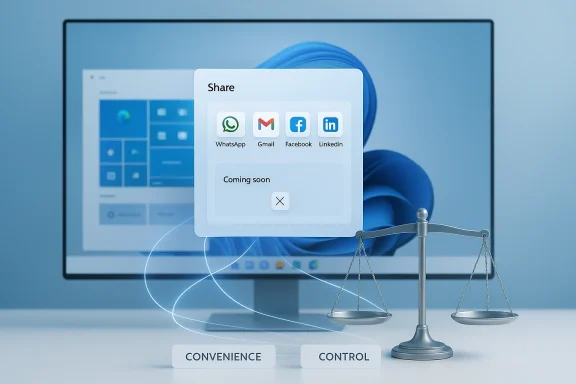
One of the most tangible user-facing pieces rolling out in the Release Preview builds is a set of enhancements to the built-in Windows share experience. The update expands the list of web and app targets you can send URLs to directly from Windows, with explicit support for services such as WhatsApp, Gmail, Facebook, and LinkedIn — and a note that support for sharing to X (formerly Twitter) is expected soon. This moves Windows’ share sheet beyond the classic Mail, Messages, and local apps, making it easier to send a web link to a mobile chat or web inbox without copying and pasting.Beyond adding targets, Microsoft continues to polish share discoverability and promotion inside the Share dialog—helpful for users who want one-click posting while also enabling store promotion lanes for apps not yet installed. The tradeoff here is clear: better discoverability, but an experience that can surface promoted or recommended apps into a system dialog.
Desktop Spotlight and Share-related fixes
Alongside sharing improvements, the update previews features like Desktop Spotlight (an iteration of the Windows Spotlight concept) and a raft of bug fixes addressing everything from Azure Virtual Desktop sign-in delays to input method quirks. The cumulative preview builds include both UX features and low-level stability patches, demonstrating Microsoft’s mixed playbook of shipping visual improvements alongside hardening fixes.Why the new share options matter
- Convenience and cross-device parity: Sending a URL directly to WhatsApp or Gmail removes friction for users who move between desktop and mobile communication channels. This is particularly valuable for people who work on a PC but communicate primarily through mobile chat apps.
- Reduced friction for content sharing: One less copy-and-paste step equals fewer user errors and a smoother workflow when compiling research, social posts, or sharing links in team chats.
- Discoverability for apps: The Share dialog can promote apps that aren’t installed. That is good for developers and users discovering new tools, but it also blurs the line between system functions and marketing prompts.
Risks and friction points
While the updates are useful, there are several practical and policy concerns that merit attention.Privacy and telemetry implications
Sharing integrations and promoted targets in shell dialogs raise legitimate questions about what data is being exchanged and how it is used. Microsoft’s shift in privacy language—moving from vague “Tailored Experiences” to explicitly labeled “Personalized Offers” in some builds—illustrates that the company is experimenting with product-facing personalization tied to device telemetry. Users need transparency on where share-target metadata and usage signals flow, and administrators should treat these defaults as policy to be explicitly configured in managed environments.Surface area for app-based data flows
When the system makes it easier to send content to third-party services, that convenience also increases the surface area for unexpected data movement. For example, a user sharing a link to a social service may unintentionally send metadata or context that the company logs. Enterprises and privacy-conscious users should assume that installing or using third-party share targets could involve additional data sharing and should review app privacy policies before enabling such shortcuts. This is a practical governance exercise as much as a technical one.Optional update risk profile
KB preview updates, including KB5034843, are optional and may introduce regressions. While Microsoft pushes such updates to gather telemetry and user feedback, they are by nature less polished than Patch Tuesday rollouts. Backups, recovery plans, and controlled pilot groups remain essential for organizations deploying preview builds. The manual availability of MSU packages from the Microsoft Update Catalog is useful for administrators, but it doesn’t eliminate the need for staged testing.Windows and Edge: the data-sharing experiment debate
One of the more controversial threads bubbling in the community is Microsoft’s exploration of tighter integration between Microsoft Edge and the Windows shell—specifically, experiments that surface browsing data into Windows experiences or otherwise share browsing telemetry with system components.BetaNews and community discussion have flagged experimental behaviors where Edge browsing data may be used by Windows features to improve discoverability or contextual suggestions. These experiments are intended to surface faster answers and more cohesive cross-app experiences, but they also rekindle long-standing concerns around default data flows in Windows and the boundaries between application telemetry and OS-level personalization. Community commentary emphasizes the tension between convenience and control: users appreciate fast, contextual features but may not want browsing habits folded into system-level personalization without explicit consent.
Caveat and verification: while community reporting and commentary on these experiments is consistent, some detailed claims about how Edge shares specific browsing fields with Windows remain fluid and are gated by staged rollouts; treat bold technical claims about exact telemetry fields as provisional until Microsoft publishes formal documentation or KB-level notes. Where public documentation is thin or absent, flagging such items as experimental and unverifiable is the prudent journalistic approach.
Windows 11 Start menu redesign: What changed and why it matters
Visual and workflow shifts
Microsoft’s Start menu work continues into Windows 11 with a refreshed layout and behavior that aims to balance classic discoverability and modern simplicity. The redesigns include:- Reorganized app grids and category views with improved jump list behavior.
- Compact taskbar interactions and more consistent Start/Search visual alignment.
- Context menu and right-click behavior enhancements designed to reduce friction for power users.
Enterprise considerations
Admins should evaluate Start menu policy baselines because visual and behavioral changes can impact user training and scripted deployments. Microsoft continues to expose group policy controls for many Start elements, but the rollout of visual changes and the mixed availability across channels means that test deployments are essential before broad enterprise adoption.The Mozilla open letter: tone, substance, and community reaction
A high-profile public letter from Mozilla’s leadership to Microsoft’s CEO—cast by some outlets in pejorative terms—underscores the broader competitive and regulatory fault lines in the browser market. The substance of Mozilla’s complaint relates to defaults, discoverability of rival browsers, and Microsoft’s approach to promoting its own services inside Windows. Community reactions vary widely: some see Mozilla’s tone as necessary advocacy in defense of browser choice and open web standards; others view it as an overreach that conflates aggressive platform design choices with anti-competitive intent.From a WindowsForum perspective, the practical takeaway is not just the rhetoric but the specific behaviors that affect users: default browser prompts, one-click install flows, and shell-level features that push Microsoft services. Where policy or compliance matters—particularly in regulated environments—administrators should assert explicit baseline configurations rather than rely on out-of-box defaults.
“Best Windows apps this week”: practical picks and verification guidance
Weekly store roundups continue to be a useful barometer for what’s practical on Windows today. Recent picks include a mix of games, utilities, and productivity tools—Candy Crush Jelly Saga for casual play, Photron Image Translator for quick OCR/translation tasks, and several smaller utilities for daily workflows. These roundups perform two important functions:- They spotlight discoverable apps that may be useful right away.
- They act as discovery leads rather than blanket endorsements; BetaNews explicitly cautions readers to verify Store pages, review privacy policies, and check recent user reviews before committing.
- Review the app’s Store page and recent changelog.
- Read the latest user reviews for compatibility or stability issues.
- Confirm the privacy policy and whether data goes to third-party servers.
- For business use, perform a small pilot and verify admin controls.
Actionable advice for users and IT teams
Below are concrete steps for different audiences to handle the current wave of Windows changes responsibly.For everyday users
- Back up before installing optional preview updates. Create a restore point and verify your File History or OneDrive backups.
- Review Settings > Privacy & security after major updates to confirm telemetry and personalized offer settings are configured as you prefer.
- Use the Share dialog’s app listings intentionally—uninstall or disable share targets you do not trust.
For power users and early adopters
- Use Release Preview Channel builds on non-critical machines for early testing, and keep a stable image for work-critical tasks.
- Test cross-device flows (Phone Link / Link to Windows) in a controlled way—particularly when sharing documents or photo data.
For IT administrators
- Create a staged rollout plan for optional previews: pilot (5–10% of fleet), extended pilot (25–50%), broad rollout.
- Lock down Share and Store behavior via group policies if organizational compliance requires it.
- Monitor telemetry and endpoint logs after mass updates—the optional nature of some KBs means regressions appear unevenly.
- Document and educate users about UX changes, particularly Start menu and search visual shifts.
Strengths, weaknesses, and the net assessment
Strengths
- Microsoft’s iterative approach delivers incremental productivity gains—reduced friction for sharing and contextual desktop experiences are undeniably useful for many users.
- The combination of feature rollout with telemetry-backed fixes allows Microsoft to refine UX quickly and push important bug fixes alongside new experiences.
Weaknesses and risks
- The gradual enablement model means features can be present but disabled, creating uneven experiences across devices and channels. This complicates enterprise change management.
- Privacy and data flow concerns remain an unresolved friction point. The more tightly integrated OS-to-app telemetry becomes, the greater the need for explicit consent and clarity.
- Optional preview updates carry a non-trivial risk of regressions and should not be treated as production-grade patches.
Final verdict: balance convenience with control
The recent stream of Windows updates, UI redesigns, and product experiments illustrate Microsoft’s fundamental tension: deliver seamless, integrated functionality that reduces user friction while preserving individual choice and enterprise control. The new sharing options in KB5034843 and the ongoing Start menu refinements deliver real productivity benefits, but they also heighten the importance of transparent defaults and controllable telemetry.For most home users, these changes will be net positives—faster sharing, easier discovery, and smoother UI behaviors. For administrators and privacy-conscious users, the work is more explicit: establish policies, test optional builds carefully, and treat system-level discoverability features as configurable defaults rather than immutable conveniences. In short: enjoy the conveniences, but plan for the governance they require.
Quick reference: where to find and test the changes
- To try preview features like KB5034843, opt into the Release Preview Channel or install the optional update via Settings > Windows Update; optional updates also appear as downloadable MSU files in the Microsoft Update Catalog for manual deployment.
- Review privacy toggles in Settings > Privacy & security to control diagnostic data and personalized offers. If organizational policy requires it, enforce settings via group policy or mobile device management (MDM).
- For app recommendations highlighted in weekly roundups, use the Store page and community reviews as the primary validation source before installation.
Source: BetaNews https://betanews.com/article/micros...e-waking-up-to-a-desktop-they-dont-recognize]
