

Microsoft is changing Windows Update’s graphics-driver publishing rules in 2026 so newer OEM or GPU-vendor display drivers are less likely to be replaced by older Windows Update packages on Windows 10 and Windows 11 PCs. The fix is not a magic undo button for every machine already burned by a bad driver swap. It is a narrowing of Microsoft’s targeting model, and that distinction matters. Redmond is not admitting that Windows Update is reckless so much as admitting that, for graphics hardware, its idea of “best match” has been too broad for the way people actually maintain PCs.
For years, Microsoft has asked users to treat Windows Update as the safest path through the driver jungle. That pitch made sense in the era when many people never visited Intel, AMD, Nvidia, Dell, Lenovo, HP, or Asus support pages unless something had already gone wrong. A signed, tested, OEM-approved driver arriving through the same mechanism as security patches sounded like exactly the kind of paternalism Windows needed.
But graphics drivers are different. They are not background plumbing in the same way as a card reader or touchpad driver. A GPU driver can decide whether a new game runs properly, whether a creative app crashes, whether a laptop switches cleanly between integrated and discrete graphics, and whether vendor control software like AMD Adrenalin or Intel’s graphics utilities recognizes the installed stack.
That is why Windows Update’s habit of replacing a user-installed graphics driver with an older package has felt so insulting. The system was not merely “updating” a component. It was overruling an intentional choice made by the person or administrator responsible for that machine.
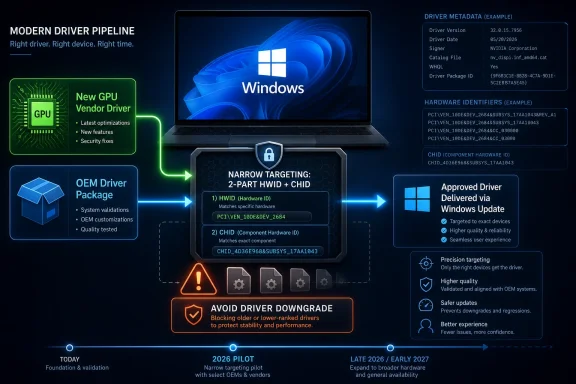
Microsoft’s new policy is best understood as a concession to that reality. The company is not removing display drivers from Windows Update. It is not handing enthusiasts a permanent veto. It is changing how newly submitted graphics drivers for new devices can be targeted, moving from broad four-part hardware ID matching toward a model that combines two-part hardware IDs with Computer Hardware IDs, or CHIDs, where appropriate.
That sounds like driver-bureaucracy alphabet soup. In practice, it is Microsoft admitting that a graphics driver meant for one slice of a hardware family should not become the “highest-ranked” answer for a much wider population of PCs.
The counterintuitive part is that Windows Update is not simply asking, “Is the installed driver newer?” It is asking a more Microsoftian question: “Which driver is the best-ranked match according to the metadata and targeting rules available to Windows Update?” Those are not the same thing.
That difference explains the stories many Windows users know by heart. A user installs a recent Intel graphics package to fix a display issue. A gamer updates to a new AMD driver for a launch-day game profile. A laptop owner installs a vendor package because hybrid graphics have been unstable. Then Windows Update arrives later and reinstalls an older OEM-sanctioned package because, inside the Windows Update machinery, that package ranks as the preferred match.
From Microsoft’s perspective, this behavior has a certain logic. OEM drivers often contain device-specific customizations, power-management tuning, panel support, hotkey integration, or validation work that a generic GPU-vendor package may not include. On laptops especially, “newer” is not always synonymous with “better for this exact device.”
But the logic breaks down when Windows Update cannot distinguish between preserving an OEM-specific baseline and clobbering a user’s deliberate driver choice. If a PC owner has gone out of their way to install a newer graphics stack, the system should at least be cautious before rolling it back. Instead, Windows Update has often behaved as though intent does not exist.
The new two-part HWID plus CHID approach is designed to make that matching narrower. CHIDs describe a specific computer hardware configuration or model population, giving Microsoft and its partners a more precise way to say, “This driver is meant for these systems, not every vaguely compatible device that happens to share a broad hardware ID.”
That means the fix is forward-looking by design. Microsoft’s pilot runs through 2026, with broader enforcement expected around the fourth quarter of 2026 or the first quarter of 2027. Even then, the policy is aimed at new-device targeting, not a retroactive cleanup of every driver package that has ever wandered through Windows Update.
This is classic Microsoft platform governance. The company rarely rips out legacy behavior in one dramatic stroke when OEMs, IHVs, enterprise deployment tools, and consumer PCs all depend on it. Instead, it changes the rules at the submission gate, waits for the ecosystem to adjust, and lets the installed base age into the new model.
That is sensible if you run Windows at planetary scale. It is also maddening if your machine was downgraded yesterday.
For enthusiasts, the immediate practical advice does not change much. If Windows Update has a habit of replacing your GPU driver, Windows 10 Pro and Windows 11 Pro still offer policy-level ways to restrict driver delivery through Windows Update. Device-installation restrictions can also be used more surgically, though they are easier to misconfigure and more annoying when you actually want to update the blocked device later.
For home users, the situation remains less elegant. Microsoft has steadily made Windows Update feel less like a menu and more like a managed service. That has security benefits, but it leaves little room for people who want Microsoft to patch Windows without touching a carefully maintained graphics stack.
That matters because drivers remain one of Windows’ oldest unsolved quality problems. The operating system can be stable in isolation and still look broken because a kernel-mode driver misbehaves, a display stack crashes, a printer package installs garbage, or an audio component drags in vendor utilities that age badly. Windows users blame Windows, not the supply chain.
Microsoft has never been wrong to care about driver centralization. A consumer operating system cannot simply tell everyone to become a part-time device-administration expert. The trouble is that Windows Update has increasingly been asked to serve two audiences whose needs diverge.
The first audience wants the PC to take care of itself. These users benefit when Windows Update supplies tested drivers and keeps old hardware functional without requiring support-site spelunking. The second audience wants Windows Update to know when to leave well enough alone. These users may be gamers, workstation owners, IT admins, developers, streamers, or laptop enthusiasts who follow GPU-driver releases more closely than Windows feature updates.
The GPU downgrade controversy sits exactly at that fault line. Microsoft’s old model optimized for broad safety and OEM control. The new model tries to preserve those goals while reducing collateral damage for users who actively manage display drivers.
That is the right direction. It is also overdue.
OEM control is central to the Windows hardware business. Laptop makers validate specific driver combinations for thermals, battery life, display panels, sleep behavior, docking stations, and hardware switches. If Microsoft simply privileged the newest GPU-vendor package everywhere, it would break machines in more subtle ways and shift support costs back onto OEMs.
This is especially true for hybrid graphics systems. A gaming notebook or handheld PC may have an AMD or Nvidia GPU, an Intel or AMD integrated GPU, vendor-specific power profiles, custom display routing, and firmware assumptions that do not map cleanly to a generic desktop-driver worldview. The driver that benchmarks best in a forum thread may not be the one the OEM wants installed across its fleet.
So the real policy goal is not “newer drivers always win.” It is “drivers should be offered to the machines they were intended to target.” That is a less satisfying slogan, but a better engineering principle.
The use of CHIDs helps because it lets OEMs and graphics vendors define device populations more precisely through Hardware Dev Center shipping labels rather than stuffing that specificity into the driver package itself. In other words, Microsoft is trying to move targeting intelligence into the distribution system, where it can be governed more cleanly.
That also explains why the change is limited to display drivers for now. Graphics drivers are high-impact, high-complaint, and high-visibility. They are a logical place to test narrower targeting before applying similar thinking elsewhere.
In managed environments, many organizations already control drivers through Windows Update for Business, WSUS, Intune policy, OEM tools, or image-management practices. But driver behavior still leaks through in mixed fleets, remote devices, and machines that users maintain semi-independently. The Windows Update pipeline matters even when it is not the only pipeline.
The new policy should improve predictability over time because it reduces the chance that a driver intended for one OEM population becomes an attractive match for another. That does not eliminate bad drivers, and it does not guarantee that every OEM-approved package is good. It narrows the blast radius.
That phrase matters in enterprise IT. The difference between “a bad driver hit every device with this GPU family” and “a bad driver hit a specific model population” is the difference between an annoying incident and a week-devouring outage. Narrower targeting is not glamorous, but it is one of the most practical ways to make Windows driver delivery less chaotic.
There is also a governance benefit. If a driver is scoped through CHIDs and shipping labels, responsibility becomes clearer. OEMs have to confirm the systems they intend to target. IHVs publishing on behalf of OEMs need approval and appropriate CHID data. Microsoft’s distribution channel becomes less of a blunt instrument and more of a controlled release system.
That is how it should have worked all along.
When Windows Update downgrades a gaming PC’s driver, the effects can be immediate and obvious. A game that launched yesterday may stutter today. Vendor software may stop opening. A feature toggle may disappear. A bug that was fixed in a newer package may return like a bad sequel.
The same principle applies to creators and developers. GPU compute frameworks, video encoders, color-management paths, AI acceleration, and workstation apps can all depend on driver cadence. For these users, a driver is not a passive component. It is part of the application platform.
That is why the downgrade problem has felt so archaic. Windows is no longer just trying to keep a VGA adapter alive long enough to render the desktop. It is orchestrating an increasingly specialized hardware stack for gaming, media, AI workloads, virtualization, security, and power management.
A one-size-fits-most driver ranking system was bound to collide with that complexity.
Microsoft’s fix implicitly acknowledges that graphics drivers now behave more like fast-moving application infrastructure than like static hardware enablement. Users who install them manually are often doing so for a reason. Windows Update does not need to admire that choice, but it does need to stop casually undoing it.
But trust in update systems erodes through exactly these “minor” events. Users do not need Windows Update to destroy a machine to become suspicious of it. They only need it to make a choice they did not ask for, fail to explain that choice, and leave them to diagnose the aftermath.
That is the deeper issue Microsoft is trying to repair. Windows Update has become the front door for security fixes, feature updates, firmware, Store dependencies, drivers, and increasingly opaque servicing behavior. The more critical that front door becomes, the more damaging it is when users perceive it as unpredictable.
The GPU downgrade problem became a symbol because it was easy to understand. The user installed a newer graphics driver. Windows installed an older one. Something got worse. Even if Microsoft could produce a valid ranking explanation, the user experience still felt backwards.
Technical correctness is not the same as product correctness. A driver can be “highest-ranked” according to Windows Update and still be the wrong thing to install over a newer driver chosen by the user.
That is the lesson Microsoft appears to have absorbed, at least partially.
Instead, Microsoft is changing the publication model so that future display drivers for new devices can be more narrowly scoped. That should reduce unintended replacements, especially where broad hardware-ID matching created an overly aggressive Windows Update candidate. But it leaves plenty of edge cases.
A new OEM driver could still supersede a user-installed driver if it is correctly targeted and ranked. A machine with existing four-part driver history may remain in the older world. Other driver classes are unaffected. And, as always with Windows, policy enforcement depends on how partners use the tools Microsoft provides.
That does not make the change meaningless. It makes it infrastructural.
Microsoft is rebuilding a section of road, not towing every car out of every pothole. The benefit arrives as new devices ship, new drivers are submitted, and OEMs and IHVs adapt their publishing workflows. The pain remains for machines caught in the legacy targeting model.
For WindowsForum readers, that distinction is crucial. If you support a fleet, this is a planning signal, not a reason to rip out current driver controls. If you maintain a gaming rig, this is encouraging news, not permission to stop watching what Windows Update installs. If you advise less technical users, the best answer remains boring: use the vendor driver when needed, but understand that Windows may still have opinions.
That is why the rollout takes months. Microsoft has to give partners time to test whether two-part HWID plus CHID targeting is sufficient, identify scenarios where it is not, and adapt submission processes before enforcement. Driver distribution is a supply chain, and supply chains do not turn on a Patch Tuesday whim.
Still, users should care because the policy attacks a real source of Windows friction. Windows Update has long blurred the line between maintenance and control. This change nudges it, modestly, back toward maintenance.
It also suggests Microsoft is learning from the feedback loop around Windows 11. The company can talk all it wants about AI PCs, Copilot integration, and modern silicon, but the daily experience of Windows is still shaped by old fundamentals: updates, drivers, sleep, display output, battery life, and peripheral reliability. When those basics misfire, the rest of the platform story sounds hollow.
A smarter graphics-driver pipeline will not make Windows beloved overnight. But it removes one more reason for technically literate users to distrust the update mechanism that Microsoft needs them to rely on.
Source: TechSpot https://www.techspot.com/news/11240...ckles-windows-update-annoying-gpu-driver.html
 Windows Update’s Driver Problem Was Always a Trust Problem
For years, Microsoft has asked users to treat Windows Update as the safest path through the driver jungle. That pitch made sense in the era when many people never visited Intel, AMD, Nvidia, Dell, Lenovo, HP, or Asus support pages unless something had already gone wrong. A signed, tested, OEM-approved driver arriving through the same mechanism as security patches sounded like exactly the kind of paternalism Windows needed.But graphics drivers are different. They are not background plumbing in the same way as a card reader or touchpad driver. A GPU driver can decide whether a new game runs properly, whether a creative app crashes, whether a laptop switches cleanly between integrated and discrete graphics, and whether vendor control software like AMD Adrenalin or Intel’s graphics utilities recognizes the installed stack.
That is why Windows Update’s habit of replacing a user-installed graphics driver with an older package has felt so insulting. The system was not merely “updating” a component. It was overruling an intentional choice made by the person or administrator responsible for that machine.
Microsoft’s new policy is best understood as a concession to that reality. The company is not removing display drivers from Windows Update. It is not handing enthusiasts a permanent veto. It is changing how newly submitted graphics drivers for new devices can be targeted, moving from broad four-part hardware ID matching toward a model that combines two-part hardware IDs with Computer Hardware IDs, or CHIDs, where appropriate.
That sounds like driver-bureaucracy alphabet soup. In practice, it is Microsoft admitting that a graphics driver meant for one slice of a hardware family should not become the “highest-ranked” answer for a much wider population of PCs.
The Old Ranking Model Treated Similar Hardware as Too Similar
The core failure sits in Windows Update’s driver ranking and targeting model. Today, display drivers published through Windows Update commonly use four-part hardware IDs. That creates a broad match that can make one driver look like the best Windows Update candidate for a class of devices, even when a user has already installed a newer package from a GPU vendor or OEM.The counterintuitive part is that Windows Update is not simply asking, “Is the installed driver newer?” It is asking a more Microsoftian question: “Which driver is the best-ranked match according to the metadata and targeting rules available to Windows Update?” Those are not the same thing.
That difference explains the stories many Windows users know by heart. A user installs a recent Intel graphics package to fix a display issue. A gamer updates to a new AMD driver for a launch-day game profile. A laptop owner installs a vendor package because hybrid graphics have been unstable. Then Windows Update arrives later and reinstalls an older OEM-sanctioned package because, inside the Windows Update machinery, that package ranks as the preferred match.
From Microsoft’s perspective, this behavior has a certain logic. OEM drivers often contain device-specific customizations, power-management tuning, panel support, hotkey integration, or validation work that a generic GPU-vendor package may not include. On laptops especially, “newer” is not always synonymous with “better for this exact device.”
But the logic breaks down when Windows Update cannot distinguish between preserving an OEM-specific baseline and clobbering a user’s deliberate driver choice. If a PC owner has gone out of their way to install a newer graphics stack, the system should at least be cautious before rolling it back. Instead, Windows Update has often behaved as though intent does not exist.
The new two-part HWID plus CHID approach is designed to make that matching narrower. CHIDs describe a specific computer hardware configuration or model population, giving Microsoft and its partners a more precise way to say, “This driver is meant for these systems, not every vaguely compatible device that happens to share a broad hardware ID.”
Microsoft Is Fixing the Pipeline, Not Rewriting History
The catch is large enough to disappoint anyone hoping for immediate relief. Microsoft’s policy change applies to new display-driver submissions for new devices. Existing drivers that are already published with the older four-part targeting model will continue to function as they do today.That means the fix is forward-looking by design. Microsoft’s pilot runs through 2026, with broader enforcement expected around the fourth quarter of 2026 or the first quarter of 2027. Even then, the policy is aimed at new-device targeting, not a retroactive cleanup of every driver package that has ever wandered through Windows Update.
This is classic Microsoft platform governance. The company rarely rips out legacy behavior in one dramatic stroke when OEMs, IHVs, enterprise deployment tools, and consumer PCs all depend on it. Instead, it changes the rules at the submission gate, waits for the ecosystem to adjust, and lets the installed base age into the new model.
That is sensible if you run Windows at planetary scale. It is also maddening if your machine was downgraded yesterday.
For enthusiasts, the immediate practical advice does not change much. If Windows Update has a habit of replacing your GPU driver, Windows 10 Pro and Windows 11 Pro still offer policy-level ways to restrict driver delivery through Windows Update. Device-installation restrictions can also be used more surgically, though they are easier to misconfigure and more annoying when you actually want to update the blocked device later.
For home users, the situation remains less elegant. Microsoft has steadily made Windows Update feel less like a menu and more like a managed service. That has security benefits, but it leaves little room for people who want Microsoft to patch Windows without touching a carefully maintained graphics stack.
The Timing Reveals a Broader Driver Reset
This graphics-driver policy does not exist in isolation. Microsoft has been tightening several pieces of the Windows driver ecosystem, from Hardware Dev Center validation to driver metadata and recovery mechanisms. The broad theme is reliability through better targeting, cleaner packages, and more controlled rollback paths.That matters because drivers remain one of Windows’ oldest unsolved quality problems. The operating system can be stable in isolation and still look broken because a kernel-mode driver misbehaves, a display stack crashes, a printer package installs garbage, or an audio component drags in vendor utilities that age badly. Windows users blame Windows, not the supply chain.
Microsoft has never been wrong to care about driver centralization. A consumer operating system cannot simply tell everyone to become a part-time device-administration expert. The trouble is that Windows Update has increasingly been asked to serve two audiences whose needs diverge.
The first audience wants the PC to take care of itself. These users benefit when Windows Update supplies tested drivers and keeps old hardware functional without requiring support-site spelunking. The second audience wants Windows Update to know when to leave well enough alone. These users may be gamers, workstation owners, IT admins, developers, streamers, or laptop enthusiasts who follow GPU-driver releases more closely than Windows feature updates.
The GPU downgrade controversy sits exactly at that fault line. Microsoft’s old model optimized for broad safety and OEM control. The new model tries to preserve those goals while reducing collateral damage for users who actively manage display drivers.
That is the right direction. It is also overdue.
OEM Control Still Wins More Often Than Enthusiast Choice
Microsoft’s wording is careful. The new policy gives customers more control over their display driver of choice while preserving OEM control over the devices they ship. That second half is not decorative.OEM control is central to the Windows hardware business. Laptop makers validate specific driver combinations for thermals, battery life, display panels, sleep behavior, docking stations, and hardware switches. If Microsoft simply privileged the newest GPU-vendor package everywhere, it would break machines in more subtle ways and shift support costs back onto OEMs.
This is especially true for hybrid graphics systems. A gaming notebook or handheld PC may have an AMD or Nvidia GPU, an Intel or AMD integrated GPU, vendor-specific power profiles, custom display routing, and firmware assumptions that do not map cleanly to a generic desktop-driver worldview. The driver that benchmarks best in a forum thread may not be the one the OEM wants installed across its fleet.
So the real policy goal is not “newer drivers always win.” It is “drivers should be offered to the machines they were intended to target.” That is a less satisfying slogan, but a better engineering principle.
The use of CHIDs helps because it lets OEMs and graphics vendors define device populations more precisely through Hardware Dev Center shipping labels rather than stuffing that specificity into the driver package itself. In other words, Microsoft is trying to move targeting intelligence into the distribution system, where it can be governed more cleanly.
That also explains why the change is limited to display drivers for now. Graphics drivers are high-impact, high-complaint, and high-visibility. They are a logical place to test narrower targeting before applying similar thinking elsewhere.
For IT Departments, the Win Is Predictability
Enterprise administrators are less interested in the emotional satisfaction of Microsoft admitting a problem and more interested in whether this reduces tickets. A surprise graphics-driver rollback can trigger a cascade: broken CAD acceleration, unstable Teams video, failed conference-room displays, black screens after docking, or helpdesk calls from users who insist “Windows updated and now my monitor is wrong.”In managed environments, many organizations already control drivers through Windows Update for Business, WSUS, Intune policy, OEM tools, or image-management practices. But driver behavior still leaks through in mixed fleets, remote devices, and machines that users maintain semi-independently. The Windows Update pipeline matters even when it is not the only pipeline.
The new policy should improve predictability over time because it reduces the chance that a driver intended for one OEM population becomes an attractive match for another. That does not eliminate bad drivers, and it does not guarantee that every OEM-approved package is good. It narrows the blast radius.
That phrase matters in enterprise IT. The difference between “a bad driver hit every device with this GPU family” and “a bad driver hit a specific model population” is the difference between an annoying incident and a week-devouring outage. Narrower targeting is not glamorous, but it is one of the most practical ways to make Windows driver delivery less chaotic.
There is also a governance benefit. If a driver is scoped through CHIDs and shipping labels, responsibility becomes clearer. OEMs have to confirm the systems they intend to target. IHVs publishing on behalf of OEMs need approval and appropriate CHID data. Microsoft’s distribution channel becomes less of a blunt instrument and more of a controlled release system.
That is how it should have worked all along.
Gamers Were the Canary in the Driver Mine
The loudest complaints have often come from gamers, and not only because gamers are loud. Modern PC gaming exposes graphics-driver regressions faster than almost any other consumer workload. New games ship with driver-specific fixes. Upscaling features, shader compilation, frame generation, HDR behavior, anti-cheat compatibility, and multi-monitor bugs can all hinge on driver version.When Windows Update downgrades a gaming PC’s driver, the effects can be immediate and obvious. A game that launched yesterday may stutter today. Vendor software may stop opening. A feature toggle may disappear. A bug that was fixed in a newer package may return like a bad sequel.
The same principle applies to creators and developers. GPU compute frameworks, video encoders, color-management paths, AI acceleration, and workstation apps can all depend on driver cadence. For these users, a driver is not a passive component. It is part of the application platform.
That is why the downgrade problem has felt so archaic. Windows is no longer just trying to keep a VGA adapter alive long enough to render the desktop. It is orchestrating an increasingly specialized hardware stack for gaming, media, AI workloads, virtualization, security, and power management.
A one-size-fits-most driver ranking system was bound to collide with that complexity.
Microsoft’s fix implicitly acknowledges that graphics drivers now behave more like fast-moving application infrastructure than like static hardware enablement. Users who install them manually are often doing so for a reason. Windows Update does not need to admire that choice, but it does need to stop casually undoing it.
The Annoyance Was Small Until It Was Yours
One reason this problem lingered is that it often looked minor from the outside. A driver version changed. A vendor utility broke. A user reinstalled the newer package. The machine survived. On a telemetry dashboard, that may not look like a catastrophe.But trust in update systems erodes through exactly these “minor” events. Users do not need Windows Update to destroy a machine to become suspicious of it. They only need it to make a choice they did not ask for, fail to explain that choice, and leave them to diagnose the aftermath.
That is the deeper issue Microsoft is trying to repair. Windows Update has become the front door for security fixes, feature updates, firmware, Store dependencies, drivers, and increasingly opaque servicing behavior. The more critical that front door becomes, the more damaging it is when users perceive it as unpredictable.
The GPU downgrade problem became a symbol because it was easy to understand. The user installed a newer graphics driver. Windows installed an older one. Something got worse. Even if Microsoft could produce a valid ranking explanation, the user experience still felt backwards.
Technical correctness is not the same as product correctness. A driver can be “highest-ranked” according to Windows Update and still be the wrong thing to install over a newer driver chosen by the user.
That is the lesson Microsoft appears to have absorbed, at least partially.
The Limits of the Fix Are the Story
The most important caveat is that this policy does not appear to create a universal “do not downgrade my display driver” rule. It does not say Windows Update will always compare version numbers and dates against the installed driver and back off. It does not promise that AMD, Intel, or Nvidia packages installed manually will be permanently respected on every device.Instead, Microsoft is changing the publication model so that future display drivers for new devices can be more narrowly scoped. That should reduce unintended replacements, especially where broad hardware-ID matching created an overly aggressive Windows Update candidate. But it leaves plenty of edge cases.
A new OEM driver could still supersede a user-installed driver if it is correctly targeted and ranked. A machine with existing four-part driver history may remain in the older world. Other driver classes are unaffected. And, as always with Windows, policy enforcement depends on how partners use the tools Microsoft provides.
That does not make the change meaningless. It makes it infrastructural.
Microsoft is rebuilding a section of road, not towing every car out of every pothole. The benefit arrives as new devices ship, new drivers are submitted, and OEMs and IHVs adapt their publishing workflows. The pain remains for machines caught in the legacy targeting model.
For WindowsForum readers, that distinction is crucial. If you support a fleet, this is a planning signal, not a reason to rip out current driver controls. If you maintain a gaming rig, this is encouraging news, not permission to stop watching what Windows Update installs. If you advise less technical users, the best answer remains boring: use the vendor driver when needed, but understand that Windows may still have opinions.
The Practical Read on Microsoft’s Driver Detente
The biggest mistake would be treating this as a consumer feature announcement. It is really a partner-policy shift with consumer consequences. The language is aimed at IHVs and OEMs because they are the ones who publish drivers through Hardware Dev Center and decide how packages are scoped.That is why the rollout takes months. Microsoft has to give partners time to test whether two-part HWID plus CHID targeting is sufficient, identify scenarios where it is not, and adapt submission processes before enforcement. Driver distribution is a supply chain, and supply chains do not turn on a Patch Tuesday whim.
Still, users should care because the policy attacks a real source of Windows friction. Windows Update has long blurred the line between maintenance and control. This change nudges it, modestly, back toward maintenance.
It also suggests Microsoft is learning from the feedback loop around Windows 11. The company can talk all it wants about AI PCs, Copilot integration, and modern silicon, but the daily experience of Windows is still shaped by old fundamentals: updates, drivers, sleep, display output, battery life, and peripheral reliability. When those basics misfire, the rest of the platform story sounds hollow.
A smarter graphics-driver pipeline will not make Windows beloved overnight. But it removes one more reason for technically literate users to distrust the update mechanism that Microsoft needs them to rely on.
The Driver Downgrade Era Ends Slowly, Not Cleanly
Here is the concrete shape of the change Windows users should keep in mind:- Microsoft is changing Windows Update display-driver publishing so new-device submissions can use narrower two-part hardware ID plus CHID targeting.
- The goal is to reduce cases where Windows Update replaces a newer user-installed graphics driver with an older OEM-published package.
- The pilot period runs through 2026, with broader enforcement expected around late 2026 or early 2027.
- The policy applies specifically to display drivers, not every Windows driver class.
- Existing four-part-targeted drivers are not automatically rewritten, so current PCs may still encounter the old behavior.
- Administrators and power users should keep existing driver-management policies in place until the new model proves itself in the field.
Source: TechSpot https://www.techspot.com/news/11240...ckles-windows-update-annoying-gpu-driver.html
