

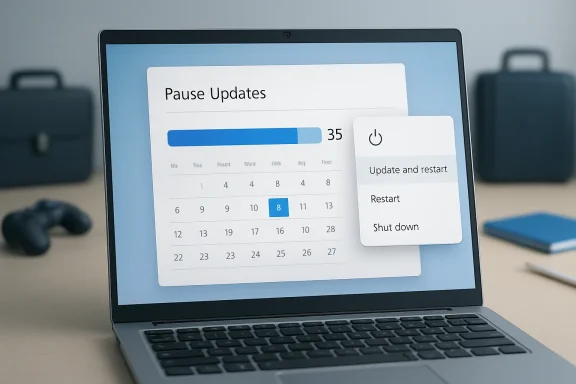
Microsoft is preparing one of the most consequential changes to Windows Update since the Windows 10 era: users will be able to pause updates repeatedly, in blocks of up to 35 days, with no stated limit on how many times the pause can be extended. The change, now rolling out first to Windows Insider testers in the Dev Channel and the new Experimental Channel, also restores clearer power options so users can shut down or restart without being forced into an update cycle. This is not the end of Windows servicing, but it is a significant philosophical retreat from the “updates happen when Windows says so” model that has frustrated consumers, gamers, travelers, students, and IT administrators for years.
For more than a decade, Microsoft has tried to solve a difficult problem: how to keep more than a billion Windows devices patched against fast-moving threats without making the operating system feel hostile to the person sitting in front of the screen. Windows 10 shifted the balance sharply toward mandatory servicing, especially for home users, because unpatched PCs had become a security risk not only to their owners but to the broader ecosystem. That decision improved baseline patch adoption, but it also cemented Windows Update as one of the most complained-about parts of the platform.
Windows 11 inherited that servicing model and refined it with smaller packages, active hours, restart scheduling, and better background download behavior. Even so, the core complaint remained: users could delay updates for a while, but Windows eventually reclaimed control. The new pause model changes that dynamic by allowing repeated 35-day extensions, effectively making update deferral indefinite for those willing to keep renewing the pause.
Microsoft is framing the change as a response to feedback about disruption, lack of control, and confusing restart behavior. The company says it reviewed thousands of direct feedback submissions and found two themes that kept returning: updates arrived at the wrong time, and users felt they did not have enough say over when installation happened. That is a familiar complaint on Windows forums, especially after problematic cumulative updates, driver regressions, or forced restarts during work.
The timing also matters. Windows 10 has now passed its free support deadline, Windows 11 adoption is more strategically important, and Microsoft is trying to make the platform feel more respectful at the exact moment it is adding more cloud, AI, and security-connected services. Giving users more visible control over updates may be as much about rebuilding trust as it is about changing a Settings page.
The deeper shift is that Microsoft says users can re-pause “as many times as needed.” That wording matters because it turns the 35-day limit from a hard servicing checkpoint into a rolling administrative boundary. Windows still nudges users toward regular maintenance, but the user can keep postponing.
Key changes now entering Insider testing include:
That distinction is important for Windows enthusiasts who already wait a week or two before applying cumulative updates. Many users have learned that a short delay can reveal whether a patch is causing printer failures, VPN issues, BitLocker surprises, performance regressions, or blue screens on specific hardware. A repeatable pause window formalizes that cautious behavior.
The model benefits several common Windows user groups:
This seemingly small change corrects a long-running trust problem. When users cannot predict what a button will do, they stop trusting the interface. A clean separation between power and servicing actions makes Windows feel less like it is negotiating with the user and more like it is obeying the user.
The practical workflow becomes clearer:
The update controls are likely to receive close telemetry review. Microsoft will want to know whether users pause responsibly, whether update compliance drops sharply, and whether support incidents increase. If the feature leads to too many badly outdated PCs, Microsoft could adjust messaging, defaults, or enterprise policy behavior before general availability.
Windows enthusiasts should watch for several rollout signals:
Microsoft’s broader Secure Future Initiative pushes the company toward secure-by-default behavior, which can seem at odds with indefinite user-controlled pauses. The way Microsoft appears to reconcile those goals is by keeping updates visible, improving install reliability, and recommending that users apply security updates soon after release. In other words, control is expanding, but Microsoft is not telling users that patching is optional.
A sensible update strategy should distinguish among update types:
This is particularly valuable because many consumers do not understand the difference between downloading, installing, staging, and restarting. Windows often performs these steps in the background, then surfaces only the final interruption. Better pause controls and clearer power choices give users more obvious agency.
Consumer benefits include:
If Microsoft exposes the same pause behavior on managed PCs, administrators will need policies to cap or disable it. If Microsoft limits the feature on commercial devices, it will need to explain the difference clearly so users do not think Windows is broken. That communication challenge is significant.
Enterprise priorities will likely include:
Coordinated updates can make servicing feel less chaotic. If Windows downloads updates in the background and waits to apply them together, users see fewer restart prompts. This is especially important for firmware and driver packages, which can carry higher perceived risk because they affect hardware behavior.
The coordination effort may improve:
Over time, Microsoft softened the roughest edges. Active hours improved. Restart scheduling became more visible. Update packages became smaller. Safeguard holds blocked some known-bad upgrades from affected devices.
Yet the emotional memory remained. Users remembered presentations interrupted by restarts, laptops updating before flights, and patches that broke printers or audio. Even if those cases represented a minority of update events, they shaped the reputation of Windows Update.
The new model is best understood as a trust reset:
Windows faces a harder problem because it supports a massive variety of hardware, drivers, peripherals, enterprise tools, gaming stacks, and legacy applications. That complexity makes updates more fragile and user trust more difficult to maintain. A bad driver update on Windows can become a platform narrative in a way that a narrower ecosystem may avoid.
The competitive implications include:
The second question is how Microsoft handles managed devices. Commercial customers will want exact answers about policy hierarchy, reporting, deadline enforcement, and emergency override behavior. A feature that feels empowering on a home PC could be unacceptable on a regulated workstation unless administrators can govern it.
Watch these developments closely:
If Microsoft executes this well, Windows Update could become less of a punchline and more of a mature maintenance system that respects both security reality and human schedules. The company still has to prove that indefinite pause controls will not create a larger patching problem, especially outside enthusiast circles. But after years of complaints about forced restarts and poorly timed updates, this is the clearest sign yet that Microsoft understands the difference between keeping a PC protected and making its owner feel powerless.
Source: Dataconomy You can now pause Windows Updates forever
 Overview
For more than a decade, Microsoft has tried to solve a difficult problem: how to keep more than a billion Windows devices patched against fast-moving threats without making the operating system feel hostile to the person sitting in front of the screen. Windows 10 shifted the balance sharply toward mandatory servicing, especially for home users, because unpatched PCs had become a security risk not only to their owners but to the broader ecosystem. That decision improved baseline patch adoption, but it also cemented Windows Update as one of the most complained-about parts of the platform.Windows 11 inherited that servicing model and refined it with smaller packages, active hours, restart scheduling, and better background download behavior. Even so, the core complaint remained: users could delay updates for a while, but Windows eventually reclaimed control. The new pause model changes that dynamic by allowing repeated 35-day extensions, effectively making update deferral indefinite for those willing to keep renewing the pause.
Microsoft is framing the change as a response to feedback about disruption, lack of control, and confusing restart behavior. The company says it reviewed thousands of direct feedback submissions and found two themes that kept returning: updates arrived at the wrong time, and users felt they did not have enough say over when installation happened. That is a familiar complaint on Windows forums, especially after problematic cumulative updates, driver regressions, or forced restarts during work.
The timing also matters. Windows 10 has now passed its free support deadline, Windows 11 adoption is more strategically important, and Microsoft is trying to make the platform feel more respectful at the exact moment it is adding more cloud, AI, and security-connected services. Giving users more visible control over updates may be as much about rebuilding trust as it is about changing a Settings page.
What Microsoft Is Actually Changing
The headline phrase “pause updates forever” is attention-grabbing, but the actual implementation is more specific. Windows users will still pause updates in increments of up to 35 days, but they will be able to extend the pause end date again and again. In practical terms, that means Windows no longer requires the user to install the latest update simply because the previous pause window expired.The new pause model
The new interface adds a calendar-based pause experience, allowing users to choose a specific date up to 35 days away. That is more precise than a generic week-by-week pause button, and it better matches how people plan around travel, exams, presentations, production deadlines, or major gaming sessions. It also makes update management more understandable for less technical users.The deeper shift is that Microsoft says users can re-pause “as many times as needed.” That wording matters because it turns the 35-day limit from a hard servicing checkpoint into a rolling administrative boundary. Windows still nudges users toward regular maintenance, but the user can keep postponing.
Key changes now entering Insider testing include:
- Repeatable 35-day update pauses with no stated renewal limit
- Specific calendar date selection for pause end dates
- Restart and shut down options that remain separate from update actions
- Update-specific power choices such as update and restart when applicable
- More descriptive driver update names that include device class
- Coordinated restart behavior for driver, firmware, .NET, and quality updates
Why the 35-Day Window Still Matters
Microsoft did not remove the 35-day unit because it remains a useful guardrail. A shorter pause interval would be annoying, while a much longer one could normalize running stale builds for months without review. The 35-day design gives users roughly one monthly patch cycle of breathing room while still keeping the update decision visible.A compromise between freedom and security
Windows quality updates are usually organized around a monthly rhythm, with security fixes arriving on a predictable cadence and emergency out-of-band releases appearing when necessary. A 35-day pause fits that model because it lets a cautious user skip the immediate rush after Patch Tuesday while still revisiting the decision before the next cycle matures. It is a practical compromise rather than a pure opt-out.That distinction is important for Windows enthusiasts who already wait a week or two before applying cumulative updates. Many users have learned that a short delay can reveal whether a patch is causing printer failures, VPN issues, BitLocker surprises, performance regressions, or blue screens on specific hardware. A repeatable pause window formalizes that cautious behavior.
The model benefits several common Windows user groups:
- Gamers who do not want drivers or services changing before tournaments
- Students who need stable laptops during exams
- Travelers working through limited bandwidth or unreliable hotel Wi-Fi
- Creators with deadlines tied to editing, rendering, or streaming
- Developers maintaining reproducible test environments
- Home users who simply dislike unexpected restarts
Power Menu Changes May Be the Bigger Everyday Fix
For many users, the most welcome improvement may not be the indefinite pause option at all. It may be the return of predictable Shut down and Restart behavior when updates are pending. Few Windows experiences are more aggravating than needing to leave quickly, pressing shutdown, and discovering that the machine has entered a long update process instead.Separating power actions from update actions
Microsoft says the Power menu will always show standard restart and shutdown choices, even when updates are waiting. Update-specific choices will still appear, but they will be distinct. That means “Restart” should mean restart, while “Update and restart” should mean install updates and restart.This seemingly small change corrects a long-running trust problem. When users cannot predict what a button will do, they stop trusting the interface. A clean separation between power and servicing actions makes Windows feel less like it is negotiating with the user and more like it is obeying the user.
The practical workflow becomes clearer:
- The user sees that updates are available.
- The user chooses whether to install them now or later.
- The user can shut down or restart without installing.
- The user can explicitly select an update action when ready.
- Windows attempts to restore the session after restart where possible.
The Insider Rollout and Why It Matters
These changes are not yet a universal stable-channel guarantee for every Windows 11 PC. Microsoft is rolling many of them out first through the Windows Insider Program, specifically in the Dev Channel and the newly introduced Experimental Channel. That means the features are still being evaluated, refined, and measured before broader release.Dev versus Experimental
The Dev Channel has long been a place where Microsoft tests platform work that may not map cleanly to a specific public release. The Experimental Channel is designed to give Microsoft even more flexibility for controlled feature testing. That distinction matters because not every Insider feature ships exactly as previewed.The update controls are likely to receive close telemetry review. Microsoft will want to know whether users pause responsibly, whether update compliance drops sharply, and whether support incidents increase. If the feature leads to too many badly outdated PCs, Microsoft could adjust messaging, defaults, or enterprise policy behavior before general availability.
Windows enthusiasts should watch for several rollout signals:
- Whether the feature reaches Beta Channel builds
- Whether Release Preview receives the same pause behavior
- Whether Home and Pro editions behave identically
- Whether managed devices receive separate administrator controls
- Whether emergency security updates can override or bypass long pauses
- Whether Microsoft changes support documentation to reflect the new model
Security Trade-Offs Are Real
The new pause controls solve a user-experience problem, but they also introduce a security-management challenge. Windows updates frequently include fixes for actively exploited vulnerabilities, browser engine flaws, kernel bugs, authentication issues, and driver-related weaknesses. Delaying those patches indefinitely can leave a machine exposed.Convenience versus exposure
For a personal gaming PC that is powered off most of the week, the risk calculation may look different than it does for a laptop used to access corporate email, financial records, or sensitive client files. The more a device touches valuable accounts and networks, the harder it is to justify long-term patch deferral. Security is not abstract when attackers weaponize newly disclosed vulnerabilities within days.Microsoft’s broader Secure Future Initiative pushes the company toward secure-by-default behavior, which can seem at odds with indefinite user-controlled pauses. The way Microsoft appears to reconcile those goals is by keeping updates visible, improving install reliability, and recommending that users apply security updates soon after release. In other words, control is expanding, but Microsoft is not telling users that patching is optional.
A sensible update strategy should distinguish among update types:
- Critical security updates should usually be installed quickly
- Emergency out-of-band fixes deserve special attention
- Driver updates may justify more caution on stable systems
- Optional non-security previews are often safe to skip
- Feature enablement packages can often wait for testing
- Firmware updates should be planned around power and recovery readiness
Consumer Impact: More Control, Less Anxiety
For consumers, the change is mostly about reducing anxiety. Windows Update has become a symbol of interruption, even when it works correctly. A home user may not know whether an update is a security fix, a driver replacement, an AI feature, a servicing stack change, or a firmware patch; they only know the PC may reboot when they are busy.Everyday scenarios improve
The new controls make Windows more humane in ordinary situations. A parent can postpone updates until after a school project is printed. A gamer can avoid changes before a weekend event. A remote worker can delay installation until after a presentation.This is particularly valuable because many consumers do not understand the difference between downloading, installing, staging, and restarting. Windows often performs these steps in the background, then surfaces only the final interruption. Better pause controls and clearer power choices give users more obvious agency.
Consumer benefits include:
- Fewer surprise restarts during active use
- Less fear of shutting down before travel or appointments
- More predictable laptop behavior on battery power
- Easier planning around limited bandwidth
- Reduced reliance on unsupported hacks
- Clearer update descriptions for drivers and device classes
Enterprise Impact: Policy, Compliance, and Support
For enterprises, the announcement is more complicated. Business environments already have tools for update rings, deferrals, deployment deadlines, safeguard holds, and staged rollouts. The question is not whether administrators can delay updates; it is how the new consumer-facing controls interact with managed policy.Admins need predictable enforcement
Organizations using Microsoft Intune, Windows Update for Business, Windows Server Update Services, or third-party patch management platforms cannot allow every user to pause updates indefinitely without oversight. Compliance frameworks often require patch deployment within defined service-level windows. Cyber insurance, regulatory requirements, and internal audit rules may also impose timelines.If Microsoft exposes the same pause behavior on managed PCs, administrators will need policies to cap or disable it. If Microsoft limits the feature on commercial devices, it will need to explain the difference clearly so users do not think Windows is broken. That communication challenge is significant.
Enterprise priorities will likely include:
- Policy controls to limit repeated pause extensions
- Reporting that identifies devices with excessive deferral
- Exception handling for executives, labs, kiosks, and field devices
- Integration with Autopatch and update rings
- Clear distinction between user pause and admin deadline
- Emergency override behavior for critical vulnerabilities
Driver, Firmware, and .NET Coordination Could Reduce Reboots
Microsoft is also working to reduce update fatigue by coordinating different update categories into a more unified monthly experience. Driver, firmware, .NET, and quality updates have often arrived as separate events, creating the feeling that Windows always wants another reboot. Aligning them more intelligently could reduce interruptions even for users who never touch the pause button.The reboot problem
A Windows restart is not just a technical event; it is a productivity break. Users may have dozens of browser tabs, unsaved context, open terminals, paused virtual machines, or creative applications mid-project. Even when Windows restores apps, the mental state does not always come back.Coordinated updates can make servicing feel less chaotic. If Windows downloads updates in the background and waits to apply them together, users see fewer restart prompts. This is especially important for firmware and driver packages, which can carry higher perceived risk because they affect hardware behavior.
The coordination effort may improve:
- Monthly restart predictability
- Driver update transparency
- Firmware installation planning
- .NET servicing consistency
- User confidence in update readiness
- Overall patch completion rates
Historical Context: From Forced Updates to Negotiated Trust
To understand why this change matters, it helps to remember how Windows arrived here. Windows XP and Windows 7 gave users more visible control, but that freedom often produced dangerously unpatched systems. Windows 10 reacted by treating updates as a service obligation rather than an occasional maintenance task.The Windows 10 legacy
The Windows 10 model made sense from a security engineering perspective. Microsoft wanted one constantly serviced platform instead of a fragmented ecosystem of old builds. But from a user-experience perspective, the model often felt paternalistic, especially when updates failed, took too long, or restarted machines at inconvenient times.Over time, Microsoft softened the roughest edges. Active hours improved. Restart scheduling became more visible. Update packages became smaller. Safeguard holds blocked some known-bad upgrades from affected devices.
Yet the emotional memory remained. Users remembered presentations interrupted by restarts, laptops updating before flights, and patches that broke printers or audio. Even if those cases represented a minority of update events, they shaped the reputation of Windows Update.
The new model is best understood as a trust reset:
- Windows 10 prioritized compliance
- Early Windows 11 prioritized refinement
- Current Windows 11 is prioritizing user agency
- Future Windows servicing must balance all three
- Security remains the non-negotiable backdrop
Competitive Implications for Windows and Rivals
Windows does not exist in a vacuum. macOS, ChromeOS, Linux distributions, iPadOS, and Android each handle updates differently, and users increasingly compare these experiences. Microsoft’s move gives Windows a stronger argument against the perception that it is uniquely intrusive.How rivals frame update control
Apple tends to emphasize integrated hardware and software, with updates that are strongly encouraged but often perceived as polished. ChromeOS updates quietly in the background and applies changes on reboot, which makes the process feel lightweight. Linux distributions vary widely, but many give technical users extensive package-level control.Windows faces a harder problem because it supports a massive variety of hardware, drivers, peripherals, enterprise tools, gaming stacks, and legacy applications. That complexity makes updates more fragile and user trust more difficult to maintain. A bad driver update on Windows can become a platform narrative in a way that a narrower ecosystem may avoid.
The competitive implications include:
- Windows becomes easier to defend for users who value control
- Gaming PCs gain more predictable maintenance windows
- Enterprise buyers get a signal that Microsoft is listening
- Linux advocates lose one common Windows criticism
- ChromeOS still retains an advantage in simplicity
- Apple still benefits from tighter hardware integration
Strengths and Opportunities
The strongest aspect of Microsoft’s update overhaul is that it addresses real user pain without pretending that security updates are unimportant. By making pause controls clearer, preserving standard power options, and coordinating restarts, Microsoft has an opportunity to make Windows servicing feel less like a confrontation and more like a partnership.- User trust improves when buttons do exactly what they say
- Update adoption may improve if users no longer feel cornered
- Support burden could decline as fewer users disable Windows Update entirely
- Power users gain flexibility without relying on registry hacks or service blockers
- Travel and low-bandwidth scenarios become easier to manage responsibly
- Driver transparency improves when update names describe the affected device class
- Microsoft can gather better feedback from users who remain inside supported update flows
Risks and Concerns
The downside is equally clear: indefinite pause capability can become indefinite exposure. Microsoft must design the experience so users understand when they are delaying routine maintenance versus leaving serious vulnerabilities unpatched. Choice without context can become a security liability.- Unpatched consumer PCs may remain vulnerable for long periods
- Users may misunderstand pause controls as a harmless preference
- Emergency fixes may be delayed on machines that need them most
- Enterprises need strict policy controls to prevent compliance drift
- Support teams may face stale builds when troubleshooting user-reported issues
- Malware campaigns could exploit slower patch behavior among habitual pausers
- Microsoft may reintroduce pressure later if telemetry shows dangerous outcomes
What to Watch Next
The first thing to watch is how quickly these controls move beyond Insider testing. Dev and Experimental Channel availability is meaningful, but it is not the same as stable release for every Windows 11 user. If the feature appears in Beta and Release Preview with similar wording, that will suggest Microsoft is serious about broad deployment.The second question is how Microsoft handles managed devices. Commercial customers will want exact answers about policy hierarchy, reporting, deadline enforcement, and emergency override behavior. A feature that feels empowering on a home PC could be unacceptable on a regulated workstation unless administrators can govern it.
Watch these developments closely:
- Stable-channel release timing for Windows 11 Home and Pro
- Administrative templates and Intune policy updates
- Changes to Microsoft Support documentation
- Behavior during emergency out-of-band security updates
- User messaging when a device becomes significantly out of date
If Microsoft executes this well, Windows Update could become less of a punchline and more of a mature maintenance system that respects both security reality and human schedules. The company still has to prove that indefinite pause controls will not create a larger patching problem, especially outside enthusiast circles. But after years of complaints about forced restarts and poorly timed updates, this is the clearest sign yet that Microsoft understands the difference between keeping a PC protected and making its owner feel powerless.
Source: Dataconomy You can now pause Windows Updates forever
