

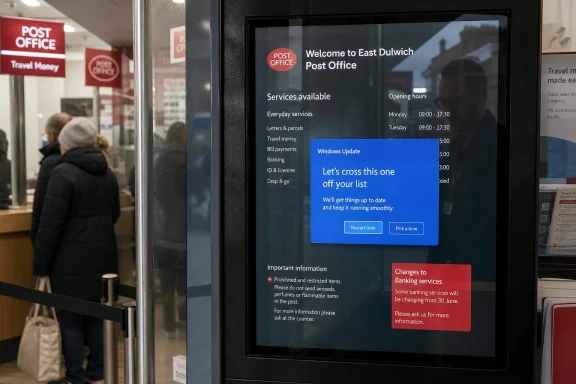
A public Post Office information screen in East Dulwich, London, was spotted displaying a Windows Update prompt on May 12, 2026, after the operating system surfaced its “Let’s cross this one off your list” message on signage meant for waiting customers. The gag writes itself, which is why The Register quite sensibly wrote it. But the useful lesson is not that Windows occasionally embarrasses its keepers in public. It is that unattended screens are only unattended when someone has done the engineering work to make them so.
The sight of Windows asking a Post Office queue when it would like to install an update is funny because it collapses two familiar frustrations into one frame. There is the institutional queue, a small civic ritual of waiting for a counter to free up. Then there is the Windows maintenance prompt, that other small ritual in which a machine asks for permission to do what everyone knows it must eventually do.
Digital signage is supposed to be ambient infrastructure. It should show opening hours, safety notices, adverts, service messages, or whatever local branch content has been scheduled for the day. The moment the operating system breaks through, the illusion fails: the screen is no longer a communications surface, but a PC with unfinished chores.
That distinction matters. A display in a home office can ask its owner for input because the owner is present, empowered, and probably holding a mouse. A display in a shop, post office, airport, clinic, school corridor, or train station has no such relationship with its audience. When Windows speaks to the queue, it is speaking to the wrong people.
Microsoft has long offered mechanisms for this kind of deployment: assigned access, kiosk mode, Edge full-screen signage experiences, policy-managed update rings, active hours, restart deadlines, write filters on IoT-oriented builds, and mobile device management controls through Intune or similar tooling. Those features do not eliminate operational work. They merely make it possible for administrators to turn a general-purpose PC into something closer to an appliance.
The Post Office screen, at least as described, appears to have been running ordinary Windows visibly enough for the update user experience to reach the public display layer. That does not necessarily mean the branch itself configured it badly; signage estates are often outsourced, inherited, cloned from old images, or maintained through a chain of contractors that turns “who owns this box?” into a surprisingly hard question. But the public result is the same. The endpoint was allowed to behave like a desktop.
That is the real bork. Not that Windows needed an update, but that the device’s maintenance state was allowed to become customer-facing content.
There are reasons for that persistence, and they are not all foolish. Windows has driver support, remote management familiarity, existing procurement channels, broad software compatibility, and a workforce that already knows how to troubleshoot it. If a signage vendor’s content player is a Windows app, or a branch estate already supports Windows endpoints, buying small Windows PCs and bolting them to the backs of screens can feel cheaper than building a separate embedded fleet.
The problem is that Windows brings its desktop assumptions along for the ride unless they are actively suppressed. It assumes there may be a user. It assumes notifications may be useful. It assumes updates may need negotiation. It assumes the graphical shell is a legitimate place to surface system state.
In a normal office, those assumptions are mostly reasonable. In public signage, they are liabilities. The device has one job, and the operating system should never compete with that job for attention.
The right answer is not “disable updates and hope nobody notices.” The right answer is maintenance that is scheduled, observable, reversible, and invisible to customers. If the public day ends at 5:30 p.m., the update process should have a defined window after closing. If the device must restart, the restart should happen before staff arrive or after the last customer leaves. If an update fails, the management platform should alert the operator rather than waiting for a member of the public to photograph the evidence.
This is especially important because signage devices live in a strange operational category. They are visible enough to embarrass an organization, but often too boring to receive the same care as tills, workstations, servers, or payment systems. They can remain powered on for months, connected to networks, running under shared accounts, and managed by exception rather than policy.
That makes them perfect vessels for neglected hygiene. The public prompt is merely the polite version of the failure. The impolite versions are expired certificates, browser errors, crashed players, exposed desktops, remote-access tools left open, or machines that drift so far out of patch that nobody wants to touch them.
On a public screen, the tone becomes absurd. The queue has no list. The customers cannot approve the update. The staff behind the counter may not control the signage. The person who can fix the issue may be in a remote operations center, a vendor ticket queue, or no longer employed by the company that deployed the system.
That mismatch is more than comic. It shows how consumer UX can leak into managed environments when devices are not correctly assigned a role. Public endpoints should not invite random humans into a maintenance decision. They should either do the work automatically under policy or suppress the prompt until an administrator handles it.
The update message is therefore a symptom of confused identity. The machine was physically deployed as signage, but behaviorally it still thought it was a PC waiting for its owner.
A mature signage endpoint should behave predictably from power-on to power-loss. It should automatically sign into the correct restricted account, launch only the intended application, recover if that application exits, hide the shell, prevent casual input, and report health remotely. If it needs updates, those updates should be governed by policy rather than by a dialog box addressed to passersby.
Windows can do much of this, but it rarely does it by accident. Assigned access and kiosk configurations need testing. Browser-based signage needs a plan for cached content, network loss, certificate changes, and captive portal weirdness. Update policies need to account for feature updates as well as monthly security updates. Screens need watchdog behavior, because “the app crashed at 9:02 a.m.” is not an acceptable discovery mechanism when the first observer is a customer.
The best kiosk systems are boring because someone invested in making them boring. The worst ones become public anthropology: a glimpse of the desktop beneath the institution.
But signage reverses that calculus. A device with no local user should not negotiate with the room. The risk of interruption is not that someone loses an unsaved spreadsheet; it is that the maintenance UI becomes the content. In that environment, a scheduled reboot at 3 a.m. is not rude. It is the entire point of management.
This is why Microsoft’s broad Windows strategy sometimes jars with specialized deployments. The company wants Windows to be adaptive: personal device, corporate endpoint, developer workstation, kiosk, cloud-managed fleet member, AI PC, and embedded-ish appliance. That breadth is commercially powerful, but it puts pressure on configuration. The same OS that politely asks a human to pick a restart time must also be capable of never asking a human anything.
When the wrong personality appears, the public blames Windows. Administrators know the more uncomfortable answer: the platform is flexible enough to let you build the wrong thing.
That visibility changes the risk calculation. Organizations often spend heavily protecting systems that process money or personal data, while signage is treated as peripheral. Yet the reputational damage from a public bork can be disproportionate to the technical severity. A Windows Update prompt in a Post Office queue is harmless in operational terms, but it tells every waiting customer that the estate is a little less controlled than the signage would like them to believe.
There is also a security subtext. If customers can see update prompts, they may eventually see other things: desktop names, software versions, browser tabs, remote access windows, file paths, or error messages that reveal backend services. Most such leaks are minor. Some are not. Public screens should be designed on the assumption that every pixel may be photographed.
That assumption leads to a simple rule. If an endpoint is public-facing, its failure modes are part of the product.
These incidents persist because the economics of signage reward “good enough” deployment. A screen that works 99 percent of the time may be considered successful until the 1 percent occurs in public. The vendor may provide the player software but not the endpoint lifecycle. The facilities team may own the screen, IT may own the network, marketing may own the content, and nobody may own the boring middle where updates, reboots, and health checks live.
Windows makes that fragmentation visible because its defaults are recognizable. A Linux crash, an Android signage error, or a proprietary player fault may be just as real, but Windows has a shared visual language. Everyone knows the prompt. Everyone knows the restart. Everyone knows the feeling of being asked by a machine to pause life for maintenance.
That familiarity is why the joke lands. It is also why the lesson should sting.
But the operating system choice is not a moral category. Non-Windows signage fails too. Thin appliances can go unpatched. Android devices can age out of vendor support. Linux boxes can be built by the one person who leaves. Browser-based players can break when a certificate, codec, JavaScript dependency, or authentication flow changes. The problem is not merely that Windows is too much OS. The problem is unmanaged generality.
Windows becomes a poor signage platform when it is treated as a cheap PC connected to a screen. It becomes a defensible signage platform when it is treated as a managed endpoint with a locked role, clear ownership, and a maintenance contract. The same is true of every alternative.
The better debate is not whether full Windows is overkill. It is whether the organization is willing to pay the operational cost of whatever platform it chooses. If the answer is no, the bork is only waiting for its moment.
That sounds simple, but many endpoint policies are designed around human workstations rather than public appliances. Active hours reduce surprise restarts while people are working, but they do not by themselves guarantee a clean signage maintenance cycle. Restart deadlines, update rings, deferral policies, wake timers, content player behavior, power settings, and monitoring all have to align.
A signage estate also needs exceptions. What happens if the branch powers screens off at the wall every night? What happens if the PC is behind the display and never wakes for its update window? What happens if a feature update leaves the content app incompatible? What happens if the machine is offline for three weeks and returns during business hours with a backlog of pending maintenance?
These are not exotic scenarios. They are the daily texture of distributed IT. A proper maintenance strategy assumes imperfect conditions and still prevents the operating system from making its problem public.
That ideal is not aesthetic fussiness. It is part of trust. Public systems ask people to accept that an institution is functioning: the counter system knows whose turn it is, the arrivals board knows the train, the clinic screen knows the appointment flow, the menu board knows the price. When the underlying computer intrudes, that confidence is weakened even if the service itself continues.
This is where small failures matter. A visible update prompt says, “This system is not being centrally controlled right now.” It may be a harmless message on an informational screen, but the human reaction is broader. If this screen is unmanaged, what else is unmanaged? If the public-facing layer is untidy, what does the private layer look like?
That inference may be unfair. It is also predictable. Public IT is judged by appearances because appearances are often all the public gets.
The administrator’s instinct is also to ask what else is true. Is the machine domain-joined or workgrouped? Is it managed by Intune, Group Policy, a vendor agent, or nothing at all? Does it have local admin credentials shared across branches? Is it running a supported Windows release? Are feature updates pinned? Is the signage app monitored? Is there a recovery image? Can anyone reach the box without sending a person to the site?
Those questions are why a trivial prompt becomes an IT governance story. Signage devices sit at the boundary between corporate endpoint management and physical estate management. When ownership is vague, the operating system becomes the messenger.
And as usual, the messenger chooses the worst possible time.
For Windows-heavy shops, the lesson is not to panic-buy a different signage stack. It is to decide whether public screens are endpoints, appliances, or vendor-managed black boxes — and then manage them consistently as one of those things. The ambiguous middle is where prompts breed.
Source: The Register Windows update prompt joins the Post Office queue
 The Public Screen Is Where Private Admin Debt Becomes Theater
The sight of Windows asking a Post Office queue when it would like to install an update is funny because it collapses two familiar frustrations into one frame. There is the institutional queue, a small civic ritual of waiting for a counter to free up. Then there is the Windows maintenance prompt, that other small ritual in which a machine asks for permission to do what everyone knows it must eventually do.Digital signage is supposed to be ambient infrastructure. It should show opening hours, safety notices, adverts, service messages, or whatever local branch content has been scheduled for the day. The moment the operating system breaks through, the illusion fails: the screen is no longer a communications surface, but a PC with unfinished chores.
That distinction matters. A display in a home office can ask its owner for input because the owner is present, empowered, and probably holding a mouse. A display in a shop, post office, airport, clinic, school corridor, or train station has no such relationship with its audience. When Windows speaks to the queue, it is speaking to the wrong people.
Windows Did Not Fail So Much as Escape Its Cage
It is tempting to frame this as Windows being Windows: too large, too chatty, too eager to insert itself into the day. There is truth in that, but it is not the whole truth. Modern Windows is perfectly capable of running a locked-down kiosk or signage endpoint when configured and managed with that role in mind.Microsoft has long offered mechanisms for this kind of deployment: assigned access, kiosk mode, Edge full-screen signage experiences, policy-managed update rings, active hours, restart deadlines, write filters on IoT-oriented builds, and mobile device management controls through Intune or similar tooling. Those features do not eliminate operational work. They merely make it possible for administrators to turn a general-purpose PC into something closer to an appliance.
The Post Office screen, at least as described, appears to have been running ordinary Windows visibly enough for the update user experience to reach the public display layer. That does not necessarily mean the branch itself configured it badly; signage estates are often outsourced, inherited, cloned from old images, or maintained through a chain of contractors that turns “who owns this box?” into a surprisingly hard question. But the public result is the same. The endpoint was allowed to behave like a desktop.
That is the real bork. Not that Windows needed an update, but that the device’s maintenance state was allowed to become customer-facing content.
Full-Fat Windows Keeps Winning Jobs It Was Never Born to Do
The Register reader’s observation that a “full-fat OS” feels excessive for a screen with a trivial function gets at a long-running industry compromise. If all a display must do is render a playlist, a webpage, or a video loop, then a lightweight embedded platform seems the obvious answer. Yet Windows keeps appearing behind menu boards, arrivals screens, ticket displays, waiting-room panels, and corporate lobby signage.There are reasons for that persistence, and they are not all foolish. Windows has driver support, remote management familiarity, existing procurement channels, broad software compatibility, and a workforce that already knows how to troubleshoot it. If a signage vendor’s content player is a Windows app, or a branch estate already supports Windows endpoints, buying small Windows PCs and bolting them to the backs of screens can feel cheaper than building a separate embedded fleet.
The problem is that Windows brings its desktop assumptions along for the ride unless they are actively suppressed. It assumes there may be a user. It assumes notifications may be useful. It assumes updates may need negotiation. It assumes the graphical shell is a legitimate place to surface system state.
In a normal office, those assumptions are mostly reasonable. In public signage, they are liabilities. The device has one job, and the operating system should never compete with that job for attention.
Patch Management Is Not Optional Just Because the Screen Shows Posters
There is an equal and opposite mistake to laughing at the update prompt: wishing the screen would never update at all. That is how low-stakes signage becomes high-risk infrastructure. A Windows box connected to a network, even if it only displays queue information or promotional slides, is still a computer with an attack surface.The right answer is not “disable updates and hope nobody notices.” The right answer is maintenance that is scheduled, observable, reversible, and invisible to customers. If the public day ends at 5:30 p.m., the update process should have a defined window after closing. If the device must restart, the restart should happen before staff arrive or after the last customer leaves. If an update fails, the management platform should alert the operator rather than waiting for a member of the public to photograph the evidence.
This is especially important because signage devices live in a strange operational category. They are visible enough to embarrass an organization, but often too boring to receive the same care as tills, workstations, servers, or payment systems. They can remain powered on for months, connected to networks, running under shared accounts, and managed by exception rather than policy.
That makes them perfect vessels for neglected hygiene. The public prompt is merely the polite version of the failure. The impolite versions are expired certificates, browser errors, crashed players, exposed desktops, remote-access tools left open, or machines that drift so far out of patch that nobody wants to touch them.
The Queue Saw a Consumer Conversation on an Enterprise Device
The phrase “Let’s cross this one off your list” is classic Microsoft UX: conversational, lightly encouraging, and designed to make maintenance sound like productivity. On a personal laptop, that tone is merely divisive. Some users prefer friendliness; others would rather the operating system stop pretending to be a life coach.On a public screen, the tone becomes absurd. The queue has no list. The customers cannot approve the update. The staff behind the counter may not control the signage. The person who can fix the issue may be in a remote operations center, a vendor ticket queue, or no longer employed by the company that deployed the system.
That mismatch is more than comic. It shows how consumer UX can leak into managed environments when devices are not correctly assigned a role. Public endpoints should not invite random humans into a maintenance decision. They should either do the work automatically under policy or suppress the prompt until an administrator handles it.
The update message is therefore a symptom of confused identity. The machine was physically deployed as signage, but behaviorally it still thought it was a PC waiting for its owner.
Kiosk Mode Is a Discipline, Not a Checkbox
A common mistake in retail and public-sector IT is treating kiosk mode as a final setting rather than an operating model. Locking a device to a browser window or signage player is only the visible part of the job. The harder work is deciding how the machine boots, authenticates, updates, recovers, logs, reports health, and fails safely.A mature signage endpoint should behave predictably from power-on to power-loss. It should automatically sign into the correct restricted account, launch only the intended application, recover if that application exits, hide the shell, prevent casual input, and report health remotely. If it needs updates, those updates should be governed by policy rather than by a dialog box addressed to passersby.
Windows can do much of this, but it rarely does it by accident. Assigned access and kiosk configurations need testing. Browser-based signage needs a plan for cached content, network loss, certificate changes, and captive portal weirdness. Update policies need to account for feature updates as well as monthly security updates. Screens need watchdog behavior, because “the app crashed at 9:02 a.m.” is not an acceptable discovery mechanism when the first observer is a customer.
The best kiosk systems are boring because someone invested in making them boring. The worst ones become public anthropology: a glimpse of the desktop beneath the institution.
Microsoft’s Dilemma Is That Windows Must Be Both Appliance and Interrupter
Microsoft sits in an awkward position here. Windows is expected to be secure by default, which means updates must keep moving. Windows is also expected to be respectful of user work, which means restarts and feature changes cannot simply happen without warning in every context. The prompt exists because, on many PCs, a forced reboot at the wrong moment is worse than a nag.But signage reverses that calculus. A device with no local user should not negotiate with the room. The risk of interruption is not that someone loses an unsaved spreadsheet; it is that the maintenance UI becomes the content. In that environment, a scheduled reboot at 3 a.m. is not rude. It is the entire point of management.
This is why Microsoft’s broad Windows strategy sometimes jars with specialized deployments. The company wants Windows to be adaptive: personal device, corporate endpoint, developer workstation, kiosk, cloud-managed fleet member, AI PC, and embedded-ish appliance. That breadth is commercially powerful, but it puts pressure on configuration. The same OS that politely asks a human to pick a restart time must also be capable of never asking a human anything.
When the wrong personality appears, the public blames Windows. Administrators know the more uncomfortable answer: the platform is flexible enough to let you build the wrong thing.
The Cheapest Screen in the Estate Can Become the Most Visible Failure
Public display failures have a peculiar afterlife. A server alert goes to a dashboard. A laptop crash annoys one worker. A signage malfunction gets photographed, posted, mocked, and remembered. The screen’s job is communications, so when it fails, it communicates failure.That visibility changes the risk calculation. Organizations often spend heavily protecting systems that process money or personal data, while signage is treated as peripheral. Yet the reputational damage from a public bork can be disproportionate to the technical severity. A Windows Update prompt in a Post Office queue is harmless in operational terms, but it tells every waiting customer that the estate is a little less controlled than the signage would like them to believe.
There is also a security subtext. If customers can see update prompts, they may eventually see other things: desktop names, software versions, browser tabs, remote access windows, file paths, or error messages that reveal backend services. Most such leaks are minor. Some are not. Public screens should be designed on the assumption that every pixel may be photographed.
That assumption leads to a simple rule. If an endpoint is public-facing, its failure modes are part of the product.
The Post Office Example Is Funny Because It Is Ordinary
The East Dulwich display is not a bizarre edge case. Anyone who has spent time in airports, shopping centers, fast-food restaurants, GP surgeries, cinemas, schools, or transport hubs has seen the genre: a Windows desktop peeking out from behind a menu board, a browser crash on a departures screen, a media player control bar over an advert, a licensing pop-up on a lobby display, or the immortal blue screen where a timetable should be.These incidents persist because the economics of signage reward “good enough” deployment. A screen that works 99 percent of the time may be considered successful until the 1 percent occurs in public. The vendor may provide the player software but not the endpoint lifecycle. The facilities team may own the screen, IT may own the network, marketing may own the content, and nobody may own the boring middle where updates, reboots, and health checks live.
Windows makes that fragmentation visible because its defaults are recognizable. A Linux crash, an Android signage error, or a proprietary player fault may be just as real, but Windows has a shared visual language. Everyone knows the prompt. Everyone knows the restart. Everyone knows the feeling of being asked by a machine to pause life for maintenance.
That familiarity is why the joke lands. It is also why the lesson should sting.
The Real Choice Is Not Windows or Something Else
Some readers will argue that Windows should not be used for signage at all. In narrow cases, they are right. If the device only needs to loop content or render a cloud playlist, a purpose-built player, locked-down Android device, ChromeOS-style appliance, or embedded Linux box may be simpler and less prone to desktop leakage.But the operating system choice is not a moral category. Non-Windows signage fails too. Thin appliances can go unpatched. Android devices can age out of vendor support. Linux boxes can be built by the one person who leaves. Browser-based players can break when a certificate, codec, JavaScript dependency, or authentication flow changes. The problem is not merely that Windows is too much OS. The problem is unmanaged generality.
Windows becomes a poor signage platform when it is treated as a cheap PC connected to a screen. It becomes a defensible signage platform when it is treated as a managed endpoint with a locked role, clear ownership, and a maintenance contract. The same is true of every alternative.
The better debate is not whether full Windows is overkill. It is whether the organization is willing to pay the operational cost of whatever platform it chooses. If the answer is no, the bork is only waiting for its moment.
Active Hours Are Not a Maintenance Strategy
One of the most revealing details in the Register piece is the obviousness of the schedule problem. A Post Office branch has opening hours. It also has closed hours. A device that serves customers during the former should perform disruptive maintenance during the latter.That sounds simple, but many endpoint policies are designed around human workstations rather than public appliances. Active hours reduce surprise restarts while people are working, but they do not by themselves guarantee a clean signage maintenance cycle. Restart deadlines, update rings, deferral policies, wake timers, content player behavior, power settings, and monitoring all have to align.
A signage estate also needs exceptions. What happens if the branch powers screens off at the wall every night? What happens if the PC is behind the display and never wakes for its update window? What happens if a feature update leaves the content app incompatible? What happens if the machine is offline for three weeks and returns during business hours with a backlog of pending maintenance?
These are not exotic scenarios. They are the daily texture of distributed IT. A proper maintenance strategy assumes imperfect conditions and still prevents the operating system from making its problem public.
The Best Public Computers Pretend Not to Be Computers
There is a design ideal for kiosks and signage: the machine should appear to have no inner life. It may be running Windows, Linux, Android, ChromeOS, or something stranger, but the public should never be invited behind the curtain. No taskbar. No notifications. No update prompts. No cursor wandering over the content. No desktop wallpaper. No file explorer. No setup wizard. No sad little dialog waiting for a click.That ideal is not aesthetic fussiness. It is part of trust. Public systems ask people to accept that an institution is functioning: the counter system knows whose turn it is, the arrivals board knows the train, the clinic screen knows the appointment flow, the menu board knows the price. When the underlying computer intrudes, that confidence is weakened even if the service itself continues.
This is where small failures matter. A visible update prompt says, “This system is not being centrally controlled right now.” It may be a harmless message on an informational screen, but the human reaction is broader. If this screen is unmanaged, what else is unmanaged? If the public-facing layer is untidy, what does the private layer look like?
That inference may be unfair. It is also predictable. Public IT is judged by appearances because appearances are often all the public gets.
The Administrator’s Version of the Joke Is Less Funny
For sysadmins, the East Dulwich screen is funny in the way a smoke alarm chirping in a locked cupboard is funny. It suggests a mundane chain of preventable causes: a device missed its maintenance window, a notification policy was not suppressed, a kiosk shell was incomplete, a restart was pending, or a content player failed to stay on top of the OS. None of these are glamorous problems. All of them are the kind that consume disproportionate time.The administrator’s instinct is also to ask what else is true. Is the machine domain-joined or workgrouped? Is it managed by Intune, Group Policy, a vendor agent, or nothing at all? Does it have local admin credentials shared across branches? Is it running a supported Windows release? Are feature updates pinned? Is the signage app monitored? Is there a recovery image? Can anyone reach the box without sending a person to the site?
Those questions are why a trivial prompt becomes an IT governance story. Signage devices sit at the boundary between corporate endpoint management and physical estate management. When ownership is vague, the operating system becomes the messenger.
And as usual, the messenger chooses the worst possible time.
The Queue Incident Leaves a Practical Checklist Behind
The Post Office screen should not be overread as a disaster. It is a small, comic failure: a public display momentarily conscripted into Microsoft’s update choreography. But small failures are useful because they reveal the assumptions buried in everyday systems.For Windows-heavy shops, the lesson is not to panic-buy a different signage stack. It is to decide whether public screens are endpoints, appliances, or vendor-managed black boxes — and then manage them consistently as one of those things. The ambiguous middle is where prompts breed.
- Public-facing Windows displays should run in a locked-down kiosk or assigned-access configuration that prevents system UI from becoming visible content.
- Update installation and restarts should be scheduled for known closed hours, with deadlines and monitoring rather than customer-facing prompts.
- Signage devices should have named ownership across IT, facilities, vendors, and content teams so that maintenance failures do not fall between contracts.
- Health monitoring should detect crashed players, pending restarts, offline devices, and update failures before members of the public do.
- Platform choice should be based on lifecycle management, security support, and recoverability, not simply on the lowest-cost box that can drive an HDMI port.
- Every public screen should be treated as photographable infrastructure, because eventually it will be.
Source: The Register Windows update prompt joins the Post Office queue
