

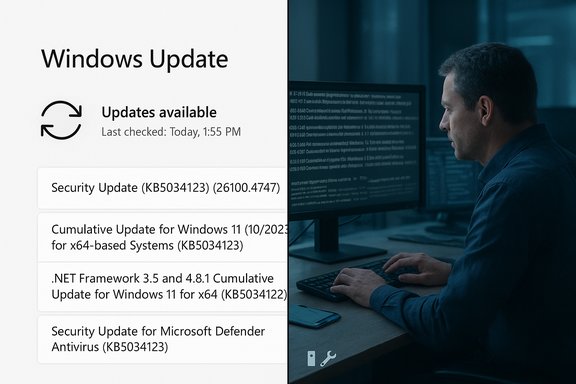
Microsoft’s server-side change to how Windows Update displays titles — dropping the YYYY‑MM date prefix and the word Cumulative from monthly update names — is already live and creating noise across IT teams and enthusiast communities. The company published the change as an update to Windows Update’s presentation on October 29, 2025, replacing verbose, information-rich titles such as “2025‑10 Cumulative Update for Windows 11, version 25H2 … (KB5066835) (26200.6899)” with shorter labels like Security Update (KB5034123) (26100.4747) and Preview Update (KB5062660) (26100.4770). The simplification is intended to improve readability for general users, but it removes cues that many administrators and power users rely on for rapid triage, compliance, and automation — and that loss of metadata is already producing real operational friction.
Microsoft’s update naming convention has long combined human-readable context (release month/year, OS version, and whether an update is cumulative or a preview) with machine identifiers (KB numbers and build versions). That combination helped administrators and support staff instantly determine which update a device had applied and whether it matched the organization’s patching posture.
Expect these near‑term outcomes:
The practical resolution is not an either/or: Microsoft can and should retain simplified labels for end users while providing clear, accessible metadata and optional verbose displays for administrators. Where that balance is struck will determine whether the change is seen as a welcome modernization or as an avoidable regression for IT operations.
Microsoft’s simplified Windows Update titles deliver a cleaner, more accessible UI for everyday users, but they also remove human‑friendly cues that IT professionals have relied on for years. The shortest path back to operational stability is for administrators and tooling vendors to adapt quickly — use KB IDs as the single source of truth, update automation to pull authoritative metadata, and press Microsoft for optional verbosity or richer machine‑readable metadata in the UI. That approach preserves the user experience benefits while restoring the transparency and traceability that enterprise environments require.
Source: Windows Latest Windows 11 update names got simpler, drops YYYY-MM. Now, IT admins are going mad
 Background
Microsoft’s update naming convention has long combined human-readable context (release month/year, OS version, and whether an update is cumulative or a preview) with machine identifiers (KB numbers and build versions). That combination helped administrators and support staff instantly determine which update a device had applied and whether it matched the organization’s patching posture.- Historically, monthly updates carried explicit date prefixes like YYYY‑MM and often the word Cumulative, for example: 2025‑10 Cumulative Update for Windows 11, version 25H2… (KB5066835) (26200.6899).
- Optional late‑month previews used the same pattern but included Preview in the title so they could be differentiated from Insider builds or feature updates.
- Those titles made it easy to eyeball a device’s update history, correlate to monthly Patch Tuesday timelines, and confirm the exact target OS version.
What changed — concrete examples
Microsoft’s examples in the announcement demonstrate the new pattern. The notable elements retained are the KB number and the build/version identifier; removed elements include date prefixes and architecture/version text. Example mappings from the new scheme:- Monthly security updates → Security Update (KB5034123) (26100.4747)
- Monthly preview (non‑security) → Preview Update (KB5062660) (26100.4770)
- .NET Framework security → .NET Framework Security Update (KB5056579)
- Driver updates → Logitech Driver Update (123.331.1.0)
- AI component updates → Phi Silica AI Component Update (KB5064650) (1.2507.793.0)
Why Microsoft made the change
The stated goals are straightforward:- Improved readability in the Windows Settings UI, particularly on smaller screens and for users unfamiliar with technical nomenclature.
- Consistency across update categories (OS, .NET, drivers, AI components) so titles match modern UI constraints and accessibility guidelines.
- Predictability for OEMs and partners integrating update displays into device management or end‑user help guidance.
Why this matters to IT administrators — immediate pain points
For enterprise and managed environments, those removed elements were not ornamental — they were operational. The new naming creates multiple practical issues:- Loss of quick visual context: Without YYYY‑MM and the Cumulative tag, a technician looking at a device’s Update History can no longer instantly know if the update is the late‑month cumulative preview, the regular Patch Tuesday cumulative, or a different servicing classification.
- Troubleshooting friction: Technicians troubleshooting a broken patch often rely on the title to determine whether the device missed a specific month’s rollup or installed the wrong release. This step now requires extra lookups by KB ID.
- Automation fragility: Scripts and reporting systems that parse title strings for compliance dashboards, alerts, or remediation triggers can break when the expected textual tokens disappear.
- Audit and compliance reporting: Regulatory or internal audit reports that rely on human‑readable reconciliation (e.g., “Devices patched for October 2025 monthly rollup”) face additional manual verification steps.
- Ambiguity around “Preview”: The new Preview Update label collides with Insider Preview nomenclature, increasing the chance helpdesk staff or users will misclassify an update as a beta or unstable build when it may simply be the standard optional cumulative preview.
Impact on end users and helpdesk workflows
The simplified titles make sense for many individual users who only need a short explanation of whether a patch is a security update or a driver. However, simpler for some is less informative for others.- Basic users will see shorter labels and fewer technical details — which reduces UI clutter and the likelihood of misreading architecture or version strings.
- Helpdesk agents now must train for two lookups instead of one: the visible short title and the underlying KB/build metadata.
- Confusion between Preview Update and Insider Preview is likely to generate extra calls from worried users who think their device is running a pre‑release build.
How enterprise tooling and distribution channels are affected
Microsoft’s announcement clarifies an important distinction: the simplified labels are applied client‑side in Settings and Update History, while distribution channels used by IT teams retain richer metadata.- Microsoft Update Catalog and WSUS: Titles in these channels will mostly remain unchanged, preserving the YYYY‑MM and cumulative prefixes for administrators who use those services to deploy updates.
- Windows Update (client UI): The client UI displays the simplified titles. That’s a server‑side change and cannot currently be disabled on consumer devices.
- Management tools (SCCM, Intune, Patch Manager): Tools that query update metadata should rely on KB IDs, update GUIDs, and build numbers returned by management APIs rather than the client UI’s human label. Microsoft Graph and Update Catalog metadata remain authoritative and machine‑readable.
Strengths of the change
- Cleaner UI for general users: Shorter labels reduce confusion for non‑technical users and align with modern UX principles.
- Accessibility and consistency: A predictable label format across OS, .NET, drivers, and AI components can simplify localizations and assistive technology rendering.
- Preserved machine identifiers: KB numbers and build/version identifiers remain visible, so no critical identifiers were removed entirely.
- Targeted impact: Feature updates and Update Catalog/WSUS titles remain largely intact, which mitigates some enterprise concerns.
Risks and unintended consequences
- Increased admin overhead: More time spent cross‑referencing KB IDs and builds to establish timeline and patch state.
- Automation and monitoring breakage: Scripts that parsed title text will fail or produce false positives/negatives until rewritten.
- Helpdesk confusion and delays: Ambiguous Preview labeling increases call volume and resolution time.
- Miscommunication during incidents: When rolling back or mitigating a problematic update, lack of date/version context in the UI can slow coordination.
- Potential audit friction: Compliance checks that rely on human‑readable reconciliation will need updated SOPs and more robust machine‑assisted reporting.
Immediate mitigation steps for administrators
Adopt the following prioritized actions to reduce operational disruption:- Use KB numbers and build/version identifiers as the canonical keys in scripts, dashboards, and reports. Replace title‑text parsing with metadata lookups.
- Query authoritative programmatic sources for update metadata:
- Microsoft Update Catalog (standalone packages and metadata).
- Microsoft Learn / Windows release health pages for monthly mapping of builds to release months.
- Microsoft Graph Update APIs and Windows Update for Business reporting for device‑level status.
- Update internal runbooks and knowledge bases to map KB IDs to calendar months and to document the new short title patterns.
- Modify detection rules in monitoring tools to match by KB ID or update GUID instead of title tokens.
- Communicate changes to helpdesk and frontline support teams, provide an easy KB‑to‑month lookup cheat sheet, and add KB lookup steps to triage scripts.
- Consider temporary dashboards or scripts that reconstruct the original verbose title format (e.g., “2025‑10 Cumulative Update… (KB5066835)”) by combining KB/build metadata with a local mapping table for historical months.
Recommended changes Microsoft should consider
To achieve the intended readability goals without the operational tradeoffs, Microsoft could adopt several low‑friction improvements:- Preserve a cumulative flag in the short title, for example Security Update (Cumulative) (KBxxxxx) (build). That single token resolves a major ambiguity.
- Offer an optional date element in the UI for admin or corporate devices (e.g., Settings > Windows Update > Advanced) that toggles verbose mode for organizations.
- Expose explicit, easily queryable metadata fields through APIs and the Update History UI (for example, a clickable KB ID that opens a compact panel showing release month, target OS version, and cumulative/preview classification).
- Provide a downloadable, machine‑readable monthly mapping file (KB → month/year → build → cumulative flag) for enterprise patch management tools to import automatically.
- Add a “Why this was simplified” explanatory link directly in the Update History UI that points to the mapping and troubleshooting guidance for administrators.
Cross‑platform and third‑party implications
- Third‑party update management and inventory tools need to update heuristics and parsing logic to rely on KB IDs and build numbers rather than titles.
- Documentation and training content should be updated to teach staff to match KB IDs with month/year releases.
- Legal and compliance teams should verify that audit evidence (logs and reports) remains intact and sufficient for regulatory needs if UI titles change.
What to expect next — Microsoft’s stance and community reaction
Microsoft rolled out the change on October 29, 2025, and positioned it as a readability and consistency improvement. The company has welcomed feedback, and independent reporting has already surfaced both favorable consumer responses and strong objections from enterprise administrators.Expect these near‑term outcomes:
- Enterprise tooling vendors and system administrators will publish guidance updates and hotfixes for their parsing logic.
- Microsoft may iterate on the approach based on feedback; the company historically monitors feedback loops and can refine implementation details.
- Users will see the change in Settings > Windows Update immediately, while catalog and WSUS titles remain more descriptive for managed deployments.
Final analysis — balancing UX and operational transparency
This change highlights a perennial tension between consumer UX simplicity and enterprise operational needs. Microsoft’s design choice to simplify titles responds to legitimate readability concerns for the broad audience that uses Windows Update. The decision is defensible for consumer UX. However, the execution — removing explicit date markers and the Cumulative token — shifts the burden of interpretation from a glanceable UI to a manual metadata lookup workflow. That shift imposes measurable costs on administrators and management tools that have relied on the old textual signals.The practical resolution is not an either/or: Microsoft can and should retain simplified labels for end users while providing clear, accessible metadata and optional verbose displays for administrators. Where that balance is struck will determine whether the change is seen as a welcome modernization or as an avoidable regression for IT operations.
Quick checklist for IT teams (actionable, immediate)
- Do not rely on the Windows Update client title for compliance checks. Use KB/build identifiers.
- Update automated parsing rules in scripts and dashboards to match by KB number or GUID.
- Add a KB‑to‑month mapping table to internal documentation and automate its refresh from authoritative release health pages.
- Train helpdesk staff on the difference between Preview Update (optional cumulative preview) and Insider Preview Feature Update.
- Monitor vendor and community guidance for updated detection scripts and management pack updates.
Microsoft’s simplified Windows Update titles deliver a cleaner, more accessible UI for everyday users, but they also remove human‑friendly cues that IT professionals have relied on for years. The shortest path back to operational stability is for administrators and tooling vendors to adapt quickly — use KB IDs as the single source of truth, update automation to pull authoritative metadata, and press Microsoft for optional verbosity or richer machine‑readable metadata in the UI. That approach preserves the user experience benefits while restoring the transparency and traceability that enterprise environments require.
Source: Windows Latest Windows 11 update names got simpler, drops YYYY-MM. Now, IT admins are going mad
