

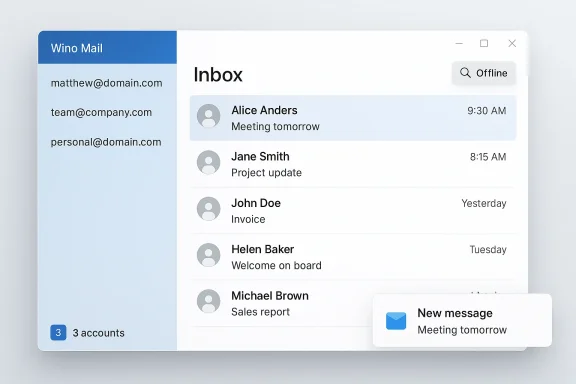
Wino Mail’s arrival is the kind of small, practical victory Windows users rarely get: a native, open‑source recreation of the old Mail & Calendar app that just works — fast, uncluttered, and familiar — and it’s being built and maintained by a single developer rather than Microsoft. //github.com/bkaankose/Wino-Mail))
Microsoft’s consolidation of Windows’ native mail apps into the “New Outlook” — a WebView2-wrapped client with ads and bloat for many users — left a noticeable hole in the ecosystem: the fast, simple Mail app that shipped with Windows for years is effectively deprecated and, in many installs, that void stepped Wino Mail: an intentionally minimal, native Windows client that aims to replicate the experience millions liked from the original Mail & Calendar apps. The project is published on GitHub and distributed as a stable build through the Microsoft Store, with beta releases available as side-loaded .msixbundle packages for advanced users. (github.com) (winomail.app)
This article tests the key claims around Wino Mail, explains how it works technically, evaluates the tradeoffs of its licensing and funding model, and places it in the broader context of Windows mail clients and user expectations.
Key factual takeaways:
That focus yields immediate benefits:
This raises a few practical and ethical questions, which I’ll address in turn.
Technical features and protocols supported:
That said, the three‑account free cap and the Microsoft Store‑centric convenience model will leave some users unhappy. If you rely on more than three addresses, want enterprise support, or prefer a decades‑old community project with a donation funding model, Thunderbird or a paid commercial client will remain compelling options.
If you want a small, fast, native mail client that feels like the Windows app you used to trust, try Wino Mail — test it with up to three accounts on the free tier, and if it fits, the one‑time unlock is a reasonable trade to support continued maintenance and easy updates via the Microsoft Store. (github.com)
Wino Mail is both a symptom and a solution: a symptom of Microsoft’s shifting app strategy, and a solution for users who simply want their mail client to be quick, quiet, and predictable. If community demand and modest user contributions keep the project funded, Wino could become the default “small‑mail” experience Windows sorely needs. (winomail.app)
Source: MUO Outlook on Windows is finally fixed — and it’s not from Microsoft
 Background
Microsoft’s consolidation of Windows’ native mail apps into the “New Outlook” — a WebView2-wrapped client with ads and bloat for many users — left a noticeable hole in the ecosystem: the fast, simple Mail app that shipped with Windows for years is effectively deprecated and, in many installs, that void stepped Wino Mail: an intentionally minimal, native Windows client that aims to replicate the experience millions liked from the original Mail & Calendar apps. The project is published on GitHub and distributed as a stable build through the Microsoft Store, with beta releases available as side-loaded .msixbundle packages for advanced users. (github.com) (winomail.app)This article tests the key claims around Wino Mail, explains how it works technically, evaluates the tradeoffs of its licensing and funding model, and places it in the broader context of Windows mail clients and user expectations.
What Wino Mail actually is — and isn’t
Wino Mail is not a Microsoft product: it’s an independent, open‑source project whose stated goal is to reproduce the classic Windows Mail & Calendar experience and then evolve it conservatively. The GitHub repository lists the project as a clone of the built‑in Mail & Calendars app and makes the source code publicly available under GPL‑3.0. (github.com)Key factual takeaways:
- Wino Mail is a native Windows app, primarily written in C# and using Windows UI stacks familiar to UWP/WinUI developers. (github.com)
- Stable releases are published to the Microsoft Store; beta builds are provided via GitHub Releases as side-loadable .msixbundle files. (github.com)
- The app’s homepage and README advertise a lean, privacy-focused design intended to mirror the original Mail UX rather than expand it into a heavyweight platform. (winomail.app)
Why the Windows Mail clone approach matters
The case for "bring back the old app"
Many Windows users didn’t ask for a feature‑race; they wanted an email client that opened quickly, kept local caches sensible, and let them switch between accounts without a browser-like feel. Wino Mail explicitly targets that mental model: simple account handling, offline search, and toast notifications with background sync, just like the old Mail app. (github.com)That focus yields immediate benefits:
- Responsiveness: native UWP/WinUI elements and a C# codebase (rather than Electron/Node) translate into lower memory usage and faster launch times for many workloads. (github.com)
- Predictable privacy posture: Wino advertises local data handling and no telemetry akin to the original Mail app philosophy, which appeal users who distrust cloud‑backed “helpful” features. (winomail.app)
- Low complexity: fewer moving parts means fewer opportunities for breakage when Windows updates arrive — a practical advantage after the Mail/Outlook transition chaos.
Who benefits most
- Casual users with up to three email accounts (personal, work, secondary) who want a clean mail experience.
- Users who prefer native Windows UI and low resource consumption.
- Non‑technical users who want an app that behaves like the Mail app they already know.
The account‑limit controversy: fact, rationale, and implications
One of the loudest objections to Wino Mail is its built‑in free tier limit: you can add up to three accounts without paying; unlocking an Unlimited Accounts add‑on is a one‑time purchase advertised in the app (roughly USD $9.99 / €9.99 depending on store region). This is explicitly mentioned in the project’s README and is visible in multiple coverage pieces and community threads. (github.com)This raises a few practical and ethical questions, which I’ll address in turn.
Is it “really open‑source” if an app charges?
Yes — and the community needs to be precise about definitions. The code for Wino Mail is published under GPL‑3.0 on GitHub, and the repository provides instructions to build and install the app yourself. That means, in principle, anyone can clone the repo, remove the account limit, compile, and sideload their own build. The developer’s fees apply to the convenience of a maintained Microsoft Store package and in‑app unlock for lifetime use. Those are two different value propositions: source freedom versus distribution convenience. (github.com)Why charge at all — and why a one‑time fee?
The developer’s README explains the fee as a way to cover packaging, store publishing, and ongoing maintenance costs; the purchase unlock is sold as a lifetime one‑time payment rather than a subscription. That model is uncommon among open‑source desktop apps but is not without precedent: it pays for practical work (packaging, updates through an official channel, support for a single maintainer)://github.com/bkaankose/Wino-Mail))How big a deal is a three‑account cap?
It depends on the user:- For many, three accounts is sufficient. The typical personal user runs one primary and maybe one or two secondary addresses. In that case, the free tier is functionally complete.
- Power users, consultants, and email “hoarders” who manage many addresses will find the limit constraining and may prefer fully free alternatives like Thunderbird or paid clients with different licensing.
Is the fee fair?
From a pragmatic standpoint, the fee — a one‑time unlock in single digits — is modest compared with the recurring costs of commercial alternatives. It’s best framed as an optional donation that buys convenience and a curated, signed Store package. From a free‑software purist vantage point, any feature gating feels off; but technically, the code is still open and modifiable. The key is transparency: the README clearly discloses the unlock mechanic, which is better than surprising users post‑install. (github.com)Under the hood: architecture, protocols, and limits
Wino Mail’s repository shows a modular structure with packages for authentication, mail processing, calendar integration, and packaging. The codebase is overwhelmingly C#, with UWP/WinUI components and .NET dependencies, indicating a native Windows implementation rather than a web wrapper. That matters for performance and system integration. (github.com)Technical features and protocols supported:
- API integration for Outlook and Gmail: For those providers that offer modern OAuth flows and APIs. (github.com)
- IMAP / SMTP support: For standard custom mail servers — the baseline requirement for any serious desktop mail client. (github.com)
- Offline search and background sync / toast notifications: Core UX expectations that the app intends to satisfy. (github.com)
- The repo and project documentation emphasize local data storage and a small telemetry footprint, but open‑source code presence is not a substitute for audited security. Users relying on advanced threat models should treat the app like any community project: inspect, test, and isolate where necessary. (github.com)
Privacy and trust: what users should verify
Wino Mail advertises that your data “stays on your device” and that the app is optimized for privacy. That’s a good baseline claim, but responsible scrutiny requires a few checks:- Read the GitHub README and license to confirm data handling claims and whether any server components exist. The repository includes a server component in the tree (Wino.Server), so users should check how account linking and sync operate if they elect to use any hosted features. (github.com)
- Verify store permissions before installing: Microsoft Store listings list what capabilities the app requests; check for network, background tasks, and notification capabilities and weigh them against your risk tolerance. (winomail.app)
- If maximum privacy is required, consider building from source and sideloading, or using a hardened client like Thunderbird that has a long, independent pedigree and established donation/support models. (github.com)
The distribution story: Microsoft Store vs GitHub side‑loads
Wino Mail’s distribution strategy is pragmatic:- Microsoft Store for stable channel: Provides convenience, automatic updates, and a signed package tied to a Microsoft account. The README explicitly states stable releases will always be distributed on the Microsoft Store and that the Unlimited Accounts add-on is available as an in‑app purchase. (github.com)
- GitHub Releases for beta builds: For advanced users who want the latest changes before they’re polished; these are side‑loadable .msixbundle files. The README contains side‑load installation instructions and a cautio be ahead of the released version. (github.com)
- The Microsoft Store package offers the easiest path for mainstream users but ties purchases and updates to Microsoft’s store infrastructure (and a Microsoft account) — something privacy-conscious users or those in restricted environments may avoid. (github.com)
- Advanced users and enterprises can still consume the app via GitHub, but doing so requires manual installation and acceptance of beta risk. (github.com)
Alternatives and where Wino Mail fits in the laopping for a mail client on Windows, your major choices break down like this:
- Outlook (New Outlook): Feature-rich, integrated with Microsoft 365, but heavier and ad‑supported on the free tier for some users. Appeals to enterprise and power users.
- Mozilla Thunderbird: Mature, free, and highly configurable. Lacks the built-in Windows Mail UX but is completely free with donation-based funding. Great for heavy multi‑account users and those who want established stability.
- Mailspring, Mailbird, eM Client, etc.: Mixed models — some freemium, some paid, some proprietary — offering different balances of features and convenience.
- Wino Mail: The place to go if you want the old Windows Mail experience recreated natively, with modern provider support and a lightweight footprint. It’s especially compelling for users who prefer the Windows Mail UI and have simple to moderate account needs. (github.com)
Strengths, weaknesses, and risk checklist
Strengths
- Native performance and UX: A true Windows native codebase delivers snappy launches and fluid animation versus web-wrapped competitors. (github.com)
- Open source: Code is auditable and forkable under GPL‑3.0. That matters where vendor lock‑in or closed‑source telemetry is a concern. (github.com)
- Clear, minimal design philosophy: The app does what Mail used to do well, without feature creep. (winomail.app)
Weaknesses / Risks
- Three‑account free limit: For people with many addresses this is a practical blocker and a potential friction point for adoption. The unlock is a small one‑time payment but remains an ideological sticking point for some free software advocates. (github.com)
- Single‑maintainer project risks: A one‑person or small‑team cadence can mean slower patching, delayed compatibility work after Windows updates, or potential abandonment — even if code is available for others to continue the project. (github.com)
- Third‑party provider quirks: API changes at Gmail, Outlook, or other providers could break sign‑in or sync flows; Wino Mail’s README and issue tracker suggest active work, but users should be mindful that interoperability maintenance is continuous. (github.com)
- Do you have more than three accounts? If so, plan to pay or use a different client. (github.com)
- Do you require enterprise support SLAs? Wino isn’t an enterprise product with vendor support; it’s community‑driven.
- Are you comfortable with Microsoft Store distribution and a Microsoft account for purchases? If ne‑load from GitHub. (github.com)
How to evaluate Wino Mail yourself (practical steps)
- Install the stable Microsoft Store build to get the signed, auto‑updating experience. Review the store permissions before you grant them. (winomail.app)
- Test with one or two accounts first — especially if you use OAuth providers like Gmail or Outlook.com — and verify background sync, notifications, and offline search meet your needs. (github.com)
- If you rely on many accounts, test the behavior up to three accounts to confirm your workflows still work; then decide if the one‑time unlock is worthwhile. (github.com)
- If you want absolute control or worry about future abandonment, consider cloning and compiling the project from GitHub and maintaining your own signed build. That’s more work but is possible because the source is GPL‑3.0. (github.com)
The broader significance: small projects, big user needs
Wino Mail is a reminder of two enduring truths in the Windows ecosystem:- People value small, well‑crafted system apps that “just work.” Heavyweight all‑in‑one products and web-wrapped clients do not always match that need.
- Open‑source projects can meaningfully fill gaps left by large vendors — but they need sustainable funding models if they’re to be reliable long term. Wino’s approach — open source code with a modest, one‑time Store purchase for convenience — is one pragmatic answer to that challenge. ([github.com](GitHub - bkaankose/Wino-Mail: Built-in Mail & Calendars app clone for Windows. succeeds (moderate fees for convenience + public source), it could become a template: smaller devs shipping open core or open source apps with optional paid conveniences, striking a balance between purity and sustainability.
Final verdict
Wino Mail does one thing and does it well: it brings back the feel and performance of the old Windows Mail app in a modern, native package. For users who want a fast, simple mail client that integrates with Windows and doesn’t feel like a browser, Wino is a strong, practical alternative. The app’s open‑source nature and explicit README reduce the risk of vendor capture: if the original developer stops, the community can fork and continue the work. (github.com)That said, the three‑account free cap and the Microsoft Store‑centric convenience model will leave some users unhappy. If you rely on more than three addresses, want enterprise support, or prefer a decades‑old community project with a donation funding model, Thunderbird or a paid commercial client will remain compelling options.
If you want a small, fast, native mail client that feels like the Windows app you used to trust, try Wino Mail — test it with up to three accounts on the free tier, and if it fits, the one‑time unlock is a reasonable trade to support continued maintenance and easy updates via the Microsoft Store. (github.com)
Wino Mail is both a symptom and a solution: a symptom of Microsoft’s shifting app strategy, and a solution for users who simply want their mail client to be quick, quiet, and predictable. If community demand and modest user contributions keep the project funded, Wino could become the default “small‑mail” experience Windows sorely needs. (winomail.app)
Source: MUO Outlook on Windows is finally fixed — and it’s not from Microsoft
