

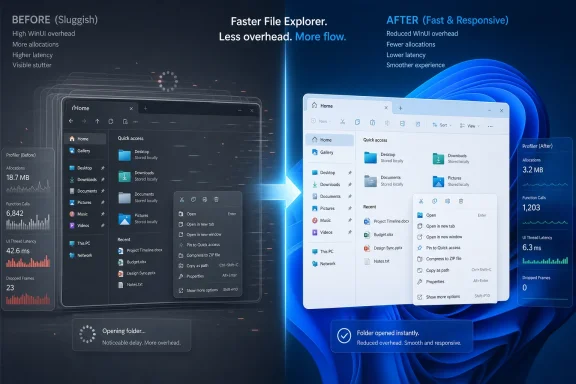
Microsoft said in May 2026 that it has cut the time spent in WinUI 3 code during File Explorer launch by about 25 percent, alongside large reductions in allocations and function calls, as part of a broader effort to make Windows 11 feel faster. That is not just a framework tuning story. It is Microsoft admitting, indirectly but unmistakably, that the modern Windows shell cannot become more responsive unless the UI platform beneath it stops being part of the drag. The bet is that WinUI 3 can finally become the native-feeling Windows framework Microsoft has been promising developers for years.
The headline number is tidy: 25 percent less time in WinUI code for the File Explorer scenario Microsoft chose to discuss. The supporting figures are more revealing. Microsoft says the optimized WinUI path produced 41 percent fewer memory allocations, 63 percent fewer transient allocations, and 45 percent fewer function calls in the measured portion of File Explorer launch.
Those numbers matter because File Explorer is not a toy benchmark. It is the place where Windows users notice delay most viscerally: opening a folder, right-clicking a file, navigating a deep directory tree, waiting for thumbnails, watching a white flash or a blank pane hang around just long enough to irritate. If Microsoft wants Windows 11 to feel less sluggish, Explorer is the proving ground.
But this announcement is also a confession. For years, Microsoft has been moving Windows experiences toward newer UI layers while users and developers complained that the results looked modern but felt heavier. The company now appears to be saying that the path forward is not to retreat from WinUI 3, but to make WinUI 3 good enough that the retreat is unnecessary.
That is the ambitious version of the story. The skeptical version is that Microsoft is trying to repair a platform while simultaneously expanding its use inside the operating system. That is a difficult maneuver: like replacing a bridge deck while telling more traffic to use the bridge.
WinUI 3, delivered through the Windows App SDK, is supposed to be the current answer for native Windows app development. It offers Fluent UI styling, modern controls, Windows 11 visual language, and a path for desktop apps that need more freedom than classic UWP allowed. In theory, it gives developers a way to write apps that look at home on modern Windows without giving up access to desktop capabilities.
In practice, the pitch has been messier. Developers have complained about startup time, memory use, tooling friction, missing features, packaging complexity, and inconsistent Microsoft adoption. A framework can survive some of those problems if the payoff is obvious. WinUI 3’s problem has been that the payoff has often looked like aesthetics rather than speed.
That is why the phrase “native framework” has become contested. Microsoft uses it because WinUI 3 is a Windows UI platform, built for Windows, and backed by Microsoft’s own app model. Critics hear “native” and expect the immediacy of Win32 or the maturity of WPF. When a “native” app feels less responsive than older desktop technology, the marketing language becomes a liability.
Pavan Davuluri, Microsoft’s Windows chief, has already made performance and dependability a public part of the Windows 11 repair agenda. Earlier this year, Microsoft said it wanted a faster and more dependable File Explorer, with improvements around launch, navigation, flicker, context menus, file operations, and search. That placed Explorer at the center of a broader quality reset.
The new WinUI figures slot neatly into that agenda. They suggest Microsoft is attacking not only surface bugs but also architectural overhead. Fewer allocations and fewer function calls are not cosmetic changes. They are the kind of low-level reductions that can translate into less CPU churn, less memory pressure, and fewer opportunities for latency to accumulate.
The danger is that users do not experience a profiler trace. They experience whether a right-click menu appears instantly, whether a folder opens without a pause, whether Explorer remains smooth while OneDrive, thumbnails, shell extensions, and indexing all compete for attention. A 25 percent improvement in one WinUI-heavy path is promising. It is not the same thing as proving that Explorer as a whole is fixed.
That tax has long been the core complaint from WinUI skeptics. WinUI 3 sits in a complicated stack involving XAML, WinRT, projections for different languages, composition, app packaging assumptions, and interop with the older desktop world. Every abstraction can be justified. Every abstraction can also cost something.
DevExpress, among others, has argued that WinUI’s component architecture has the potential for fast rendering and animation, but that repeated WinRT interop can become expensive. That is exactly the sort of criticism Microsoft now seems to be addressing, though cautiously. If the performance work requires breaking changes, even small ones, Microsoft cannot simply flip the switch for every app and declare victory.
That opt-in posture is important. Microsoft says some optimizations will first be available to developers who choose them, with the plan to make them default in future WinUI and Windows App SDK versions while preserving opt-out where needed. That is a sensible rollout strategy. It is also an admission that performance modernization can disturb compatibility, and compatibility is the law of gravity in Windows.
On the other hand, opt-in performance means fragmentation. Some apps will enable the new behavior quickly. Some will wait. Some will never test it. Some vendors will ship controls that work best under one set of assumptions while customers run another. The Windows App SDK was supposed to decouple modern app capabilities from Windows itself, but decoupling also means version spread.
Microsoft appears to understand this, which is why the end state is supposed to be default-on optimization with opt-out for compatibility. That is the only credible long-term posture. A framework cannot win back trust if its best performance profile is hidden behind flags that ordinary developers do not know to enable.
Still, the transition period matters. Windows developers have learned to be cautious around Microsoft UI technologies because migrations are rarely as clean as the slide decks suggest. The burden is on Microsoft to document exactly what changes, what breaks, what improves, and which workloads benefit. “Leap forward” is useful as a rallying phrase. It is not a migration guide.
A UI framework is a long-term bet. If you build a serious desktop application on it, you are betting on tooling, documentation, control availability, third-party ecosystem support, accessibility, deployment, servicing, and Microsoft’s willingness to keep using the technology in its own products. Performance is one axis in a larger trust equation.
That is why comments from developers often sound harsher than the immediate bug warrants. When someone says you cannot build a WinUI app and call it smooth, they are not merely reporting a benchmark. They are expressing doubt that Microsoft’s chosen path for Windows app development is mature enough to carry real products.
Microsoft has contributed to that doubt by failing, over many years, to present one stable desktop development story. WPF was not killed, but it stopped feeling like the future. UWP was pushed hard, then constrained by its app model and Windows Store associations. WinUI 3 became the new thing, but arrived with gaps and friction. Developers can forgive a young framework for being incomplete; they are less forgiving when the company asking for patience has repeatedly changed the map.
Windows and Office have not always followed the same UI technology path as Microsoft’s developer evangelism. That disconnect has been damaging. When Microsoft tells outsiders to adopt a framework that its own flagship teams avoid, developers notice. When internal products use private layers, hybrid stacks, or older technologies while public messaging points elsewhere, developers draw the obvious conclusion: the recommended platform is not trusted by Microsoft’s most important teams.
File Explorer therefore matters twice. It matters as a user-facing Windows component, and it matters as proof that Microsoft is willing to put WinUI 3 under pressure inside the OS itself. If Microsoft can make Explorer faster while increasing its use of WinUI 3, that is a stronger endorsement than any conference keynote.
But internal adoption also raises the stakes. If Microsoft moves more shell surfaces to WinUI 3 before the framework’s performance and reliability problems are convincingly solved, it risks making Windows feel like a test harness. The company must prove that “dogfooding” is not simply moving users onto the same unstable path developers have been complaining about.
WinUI 3 is native in the sense that it is a Microsoft Windows UI framework designed for Windows applications. It is not native in the older Win32 sense of a thin layer over the classic desktop API. It depends on modern Windows abstractions, including WinRT, and those abstractions can introduce overhead.
That does not automatically make WinUI 3 bad. Modern UI systems do things classic Win32 was never designed to do cleanly: high-DPI behavior, animation, theme adaptation, accessibility patterns, composition effects, touch-friendly controls, and Fluent design conventions. A richer UI stack will often have more machinery.
The question is whether the machinery earns its keep. Users will tolerate some overhead if the result is smoother, more consistent, more accessible, and easier to maintain. They will not tolerate overhead that produces both slower apps and more bugs. Microsoft’s latest performance work is therefore not merely optimization; it is an attempt to make the trade-off feel rational again.
File Explorer is also not a typical third-party app. Microsoft can tune internal scenarios with knowledge and access outside developers may not have. It can change framework behavior and app code together. It can use private diagnostics and internal branches. A vendor maintaining a large WinUI app through public SDK releases may have a very different experience.
That distinction matters because Windows developers are not merely waiting for Explorer to feel better. They are deciding whether to build new desktop apps with WinUI 3, keep investing in WPF, use WinForms for pragmatic internal tools, adopt cross-platform stacks, or move more functionality to the web. A File Explorer win helps the WinUI story, but it does not settle the platform choice.
Microsoft needs broader evidence. Startup time, layout performance, scrolling, virtualization, animation smoothness, memory usage, control-heavy screens, C# projection overhead, packaging footprint, and developer inner-loop speed all matter. A platform earns trust by improving across the boring cases, not just the showcased ones.
Shell extensions can slow context menus. Cloud integration can complicate file operations. Security features can add checks. Indexing, thumbnails, antivirus scanning, network paths, and OneDrive state can all influence Explorer. The Windows experience is a stack of stacks, and the user blames “Windows” when any one layer hesitates.
That is why Microsoft’s quality push must be judged by end-to-end behavior. A faster UI framework helps only if the rest of the system stops tripping over itself. If Explorer’s UI initializes faster but folder enumeration still stalls, users will not care which component improved. If menus animate smoothly but commands take too long to populate, the perceived win shrinks.
The best interpretation of Microsoft’s announcement is that it has identified one important source of overhead and is reducing it. The worst interpretation would be to treat WinUI 3 optimization as a substitute for comprehensive shell engineering. Windows needs the former. Users will judge the latter.
Breaking changes are painful, but they are sometimes the price of escaping a bad abstraction. If a framework’s compatibility surface accidentally preserves inefficient behavior, the vendor must choose between permanent overhead and managed disruption. Windows has often chosen permanent overhead because compatibility is sacred. In an application framework with opt-in toggles, Microsoft has a little more room to maneuver.
The challenge is governance. Developers need clear versioning, diagnostics, analyzers, migration notes, and performance guidance. They need to know whether a change affects control authors, app developers, language projections, XAML markup, resource lookup, binding, layout, or event handling. Vague warnings about possible breakage will slow adoption.
If Microsoft gets this right, the opt-in phase can become a useful compatibility laboratory. If it gets it wrong, the performance work will become another checkbox that only the most adventurous teams enable.
That institutional memory still matters. Windows is not just another Microsoft product. It is an ecosystem contract. Enterprises run fleets on it. Developers sell software into it. Hardware vendors build around it. A UI framework used inside Windows must clear a higher bar than a framework used for a sample app.
This is where Microsoft’s modern problem becomes paradoxical. The company needs to modernize Windows so it does not feel like a museum of inconsistent control styles and legacy dialogs. But every modernization layer risks making the OS feel heavier. Users want Windows to look current, but they punish it when modern surfaces are slower than the old ones.
WinUI 3 is Microsoft’s attempt to square that circle. It is meant to let Windows adopt a modern visual language without abandoning desktop power. The performance push is evidence that Microsoft knows the circle has not yet been squared.
If WinUI 3 is the future of native Windows UI, developers expect to see Microsoft’s own Windows experiences converge around it. Not necessarily every product, and not overnight, but enough to prove that the framework is not merely a recommendation for outsiders. A platform becomes real when important internal teams depend on it.
File Explorer gives Microsoft a credible example. Notepad has also been used as a modern Windows app showcase. But the larger pattern is still uneven. Developers will watch not just what Microsoft says about WinUI 3, but where it appears, how it performs, and whether the same public SDK capabilities are available to third parties.
The uncomfortable truth is that Microsoft does not need every team to use WinUI 3 for WinUI 3 to be viable. But it does need enough visible adoption to overcome the suspicion that Windows UI guidance is a moving target. Trust is cumulative, and Microsoft has spent a lot of it.
The problem is that visual coherence cannot outrun performance. A beautiful button that appears late is worse than an ugly button that responds instantly. A modern navigation view that stutters teaches users to distrust the app. Animation is supposed to signal continuity; when it drops frames, it signals weakness.
This is why Microsoft’s allocation and function-call reductions matter at a philosophical level. Fluent design cannot be a skin over a slow substrate. It has to be paired with a framework that makes modern UI feel light, not indulgent.
The Windows desktop has always rewarded immediacy. Classic Win32 applications often look dated, but many feel direct. If WinUI 3 wants to replace or augment that tradition, it has to compete not only on design elegance but on the old desktop virtue of doing the thing now.
That is a healthy tension. Windows has suffered when Microsoft optimized for internal narratives rather than lived experience. A public performance effort, especially one tied to specific shell scenarios, gives the community something to test.
It also gives Microsoft a chance to change the WinUI conversation. For too long, WinUI 3 has been discussed as promising but incomplete, modern but slower, official but inconsistently adopted. A sustained series of measurable improvements could shift that perception. One announcement will not.
The company should be careful with the phrase “leap forward.” It may be accurate inside a profiler. But to Windows users, a leap forward means a File Explorer that opens quickly every time, context menus that do not feel lazy, Settings pages that do not lag, and modern apps that do not consume surprising amounts of memory for basic tasks.
The practical read for developers is more conditional. WinUI 3 may be getting faster, but teams should wait for SDK availability, documentation, compatibility notes, and real-world benchmarks before making architectural bets. Performance improvements that require opt-in testing are not vaporware, but they are not universal reality yet either.
For IT pros, the story is less about choosing WinUI and more about the quality of the Windows estate. Explorer performance affects support tickets, user satisfaction, VDI behavior, and the perceived cost of Windows 11 migrations. If Microsoft can make the shell more reliable without increasing compatibility risk, that is not merely polish. It is operational value.
The larger lesson is that Windows performance is once again being treated as a first-class product issue. After years in which the Windows conversation was dominated by AI placement, advertising complaints, account nudges, and design churn, a framework-level performance push is a welcome return to fundamentals.
Source: DevClass Microsoft aims to speed Windows with 'leap forward' in WinUI 3 perf
 Microsoft’s Performance Promise Is Really a Shell Strategy
The headline number is tidy: 25 percent less time in WinUI code for the File Explorer scenario Microsoft chose to discuss. The supporting figures are more revealing. Microsoft says the optimized WinUI path produced 41 percent fewer memory allocations, 63 percent fewer transient allocations, and 45 percent fewer function calls in the measured portion of File Explorer launch.Those numbers matter because File Explorer is not a toy benchmark. It is the place where Windows users notice delay most viscerally: opening a folder, right-clicking a file, navigating a deep directory tree, waiting for thumbnails, watching a white flash or a blank pane hang around just long enough to irritate. If Microsoft wants Windows 11 to feel less sluggish, Explorer is the proving ground.
But this announcement is also a confession. For years, Microsoft has been moving Windows experiences toward newer UI layers while users and developers complained that the results looked modern but felt heavier. The company now appears to be saying that the path forward is not to retreat from WinUI 3, but to make WinUI 3 good enough that the retreat is unnecessary.
That is the ambitious version of the story. The skeptical version is that Microsoft is trying to repair a platform while simultaneously expanding its use inside the operating system. That is a difficult maneuver: like replacing a bridge deck while telling more traffic to use the bridge.
WinUI 3 Has Always Had the Burden of Microsoft’s UI History
To understand why developers are reacting with equal parts relief and suspicion, you have to remember how many times Windows developers have been asked to follow Microsoft to the next “modern” UI stack. Win32 never really left. Windows Forms became the pragmatic line-of-business workhorse. WPF promised richer desktop interfaces. Silverlight came and went. UWP arrived with Windows 8’s app model and its sandbox. WinUI then emerged as Microsoft’s attempt to separate modern Windows UI controls from the operating system release cycle.WinUI 3, delivered through the Windows App SDK, is supposed to be the current answer for native Windows app development. It offers Fluent UI styling, modern controls, Windows 11 visual language, and a path for desktop apps that need more freedom than classic UWP allowed. In theory, it gives developers a way to write apps that look at home on modern Windows without giving up access to desktop capabilities.
In practice, the pitch has been messier. Developers have complained about startup time, memory use, tooling friction, missing features, packaging complexity, and inconsistent Microsoft adoption. A framework can survive some of those problems if the payoff is obvious. WinUI 3’s problem has been that the payoff has often looked like aesthetics rather than speed.
That is why the phrase “native framework” has become contested. Microsoft uses it because WinUI 3 is a Windows UI platform, built for Windows, and backed by Microsoft’s own app model. Critics hear “native” and expect the immediacy of Win32 or the maturity of WPF. When a “native” app feels less responsive than older desktop technology, the marketing language becomes a liability.
The File Explorer Test Cuts Straight to User Trust
Microsoft chose its example carefully. File Explorer is one of the few Windows components that almost every user touches, and it is also one of the most politically dangerous parts of the OS to slow down. People can ignore Copilot. They can uninstall many bundled apps. They cannot avoid Explorer without changing the way they use Windows.Pavan Davuluri, Microsoft’s Windows chief, has already made performance and dependability a public part of the Windows 11 repair agenda. Earlier this year, Microsoft said it wanted a faster and more dependable File Explorer, with improvements around launch, navigation, flicker, context menus, file operations, and search. That placed Explorer at the center of a broader quality reset.
The new WinUI figures slot neatly into that agenda. They suggest Microsoft is attacking not only surface bugs but also architectural overhead. Fewer allocations and fewer function calls are not cosmetic changes. They are the kind of low-level reductions that can translate into less CPU churn, less memory pressure, and fewer opportunities for latency to accumulate.
The danger is that users do not experience a profiler trace. They experience whether a right-click menu appears instantly, whether a folder opens without a pause, whether Explorer remains smooth while OneDrive, thumbnails, shell extensions, and indexing all compete for attention. A 25 percent improvement in one WinUI-heavy path is promising. It is not the same thing as proving that Explorer as a whole is fixed.
The Framework Tax Is Finally Being Itemized
The most interesting part of Microsoft’s disclosure is not the percentage improvement. It is the shape of the improvement. Reducing allocations, transient allocations, and function calls points to a framework tax that has been measurable enough to attack.That tax has long been the core complaint from WinUI skeptics. WinUI 3 sits in a complicated stack involving XAML, WinRT, projections for different languages, composition, app packaging assumptions, and interop with the older desktop world. Every abstraction can be justified. Every abstraction can also cost something.
DevExpress, among others, has argued that WinUI’s component architecture has the potential for fast rendering and animation, but that repeated WinRT interop can become expensive. That is exactly the sort of criticism Microsoft now seems to be addressing, though cautiously. If the performance work requires breaking changes, even small ones, Microsoft cannot simply flip the switch for every app and declare victory.
That opt-in posture is important. Microsoft says some optimizations will first be available to developers who choose them, with the plan to make them default in future WinUI and Windows App SDK versions while preserving opt-out where needed. That is a sensible rollout strategy. It is also an admission that performance modernization can disturb compatibility, and compatibility is the law of gravity in Windows.
Opt-In Performance Is Both Sensible and Unsatisfying
For developers, opt-in performance improvements are a mixed blessing. On one hand, they give teams time to test. If a XAML behavior changes, a binding path behaves differently, or a control lifecycle assumption shifts, developers need a way to adopt the new path without risking production apps overnight.On the other hand, opt-in performance means fragmentation. Some apps will enable the new behavior quickly. Some will wait. Some will never test it. Some vendors will ship controls that work best under one set of assumptions while customers run another. The Windows App SDK was supposed to decouple modern app capabilities from Windows itself, but decoupling also means version spread.
Microsoft appears to understand this, which is why the end state is supposed to be default-on optimization with opt-out for compatibility. That is the only credible long-term posture. A framework cannot win back trust if its best performance profile is hidden behind flags that ordinary developers do not know to enable.
Still, the transition period matters. Windows developers have learned to be cautious around Microsoft UI technologies because migrations are rarely as clean as the slide decks suggest. The burden is on Microsoft to document exactly what changes, what breaks, what improves, and which workloads benefit. “Leap forward” is useful as a rallying phrase. It is not a migration guide.
The Developer Complaint Was Never Just Speed
It would be easy to frame this as a simple performance story: WinUI 3 was slow, Microsoft made it faster, developers should be happy. That misses the emotional context. Developer frustration with WinUI 3 has always been about confidence as much as milliseconds.A UI framework is a long-term bet. If you build a serious desktop application on it, you are betting on tooling, documentation, control availability, third-party ecosystem support, accessibility, deployment, servicing, and Microsoft’s willingness to keep using the technology in its own products. Performance is one axis in a larger trust equation.
That is why comments from developers often sound harsher than the immediate bug warrants. When someone says you cannot build a WinUI app and call it smooth, they are not merely reporting a benchmark. They are expressing doubt that Microsoft’s chosen path for Windows app development is mature enough to carry real products.
Microsoft has contributed to that doubt by failing, over many years, to present one stable desktop development story. WPF was not killed, but it stopped feeling like the future. UWP was pushed hard, then constrained by its app model and Windows Store associations. WinUI 3 became the new thing, but arrived with gaps and friction. Developers can forgive a young framework for being incomplete; they are less forgiving when the company asking for patience has repeatedly changed the map.
Microsoft’s Internal Adoption Problem Is the Real Test
The most consequential line in the DevClass report may not be a benchmark at all. It is Beth Pan’s reported response to a developer urging Microsoft to use its own framework across the company: “that’s the push.” That is exactly what WinUI 3 developers want to hear, and exactly where Microsoft’s record invites skepticism.Windows and Office have not always followed the same UI technology path as Microsoft’s developer evangelism. That disconnect has been damaging. When Microsoft tells outsiders to adopt a framework that its own flagship teams avoid, developers notice. When internal products use private layers, hybrid stacks, or older technologies while public messaging points elsewhere, developers draw the obvious conclusion: the recommended platform is not trusted by Microsoft’s most important teams.
File Explorer therefore matters twice. It matters as a user-facing Windows component, and it matters as proof that Microsoft is willing to put WinUI 3 under pressure inside the OS itself. If Microsoft can make Explorer faster while increasing its use of WinUI 3, that is a stronger endorsement than any conference keynote.
But internal adoption also raises the stakes. If Microsoft moves more shell surfaces to WinUI 3 before the framework’s performance and reliability problems are convincingly solved, it risks making Windows feel like a test harness. The company must prove that “dogfooding” is not simply moving users onto the same unstable path developers have been complaining about.
The Native Debate Is More Than Pedantry
Some readers will dismiss the argument over whether WinUI 3 is truly “native” as semantic nitpicking. It is not. The word “native” carries an implied promise: that an app is close to the platform, efficient, responsive, and idiomatic. If that promise is not met, the label becomes a source of resentment.WinUI 3 is native in the sense that it is a Microsoft Windows UI framework designed for Windows applications. It is not native in the older Win32 sense of a thin layer over the classic desktop API. It depends on modern Windows abstractions, including WinRT, and those abstractions can introduce overhead.
That does not automatically make WinUI 3 bad. Modern UI systems do things classic Win32 was never designed to do cleanly: high-DPI behavior, animation, theme adaptation, accessibility patterns, composition effects, touch-friendly controls, and Fluent design conventions. A richer UI stack will often have more machinery.
The question is whether the machinery earns its keep. Users will tolerate some overhead if the result is smoother, more consistent, more accessible, and easier to maintain. They will not tolerate overhead that produces both slower apps and more bugs. Microsoft’s latest performance work is therefore not merely optimization; it is an attempt to make the trade-off feel rational again.
File Explorer Cannot Carry the Whole Framework Narrative
There is a risk in overreading the File Explorer benchmark. Microsoft measured a specific WinUI portion of a specific scenario, and the numbers are encouraging within that scope. They do not prove that every WinUI 3 app will become 25 percent faster, or that data-heavy enterprise apps will see the same gains, or that C# and C++ projects will benefit equally.File Explorer is also not a typical third-party app. Microsoft can tune internal scenarios with knowledge and access outside developers may not have. It can change framework behavior and app code together. It can use private diagnostics and internal branches. A vendor maintaining a large WinUI app through public SDK releases may have a very different experience.
That distinction matters because Windows developers are not merely waiting for Explorer to feel better. They are deciding whether to build new desktop apps with WinUI 3, keep investing in WPF, use WinForms for pragmatic internal tools, adopt cross-platform stacks, or move more functionality to the web. A File Explorer win helps the WinUI story, but it does not settle the platform choice.
Microsoft needs broader evidence. Startup time, layout performance, scrolling, virtualization, animation smoothness, memory usage, control-heavy screens, C# projection overhead, packaging footprint, and developer inner-loop speed all matter. A platform earns trust by improving across the boring cases, not just the showcased ones.
Windows 11’s Responsiveness Problem Is Bigger Than WinUI
The renewed focus on WinUI 3 should not obscure the broader Windows 11 performance complaint. Users have criticized Windows 11 for inconsistent responsiveness, shell latency, context menu delays, Start menu sluggishness, Settings app friction, update disruptions, and background feature creep. Some of those problems may involve WinUI. Many do not.Shell extensions can slow context menus. Cloud integration can complicate file operations. Security features can add checks. Indexing, thumbnails, antivirus scanning, network paths, and OneDrive state can all influence Explorer. The Windows experience is a stack of stacks, and the user blames “Windows” when any one layer hesitates.
That is why Microsoft’s quality push must be judged by end-to-end behavior. A faster UI framework helps only if the rest of the system stops tripping over itself. If Explorer’s UI initializes faster but folder enumeration still stalls, users will not care which component improved. If menus animate smoothly but commands take too long to populate, the perceived win shrinks.
The best interpretation of Microsoft’s announcement is that it has identified one important source of overhead and is reducing it. The worst interpretation would be to treat WinUI 3 optimization as a substitute for comprehensive shell engineering. Windows needs the former. Users will judge the latter.
The Breaking-Change Warning Is a Sign of Serious Engineering
There is one reason to take Microsoft’s announcement more seriously than a routine performance blog post: the company is warning that some optimizations involve breaking changes. That is not the language of a purely cosmetic pass. It suggests Microsoft is willing to revisit assumptions inside the framework rather than merely shave a few allocations around the edges.Breaking changes are painful, but they are sometimes the price of escaping a bad abstraction. If a framework’s compatibility surface accidentally preserves inefficient behavior, the vendor must choose between permanent overhead and managed disruption. Windows has often chosen permanent overhead because compatibility is sacred. In an application framework with opt-in toggles, Microsoft has a little more room to maneuver.
The challenge is governance. Developers need clear versioning, diagnostics, analyzers, migration notes, and performance guidance. They need to know whether a change affects control authors, app developers, language projections, XAML markup, resource lookup, binding, layout, or event handling. Vague warnings about possible breakage will slow adoption.
If Microsoft gets this right, the opt-in phase can become a useful compatibility laboratory. If it gets it wrong, the performance work will become another checkbox that only the most adventurous teams enable.
The Longhorn Ghost Still Haunts the Windows Desktop
The DevClass piece invokes an old wound: Longhorn, the ambitious Windows project that eventually became Windows Vista after a painful reset. Early Longhorn builds leaned heavily into managed-code ambitions and new presentation technologies, and the eventual retreat left scars inside Microsoft. Whether every retelling of that era is fair or not, the lesson many Windows veterans absorbed was simple: do not let a shiny framework jeopardize the operating system.That institutional memory still matters. Windows is not just another Microsoft product. It is an ecosystem contract. Enterprises run fleets on it. Developers sell software into it. Hardware vendors build around it. A UI framework used inside Windows must clear a higher bar than a framework used for a sample app.
This is where Microsoft’s modern problem becomes paradoxical. The company needs to modernize Windows so it does not feel like a museum of inconsistent control styles and legacy dialogs. But every modernization layer risks making the OS feel heavier. Users want Windows to look current, but they punish it when modern surfaces are slower than the old ones.
WinUI 3 is Microsoft’s attempt to square that circle. It is meant to let Windows adopt a modern visual language without abandoning desktop power. The performance push is evidence that Microsoft knows the circle has not yet been squared.
The Office Question Remains Unanswered
One reason developers remain skeptical is that Microsoft’s largest applications often live by their own rules. Office, Teams, Visual Studio, Edge, the Store, Settings, Terminal, PowerToys, and shell components have each used different mixes of technologies over time. That diversity may be rational internally, but externally it looks like strategic indecision.If WinUI 3 is the future of native Windows UI, developers expect to see Microsoft’s own Windows experiences converge around it. Not necessarily every product, and not overnight, but enough to prove that the framework is not merely a recommendation for outsiders. A platform becomes real when important internal teams depend on it.
File Explorer gives Microsoft a credible example. Notepad has also been used as a modern Windows app showcase. But the larger pattern is still uneven. Developers will watch not just what Microsoft says about WinUI 3, but where it appears, how it performs, and whether the same public SDK capabilities are available to third parties.
The uncomfortable truth is that Microsoft does not need every team to use WinUI 3 for WinUI 3 to be viable. But it does need enough visible adoption to overcome the suspicion that Windows UI guidance is a moving target. Trust is cumulative, and Microsoft has spent a lot of it.
Fluent Design Needs a Faster Foundation
Fluent UI remains one of WinUI 3’s strongest arguments. Windows 11 has a visual identity: rounded corners, updated controls, mica-like materials, modern iconography, improved theme behavior, and more consistent accessibility expectations. Developers who want their apps to look like they belong on Windows need a first-party path to that design system.The problem is that visual coherence cannot outrun performance. A beautiful button that appears late is worse than an ugly button that responds instantly. A modern navigation view that stutters teaches users to distrust the app. Animation is supposed to signal continuity; when it drops frames, it signals weakness.
This is why Microsoft’s allocation and function-call reductions matter at a philosophical level. Fluent design cannot be a skin over a slow substrate. It has to be paired with a framework that makes modern UI feel light, not indulgent.
The Windows desktop has always rewarded immediacy. Classic Win32 applications often look dated, but many feel direct. If WinUI 3 wants to replace or augment that tradition, it has to compete not only on design elegance but on the old desktop virtue of doing the thing now.
The WinUI Repair Job Now Has a Public Scoreboard
The good news for Microsoft is that this performance push creates a scoreboard. The bad news is that users and developers will read it differently. Microsoft can show reduced allocations and faster launch traces; users will judge whether Explorer still hesitates; developers will judge whether their own apps improve after adopting the new SDK paths.That is a healthy tension. Windows has suffered when Microsoft optimized for internal narratives rather than lived experience. A public performance effort, especially one tied to specific shell scenarios, gives the community something to test.
It also gives Microsoft a chance to change the WinUI conversation. For too long, WinUI 3 has been discussed as promising but incomplete, modern but slower, official but inconsistently adopted. A sustained series of measurable improvements could shift that perception. One announcement will not.
The company should be careful with the phrase “leap forward.” It may be accurate inside a profiler. But to Windows users, a leap forward means a File Explorer that opens quickly every time, context menus that do not feel lazy, Settings pages that do not lag, and modern apps that do not consume surprising amounts of memory for basic tasks.
The Numbers Are Encouraging, but the Burden of Proof Is Still Microsoft’s
The practical read for Windows enthusiasts is cautiously optimistic. If Microsoft has genuinely reduced WinUI overhead in File Explorer and plans to roll those optimizations into the broader framework, Windows 11 could become more responsive in places where users have long complained. That would be a meaningful change.The practical read for developers is more conditional. WinUI 3 may be getting faster, but teams should wait for SDK availability, documentation, compatibility notes, and real-world benchmarks before making architectural bets. Performance improvements that require opt-in testing are not vaporware, but they are not universal reality yet either.
For IT pros, the story is less about choosing WinUI and more about the quality of the Windows estate. Explorer performance affects support tickets, user satisfaction, VDI behavior, and the perceived cost of Windows 11 migrations. If Microsoft can make the shell more reliable without increasing compatibility risk, that is not merely polish. It is operational value.
The larger lesson is that Windows performance is once again being treated as a first-class product issue. After years in which the Windows conversation was dominated by AI placement, advertising complaints, account nudges, and design churn, a framework-level performance push is a welcome return to fundamentals.
The Explorer Benchmark Gives Windows Watchers a Short List to Track
Microsoft’s WinUI 3 performance work is promising precisely because it is concrete, but it should be judged by concrete follow-through. The next phase is not about whether the company can produce a better chart. It is about whether Windows and Windows apps feel measurably less encumbered by the framework Microsoft wants them to use.- Microsoft says the WinUI portion of File Explorer launch now spends about 25 percent less time in WinUI code in its measured scenario.
- The same work reportedly cuts memory allocations by 41 percent, transient allocations by 63 percent, and function calls by 45 percent.
- Some optimizations will be opt-in at first because they may involve small or large breaking changes for existing WinUI 3 applications.
- Microsoft’s stated plan is to make the new performance behavior default in future WinUI and Windows App SDK releases, with opt-out available where needed.
- The real test will be whether these gains appear in everyday shell behavior, third-party apps, and developer benchmarks rather than only in Microsoft’s showcased Explorer path.
- The credibility of WinUI 3 depends as much on Microsoft’s own adoption and documentation as it does on raw profiler improvements.
Source: DevClass Microsoft aims to speed Windows with 'leap forward' in WinUI 3 perf
