

Microsoft has begun optimizing WinUI 3 itself as part of its Windows 11 performance push, with early File Explorer launch benchmarks showing fewer allocations, fewer transient allocations, fewer function calls, and less time spent inside WinUI code. That is the more important story behind the latest Windows K2 reporting: Microsoft is not merely repainting Windows with a newer toolkit. It is trying to make the toolkit worthy of carrying the operating system. For a platform whose visual modernization has too often arrived with a performance tax, that distinction matters.
For years, Windows 11 has lived with an awkward contradiction. It looks more modern than Windows 10 in many places, but some of the most frequently touched parts of the system have felt less immediate than their predecessors. File Explorer, Start, context menus, Settings pages, flyouts, and inbox apps have all become part of the same user complaint: the OS often looks expensive and feels delayed.
That is why the new WinUI 3 work matters beyond the usual framework chatter. A UI framework is not just a developer abstraction when it sits under the Start menu, File Explorer, Notepad, and other system experiences. It becomes part of the user’s sense of whether Windows is quick, disciplined, and respectful of input.
Microsoft’s public framing is straightforward: WinUI 3 is meant to be the native UI platform for modern Windows apps and experiences. But the hard part has never been making Fluent Design controls look correct in screenshots. The hard part is making the modern layer feel as cheap, direct, and predictable as the old Win32 surfaces users still compare it against.
That comparison is brutally unfair in one sense and completely fair in another. Classic Windows UI code had decades to become fast, weird, specialized, and deeply tied to the shell. Modern frameworks arrive with richer composition, accessibility, scaling, animations, and developer ergonomics. But when a user clicks File Explorer, they do not grade on architectural difficulty.
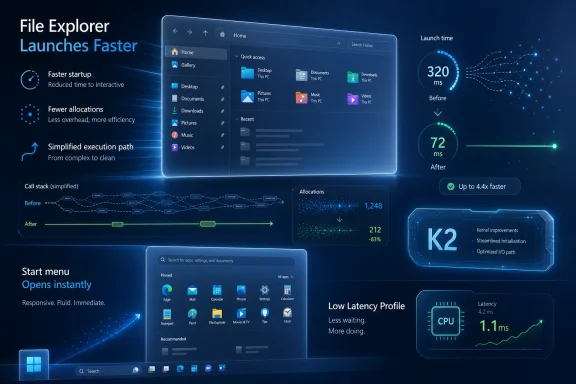
The reported improvements are not vague claims about “snappiness.” Microsoft says its WinUI work has reduced allocations by 41 percent, transient allocations by 63 percent, function calls by 45 percent, and time spent in WinUI code by 25 percent in the File Explorer launch path. Those are framework-level indicators, not marketing adjectives.
They also point to the right disease. Modern UI slowness is often death by tiny costs: allocations that pressure memory management, call stacks that grow too deep, object lifetimes that churn, layout passes that do more than users can see, and initialization paths that assume desktop hardware can hide anything. One such cost is forgivable. Thousands of them become the half-second delay everyone notices.
File Explorer has been the place where Microsoft’s modern UI ambitions have most visibly collided with user tolerance. The Windows 11 version added tabs, a refreshed command bar, newer visuals, and deeper cloud integration, but many users experienced it as slower or less predictable than the old Explorer. That perception became hard to shake because Explorer is muscle memory software. If it hesitates, the whole OS feels slower.
This is why optimizing WinUI rather than just optimizing Explorer is the smarter move. If Microsoft only hacks Explorer into better shape, the next WinUI-based shell surface risks repeating the same mistake. If the framework itself gets leaner, every team building on it gets a better starting point.
Windows 11’s Start menu has already been controversial for reasons unrelated to raw performance. It removed long-standing customization patterns, centered the default layout, leaned heavily on recommendations, and became a canvas for Microsoft’s shifting ideas about search, cloud content, and AI. If Microsoft rebuilds it again, users will judge the result by whether it opens instantly and stays out of the way.
That is where WinUI 3 has to prove it can be more than the “modern” answer. In Windows, modernity has too often meant a slower settings page replacing a faster dialog, a prettier context menu requiring an extra click, or a web-backed experience replacing a native one. Microsoft has trained power users to be suspicious of aesthetic reform.
A faster WinUI 3 Start menu could begin to reverse that suspicion. But a slower one would confirm every bad instinct the enthusiast community already has: that Windows modernization means replacing battle-tested native surfaces with heavier, more abstracted ones that serve Microsoft’s design system before they serve the user.
The timing is telling. Windows 11 has matured into a capable operating system, but its reputation among enthusiasts remains oddly fragile. For every useful improvement, there has been a complaint about ads, account pressure, Copilot placement, inconsistent UI, or sluggish shell behavior. The cumulative impression is not that Windows 11 is broken. It is that Microsoft keeps asking users to accept friction in exchange for strategic priorities they did not request.
K2, if the reporting accurately reflects Microsoft’s internal posture, is a recognition that fundamentals are now a competitive feature. Performance is not merely something to tune after the design is done. It is part of the product’s trust contract. A fast OS feels competent even when it is visually boring; a slow OS feels suspicious even when it is beautiful.
The WinUI 3 work fits that contract because it attacks the modernization tax at the source. Microsoft can keep moving the shell and inbox apps toward a common native framework only if the framework stops being blamed for every delay. That requires measurements, not promises.
WinUI 3 occupies a complicated place in that debate. It is Microsoft’s modern native UI stack for Windows App SDK apps, but it is also young compared with Win32, WPF, and the deeply specialized shell components that came before it. Developers have complained about performance, missing features, packaging complexity, and the general churn of Microsoft UI frameworks. Some of that criticism is historical baggage; some of it is earned.
The company’s task is to make WinUI 3 boring in the best possible way. Developers should not have to wonder whether choosing Microsoft’s preferred Windows UI stack will impose obvious startup penalties. Windows teams should not need heroic one-off optimization campaigns every time they move a core surface to the modern framework. Users should not be able to tell which framework a dialog uses by how long it takes to appear.
That is the bar Microsoft set for itself when it positioned WinUI as the path forward. A native framework that cannot carry the native shell without excuses is not a platform strategy. It is a design aspiration waiting for engineering to catch up.
The backlash was predictable anyway. Windows users have heard too many explanations that sound like workarounds for bloat. If the Start menu needs a CPU sprint to open quickly, critics ask, is the OS being optimized or merely muscled through its own overhead?
That criticism is emotionally understandable but technically incomplete. Responsiveness is often a collaboration between software path length, scheduler decisions, power management, caching, and hardware boost behavior. A short-lived latency profile can be a legitimate way to align silicon behavior with user intent. The question is not whether boosting is “cheating.” The question is whether boosting is being used alongside code reduction or instead of it.
The WinUI 3 figures help Microsoft’s case because they suggest the company is doing both. Reducing allocations and function calls is not a power-management trick. It is real software work. If Low Latency Profile gives optimized paths the last push they need to feel immediate, it could be a sensible part of the stack rather than a fig leaf for inefficiency.
Still, Microsoft should be careful about the optics. Windows runs on thin-and-light laptops, fanless tablets, handheld gaming PCs, desktops with aggressive power plans, corporate fleets, and aging machines that barely meet Windows 11’s requirements. A responsiveness feature that looks good in demos must not become a battery-life or thermals surprise in the field.
That does not make preloading illegitimate. Operating systems have always guessed what users will need next. The Start menu, shell extensions, search indexers, font caches, thumbnail providers, and service hosts are all forms of speculative readiness. Responsiveness has never been a purely on-demand affair.
But preloading is least satisfying when the underlying code still feels heavy. It can reduce visible delay while increasing background complexity, memory pressure, and distrust. On low-memory systems, it can also be a zero-sum game: one thing feels quicker because something else has been evicted or delayed.
Framework optimization is harder to dismiss. A launch path that allocates less, calls less, and spends less time in framework code is not merely hiding the cost. It is reducing the cost. That is the difference between making Windows feel faster and making Windows more efficient.
The best version of K2 would combine these techniques in the right order. First remove avoidable overhead. Then use preloading sparingly where it matches user behavior. Then use short CPU boosts to cut tail latency for foreground actions. Reverse that order, and Microsoft risks building a faster-feeling house on a wasteful foundation.
Performance multiplies that expense. Each framework brings different startup behavior, rendering paths, dependency models, packaging assumptions, input handling, accessibility layers, and diagnostic tools. A Windows team trying to modernize a component is not just choosing a visual style. It is choosing a performance envelope.
That is why Microsoft’s stated desire to move more Windows experiences to WinUI 3 only works if WinUI 3 becomes the obvious choice. The company cannot afford a future where every shell team asks whether the modern framework will make its surface slower, or where every modernized dialog invites users to compare it unfavorably with a 30-year-old predecessor.
There is a developer ecosystem angle, too. Third-party Windows developers watch what Microsoft uses. If Microsoft’s own apps avoid WinUI, developers notice. If Microsoft’s own shell surfaces use WinUI and feel slow, developers notice that as well. The platform’s credibility depends on Microsoft being able to dogfood the framework without making excuses for it.
The Windows App SDK and WinUI 3 were supposed to give classic desktop developers a modern Windows path without forcing them into the old UWP bargain. That remains a worthy goal. But it will only become a default choice if the runtime and controls feel dependable in ordinary applications, not merely acceptable in carefully tuned Microsoft showcases.
When File Explorer opens slowly, the user does not know whether the culprit is WinUI, shell namespace initialization, OneDrive integration, third-party extensions, disk state, Defender scanning, recent-file hydration, or GPU composition. They just know Explorer was slow. Internal boundaries do not soften the judgment.
This is one of Microsoft’s oldest Windows problems. The platform’s greatest strength is also its performance trap: compatibility invites layers, extensibility invites hooks, and decades of user expectations prevent clean breaks. The shell has to support scenarios no clean-room modern OS would design today.
That makes end-to-end performance work more important than framework bragging rights. A 25 percent reduction in time spent inside WinUI code is valuable, but it will not matter if another layer consumes the savings. Users need the full click-to-ready path to improve.
The encouraging sign is that Microsoft appears to be discussing performance in those terms. The less encouraging reality is that Windows has had performance pushes before. The proof will be in Insider builds, release notes, independent testing, and the daily experience of people who open Explorer a hundred times a week.
That lag is not inherently bad. UI framework changes can regress apps in subtle ways, and shell performance fixes can break assumptions in places users never see until they do. Microsoft should take the time to validate the work. But the company also needs to communicate clearly when improvements are framework-level, app-level, Insider-only, or broadly available.
The Windows community is especially sensitive to this because Microsoft often announces direction before users can feel results. A new design language, a new app SDK, a new Copilot integration, a new Start experience, a new Store policy, a new performance initiative: Windows is never short of roadmaps. What it has lacked is a consistent sense that the platform is getting simpler and faster underneath the announcements.
K2 will be judged against that history. If it produces measurable improvements in File Explorer, Start, context menus, inbox app launch, and shell reliability, it will look like a serious course correction. If it becomes another codename attached to scattered fixes, users will remember the promise more than the patch.
That is why Microsoft’s choice of benchmarks matters. File Explorer and Notepad are humble, repeated, everyday surfaces. Improving them is not glamorous. It is exactly the kind of thing Windows needs.
Enterprises care about predictable behavior more than design coherence. A File Explorer that launches consistently is more valuable than one with a modern command bar that sometimes paints late. A Start menu that opens immediately is more valuable than one that better reflects Microsoft’s design system. Responsiveness is a productivity feature when multiplied across thousands of users.
There is also a hardware lifecycle dimension. Many organizations are still navigating Windows 11 requirements, refresh schedules, and application compatibility. If Windows 11 feels heavier than Windows 10 on otherwise capable hardware, the OS becomes harder to sell internally. Performance improvements can reduce resistance to upgrades in a way no AI feature can.
Developers inside companies will also watch WinUI 3’s trajectory. If Microsoft can show that its modern native stack is becoming faster under real shell workloads, the case for building new Windows desktop apps on WinUI becomes stronger. If the framework remains associated with latency and incomplete maturity, many teams will continue to choose WPF, WinForms, Electron, web apps, or hybrid approaches depending on their constraints.
That is the broader platform risk. Windows does not merely need fast first-party apps. It needs a convincing answer for developers who want to build modern desktop software without betting on a framework that feels perpetually transitional.
A launch can be technically improved and still feel wrong if visual readiness arrives in stages. A menu can open faster but still stutter when populated. A window can appear quickly but remain unusable for a beat while content catches up. Windows 11 has suffered from all of these perception gaps in different places.
That is why Microsoft needs to measure not just launch time but interactive readiness. The question is not when a window exists. It is when the user can act without penalty. In shell components, those two moments must be as close together as possible.
There is also the matter of variance. Average launch time matters less than the occasional embarrassing delay. Users forgive a system that is consistently a little slower more readily than one that is usually fast but randomly stalls. A modern Windows performance push should be obsessed with tail latency, not just benchmark medians.
If K2 is serious, Microsoft will need to chase the ugly cases: first launch after boot, launch under memory pressure, launch with cloud providers installed, launch on battery saver, launch on low-end CPUs, launch after updates, launch with shell extensions, launch on systems carrying years of user cruft. Windows lives in those conditions.
Modern Windows cannot simply return to that world. Accessibility expectations are higher. Display scaling is more complex. Touch, pen, high refresh rate screens, multi-monitor setups, dark mode, localization, and animation all matter. Security boundaries and packaging models are different. The operating system has to present local and cloud state in ways old dialogs never did.
But the old model still teaches a lesson: UI should be cheap unless it has a very good reason not to be. Every layer must justify itself against the user’s click. Every animation must earn the frame time it consumes. Every service hook must respect the foreground task.
WinUI 3’s challenge is to deliver modern capabilities without violating that old Windows bargain. It does not have to imitate Windows 95 to respect what made Windows 95-era UI feel immediate. It has to make rich controls feel as if they are already there when the user reaches for them.
That is a cultural shift as much as a technical one. Microsoft has spent much of the Windows 11 era telling users what the OS should become. K2, at its best, suggests the company is listening to what the OS must still be.
The risk is that Microsoft treats these optimizations as permission to accelerate UI migrations before the framework has earned user trust. Moving more surfaces to WinUI 3 is not automatically a win. Moving them to a faster, leaner, better-tested WinUI 3 could be.
For Windows power users, the correct posture is cautious encouragement. The numbers are meaningful, the target is important, and the broader K2 framing suggests Microsoft understands the reputational damage caused by sluggish fundamentals. But Windows history recommends waiting for builds, not promises.
For developers, this is a signal to keep watching WinUI 3 rather than writing it off entirely. A framework that improves under pressure from File Explorer and Start menu workloads may become more attractive for ordinary apps. Microsoft’s own pain can become the ecosystem’s gain if the fixes flow back into the public SDK and not just internal branches.
For administrators, the practical takeaway is simpler: performance improvements in shell components may become one of the more important Windows 11 quality stories of the year. Not because they are flashy, but because they affect the daily rhythm of every managed desktop.
Windows does not need another promise that the future will be more modern; it needs the modern parts to feel as immediate as the old ones they are replacing. If Microsoft can make WinUI 3 faster while moving core experiences onto it, K2 could become more than an internal codename — it could be the moment Windows 11 stops asking users to choose between polish and speed.
Source: Windows Central https://www.windowscentral.com/micr...mework-to-increase-windows-11-responsiveness/
 Microsoft’s UI Bet Finally Meets the Performance Bill
For years, Windows 11 has lived with an awkward contradiction. It looks more modern than Windows 10 in many places, but some of the most frequently touched parts of the system have felt less immediate than their predecessors. File Explorer, Start, context menus, Settings pages, flyouts, and inbox apps have all become part of the same user complaint: the OS often looks expensive and feels delayed.That is why the new WinUI 3 work matters beyond the usual framework chatter. A UI framework is not just a developer abstraction when it sits under the Start menu, File Explorer, Notepad, and other system experiences. It becomes part of the user’s sense of whether Windows is quick, disciplined, and respectful of input.
Microsoft’s public framing is straightforward: WinUI 3 is meant to be the native UI platform for modern Windows apps and experiences. But the hard part has never been making Fluent Design controls look correct in screenshots. The hard part is making the modern layer feel as cheap, direct, and predictable as the old Win32 surfaces users still compare it against.
That comparison is brutally unfair in one sense and completely fair in another. Classic Windows UI code had decades to become fast, weird, specialized, and deeply tied to the shell. Modern frameworks arrive with richer composition, accessibility, scaling, animations, and developer ergonomics. But when a user clicks File Explorer, they do not grade on architectural difficulty.
File Explorer Is the Benchmark Because File Explorer Is the Trial
Microsoft’s early numbers are centered on File Explorer launch behavior, and that is no accident. File Explorer is not a toy sample or a polished demo app. It is the daily stress test for Windows itself: a shell-adjacent, extension-heavy, compatibility-haunted file manager that exposes every layer of Microsoft’s platform choices.The reported improvements are not vague claims about “snappiness.” Microsoft says its WinUI work has reduced allocations by 41 percent, transient allocations by 63 percent, function calls by 45 percent, and time spent in WinUI code by 25 percent in the File Explorer launch path. Those are framework-level indicators, not marketing adjectives.
They also point to the right disease. Modern UI slowness is often death by tiny costs: allocations that pressure memory management, call stacks that grow too deep, object lifetimes that churn, layout passes that do more than users can see, and initialization paths that assume desktop hardware can hide anything. One such cost is forgivable. Thousands of them become the half-second delay everyone notices.
File Explorer has been the place where Microsoft’s modern UI ambitions have most visibly collided with user tolerance. The Windows 11 version added tabs, a refreshed command bar, newer visuals, and deeper cloud integration, but many users experienced it as slower or less predictable than the old Explorer. That perception became hard to shake because Explorer is muscle memory software. If it hesitates, the whole OS feels slower.
This is why optimizing WinUI rather than just optimizing Explorer is the smarter move. If Microsoft only hacks Explorer into better shape, the next WinUI-based shell surface risks repeating the same mistake. If the framework itself gets leaner, every team building on it gets a better starting point.
The Start Menu Migration Raises the Stakes
The Start menu is reportedly another core target in Microsoft’s broader move toward WinUI 3. That turns a framework performance effort into a political act inside Windows. Start is not just another app surface; it is the front door to the operating system, and it carries the emotional weight of every Windows redesign since Windows 8.Windows 11’s Start menu has already been controversial for reasons unrelated to raw performance. It removed long-standing customization patterns, centered the default layout, leaned heavily on recommendations, and became a canvas for Microsoft’s shifting ideas about search, cloud content, and AI. If Microsoft rebuilds it again, users will judge the result by whether it opens instantly and stays out of the way.
That is where WinUI 3 has to prove it can be more than the “modern” answer. In Windows, modernity has too often meant a slower settings page replacing a faster dialog, a prettier context menu requiring an extra click, or a web-backed experience replacing a native one. Microsoft has trained power users to be suspicious of aesthetic reform.
A faster WinUI 3 Start menu could begin to reverse that suspicion. But a slower one would confirm every bad instinct the enthusiast community already has: that Windows modernization means replacing battle-tested native surfaces with heavier, more abstracted ones that serve Microsoft’s design system before they serve the user.
K2 Is an Apology Written in Engineering Work
The reported Windows K2 initiative appears to be Microsoft’s internal umbrella for improving Windows 11 fundamentals: performance, reliability, and craft. The name is almost too neat. Windows has spent years climbing feature mountains of its own making, and now the company is trying to convince users it can still do the unglamorous work of making the base camp stable.The timing is telling. Windows 11 has matured into a capable operating system, but its reputation among enthusiasts remains oddly fragile. For every useful improvement, there has been a complaint about ads, account pressure, Copilot placement, inconsistent UI, or sluggish shell behavior. The cumulative impression is not that Windows 11 is broken. It is that Microsoft keeps asking users to accept friction in exchange for strategic priorities they did not request.
K2, if the reporting accurately reflects Microsoft’s internal posture, is a recognition that fundamentals are now a competitive feature. Performance is not merely something to tune after the design is done. It is part of the product’s trust contract. A fast OS feels competent even when it is visually boring; a slow OS feels suspicious even when it is beautiful.
The WinUI 3 work fits that contract because it attacks the modernization tax at the source. Microsoft can keep moving the shell and inbox apps toward a common native framework only if the framework stops being blamed for every delay. That requires measurements, not promises.
Native Has to Mean More Than “Not a WebView”
One of the stranger developments in recent Windows discourse is that “native” has become a defensive word. Microsoft uses it to reassure users and developers that an experience belongs to Windows rather than being a web wrapper in a local costume. But native code alone does not guarantee native feel.WinUI 3 occupies a complicated place in that debate. It is Microsoft’s modern native UI stack for Windows App SDK apps, but it is also young compared with Win32, WPF, and the deeply specialized shell components that came before it. Developers have complained about performance, missing features, packaging complexity, and the general churn of Microsoft UI frameworks. Some of that criticism is historical baggage; some of it is earned.
The company’s task is to make WinUI 3 boring in the best possible way. Developers should not have to wonder whether choosing Microsoft’s preferred Windows UI stack will impose obvious startup penalties. Windows teams should not need heroic one-off optimization campaigns every time they move a core surface to the modern framework. Users should not be able to tell which framework a dialog uses by how long it takes to appear.
That is the bar Microsoft set for itself when it positioned WinUI as the path forward. A native framework that cannot carry the native shell without excuses is not a platform strategy. It is a design aspiration waiting for engineering to catch up.
The Low Latency Profile Is a Symptom and a Tool
The other reported piece of the K2 puzzle is Windows 11’s Low Latency Profile, a mode said to briefly boost CPU frequency for high-priority user interactions such as opening apps, invoking the Start menu, or displaying system UI. The idea is not exotic. Modern operating systems and hardware platforms routinely use short bursts of power to make foreground interactions feel instant.The backlash was predictable anyway. Windows users have heard too many explanations that sound like workarounds for bloat. If the Start menu needs a CPU sprint to open quickly, critics ask, is the OS being optimized or merely muscled through its own overhead?
That criticism is emotionally understandable but technically incomplete. Responsiveness is often a collaboration between software path length, scheduler decisions, power management, caching, and hardware boost behavior. A short-lived latency profile can be a legitimate way to align silicon behavior with user intent. The question is not whether boosting is “cheating.” The question is whether boosting is being used alongside code reduction or instead of it.
The WinUI 3 figures help Microsoft’s case because they suggest the company is doing both. Reducing allocations and function calls is not a power-management trick. It is real software work. If Low Latency Profile gives optimized paths the last push they need to feel immediate, it could be a sensible part of the stack rather than a fig leaf for inefficiency.
Still, Microsoft should be careful about the optics. Windows runs on thin-and-light laptops, fanless tablets, handheld gaming PCs, desktops with aggressive power plans, corporate fleets, and aging machines that barely meet Windows 11’s requirements. A responsiveness feature that looks good in demos must not become a battery-life or thermals surprise in the field.
The Framework Fix Is Better Than the Preload Fix
Recent Windows performance debates have also touched on preloading, especially around File Explorer. Preloading can be useful, but it has a credibility problem. Users know the trick: start part of an app earlier, keep something resident, and declare the launch faster because the cost moved somewhere else.That does not make preloading illegitimate. Operating systems have always guessed what users will need next. The Start menu, shell extensions, search indexers, font caches, thumbnail providers, and service hosts are all forms of speculative readiness. Responsiveness has never been a purely on-demand affair.
But preloading is least satisfying when the underlying code still feels heavy. It can reduce visible delay while increasing background complexity, memory pressure, and distrust. On low-memory systems, it can also be a zero-sum game: one thing feels quicker because something else has been evicted or delayed.
Framework optimization is harder to dismiss. A launch path that allocates less, calls less, and spends less time in framework code is not merely hiding the cost. It is reducing the cost. That is the difference between making Windows feel faster and making Windows more efficient.
The best version of K2 would combine these techniques in the right order. First remove avoidable overhead. Then use preloading sparingly where it matches user behavior. Then use short CPU boosts to cut tail latency for foreground actions. Reverse that order, and Microsoft risks building a faster-feeling house on a wasteful foundation.
Windows’ UI Fragmentation Is Now a Performance Problem
The Windows UI story has long been a museum tour. There are Win32 dialogs that look old but open instantly, UWP-era surfaces that look modern but carry their own limitations, WPF utilities that sit somewhere in between, web-backed components that follow Microsoft’s service strategy, and WinUI controls that represent the official future. For enthusiasts, inconsistency is annoying. For engineers, it is expensive.Performance multiplies that expense. Each framework brings different startup behavior, rendering paths, dependency models, packaging assumptions, input handling, accessibility layers, and diagnostic tools. A Windows team trying to modernize a component is not just choosing a visual style. It is choosing a performance envelope.
That is why Microsoft’s stated desire to move more Windows experiences to WinUI 3 only works if WinUI 3 becomes the obvious choice. The company cannot afford a future where every shell team asks whether the modern framework will make its surface slower, or where every modernized dialog invites users to compare it unfavorably with a 30-year-old predecessor.
There is a developer ecosystem angle, too. Third-party Windows developers watch what Microsoft uses. If Microsoft’s own apps avoid WinUI, developers notice. If Microsoft’s own shell surfaces use WinUI and feel slow, developers notice that as well. The platform’s credibility depends on Microsoft being able to dogfood the framework without making excuses for it.
The Windows App SDK and WinUI 3 were supposed to give classic desktop developers a modern Windows path without forcing them into the old UWP bargain. That remains a worthy goal. But it will only become a default choice if the runtime and controls feel dependable in ordinary applications, not merely acceptable in carefully tuned Microsoft showcases.
Users Don’t Care Which Team Owns the Delay
Beth Pan’s reported GitHub comments describe a framework-side effort coordinated with other Windows teams working on end-to-end launch performance. That coordination matters because users experience Windows as one thing, while Microsoft builds it as many things.When File Explorer opens slowly, the user does not know whether the culprit is WinUI, shell namespace initialization, OneDrive integration, third-party extensions, disk state, Defender scanning, recent-file hydration, or GPU composition. They just know Explorer was slow. Internal boundaries do not soften the judgment.
This is one of Microsoft’s oldest Windows problems. The platform’s greatest strength is also its performance trap: compatibility invites layers, extensibility invites hooks, and decades of user expectations prevent clean breaks. The shell has to support scenarios no clean-room modern OS would design today.
That makes end-to-end performance work more important than framework bragging rights. A 25 percent reduction in time spent inside WinUI code is valuable, but it will not matter if another layer consumes the savings. Users need the full click-to-ready path to improve.
The encouraging sign is that Microsoft appears to be discussing performance in those terms. The less encouraging reality is that Windows has had performance pushes before. The proof will be in Insider builds, release notes, independent testing, and the daily experience of people who open Explorer a hundred times a week.
Enthusiasts Have Heard “Soon” Before
Microsoft says the WinUI changes should hit the development branch soon before moving into the main WinUI 3 branch. That is useful for developers watching the repository, but it leaves normal users in the familiar Windows waiting room. A framework change has to land, be integrated into Windows components, survive testing, and ship through the usual release machinery.That lag is not inherently bad. UI framework changes can regress apps in subtle ways, and shell performance fixes can break assumptions in places users never see until they do. Microsoft should take the time to validate the work. But the company also needs to communicate clearly when improvements are framework-level, app-level, Insider-only, or broadly available.
The Windows community is especially sensitive to this because Microsoft often announces direction before users can feel results. A new design language, a new app SDK, a new Copilot integration, a new Start experience, a new Store policy, a new performance initiative: Windows is never short of roadmaps. What it has lacked is a consistent sense that the platform is getting simpler and faster underneath the announcements.
K2 will be judged against that history. If it produces measurable improvements in File Explorer, Start, context menus, inbox app launch, and shell reliability, it will look like a serious course correction. If it becomes another codename attached to scattered fixes, users will remember the promise more than the patch.
That is why Microsoft’s choice of benchmarks matters. File Explorer and Notepad are humble, repeated, everyday surfaces. Improving them is not glamorous. It is exactly the kind of thing Windows needs.
The Enterprise Angle Is Quiet but Important
For IT administrators, UI framework performance can sound like consumer polish until it becomes a support issue. Slow shell behavior generates tickets, user frustration, and workarounds. It also complicates migrations, because employees compare a new Windows 11 deployment not to Microsoft’s strategy but to the Windows 10 machine they used yesterday.Enterprises care about predictable behavior more than design coherence. A File Explorer that launches consistently is more valuable than one with a modern command bar that sometimes paints late. A Start menu that opens immediately is more valuable than one that better reflects Microsoft’s design system. Responsiveness is a productivity feature when multiplied across thousands of users.
There is also a hardware lifecycle dimension. Many organizations are still navigating Windows 11 requirements, refresh schedules, and application compatibility. If Windows 11 feels heavier than Windows 10 on otherwise capable hardware, the OS becomes harder to sell internally. Performance improvements can reduce resistance to upgrades in a way no AI feature can.
Developers inside companies will also watch WinUI 3’s trajectory. If Microsoft can show that its modern native stack is becoming faster under real shell workloads, the case for building new Windows desktop apps on WinUI becomes stronger. If the framework remains associated with latency and incomplete maturity, many teams will continue to choose WPF, WinForms, Electron, web apps, or hybrid approaches depending on their constraints.
That is the broader platform risk. Windows does not merely need fast first-party apps. It needs a convincing answer for developers who want to build modern desktop software without betting on a framework that feels perpetually transitional.
The Numbers Are Promising, but the Feeling Is the Product
The reported WinUI 3 metrics are the right kind of numbers, but they are not the final score. Allocations, transient allocations, function calls, and framework time are internal measures. They are valuable because they usually correlate with startup cost and responsiveness, but users ultimately perceive latency, animation smoothness, input readiness, and consistency.A launch can be technically improved and still feel wrong if visual readiness arrives in stages. A menu can open faster but still stutter when populated. A window can appear quickly but remain unusable for a beat while content catches up. Windows 11 has suffered from all of these perception gaps in different places.
That is why Microsoft needs to measure not just launch time but interactive readiness. The question is not when a window exists. It is when the user can act without penalty. In shell components, those two moments must be as close together as possible.
There is also the matter of variance. Average launch time matters less than the occasional embarrassing delay. Users forgive a system that is consistently a little slower more readily than one that is usually fast but randomly stalls. A modern Windows performance push should be obsessed with tail latency, not just benchmark medians.
If K2 is serious, Microsoft will need to chase the ugly cases: first launch after boot, launch under memory pressure, launch with cloud providers installed, launch on battery saver, launch on low-end CPUs, launch after updates, launch with shell extensions, launch on systems carrying years of user cruft. Windows lives in those conditions.
The Old Windows Was Fast Because It Was Merciless
There is a reason enthusiasts romanticize old Windows dialogs. They were not beautiful, but they were direct. Many were thin wrappers over native controls, loaded with minimal ceremony, and displayed information with little animation or dynamic content. They did not try to be canvases for services.Modern Windows cannot simply return to that world. Accessibility expectations are higher. Display scaling is more complex. Touch, pen, high refresh rate screens, multi-monitor setups, dark mode, localization, and animation all matter. Security boundaries and packaging models are different. The operating system has to present local and cloud state in ways old dialogs never did.
But the old model still teaches a lesson: UI should be cheap unless it has a very good reason not to be. Every layer must justify itself against the user’s click. Every animation must earn the frame time it consumes. Every service hook must respect the foreground task.
WinUI 3’s challenge is to deliver modern capabilities without violating that old Windows bargain. It does not have to imitate Windows 95 to respect what made Windows 95-era UI feel immediate. It has to make rich controls feel as if they are already there when the user reaches for them.
That is a cultural shift as much as a technical one. Microsoft has spent much of the Windows 11 era telling users what the OS should become. K2, at its best, suggests the company is listening to what the OS must still be.
The K2 Promise Lives or Dies in Explorer’s First Second
The most concrete reading of this news is also the most optimistic: Microsoft has identified WinUI 3 overhead in real Windows components and is reducing it at the framework level. That is exactly the kind of work users rarely see announced but always feel when it succeeds.The risk is that Microsoft treats these optimizations as permission to accelerate UI migrations before the framework has earned user trust. Moving more surfaces to WinUI 3 is not automatically a win. Moving them to a faster, leaner, better-tested WinUI 3 could be.
For Windows power users, the correct posture is cautious encouragement. The numbers are meaningful, the target is important, and the broader K2 framing suggests Microsoft understands the reputational damage caused by sluggish fundamentals. But Windows history recommends waiting for builds, not promises.
For developers, this is a signal to keep watching WinUI 3 rather than writing it off entirely. A framework that improves under pressure from File Explorer and Start menu workloads may become more attractive for ordinary apps. Microsoft’s own pain can become the ecosystem’s gain if the fixes flow back into the public SDK and not just internal branches.
For administrators, the practical takeaway is simpler: performance improvements in shell components may become one of the more important Windows 11 quality stories of the year. Not because they are flashy, but because they affect the daily rhythm of every managed desktop.
What Windows Users Should Watch as Microsoft Rebuilds the Road Under the Car
The next phase is less about whether Microsoft can publish encouraging percentages and more about whether those percentages survive contact with real Windows installations. If K2 is working, the evidence should appear in the places users touch constantly, not just in isolated demos or carefully chosen benchmark paths.- File Explorer should launch faster, become interactive sooner, and show fewer staged visual delays during common navigation.
- The Start menu’s move toward WinUI 3 should improve responsiveness rather than merely standardize Microsoft’s internal UI architecture.
- Low Latency Profile should complement code-level optimization without becoming a battery, fan, or thermals concern on mobile hardware.
- WinUI 3 improvements should land in public development branches and eventually benefit third-party developers through the Windows App SDK.
- Microsoft should be judged by tail latency and consistency, not by best-case demos on clean high-end machines.
Windows does not need another promise that the future will be more modern; it needs the modern parts to feel as immediate as the old ones they are replacing. If Microsoft can make WinUI 3 faster while moving core experiences onto it, K2 could become more than an internal codename — it could be the moment Windows 11 stops asking users to choose between polish and speed.
Source: Windows Central https://www.windowscentral.com/micr...mework-to-increase-windows-11-responsiveness/
