

SharkTime Software’s new wList 3.0 ships as a lightweight, cache-first file search and directory‑listing tool for Windows, promising “super‑fast” local and network searches, three exportable list styles, Unicode compatibility, and an internal image preview—available starting January 7, 2026 as a Microsoft Store package and downloadable EXE from the developer’s site.
SharkTime Software is a small independent developer with a long‑standing history of compact Windows utilities such as wList (legacy 2.1), wReplace, and a few machine‑learning demonstration tools. The company’s new announcement positions wList 3.0 as a modern refresh of a classic directory‑lister: the emphasis is on search speed through on‑demand indexing and intelligent caching, a streamlined user interface, and easy creation of clean file lists for documentation or archiving. The release date and product page published by the developer confirm the version number, build information, and the stated compatibility with Windows 10 or later. wList’s stated mission is straightforward: give users a focused, low‑overhead file search tool for Windows that produces readable directory lists and finds files quickly without the complexity or background resource use of enterprise indexing services. SharkTime bills the product as light on the system and suitable for working across both local disks and network drives.
Key scenarios where wList’s approach is attractive:
For administrators and power users, the tool is worth a hands‑on evaluation, with attention to initial indexing times and verification of installer behavior. For users who need content‑level search, an additional tool (or the native Windows Search service) will still be necessary.
wList 3.0 is a focused tool that does what it advertises: fast filename searching, clean file lists, and a small footprint for Windows users who prioritize simplicity and readable outputs. The developer’s transparency about limitations and the Microsoft Store availability make it easy to try, and the product is worth evaluation for users who maintain multimedia archives, perform ad‑hoc file inventories, or need a quick filename search on network shares—provided they validate indexing times and installer behavior in their own environments.
Conclusion
SharkTime’s wList 3.0 fills a narrow but practical niche in the Windows tooling landscape: a streamlined, cache‑first file search and listing utility optimized for quick, readable outputs without permanent background services. The product’s initial release (January 7, 2026) and Microsoft Store distribution make it immediately accessible; prudent users and IT teams should perform local testing to confirm indexing performance, export fidelity, and installer behavior before integrating it into daily workflows.
Source: openPR.com SharkTime Software announces wList 3.0
 Background / Overview
SharkTime Software is a small independent developer with a long‑standing history of compact Windows utilities such as wList (legacy 2.1), wReplace, and a few machine‑learning demonstration tools. The company’s new announcement positions wList 3.0 as a modern refresh of a classic directory‑lister: the emphasis is on search speed through on‑demand indexing and intelligent caching, a streamlined user interface, and easy creation of clean file lists for documentation or archiving. The release date and product page published by the developer confirm the version number, build information, and the stated compatibility with Windows 10 or later. wList’s stated mission is straightforward: give users a focused, low‑overhead file search tool for Windows that produces readable directory lists and finds files quickly without the complexity or background resource use of enterprise indexing services. SharkTime bills the product as light on the system and suitable for working across both local disks and network drives.What wList 3.0 claims to do
Key features (as published)
- High‑Performance Search: Intelligent caching and on‑demand indexing intended to make repeated searches lightning fast after the initial index.
- Clean, Minimal UI: A simplified interface focused on quick results and list creation.
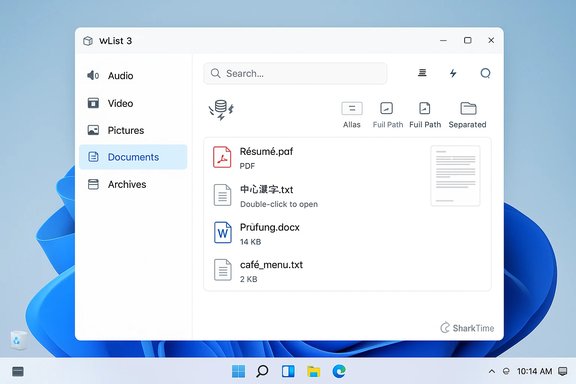
- Smart Categorization: Built‑in filters that group search results into common types (Audio, Video, Pictures, Documents, Archives).
- Flexible File Listing: Three exportable list formats—Full Path, Full Path Separated, and Simple—suitable for printing, archiving, or saving to clipboard.
- Direct File Access: Double‑click to open files or their containing folders directly from the results.
- Unicode / National Character Support: Full support for non‑ASCII filenames and diacritics.
- Internal Image Preview: Quick, inline viewing of images without launching an external viewer.
What wList intentionally does not do
SharkTime is explicit about limitations that matter to power users: wList does not search file contents (no text indexing), it does not currently support search or organization by file size, and it does not run continuous background indexing—indexing occurs on demand and can take longer on large or slow drives. Those limitations are documented on the product pages and help files.Why a cache‑first file search tool still matters in 2026
Windows provides multiple search options: the built‑in Windows Search (which indexes file contents and runs background services), PowerShell and command‑line utilities, third‑party indexers like Everything (Voidtools), and occasional enterprise tools for file inventory. A focused utility like wList targets a different pain point: users who want fast, responsive filename searches and clean directory lists without the overhead of full content indexing or the complexity of system services.Key scenarios where wList’s approach is attractive:
- Creating a printable or shareable file list before archiving a folder or burning media.
- Quickly finding and opening files on network shares where content indexing is not available or permitted.
- Working on older or resource‑constrained hardware where background indexers are undesirable.
- Environments where Unicode filenames and diacritic handling are necessary for accurate results.
Technical analysis: how wList’s design choices will affect real‑world use
On‑demand indexing and intelligent caching
SharkTime describes wList’s performance gains as coming from on‑demand indexing and subsequent caching. This is a sensible pattern for a light utility: the first pass builds a metadata index (file names, paths, timestamps), and subsequent queries against that index are fast and low‑IO. The tradeoffs are clear:- Pros:
- No resident service—lower memory and CPU overhead.
- Predictable behavior for single‑session users.
- Lower attack surface from background services and fewer always‑on permissions.
- Cons:
- Initial indexing can be slow, especially for spinning disks, NAS shares, or deeply nested structures.
- Index staleness risk if files change after indexing; because wList does not run in the background, the index must be refreshed intentionally.
- Network drive performance and permissions can greatly increase indexing time; enterprise‑grade file servers with millions of files may expose the limits of on‑demand indexing.
File categorization and filters
Grouping by broad categories (Audio, Video, Documents, Pictures, Archives) is a pragmatic way to narrow noisy search results without content inspection. This works well for filename‑based discovery (e.g., searching for a date code in photographic exports), but it cannot replace content indexing for locating documents by internal text or metadata. Users who require content search will need to continue using tools that index file contents or rely on Windows Search’s content indexing features. SharkTime clearly marks content search as “not supported.”Security, distribution, and the Microsoft Store model
wList 3.0 is distributed both as a download on SharkTime’s site and as a Microsoft Store package. Listing in the Microsoft Store is an indicator of availability and convenience, but users should understand what that does—and does not—mean for security and trust:- Microsoft monitors Store submissions for malicious content, but not every app is certified in the same way a system component is. The Store now accepts Win32/EXE installers and PWAs alongside packaged apps, which changes the vetting model from the early UWP era. Users should still validate integrity (developer website, checksum) and review permissions and installation behavior before installing any new utility.
- For corporate environments, the ability to distribute via apps.microsoft.com may bypass some IT policies, so administrators should confirm whether an app’s installation path aligns with their security and endpoint management procedures.
Usability and feature breakdown
Interface and workflows
wList’s focus on a clean and simple UI lowers the learning curve for users who primarily need file name discovery and neat directory lists. Key workflow benefits include:- Rapid creation of textual file lists in three export styles—useful for archival documentation, evidence lists, or playlists (M3U8 creation is supported in prior versions).
- Double‑click access to files and containing folders, which keeps the tool tightly integrated into a Windows workflow.
- Internal image preview, which reduces context switching when scanning visual media results.
Export formats and archiving
wList’s three export modes—Full Path, Full Path Separated, and Simple—are designed for human‑readable lists and clipboard interoperability. This is a practical inclusion for use cases like:- Documenting the content of removable media (CD/DVD/USB) before handing it off.
- Preparing lists for bulk processing by other tools or scripts that can parse standard path lists.
- Printing directory inventories for audit or compliance purposes.
Performance claims: verification and caveats
SharkTime’s press materials and product pages emphasize “super‑fast” searches after indexing. The claim is plausible for a filename‑only index operated in memory or with an efficient on‑disk cache. However, several important performance caveats should be noted:- The initial indexing pass is the performance bottleneck and varies with drive speed, file count, network latency (for NAS), and directory nesting depth. The developer warns that indexing can be exceptionally long in some cases.
- The product does not publish third‑party benchmark results or independent tests at the time of release. There are no widely distributed reviews of wList 3.0 yet, so the performance claims should be treated as vendor statements until independent benchmarks appear. If raw search latency matters to you, conduct a quick local test on representative folders before adopting wList as a primary tool.
Privacy and security considerations
SharkTime states that wList 3.0 is a local utility that does not run in the background. That design reduces ongoing telemetry risk, but users still need to evaluate:- Installer behavior and whether the EXE or Microsoft Store package requests elevated rights or writes to unexpected system locations.
- Any optional error reporting or telemetry the app may enable; the developer’s website includes a support/contact form but does not prominently advertise telemetry policies on the product page. When installing, inspect privacy settings or post‑install options for telemetry, crash reporting, or optional feature flags.
- The Microsoft Store distribution model is convenient but does not replace due diligence: Store listing presence does not guarantee the same level of vetting as OS‑level components. Administrators should test the installer in a controlled environment before broad deployment.
- Test the app on a disposable VM or non‑production workstation.
- Inspect network activity (if any) during indexing or file preview operations.
- Confirm that file previews and list exports do not inadvertently leak content to cloud services or external viewers.
Comparing wList 3.0 to alternatives
For readers deciding whether wList 3.0 should join their toolkit, here’s a practical comparison to common alternatives:- Everything (Voidtools): Ultra‑fast filename search for NTFS volumes using a kernel‑level index; excellent for immediate global filename queries. Everything indexes fast and runs in the background by default. It has a richer set of query operators for power users. Use Everything if you want continuous, global filename indexing and instant results. (wList’s advantage: simplified UI, list export formats, internal preview.
- Windows Search: Indexes file contents (subject to indexing options) and integrates with Windows UI and Cortana. Best when content search (full text) is a requirement. Its background indexing and service model make it a heavier component.
- Agent Ransack / FileLocator Lite: Better for content search without the full weight of Windows Search; more advanced search options (regex, content search), but not as lightweight as wList’s one‑pass filename listings.
- Command‑line (dir / PowerShell Get‑ChildItem): Scriptable and flexible for custom list generation, but requires shell skills and lacks a GUI preview and categorization.
Installation, licensing, and availability
wList 3.0 is published by SharkTime as a shareware offering with a free license tier for initial download; the developer’s product page lists the installer size (approx. 5.2 MB) and confirms compatibility with Windows 10 or later. The press release and product page state the application was published January 7, 2026, and the Microsoft Store package is available for convenient installation. Practical steps to evaluate wList safely:- Download the Microsoft Store package for convenience or the EXE from SharkTime’s site if you prefer manual installations.
- Run the installer in a test environment first (VM or isolated workstation). Monitor requested permissions, disk writes, and any unsolicited outbound connections.
- Point wList at a representative folder (local and a network share) to measure indexing time and subsequent search latency. Record resource usage during initial indexing to understand IO and CPU impact.
- Confirm export formats meet your downstream parsing or reporting needs.
Strengths, risks, and editorial verdict
Strengths
- Focused utility: wList 3.0 is deliberately built for filename discovery and list creation; the disciplined scope keeps the UI uncluttered and the feature set practical.
- Lightweight distribution: Small installer and a non‑persistent, no‑background approach reduce ongoing system footprint.
- Unicode and network support: Explicit support for national characters and LAN searches is valuable in multi‑lingual and enterprise network contexts.
Risks and limitations
- Initial indexing latency: On large drives or network shares, initial indexing can be lengthy; the tool intentionally sacrifices instant indexing for a no‑background model. Users must accept that tradeoff.
- No content search: The lack of file‑content indexing limits use cases—document search by keyword inside files is outside wList’s design scope.
- Early‑stage adoption risk: As a brand‑new major version, third‑party reviews, benchmarks, and broader user feedback are sparse at release. Treat performance and stability claims as vendor‑asserted until independent testing is available. This is a cautionary point—validate in your environment before relying on it for production workflows.
Editorial verdict
wList 3.0 is a credible, tightly scoped utility that resurrects a classic feature set—fast filename discovery and readable file lists—with modern polish and Microsoft Store convenience. It will appeal to users who need simple, reliable file listing and filename searches across both local and networked storage without the ongoing resource use of full desktop indexers.For administrators and power users, the tool is worth a hands‑on evaluation, with attention to initial indexing times and verification of installer behavior. For users who need content‑level search, an additional tool (or the native Windows Search service) will still be necessary.
Practical recommendations for Windows users and administrators
- For individuals: Try wList 3.0 on a non‑critical machine, index a folder you regularly search, and compare the post‑index search latency with tools you already use. If you frequently create directory lists for archiving or auditing, wList’s export options may save time.
- For IT administrators: Evaluate wList in a controlled lab to confirm it conforms to your installation policies and security posture. Check whether the Store package installs are permitted by your endpoint management policies and whether the EXE installer requires administrative elevation or creates unexpected services. If you manage many endpoints, consider packaging the app centrally after confirming behavior in your environment.
- For archival and compliance use: Validate that the exported list formats capture the metadata your processes require (e.g., full paths, timestamps) and that the tool’s Unicode handling correctly preserves non‑ASCII filenames in export files.
What to watch next
- Independent benchmarks comparing wList 3.0’s search latency (post‑index) and initial indexing time against Everything and Windows Search would help position the product more concretely for power users. At publication there are no published third‑party performance reports. Flagged for verification.
- User feedback and bug reports from early adopters will clarify real‑world stability, network drive behavior, and how the internal preview handles large or proprietary image formats.
- Any future updates that add content search, file size sorting, or background incremental indexing would significantly broaden wList’s use cases—but they would also alter the design tradeoffs that make the current version appealing.
wList 3.0 is a focused tool that does what it advertises: fast filename searching, clean file lists, and a small footprint for Windows users who prioritize simplicity and readable outputs. The developer’s transparency about limitations and the Microsoft Store availability make it easy to try, and the product is worth evaluation for users who maintain multimedia archives, perform ad‑hoc file inventories, or need a quick filename search on network shares—provided they validate indexing times and installer behavior in their own environments.
Conclusion
SharkTime’s wList 3.0 fills a narrow but practical niche in the Windows tooling landscape: a streamlined, cache‑first file search and listing utility optimized for quick, readable outputs without permanent background services. The product’s initial release (January 7, 2026) and Microsoft Store distribution make it immediately accessible; prudent users and IT teams should perform local testing to confirm indexing performance, export fidelity, and installer behavior before integrating it into daily workflows.
Source: openPR.com SharkTime Software announces wList 3.0
