

WPS Office is a freemium productivity suite from Kingsoft that runs on Windows, macOS, Linux, Android, and iOS, combining word processing, spreadsheets, presentations, PDF tools, cloud sync, templates, and AI features in one Microsoft Office-like application. That makes it one of the more credible answers to a question many Windows users are asking in 2026: how much Office do you really need to pay Microsoft for? The short version is that WPS Office is not a Microsoft 365 clone in every enterprise sense, but it is close enough for a large slice of everyday work. Its real achievement is not replacing every corner of Microsoft’s ecosystem; it is exposing how much of that ecosystem many users never touch.
For decades, Microsoft Office won because it was the format everyone else had to understand. Word documents, Excel workbooks, and PowerPoint decks became the grammar of business computing, and Windows users learned to treat Office as less a product than an assumption. Microsoft 365 added cloud storage, collaboration, security features, and now Copilot, but it also turned the office suite into a recurring household and business expense.
That subscription logic works well if you live inside Outlook, OneDrive, Teams, SharePoint, Exchange, Defender, and Entra ID. It is much harder to justify if your real workflow is writing documents, opening spreadsheets, editing the occasional presentation, and converting files to PDF. The more Microsoft adds to the bundle, the more the bundle starts to feel oversized for users who only need the core apps.
WPS Office enters that gap with a simple pitch: familiar Office-style tools, broad file compatibility, PDF functionality, and AI assistance without requiring users to buy into the full Microsoft stack. That pitch is not new, but it has become more compelling as software subscriptions pile up and users get more willing to question defaults.
The interesting thing about WPS Office is that it does not try to win by being radically different. It wins, when it wins, by being familiar enough that switching does not feel like a productivity tax.
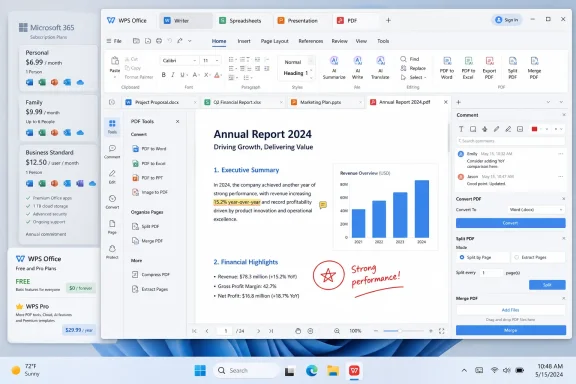
WPS Office makes a strong showing here. Writer, Spreadsheets, and Presentation are clearly built around Microsoft Office conventions, from the ribbon-style interface to the expected support for DOC, DOCX, XLS, XLSX, CSV, PPT, and PPTX files. In ordinary use, that matters more than philosophical purity. A user moving from Word or Excel does not have to relearn where everything lives before getting back to work.
That does not mean WPS is a perfect substitute for Microsoft Office in every situation. Complex Excel workbooks with deeply embedded macros, esoteric add-ins, or business-critical VBA workflows remain risky territory for any third-party suite. Heavily customized enterprise templates can also expose small layout differences that home users would never notice.
But for the broad middle of office work, WPS gets the balance right. It treats compatibility as a practical user problem rather than a standards debate, and that is why it feels credible from the first launch.
That unified approach has a bigger impact than it sounds. Switching from a document to a spreadsheet to a PDF does not feel like changing applications; it feels like moving between tabs. For users who spend the day touching many file types rather than living in one giant document, this is genuinely convenient.
It also makes WPS feel lighter than its feature list suggests. The suite is not minimal, but it avoids the psychological sprawl of having separate icons, launchers, windows, and update routines for every part of the workflow. On older Windows laptops or inexpensive student machines, that matters.
There is a trade-off. Users who prefer separate, dedicated apps may find the all-in-one model a little too centralized. Still, WPS has correctly identified something Microsoft sometimes obscures: most people do not think in terms of “word processor,” “spreadsheet application,” and “PDF editor.” They think in terms of the file they need to finish.
The most important test is document fidelity. In routine scenarios, Writer does a good job preserving Microsoft Word formatting, especially for everyday reports, letters, resumes, school papers, and business documents. That is enough to make it viable for users who exchange files with people still using Microsoft Office.
Where Writer becomes more modern is in its AI integration. Instead of forcing users to copy text into a separate chatbot, WPS places rewriting, summarization, expansion, tone adjustment, and grammar help close to the document itself. That is exactly where these tools belong.
The danger is the same danger facing every AI-assisted writing tool: convenience can blur into overreliance. AI can tighten a paragraph or summarize a report, but it can also flatten voice, miss nuance, or introduce confident errors. WPS deserves credit for integrating the tools cleanly, but users still need to treat AI as an assistant, not an editor-in-chief.
For ordinary spreadsheet work, WPS Spreadsheets is impressive. It supports common workbook formats, formulas, charts, filters, conditional formatting, pivot tables, and data validation. Large files can open quickly, and the interface mirrors Excel closely enough that casual and intermediate users will not feel stranded.
The question is not whether WPS can handle a budget sheet, sales tracker, class gradebook, or CSV cleanup job. It can. The question is whether it can replace the particular monster workbook your accounting department has been feeding since 2014.
That is where caution is warranted. If your organization depends on advanced macros, unusual add-ins, Power Query-style workflows, or tight integration with Microsoft services, Excel remains difficult to dislodge. For everyone else, WPS Spreadsheets is a reminder that many users pay for Excel’s deepest capabilities without ever needing them.
The more interesting feature is AI Slides. The promise is straightforward: provide a topic or source material, and WPS generates a structured presentation with suggested content and layouts. There is also a document-to-slides workflow that can turn written material into a draft presentation.
That kind of feature is easy to dismiss until you remember how many presentations are not acts of design brilliance. Most are status updates, training decks, classroom materials, proposals, meeting summaries, and internal briefings. For those jobs, a structured first draft is often more valuable than a blank canvas.
AI-generated presentations still need human judgment. They can be generic, overconfident, or visually safe in the way templates often are. But as a way to turn a report into a meeting-ready outline, WPS is aiming at a real pain point rather than adding AI for decoration.
PDF work is where many users quietly accumulate extra software costs. They need to annotate a file, convert a PDF to Word, merge documents, split pages, sign a form, extract images, compress a file, or perform OCR. Microsoft Office handles some PDF-adjacent tasks, but it does not replace a full PDF utility. Adobe Acrobat is powerful, but its subscription cost can feel excessive for occasional users.
WPS folds PDF reading, conversion, editing, annotation, signing, splitting, merging, and related tools into the same productivity environment. That gives the suite a practical advantage over office alternatives that focus only on documents, spreadsheets, and slides.
This matters because PDF is where office work often ends up. Contracts, invoices, resumes, forms, reports, academic papers, manuals, and client deliverables frequently arrive as PDFs. A suite that treats PDF as a first-class format rather than an export destination is better aligned with how people actually work.
For many home users, students, freelancers, and small businesses, this alone could justify installing WPS. If it prevents a separate Acrobat subscription or a collection of sketchy web converters, the value proposition becomes much easier to understand.
The Chat Doc concept is especially relevant. Being able to ask questions about a long report, contract, research paper, or manual can save real time. Side-by-side translation also fits a practical need, particularly for multilingual teams and students working across source material.
But AI features in productivity software raise two questions that marketing pages rarely answer to an administrator’s satisfaction. What data leaves the device, and how is it retained or used? For casual users, that may not be a deal-breaker. For regulated industries, legal departments, schools, healthcare organizations, and government environments, it absolutely can be.
This is where Microsoft has an advantage, not because Copilot is automatically better at every task, but because Microsoft can wrap AI inside the broader governance story of Microsoft 365. Admin controls, tenant boundaries, compliance settings, identity management, and audit trails matter. WPS may be attractive, but IT departments will need to read the fine print before feeding sensitive files into its AI tools.
The paid tiers are where the calculation becomes more nuanced. WPS promotes Pro and AI plans that unlock advanced PDF features, cloud storage, templates, conversion tools, AI writing, AI slides, AI spell check, and document chat features. Pricing can vary by region, promotion, billing period, and bundle, so users should check the current plan page rather than relying on a single quoted monthly figure.
The broader point remains: WPS is usually positioned below the cost of Microsoft 365 when the comparison is limited to office documents, PDFs, and AI productivity features. But Microsoft 365 includes much more than the desktop apps, especially for families and businesses that use OneDrive storage, Outlook, Teams, Defender, and identity-backed collaboration.
That makes the decision less about which suite has the lower sticker price and more about which bundle you are actually using. If Microsoft 365 is your storage, email, collaboration, and security layer, WPS may be a supplement rather than a replacement. If Microsoft 365 is just the thing you pay for to open Word files, WPS becomes much harder to ignore.
WPS is particularly appealing on older laptops, budget desktops, student PCs, and secondary machines. The suite’s relatively lightweight footprint and unified interface make it feel less burdensome than modern productivity stacks that assume abundant storage, memory, bandwidth, and subscription tolerance.
It is also useful for users who need local-first productivity rather than browser-first productivity. Google Workspace is excellent for collaboration, but not everyone wants to live in a browser or trust every workflow to an internet connection. LibreOffice is powerful and open source, but its interface and Microsoft compatibility can feel less polished to users coming straight from Office.
WPS sits in a pragmatic middle. It is not the ideological choice, and it is not the enterprise default. It is the practical choice for users who want something that looks like Office, opens Office files, handles PDFs, and does not demand that every document become part of a larger cloud ecosystem.
Microsoft 365 is deeply embedded in many organizations. Files live in OneDrive and SharePoint. Permissions flow through Entra ID. Teams meetings generate documents and recordings. Compliance teams care about retention, eDiscovery, sensitivity labels, and auditability. Security teams care about patching, identity, and data boundaries.
Replacing the Office apps alone does not replace that ecosystem. In some companies, it may even create friction if users begin generating files, sharing links, or invoking AI tools outside approved governance channels. WPS can be useful in business settings, but administrators should test deployment, update behavior, data handling, file fidelity, and policy controls before treating it as a wholesale Microsoft 365 substitute.
There is also a geopolitical and procurement dimension that some organizations will consider because WPS comes from Kingsoft, a Chinese software company. That fact does not automatically make the product unsuitable, but it does mean some enterprises and public-sector buyers will apply additional scrutiny. In 2026, software trust is not only about features; it is about jurisdiction, telemetry, vendor transparency, and compliance posture.
That may sound like a narrower ambition, but it is exactly why the suite works. Microsoft has made Office part of a vast productivity operating system. WPS has made an office suite that still feels like an office suite.
The result is a product that can feel refreshing. It opens quickly, presents familiar tools, keeps multiple file types under one roof, and includes PDF capabilities that many users otherwise have to assemble from separate utilities. Its AI features are not magic, but they are placed where users can actually use them.
The unresolved tension is trust. Users should think carefully before uploading sensitive documents to any AI service, and businesses should evaluate WPS through the same security and compliance lens they would apply to any productivity platform. Affordability does not eliminate due diligence.
 Microsoft 365 Has Become the Default, and That Is Exactly the Problem
For decades, Microsoft Office won because it was the format everyone else had to understand. Word documents, Excel workbooks, and PowerPoint decks became the grammar of business computing, and Windows users learned to treat Office as less a product than an assumption. Microsoft 365 added cloud storage, collaboration, security features, and now Copilot, but it also turned the office suite into a recurring household and business expense.That subscription logic works well if you live inside Outlook, OneDrive, Teams, SharePoint, Exchange, Defender, and Entra ID. It is much harder to justify if your real workflow is writing documents, opening spreadsheets, editing the occasional presentation, and converting files to PDF. The more Microsoft adds to the bundle, the more the bundle starts to feel oversized for users who only need the core apps.
WPS Office enters that gap with a simple pitch: familiar Office-style tools, broad file compatibility, PDF functionality, and AI assistance without requiring users to buy into the full Microsoft stack. That pitch is not new, but it has become more compelling as software subscriptions pile up and users get more willing to question defaults.
The interesting thing about WPS Office is that it does not try to win by being radically different. It wins, when it wins, by being familiar enough that switching does not feel like a productivity tax.
WPS Office Understands That Compatibility Is the Product
The first thing a Microsoft Office alternative has to do is boring: open the files correctly. If a suite mangles a DOCX contract, shifts a spreadsheet layout, or breaks a PowerPoint deck before a meeting, the conversation is over. Compatibility is not a feature in this market; it is the entry fee.WPS Office makes a strong showing here. Writer, Spreadsheets, and Presentation are clearly built around Microsoft Office conventions, from the ribbon-style interface to the expected support for DOC, DOCX, XLS, XLSX, CSV, PPT, and PPTX files. In ordinary use, that matters more than philosophical purity. A user moving from Word or Excel does not have to relearn where everything lives before getting back to work.
That does not mean WPS is a perfect substitute for Microsoft Office in every situation. Complex Excel workbooks with deeply embedded macros, esoteric add-ins, or business-critical VBA workflows remain risky territory for any third-party suite. Heavily customized enterprise templates can also expose small layout differences that home users would never notice.
But for the broad middle of office work, WPS gets the balance right. It treats compatibility as a practical user problem rather than a standards debate, and that is why it feels credible from the first launch.
The Unified App Is More Than a Cosmetic Trick
One of WPS Office’s smartest design choices is bundling documents, spreadsheets, presentations, PDFs, templates, and cloud files into a single workspace. Microsoft’s desktop apps remain powerful, but they still largely behave like separate kingdoms. WPS feels more like a browser for productivity files.That unified approach has a bigger impact than it sounds. Switching from a document to a spreadsheet to a PDF does not feel like changing applications; it feels like moving between tabs. For users who spend the day touching many file types rather than living in one giant document, this is genuinely convenient.
It also makes WPS feel lighter than its feature list suggests. The suite is not minimal, but it avoids the psychological sprawl of having separate icons, launchers, windows, and update routines for every part of the workflow. On older Windows laptops or inexpensive student machines, that matters.
There is a trade-off. Users who prefer separate, dedicated apps may find the all-in-one model a little too centralized. Still, WPS has correctly identified something Microsoft sometimes obscures: most people do not think in terms of “word processor,” “spreadsheet application,” and “PDF editor.” They think in terms of the file they need to finish.
Writer Is a Familiar Word Processor With AI in the Margins
WPS Writer is the least surprising part of the suite, and that is mostly a compliment. It looks and behaves enough like Word that the learning curve is shallow. Formatting, styles, tables, headers, footers, references, and common document tools are where a Microsoft Office user expects them to be.The most important test is document fidelity. In routine scenarios, Writer does a good job preserving Microsoft Word formatting, especially for everyday reports, letters, resumes, school papers, and business documents. That is enough to make it viable for users who exchange files with people still using Microsoft Office.
Where Writer becomes more modern is in its AI integration. Instead of forcing users to copy text into a separate chatbot, WPS places rewriting, summarization, expansion, tone adjustment, and grammar help close to the document itself. That is exactly where these tools belong.
The danger is the same danger facing every AI-assisted writing tool: convenience can blur into overreliance. AI can tighten a paragraph or summarize a report, but it can also flatten voice, miss nuance, or introduce confident errors. WPS deserves credit for integrating the tools cleanly, but users still need to treat AI as an assistant, not an editor-in-chief.
Spreadsheets Are Good Enough Until Excel Stops Being Just a Spreadsheet
WPS Spreadsheets is perhaps the most consequential test because Excel is the hardest Microsoft Office app to replace. Word alternatives are common. PowerPoint alternatives are workable. Excel, however, is not merely a spreadsheet for many businesses; it is a programming environment, a reporting layer, a finance tool, and sometimes an accidental database.For ordinary spreadsheet work, WPS Spreadsheets is impressive. It supports common workbook formats, formulas, charts, filters, conditional formatting, pivot tables, and data validation. Large files can open quickly, and the interface mirrors Excel closely enough that casual and intermediate users will not feel stranded.
The question is not whether WPS can handle a budget sheet, sales tracker, class gradebook, or CSV cleanup job. It can. The question is whether it can replace the particular monster workbook your accounting department has been feeding since 2014.
That is where caution is warranted. If your organization depends on advanced macros, unusual add-ins, Power Query-style workflows, or tight integration with Microsoft services, Excel remains difficult to dislodge. For everyone else, WPS Spreadsheets is a reminder that many users pay for Excel’s deepest capabilities without ever needing them.
Presentation Tools Have Quietly Become an AI Showcase
WPS Presentation follows the same pattern as Writer and Spreadsheets: familiar interface, Microsoft file support, and enough templates to get users started quickly. It is not trying to reinvent slideware. It is trying to reduce the friction of producing a decent deck.The more interesting feature is AI Slides. The promise is straightforward: provide a topic or source material, and WPS generates a structured presentation with suggested content and layouts. There is also a document-to-slides workflow that can turn written material into a draft presentation.
That kind of feature is easy to dismiss until you remember how many presentations are not acts of design brilliance. Most are status updates, training decks, classroom materials, proposals, meeting summaries, and internal briefings. For those jobs, a structured first draft is often more valuable than a blank canvas.
AI-generated presentations still need human judgment. They can be generic, overconfident, or visually safe in the way templates often are. But as a way to turn a report into a meeting-ready outline, WPS is aiming at a real pain point rather than adding AI for decoration.
The PDF Tools May Be the Real Subscription Killer
The strongest argument for WPS Office may not be Writer, Spreadsheets, or Presentation. It may be PDF.PDF work is where many users quietly accumulate extra software costs. They need to annotate a file, convert a PDF to Word, merge documents, split pages, sign a form, extract images, compress a file, or perform OCR. Microsoft Office handles some PDF-adjacent tasks, but it does not replace a full PDF utility. Adobe Acrobat is powerful, but its subscription cost can feel excessive for occasional users.
WPS folds PDF reading, conversion, editing, annotation, signing, splitting, merging, and related tools into the same productivity environment. That gives the suite a practical advantage over office alternatives that focus only on documents, spreadsheets, and slides.
This matters because PDF is where office work often ends up. Contracts, invoices, resumes, forms, reports, academic papers, manuals, and client deliverables frequently arrive as PDFs. A suite that treats PDF as a first-class format rather than an export destination is better aligned with how people actually work.
For many home users, students, freelancers, and small businesses, this alone could justify installing WPS. If it prevents a separate Acrobat subscription or a collection of sketchy web converters, the value proposition becomes much easier to understand.
AI Is Integrated Well, but the Trust Questions Do Not Disappear
WPS AI is not just a chatbot bolted onto the side of the suite. It appears throughout the workflow: summarizing documents, helping draft text, rewriting passages, translating content, generating slides, checking spelling and grammar, and allowing users to ask questions about documents. That makes it feel more useful than an AI button that opens a generic prompt box.The Chat Doc concept is especially relevant. Being able to ask questions about a long report, contract, research paper, or manual can save real time. Side-by-side translation also fits a practical need, particularly for multilingual teams and students working across source material.
But AI features in productivity software raise two questions that marketing pages rarely answer to an administrator’s satisfaction. What data leaves the device, and how is it retained or used? For casual users, that may not be a deal-breaker. For regulated industries, legal departments, schools, healthcare organizations, and government environments, it absolutely can be.
This is where Microsoft has an advantage, not because Copilot is automatically better at every task, but because Microsoft can wrap AI inside the broader governance story of Microsoft 365. Admin controls, tenant boundaries, compliance settings, identity management, and audit trails matter. WPS may be attractive, but IT departments will need to read the fine print before feeding sensitive files into its AI tools.
Free Is Powerful, but Freemium Always Has a Shape
WPS Office’s free tier is one of its biggest strengths. Users can install the suite, open and create mainstream office files, read PDFs, and get a feel for the workflow before paying. In a market full of subscriptions that ask for a credit card before proving anything, that matters.The paid tiers are where the calculation becomes more nuanced. WPS promotes Pro and AI plans that unlock advanced PDF features, cloud storage, templates, conversion tools, AI writing, AI slides, AI spell check, and document chat features. Pricing can vary by region, promotion, billing period, and bundle, so users should check the current plan page rather than relying on a single quoted monthly figure.
The broader point remains: WPS is usually positioned below the cost of Microsoft 365 when the comparison is limited to office documents, PDFs, and AI productivity features. But Microsoft 365 includes much more than the desktop apps, especially for families and businesses that use OneDrive storage, Outlook, Teams, Defender, and identity-backed collaboration.
That makes the decision less about which suite has the lower sticker price and more about which bundle you are actually using. If Microsoft 365 is your storage, email, collaboration, and security layer, WPS may be a supplement rather than a replacement. If Microsoft 365 is just the thing you pay for to open Word files, WPS becomes much harder to ignore.
The Windows User Gets the Best Version of the Argument
For WindowsForum readers, the most relevant question is not whether WPS Office exists on every platform. It is whether it makes sense on a Windows PC in 2026. The answer is yes, especially on machines where Microsoft 365 feels heavy, unnecessary, or expensive.WPS is particularly appealing on older laptops, budget desktops, student PCs, and secondary machines. The suite’s relatively lightweight footprint and unified interface make it feel less burdensome than modern productivity stacks that assume abundant storage, memory, bandwidth, and subscription tolerance.
It is also useful for users who need local-first productivity rather than browser-first productivity. Google Workspace is excellent for collaboration, but not everyone wants to live in a browser or trust every workflow to an internet connection. LibreOffice is powerful and open source, but its interface and Microsoft compatibility can feel less polished to users coming straight from Office.
WPS sits in a pragmatic middle. It is not the ideological choice, and it is not the enterprise default. It is the practical choice for users who want something that looks like Office, opens Office files, handles PDFs, and does not demand that every document become part of a larger cloud ecosystem.
The Enterprise Case Is More Complicated Than the Home Case
For individuals and small teams, WPS Office is easy to recommend as a serious trial. For enterprise IT, the recommendation becomes more conditional. That is not because the apps are weak; it is because productivity software is infrastructure.Microsoft 365 is deeply embedded in many organizations. Files live in OneDrive and SharePoint. Permissions flow through Entra ID. Teams meetings generate documents and recordings. Compliance teams care about retention, eDiscovery, sensitivity labels, and auditability. Security teams care about patching, identity, and data boundaries.
Replacing the Office apps alone does not replace that ecosystem. In some companies, it may even create friction if users begin generating files, sharing links, or invoking AI tools outside approved governance channels. WPS can be useful in business settings, but administrators should test deployment, update behavior, data handling, file fidelity, and policy controls before treating it as a wholesale Microsoft 365 substitute.
There is also a geopolitical and procurement dimension that some organizations will consider because WPS comes from Kingsoft, a Chinese software company. That fact does not automatically make the product unsuitable, but it does mean some enterprises and public-sector buyers will apply additional scrutiny. In 2026, software trust is not only about features; it is about jurisdiction, telemetry, vendor transparency, and compliance posture.
The Best Microsoft Office Alternative Is the One That Knows Its Place
WPS Office is at its strongest when it does not pretend to be Microsoft 365. It is not an Exchange replacement. It is not Teams. It is not SharePoint. It is not a complete enterprise compliance platform. Its value lies in doing the visible office work well: documents, spreadsheets, presentations, PDFs, templates, conversions, and AI-assisted drafting.That may sound like a narrower ambition, but it is exactly why the suite works. Microsoft has made Office part of a vast productivity operating system. WPS has made an office suite that still feels like an office suite.
The result is a product that can feel refreshing. It opens quickly, presents familiar tools, keeps multiple file types under one roof, and includes PDF capabilities that many users otherwise have to assemble from separate utilities. Its AI features are not magic, but they are placed where users can actually use them.
The unresolved tension is trust. Users should think carefully before uploading sensitive documents to any AI service, and businesses should evaluate WPS through the same security and compliance lens they would apply to any productivity platform. Affordability does not eliminate due diligence.
The Office Bill Finally Has Competition Again
The real lesson from WPS Office is not that Microsoft Office is obsolete. It is that Microsoft no longer owns the only credible version of productivity for many users. The default is still powerful, but the default is no longer automatically the best value.- WPS Office is a strong free Microsoft Office alternative for users whose work centers on standard documents, spreadsheets, presentations, and PDFs.
- Its Microsoft Office-style interface lowers the switching cost for Windows users who do not want to relearn basic productivity habits.
- Its integrated PDF tools are a major advantage and may eliminate the need for separate PDF software in many workflows.
- Its AI features are useful for drafting, summarizing, translating, and generating slide outlines, but users should remain cautious with sensitive documents.
- Excel power users, macro-heavy businesses, and Microsoft 365-dependent organizations should test carefully before replacing Microsoft’s apps.
- The best audience for WPS Office is students, freelancers, home users, small businesses, and anyone trying to reduce subscription sprawl without giving up familiar desktop tools.
References
- Primary source: Windows Report
Published: 2026-06-02T08:12:13.340586
WPS Office Review: The Best Free Alternative to Microsoft Office?
WPS Office is a cross-platform productivity suite that includes Writer, Sheets, Presentation, and PDF apps. windowsreport.com
- Official source: microsoft.com
Compare Microsoft 365 Plans & Pricing (Formerly Office 365) - Microsoft Store
Compare Microsoft 365 subscription plans and pricing (formerly Office 365). Choose from Personal, Family and Premium subscriptions with Copilot AI, Word, Excel, PowerPoint, Outlook, and OneDrive. Works on PC, Mac, iPhone, iPad and Android. Find the right plan for your needs.www.microsoft.com
- Related coverage: wps.com
WPS Excel: Best Free Spreadsheet Software to Edit Excel Sheets
Download free spreadsheet software from WPS Office. WPS Excel helps you create and edit XLS and XLSX files, generate formulas with AI, analyze data faster. Start your spreadsheet download today and enjoy a powerful free alternative to Microsoft Excel.www.wps.com - Related coverage: searchengineinsight.com
Microsoft 365 Plans & Pricing Guide 2026: Which Tier Is Right for You?
Microsoft 365 pricing is changing in July 2026. Get the full breakdown of all plans, updated costs, new features, pros and cons, and our honest verdict on whether it is worth your money. www.searchengineinsight.com
- Related coverage: windowscentral.com
Microsoft combines Office and Copilot Pro under new $20 subscription | Windows Central
Microsoft has announced a new productivity subscription that combines Microsoft 365 Family and Copilot Pro under one $20 a month subscription dubbed Microsoft 365 Premium.www.windowscentral.com - Related coverage: tomshardware.com
Microsoft offers a one-year free Microsoft 365 subscription to college students — eligible users get 50% off the monthly plan after the first year | Tom's Hardware
This promo will save you $100 for the first year of Microsoft 365.www.tomshardware.com
- Related coverage: metrics.biz
- Official source: store.apple.com
- Related coverage: oceanduran.com
- Official source: cdn-dynmedia-1.microsoft.com
microsoft 365 consumer and small business master product chooser
PDF documentcdn-dynmedia-1.microsoft.com
