

A proposed freeze at WSL 2.7.8 is already stale: Microsoft marked WSL 2.7.10 as the Latest release on June 26, 2026. The practical decision is to deploy 2.7.10 through a controlled ring, not to stop at 2.7.8, while making four validations mandatory: hosts-file and DNS behavior, the revised 6.18 kernel, WSL running inside virtualized Windows hosts, and persisted VHD restore workflows.
Microsoft’s WSL release notes show why version numbers alone are not an adequate rollout gate in the 2.7.x line. WSL 2.7.8, released June 6, fixed CreateInstance failures linked to oversized Windows hosts files and moved the WSL kernel to 6.18.33.1-1. But 2.7.9 then addressed a boot regression affecting Windows under KVM and older AMD chipsets, while 2.7.10 changed how VHD restores are performed by passing the mounting user’s token during restore.
That sequence matters because a freeze at 2.7.8 locks an organization onto a version that contains an important hosts-file fix but predates both a virtualization boot correction and a restore-path security and behavior change. The right operational posture is not “deploy every release immediately.” It is “move to the current release and test the paths that actually changed.”
Administrators should use a representative pilot group rather than treating WSL as a single homogeneous application. Include at least one Windows 10 system with a managed hosts file, one standard Windows desktop, one ARM64 device if the organization supports it, a Windows guest operating under KVM if applicable, and a machine that uses persisted VHD mounts or restoration.
The immediate procedure is straightforward:
The effect is most relevant on Windows 10 systems where DNS tunneling is unavailable. In that scenario, the Windows hosts file can be more directly significant to how name resolution is handed into WSL. Enterprises with endpoint agents, development stacks, ad-blocking entries, test-domain mappings, or centrally managed hosts-file policies should not assume that a normal laptop represents their riskiest device.
Begin by identifying the size and provenance of the Windows hosts file on the pilot. In PowerShell, administrators can inspect it with:
Then launch each managed distribution after the WSL shutdown and confirm that the instance creates normally. Inside the distribution, test both a hostname that is deliberately defined in the Windows hosts file and an ordinary internal or external name used by the organization. The point is not to manufacture a huge hosts file in production; it is to demonstrate that the actual managed configuration no longer prevents WSL startup and that expected resolution still works.
A useful acceptance record should capture three separate outcomes:
The correct test is to start the distributions that matter, then exercise the workloads that actually rely on Linux networking and filesystem behavior. For a developer workstation, that might mean launching the normal build environment, accessing the project files it uses, and making its usual network calls. For an administration host, it means launching the scripts and tools that are expected to operate from WSL.
WSL 2.7.3 is the reason to pay particular attention to networking and ARM64 rather than treating this as an ordinary servicing update. That release added ARM64 test-distro coverage and reverted prior DNS behavior while Microsoft investigated DNS-over-TCP behavior in virtio networking. The lesson is not that every system will have a DNS defect; it is that networking changes in this release family deserve a direct test on the architectures and network configurations that matter.
For ARM64, validate a real ARM64 device or test image rather than inferring compatibility from an x64 result. For networking, test resolution, connection establishment, and the application path that depends on them. A single successful
WindowsForum’s earlier coverage of WSL 2.7.5 and 2.7.7 correctly flagged the 6.18 kernel transition and VHD-related changes as more consequential than their compact changelogs suggested. The 2.7.10 decision reinforces that point: the release train is carrying infrastructure changes, not merely cosmetic WSL servicing.
This is a targeted test population, but it is exactly the sort of population broad desktop pilot rings often omit. Windows running as a KVM guest may be a developer lab VM, a hosted build system, a test environment, or a virtual desktop scenario. Older AMD hardware may be a small legacy pool, but it is still an operationally distinct pool if WSL is approved there.
The validation should be deliberately simple and repeatable: fully shut down WSL, reboot the Windows guest or host as appropriate to the maintenance plan, launch each WSL distribution, and confirm it reaches a usable shell. Then run the same basic network and workload checks used on physical systems.
If the organization has neither KVM-hosted Windows nor older AMD endpoints, document that the path is out of scope rather than pretending it passed. A deployment record should distinguish “tested successfully” from “not present in this environment.” That is a more useful risk statement than declaring the release universally validated.
For these environments, upgrading without testing restoration would be the weakest possible interpretation of the release. The update may install cleanly and normal distributions may launch, while the organization’s VHD-based workflow remains untested at the moment it matters: after the WSL utility VM has been recreated and a restore must occur.
Use a nonproduction copy of the organization’s normal persisted-VHD process. Perform the usual mount and restore sequence under the same class of user account that owns the workflow, force a WSL shutdown so the utility VM is recreated, then perform the restore again. Confirm not only that the VHD is available, but that the expected data is accessible through the intended user context.
The test should explicitly avoid improvised elevation as a workaround. If a restore only succeeds when an administrator changes the operational context, the organization has not validated the behavior that 2.7.10 changed. The meaningful outcome is a successful restore through the sanctioned, routine mounting-user process.
This is also where security and usability meet. WindowsForum readers tracking the WSL 2.7.10 data-tampering advisory should treat the current package as the security baseline, but security urgency does not eliminate the need to test the changed restore path. It makes a short, disciplined validation window more important.
A brief controlled rollout is more defensible than a broad 2.7.8 freeze. WSL 2.7.10 gives administrators the current servicing baseline, while the four-path test plan turns a vague version decision into evidence: WSL starts with real hosts-file policy, workloads survive the 6.18 kernel transition, virtualized Windows boots correctly, and persisted VHD restores work in the user context that operations actually rely on.
Microsoft’s WSL release notes show why version numbers alone are not an adequate rollout gate in the 2.7.x line. WSL 2.7.8, released June 6, fixed CreateInstance failures linked to oversized Windows hosts files and moved the WSL kernel to 6.18.33.1-1. But 2.7.9 then addressed a boot regression affecting Windows under KVM and older AMD chipsets, while 2.7.10 changed how VHD restores are performed by passing the mounting user’s token during restore.
That sequence matters because a freeze at 2.7.8 locks an organization onto a version that contains an important hosts-file fix but predates both a virtualization boot correction and a restore-path security and behavior change. The right operational posture is not “deploy every release immediately.” It is “move to the current release and test the paths that actually changed.”
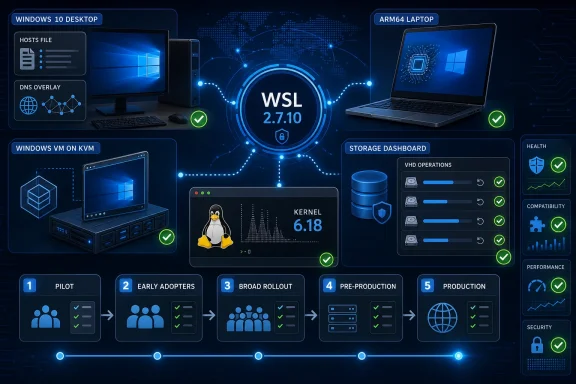 Start With a Narrow 2.7.10 Deployment Ring
Administrators should use a representative pilot group rather than treating WSL as a single homogeneous application. Include at least one Windows 10 system with a managed hosts file, one standard Windows desktop, one ARM64 device if the organization supports it, a Windows guest operating under KVM if applicable, and a machine that uses persisted VHD mounts or restoration.The immediate procedure is straightforward:
- Record the installed WSL package and kernel details with
wsl --versionon every pilot device. - Record installed distributions and their WSL generation with
wsl --list --verbose. - Update the pilot to the current package with
wsl --update, then close active Linux workloads and runwsl --shutdownbefore beginning validation. - Run
wsl --versionagain and confirm that the pilot is on WSL 2.7.10 before recording test results. - Test the four paths below using ordinary workloads as well as the focused checks. A successful
wsl --updateis not a deployment acceptance test.
The Hosts-File Fix Should Change the Windows 10 Test Plan
WSL 2.7.8 fixed CreateInstance failures caused by oversized Windows hosts files. The release also changed WSL’s handling so excessively large parsed hosts-file content is skipped, while raising a shared-message size cap from 4 MiB to 16 MiB.The effect is most relevant on Windows 10 systems where DNS tunneling is unavailable. In that scenario, the Windows hosts file can be more directly significant to how name resolution is handed into WSL. Enterprises with endpoint agents, development stacks, ad-blocking entries, test-domain mappings, or centrally managed hosts-file policies should not assume that a normal laptop represents their riskiest device.
Begin by identifying the size and provenance of the Windows hosts file on the pilot. In PowerShell, administrators can inspect it with:
Get-Item "$env:SystemRoot\System32\drivers\etc\hosts" | Select-Object FullName,Length,LastWriteTimeThen launch each managed distribution after the WSL shutdown and confirm that the instance creates normally. Inside the distribution, test both a hostname that is deliberately defined in the Windows hosts file and an ordinary internal or external name used by the organization. The point is not to manufacture a huge hosts file in production; it is to demonstrate that the actual managed configuration no longer prevents WSL startup and that expected resolution still works.
A useful acceptance record should capture three separate outcomes:
- The distribution starts without a CreateInstance failure.
- A host mapped in the Windows hosts file resolves as the organization expects.
- Ordinary DNS resolution works after a clean
wsl --shutdownand relaunch.
Kernel 6.18 Requires Workload Validation, Not Just a Boot Check
WSL 2.7.8 updated the bundled kernel to 6.18.33.1-1, and WSL 2.7.9 moved again to 6.18.33.2-2. That makes the 2.7.10 rollout a kernel-and-platform validation event, even though the final release note called out VHD restore behavior rather than a new kernel number.The correct test is to start the distributions that matter, then exercise the workloads that actually rely on Linux networking and filesystem behavior. For a developer workstation, that might mean launching the normal build environment, accessing the project files it uses, and making its usual network calls. For an administration host, it means launching the scripts and tools that are expected to operate from WSL.
WSL 2.7.3 is the reason to pay particular attention to networking and ARM64 rather than treating this as an ordinary servicing update. That release added ARM64 test-distro coverage and reverted prior DNS behavior while Microsoft investigated DNS-over-TCP behavior in virtio networking. The lesson is not that every system will have a DNS defect; it is that networking changes in this release family deserve a direct test on the architectures and network configurations that matter.
For ARM64, validate a real ARM64 device or test image rather than inferring compatibility from an x64 result. For networking, test resolution, connection establishment, and the application path that depends on them. A single successful
ping or package-manager lookup is useful diagnostic evidence, but it is not a substitute for the tools users need to run.WindowsForum’s earlier coverage of WSL 2.7.5 and 2.7.7 correctly flagged the 6.18 kernel transition and VHD-related changes as more consequential than their compact changelogs suggested. The 2.7.10 decision reinforces that point: the release train is carrying infrastructure changes, not merely cosmetic WSL servicing.
KVM Guests and Older AMD Systems Cannot Be an Afterthought
WSL 2.7.9, published as a pre-release on June 23, moved to kernel 6.18.33.2-2 to address a boot regression affecting Windows under KVM and older AMD chipsets. WSL 2.7.10 followed three days later as the Latest release, so organizations that froze at 2.7.8 would miss the correction path.This is a targeted test population, but it is exactly the sort of population broad desktop pilot rings often omit. Windows running as a KVM guest may be a developer lab VM, a hosted build system, a test environment, or a virtual desktop scenario. Older AMD hardware may be a small legacy pool, but it is still an operationally distinct pool if WSL is approved there.
The validation should be deliberately simple and repeatable: fully shut down WSL, reboot the Windows guest or host as appropriate to the maintenance plan, launch each WSL distribution, and confirm it reaches a usable shell. Then run the same basic network and workload checks used on physical systems.
If the organization has neither KVM-hosted Windows nor older AMD endpoints, document that the path is out of scope rather than pretending it passed. A deployment record should distinguish “tested successfully” from “not present in this environment.” That is a more useful risk statement than declaring the release universally validated.
The VHD Restore Change Is the 2.7.10-Specific Gate
WSL 2.7.10 changed VHD restore behavior by passing the mounting user’s token during restore. That is a narrowly described release-note item, but it directly affects teams that depend on persisted VHDs and restore workflows.For these environments, upgrading without testing restoration would be the weakest possible interpretation of the release. The update may install cleanly and normal distributions may launch, while the organization’s VHD-based workflow remains untested at the moment it matters: after the WSL utility VM has been recreated and a restore must occur.
Use a nonproduction copy of the organization’s normal persisted-VHD process. Perform the usual mount and restore sequence under the same class of user account that owns the workflow, force a WSL shutdown so the utility VM is recreated, then perform the restore again. Confirm not only that the VHD is available, but that the expected data is accessible through the intended user context.
The test should explicitly avoid improvised elevation as a workaround. If a restore only succeeds when an administrator changes the operational context, the organization has not validated the behavior that 2.7.10 changed. The meaningful outcome is a successful restore through the sanctioned, routine mounting-user process.
This is also where security and usability meet. WindowsForum readers tracking the WSL 2.7.10 data-tampering advisory should treat the current package as the security baseline, but security urgency does not eliminate the need to test the changed restore path. It makes a short, disciplined validation window more important.
Frequently Asked Questions
Should organizations deploy WSL 2.7.8 first and then move to 2.7.10?
No. WSL 2.7.10 is the current Latest release and includes changes that follow 2.7.8, including the VHD restore behavior update. Test and deploy 2.7.10 directly unless a documented internal constraint requires a different package.Is the hosts-file issue only relevant to Windows 10?
The 2.7.8 change is particularly important on Windows 10 systems where DNS tunneling is unavailable. Any environment using large or centrally managed Windows hosts files should still include hosts-file validation in its pilot.Does a successful WSL launch prove that networking is safe?
No. It proves the distribution starts. Test hostname resolution and the real networked workloads used on the device, especially on ARM64 systems and configurations using virtio networking.Which systems need the KVM test?
Windows systems operating as KVM guests and systems using older AMD chipsets should be included if they exist in the deployment population. The 2.7.9 kernel update specifically addressed a boot regression affecting those scenarios.A brief controlled rollout is more defensible than a broad 2.7.8 freeze. WSL 2.7.10 gives administrators the current servicing baseline, while the four-path test plan turns a vague version decision into evidence: WSL starts with real hosts-file policy, workloads survive the 6.18 kernel transition, virtualized Windows boots correctly, and persisted VHD restores work in the user context that operations actually rely on.
References
- Primary source: learn.microsoft.com
Release Notes for WSL | Microsoft Learn
Read release notes for the Windows Subsystem for Linux. These release notes include fixed issues and are updated weekly.learn.microsoft.com - Independent coverage: github.com
Releases · microsoft/WSL · GitHub
Windows Subsystem for Linux. Contribute to microsoft/WSL development by creating an account on GitHub. github.com
- Primary source: WindowsForum
WSL 2.7.7 and 2.7.5 Released: New 6.18 Kernel, VHD Access Fixes, and WSLg Package Change | Windows Forum
Microsoft’s latest Windows Subsystem for Linux preview releases are small on the surface, but WSL 2.7.5 carries a kernel jump that developers and...windowsforum.com
