

Microsoft previewed Windows Subsystem for Linux 3 at Build 2026 in San Francisco on June 2, promising a reworked Linux-on-Windows architecture with near-native GPU and NPU access for AI workloads running inside WSL environments. The announcement matters less because it gives Windows another developer checkbox and more because it attacks one of the platform’s most stubborn credibility gaps. For years, Microsoft has told developers they can live in Windows while building for Linux; local AI has made that claim harder to sustain. WSL 3 is Microsoft’s attempt to make the Windows PC feel less like a compromise machine for modern AI work.
The old Windows developer pitch was pragmatic: use Windows for the desktop, WSL for Linux tooling, Visual Studio Code as the bridge, and Azure when the local machine runs out of road. That worked beautifully for web development, cloud deployment scripts, container work, and the everyday mess of Git, Python, Node, Go, and shell utilities. It worked less beautifully once the center of gravity shifted from “run a dev server” to “run a model.”
Local AI has a different relationship with hardware. It wants fast memory, strong GPU access, low-latency drivers, and increasingly an NPU that is not merely present on the spec sheet but visible to the software stack. WSL 2 gave Windows users a real Linux kernel in a lightweight VM, but the virtualization boundary always mattered most when the workload was least forgiving.
That is why WSL 3, if Microsoft delivers what it previewed, is not just another subsystem update. It is a platform correction. Microsoft is acknowledging that AI developers do not merely need Linux commands on Windows; they need Linux frameworks to see Windows hardware as something close to native.
For traditional development, that model was good enough and often excellent. File system placement still mattered, networking occasionally produced surprises, and enterprise images could complicate setup, but the broad experience became routine. A Windows laptop could be a credible Linux development machine without the social tax of telling everyone to dual-boot.
The problem is that AI development exposed the limits of “good enough.” GPUs are not just another peripheral in local model work; they are the difference between experimentation and waiting. NPUs, meanwhile, are the centerpiece of the new AI PC story, but a chip that cannot be reached from the developer’s preferred environment is marketing silicon, not a platform capability.
WSL 2 already had important GPU acceleration paths, especially for NVIDIA CUDA workloads, and that history should not be erased. Many developers have been productive with CUDA in WSL 2 for years. But support has been uneven across hardware, backend, driver maturity, and workload type. The moment the conversation turns to NPUs, ARM-based Windows machines, or a broader local inference stack, the cracks become easier to see.
That distinction matters because AI frameworks tend to be deeply tied to assumptions about the operating system, driver model, and accelerator runtime. PyTorch, JAX, vLLM, llama.cpp, Ollama, ONNX Runtime, CUDA, ROCm, DirectML, OpenVINO, and vendor-specific NPU stacks all live in a layered world where one bad boundary can turn a promising machine into a CPU-only curiosity. WSL 3 is Microsoft’s bid to make that boundary less expensive.
The company’s phrase “near-native” should still be treated as a promise to test, not a law of physics. Performance will depend on the model, backend, batch size, memory pressure, driver quality, framework support, and whether the workload is compute-bound or constantly crossing between Windows and Linux file systems. “Near-native” can mean a lot of things in a keynote.
But the architectural direction is the right one. If developers can install a Linux distribution in WSL, run familiar AI tooling, and see the machine’s GPU or NPU without an afternoon of driver archaeology, Microsoft will have solved a real problem. The point is not perfection. The point is removing the mental step where a developer thinks, “I should probably just install Linux.”
For ordinary users, the NPU is mostly invisible. It accelerates specific platform features, offloads background AI tasks, and helps with battery life when supported applications use the right APIs. For developers, invisibility is a problem. If the NPU cannot be targeted from the frameworks and runtimes they actually use, it might as well be soldered optimism.
That is where WSL 3 could become more consequential than another Windows AI demo. The preview reportedly begins with Qualcomm Snapdragon X Elite and Intel Meteor Lake and Lunar Lake platforms, putting the first emphasis on the Copilot+ and recent Intel AI PC ecosystem. AMD support is said to be planned later, which is both unsurprising and strategically risky.
The risk is not just that AMD users will complain. It is that developer trust is built through broad, boring availability. If WSL 3’s accelerator story feels like a small set of blessed machines, it will be interesting. If it feels like a predictable Windows capability across mainstream PCs, it becomes infrastructure.
That work is still heavily Linux-flavored. The open-source AI ecosystem moves quickly, often assumes Linux first, and frequently treats Windows support as either secondary or community-maintained. WSL has been Microsoft’s answer to that asymmetry. WSL 3 is the version of that answer adapted to the accelerator era.
The difference between a local model running on CPU and one running on an accelerator is not subtle. It changes whether a developer can iterate interactively, whether a small team can prototype without cloud bills, and whether sensitive prompts or internal documents can stay on the machine. For sysadmins and security-minded users, that last point is not cosmetic.
Local inference also changes the economics of tinkering. Cloud APIs are extraordinary, but they meter curiosity. A capable local setup lets developers test workflows, break things, and run private experiments without turning every prompt into a line item. If WSL 3 makes that setup viable on a mainstream Windows laptop, Microsoft gets more than a feature win; it gets more developer hours spent inside Windows.
That expectation collided with Windows in uneven ways. Native Windows tools exist, and many are good, but the Linux ecosystem remains the reference path for a large slice of AI tooling. WSL offered a bridge, yet the accelerator story often determined whether the bridge felt sturdy or improvised.
The claim that WSL 3 will let Ollama or llama.cpp inside Linux target supported GPUs and NPUs directly is therefore more than a convenience. It says the Windows machine can host the Linux-native local AI workflow without the user falling into an unsupported-driver rabbit hole. If that proves true in daily use, Windows gains back ground it has quietly ceded to native Linux boxes and Apple Silicon Macs.
Apple’s advantage has never been only raw performance. It has been coherence. Unified memory, a stable hardware lineup, and a developer story that is relatively easy to explain made macOS attractive for local AI experimentation even when Linux remained stronger for production-like infrastructure. Microsoft’s challenge is harder because Windows is a vast hardware federation. WSL 3 is one way to impose order on that sprawl.
For individual developers, the practical question is simple: will my machine work? For enterprise IT, the question is harsher: can I standardize on this? A preview that works beautifully on a narrow hardware set may excite enthusiasts but frustrate fleet managers who need predictable behavior across Lenovo, Dell, HP, Surface, and whatever procurement bought last quarter.
Qualcomm support is particularly important because Windows on Arm needs developer credibility. Snapdragon X Elite systems have improved the performance story for Arm-based Windows PCs, but software compatibility and developer tooling remain the real tests. If WSL 3 can make Arm Windows machines competent local AI development devices, it gives that ecosystem a much stronger reason to exist beyond battery life.
Intel support matters for scale. Meteor Lake and Lunar Lake systems are already part of the mainstream PC refresh conversation, and Intel’s NPU story needs developer adoption as much as Microsoft’s does. If WSL 3 gives those machines a useful Linux-side AI path, it helps turn the NPU from a checkbox into a usable target.
AMD’s absence at preview, if accurately reported, will be watched closely. AMD has strong AI PC silicon and a passionate developer audience, but GPU and NPU software stacks have often been more fragmented than users would like. Microsoft cannot afford for WSL 3 to become another place where AMD support is perpetually “coming soon.”
That ambition depends on two worlds that do not naturally merge. Windows owns the desktop, identity plumbing, management surface, and enterprise installed base. Linux owns much of the AI developer workflow and cloud-native runtime culture. WSL is the diplomatic mission between the two.
If an agent running on Windows needs to call into a Linux-first ML library, launch a local inference server, run a containerized toolchain, or use a CUDA-dependent component, WSL becomes part of the agent substrate. The performance of that substrate then matters directly. Nobody wants an “AI agent” whose first act is to explain why the GPU is unavailable.
This is why WSL 3 may be more important than the agent APIs that will get the keynote glamour. APIs define what developers are allowed to build. Runtime performance defines whether they bother. A slow or hardware-blind Linux layer would make Windows agents look like a shell integration wrapped around cloud dependency. A fast, accelerator-aware WSL makes the local PC part of the compute fabric.
But more capable local execution also expands the operational surface area. WSL environments already require administrators to think carefully about patching, identity, networking, file access, and the boundary between Windows and Linux. Add GPU and NPU access to the mix, and the subsystem becomes more powerful in exactly the ways security teams tend to notice.
That does not make WSL 3 dangerous by default. It makes it consequential. Enterprises will want policy controls, telemetry, update clarity, driver governance, and documentation that explains what accelerator access does and does not expose. The best version of WSL 3 is not merely fast; it is manageable.
There is also the supply-chain question. Local AI developers routinely pull models, containers, Python packages, and native binaries from a fast-moving ecosystem. WSL 3 does not create that behavior, but it may make it more common on corporate Windows machines. Microsoft’s challenge will be to celebrate local AI without pretending that “local” automatically means “safe.”
It is also a source of anxiety for administrators. Driver stacks, virtualization components, and Linux kernel changes are not the same as updating a calculator app. If WSL 3 becomes part of production developer workflows, organizations will need rings, rollback guidance, compatibility notes, and a clear distinction between preview and stable behavior.
Microsoft has become better at shipping developer tools outside the old Windows monolith, but trust still depends on boring operational details. Which Windows builds support WSL 3? Which kernel versions are used? How are distributions affected? What happens to existing WSL 2 instances? Can WSL 2 and WSL 3 coexist cleanly during migration? These are not footnotes for IT pros. They are the difference between a keynote feature and a deployable platform.
The good news is that Microsoft does not need to force everyone forward. Many users do not need accelerator passthrough, and WSL 2 remains sufficient for a huge range of development work. The migration should be driven by workload, not fear of missing out.
The most meaningful tests will not be synthetic bragging rights. They will be practical workloads: Ollama serving a quantized model, llama.cpp using GPU or NPU backends, PyTorch inference and small training jobs, JAX compilation behavior, vLLM throughput, containerized workloads, and mixed pipelines that touch both Windows and Linux files. Developers will also watch memory behavior closely, because local AI performance often depends as much on memory architecture and bandwidth as on headline accelerator numbers.
NPU benchmarking will be especially messy. NPUs are not general-purpose GPUs, and they often shine in specific model sizes, precision formats, and power envelopes. A great NPU experience for low-power background inference does not necessarily translate into a great experience for every local LLM workload. Microsoft and its partners will need to be precise about what is accelerated, through which backend, and under which constraints.
That precision matters because developers are tired of AI PC ambiguity. A TOPS number does not tell you whether your tool works. A demo does not tell you whether your model runs. WSL 3’s success will depend on reducing that ambiguity until the answer becomes ordinary: install, run, accelerate.
WSL 2’s best accelerator experiences have often involved NVIDIA GPUs precisely because CUDA on WSL became a known path. That raises an interesting question for WSL 3: is the new architecture primarily about making NPUs and non-NVIDIA hardware more credible, or does it also improve the experience for the CUDA-heavy workflows that already function reasonably well? Microsoft will want the answer to be both.
If Nvidia-backed Windows PCs with new AI silicon arrive alongside WSL 3, the platform story becomes stronger but more complex. Developers could face a landscape where Qualcomm, Intel, AMD, and Nvidia each have different acceleration paths, different runtime preferences, and different levels of Linux-side maturity. WSL 3 can abstract some of that, but it cannot repeal the physics of vendor ecosystems.
The best outcome would be a Windows AI workstation story where WSL provides a common Linux environment and hardware vendors compete on performance rather than basic enablement. The worst outcome would be another compatibility matrix that only enthusiasts can love. Microsoft’s job is to drag the market toward the former.
But Windows does not need to become macOS to win back local AI developers. It needs to exploit its own strengths: hardware choice, enterprise manageability, gaming-class GPUs, broad peripheral support, and the enormous installed base of PCs already sitting in homes and offices. WSL 3 is valuable because it turns those strengths toward Linux-native AI workflows rather than asking developers to choose between them.
There is a philosophical difference as well. Apple’s model is integrated; Microsoft’s is federated. Apple can optimize for a narrow set of chips and machines. Microsoft has to coordinate silicon vendors, OEMs, driver teams, Windows Update, Linux kernel work, framework maintainers, and enterprise policy. That is harder, messier, and slower.
It is also potentially more consequential. If Microsoft makes local AI development viable across mainstream Windows hardware, the impact is not limited to a premium developer niche. It reaches students, sysadmins, hobbyists, enterprise developers, and small businesses using the machines they already own or are already buying.
That does not mean the boundary goes away. Windows and Linux have different kernels, driver models, security assumptions, file systems, and management conventions. But the boundary can become less intrusive. A developer should be able to open a terminal, start a model server, run a Python workload, and see accelerator utilization without performing a ritual.
The same applies to administrators. The goal is not to let every user improvise a shadow AI lab. The goal is to provide a managed, supportable way for authorized developers to use local accelerators without leaving the Windows fleet. If WSL 3 helps IT say yes more often, it will have done something rare: made developer freedom and enterprise control less mutually hostile.
This is where Microsoft’s broader agent strategy and WSL strategy meet. Agents will need tools. Tools will need runtimes. Runtimes will need hardware. Hardware will need drivers and policy. WSL 3 sits in the middle of that chain, which is not glamorous but is exactly where platform leverage lives.
 Microsoft Is Trying to Make Windows the AI Workstation Again
The old Windows developer pitch was pragmatic: use Windows for the desktop, WSL for Linux tooling, Visual Studio Code as the bridge, and Azure when the local machine runs out of road. That worked beautifully for web development, cloud deployment scripts, container work, and the everyday mess of Git, Python, Node, Go, and shell utilities. It worked less beautifully once the center of gravity shifted from “run a dev server” to “run a model.”Local AI has a different relationship with hardware. It wants fast memory, strong GPU access, low-latency drivers, and increasingly an NPU that is not merely present on the spec sheet but visible to the software stack. WSL 2 gave Windows users a real Linux kernel in a lightweight VM, but the virtualization boundary always mattered most when the workload was least forgiving.
That is why WSL 3, if Microsoft delivers what it previewed, is not just another subsystem update. It is a platform correction. Microsoft is acknowledging that AI developers do not merely need Linux commands on Windows; they need Linux frameworks to see Windows hardware as something close to native.
WSL 2 Won the Shell and Lost the Accelerator
WSL 2 was one of Microsoft’s more successful developer moves of the last decade because it accepted reality rather than fighting it. Linux had become the default target for cloud-native development, and Windows users needed first-class access to that world. By shipping a real Linux kernel inside a managed virtual environment, Microsoft gave developers compatibility without forcing them to abandon the Windows desktop.For traditional development, that model was good enough and often excellent. File system placement still mattered, networking occasionally produced surprises, and enterprise images could complicate setup, but the broad experience became routine. A Windows laptop could be a credible Linux development machine without the social tax of telling everyone to dual-boot.
The problem is that AI development exposed the limits of “good enough.” GPUs are not just another peripheral in local model work; they are the difference between experimentation and waiting. NPUs, meanwhile, are the centerpiece of the new AI PC story, but a chip that cannot be reached from the developer’s preferred environment is marketing silicon, not a platform capability.
WSL 2 already had important GPU acceleration paths, especially for NVIDIA CUDA workloads, and that history should not be erased. Many developers have been productive with CUDA in WSL 2 for years. But support has been uneven across hardware, backend, driver maturity, and workload type. The moment the conversation turns to NPUs, ARM-based Windows machines, or a broader local inference stack, the cracks become easier to see.
Paravirtualization Is the Unsexy Word Doing the Heavy Lifting
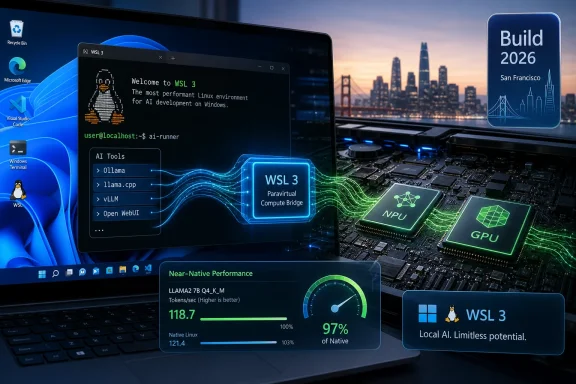
The central claim around WSL 3 is that Microsoft is changing the hardware access model rather than papering over WSL 2’s rough edges. Instead of treating the Linux environment as a guest that must reach accelerators through a more constrained virtualization path, WSL 3 reportedly uses a lighter paravirtualized interface for GPU and NPU access. In plain English: Linux workloads inside WSL should be able to talk to the Windows machine’s accelerators with much less friction.That distinction matters because AI frameworks tend to be deeply tied to assumptions about the operating system, driver model, and accelerator runtime. PyTorch, JAX, vLLM, llama.cpp, Ollama, ONNX Runtime, CUDA, ROCm, DirectML, OpenVINO, and vendor-specific NPU stacks all live in a layered world where one bad boundary can turn a promising machine into a CPU-only curiosity. WSL 3 is Microsoft’s bid to make that boundary less expensive.
The company’s phrase “near-native” should still be treated as a promise to test, not a law of physics. Performance will depend on the model, backend, batch size, memory pressure, driver quality, framework support, and whether the workload is compute-bound or constantly crossing between Windows and Linux file systems. “Near-native” can mean a lot of things in a keynote.
But the architectural direction is the right one. If developers can install a Linux distribution in WSL, run familiar AI tooling, and see the machine’s GPU or NPU without an afternoon of driver archaeology, Microsoft will have solved a real problem. The point is not perfection. The point is removing the mental step where a developer thinks, “I should probably just install Linux.”
The NPU Finally Gets a Job Inside Linux
The NPU is the most awkward component in the AI PC story because it is simultaneously important and underused. Microsoft and its hardware partners have spent the last two years pushing Copilot+ PCs and TOPS figures as if every developer instinctively knows what to do with them. Many do not, because the software path has often been narrower than the hardware pitch.For ordinary users, the NPU is mostly invisible. It accelerates specific platform features, offloads background AI tasks, and helps with battery life when supported applications use the right APIs. For developers, invisibility is a problem. If the NPU cannot be targeted from the frameworks and runtimes they actually use, it might as well be soldered optimism.
That is where WSL 3 could become more consequential than another Windows AI demo. The preview reportedly begins with Qualcomm Snapdragon X Elite and Intel Meteor Lake and Lunar Lake platforms, putting the first emphasis on the Copilot+ and recent Intel AI PC ecosystem. AMD support is said to be planned later, which is both unsurprising and strategically risky.
The risk is not just that AMD users will complain. It is that developer trust is built through broad, boring availability. If WSL 3’s accelerator story feels like a small set of blessed machines, it will be interesting. If it feels like a predictable Windows capability across mainstream PCs, it becomes infrastructure.
Local AI Is the Real Battleground, Not Another Chatbot Window
Microsoft’s framing around agents at Build 2026 is predictable, but WSL 3’s importance sits underneath the branding. Windows does not need another place to display a chatbot. It needs a credible local execution environment for the messy, developer-facing side of AI: running inference servers, testing agent pipelines, experimenting with quantized models, building retrieval systems, and stitching Python libraries together in ways no product manager should have to see.That work is still heavily Linux-flavored. The open-source AI ecosystem moves quickly, often assumes Linux first, and frequently treats Windows support as either secondary or community-maintained. WSL has been Microsoft’s answer to that asymmetry. WSL 3 is the version of that answer adapted to the accelerator era.
The difference between a local model running on CPU and one running on an accelerator is not subtle. It changes whether a developer can iterate interactively, whether a small team can prototype without cloud bills, and whether sensitive prompts or internal documents can stay on the machine. For sysadmins and security-minded users, that last point is not cosmetic.
Local inference also changes the economics of tinkering. Cloud APIs are extraordinary, but they meter curiosity. A capable local setup lets developers test workflows, break things, and run private experiments without turning every prompt into a line item. If WSL 3 makes that setup viable on a mainstream Windows laptop, Microsoft gets more than a feature win; it gets more developer hours spent inside Windows.
Ollama Is the Symbol Because It Made Local Models Ordinary
Ollama and llama.cpp loom large in this discussion because they made local model experimentation feel approachable. They are not the entire AI developer universe, but they represent the change in expectations. A few years ago, running a useful local model felt like a specialist exercise. Now it is something developers expect to do on a laptop between meetings.That expectation collided with Windows in uneven ways. Native Windows tools exist, and many are good, but the Linux ecosystem remains the reference path for a large slice of AI tooling. WSL offered a bridge, yet the accelerator story often determined whether the bridge felt sturdy or improvised.
The claim that WSL 3 will let Ollama or llama.cpp inside Linux target supported GPUs and NPUs directly is therefore more than a convenience. It says the Windows machine can host the Linux-native local AI workflow without the user falling into an unsupported-driver rabbit hole. If that proves true in daily use, Windows gains back ground it has quietly ceded to native Linux boxes and Apple Silicon Macs.
Apple’s advantage has never been only raw performance. It has been coherence. Unified memory, a stable hardware lineup, and a developer story that is relatively easy to explain made macOS attractive for local AI experimentation even when Linux remained stronger for production-like infrastructure. Microsoft’s challenge is harder because Windows is a vast hardware federation. WSL 3 is one way to impose order on that sprawl.
The Hardware List Is Where the Promise Meets the Procurement Spreadsheet
The first supported platforms reportedly include Qualcomm Snapdragon X Elite and Intel Meteor Lake and Lunar Lake systems, with AMD support to follow. That list reveals Microsoft’s priorities. It wants WSL 3 to validate the AI PC wave, especially machines with dedicated NPUs that have sometimes felt ahead of the software they were sold to run.For individual developers, the practical question is simple: will my machine work? For enterprise IT, the question is harsher: can I standardize on this? A preview that works beautifully on a narrow hardware set may excite enthusiasts but frustrate fleet managers who need predictable behavior across Lenovo, Dell, HP, Surface, and whatever procurement bought last quarter.
Qualcomm support is particularly important because Windows on Arm needs developer credibility. Snapdragon X Elite systems have improved the performance story for Arm-based Windows PCs, but software compatibility and developer tooling remain the real tests. If WSL 3 can make Arm Windows machines competent local AI development devices, it gives that ecosystem a much stronger reason to exist beyond battery life.
Intel support matters for scale. Meteor Lake and Lunar Lake systems are already part of the mainstream PC refresh conversation, and Intel’s NPU story needs developer adoption as much as Microsoft’s does. If WSL 3 gives those machines a useful Linux-side AI path, it helps turn the NPU from a checkbox into a usable target.
AMD’s absence at preview, if accurately reported, will be watched closely. AMD has strong AI PC silicon and a passionate developer audience, but GPU and NPU software stacks have often been more fragmented than users would like. Microsoft cannot afford for WSL 3 to become another place where AMD support is perpetually “coming soon.”
Windows Agents Need Linux More Than Microsoft Would Like to Admit
Build 2026’s broader platform message reportedly ties WSL 3 to a larger push around Windows agents, a Windows Agent Framework, a Windows Agent Runtime, and Azure-based orchestration. The branding is new, but the strategic pattern is familiar. Microsoft wants Windows to be not just where users summon AI, but where AI agents execute work across local apps, cloud PCs, enterprise data, and developer tools.That ambition depends on two worlds that do not naturally merge. Windows owns the desktop, identity plumbing, management surface, and enterprise installed base. Linux owns much of the AI developer workflow and cloud-native runtime culture. WSL is the diplomatic mission between the two.
If an agent running on Windows needs to call into a Linux-first ML library, launch a local inference server, run a containerized toolchain, or use a CUDA-dependent component, WSL becomes part of the agent substrate. The performance of that substrate then matters directly. Nobody wants an “AI agent” whose first act is to explain why the GPU is unavailable.
This is why WSL 3 may be more important than the agent APIs that will get the keynote glamour. APIs define what developers are allowed to build. Runtime performance defines whether they bother. A slow or hardware-blind Linux layer would make Windows agents look like a shell integration wrapped around cloud dependency. A fast, accelerator-aware WSL makes the local PC part of the compute fabric.
The Security Story Cuts Both Ways
Local AI has an appealing security pitch: keep prompts, documents, embeddings, and model interactions on the device. For regulated industries, developers working with proprietary code, and users who simply do not want every experiment leaving the machine, that is a meaningful advantage. WSL 3 could strengthen that pitch by making local inference practical without forcing users into a separate Linux installation.But more capable local execution also expands the operational surface area. WSL environments already require administrators to think carefully about patching, identity, networking, file access, and the boundary between Windows and Linux. Add GPU and NPU access to the mix, and the subsystem becomes more powerful in exactly the ways security teams tend to notice.
That does not make WSL 3 dangerous by default. It makes it consequential. Enterprises will want policy controls, telemetry, update clarity, driver governance, and documentation that explains what accelerator access does and does not expose. The best version of WSL 3 is not merely fast; it is manageable.
There is also the supply-chain question. Local AI developers routinely pull models, containers, Python packages, and native binaries from a fast-moving ecosystem. WSL 3 does not create that behavior, but it may make it more common on corporate Windows machines. Microsoft’s challenge will be to celebrate local AI without pretending that “local” automatically means “safe.”
The Windows Update Delivery Model Is a Feature and a Liability
Microsoft reportedly plans to distribute WSL 3 through Windows Update, consistent with the direction of WSL as an updatable platform component. That is the right model for velocity. AI hardware support will evolve quickly, and waiting for annual OS releases would be fatal.It is also a source of anxiety for administrators. Driver stacks, virtualization components, and Linux kernel changes are not the same as updating a calculator app. If WSL 3 becomes part of production developer workflows, organizations will need rings, rollback guidance, compatibility notes, and a clear distinction between preview and stable behavior.
Microsoft has become better at shipping developer tools outside the old Windows monolith, but trust still depends on boring operational details. Which Windows builds support WSL 3? Which kernel versions are used? How are distributions affected? What happens to existing WSL 2 instances? Can WSL 2 and WSL 3 coexist cleanly during migration? These are not footnotes for IT pros. They are the difference between a keynote feature and a deployable platform.
The good news is that Microsoft does not need to force everyone forward. Many users do not need accelerator passthrough, and WSL 2 remains sufficient for a huge range of development work. The migration should be driven by workload, not fear of missing out.
“Near-Native” Will Be Judged by Benchmarks, Not Stage Demos
The phrase “near-native” has a long and complicated history in virtualization. Sometimes it is deserved. Sometimes it means “fast enough if you avoid the cases where it is not.” WSL 3 will face that same scrutiny the moment developers get their hands on preview builds.The most meaningful tests will not be synthetic bragging rights. They will be practical workloads: Ollama serving a quantized model, llama.cpp using GPU or NPU backends, PyTorch inference and small training jobs, JAX compilation behavior, vLLM throughput, containerized workloads, and mixed pipelines that touch both Windows and Linux files. Developers will also watch memory behavior closely, because local AI performance often depends as much on memory architecture and bandwidth as on headline accelerator numbers.
NPU benchmarking will be especially messy. NPUs are not general-purpose GPUs, and they often shine in specific model sizes, precision formats, and power envelopes. A great NPU experience for low-power background inference does not necessarily translate into a great experience for every local LLM workload. Microsoft and its partners will need to be precise about what is accelerated, through which backend, and under which constraints.
That precision matters because developers are tired of AI PC ambiguity. A TOPS number does not tell you whether your tool works. A demo does not tell you whether your model runs. WSL 3’s success will depend on reducing that ambiguity until the answer becomes ordinary: install, run, accelerate.
Nvidia’s Shadow Hangs Over the Whole Announcement
The reported mention of Nvidia RTX Spark systems adds another layer to the story, even if details remain thin. Nvidia remains the gravitational center of practical AI acceleration because CUDA remains deeply entrenched. Any Windows local AI story that does not account for Nvidia is incomplete.WSL 2’s best accelerator experiences have often involved NVIDIA GPUs precisely because CUDA on WSL became a known path. That raises an interesting question for WSL 3: is the new architecture primarily about making NPUs and non-NVIDIA hardware more credible, or does it also improve the experience for the CUDA-heavy workflows that already function reasonably well? Microsoft will want the answer to be both.
If Nvidia-backed Windows PCs with new AI silicon arrive alongside WSL 3, the platform story becomes stronger but more complex. Developers could face a landscape where Qualcomm, Intel, AMD, and Nvidia each have different acceleration paths, different runtime preferences, and different levels of Linux-side maturity. WSL 3 can abstract some of that, but it cannot repeal the physics of vendor ecosystems.
The best outcome would be a Windows AI workstation story where WSL provides a common Linux environment and hardware vendors compete on performance rather than basic enablement. The worst outcome would be another compatibility matrix that only enthusiasts can love. Microsoft’s job is to drag the market toward the former.
The Mac Comparison Is Unavoidable, but Not Sufficient
It is tempting to frame WSL 3 as Microsoft’s answer to Apple Silicon, and there is truth in that. Apple gave developers powerful laptops with excellent battery life, unified memory, and a local AI story that feels coherent even when the software stack is not always the industry default. Many developers who once tolerated Windows friction moved to Macs because the whole machine felt simpler.But Windows does not need to become macOS to win back local AI developers. It needs to exploit its own strengths: hardware choice, enterprise manageability, gaming-class GPUs, broad peripheral support, and the enormous installed base of PCs already sitting in homes and offices. WSL 3 is valuable because it turns those strengths toward Linux-native AI workflows rather than asking developers to choose between them.
There is a philosophical difference as well. Apple’s model is integrated; Microsoft’s is federated. Apple can optimize for a narrow set of chips and machines. Microsoft has to coordinate silicon vendors, OEMs, driver teams, Windows Update, Linux kernel work, framework maintainers, and enterprise policy. That is harder, messier, and slower.
It is also potentially more consequential. If Microsoft makes local AI development viable across mainstream Windows hardware, the impact is not limited to a premium developer niche. It reaches students, sysadmins, hobbyists, enterprise developers, and small businesses using the machines they already own or are already buying.
The Real Test Is Whether Developers Stop Thinking About the Boundary
The best developer infrastructure disappears. Nobody praises TCP/IP during a successful deployment. Nobody wants to admire a virtualization layer while waiting for a model to answer. WSL 3 will succeed if developers stop thinking about whether they are “really” on Windows or Linux for local AI work.That does not mean the boundary goes away. Windows and Linux have different kernels, driver models, security assumptions, file systems, and management conventions. But the boundary can become less intrusive. A developer should be able to open a terminal, start a model server, run a Python workload, and see accelerator utilization without performing a ritual.
The same applies to administrators. The goal is not to let every user improvise a shadow AI lab. The goal is to provide a managed, supportable way for authorized developers to use local accelerators without leaving the Windows fleet. If WSL 3 helps IT say yes more often, it will have done something rare: made developer freedom and enterprise control less mutually hostile.
This is where Microsoft’s broader agent strategy and WSL strategy meet. Agents will need tools. Tools will need runtimes. Runtimes will need hardware. Hardware will need drivers and policy. WSL 3 sits in the middle of that chain, which is not glamorous but is exactly where platform leverage lives.
The Announcement Leaves a Short List of Hard Answers Still Missing
The preview sets a direction, but the practical buying and deployment decisions will wait for details. Microsoft’s next job is to replace keynote confidence with documentation, compatibility tables, and reproducible benchmarks. Until then, WSL 3 is best understood as a serious architectural promise rather than a finished verdict.- WSL 3 is reportedly designed to reduce the accelerator penalty that made some Linux AI workloads feel second-class on Windows.
- Initial NPU passthrough support appears focused on Qualcomm Snapdragon X Elite and Intel Meteor Lake and Lunar Lake systems, with AMD support still to come.
- The biggest practical win would be making tools such as Ollama, llama.cpp, PyTorch, JAX, and vLLM behave more like they do on native Linux.
- The phrase “near-native” will need validation across real models, real frameworks, and real driver stacks before developers treat it as settled.
- Windows Update delivery should help WSL 3 evolve quickly, but enterprises will need clear controls, rollback options, and compatibility guidance.
- The broader Windows agent strategy depends on this kind of low-level infrastructure more than the keynote branding suggests.
References
- Primary source: Tech Times
Published: 2026-06-02T12:31:06.320107
WSL 3 at Build 2026: Near-Native GPU and NPU Passthrough Brings Local AI to Windows
WSL 3 GPU passthrough for Windows arrives at Microsoft Build 2026, letting developers run Ollama, PyTorch, and llama.cpp inside Linux on Windows at near-native GPU and NPU speed. Qualcomm Snapdragonwww.techtimes.com - Related coverage: aitoolsrecap.com
Microsoft Build 2026: Windows Agent Framework, WSL 3, Azure Agent Mesh, and Windows Agent Store Explained | AIToolsRecap
Microsoft Build 2026 runs June 2-3 in San Francisco: Windows Agent Framework APIs, WSL 3 with near-native GPU/NPU access, Azure Agent Mesh federated executio... aitoolsrecap.com
- Related coverage: insiderllm.com
WSL2 for Local AI: The Complete Windows Setup Guide | InsiderLLM
Install WSL2, configure GPU passthrough, set up Ollama and llama.cpp with CUDA, and optimize memory for LLM inference. Step-by-step for Windows 11.insiderllm.com - Related coverage: kad8.com
WSL in 2026: The Ultimate Windows Dev Environment · KAD
WSL has become the standard for cross-platform development in 2026, offering native Linux performance on Windows with near-zero friction.www.kad8.com - Related coverage: remoteopenclaw.com
OpenClaw on Windows: WSL2 Setup Guide [2026]
OpenClaw is built on Node.js with dependencies that expect a Unix-based operating system.www.remoteopenclaw.com - Related coverage: craftrigs.com
AI PC Build 2026: CPU + GPU + NPU — How to Use All Three | CraftRigs
Plan your 2026 AI PC. CPU + GPU + NPU optimization, cost allocation, power budgeting, and motherboard/cooling requirements for local AI inference. craftrigs.com
- Related coverage: fazm.ai

vLLM on Windows in 2026: what officially works, what doesn't, and what to do once it's serving
vLLM does not officially support Windows. The three working paths in 2026 are WSL2, Docker Model Runner with the WSL2 backend (December 2025), and community-maintained native wheels at SystemPanic/vllm-windows (v0.20.0, April 30 2026). Each works. None of them answers the more useful question...
fazm.ai
- Related coverage: techradar.com
Windows 12 at Build 2026: What to expect | TechRadar
What Build 2026 signals about the future of the Windowswww.techradar.com - Official source: learn.microsoft.com
GPU accelerated ML training in WSL | Microsoft Learn
Learn how to setup the Windows Subsystem for Linux with NVIDIA CUDA, TensorFlow-DirectML, and PyTorch-DirectML. Read about using GPU acceleration with WSL to support machine learning training scenarios.learn.microsoft.com - Official source: techcommunity.microsoft.com
GPU compute within Windows Subsystem for Linux 2 supports AI and ML workloads | Microsoft Community Hub
Adding GPU compute support to WSL has been our #1 most requested feature since the first release. Over the last few years, the WSL, Virtualization,... techcommunity.microsoft.com
- Related coverage: video2.skills-academy.com
