

Windows 10 PCs that can run WSL 2 can now run Microsoft’s pre-release WSL Containers feature, after Craig Loewen, the Microsoft product manager who leads WSL development, confirmed to Windows Latest on July 9, 2026 that WSLc works on Windows 10 too. That makes this more than a developer footnote: Microsoft is letting a retired consumer operating system inherit one of Windows 11’s more interesting Linux-development conveniences. The catch is that this is not Windows 10 being revived as a modern desktop platform. It is Windows 10 being kept useful at the edge, for developers, power users, and administrators who still need Linux tooling on machines that are not yet leaving the fleet.
The result is a strange but practical compromise. Windows 10 reached end of support on October 14, 2025, yet Microsoft has extended the consumer ESU program through October 12, 2027, creating a two-year zone in which millions of PCs are neither current nor entirely abandoned. WSL Containers fits precisely into that liminal period: a first-party way to build and run Linux containers without Docker Desktop, without pretending that Windows 10 itself is back on the feature treadmill.
The headline is not that Windows 10 is “getting Windows 11 features” in the normal consumer sense. Microsoft is not backporting a redesigned shell, AI experience, or new Settings page to the operating system it spent years trying to move users away from. The meaningful story is narrower and more revealing: Microsoft’s developer substrate now floats above the Windows version boundary more than the Windows marketing story does.
WSL has always been an awkwardly brilliant exception inside Windows. It is not a Linux desktop, not a traditional VM workflow, and not simply a compatibility feature. Since 2016, Windows Subsystem for Linux has given developers a way to run Linux tools directly on Windows; since WSL 2 arrived in 2019, it has done so with a real Linux kernel inside a lightweight VM, which is why Docker-based development became practical on Windows in the first place.
WSL Containers, or WSLc, is the next logical turn of that wheel. Windows Latest describes it as a built-in way to create, run, and manage Linux containers directly from Windows, using
That is why the Windows 10 confirmation matters. If WSLc had been held back as a Windows 11-only feature, it would have been another small lever in Microsoft’s migration campaign. Instead, as Loewen told Windows Latest, “This works anywhere WSL is supported today which is the vast majority of supported Windows versions. So yes this will work on Win10 too
  ”
”
That quote is doing a lot of work. It frames WSLc not as a Windows 11 feature that has been generously backported, but as a WSL feature that follows WSL’s support footprint. For developers, that is the better answer. For Microsoft’s Windows strategy, it is more complicated.
Security updates are not feature updates. ESU exists to reduce the blast radius of staying behind, not to make Windows 10 strategically current again. Still, once Microsoft grants users an additional runway, the company also has to reckon with what those users will actually do on those machines for the next year-plus.
Many will browse, stream, run Office, or limp along with old hardware. But a meaningful slice of the Windows 10 holdout population is technical: people with older workstations, GPUs, lab boxes, spare desktops, or laptops that remain good enough for coding and testing. Those are exactly the users who care about WSL, Linux containers, Python workloads, GPU passthrough, and reproducible environments.
That makes WSLc’s Windows 10 support both generous and strategically sensible. Microsoft does not need to “save” Windows 10 as a mainstream platform to keep Windows useful for developers who may otherwise move more of their workflow to Linux or macOS. A retired Windows desktop that can still run modern Linux development tooling is, for Microsoft, better than a retired Windows desktop that becomes a reason to leave the Windows ecosystem altogether.
Windows Latest is right to frame this as a developer-only benefit. Ordinary Windows 10 users will not notice
WSL 2 was a generational change because it moved WSL from a translation-layer model to a real Linux kernel running in a lightweight VM. WSLc is different. It does not replace WSL 2; it rides on top of the WSL service that already manages the Linux VM and adds first-party container tooling to that environment.
That has two practical consequences. First, it means WSLc can arrive as a WSL update rather than as a Windows version-gated operating system feature. That is why Windows 10 version 2004, Build 19041 or later, is the meaningful floor. If the machine can run modern WSL, and especially if it already runs WSL 2, the container feature can arrive through WSL’s update path.
Second, it means developers should not treat WSLc as a wholesale Docker Desktop replacement yet. Windows Latest’s test deliberately built and ran a single Flask-based dashboard container without Docker Desktop, Docker Engine, or any Docker component. That is a strong proof point for simple local container work. It is not the same thing as proving that every multi-service, GUI-managed, enterprise-polished Docker Desktop workflow can be dropped in unchanged.
Microsoft’s own language reinforces the caution. WSL Container is still a pre-release feature. The right mental model is “promising first-party container primitive,” not “finished container platform with every workflow solved.”
That is still a big deal. The absence of first-party container tooling has long forced Windows developers into a slightly odd arrangement: install Docker Desktop, or manually set up Docker Engine inside a WSL 2 distro, or rely on a remote Linux host. WSLc makes a different promise. If WSL already owns the Linux VM, maybe WSL should also own the developer’s simplest container lifecycle.
The basic path starts with the operating-system floor. Windows 10 users need version 2004, Build 19041 or later. The simplest check is still
From there, the install sequence is familiar:
After the required restart, the pre-release update path is:
After another restart, the version check is:
Windows Latest reports that users should see
This workflow tells us something about the audience. Windows 10 may not have Windows Terminal pre-installed, and PowerShell can run the commands just fine, but Windows Latest correctly recommends installing Terminal first because the tabbed, modern command-line experience makes this work less annoying. That is not a feature requirement; it is a quality-of-life requirement. And quality of life matters when Microsoft is asking Windows developers to stay inside a CLI-heavy stack.
The first rough edge is also already known. Windows Latest says a handful of users have hit a “Catastrophic failure, Error code: E_UNEXPECTED” message on first container launch, with a full reboot mostly fixing it. That is not shocking for a pre-release feature, but it is the line between experiment and dependency. If the first remediation step is “reboot and try again,” production workloads should stay elsewhere.
This table is why the story is bigger than Windows 10 nostalgia. Microsoft is implicitly saying that the developer layer should be consistent across supported WSL environments, even when the Windows desktop layer is on different strategic footing. That is good engineering policy. It reduces fragmentation for tool builders, documentation writers, and administrators who need to support mixed estates.
It also avoids an unnecessary own goal. If WSLc had worked only on Windows 11, Windows 10 developers would have kept using Docker Desktop, manual Docker Engine installs inside WSL 2, or Linux machines. By letting WSLc run on Windows 10, Microsoft gives those users a reason to keep testing Microsoft’s container story before they migrate the host OS.
There is a limit to the generosity. Windows 10’s ESU window still closes in October 2027, and nothing in this support confirmation says Microsoft will keep every future WSLc capability equally available on Windows 10 forever. Windows Latest makes that point carefully: whether support continues well into WSL Container’s development cycle, especially if future features such as GUI support arrive, is a separate question.
That uncertainty should shape planning. WSLc on Windows 10 is real. Its long-term parity is not guaranteed.
That is the correct kind of demo for a pre-release container feature. It avoids pretending that WSLc is already an enterprise orchestration solution and instead tests the thing developers actually need to know first: can I build an image, run it, expose a port, and reach it from Windows?
The reported build command was simple:
That simplicity is the point. WSLc is designed to feel familiar to Docker users while sitting inside Microsoft’s WSL plumbing. The image is built from a Containerfile using the same OCI image format Docker uses, but the tool doing the building, running, and networking is WSL Container’s binary.
The technical nuance is important. Windows Latest notes that Moby, the open-source container runtime Docker is built on, is doing the underlying work. But the pipeline does not require Docker Desktop, Docker Engine, or Docker components as user-installed dependencies. In practical terms, Microsoft is trying to move the default Windows container-development baseline from “install a third-party desktop app or wire Docker into WSL yourself” to “use the WSL service already present on the machine.”
That may sound incremental, but developer tooling succeeds or fails on friction. Every fewer installer, privileged service, license prompt, desktop daemon, and hidden dependency matters. A first-party
That should not be treated as a failure. A command-line-first container feature is exactly what many developers want, especially when scripting, automation, and CI-like local workflows are the target. But it does limit who will adopt WSLc early.
The middle ground is already emerging. Windows Latest notes that Loewen has a text-based UI dashboard for managing WSL Containers called
For administrators, the lack of a GUI may actually be a benefit during evaluation. GUI tools tend to hide state; CLIs reveal it, log it, and make it scriptable. If WSLc becomes a serious part of Windows developer fleets, the first wave of enterprise use will probably be scripted installation, version checks, reproducible local images, and developer documentation—not a glossy management console.
But Microsoft will eventually face the adoption wall. Docker Desktop’s value is not only that it runs containers. It packages container development into something a wider set of developers can understand. WSLc will need better user experience, better error messages, and stronger documentation before it escapes the early-adopter lane.
The example command in the report uses a PyTorch CUDA image:
That one-liner matters because local AI development has changed the value of older hardware. A Windows 10 workstation that is not eligible for, or not yet migrated to, Windows 11 may still have a capable dedicated GPU. If WSLc can expose that GPU to a Linux container with minimal ceremony, the machine remains useful for testing CUDA code, running local inference, experimenting with PyTorch or TensorFlow, or validating a workload before it moves to a Linux server.
This is not magic. It does not turn obsolete hardware into a modern AI workstation, and Windows Latest’s report sensibly frames the use cases as realistic local development rather than production-scale training. Fine-tuning a small model, running local inference through tools such as Ollama or
Still, this is exactly where Windows 10’s extended life becomes technically meaningful. The operating system may be out of mainstream support, but the hardware underneath it has not necessarily lost relevance. WSLc gives that hardware a cleaner route into modern Linux container workflows.
The better conclusion is narrower: Microsoft has decided that WSL’s development model should not be artificially constrained by Windows 11 marketing. That is a defensible choice, especially because WSL is now distributed and updated in ways that are not identical to the old Windows feature-update cadence. If a supported WSL environment exists on Windows 10, WSLc can follow it.
The danger for users is misclassification. A pre-release container feature is not a reason to keep an unmanaged Windows 10 PC online after security coverage ends. It is not a reason to skip hardware planning. It is not a reason to build critical workflows on a stack whose own reporting still says single-container experiments are a better fit than anything depending on multiple linked services.
Administrators should be especially careful here. WSLc may be useful for developer workstations, lab systems, training environments, and GPU experiments. But once it appears on Windows 10, it also becomes another component that must be documented, patched, and governed. Containers do not stop being supply-chain objects just because they run inside WSL.
The right policy is neither panic nor enthusiasm. Permit WSLc where it solves a real developer problem. Keep it off machines that do not need it. Make sure the host is covered by the appropriate Windows 10 ESU status if it remains in service. And do not let a successful Flask demo become an accidental production platform.
2019 — WSL 2 arrived with a real Linux kernel running inside a lightweight VM, enabling the container workflows that later made Docker on Windows practical.
October 14, 2025 — Windows 10 reached end of support, ending its normal consumer servicing life.
July 9, 2026 — Windows Latest reported that Microsoft confirmed WSL Containers works on Windows 10, with Craig Loewen saying WSLc works anywhere WSL is supported today.
October 12, 2027 — Microsoft’s consumer ESU program extension for Windows 10 is set to end, closing the practical security runway for many remaining consumer systems.
That is very different from saying WSLc justifies broad Windows 10 retention. It does not. The operating system’s lifecycle has not changed beyond the ESU runway. The security posture of a Windows 10 fleet still depends on enrollment, patching discipline, endpoint controls, and a plan for what happens before October 12, 2027.
The governance challenge is that WSLc blurs familiar boundaries. A Windows workstation can now build and run Linux containers directly through a Microsoft-supplied tool. That raises ordinary but important questions: Which base images are allowed? Where do developers pull images from? Are secrets being copied into Containerfiles? Are exposed ports documented? Is GPU access permitted on shared workstations? Are container images scanned before use?
Those questions are not unique to WSLc, but WSLc makes them easier to ignore because the workflow feels local and lightweight. A developer running a container on
A sensible admin posture is to write a short WSLc policy before enthusiasm spreads organically. Define approved use cases. Define update expectations. Define whether pre-release WSL builds are allowed on corporate machines. Define whether WSLc is permitted only on pilot devices. And define the exit path when Windows 10 leaves the ESU window.
The feature is useful enough to allow in the right places. It is also new enough, and pre-release enough, to deserve boundaries.
That is the strategic center of the story. The competition is not merely Windows 10 versus Windows 11. It is Windows versus the developer’s temptation to do everything on Linux, in a remote dev box, or on another platform entirely. If Microsoft can make Windows feel less like an obstacle to Linux-native workflows, it keeps Windows relevant even when the actual deployment target is Linux.
Windows 10 support sharpens that point because it removes an artificial barrier. A developer with a Windows 10 machine under ESU and a functioning WSL 2 setup does not need to wait for a Windows 11 migration to test WSLc. That helps Microsoft gather feedback, helps developers avoid extra dependencies, and helps mixed fleets standardize on a single WSL container story while migration proceeds.
But this also exposes the split personality of modern Windows. The consumer surface is increasingly tied to Windows 11-era requirements, services, and experiences. The developer substrate is becoming more modular, more updateable, and more capable of crossing version boundaries. WSLc is what happens when the substrate wins.
That split may become more common. Microsoft has strong incentives to keep developer infrastructure moving quickly without waiting for every organization to finish desktop migrations. The more WSL, Windows Terminal, package management, and developer services behave like independently evolving layers, the less meaningful the old idea of a monolithic Windows feature release becomes.
Its best early use cases are also clear. Single-container development. Local web services. Small Python apps. Lightweight API tests. CUDA checks. Reproducible experiments that benefit from OCI image packaging but do not yet require the full polish of Docker Desktop or the complexity of multi-service orchestration.
Its weak points are equally clear. It is pre-release. It has no GUI. Some users have reportedly hit a first-launch catastrophic failure that required a reboot. Windows Latest’s own advice is to treat it as something to experiment with rather than something to depend on daily.
That is a reasonable bargain for July 2026. The feature does not have to be finished to be important. It simply has to show that Microsoft is serious about making container development a native part of the WSL experience.
Microsoft’s decision to let WSL Containers run on Windows 10 is a small engineering mercy with large symbolic weight: the company is letting useful developer infrastructure outlive the operating system’s mainstream life, but only inside the guardrails of WSL and the ESU clock. That is probably the future of Windows compatibility in miniature—less about reviving old desktops, more about keeping the layers developers depend on portable long enough for the rest of the platform to catch up.
The result is a strange but practical compromise. Windows 10 reached end of support on October 14, 2025, yet Microsoft has extended the consumer ESU program through October 12, 2027, creating a two-year zone in which millions of PCs are neither current nor entirely abandoned. WSL Containers fits precisely into that liminal period: a first-party way to build and run Linux containers without Docker Desktop, without pretending that Windows 10 itself is back on the feature treadmill.
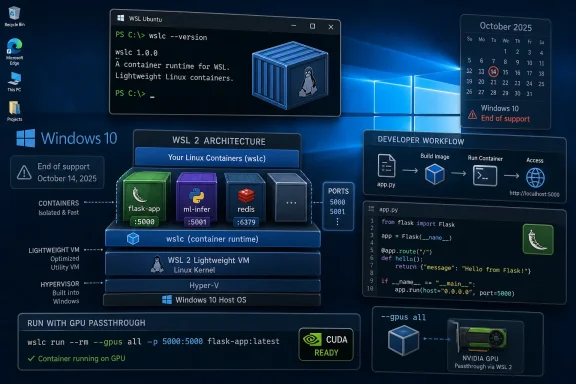 Microsoft Lets the Developer Layer Outlive the Desktop Strategy
The headline is not that Windows 10 is “getting Windows 11 features” in the normal consumer sense. Microsoft is not backporting a redesigned shell, AI experience, or new Settings page to the operating system it spent years trying to move users away from. The meaningful story is narrower and more revealing: Microsoft’s developer substrate now floats above the Windows version boundary more than the Windows marketing story does.WSL has always been an awkwardly brilliant exception inside Windows. It is not a Linux desktop, not a traditional VM workflow, and not simply a compatibility feature. Since 2016, Windows Subsystem for Linux has given developers a way to run Linux tools directly on Windows; since WSL 2 arrived in 2019, it has done so with a real Linux kernel inside a lightweight VM, which is why Docker-based development became practical on Windows in the first place.
WSL Containers, or WSLc, is the next logical turn of that wheel. Windows Latest describes it as a built-in way to create, run, and manage Linux containers directly from Windows, using
wslc.exe, a command-line tool whose syntax is intentionally familiar to anyone who has used Docker. Microsoft’s own WSL Container documentation describes the same two-part model: a CLI for building and running containers and an API for Windows app developers who want Linux containers as part of their application logic.That is why the Windows 10 confirmation matters. If WSLc had been held back as a Windows 11-only feature, it would have been another small lever in Microsoft’s migration campaign. Instead, as Loewen told Windows Latest, “This works anywhere WSL is supported today which is the vast majority
of supported Windows versions. So yes this will work on Win10 too ”That quote is doing a lot of work. It frames WSLc not as a Windows 11 feature that has been generously backported, but as a WSL feature that follows WSL’s support footprint. For developers, that is the better answer. For Microsoft’s Windows strategy, it is more complicated.
Windows 10 Is Unsupported, But Not Yet Irrelevant
The context is the part Microsoft cannot escape. Windows 10 reached end of support on October 14, 2025, but the consumer Extended Security Updates window now runs through October 12, 2027. That extension changes the practical reality for households, small offices, labs, schools, hobbyist developers, and underfunded IT departments with machines that are still useful but not ready for Windows 11.Security updates are not feature updates. ESU exists to reduce the blast radius of staying behind, not to make Windows 10 strategically current again. Still, once Microsoft grants users an additional runway, the company also has to reckon with what those users will actually do on those machines for the next year-plus.
Many will browse, stream, run Office, or limp along with old hardware. But a meaningful slice of the Windows 10 holdout population is technical: people with older workstations, GPUs, lab boxes, spare desktops, or laptops that remain good enough for coding and testing. Those are exactly the users who care about WSL, Linux containers, Python workloads, GPU passthrough, and reproducible environments.
That makes WSLc’s Windows 10 support both generous and strategically sensible. Microsoft does not need to “save” Windows 10 as a mainstream platform to keep Windows useful for developers who may otherwise move more of their workflow to Linux or macOS. A retired Windows desktop that can still run modern Linux development tooling is, for Microsoft, better than a retired Windows desktop that becomes a reason to leave the Windows ecosystem altogether.
Windows Latest is right to frame this as a developer-only benefit. Ordinary Windows 10 users will not notice
wslc.exe, and Microsoft is not suddenly making the OS feel new. But for the users who do notice, the feature lands in exactly the right place: below the consumer interface, above the hardware, and close to the work.WSLc Is Not WSL 3, And That Distinction Matters
One of the most useful corrections in Windows Latest’s report is also one of the easiest to miss: this is not WSL 3. Some early coverage around Microsoft’s developer announcements reportedly blurred that point, but the actual feature is WSL Containers. That distinction matters because it prevents the hype from outrunning the architecture.WSL 2 was a generational change because it moved WSL from a translation-layer model to a real Linux kernel running in a lightweight VM. WSLc is different. It does not replace WSL 2; it rides on top of the WSL service that already manages the Linux VM and adds first-party container tooling to that environment.
That has two practical consequences. First, it means WSLc can arrive as a WSL update rather than as a Windows version-gated operating system feature. That is why Windows 10 version 2004, Build 19041 or later, is the meaningful floor. If the machine can run modern WSL, and especially if it already runs WSL 2, the container feature can arrive through WSL’s update path.
Second, it means developers should not treat WSLc as a wholesale Docker Desktop replacement yet. Windows Latest’s test deliberately built and ran a single Flask-based dashboard container without Docker Desktop, Docker Engine, or any Docker component. That is a strong proof point for simple local container work. It is not the same thing as proving that every multi-service, GUI-managed, enterprise-polished Docker Desktop workflow can be dropped in unchanged.
Microsoft’s own language reinforces the caution. WSL Container is still a pre-release feature. The right mental model is “promising first-party container primitive,” not “finished container platform with every workflow solved.”
That is still a big deal. The absence of first-party container tooling has long forced Windows developers into a slightly odd arrangement: install Docker Desktop, or manually set up Docker Engine inside a WSL 2 distro, or rely on a remote Linux host. WSLc makes a different promise. If WSL already owns the Linux VM, maybe WSL should also own the developer’s simplest container lifecycle.
The New Container Path Is Command-Line First By Design
The WSLc installation story is straightforward, but it is not consumer-friendly in the Windows Store sense. On Windows 10 or Windows 11, you install WSL, update WSL to the pre-release container build, shut WSL down, restart, and verify thatwslc.exe is present. This is a developer workflow, and it behaves like one.The basic path starts with the operating-system floor. Windows 10 users need version 2004, Build 19041 or later. The simplest check is still
winver, and machines below that line need to be updated before WSLc is even part of the conversation.From there, the install sequence is familiar:
wsl --installAfter the required restart, the pre-release update path is:
Code:
wsl --update --pre-release
wsl --shutdownwslc --versionWindows Latest reports that users should see
wslc 2.9.3.0, which is the version shown in its article as confirming WSL Container availability. A quick wslc --help then confirms that the binary is responding.This workflow tells us something about the audience. Windows 10 may not have Windows Terminal pre-installed, and PowerShell can run the commands just fine, but Windows Latest correctly recommends installing Terminal first because the tabbed, modern command-line experience makes this work less annoying. That is not a feature requirement; it is a quality-of-life requirement. And quality of life matters when Microsoft is asking Windows developers to stay inside a CLI-heavy stack.
The first rough edge is also already known. Windows Latest says a handful of users have hit a “Catastrophic failure, Error code: E_UNEXPECTED” message on first container launch, with a full reboot mostly fixing it. That is not shocking for a pre-release feature, but it is the line between experiment and dependency. If the first remediation step is “reboot and try again,” production workloads should stay elsewhere.
Windows 10 and Windows 11 Now Share the WSLc Bet
The most interesting part of Loewen’s confirmation is that it collapses the distinction between Windows 10 and Windows 11 for this particular layer. WSLc is not being sold as a Windows 11-exclusive developer advantage. It is being treated as part of the WSL surface wherever WSL itself is supported.| Area | Windows 10 | Windows 11 | Practical consequence |
|---|---|---|---|
| WSLc availability | Confirmed by Craig Loewen for supported WSL systems | Supported through the same WSL container path | Developers can test the same container tooling across both OS generations |
| Minimum Windows 10 floor | Version 2004, Build 19041 or later | Not the limiting issue in this story | Older Windows 10 installs must update before WSLc matters |
| Install path | wsl --install, then wsl --update --pre-release | Same WSL update model | WSLc behaves like a WSL feature, not a classic Windows feature update |
| Current maturity | Pre-release | Pre-release | Treat as experimental on both platforms |
| GUI status | No GUI for WSLc itself | No GUI for WSLc itself | Docker Desktop still has a role for GUI-driven workflows |
| GPU containers | --gpus all supported through the Windows NVIDIA driver | Same model | CUDA workloads can be tested locally when hardware and drivers line up |
It also avoids an unnecessary own goal. If WSLc had worked only on Windows 11, Windows 10 developers would have kept using Docker Desktop, manual Docker Engine installs inside WSL 2, or Linux machines. By letting WSLc run on Windows 10, Microsoft gives those users a reason to keep testing Microsoft’s container story before they migrate the host OS.
There is a limit to the generosity. Windows 10’s ESU window still closes in October 2027, and nothing in this support confirmation says Microsoft will keep every future WSLc capability equally available on Windows 10 forever. Windows Latest makes that point carefully: whether support continues well into WSL Container’s development cycle, especially if future features such as GUI support arrive, is a separate question.
That uncertainty should shape planning. WSLc on Windows 10 is real. Its long-term parity is not guaranteed.
A Flask Dashboard Is Small, But It Proves the Important Thing
Windows Latest’s practical test is not flashy, which is why it is useful. The outlet built a small Flask dashboard inside a WSL Container on Windows 10, usingpsutil for system stats, uname -a for the kernel line, and Flask serving on port 5000. It then loaded 127.0.0.1:5000 in Edge and showed that a Linux container could serve a live dashboard on a Windows 10 host without Docker Desktop in the loop.That is the correct kind of demo for a pre-release container feature. It avoids pretending that WSLc is already an enterprise orchestration solution and instead tests the thing developers actually need to know first: can I build an image, run it, expose a port, and reach it from Windows?
The reported build command was simple:
wslc build -t wsl-dashboard .That simplicity is the point. WSLc is designed to feel familiar to Docker users while sitting inside Microsoft’s WSL plumbing. The image is built from a Containerfile using the same OCI image format Docker uses, but the tool doing the building, running, and networking is WSL Container’s binary.
The technical nuance is important. Windows Latest notes that Moby, the open-source container runtime Docker is built on, is doing the underlying work. But the pipeline does not require Docker Desktop, Docker Engine, or Docker components as user-installed dependencies. In practical terms, Microsoft is trying to move the default Windows container-development baseline from “install a third-party desktop app or wire Docker into WSL yourself” to “use the WSL service already present on the machine.”
That may sound incremental, but developer tooling succeeds or fails on friction. Every fewer installer, privileged service, license prompt, desktop daemon, and hidden dependency matters. A first-party
wslc.exe does not make containers simple, but it makes the Windows path to containers less ceremonial.The Missing GUI Is Not a Footnote
The most obvious gap is the one Windows Latest calls out directly: WSLc does not have a GUI. Docker Desktop still matters if your workflow depends on a graphical dashboard, visual container management, integrated settings, or a more polished onboarding path. WSLc is, for now, a CLI feature.That should not be treated as a failure. A command-line-first container feature is exactly what many developers want, especially when scripting, automation, and CI-like local workflows are the target. But it does limit who will adopt WSLc early.
The middle ground is already emerging. Windows Latest notes that Loewen has a text-based UI dashboard for managing WSL Containers called
lazywslc. That detail is telling. It suggests the early WSLc community is likely to resemble the early WSL community: developers comfortable living in terminals, layering small tools on top of Microsoft’s base, and gradually turning a raw capability into a usable daily workflow.For administrators, the lack of a GUI may actually be a benefit during evaluation. GUI tools tend to hide state; CLIs reveal it, log it, and make it scriptable. If WSLc becomes a serious part of Windows developer fleets, the first wave of enterprise use will probably be scripted installation, version checks, reproducible local images, and developer documentation—not a glossy management console.
But Microsoft will eventually face the adoption wall. Docker Desktop’s value is not only that it runs containers. It packages container development into something a wider set of developers can understand. WSLc will need better user experience, better error messages, and stronger documentation before it escapes the early-adopter lane.
GPU Passthrough Makes Old Windows 10 Workstations Interesting Again
The GPU angle is where WSLc on Windows 10 becomes more than a convenience. Windows Latest reports that WSL Container supports GPU passthrough through a--gpus all flag on CUDA-capable containers, working the same way on Windows 10 as on Windows 11 because passthrough runs through the Windows NVIDIA driver. The pitch is clean: install the regular Windows NVIDIA driver, avoid extra Linux-side driver work, and let CUDA libraries be exposed automatically to containers requesting GPU access.The example command in the report uses a PyTorch CUDA image:
wslc run --rm --gpus all pytorch/pytorch:2.5.1-cuda12.4-cudnn9-runtime python -c "import torch; print(torch.cuda.is_available())"That one-liner matters because local AI development has changed the value of older hardware. A Windows 10 workstation that is not eligible for, or not yet migrated to, Windows 11 may still have a capable dedicated GPU. If WSLc can expose that GPU to a Linux container with minimal ceremony, the machine remains useful for testing CUDA code, running local inference, experimenting with PyTorch or TensorFlow, or validating a workload before it moves to a Linux server.
This is not magic. It does not turn obsolete hardware into a modern AI workstation, and Windows Latest’s report sensibly frames the use cases as realistic local development rather than production-scale training. Fine-tuning a small model, running local inference through tools such as Ollama or
llama.cpp, or testing CUDA code before deployment are plausible. Replacing a managed Linux GPU environment is not.Still, this is exactly where Windows 10’s extended life becomes technically meaningful. The operating system may be out of mainstream support, but the hardware underneath it has not necessarily lost relevance. WSLc gives that hardware a cleaner route into modern Linux container workflows.
The Risk Is Not That WSLc Exists; It Is That People Will Overread It
There is an easy but wrong conclusion here: if Windows 10 is getting WSLc, maybe Microsoft is softening its end-of-support stance. It is not. Windows 10 reached end of support on October 14, 2025, and the consumer ESU extension through October 12, 2027 is a security runway, not a product revival.The better conclusion is narrower: Microsoft has decided that WSL’s development model should not be artificially constrained by Windows 11 marketing. That is a defensible choice, especially because WSL is now distributed and updated in ways that are not identical to the old Windows feature-update cadence. If a supported WSL environment exists on Windows 10, WSLc can follow it.
The danger for users is misclassification. A pre-release container feature is not a reason to keep an unmanaged Windows 10 PC online after security coverage ends. It is not a reason to skip hardware planning. It is not a reason to build critical workflows on a stack whose own reporting still says single-container experiments are a better fit than anything depending on multiple linked services.
Administrators should be especially careful here. WSLc may be useful for developer workstations, lab systems, training environments, and GPU experiments. But once it appears on Windows 10, it also becomes another component that must be documented, patched, and governed. Containers do not stop being supply-chain objects just because they run inside WSL.
The right policy is neither panic nor enthusiasm. Permit WSLc where it solves a real developer problem. Keep it off machines that do not need it. Make sure the host is covered by the appropriate Windows 10 ESU status if it remains in service. And do not let a successful Flask demo become an accidental production platform.
Timeline
2016 — WSL became part of Windows, giving developers a first-party way to use Linux command-line tools directly on Windows.2019 — WSL 2 arrived with a real Linux kernel running inside a lightweight VM, enabling the container workflows that later made Docker on Windows practical.
October 14, 2025 — Windows 10 reached end of support, ending its normal consumer servicing life.
July 9, 2026 — Windows Latest reported that Microsoft confirmed WSL Containers works on Windows 10, with Craig Loewen saying WSLc works anywhere WSL is supported today.
October 12, 2027 — Microsoft’s consumer ESU program extension for Windows 10 is set to end, closing the practical security runway for many remaining consumer systems.
Action checklist for admins
- Inventory Windows 10 developer machines and confirm which ones are on version 2004, Build 19041 or later.
- Verify whether each remaining Windows 10 system is covered by the appropriate ESU path through October 12, 2027.
- Limit WSLc testing to machines that already have a legitimate WSL or Linux-container use case.
- Install or update WSL using
wsl --install, then test WSLc only through the pre-release path withwsl --update --pre-release. - Document the presence of
wslc.exe, the reportedwslc 2.9.3.0version, and any first-launch failures such asE_UNEXPECTED. - Treat GPU container testing as a developer or lab capability, not as a substitute for managed production Linux infrastructure.
Why IT Should Treat This as a Developer Exception, Not a Windows 10 Reprieve
For enterprise IT, the most useful reading of WSLc on Windows 10 is that it creates a controlled exception category. Some Windows 10 machines may need to remain in service because of hardware, application compatibility, budget timing, or migration sequencing. If those machines belong to developers, researchers, data scientists, or lab users, WSLc can reduce the need for additional container tooling while the migration plan continues.That is very different from saying WSLc justifies broad Windows 10 retention. It does not. The operating system’s lifecycle has not changed beyond the ESU runway. The security posture of a Windows 10 fleet still depends on enrollment, patching discipline, endpoint controls, and a plan for what happens before October 12, 2027.
The governance challenge is that WSLc blurs familiar boundaries. A Windows workstation can now build and run Linux containers directly through a Microsoft-supplied tool. That raises ordinary but important questions: Which base images are allowed? Where do developers pull images from? Are secrets being copied into Containerfiles? Are exposed ports documented? Is GPU access permitted on shared workstations? Are container images scanned before use?
Those questions are not unique to WSLc, but WSLc makes them easier to ignore because the workflow feels local and lightweight. A developer running a container on
127.0.0.1:5000 may not think of it as part of the organization’s container estate. From a security and compliance perspective, it still is.A sensible admin posture is to write a short WSLc policy before enthusiasm spreads organically. Define approved use cases. Define update expectations. Define whether pre-release WSL builds are allowed on corporate machines. Define whether WSLc is permitted only on pilot devices. And define the exit path when Windows 10 leaves the ESU window.
The feature is useful enough to allow in the right places. It is also new enough, and pre-release enough, to deserve boundaries.
Microsoft’s Real Win Is Reducing the Windows Developer Tax
The larger arc is that Microsoft keeps trying to reduce the tax developers pay for choosing Windows. WSL reduced the cost of needing Linux command-line tools. WSL 2 reduced the compatibility gap by using a real Linux kernel. WSLc now reduces the container-tooling gap by letting Windows build and run Linux containers through a first-party CLI.That is the strategic center of the story. The competition is not merely Windows 10 versus Windows 11. It is Windows versus the developer’s temptation to do everything on Linux, in a remote dev box, or on another platform entirely. If Microsoft can make Windows feel less like an obstacle to Linux-native workflows, it keeps Windows relevant even when the actual deployment target is Linux.
Windows 10 support sharpens that point because it removes an artificial barrier. A developer with a Windows 10 machine under ESU and a functioning WSL 2 setup does not need to wait for a Windows 11 migration to test WSLc. That helps Microsoft gather feedback, helps developers avoid extra dependencies, and helps mixed fleets standardize on a single WSL container story while migration proceeds.
But this also exposes the split personality of modern Windows. The consumer surface is increasingly tied to Windows 11-era requirements, services, and experiences. The developer substrate is becoming more modular, more updateable, and more capable of crossing version boundaries. WSLc is what happens when the substrate wins.
That split may become more common. Microsoft has strong incentives to keep developer infrastructure moving quickly without waiting for every organization to finish desktop migrations. The more WSL, Windows Terminal, package management, and developer services behave like independently evolving layers, the less meaningful the old idea of a monolithic Windows feature release becomes.
The Practical Shape of WSLc Today
For now, the feature’s shape is clear. WSLc is a pre-release command-line tool, exposed aswslc.exe, that can build, run, and manage Linux containers directly from Windows. It is available on Windows 10 where WSL is supported, including Windows 10 version 2004, Build 19041 or later, and it follows the same basic model on Windows 11.Its best early use cases are also clear. Single-container development. Local web services. Small Python apps. Lightweight API tests. CUDA checks. Reproducible experiments that benefit from OCI image packaging but do not yet require the full polish of Docker Desktop or the complexity of multi-service orchestration.
Its weak points are equally clear. It is pre-release. It has no GUI. Some users have reportedly hit a first-launch catastrophic failure that required a reboot. Windows Latest’s own advice is to treat it as something to experiment with rather than something to depend on daily.
That is a reasonable bargain for July 2026. The feature does not have to be finished to be important. It simply has to show that Microsoft is serious about making container development a native part of the WSL experience.
The Signal Hidden in This Developer-Only Backport
The concrete lessons are narrower than the hype, but more useful. WSLc on Windows 10 is not a Windows 10 comeback story; it is a WSL continuity story. Microsoft is preserving a developer path across the awkward years between Windows 10’s official end and the final ESU off-ramp.- Windows 10 reached end of support on October 14, 2025, but consumer ESU coverage now runs through October 12, 2027.
- WSLc works on Windows 10 where WSL is supported, according to Craig Loewen’s confirmation to Windows Latest.
- The required Windows 10 floor for the relevant WSL install path is version 2004, Build 19041 or later.
- WSL Containers is still pre-release, and
wslc 2.9.3.0is the version Windows Latest showed for the feature. - Docker Desktop is no longer required for the simple container workflow Windows Latest tested, but WSLc does not yet replace every Docker Desktop use case.
- GPU passthrough through
--gpus allmakes Windows 10 developer workstations with NVIDIA hardware more interesting during the ESU window.
Microsoft’s decision to let WSL Containers run on Windows 10 is a small engineering mercy with large symbolic weight: the company is letting useful developer infrastructure outlive the operating system’s mainstream life, but only inside the guardrails of WSL and the ESU clock. That is probably the future of Windows compatibility in miniature—less about reviving old desktops, more about keeping the layers developers depend on portable long enough for the rest of the platform to catch up.
References
- Primary source: Windows Latest
Published: Thu, 09 Jul 2026 10:10:05 GMT
Windows 10 is still getting Windows 11 features, but it's only for developers
Microsoft confirms WSL Container works on Windows 10. We installed it, built a live dashboard, and tested GPU passthrough, no Docker Desktop. www.windowslatest.com
- Official source: learn.microsoft.com
WSL container | Microsoft Learn
An overview of what the WSL container feature is, and how to use it to run Linux container workflows on Windowslearn.microsoft.com - Related coverage: tomshardware.com
Microsoft extends free Windows 10 security updates for a second year — program now ends on October 12, 2027 | Tom's Hardware
Just as the memory shortage pushes PC prices even higher.www.tomshardware.com - Official source: microsoft.com
- Official source: techcommunity.microsoft.com
- Related coverage: aha.org
</rdf:Alt> </dc:title> <dc:description> <rdf:Alt> <rdf:li xml:lang="x-default"/> </rdf:Alt> </dc:description> <dc:creator> <rdf:Seq> <rdf:li>Katheri
</rdf:Alt> </dc:description> <dc:creator> <rdf:Seq> <rdf:li>Katherine Higgins (SLALOM INC)www.aha.org
- Related coverage: techradar.com
Microsoft extends Windows 10 support out of the blue — consumers now get updates for another year to October 2027 | TechRadar
Windows 10 stays alive for another year with an extension for extended supportwww.techradar.com - Related coverage: windowscentral.com
Windows 10 support has ended: Discover how to keep your device secure beyond October 2025 | Windows Central
Mainstream support for Windows 10 ended in October 2025. That means the OS no longer receives security updates automatically, and you must take action to ensure your devices remain secure when connected to the internet.www.windowscentral.com - Related coverage: tomsguide.com
Windows 10 will die this fall — here's how to survive | Tom's Guide
Windows 10 will reach end of life in October of 2025, and after that Microsoft won't be issuing any new security updates — but there are some ways around that, and you can keep using Windows 10 well into 2026 if you follow these tips!www.tomsguide.com