

Microsoft has quietly opened the door to a significantly redesigned Xbox Cloud Gaming web experience, and the first public preview makes a persuasive case for one of the clearest strategic shifts in Xbox’s cross‑platform play ambitions: bring the console experience to the browser, everywhere.
Xbox’s cloud story began as Project xCloud and evolved into the broader Xbox Cloud Gaming service that lives inside Xbox Game Pass and the broader Xbox ecosystem. Over the last several years Microsoft has steadily expanded streaming quality, device reach, and feature parity: higher streaming resolutions, mouse-and-keyboard and touch input support, TV app integrations, and a steady expansion into new markets and devices. The web has always been an important front for this effort—accessing your library in a browser is the most frictionless way to play across devices—but until now the web experience felt like a lightweight, app-like port rather than a first-class, console‑flavored interface.
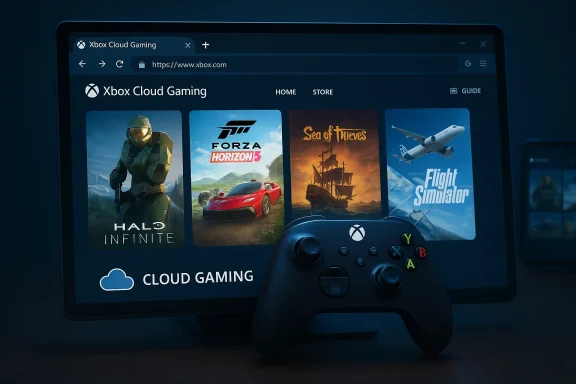
That changes with the public preview released via Microsoft’s own announcement: users who opt in can experience a new, console‑inspired web UI by enabling Preview Features in their Xbox account and visiting play.xbox.com. The new layout intentionally mirrors the console home, guide, and navigation flow more closely than the old web app, and Microsoft is explicitly calling this a foundational step toward shipping more web‑first experiences faster.
That matters enormously for emerging form factors—Windows handhelds and devices like the ROG Xbox Ally series—where the line between PC and console experiences is already blurred. A console‑first web experience means Microsoft can push feature parity faster to any device with a browser.
Two market pressures motivate this redesign:
That said, the preview is a preview: feature gaps, browser differences, subscription constraints, and privacy considerations remain. The real test will be Microsoft’s capacity to iterate publicly, maintain cross‑platform parity, and be transparent about telemetry, entitlements, and potential monetization experiments.
For users, the preview is worth trying—especially if you want to see how Microsoft is thinking about the future of play. For developers and ecosystem partners, the preview signals an opportunity (and a responsibility): design for a world where the same player might discover your game in a browser, resume it on a handheld, and finish it on a console. If Microsoft follows through, this redesigned web UI could be the glue that turns that seamless narrative into everyday reality.
Source: Windows Central Redesigned Xbox cloud gaming hits public preview with new web UI
 Background
Xbox’s cloud story began as Project xCloud and evolved into the broader Xbox Cloud Gaming service that lives inside Xbox Game Pass and the broader Xbox ecosystem. Over the last several years Microsoft has steadily expanded streaming quality, device reach, and feature parity: higher streaming resolutions, mouse-and-keyboard and touch input support, TV app integrations, and a steady expansion into new markets and devices. The web has always been an important front for this effort—accessing your library in a browser is the most frictionless way to play across devices—but until now the web experience felt like a lightweight, app-like port rather than a first-class, console‑flavored interface.That changes with the public preview released via Microsoft’s own announcement: users who opt in can experience a new, console‑inspired web UI by enabling Preview Features in their Xbox account and visiting play.xbox.com. The new layout intentionally mirrors the console home, guide, and navigation flow more closely than the old web app, and Microsoft is explicitly calling this a foundational step toward shipping more web‑first experiences faster.
Overview: what’s different in the preview
The new web UI focuses on three linked goals: familiarity, clarity, and cross‑device consistency.- Familiarity: the visual language and navigation patterns now resemble what console owners already know—Home tiles, a guide accessed by an Xbox icon, and clearer top‑level categories.
- Clarity: the layout is intentionally cleaner, with emphasis on immediate actions (play, add to library, open guide) and less visual clutter than before.
- Cross‑device consistency: the design looks like an obvious template Microsoft could scale to other surfaces—handhelds, TV apps, and even the Xbox app on Windows—so that users get the same mental model regardless of hardware.
First impressions and interaction flow
Early testers described the feel as “console‑like” — navigation is faster, the guide and account menus behave like their console equivalents, and the overall experience is more structured. That structure shows up in several places:- A reworked top bar and profile menu that centralizes account controls and feedback reporting.
- A guide overlay (Xbox button equivalent) that exposes controller-friendly quick actions.
- A library and game-launch flow that emphasizes “jump in” actions and clearer context on which games are cloud‑playable.
How to try the new web UI (step‑by‑step)
If you want to test the preview yourself, Microsoft’s flow is straightforward. Follow these steps to opt in and access the new web experience:- Sign in to your Xbox account at xbox.com/play using a compatible browser.
- Open your profile menu in the top‑right corner of the page and choose Settings.
- Under Account, locate the Preview Features toggle and switch it on. Confirm when prompted.
- Wait for the feature to activate; Microsoft notes it may take up to 10 minutes. If the new UI doesn’t appear, logging out and back in can help expedite the change.
- After the toggle is active, either follow the on‑screen prompts from xbox.com/play or manually open play.xbox.com.
- To provide feedback from inside the preview, use the profile menu’s “Give Feedback” option or the Guide’s feedback entry point.
Why this matters: beyond a visual refresh
At first glance, this is a cosmetic update. But there are three deeper reasons the new web UI could be strategically important for Xbox and the wider PC and handheld ecosystem.1) Lowering commitment friction
A console‑style web UI reduces mental friction for players who are unsure about cloud gaming. When the interface resembles a familiar console home, users are more likely to engage for longer sessions and to discover cloud‑only or cloud‑enabled titles. That conversion effect—turning casual “I’ll try it” sessions into repeat behavior—is one of the most underrated benefits of UI parity.2) A single design language across devices
Microsoft has been pushing a multi‑device narrative: the same Xbox profile, achievements, and progression across console, handhelds, PC, and cloud. A unified web UI is another piece of that puzzle. If the web becomes visually and functionally indistinguishable from console home and guide patterns, Microsoft can iterate once and ship changes that feel native across platforms.That matters enormously for emerging form factors—Windows handhelds and devices like the ROG Xbox Ally series—where the line between PC and console experiences is already blurred. A console‑first web experience means Microsoft can push feature parity faster to any device with a browser.
3) Speed of iteration and feature plumbing
The web is a faster delivery channel than console firmware or native app releases. By investing in a web platform that supports console‑grade navigation and the same product flows, Microsoft gains an agile runway to prototype features (new store placements, social modules, ad experiments, or even an eventual lightweight “console in the cloud” shell) without the slower cadence of console updates.The user benefits (what players gain)
This redesign brings several immediate user wins:- Faster discovery: Games and actions are surfaced in a more intentional way, reducing clicks to play.
- Controller‑first navigation: The Guide and control mapping make it easier to navigate via controller connected to the device.
- Cleaner library management: The library and play flows are clearer and more consistent with Xbox consoles.
- Better feedback channels: Built‑in feedback entry points reduce the barrier to filing bug reports and suggestions.
- Cross‑device continuity: Players who move between console and browser encounter the same mental model, which makes resuming and discovering games more intuitive.
The technical and product constraints to watch
A better UI is one thing; a better experience depends on the plumbing behind it. Here are important technical and product caveats to keep in mind:- Browser performance and network variability still determine playability. The UI can make launching a title easier, but latency, packet loss, and local network conditions still dictate the fidelity and responsiveness of streamed play.
- Browser compatibility remains a moving target. Microsoft’s preview emphasizes “compatible browsers,” but exact compatibility and feature parity (e.g., capture, controller mapping, local input latency) will vary between Chromium‑based browsers and others. Expect subtle differences on Safari, Firefox, and mobile browsers.
- Licensing and subscription nuance: the UI clarifies navigation but does not alter entitlement rules. Streaming access is still governed by whether a title is offered via Xbox Game Pass, is free‑to‑play, or is a purchased title eligible for cloud streaming. If you rely on cloud access via Game Pass, subscription changes or tier restructuring can still affect availability.
- Missing or delayed features: Preview builds frequently omit functionality that will return later. If you rely on features like “remote play,” saved session continuity, or specific accessibility tools, anticipate temporary regressions during the preview period.
Potential risks, business signals, and what's at stake
A seemingly simple web UI change has product and business implications that deserve scrutiny.UX and fragmentation risk
Microsoft now maintains multiple surfaces: console OS, Xbox app on Windows, the browser experience, TV apps, and handheld platform shells like the Full Screen Experience. If those surfaces diverge in interaction patterns or feature sets, users could face inconsistent behavior. The exact risk: two devices can present similar UIs but behave differently, which increases user confusion and complicates developer guidance.Monetization and ad placement
A more discoverable, web‑native interface makes it technically easier to introduce new monetization experiments (promoted tiles, subscription upsells, or contextual ad placements). While Microsoft has not announced ad strategies tied to the preview, a polished web space is a sensible place to trial new revenue models. That matters to consumers because the introduction of ads or aggressive upsells could degrade the perceived value of cloud gaming and change the subscription calculus.Accessibility and performance parity
Console native builds have long benefitted from deep accessibility frameworks on Xbox Series consoles. Web accessibility is improving but still depends on browsers and OS accessibility APIs. Microsoft must ensure parity—screen readers, magnification, remappable inputs—so the web doesn’t become a second‑class experience for accessibility needs.Data and telemetry surface area
A more capable web UI likely increases telemetry surface area. That’s useful for rapid iteration but can raise privacy questions: what gets logged, how is session behavior used to test new features, and how transparent is Microsoft about that telemetry? Users concerned with privacy will want clear controls and documentation.Developer and ecosystem implications
For game creators and third‑party services, a console‑like web storefront and guide open new possibilities:- Easier cloud‑first feature discovery could lead players to try games they otherwise wouldn’t, increasing trial rates for new releases.
- Web hooks and faster deployment pipelines can allow Microsoft to prototype social features, promotions, and cross‑platform tournaments without console update cycles.
- Streaming parity simplifies QA workflows; if the web UI becomes an authoritative layer for discovery and matchmaking, studios can optimize for a single flow that reaches console, handheld, and web players.
The competition and market context
Cloud gaming has matured: multiple players offer streaming on TVs, handhelds, and browsers. Microsoft’s advantage has been integration with Xbox Game Pass and its Azure datacenter footprint. A more console‑like web experience strengthens Microsoft’s play to be device‑agnostic and to lower the barrier to play.Two market pressures motivate this redesign:
- Platform parity: players expect the same polish and flow across devices. A console‑like web UI removes a common complaint that browser streaming felt like a second‑class experience.
- Speed of iteration: web platforms allow Microsoft to prototype monetization, social, and discovery features faster than shipping large console OS updates.
What’s missing or still unclear
This public preview is promising, but several items remain ambiguous or require follow-up:- Exact browser support and feature parity across browsers: Microsoft’s preview language is intentionally non‑specific with “compatible browser.” For people on older or non‑Chromium browsers, clarify support before committing.
- Entitlements and subscription nuance: the UI won’t change how titles are licensed or streamed. Consumers should verify whether cloud streaming for a specific title requires Game Pass Ultimate or separate purchase.
- Long‑term roadmap: Microsoft calls this a “foundation,” but it’s not yet clear how and when the same web design intent will ship to the Xbox app on Windows, TV apps, or consoles. The preview is a leading signal, not a final rollout schedule.
- Privacy and telemetry specifics: more featureful web clients mean more data. Microsoft should publish clear telemetry controls and documentation for privacy‑minded users.
Practical advice for readers who want to test the preview
If you plan to try the preview, here are pragmatic tips to get a smooth experience:- Use a modern, up‑to‑date browser (preferably the latest version of a Chromium‑based browser or Safari). Update your browser before opting in.
- Connect a controller (Bluetooth or wired) if you want the full guide and controller navigation experience.
- Test streaming quality at different times of day to measure variability—ISP congestion and last‑mile conditions affect cloud play more than UI fidelity.
- Provide feedback via the in‑experience tools; preview programs succeed or fail on the quality and usefulness of user reports.
- If you rely on accessibility tools, test the specific scenarios you need (screen reader flow, caption settings, remapping). Report regressions immediately.
What to watch next
This preview is as much a product announcement as it is a roadmap hint. Keep an eye on these signals:- Expansion to native apps: will the same UI concept appear in the Xbox app on Windows and consoles?
- Feature parity rollouts: which console features show up next in the web client—cloud save sync behavior, profile crossplay features, or native capture functionality?
- Third‑party adoption: will publishers leverage the cleaner web interface to highlight cloud‑only demos or timed promotions?
- Monetization tests: given the web is the easiest surface to introduce subtle monetization (promotions, upsells, sponsored placements), watch carefully for signs of paid placement or ad experiments.
Conclusion
The new Xbox Cloud Gaming web preview is more than a UI refresh — it’s a concrete, user‑visible step toward the unified, device‑agnostic Xbox vision Microsoft has been teasing for years. By aligning the browser experience with the console’s navigation and look, Microsoft lowers the cognitive and operational barrier to streaming, which could materially increase engagement and make cloud play a daily choice for more users.That said, the preview is a preview: feature gaps, browser differences, subscription constraints, and privacy considerations remain. The real test will be Microsoft’s capacity to iterate publicly, maintain cross‑platform parity, and be transparent about telemetry, entitlements, and potential monetization experiments.
For users, the preview is worth trying—especially if you want to see how Microsoft is thinking about the future of play. For developers and ecosystem partners, the preview signals an opportunity (and a responsibility): design for a world where the same player might discover your game in a browser, resume it on a handheld, and finish it on a console. If Microsoft follows through, this redesigned web UI could be the glue that turns that seamless narrative into everyday reality.
Source: Windows Central Redesigned Xbox cloud gaming hits public preview with new web UI
